fog light VOLVO XC90 2018 Owner´s Manual
[x] Cancel search | Manufacturer: VOLVO, Model Year: 2018, Model line: XC90, Model: VOLVO XC90 2018Pages: 666, PDF Size: 11.32 MB
Page 226 of 666
CLIMATE CONTROL
224
Activating and deactivatingrecirculation
The climate system's recirculation function helps shut out smog, smoke, exhaust fumes, etc. byreusing the air in the passenger compartment.
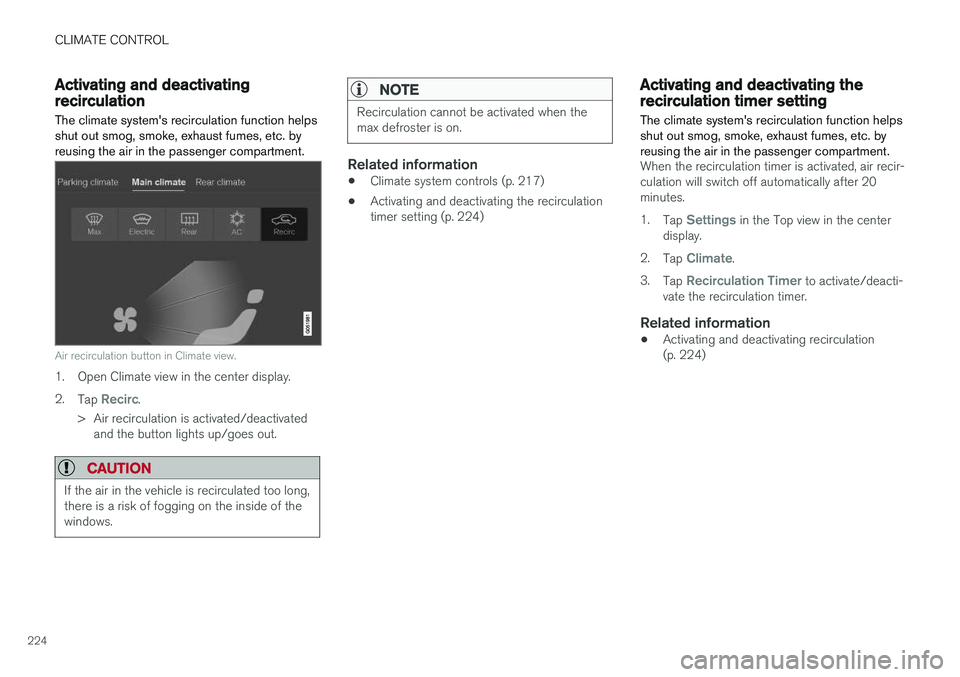
Air recirculation button in Climate view.
1. Open Climate view in the center display. 2. Tap
Recirc.
> Air recirculation is activated/deactivated and the button lights up/goes out.
CAUTION
If the air in the vehicle is recirculated too long, there is a risk of fogging on the inside of thewindows.
NOTE
Recirculation cannot be activated when the max defroster is on.
Related information
• Climate system controls (p. 217)
• Activating and deactivating the recirculation timer setting (p. 224)
Activating and deactivating therecirculation timer setting
The climate system's recirculation function helps shut out smog, smoke, exhaust fumes, etc. byreusing the air in the passenger compartment.
When the recirculation timer is activated, air recir- culation will switch off automatically after 20minutes. 1. Tap
Settings in the Top view in the center
display.
2. Tap
Climate.
3. Tap
Recirculation Timer to activate/deacti-
vate the recirculation timer.
Related information
• Activating and deactivating recirculation (p. 224)
Page 230 of 666
||
CLIMATE CONTROL
228
Activating and deactivating the heated rear window and door mirrors from thecenter display
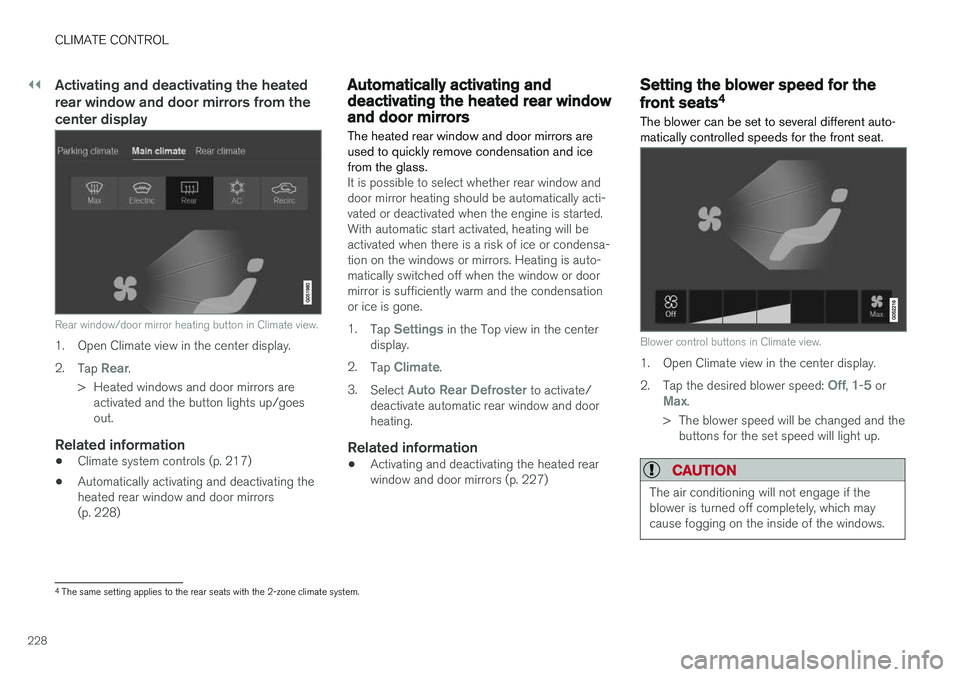
Rear window/door mirror heating button in Climate view.
1. Open Climate view in the center display. 2.Tap
Rear.
> Heated windows and door mirrors are activated and the button lights up/goes out.
Related information
• Climate system controls (p. 217)
• Automatically activating and deactivating theheated rear window and door mirrors(p. 228)
Automatically activating anddeactivating the heated rear windowand door mirrors
The heated rear window and door mirrors are used to quickly remove condensation and icefrom the glass.
It is possible to select whether rear window and door mirror heating should be automatically acti-vated or deactivated when the engine is started.With automatic start activated, heating will beactivated when there is a risk of ice or condensa-tion on the windows or mirrors. Heating is auto-matically switched off when the window or doormirror is sufficiently warm and the condensationor ice is gone. 1. Tap
Settings in the Top view in the center
display.
2. Tap
Climate.
3. Select
Auto Rear Defroster to activate/
deactivate automatic rear window and door heating.
Related information
• Activating and deactivating the heated rearwindow and door mirrors (p. 227)
Setting the blower speed for the
front seats4
The blower can be set to several different auto- matically controlled speeds for the front seat.
Blower control buttons in Climate view.
1. Open Climate view in the center display. 2. Tap the desired blower speed:
Off, 1-5 orMax.
> The blower speed will be changed and the buttons for the set speed will light up.
CAUTION
The air conditioning will not engage if the blower is turned off completely, which maycause fogging on the inside of the windows.
4The same setting applies to the rear seats with the 2-zone climate system.
Page 323 of 666
DRIVER SUPPORT
}}}}
321
Deactivation of the Auto-hold brake function
In certain situations, Auto-hold will be deactivated when the vehicle is at a standstill and Pilot Assistwill go into standby mode. This means that thebrakes will be released and the vehicle couldbegin to roll. The driver must actively apply thebrakes to keep the vehicle stationary. This can occur if:
• the driver depresses the brake pedal
• the parking brake is applied
• the gear selector is moved to the
P, N or R
positions
• the driver puts Pilot Assist in standby mode.
Auto Activate Parking BrakeIn certain situations, the parking brake will be applied to keep the vehicle at a standstill. This occurs if Pilot Assist is keeping the vehicle stationary using the brakes and:
• the driver opens the door or unbuckleshis/her seat belt
• Pilot Assist has kept the vehicle at a stand-still for more than approx. 5 minutes
• the brakes overheat
• the driver switches off the engine manually.
Related information
•Pilot Assist (p. 309)
Pilot Assist limitations
Pilot Assist functionality may be reduced in cer- tain situations.
Pilot Assist is a driver support function designed to simplify driving and assist the driver in manysituations. However, the driver is always responsi-ble for maintaining a suitable distance to vehiclesor objects around it and ensuring that the vehicleis correctly positioned in the traffic lane.
WARNING
In some situations, Pilot Assist may have trou- ble helping the driver properly or may bedeactivated automatically – we advise againstusing Pilot Assist in such cases. Examples ofsuch situations include:
• the lane markings are worn, missing or cross each other.
• lane division is unclear, for example, whenthe lanes divide or merge or at exits orwhen there are multiple sets of markings.
• edges or other lines than lane markingsare present on or near the road, e.g.curbs, joints or repairs to the road sur-face, edges of barriers, roadside edges orstrong shadows.
• the lane is narrow or winding.
• the lane contains ridges or holes.
• weather conditions are poor, e.g. rain,snow or fog or slush or reduced visibilitywith poor light conditions, backlighting,wet road surface, etc.
The driver should also note that Pilot Assist has the following limitations: • High curbs, roadside barriers, temporary obstacles (traffic cones, safety barriers,etc.) are not detected. Alternatively, theymay be detected incorrectly as lane mark-ings, with a subsequent risk of contactbetween the vehicle and such obstacles.
Page 332 of 666
DRIVER SUPPORT
330
Camera limitations
The camera used by several of the driver support functions has certain limitations, which alsoaffect the functions using the camera.
Reduced visibilityThe camera has the same limitations as the human eye. In other words, its “vision" is impairedby adverse weather conditions such as heavysnowfall/rain, dense fog, swirling dust/snow, etc.These conditions may reduce the function of sys-tems that depend on the camera or cause thesesystems to temporarily stop functioning. Strong sunlight, reflections from the road surface, ice or snow covering the road, a dirty road sur- face, or unclear lane marker lines may drastically reduce the camera
Page 333 of 666
DRIVER SUPPORT
}}}}
331
CauseAction
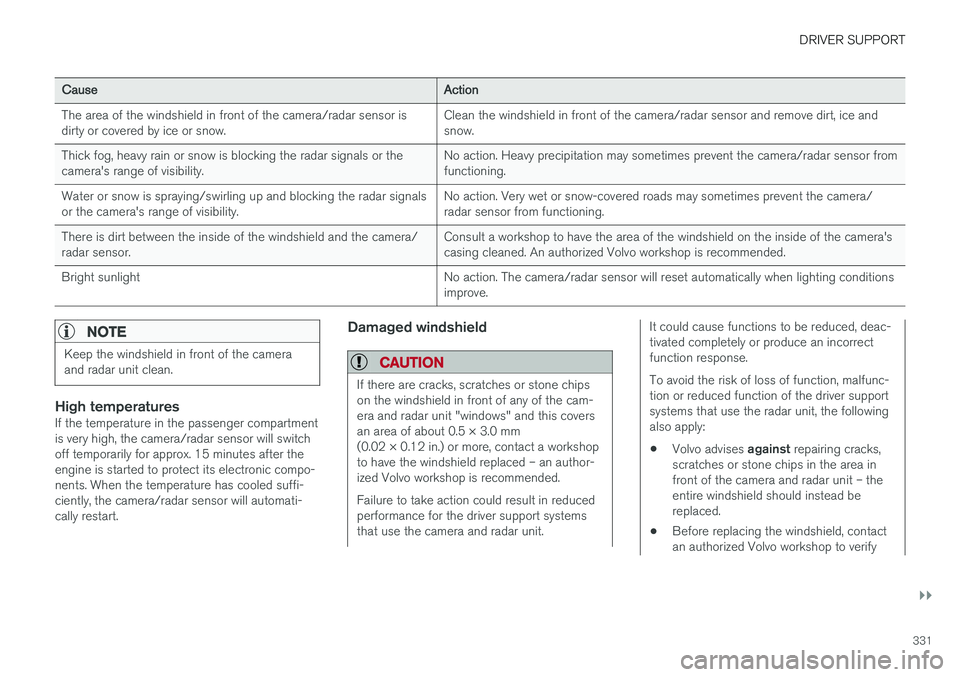
The area of the windshield in front of the camera/radar sensor is dirty or covered by ice or snow. Clean the windshield in front of the camera/radar sensor and remove dirt, ice andsnow.
Thick fog, heavy rain or snow is blocking the radar signals or thecamera's range of visibility. No action. Heavy precipitation may sometimes prevent the camera/radar sensor fromfunctioning.
Water or snow is spraying/swirling up and blocking the radar signalsor the camera's range of visibility. No action. Very wet or snow-covered roads may sometimes prevent the camera/radar sensor from functioning.
There is dirt between the inside of the windshield and the camera/radar sensor. Consult a workshop to have the area of the windshield on the inside of the camera'scasing cleaned. An authorized Volvo workshop is recommended.
Bright sunlight No action. The camera/radar sensor will reset automatically when lighting conditionsimprove.
NOTE
Keep the windshield in front of the camera and radar unit clean.
High temperaturesIf the temperature in the passenger compartment is very high, the camera/radar sensor will switchoff temporarily for approx. 15 minutes after theengine is started to protect its electronic compo-nents. When the temperature has cooled suffi-ciently, the camera/radar sensor will automati-cally restart.
Damaged windshield
CAUTION
If there are cracks, scratches or stone chips on the windshield in front of any of the cam-era and radar unit "windows" and this coversan area of about 0.5 × 3.0 mm(0.02 × 0.12 in.) or more, contact a workshopto have the windshield replaced – an author-ized Volvo workshop is recommended. Failure to take action could result in reduced performance for the driver support systemsthat use the camera and radar unit.
It could cause functions to be reduced, deac- tivated completely or produce an incorrectfunction response. To avoid the risk of loss of function, malfunc- tion or reduced function of the driver supportsystems that use the radar unit, the followingalso apply:
• Volvo advises
against repairing cracks,
scratches or stone chips in the area infront of the camera and radar unit – theentire windshield should instead bereplaced.
• Before replacing the windshield, contactan authorized Volvo workshop to verify
Page 454 of 666
||
STARTING AND DRIVING
* Option/accessory.
452 When Trailer Stability Assist is activated, the
ESC symbol is
displayed in the instrument panel.
Related information
• Driving with a trailer (p. 449)
• Electronic Stability Control (p. 272)
Checking trailer lights
When connecting a trailer, make sure that all of the lights on the trailer are functioning beforestarting to drive.
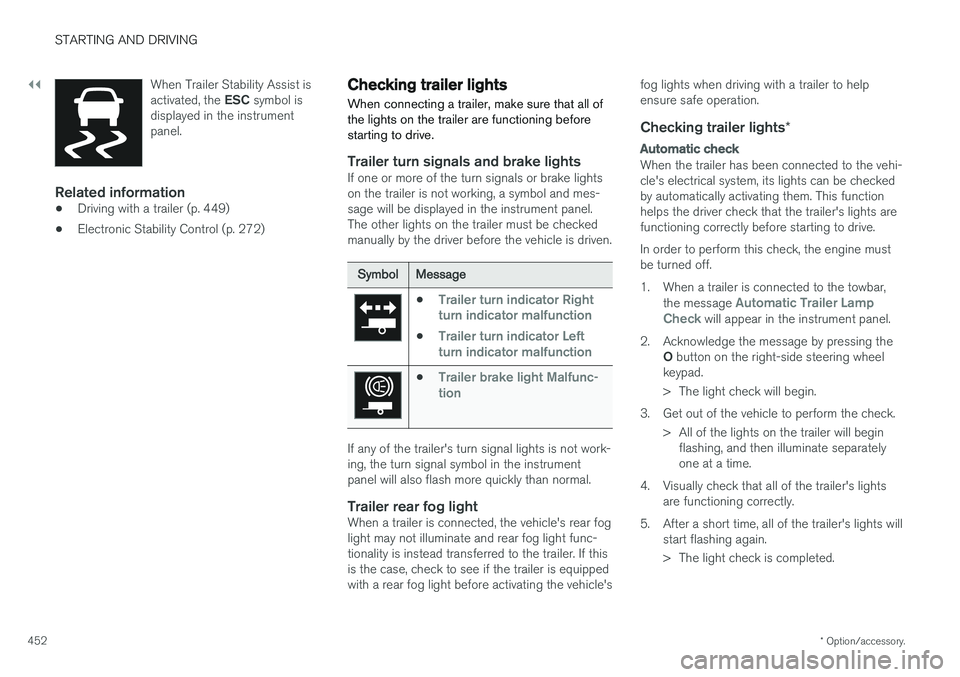
Trailer turn signals and brake lightsIf one or more of the turn signals or brake lights on the trailer is not working, a symbol and mes-sage will be displayed in the instrument panel.The other lights on the trailer must be checkedmanually by the driver before the vehicle is driven.
SymbolMessage
•Trailer turn indicator Right
turn indicator malfunction
•Trailer turn indicator Left
turn indicator malfunction
•Trailer brake light Malfunc-
tion
If any of the trailer's turn signal lights is not work- ing, the turn signal symbol in the instrumentpanel will also flash more quickly than normal.
Trailer rear fog lightWhen a trailer is connected, the vehicle's rear foglight may not illuminate and rear fog light func-tionality is instead transferred to the trailer. If thisis the case, check to see if the trailer is equippedwith a rear fog light before activating the vehicle's fog lights when driving with a trailer to helpensure safe operation.
Checking trailer lights
*
Automatic check
When the trailer has been connected to the vehi- cle's electrical system, its lights can be checkedby automatically activating them. This functionhelps the driver check that the trailer's lights arefunctioning correctly before starting to drive. In order to perform this check, the engine must be turned off.
1. When a trailer is connected to the towbar,
the message
Automatic Trailer Lamp
Check will appear in the instrument panel.
2. Acknowledge the message by pressing the O button on the right-side steering wheel
keypad.
> The light check will begin.
3. Get out of the vehicle to perform the check. > All of the lights on the trailer will beginflashing, and then illuminate separately one at a time.
4. Visually check that all of the trailer's lights are functioning correctly.
5. After a short time, all of the trailer's lights will start flashing again.
> The light check is completed.
Page 596 of 666
||
MAINTENANCE AND SERVICE
* Option/accessory.
594
Related information
• Replacing bulbs (p. 591)
• Replacing the low beam headlight bulbs (p. 595)
• Replacing the high beam headlight bulbs(p. 595)
• Replacing daytime running lights/front park-ing light bulbs (p. 596)
• Replacing front turn signal bulbs (p. 597)
• Bulb specifications (p. 597)
Location of exterior lights
The vehicle's exterior lighting consists of several different bulbs. LED 15
bulbs must be replaced
by a workshop. An authorized Volvo workshop is recommended.
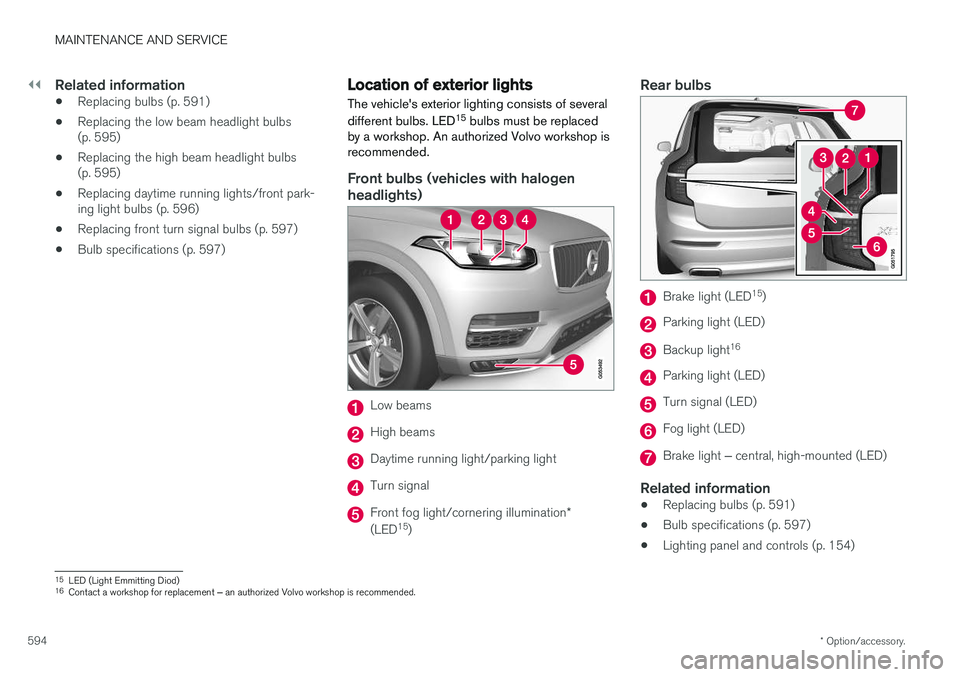
Front bulbs (vehicles with halogen headlights)
Low beams
High beams
Daytime running light/parking light
Turn signal
Front fog light/cornering illumination *
(LED 15
)
Rear bulbs
Brake light (LED 15
)
Parking light (LED)
Backup light 16
Parking light (LED)
Turn signal (LED)
Fog light (LED)
Brake light
‒ central, high-mounted (LED)
Related information
• Replacing bulbs (p. 591)
• Bulb specifications (p. 597)
• Lighting panel and controls (p. 154)
15
LED (Light Emmitting Diod)
16 Contact a workshop for replacement ‒ an authorized Volvo workshop is recommended.
Page 655 of 666
INDEX
653
filter 587
grade and volume 644
Engine shutdown 406
Engine specifications 643Engine temperature high 446
Environment 27Error messages Adaptive Cruise Control 307
see Messages and symbols 307, 322
Error messages in BLIS 350 Ethanol content max. 10% by volume 442
Exterior dimensions 639
F
Federal Clean Air Act 576
Ferry transport 432
Flat tire 550
Flooded road 441
Fluids, volumes 632, 646
Fluids and oils 645, 646 Fog lights front 161
rear 162
Four-C 432 Front seatblower 228
climate 217
heating 219, 220
temperature 230
ventilation 221
Front seat manual 188
Front seats, power 189 adjusting passenger seat from driver's
seat 195
adjusting seat 189
Lumbar support 194
massage 192, 193
memory function 190, 191
multifunction control 192, 193, 194
Side bolsters 194
FSC, environmental labeling 23
Fuel 442 Travel Link service 483
Fuel filling 442
Fuel gauge 89
Fuel requirements 442, 443 Fuel tank volume 646
Fuse box 603Fuses below the glove compartment 608
general 603
in engine compartment 605
in the cargo compartment 611
replacing 604
G
Gasoline grade 442 Gaugefuel gauge 89
Gear indicator 422Gear selector positions automatic transmission 418
Glass laminated/reinforced 170
Glove compartment 563 Gracenote ®
489
Grocery bag holders 566
Gross vehicle weight 641
GSI - Gear shift indicator 422
Guide lines for Park Assist Camera 386
Page 657 of 666
INDEX
655
IntelliSafe
driver support 28
Interior Air Quality System 210
Intermittent wiping 180
Internet, see Internet-connected vehicle 507
Internet-connected vehicle 507 book service and repair 580
No connection or poor connection 512
send car data 582
system updates 579
iPod ®, connecting 492
ISOFIX/LATCH anchors 74
J
Jack 543
Jump-start 447
K
Key 237
Keyboard 128, 131 change language 131
Keylesslocking/unlocking 252
settings 254
touch-sensitive surfaces 251
Key tag 237
L
Labels location of 636
Laminated glass 170 Lamps changing 591
location 594
specifications 597
Trailer 452
Lane Keeping Aid operation 365
Lane Keeping Aid (LKA) 362, 364, 365, 367, 369
Language 134
Leather upholstery, cleaning instructions 618
Leveling control 432 settings 435
License agreement 98, 517
Lifting tools 543
Light bulbs, specifications 597
Light control 154, 167Lighting Active Bending Lights 161
approach lighting 164
automatic high beam 159automatic lighting controls, passenger
compartment 165
brake lights 163
controls 154, 165, 167
cornering illumination 162
daytime running lights 156
display lighting 167
emergency brake lights 163
front fog lights 161
Hazard warning flashers 164
high beams 158, 159
home safe lighting 164
in passenger compartment 165, 167
instrument illumination 167
instrument lighting 167
light bulbs, specifications 597
light locations 594
low beams 157
position lights 156
rear fog light 162
settings 155
Turn signals 160