fuel type VOLVO XC90 2018 Owner´s Manual
[x] Cancel search | Manufacturer: VOLVO, Model Year: 2018, Model line: XC90, Model: VOLVO XC90 2018Pages: 666, PDF Size: 11.32 MB
Page 12 of 666
10
Using the steering wheel paddles* to
shift 419
Shiftlock 421
Deactivating the automatic shiftlock 421
The kickdown function 422
Gear indicator *
422
All Wheel Drive (AWD) *
423
Drive modes *
423
Changing drive mode *
425
ECO drive mode 426
Activating and deactivating ECO drive mode using the function button 428
Start/Stop function 428
Driving with the Start/Stop function 428
Temporarily deactivating the Start/Stop function 430
Conditions for the Start/Stop function 430
Leveling control * and suspension
432
Leveling control settings *
435
Low Speed Control *
435
Activating and deactivating Low Speed Control * using the function button 436
Hill Descent Control *
437
Activating and deactivating HillDescent Control * using the function
button 438
Economical driving
438
Preparing for a long trip 439
Winter driving 440
Driving through standing water 441
Opening/closing the fuel filler door 441
Refueling 442
Fuel 442
Octane rating 443
Emission controls 445
Overheating of engine and transmission 446
Battery drain 447
Jump starting using another battery 447
Detachable towbar *
448
Driving with a trailer 449
Trailer Stability Assist *
451
Checking trailer lights 452
Towing using a towline 453
Attaching and removing the towing eyelet 454
Recovery 455
HomeLink ®
* 456
Programming HomeLink ®
* 457
Using HomeLink 458
Type approval for HomeLink ®
* 459
Compass 459
Activating and deactivating the compass460
Calibrating the compass 460
Page 16 of 666
14
Polishing and waxing621
Hand washing 621
Automatic car washes 623
High-pressure washing 624
Cleaning the wiper blades 624
Cleaning exterior plastic, rubber and trim components 625
Cleaning rims 626
Corrosion protection 626
Paintwork 627
Touching up minor paint damage 627
Color codes 628
Changing rear window wipers 629
Replacing windshield wiper blades 630
Windshield wipers in the service position 631
Filling washer fluid 632
SPECIFICATIONS
Type designations636
Dimensions 639
Weights 641
Towing capacity and tongue weight 642
Engine specifications 643
Engine oil specifications 644
Coolant specifications 645
Transmission fluid specifications 645
Brake fluid specifications 645
Fuel tank volume 646
Air conditioning specifications 646
Approved tire pressure 647
INDEX
Index 649
Page 53 of 666
SAFETY
}}
51
When a critical situation has passed, the seat belt and the electric seat belt tensioner are resetautomatically. However, they can also be resetmanually.
WARNING
Never attempt to alter or repair the seat belt on your own. Volvo recommends contactingan authorized Volvo workshop. If the seat belt has been exposed to extreme forces, e.g. in conjunction with a collision, theentire seat belt must be replaced. Even if theseat belt appears undamaged, some of itsprotective properties may have been lost. Alsoreplace the seat belt if it is worn or damaged.The new seat belt must be type approved andintended for the same seating position as thereplaced seat belt.
Related information
•
Seat belts (p. 47)
• Buckling and unbuckling seat belts (p. 48)
• Resetting the electric seat belt tensioners (p. 51)
• City Safety
™ (p. 333)
• Rear Collision Warning (p. 345)
Resetting the electric seat belttensioners
The electric seat belt tensioners are designed to be reset automatically, but if the seat beltremains taut it can be reset manually.
1. Stop the vehicle in a safe location.
2. Unbuckle the seat belt and then rebuckle it.
> The seat belt and the electric seat belttensioner will be reset.
WARNING
Never attempt to alter or repair the seat belt on your own. Volvo recommends contactingan authorized Volvo workshop. If the seat belt has been exposed to extreme forces, e.g. in conjunction with a collision, theentire seat belt must be replaced. Even if theseat belt appears undamaged, some of itsprotective properties may have been lost. Alsoreplace the seat belt if it is worn or damaged.The new seat belt must be type approved andintended for the same seating position as thereplaced seat belt.
Related information
• Seat belt tensioners (p. 50)
• Seat belts (p. 47)
Door and seat belt reminders
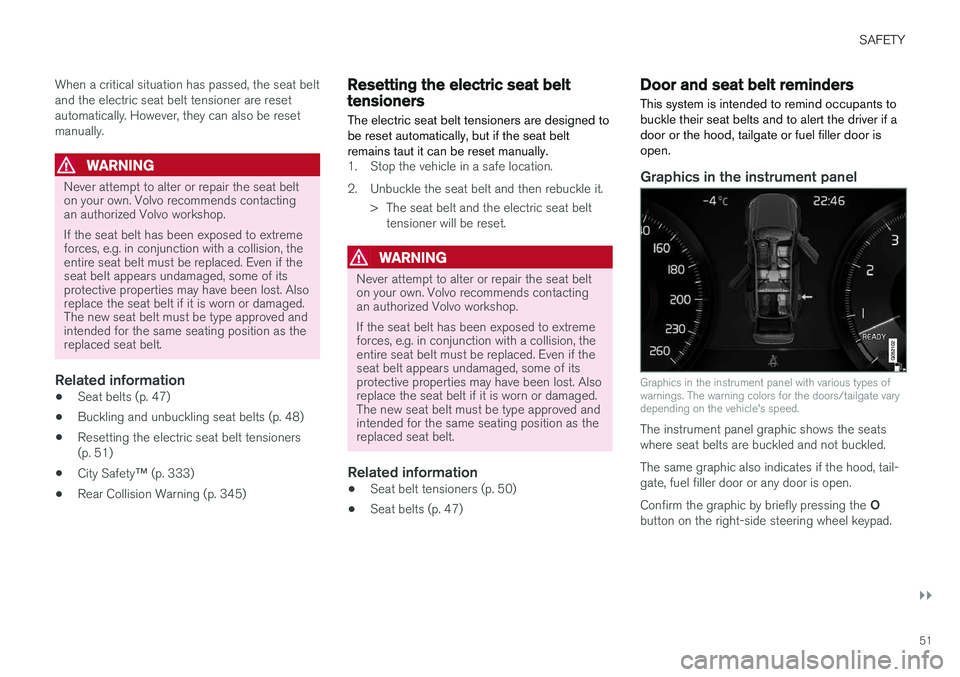
This system is intended to remind occupants to buckle their seat belts and to alert the driver if adoor or the hood, tailgate or fuel filler door isopen.
Graphics in the instrument panel
Graphics in the instrument panel with various types of warnings. The warning colors for the doors/tailgate varydepending on the vehicle's speed.
The instrument panel graphic shows the seats where seat belts are buckled and not buckled. The same graphic also indicates if the hood, tail- gate, fuel filler door or any door is open. Confirm the graphic by briefly pressing the O
button on the right-side steering wheel keypad.
Page 88 of 666
||
DISPLAYS AND VOICE CONTROL
86
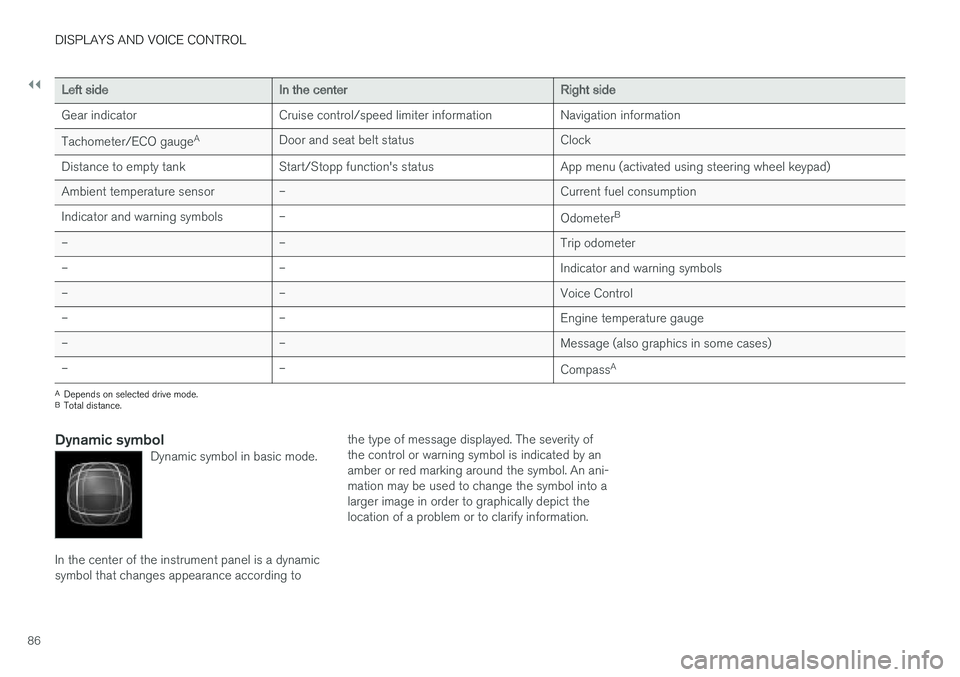
Left sideIn the centerRight side
Gear indicator Cruise control/speed limiter information Navigation information Tachometer/ECO gauge A
Door and seat belt status Clock
Distance to empty tank Start/Stopp function's status App menu (activated using steering wheel keypad) Ambient temperature sensor – Current fuel consumption
Indicator and warning symbols – OdometerB
– – Trip odometer
– – Indicator and warning symbols
– – Voice Control
– – Engine temperature gauge
– – Message (also graphics in some cases)
– –
CompassA
A
Depends on selected drive mode.
B Total distance.
Dynamic symbolDynamic symbol in basic mode.
In the center of the instrument panel is a dynamic symbol that changes appearance according to the type of message displayed. The severity ofthe control or warning symbol is indicated by anamber or red marking around the symbol. An ani-mation may be used to change the symbol into alarger image in order to graphically depict thelocation of a problem or to clarify information.
Page 441 of 666
STARTING AND DRIVING
}}
439
•
Fuel consumption is increased at high speeds - air resistance increases with speed.
• Remove unnecessary items from the vehicle- the heavier the load, the higher the fuelconsumption.
• Maintain the correct pressure in the tires andcheck pressure regularly.
• The type of tires used could affect fuel con-sumption - consult a retailer for advice onsuitable tires.
• Do not use winter tires after the winter sea-son has ended.
• Roof loads increase air resistance andincrease fuel consumption. Remove roofboxes, ski racks, etc. that are not in use.
• Avoid driving with the windows open.
• Using the trip computer's fuel consumptionindicators can help you learn how to drivemore economically.
Other factors that decrease fuel
consumption
• Dirty air cleaner.
• Dirty engine oil and clogged oil filter.
• Incorrect front-end alignment.
• Incorrect wheel alignment.
Some of the above items and others are checked as part of Volvo's standard maintenance sched-ule.
Related information
• Drive-E
‒ purer driving pleasure (p. 27)
• ECO drive mode (p. 426)
• Checking tire pressure (p. 535)
Preparing for a long trip
It is important to have the vehicle's systems and equipment checked carefully before driving longdistances.
Check that:
• the engine is running properly and that fuel consumption is normal
• there are no leaks (fuel, oil or other fluid)
• the brake pedal is functioning optimally
• all lights are working
‒
adjust the headlight
height if the vehicle is carrying a heavy load
• tire tread depth and air pressure are at cor-rect levels. Change to snow tires when driv-ing in areas where there is a risk of snowy oricy roads.
• the start battery is sufficiently charged
• the wiper blades are in good condition
Related information
• Checking tire pressure (p. 535)
• Filling washer fluid (p. 632)
• Winter driving (p. 440)
• Economical driving (p. 438)
• Vehicle modem settings (p. 511)
• Loading recommendations (p. 564)
• Driving with a trailer (p. 449)
• Pilot Assist (p. 309)
Page 442 of 666
STARTING AND DRIVING
440•
Speed limiter (p. 276)
• Tire sealing system (p. 550)
Winter driving
It is important to check the vehicle before driving in cold/snowy conditions to make sure it can bedriven safely.
Before the cold season arrives:
• Make sure the engine coolant contains 50% antifreeze. This mixture helps protect theengine from frost erosion down toapprox. -35 °C (-31 °F). Do not mix differenttypes of antifreeze as this could pose ahealth risk.
• Keep the fuel tank well filled to prevent con-densation from forming.
• Check the viscosity of the engine oil. Oil withlow viscosity (thinner oil) improves cold-weather starting and reduces fuel consump-tion when driving with a cold engine.
CAUTION
Low-viscosity oil should not be used with hard driving or in hot weather.
•
Check the condition and charge level of the start battery. Cold weather places greaterdemands on the start battery and reduces itscapacity.
• Use washer fluid containing antifreeze tohelp prevent ice from forming in the washerfluid reservoir.
Slippery driving conditionsFor optimal traction and roadholding, Volvo rec-ommends using snow tires on all wheels when-ever there is a risk of snow or ice on the road.
NOTE
Certain countries require use of winter tires by law. Not all countries permit the use ofstudded tires.
Practice driving on slippery surfaces under con- trolled conditions to learn how the vehicle reacts.
Related information
•Snow tires (p. 549)
• Snow chains (p. 549)
• Braking on salted roads (p. 411)
• Braking on wet roads (p. 410)
• Filling washer fluid (p. 632)
• Start battery (p. 598)
• Replacing windshield wiper blades (p. 630)
• Changing rear window wipers (p. 629)
• Refilling coolant (p. 590)
Page 484 of 666
||
AUDIO, MEDIA AND INTERNET
* Option/accessory.
482
5 days
Tap to see weather information for the coming 5 days. Tap
Back to return to the Local screen or Closeto return to the SiriusXM Travel Link home screen.
Ski conditionTap to display a list of ski areas in the vicinity ofthe vehicle. Tap a name in the list for informationsuch as if the ski area is open/closed, tempera-ture, wind conditions, snow conditions, the num-ber of lifts that are in operation, etc.
• Weather locations
• Ski location
Tap Map view to display a map and a weatherlegend. Tap
Map options to display the following alter-
natives. •
Weather radar
•Storm attributes
•Surface features
•Tropical storm tracks
•Winds
Tap the relevant box to the right of the option to select/deselect it. Tap Done to confirm and
return to the previous screen or Cancel.
AreasTap Areas to display a list of areas/locations in
states from the SiriusXM Travel Link database. Scroll to a state and tap to display:
•
Weather locations: tap arrow to the right to
display a list of towns. Scroll to desired town and tap for detailed weather information. Youcan choose Map view, today, 5 days or Favor-ites (star)
•
Ski locations: tap arrow at right to display
local ski areas. Tap an area for detailed info.
For information about storing a location, state, town, etc. as a favorite, see the heading "Favor-ites" in the article "SiriusXM Travel Link."
Related information
• SiriusXM Travel Link ®
* (p. 480)
• SiriusXM Travel Link ®
* - Fuel (p. 483)
• SiriusXM Travel Link ®
* - Sports (p. 484)
• SiriusXM Travel Link ®
* - Notifications
(p. 482)
SiriusXM Travel Link® * -Notifications
This SiriusXM Travel Link service provides notifi- cations of potential weather problems or otheremergency situations in the vicinity of the vehi-cle.
From the SiriusXM Travel Link home screen, to show notifications:
–Tap the Alerts button to display this screen.
• If any notifications are currently available, a message will appear at the top of the screen. They can also be listed from the
Settingsmenu in the center display's Top view.
• If no notifications are available,
No active
alerts will be displayed.
Types of notifications
To select the types of notifications to be dis- played: 1. From the
Alerts screen, tap the Select
alerts button at the bottom of the screen.
2. This displays the types of notifications that can be displayed. Tap the box to the right of each type of notification to select/deselect it.
3. Tap
Done when you have made your selec-
tions. You will return to the Alerts screen.
Page 485 of 666
AUDIO, MEDIA AND INTERNET
}}
* Option/accessory.483
Information about a notification
If any notifications have been displayed on the screen, tap one for more detailed information (i.e.,the location of the weather problem on a mapand a description of the situation). If a phone number is available in a notification, a
Call button will be displayed. Tap this button for
additional information.
Related information
• SiriusXM Travel Link ®
* (p. 480)
• SiriusXM Travel Link ®
* - Fuel (p. 483)
• SiriusXM Travel Link ®
* - Sports (p. 484)
• SiriusXM Travel Link ®
* - Weather (p. 481)
SiriusXM Travel Link®
* - Fuel5
This SiriusXM Travel Link service provides infor- mation and guidance to service stations near thevehicle providing the type of fuel that you prefer/require for your vehicle.
From the SiriusXM Travel Link home screen, to show fuel information:
–Tap the Fuel button to display the main fuel
screen.
The following categories are shown:
• Search (the magnifying glass icon)
•
Nearby
•Recommended
•Favorites
•Brands
Tap one of the alternatives to display its screen.
NOTE
In each of the categories listed, tapping theSelect fuel type button near the bottom of
the screen opens a sub-view where you can specify the type of fuel preferred/required (
Regular, Midrange, Premium, Diesel,Electric 120V, etc.) Tap Done to return to
the previous screen.
SearchTap the magnifying glass icon. If the function is supported in the current context, a keyboard willappear on the screen. Enter the text of your choice and tap
Search for detailed information if
available.
NearbyTap for a list of service stations in the vicinity of the vehicle, with the nearest station at the top ofthe list. The following information will be provided where available:
• For vehicles using gasoline, the price infor-mation for regular gasoline (unless anothergrade/type of fuel has been selected in
Select fuel type)
• For electric vehicles/hybrids, information about charging stations, showing the totalnumber of charging ports and the number ofports currently not in use
• the distance to the station
• a star icon to set the service station as afavorite
Tap the name of a service station to display moredetailed information. For guidance to the service station, tap the
Start
navigation or Add as waypoint buttons. See
5 This service is not available in Canada.
Page 486 of 666
||
AUDIO, MEDIA AND INTERNET
* Option/accessory.
484 the Sensus Navigation
* supplement for additional
information about using the navigation system.
RecommendedTap for a list of service stations near the vehicle, displayed according to the price of regular gaso-line (unless another grade/type of fuel has been selected in
Select fuel type) or of stations
offering the greatest number of available charg- ing ports for electric vehicles/hybrids. The stationoffering the lowest price/most available chargingports will be displayed at the top of the list. Tapthe name of a service station to display moredetailed information.
FavoritesTap for a list of service stations that have beenstored as favorites. See also the heading
Favorites in the article "SiriusXM Travel Link" for
information explaining how to create favorites. Tap the name of a service station to display moredetailed information. In addition to the
Select fuel type button at the
bottom of the screen, tap the Edit button to
delete individual stations from the list or tap
Delete to clear the list. Tap Done to return to
the previous screen.
Brands1. Tap Brands to display a list of service sta-
tion brands in the area. 2. Tap a brand to display a list of service sta-
tions affiliated with that brand (BP, Exxon, etc.).
3. Tap the name of a service station to display more detailed information.
In addition to the
Select fuel type button at the
bottom of the screen, tap the Sort button to
arrange the list according to Nearest orCheapest/Recommended. Tap Done to
return to the previous screen.
Related information
• SiriusXM Travel Link ®
* (p. 480)
• SiriusXM Travel Link ®
* - Notifications
(p. 482)
• SiriusXM Travel Link ®
* - Sports (p. 484)
• SiriusXM Travel Link ®
* - Weather (p. 481)
SiriusXM Travel Link®
* - Sports
This SiriusXM Travel Link service provides infor- mation about sporting events, tournaments,teams, leagues, etc.
From the SiriusXM Travel Link home screen, to display sports information:
–Tap the Sports button to display the main
sports screen.
A number of sports categories will be listed (Football, Baseball, Basketball, etc.) Tap a sport to select a league in that sport (NFL, MLB, etc.) or a sport organization (PGA, LPGA, etc.). The following is an example of the result of tapping Baseball :
1. MLB (Major League Baseball) will be dis- played.
2. Tap MLB to display the two leagues in Major League Baseball (American League orNational League).
3. Tap one of the league names to display the divisions in the league.
Page 530 of 666
WHEELS AND TIRES
528
Tires
The function of the tires is to carry loads, provide traction on road surfaces, reduce vibrations andprotect the wheels from wear.
The tires significantly influence the vehicle's driv- ing characteristics. The type, dimensions, tirepressure and speed rating have a considerableimpact on how the vehicle performs. Your vehicle is equipped with tires according to the vehicle's tire information placard on the B-pil-lar (the structural member at the side of the vehi-cle, at the rear of the driver's door opening).
WARNING
A damaged tire could cause the driver to lose control of the vehicle.
CAUTION
Some Volvo models are equipped with an Ultra High Performance tire and wheel com-bination designed to provide maximum drypavement performance with consideration forhydroplaning resistance. They may be moresusceptible to road hazard damage and,depending on driving conditions, may achievea tread life of less than 30,000 km (20,000miles). Even if this vehicle is equipped withVolvo's advanced AWD or stability system,these tires are not designed for winter driving,and should be replaced with winter tires whenweather conditions dictate.
The tires have good road holding characteristics and offer good handling on dry and wet surfaces.It should be noted however that the tires havebeen developed to give these features on snow/ice-free surfaces. Most models are equipped with "all-season" tires, which provide a somewhat higher degree of road-holding on slippery road surfaces than tires with-out the "all-season" rating. However, for optimalroadholding on icy or snow-covered roads, werecommend snow tires on all four wheels. When replacing tires, be sure that the new tires are the same size designation, type (radial) andpreferably from the same manufacturer, on all four wheels. Otherwise there is a risk of alteringthe vehicle's roadholding and handling characte-ristics.
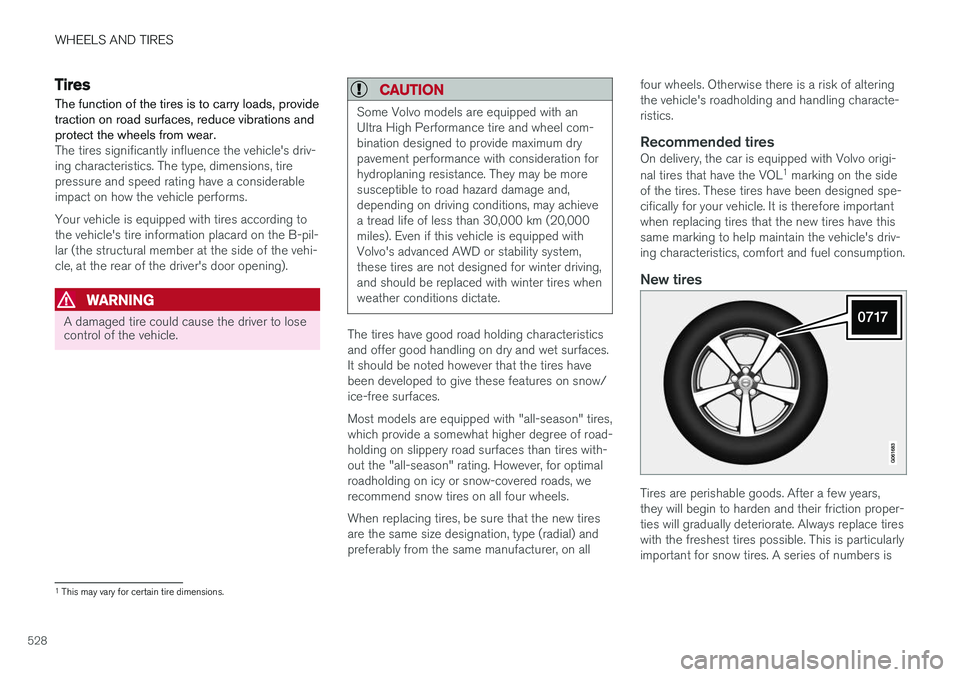
Recommended tiresOn delivery, the car is equipped with Volvo origi- nal tires that have the VOL
1
marking on the side
of the tires. These tires have been designed spe- cifically for your vehicle. It is therefore importantwhen replacing tires that the new tires have thissame marking to help maintain the vehicle's driv-ing characteristics, comfort and fuel consumption.
New tires
Tires are perishable goods. After a few years, they will begin to harden and their friction proper-ties will gradually deteriorate. Always replace tireswith the freshest tires possible. This is particularlyimportant for snow tires. A series of numbers is
1 This may vary for certain tire dimensions.