turn signal VOLVO XC90 2018 Owner´s Manual
[x] Cancel search | Manufacturer: VOLVO, Model Year: 2018, Model line: XC90, Model: VOLVO XC90 2018Pages: 666, PDF Size: 11.32 MB
Page 251 of 666
KEY, LOCKS AND ALARM
}}
249
Locking and unlocking withdetachable key blade
The detachable key blade can be used to unlock the vehicle from the outside, e.g. if the battery inthe remote key is discharged.
Unlocking
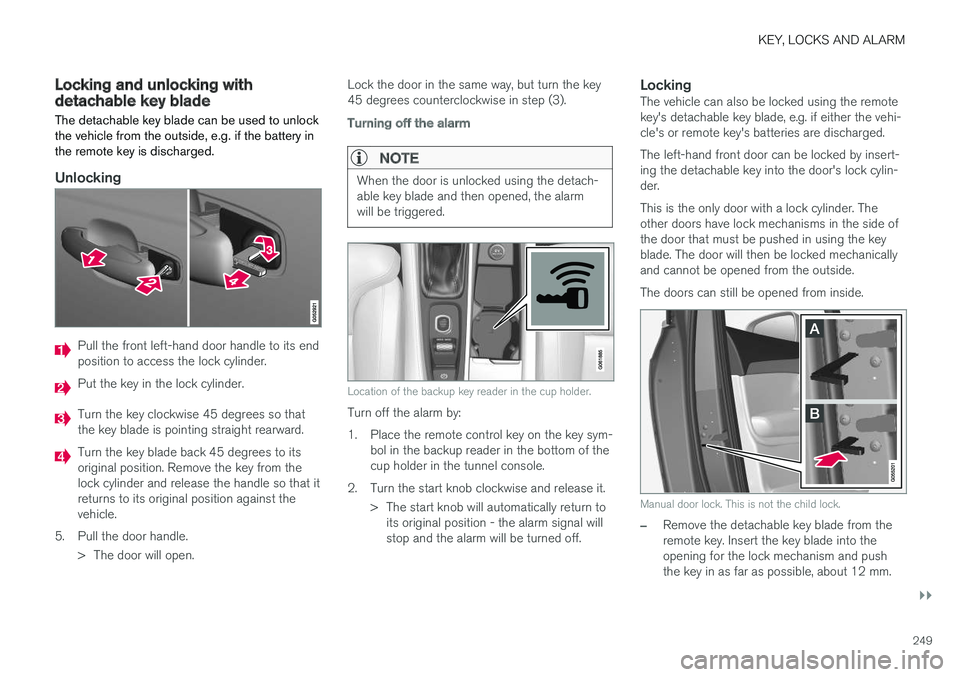
Pull the front left-hand door handle to its end position to access the lock cylinder.
Put the key in the lock cylinder.
Turn the key clockwise 45 degrees so that the key blade is pointing straight rearward.
Turn the key blade back 45 degrees to its original position. Remove the key from thelock cylinder and release the handle so that itreturns to its original position against thevehicle.
5. Pull the door handle. > The door will open. Lock the door in the same way, but turn the key45 degrees counterclockwise in step (3).
Turning off the alarm
NOTE
When the door is unlocked using the detach- able key blade and then opened, the alarmwill be triggered.
Location of the backup key reader in the cup holder.
Turn off the alarm by:
1. Place the remote control key on the key sym-
bol in the backup reader in the bottom of the cup holder in the tunnel console.
2. Turn the start knob clockwise and release it. > The start knob will automatically return toits original position - the alarm signal willstop and the alarm will be turned off.
LockingThe vehicle can also be locked using the remotekey's detachable key blade, e.g. if either the vehi-cle's or remote key's batteries are discharged. The left-hand front door can be locked by insert- ing the detachable key into the door's lock cylin-der. This is the only door with a lock cylinder. The other doors have lock mechanisms in the side ofthe door that must be pushed in using the keyblade. The door will then be locked mechanicallyand cannot be opened from the outside. The doors can still be opened from inside.
Manual door lock. This is not the child lock.
–Remove the detachable key blade from the remote key. Insert the key blade into theopening for the lock mechanism and pushthe key in as far as possible, about 12 mm.
Page 263 of 666
KEY, LOCKS AND ALARM
}}
* Option/accessory.261
Closing and locking 17
the power
tailgate
–Press the button on the lower edge of
the tailgate to close and simultaneously lock the tailgate and doors (all doors must beclosed in order to lock).
> The tailgate closes automatically - the tail-
gate and doors lock, and the alarm * is
activated.
NOTE
• One of the vehicle's remote keys must be within range for locking and unlocking tobe possible.
• When the keyless locking or closing
* func-
tions are used, three audible signals willsound if the key is not detected closeenough to the tailgate.
CAUTION
When operating the tailgate manually, open and close it slowly. If you encounter resis-tance, do not use force. This could lead todamage and loss of function.
Interrupting opening or closingInterrupt opening or closing by doing one of the following:
• Press the button on the dashboard.
• Press the button on the remote key.
• Press the close button on the underside ofthe tailgate.
• Press the rubberized pressure plate on theunderside of the tailgate's outer handle.
• Using a foot movement
*.
Tailgate movement is interrupted and stops. Thetrunk lid can then be opened or closed manually.
Pinch protectionIf anything obstructs the tailgate with enoughforce to prevent it from opening or closing, pinchprotection will be activated.
• When opening - the tailgate will stop movingand an audible signal will sound.
• When closing - the tailgate will stop, a longaudible signal will sound and the tailgate willreturn to the programmed maximum openingposition.
WARNING
Be aware of the risk of serious injury when operating the tailgate. Before opening/clos-ing, make sure that no one is in the path ofthe tailgate who could be injured by its move-ment. Always operate the tailgate with caution.
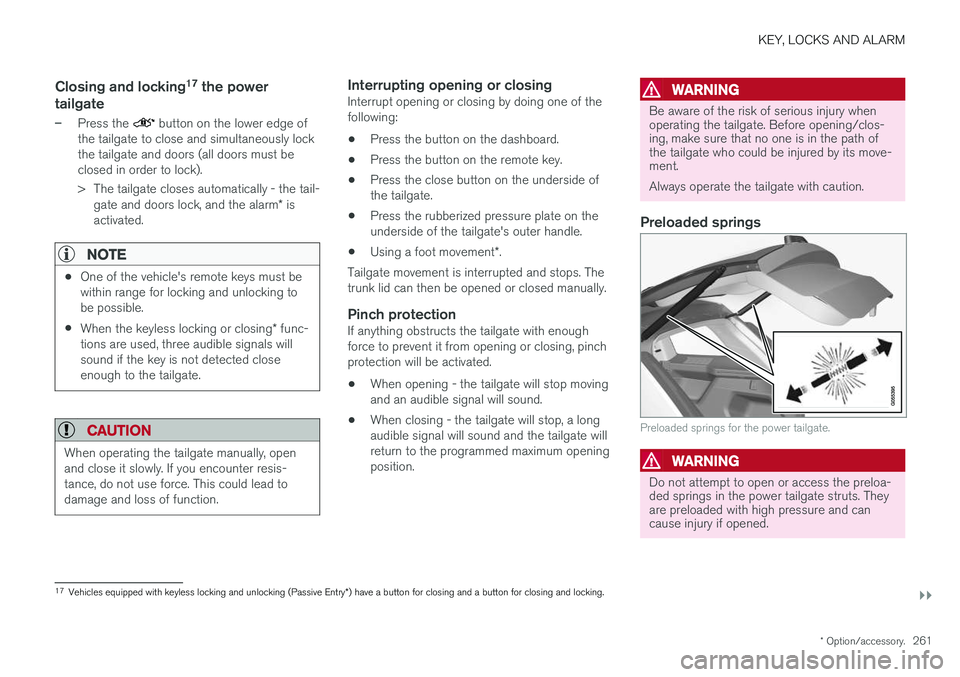
Preloaded springs
Preloaded springs for the power tailgate.
WARNING
Do not attempt to open or access the preloa- ded springs in the power tailgate struts. Theyare preloaded with high pressure and cancause injury if opened.
17
Vehicles equipped with keyless locking and unlocking (Passive Entry *) have a button for closing and a button for closing and locking.
Page 268 of 666
||
KEY, LOCKS AND ALARM
266
Related information
•Private Locking (p. 264)
Alarm
The alarm emits sound and light signals if any- one without a valid remote key attempts to breakinto the vehicle or interferes with the start batteryor alarm siren.
When armed, the alarm will be triggered if:
• the hood, tailgate or any door is opened.
• a battery cable is disconnected
• the alarm siren is disconnected.
Alarm signalsThe following occurs if the alarm is triggered:
• A siren will sound for 30 seconds or until the alarm is turned off.
• All turn signals will flash for 5 minutes oruntil the alarm is turned off.
If the reason the alarm was triggered is not recti- fied, the alarm cycle will repeat up to 10 times 20
.
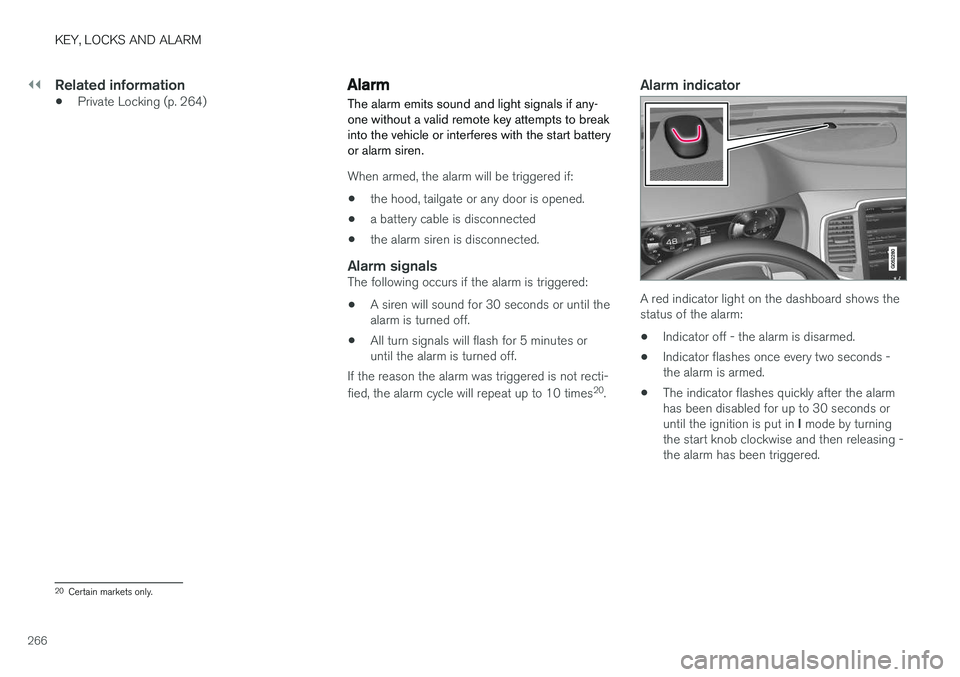
Alarm indicator
A red indicator light on the dashboard shows the status of the alarm:
• Indicator off - the alarm is disarmed.
• Indicator flashes once every two seconds -the alarm is armed.
• The indicator flashes quickly after the alarmhas been disabled for up to 30 seconds or until the ignition is put in
I mode by turning
the start knob clockwise and then releasing - the alarm has been triggered.
20 Certain markets only.
Page 303 of 666
DRIVER SUPPORT
}}
301
To temporarily deactivate Adaptive Cruise Control and put it in standby mode:
–Press the button on the steering wheel
(2). > The
symbol in the instrument panel
changes color from WHITE to GRAY and the set speed in the center of the speed-ometer will change from BEIGE to GRAY.
WARNING
• If Adaptive Cruise Control is in standby mode, the driver must intervene and regu-late both speed and distance to the vehicleahead.
• If the vehicle comes too close to a vehicleahead when Adaptive Cruise Control is instandby mode, the driver is instead warnedof the short distance by the Distance Alertfunction.
Standby mode due to action by the driver
Adaptive Cruise Control will be temporarily deac- tivated and put in standby mode if:
• the brakes are applied.
• the gear selector is moved to
N
• the vehicle is driven faster than the setspeed for more than 1 minute Temporarily increasing speed using the accelera-
tor pedal, e.g. when passing another vehicle, willnot affect the setting. The vehicle will return tothe set speed when the accelerator pedal isreleased.
Automatic standby mode
Adaptive Cruise Control is dependent on other systems, such as Electronic Stability Control (ESC 50
). If any of these other systems stops
working, Adaptive Cruise Control will automati- cally switch off.
WARNING
With automatic standby mode, the driver is warned by an acoustic signal and a messageon the instrument panel. • The driver must then regulate vehicle speed, apply the brakes if necessary, andmaintain a safe distance to other vehicles.
Adaptive Cruise Control may go into standbymode if: • your vehicle's speed goes below 5 km/h(3 mph) and ACC cannot determine if thevehicle ahead is stationary or if it is anotherobject, e.g. a speed bump.
• your vehicle's speed goes under 5 km/h(3 mph) and the vehicle ahead turns so thatACC no longer has a vehicle to follow. •
the driver opens the door.
• the driver unbuckles the seat belt.
• the engine speed (rpm) is too low/high.
• one or more of the wheels lose traction.
• the brake temperature is high.
• the parking brake is applied.
• the camera/radar sensor is covered by snowor heavy rain (the camera lens/radar wavesare blocked)
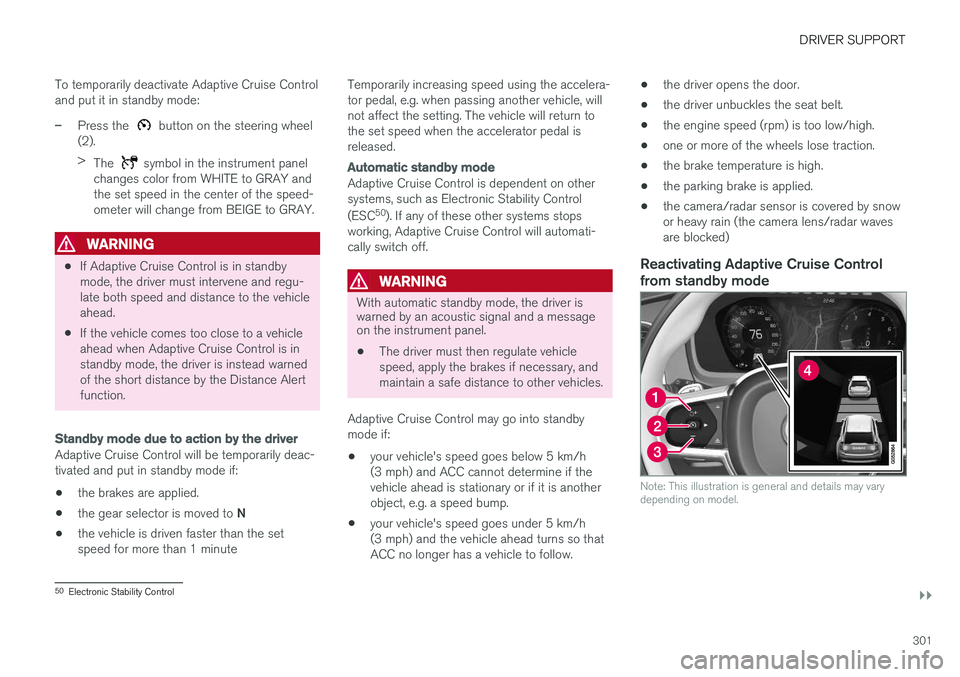
Reactivating Adaptive Cruise Control
from standby mode
Note: This illustration is general and details may vary depending on model.
50 Electronic Stability Control
Page 304 of 666
||
DRIVER SUPPORT
* Option/accessory.
302 To reactivate ACC from standby mode:
–Press the button on the steering wheel
(1).
> Speed will be set to the most recently stored speed.
WARNING
A noticeable increase in speed may follow when the speed is resumed with the
steering wheel button.
Related information
• Adaptive Cruise Control
* (p. 293)
Passing assistance with AdaptiveCruise Control Adaptive Cruise Control (ACC 51
) can assist the
driver when passing other vehicles.
How passing assistance worksWhen ACC is following another vehicle and you indicate that you intend to pass that vehicle by using the turn signal 52
, Adaptive Cruise Control
will begin accelerating toward the vehicle ahead before your vehicle has moved into the passing
lane. The function will then delay a speed reduction to avoid early braking as your vehicle approaches aslower-moving vehicle. The function remains active until your vehicle has passed the other vehicle.
WARNING
Please note that this function can be acti- vated in more situations than just passinganother vehicle, such as when a direction indi-cator is used to indicate a lane change orbefore exiting to another road – the vehiclewill then briefly accelerate.
Related information
• Adaptive Cruise Control
* (p. 293)
Starting passing assistance withAdaptive Cruise Control
Requirements for passing assistanceIn order to activate passing assistance:
• your vehicle must be following a vehicle ahead (target vehicle)
• your vehicle's
current speed must be
at least 70 km/h (43 mph)
• the set speed
for ACC must be high
enough to safely pass another vehicle.
Starting parking assistanceTo start passing assistance:
–Turn on the left turn signal.
> Passing assistance will start.
Related information
• Adaptive Cruise Control
* (p. 293)
51
Adaptive Cruise Control
52 Only the left-hand turn signal for left-hand drive vehicles, or right-hand turn signal for right-hand drive vehicles.
Page 319 of 666
DRIVER SUPPORT
}}
317
Deactivating/reactivating PilotAssist
Pilot Assist can be temporarily put into standby mode and then reactivated.
Deactivating and putting Pilot Assist in standby mode
Note: This illustration is general and details may vary depending on model.
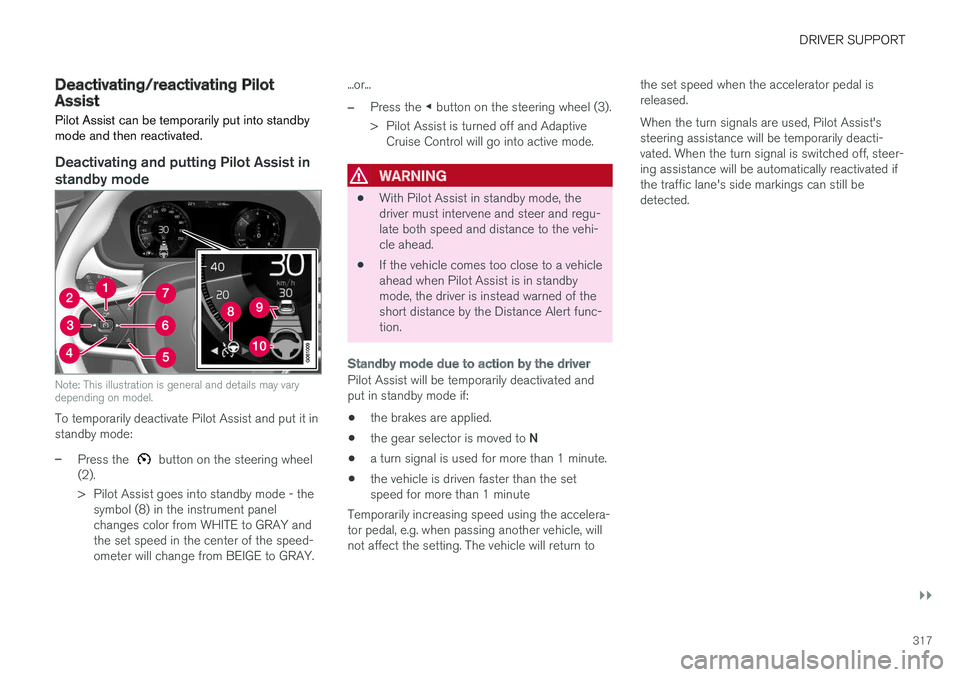
To temporarily deactivate Pilot Assist and put it in standby mode:
–Press the button on the steering wheel
(2).
> Pilot Assist goes into standby mode - the symbol (8) in the instrument panel changes color from WHITE to GRAY andthe set speed in the center of the speed-ometer will change from BEIGE to GRAY. ...or...
–Press the
◀ button on the steering wheel (3).
> Pilot Assist is turned off and Adaptive Cruise Control will go into active mode.
WARNING
• With Pilot Assist in standby mode, the driver must intervene and steer and regu-late both speed and distance to the vehi-cle ahead.
• If the vehicle comes too close to a vehicleahead when Pilot Assist is in standbymode, the driver is instead warned of theshort distance by the Distance Alert func-tion.
Standby mode due to action by the driver
Pilot Assist will be temporarily deactivated and put in standby mode if:
• the brakes are applied.
• the gear selector is moved to
N
• a turn signal is used for more than 1 minute.
• the vehicle is driven faster than the setspeed for more than 1 minute
Temporarily increasing speed using the accelera-tor pedal, e.g. when passing another vehicle, willnot affect the setting. The vehicle will return to the set speed when the accelerator pedal isreleased. When the turn signals are used, Pilot Assist's steering assistance will be temporarily deacti-vated. When the turn signal is switched off, steer-ing assistance will be automatically reactivated ifthe traffic lane's side markings can still bedetected.
Page 320 of 666
||
DRIVER SUPPORT
318
Automatic standby mode
Pilot Assist is dependent on other systems, such as Electronic Stability Control (ESC66
). If any of
these other systems stops working, Pilot Assist will automatically switch off.
WARNING
With automatic standby mode, the driver is warned by an acoustic signal and a messageon the instrument panel. • The driver must then regulate vehicle speed, apply the brakes if necessary, andmaintain a safe distance to other vehicles.
Adaptive Cruise Control may go into standbymode if, e.g.: • the driver opens the door.
• the brake temperature is high.
• the driver's hands are not on the steering wheel.
• the parking brake is applied.
• the engine speed (rpm) is too low/high.
• the driver unbuckles the seat belt.
• one or more of the wheels lose traction.
• the camera/radar sensor is covered by snowor heavy rain (the camera lens/radar wavesare blocked) •
your vehicle's speed goes below 5 km/h(3 mph) and Pilot Assist cannot determine ifthe vehicle ahead is stationary or if it isanother object, e.g. a speed bump.
• your vehicle's speed goes under 5 km/h(3 mph) and the vehicle ahead turns so thatPilot Assist no longer has a vehicle to follow.Reactivating Pilot Assist from standby
mode
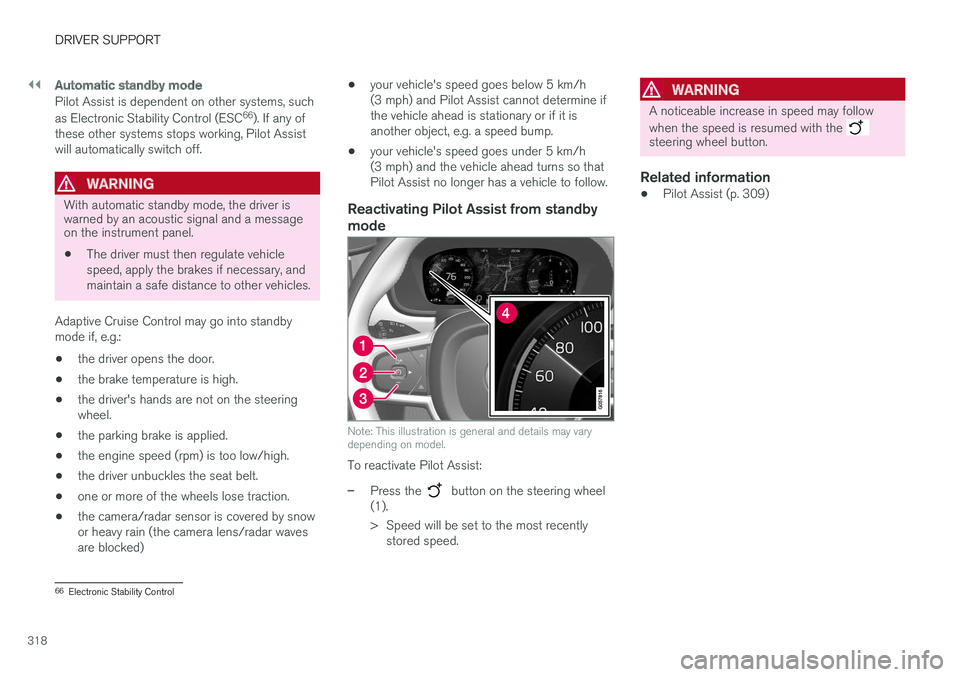
Note: This illustration is general and details may vary depending on model.
To reactivate Pilot Assist:
–Press the button on the steering wheel
(1).
> Speed will be set to the most recently stored speed.
WARNING
A noticeable increase in speed may follow when the speed is resumed with the
steering wheel button.
Related information
• Pilot Assist (p. 309)
66
Electronic Stability Control
Page 321 of 666
DRIVER SUPPORT
319
Passing assistance with Pilot Assist
Pilot Assist can assist the driver when passing other vehicles.
How passing assistance worksWhen Pilot Assist is following another vehicle and you indicate that you intend to pass that vehicle by using the turn signal 67
, Pilot Assist will
begin accelerating toward the vehicle ahead before your vehicle has moved into the passing
lane. The function will then delay a speed reduction to avoid early braking as your vehicle approaches aslower-moving vehicle. The function remains active until your vehicle has passed the other vehicle.
WARNING
Please note that this function can be acti- vated in more situations than just passinganother vehicle, such as when a direction indi-cator is used to indicate a lane change orbefore exiting to another road – the vehiclewill then briefly accelerate.
Related information
• Pilot Assist (p. 309)
Starting passing assistance withPilot Assist
Requirements for passing assistanceIn order to activate passing assistance:
• your vehicle must be following a vehicle ahead (target vehicle)
• your vehicle's
current speed must be
at least 70 km/h (43 mph)
• the set speed
for Pilot Assist must be high
enough to safely pass another vehicle.
Starting parking assistanceTo start passing assistance:
–Turn on the left turn signal.
> Passing assistance will start.
Related information
• Pilot Assist (p. 309)
Passing assistance with Pilot Assistlimitations
Passing assistance functionality may be reduced in certain situations.
WARNING
The driver should be aware that if conditions suddenly change when using Parking Assis-tance, the function may implement an unde-sired acceleration in certain conditions. Some situations should be avoided, e.g. if: • the vehicle is approaching an exit in the same direction as passing would normallyoccur
• the vehicle ahead slows before your vehi-cle has had time to switch to the passinglane
• traffic in the passing lane slows down
• a vehicle for right-hand traffic is driven ina country with left-hand traffic (or viceversa).
Situations of this type can be avoided by tempo-rarily putting Pilot Assist in standby mode.
Related information
• Pilot Assist (p. 309)
67
Only the left-hand turn signal for left-hand drive vehicles, or right-hand turn signal for right-hand drive vehicles.
Page 347 of 666
DRIVER SUPPORT
345
Rear Collision Warning
The Rear Collision Warning (RCW) function can help the driver avoid rear-end collisions fromvehicles approaching from behind.
RCW is automatically activated each time the engine is started. RCW can warn the driver of a potential collision with vehicles approaching from behind by rapidlyflashing the turn signals. If, at a speed below 30 km/h (20 mph), the RCW function detects that the car is in danger of beinghit from behind, the seatbelt tensioners may ten-sion the front seatbelts and activate the WhiplashProtection System safety system. Immediately before a collision from behind, RCW may also activate the foot brake in order toreduce the forward acceleration of the car duringthe collision. However, the brakes will only beapplied if your vehicle is stationary. The brakeswill be immediately released if the acceleratorpedal is depressed.
Related information
• Rear Collision Warning limitations (p. 345)
• Whiplash Protection System (p. 46)
Rear Collision Warning limitations
In some situations, it may be difficult for RCW to warn the driver of a collision risk.
This may be the case if:
• the vehicle approaching from the rear is detected at a late stage
• the vehicle approaching from the rearchanges lanes at a late stage
• the vehicle approaching from the rear is mov-ing at a speed above 80 km/h (50 mph)
• a trailer, bicycle holder or similar is con-nected to the vehicle's electrical system - theRCW function will then be automaticallydeactivated.
NOTE
In certain markets RCW does
not warn with
the direction indicators due to local traffic regulations – in such cases, that part of thefunction is deactivated.
NOTE
The warning with direction indicators for Rear Collision Warning is deactivated if the colli-sion warning distance in the City Safety func- tion is set to the lowest level "
Late".
The seat belt tensioning and braking func- tions remain active.
Related information
• Rear Collision Warning (p. 345)
Page 348 of 666
DRIVER SUPPORT
* Option/accessory.
346
BLIS *
The BLIS 78
function is designed to help provide
assistance in heavy traffic with several lanes moving in the same direction by helping thedriver to detect the presence of vehicles in the"blind spot" area behind and to the side of thevehicle.
BLIS is a driver support system designed to alert the driver of:
• vehicles in your "blind spot"
• vehicles approaching rapidly in adjacentlanes.
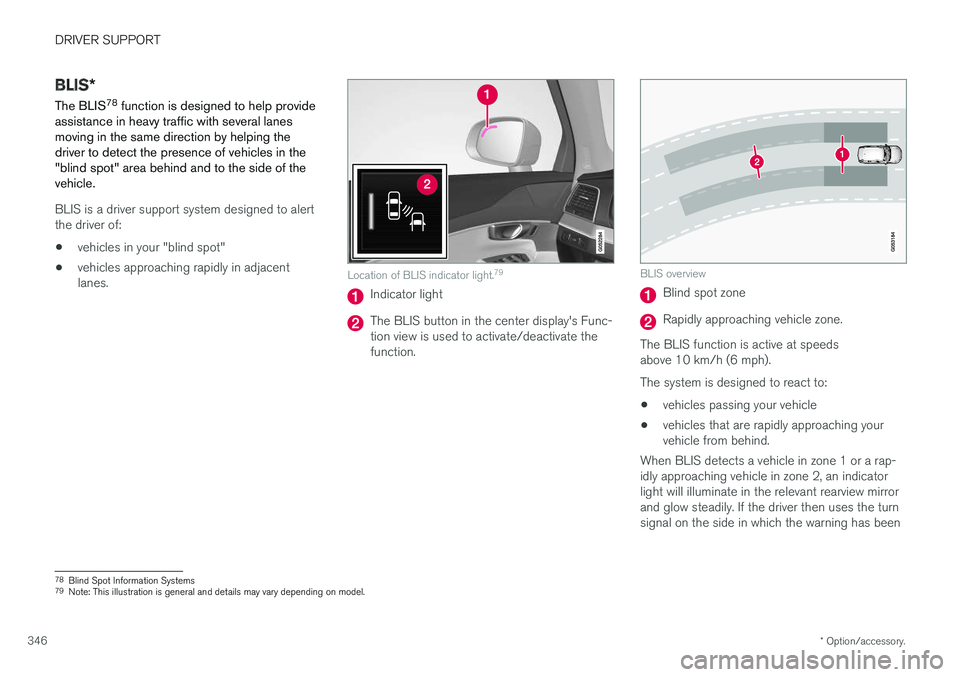
Location of BLIS indicator light. 79
Indicator light
The BLIS button in the center display's Func- tion view is used to activate/deactivate thefunction.
BLIS overview
Blind spot zone
Rapidly approaching vehicle zone.
The BLIS function is active at speeds above 10 km/h (6 mph). The system is designed to react to: • vehicles passing your vehicle
• vehicles that are rapidly approaching your vehicle from behind.
When BLIS detects a vehicle in zone 1 or a rap- idly approaching vehicle in zone 2, an indicatorlight will illuminate in the relevant rearview mirrorand glow steadily. If the driver then uses the turnsignal on the side in which the warning has been
78 Blind Spot Information Systems
79 Note: This illustration is general and details may vary depending on model.