Seat VOLVO XC90 2018 Owner´s Manual
[x] Cancel search | Manufacturer: VOLVO, Model Year: 2018, Model line: XC90, Model: VOLVO XC90 2018Pages: 666, PDF Size: 11.32 MB
Page 3 of 666
VÄLKOMMEN!
We hope your Volvo will give you many years of happy motoring. The vehicle is designed for the safety and comfort of you and your passen-gers. Volvo strives to be one of the world's safest passenger vehicles.Your Volvo is also designed to meet applicable safety and environmentalrequirements. To increase your enjoyment of your Volvo, we recommend that you read the instructions and maintenance information contained in this owner'smanual. The owner's manual is also available as a mobile app (VolvoManual) and on Volvo Cars support page (support.volvocars.com). We also encourage everyone to always use seat belts in this and other vehicles. You should also not drive if you are under the influence of alco-hol or medicines or if your ability to drive is for some other reasonimpaired.
Page 4 of 666
2
OWNER'S INFORMATION
Owner's information16
Owner's Manual in the center display 17
Navigate in the Owner's Manual in the center display 18
Owner's manual in mobile devices 20
Volvo Cars support site 20
Using the Owner's Manual 21
The Owner's Manual and the envi-ronment 23
YOUR VOLVO
Contacting Volvo
26
Volvo ID 26
Creating and registering a Volvo ID 27
Drive-E ‒ purer driving pleasure
27
IntelliSafe - driver support 28
Sensus - connection and entertainment 30
Software Updates 33
Data recording 33
Terms & Conditions for Services 34
Customer Privacy Policy 34
Important information on accessories and extra equipment 35
Accessory installation 36
Connecting equipment to the vehi-cle's data link connector 36
Technician certification 37
Viewing the Vehicle IdentificationNumber (VIN) 38
Volvo Structural Parts Statement 38
Driver distraction 39
SAFETY
Safety42
Safety during pregnancy 43
Occupant safety 43
Reporting safety defects 44
Recall information 45
Whiplash Protection System 46
Seat belts 47
Buckling and unbuckling seat belts 48
Seat belt tensioners 50
Resetting the electric seat belt ten- sioners 51
Door and seat belt reminders 51
Airbags 52
Driver/passenger-side airbags 53
Occupant weight sensor 56
Side airbags 60
Inflatable curtain 60
Safety mode 61
Starting and moving the vehiclewhen it is in safety mode 62
Child safety 63
Child restraints 65
Infant seats 67
Convertible seats 69
Booster cushions 71
TABLE OF CONTENTS
Page 5 of 666
3
Top tether anchors72
Lower child seat attachment points 74
ISOFIX/LATCH lower anchors 74
Integrated booster cushion *
76
Folding up the integrated booster cushion * 77
Folding down the integrated boostercushion * 78
DISPLAYS AND VOICE CONTROL
Instruments and controls in left-hand drive vehicles
82
Instrument panel 84
Instrument panel settings 88
Fuel gauge 89
Trip computer 89
Displaying trip data in the instrumentpanel 91
Resetting the trip odometer 92
Displaying trip statistics in the centerdisplay 92
Trip statistics settings 93
Date and time 94
Ambient temperature sensor 94
Indicator symbols in the instrument panel 95
Warning symbols in the instrument panel 97
Instrument panel licenses 98
App menu in instrument panel 104
Handling the App menu in the instru-ment panel 105
Messages in the instrument panel 106
Handling messages in the instru-ment panel 107
Handling messages saved from theinstrument panel 109
Center display overview 111
Handling the center display114
Activating and deactivating the cen- ter display 117
Navigating in the center display's views 117
Handling tiles in the center display 121
Function view in the center display 124
Moving apps and buttons in the cen-ter display 126
Symbols in the center display status bar 126
Using the center display keyboard 128
Changing keyboard language in thecenter display 131
Entering characters, letters andwords by hand in the center display 131
Changing the appearance of thecenter display 133
Turning off and adjusting the volumeof the center display system sounds 133
Changing system units of measurement 134
Changing system language 134
Opening settings in the center display 134
Opening contextual setting in thecenter display 135
Changing settings in the center display 136
Resetting user data when the vehiclechanges owners 136
Resetting center display settings 137
Page 7 of 666
5
SEATS AND STEERING WHEEL
Manual front seats188
Power front seats *
189
Adjusting the power front seats *
189
Storing memory settings in power front seats * 190
Using stored memory in a powered front seat 191
Front seat massage settings *
192
Adjusting front seat massage settings *
192
Adjusting front seat cushion length 193
Adjusting front seat side bolster settings *
194
Adjusting front seat lumbar support *
194
Adjusting the passenger seat from the driver's seat * 195
Folding the second row backrests 196
Adjusting the second row head restraints 198
Moving the second row seats for-ward/rearward * 199
Adjusting the second row backrest tilt 200
Getting into and out of the third rowof seats * 201
Folding the third row backrests *
202
Steering wheel controls and horn 203
Adjusting the steering wheel 203
CLIMATE CONTROL
Climate206
Climate zones 206
Climate control sensors 207
Perceived temperature 207
Climate control system voice commands 208
Air quality 209
Clean Zone *
209
Clean Zone Interior Package *
210
Interior Air Quality System *
210
Activating and deactivating the air quality sensor * 211
Passenger compartment air filter 211
Air distribution 212
Adjusting air distribution 212
Opening, closing and directing air vents 213
Air distribution options 214
Climate system controls 217
Activating and deactivating powerfront seats * 219
Activating and deactivating theheated front seat * 220
Activating and deactivating theheated rear seats * 220
Activating and deactivating front seatventilation * 221
Activating and deactivating the heated steering wheel
*222
Activating and deactivating automaticsteering wheel heating *223
Activating auto climate control 223
Activating and deactivating recirculation 224
Activating and deactivating the recir- culation timer setting 224
Activating and deactivating max defroster 225
Activating and deactivating the heated windshield * 226
Activating and deactivating automaticwindshield heating * 227
Activating and deactivating the heated rear window and door mirrors 227
Automatically activating and deacti-vating the heated rear window anddoor mirrors 228
Setting the blower speed for thefront seats 228
Setting the blower speed for the rear seats * 229
Setting the temperature for the front seats 230
Setting the temperature for the rear seats * 231
Synchronize temperature 232
Activating and deactivating air condi- tioning 233
Page 8 of 666
6
Activating and deactivating climate control for the third-row seats*233
Activating and deactivating auto-startof third-row climate control *234
KEY, LOCKS AND ALARM
Lock indication
236
Lock confirmation settings 237
Remote key 237
Locking and unlocking using the remote key 239
Settings for remote and inside doorunlock 240
Unlocking the tailgate using theremote key 241
Remote key range 241
Replacing the remote key's battery 242
Ordering additional remote keys 246
Red Key - restricted remote key *
246
Red Key * settings
247
Detachable key blade 248
Locking and unlocking with detacha-ble key blade 249
Electronic immobilizer 250
Start and lock system type designations 250
Keyless and touch-sensitive surfaces *
251
Keyless locking and unlocking *
252
Keyless unlock settings *
254
Keyless tailgate unlock *
254
Antenna locations for the start andlock system 255
Locking and unlocking from inside the vehicle255
Unlocking the tailgate from insidethe vehicle 257
Activating and deactivating childsafety locks 257
Automatic locking when driving 259
Opening and closing the power tailgate *
259
Setting a maximum height for the power tailgate * 262
Foot movement tailgate operation *
263
Private Locking 264
Activating and deactivating private locking 265
Alarm 266
Arming and disarming the alarm 267
Foreign Component Detection *
268
Page 15 of 666
13
LOADING, STORAGE AND
PASSENGER COMPARTMENT
Passenger compartment interior558
Tunnel console 559
Electrical outlets 560
Using the electrical outlets 562
Using the glove compartment 563
Sun visors 564
Cargo compartment 564
Loading recommendations 564
Roof loads and load carriers 566
Grocery bag holders 566
Load anchoring eyelets 567
Installing and removing the cargo compartment cover * 567
Operating the cargo compartment cover *
568
Installing and removing the steelcargo grid * 570
Installing and removing the cargo net *
571
MAINTENANCE AND SERVICE
Volvo's service program
576
Data transfer between vehicle and workshop over Wi-Fi 578
Download Center 579
Handling system updates via Down-load Center 579
Vehicle status 580
Scheduling service and repairs 580
Sending vehicle information to theworkshop 582
Hoisting the vehicle 583
Opening and closing the hood 585
Climate control system service 586
Replacing a windshield with head-up display * 586
Engine compartment overview 587
Engine oil 587
Checking and filling engine oil 588
Refilling coolant 590
Replacing bulbs 591
Removing the plastic cover to replace bulbs 593
Removing the rectangular headlightcover 593
Location of exterior lights 594
Replacing the low beam headlight bulbs 595
Replacing the high beam headlight bulbs595
Replacing daytime running lights/ front parking light bulbs 596
Replacing front turn signal bulbs 597
Bulb specifications 597
Start battery 598
Support battery 601
Battery symbols 602
Fuses and fuseboxes 603
Replacing fuses 604
Fuses in the engine compartment 605
Fuses under the glove compartment 608
Fuses in the cargo compartment 611
Cleaning the interior 615
Cleaning the center display 615
Cleaning the head-up display *
616
Cleaning fabric upholstery and ceil-ing liner 617
Cleaning the seat belt 617
Cleaning floor mats and inlay mats 617
Cleaning leather upholstery 618
Cleaning the leather steering wheel 619
Cleaning interior plastic, metal andwood surfaces 620
Cleaning the exterior 620
Page 21 of 666
OWNER'S INFORMATION
19
Quick Guide
Tap the symbol to go to a page with links to a selection of use-ful articles about the vehicle'smost commonly used featuresand functions. The articles canalso be accessed via catego-ries, but have been collected
here for quick access. Tap an article to read it inits entirety.
Exterior and interior hotspots
Exterior and interior overviews of the vehicle. Hotspots areprovided for certain functions,components, etc. Tap a hotspotto come to a relevant article.
1. Press Exterior or Interior.
> Exterior or interior images of the vehicle are shown with hotspots. The hotspots lead to articles about the correspondingfunction, component, etc. Swipe thescreen horizontally to scroll between theimages. 2. Tap a hotspot.
> The title of a relevant article will be dis-played.
3. Tap the title to open the article. To go back, tap the left arrow.
Favorites
Tap the symbol to go to articles saved as favorites. Tap an arti-cle to read it in its entirety.
Saving or deleting favorite articles
Save an article as a favorite by tapping the at
the upper right when the article is open. When an article has been saved as a favorite, the star sym- bol will be filled in:
.
To remove an article from the list of favorites, tap its star again.
Video
Tap the symbol to go to brief instructive videos for variousfunctions in the vehicle.
Information
Tap the symbol for information about the current version of theOwner's Manual in your vehicleand other useful information.
Using the search function in the Top menu
1. Tap in the Owner's Manual upper menu.
A keyboard will appear at the bottom of the screen.
2. Enter a search word, e.g. "seat belt". > Suggested articles and categories will bedisplayed as characters are entered.
3. Tap the article or category to read it.
Related information
• Owner's Manual in the center display (p. 17)
• Using the center display keyboard (p. 128)
• Using the Owner's Manual (p. 21)
Page 31 of 666
YOUR VOLVO
29
possible collision and help the driver act in time to prevent it. If the driver does not react to thewarning and the risk of collision is determined tobe imminent, City Safety can automatically applythe brakes. Lane assistance (LKA) is another example of a function that can help prevent accidents by help-ing the driver - on expressways and similar largerroads - to reduce the risk of the car accidentallyleaving its own lane. The function
Steering aid during increased
collision risk can help the driver reduce the risk
of the car leaving its lane unintentionally and/or colliding with another vehicle or obstacle byactively steering the car back into its lane and/orswerving.
ProtectionTo help protect the driver and passengers, thevehicle is equipped with seat belt tensioners thatpull the seat belts taut in collisions and other crit-ical situations. The vehicle also has airbags, inflat-able curtains and the Whiplash ProtectionSystem (WHIPS), which helps prevent whiplashinjuries.
Related information
• Driver support systems (p. 270)
• Active high beam (p. 159)
• Safety (p. 42)
• Seat belts (p. 47) •
Airbags (p. 52)
• Whiplash Protection System (p. 46)
Page 34 of 666
||
YOUR VOLVO
* Option/accessory.
32
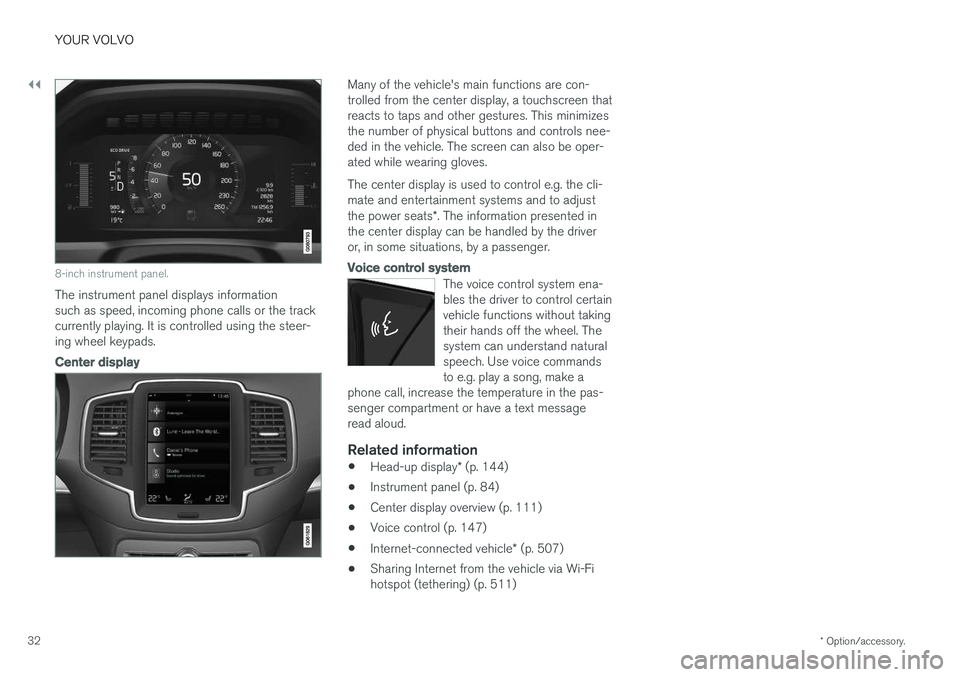
8-inch instrument panel.
The instrument panel displays information such as speed, incoming phone calls or the trackcurrently playing. It is controlled using the steer-ing wheel keypads.
Center display
Many of the vehicle's main functions are con- trolled from the center display, a touchscreen thatreacts to taps and other gestures. This minimizesthe number of physical buttons and controls nee-ded in the vehicle. The screen can also be oper-ated while wearing gloves. The center display is used to control e.g. the cli- mate and entertainment systems and to adjust the power seats *. The information presented in
the center display can be handled by the driver or, in some situations, by a passenger.
Voice control system
The voice control system ena- bles the driver to control certainvehicle functions without takingtheir hands off the wheel. Thesystem can understand naturalspeech. Use voice commandsto e.g. play a song, make a
phone call, increase the temperature in the pas-senger compartment or have a text messageread aloud.
Related information
• Head-up display
* (p. 144)
• Instrument panel (p. 84)
• Center display overview (p. 111)
• Voice control (p. 147)
• Internet-connected vehicle
* (p. 507)
• Sharing Internet from the vehicle via Wi-Fi hotspot (tethering) (p. 511)
Page 37 of 666
YOUR VOLVO
35
Important information onaccessories and extra equipment
Incorrectly connected or installed accessories or extra equipment may have an adverse effect onthe vehicle's electronics.
We strongly recommend that Volvo owners use only genuine, Volvo-approved accessories, andthat accessory installations be performed only bya trained and qualified Volvo service technician.Certain accessories only work when the associ-ated software is installed in the vehicle's com-puter system. The equipment described in the Owner's Manual is not available in all vehicles. Vehicles may beequipped differently depending on marketrequirements and national or local laws and regu-lations. Optional or accessory equipment may not be available in all countries or markets. Please notethat some vehicles may be equipped differently,depending on special legal requirements. Formore information on which equipment is standardand which is an option or accessory, please con-tact your Volvo retailer.
NOTE
Do not export your Volvo to another country before investigating that country's applicablesafety and exhaust emission requirements. Insome cases it may be difficult or impossibleto comply with these requirements. Modifica-tions to the emission control system(s) mayrender your Volvo not certifiable for legaloperation in the U.S., Canada and other coun-tries.
WARNING
CALIFORNIA proposition 65 Engine exhaust, some of its constituents, and certain vehicle components contain or emitchemicals known to the state of California tocause cancer, and birth defects or otherreproductive harm. In addition, certain fluidscontained in vehicles and certain products ofcomponent wear contain or emit chemicalsknown to the State of California to cause can-cer, and birth defects or other reproductiveharm.
WARNING
Certain of the vehicle's components, such as airbag modules, seat belt tensioners, adjusta-ble steering wheel columns and button cellbatteries, may contain perchlorate materials.Special handling may apply for service or vehi-cle end of life disposal. See www.dtsc.ca.gov/hazardouswaste/ perchlorate.
WARNING
The driver is always responsible for operating the vehicle in a safe manner and for comply-ing with current statutes and regulations. It is also essential to maintain and service the vehicle according to Volvo's recommendationsas stated in the owner's information and theservice and warranty booklet. If the on-board information differs from the printed owner's manual, the printed informa-tion always takes precedence.
Related information
• Accessory installation (p. 36)
• Connecting equipment to the vehicle's data link connector (p. 36)
• Using the Owner's Manual (p. 21)