climate settings VOLVO XC90 2018 Owner´s Manual
[x] Cancel search | Manufacturer: VOLVO, Model Year: 2018, Model line: XC90, Model: VOLVO XC90 2018Pages: 666, PDF Size: 11.32 MB
Page 7 of 666
5
SEATS AND STEERING WHEEL
Manual front seats188
Power front seats *
189
Adjusting the power front seats *
189
Storing memory settings in power front seats * 190
Using stored memory in a powered front seat 191
Front seat massage settings *
192
Adjusting front seat massage settings *
192
Adjusting front seat cushion length 193
Adjusting front seat side bolster settings *
194
Adjusting front seat lumbar support *
194
Adjusting the passenger seat from the driver's seat * 195
Folding the second row backrests 196
Adjusting the second row head restraints 198
Moving the second row seats for-ward/rearward * 199
Adjusting the second row backrest tilt 200
Getting into and out of the third rowof seats * 201
Folding the third row backrests *
202
Steering wheel controls and horn 203
Adjusting the steering wheel 203
CLIMATE CONTROL
Climate206
Climate zones 206
Climate control sensors 207
Perceived temperature 207
Climate control system voice commands 208
Air quality 209
Clean Zone *
209
Clean Zone Interior Package *
210
Interior Air Quality System *
210
Activating and deactivating the air quality sensor * 211
Passenger compartment air filter 211
Air distribution 212
Adjusting air distribution 212
Opening, closing and directing air vents 213
Air distribution options 214
Climate system controls 217
Activating and deactivating powerfront seats * 219
Activating and deactivating theheated front seat * 220
Activating and deactivating theheated rear seats * 220
Activating and deactivating front seatventilation * 221
Activating and deactivating the heated steering wheel
*222
Activating and deactivating automaticsteering wheel heating *223
Activating auto climate control 223
Activating and deactivating recirculation 224
Activating and deactivating the recir- culation timer setting 224
Activating and deactivating max defroster 225
Activating and deactivating the heated windshield * 226
Activating and deactivating automaticwindshield heating * 227
Activating and deactivating the heated rear window and door mirrors 227
Automatically activating and deacti-vating the heated rear window anddoor mirrors 228
Setting the blower speed for thefront seats 228
Setting the blower speed for the rear seats * 229
Setting the temperature for the front seats 230
Setting the temperature for the rear seats * 231
Synchronize temperature 232
Activating and deactivating air condi- tioning 233
Page 8 of 666
6
Activating and deactivating climate control for the third-row seats*233
Activating and deactivating auto-startof third-row climate control *234
KEY, LOCKS AND ALARM
Lock indication
236
Lock confirmation settings 237
Remote key 237
Locking and unlocking using the remote key 239
Settings for remote and inside doorunlock 240
Unlocking the tailgate using theremote key 241
Remote key range 241
Replacing the remote key's battery 242
Ordering additional remote keys 246
Red Key - restricted remote key *
246
Red Key * settings
247
Detachable key blade 248
Locking and unlocking with detacha-ble key blade 249
Electronic immobilizer 250
Start and lock system type designations 250
Keyless and touch-sensitive surfaces *
251
Keyless locking and unlocking *
252
Keyless unlock settings *
254
Keyless tailgate unlock *
254
Antenna locations for the start andlock system 255
Locking and unlocking from inside the vehicle255
Unlocking the tailgate from insidethe vehicle 257
Activating and deactivating childsafety locks 257
Automatic locking when driving 259
Opening and closing the power tailgate *
259
Setting a maximum height for the power tailgate * 262
Foot movement tailgate operation *
263
Private Locking 264
Activating and deactivating private locking 265
Alarm 266
Arming and disarming the alarm 267
Foreign Component Detection *
268
Page 115 of 666
DISPLAYS AND VOICE CONTROL
* Option/accessory.113
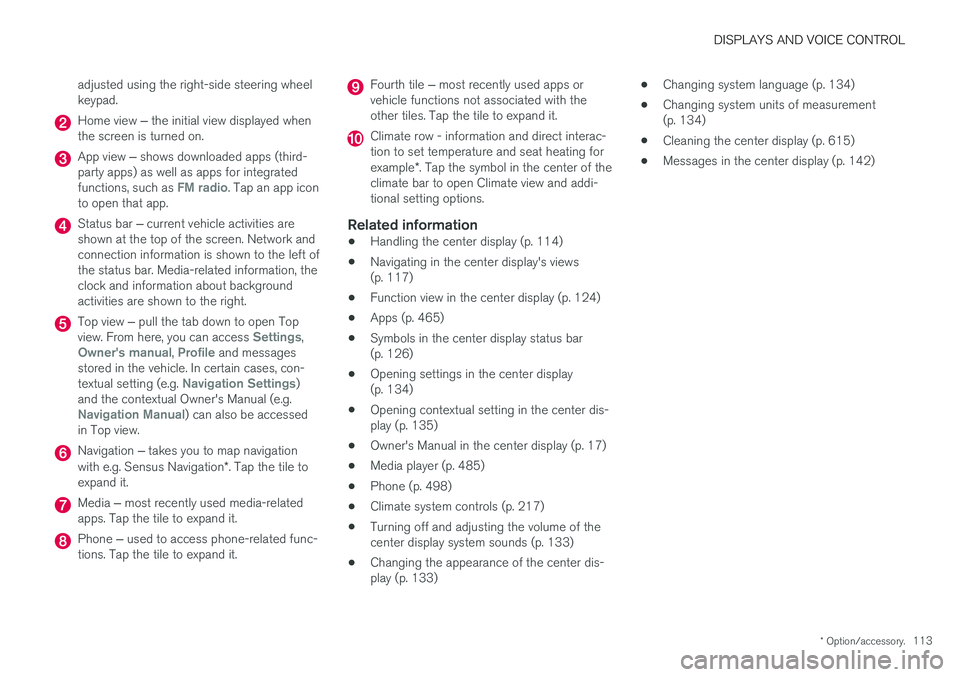
adjusted using the right-side steering wheel keypad.
Home view
‒ the initial view displayed when
the screen is turned on.
App view ‒ shows downloaded apps (third-
party apps) as well as apps for integrated functions, such as
FM radio. Tap an app icon
to open that app.
Status bar ‒ current vehicle activities are
shown at the top of the screen. Network and connection information is shown to the left ofthe status bar. Media-related information, theclock and information about backgroundactivities are shown to the right.
Top view ‒ pull the tab down to open Top
view. From here, you can access Settings,Owner's manual, Profile and messages
stored in the vehicle. In certain cases, con- textual setting (e.g.
Navigation Settings)
and the contextual Owner's Manual (e.g.
Navigation Manual) can also be accessed
in Top view.
Navigation ‒ takes you to map navigation
with e.g. Sensus Navigation *. Tap the tile to
expand it.
Media ‒ most recently used media-related
apps. Tap the tile to expand it.
Phone ‒ used to access phone-related func-
tions. Tap the tile to expand it.
Fourth tile ‒ most recently used apps or
vehicle functions not associated with the other tiles. Tap the tile to expand it.
Climate row - information and direct interac- tion to set temperature and seat heating for example *. Tap the symbol in the center of the
climate bar to open Climate view and addi- tional setting options.
Related information
• Handling the center display (p. 114)
• Navigating in the center display's views(p. 117)
• Function view in the center display (p. 124)
• Apps (p. 465)
• Symbols in the center display status bar(p. 126)
• Opening settings in the center display(p. 134)
• Opening contextual setting in the center dis-play (p. 135)
• Owner's Manual in the center display (p. 17)
• Media player (p. 485)
• Phone (p. 498)
• Climate system controls (p. 217)
• Turning off and adjusting the volume of thecenter display system sounds (p. 133)
• Changing the appearance of the center dis-play (p. 133) •
Changing system language (p. 134)
• Changing system units of measurement(p. 134)
• Cleaning the center display (p. 615)
• Messages in the center display (p. 142)
Page 116 of 666
DISPLAYS AND VOICE CONTROL
* Option/accessory.
114
Handling the center display
Many of the vehicle's functions and features can be controlled and adjusted from the center dis-play. The center display is a touchscreen thatreacts to taps and other gestures.
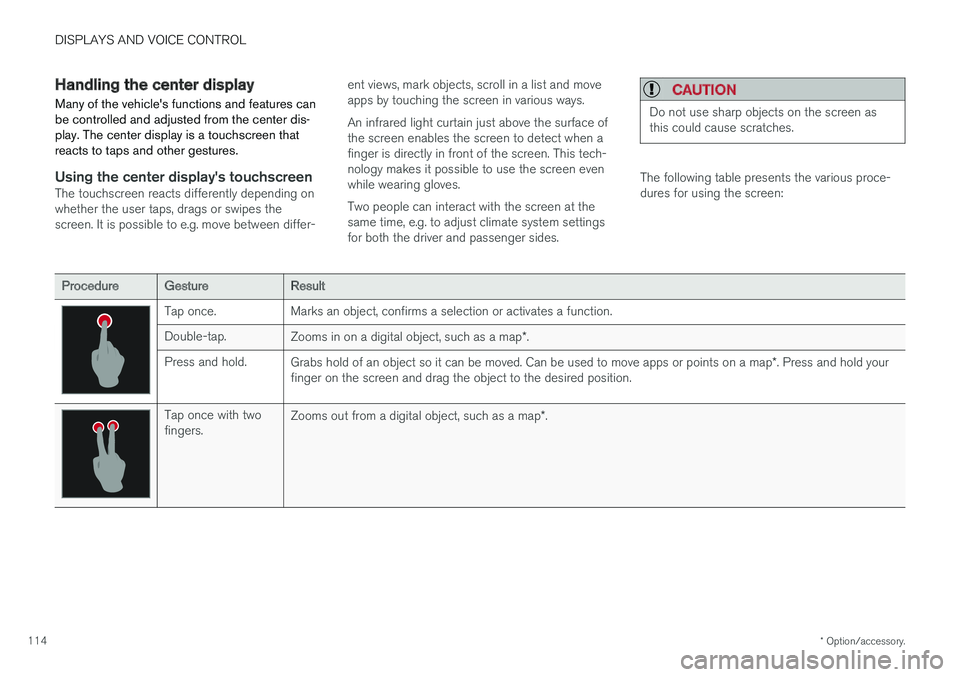
Using the center display's touchscreenThe touchscreen reacts differently depending on whether the user taps, drags or swipes thescreen. It is possible to e.g. move between differ- ent views, mark objects, scroll in a list and moveapps by touching the screen in various ways. An infrared light curtain just above the surface of the screen enables the screen to detect when afinger is directly in front of the screen. This tech-nology makes it possible to use the screen evenwhile wearing gloves. Two people can interact with the screen at the same time, e.g. to adjust climate system settingsfor both the driver and passenger sides.
CAUTION
Do not use sharp objects on the screen as this could cause scratches.
The following table presents the various proce- dures for using the screen:
ProcedureGestureResult
Tap once. Marks an object, confirms a selection or activates a function. Double-tap.
Zooms in on a digital object, such as a map *.
Press and hold. Grabs hold of an object so it can be moved. Can be used to move apps or points on a map *. Press and hold your
finger on the screen and drag the object to the desired position.
Tap once with two fingers. Zooms out from a digital object, such as a map
*.
Page 120 of 666
||
DISPLAYS AND VOICE CONTROL
* Option/accessory.
118
NOTE
In Home view's standard mode – short press on the Home button. An animation describingaccess to the various views is shown on thescreen.
NOTE
When the vehicle is moving:
• Certain functions (e.g. using the center display's keyboard) may be deactivated.
• Certain texts (e.g. those generated byapps) will be shortened to three rows. Tap the
Read out button to have the
entire message read aloud.
• The message will be shortened to one row. Tap the
Read out button to have
the entire message read aloud.
Status barCurrent vehicle activities are shown at the top of the screen in the status bar. Network and con-nection information is shown to the left of thestatus bar. Media-related information, the clockand information about background activities areshown to the right.
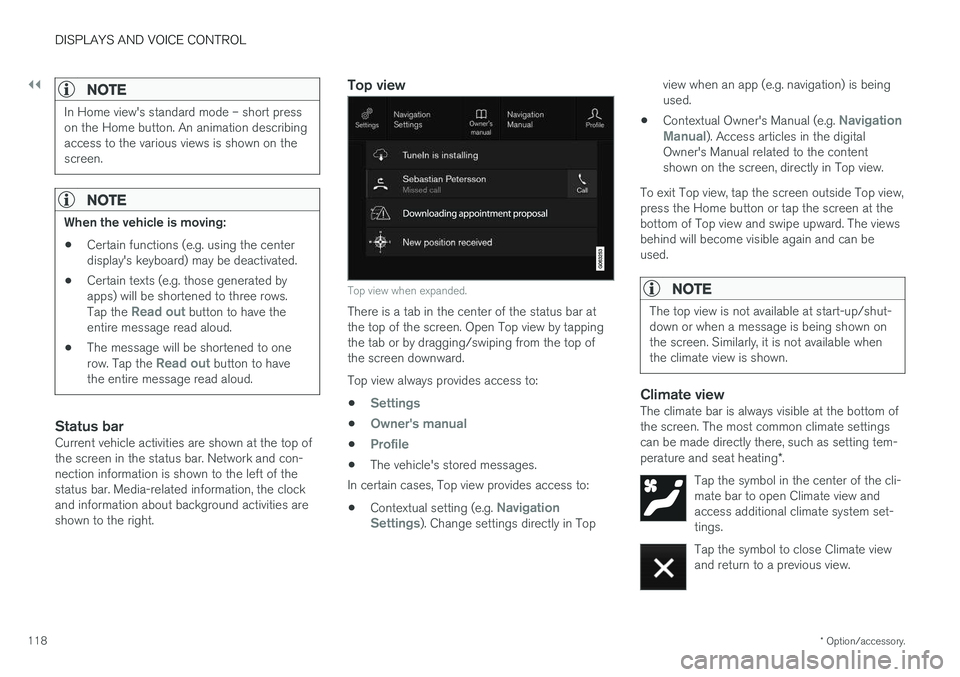
Top view
Top view when expanded.
There is a tab in the center of the status bar at the top of the screen. Open Top view by tappingthe tab or by dragging/swiping from the top ofthe screen downward. Top view always provides access to:
•
Settings
•Owner's manual
•Profile
• The vehicle's stored messages.
In certain cases, Top view provides access to:
• Contextual setting (e.g.
Navigation
Settings). Change settings directly in Top view when an app (e.g. navigation) is being used.
• Contextual Owner's Manual (e.g.
Navigation
Manual). Access articles in the digital
Owner's Manual related to the content shown on the screen, directly in Top view.
To exit Top view, tap the screen outside Top view,press the Home button or tap the screen at thebottom of Top view and swipe upward. The viewsbehind will become visible again and can beused.
NOTE
The top view is not available at start-up/shut- down or when a message is being shown onthe screen. Similarly, it is not available whenthe climate view is shown.
Climate viewThe climate bar is always visible at the bottom of the screen. The most common climate settingscan be made directly there, such as setting tem- perature and seat heating *.
Tap the symbol in the center of the cli- mate bar to open Climate view andaccess additional climate system set-tings.
Tap the symbol to close Climate view and return to a previous view.
Page 122 of 666
||
DISPLAYS AND VOICE CONTROL
120If there are many functions, you can also scroll downward through the view. This is done bysweeping/dragging from the bottom upwards. Unlike in App view, where you tap an app to open it, in Function view, tapping a function activates ordeactivates it. Certain functions (trigger func-tions) open in their own window when tapped. To return to Home view, swipe the screen from right to left
10
or press the Home button.
Related information
• Handling tiles in the center display (p. 121)
• Symbols in the center display status bar (p. 126)
• Opening settings in the center display(p. 134)
• Opening contextual setting in the center dis-play (p. 135)
• Owner's Manual in the center display (p. 17)
• Driver profiles (p. 139)
• Climate system controls (p. 217)
• Apps (p. 465)
• Function view in the center display (p. 124)
• Center display overview (p. 111)
10
Applies for left-hand drive vehicles. For right-hand drive vehicles, swipe in the other direction.
Page 140 of 666
||
DISPLAYS AND VOICE CONTROL
* Option/accessory.
138
Type ofsettingDescription
Slider Select a level for a function by pressing and dragging the slider control, e.g. to set volume level.
Informa-tion dis-play This is not an actual setting, butinstead displays information suchas the vehicle's VIN number.
Related information
•
Center display overview (p. 111)
Table of settings in the centerdisplay The center display's Settings menu has a num- ber of main categories and sub-categories thatcontain settings and information for many of thevehicle's features and functions.
There are seven main categories: My Car,Sound, Navigation, Media, Communication,Climate and System.
Each category, in turn, contains a number of sub- categories and possible settings. The table belowshows the first level of sub-categories. The possi-ble settings for a function or an area are descri-bed in more detail in their respective sections ofthe Owner's Manual. Some settings are personal, which means that they can be saved to a
Driver Profiles. Others
are global, which means that they are not linked to a driver profile.
My Car
Sub-categories
Displays IntelliSafe Drive Preferences
/Individual Drive Mode*
Lights and Lighting Mirrors and Convenience
Sub-categories
Locking Parking Brake and SuspensionWipers
Sound
Sub-categories
Tone BalanceSystem Volumes
Navigation
Sub-categories
Map Route and GuidanceTraffic
Media
Sub-categories
AM/FM Radio SiriusXM SiriusXM Travel Link
Page 141 of 666
DISPLAYS AND VOICE CONTROL
}}
* Option/accessory.139
Sub-categories
Gracenote®
Video
Communication
Sub-categories
Phone Text Messages Android Auto
*
Apple CarPlay*
Bluetooth Devices Wi-FiVehicle Wi-Fi HotspotVehicle Modem Internet Volvo On Call Volvo Service Networks
ClimateThe Climate main category does not have any
sub-categories.
System
Sub-categories
Driver Profile Date and TimeSystem Languages and UnitsPrivacy and dataKeyboard Layouts Voice Control
*
Factory Reset System Information
Related information
• Center display overview (p. 111)
• Changing settings in the center display (p. 136)
• Resetting center display settings (p. 137)
Driver profiles
Many of the vehicle's settings can be custom- ized to the driver's personal preferences andsaved in one or more driver profiles.
These personal settings are automatically saved in the active driver profile. Each key can be linkedto one driver profile. When the linked key is used,the vehicle is customized to the specific settingsof that driver profile.
Which settings are saved in driver profiles?
The vehicle has settings that can be made eitherpersonal or global. The personal settings aresaved in driver profiles. Settings that can be saved in a driver profile include, among other things, screens, mirrors, front seats, navigation *, audio and media system,
language and voice control. Some settings are global settings. These settings can be changed but are not saved to a specificdriver profile. Changes to global settings affect allprofiles.
Page 149 of 666
DISPLAYS AND VOICE CONTROL
}}
* Option/accessory.147
Lowering position
Confirm
The brightness of the graphic is automatically adapted to the light conditions in its background.Brightness is also affected by adjustments to thebrightness of the other displays in the vehicle. The height position can be stored in the front power seat's * memory function.
Calibrating the horizontal positionIf the windshield or display unit has been replaced, the head-up display's horizontal posi-tion may need to be calibrated. Calibration meansthat the projected image is rotated clockwise orcounterclockwise. 1.
Tap
Settings in the center display's Top
view.
2. Select
My CarDisplaysHead-Up
Display Options
Head-Up Display
Calibration.
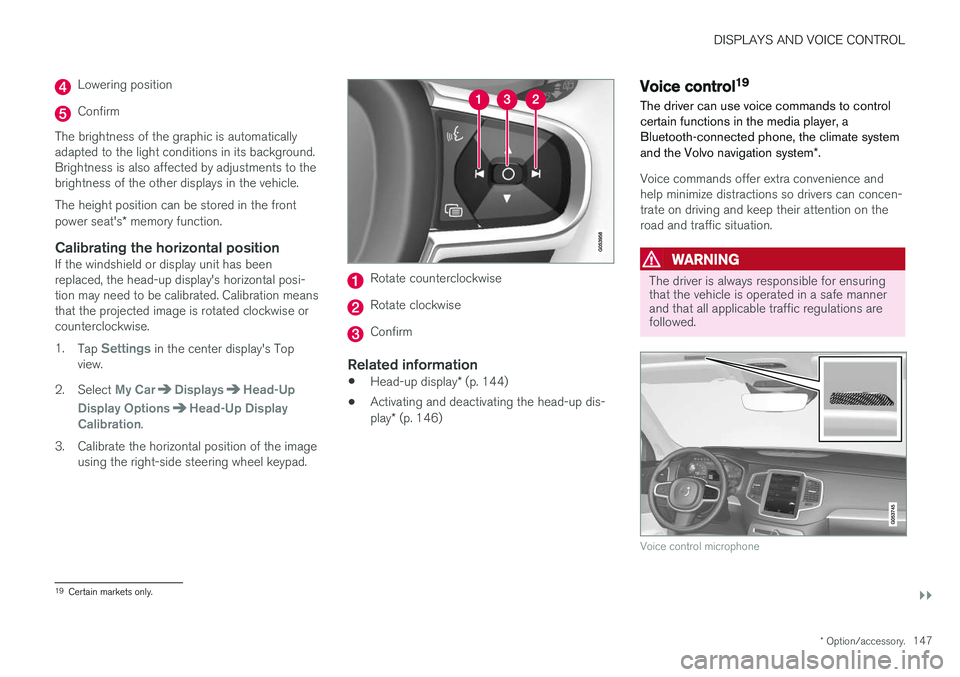
3. Calibrate the horizontal position of the image using the right-side steering wheel keypad.
Rotate counterclockwise
Rotate clockwise
Confirm
Related information
• Head-up display
* (p. 144)
• Activating and deactivating the head-up dis- play
* (p. 146)
Voice control19
The driver can use voice commands to control certain functions in the media player, aBluetooth-connected phone, the climate system and the Volvo navigation system *.
Voice commands offer extra convenience and help minimize distractions so drivers can concen-trate on driving and keep their attention on theroad and traffic situation.
WARNING
The driver is always responsible for ensuring that the vehicle is operated in a safe mannerand that all applicable traffic regulations arefollowed.
Voice control microphone
19
Certain markets only.
Page 150 of 666
||
DISPLAYS AND VOICE CONTROL
* Option/accessory.
148 Voice control is carried out as a dialog, with spo- ken commands from the user and verbal respon-ses from the system. The voice control systemuses the same microphone as devices connectedwith Bluetooth, and the voice control systemresponds through the vehicle's loudspeakers. Incertain cases, text messages will also be dis-played in the instrument panel. The functions arecontrolled using the right-side steering wheelkeypad and settings are made in the center dis-play.
System updates
The voice control system is continuously improved. For optimal functionality, always down-load the latest update at support.volvocars.com.
Related information
•
Using voice commands (p. 148)
• Voice control for cellular phones (p. 149)
• Voice control for radio and media (p. 150)
• Climate control system voice commands(p. 208)
• Voice control settings (p. 150)
Using voice commands20
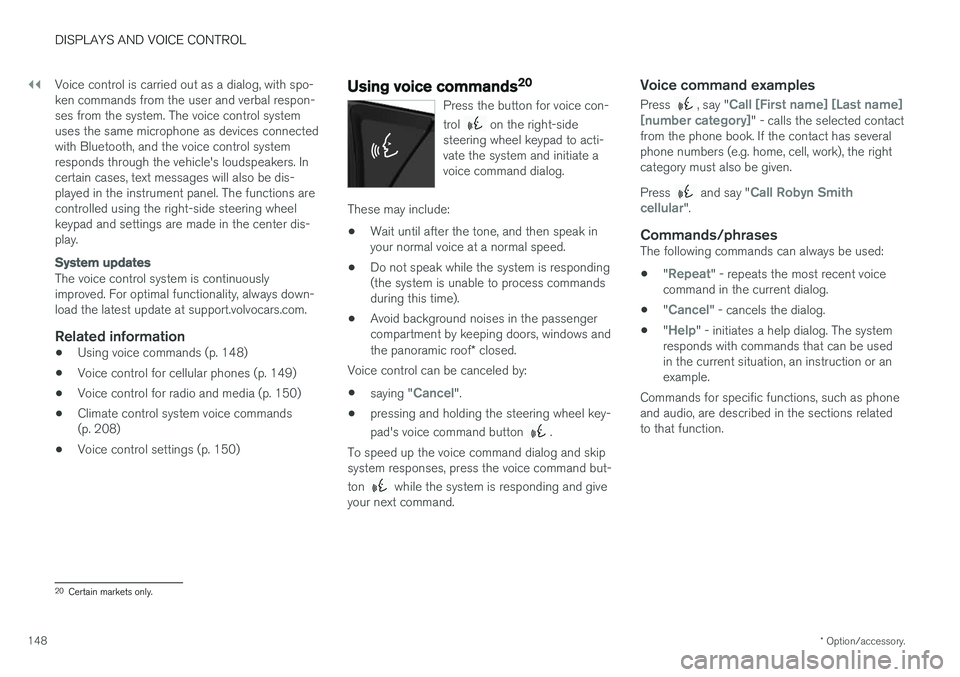
Press the button for voice con- trol
on the right-side
steering wheel keypad to acti- vate the system and initiate avoice command dialog.
These may include:
• Wait until after the tone, and then speak in your normal voice at a normal speed.
• Do not speak while the system is responding(the system is unable to process commandsduring this time).
• Avoid background noises in the passengercompartment by keeping doors, windows and the panoramic roof
* closed.
Voice control can be canceled by:
• saying "
Cancel".
• pressing and holding the steering wheel key- pad's voice command button
.
To speed up the voice command dialog and skip system responses, press the voice command but- ton
while the system is responding and give
your next command.
Voice command examples
Press , say "Call [First name] [Last name]
[number category]" - calls the selected contact
from the phone book. If the contact has several phone numbers (e.g. home, cell, work), the rightcategory must also be given. Press
and say "Call Robyn Smith
cellular".
Commands/phrasesThe following commands can always be used: • "
Repeat" - repeats the most recent voice
command in the current dialog.
• "
Cancel" - cancels the dialog.
• "
Help" - initiates a help dialog. The system
responds with commands that can be used in the current situation, an instruction or anexample.
Commands for specific functions, such as phoneand audio, are described in the sections relatedto that function.
20 Certain markets only.