phone VOLVO XC90 RECHARGE 2022 Quick Guide
[x] Cancel search | Manufacturer: VOLVO, Model Year: 2022, Model line: XC90 RECHARGE, Model: VOLVO XC90 RECHARGE 2022Pages: 48, PDF Size: 6.72 MB
Page 2 of 48
VÄLKOMMEN!
This Quick Guide describes a selection of features and functions in your Volvo. Additional owner's information is available in your vehicle, in an app and on the Internet.
THE CENTER DISPLAY
The Owner's Manual is available in the center display in Top view.
MOBILE APP
The Owner's Manual is available as an app (Volvo Manual) for smart- phones and tablets. The app also contains instructional videos for cer-tain functions.
VOLVO'S SUPPORT SITE
Go to Volvo Cars' support site (support.volvocars.com) for manuals and instructional videos. Additional assistance and information aboutyour vehicle and owning a Volvo is also available on the support site.
PRINTED INFORMATION
The glove compartment contains a printed supplement to the Own- er
Page 11 of 48
INTERIOR OVERVIEW
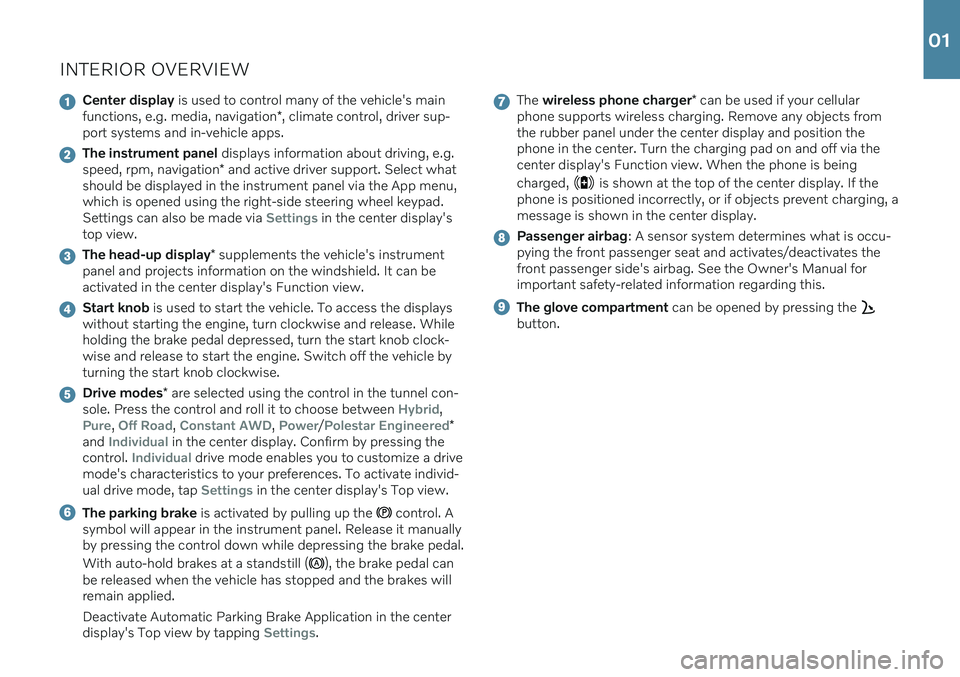
Center display is used to control many of the vehicle's main
functions, e.g. media, navigation *, climate control, driver sup-
port systems and in-vehicle apps.
The instrument panel displays information about driving, e.g.
speed, rpm, navigation * and active driver support. Select what
should be displayed in the instrument panel via the App menu, which is opened using the right-side steering wheel keypad.Settings can also be made via
Settings in the center display's
top view.
The head-up display * supplements the vehicle's instrument
panel and projects information on the windshield. It can be activated in the center display's Function view.
Start knob is used to start the vehicle. To access the displays
without starting the engine, turn clockwise and release. While holding the brake pedal depressed, turn the start knob clock-wise and release to start the engine. Switch off the vehicle byturning the start knob clockwise.
Drive modes * are selected using the control in the tunnel con-
sole. Press the control and roll it to choose between Hybrid,
Pure, Off Road, Constant AWD, Power/Polestar Engineered*
and Individual in the center display. Confirm by pressing the
control. Individual drive mode enables you to customize a drive
mode's characteristics to your preferences. To activate individ- ual drive mode, tap
Settings in the center display's Top view.
The parking brake is activated by pulling up the control. A
symbol will appear in the instrument panel. Release it manually by pressing the control down while depressing the brake pedal. With auto-hold brakes at a standstill (
), the brake pedal can
be released when the vehicle has stopped and the brakes will remain applied. Deactivate Automatic Parking Brake Application in the center display's Top view by tapping
Settings.
The wireless phone charger * can be used if your cellular
phone supports wireless charging. Remove any objects from the rubber panel under the center display and position thephone in the center. Turn the charging pad on and off via thecenter display's Function view. When the phone is being charged,
is shown at the top of the center display. If the
phone is positioned incorrectly, or if objects prevent charging, a message is shown in the center display.
Passenger airbag : A sensor system determines what is occu-
pying the front passenger seat and activates/deactivates the front passenger side's airbag. See the Owner's Manual forimportant safety-related information regarding this.
The glove compartment can be opened by pressing the
button.
01
Page 21 of 48
Pressing also resumes the stored speed for the selected func-
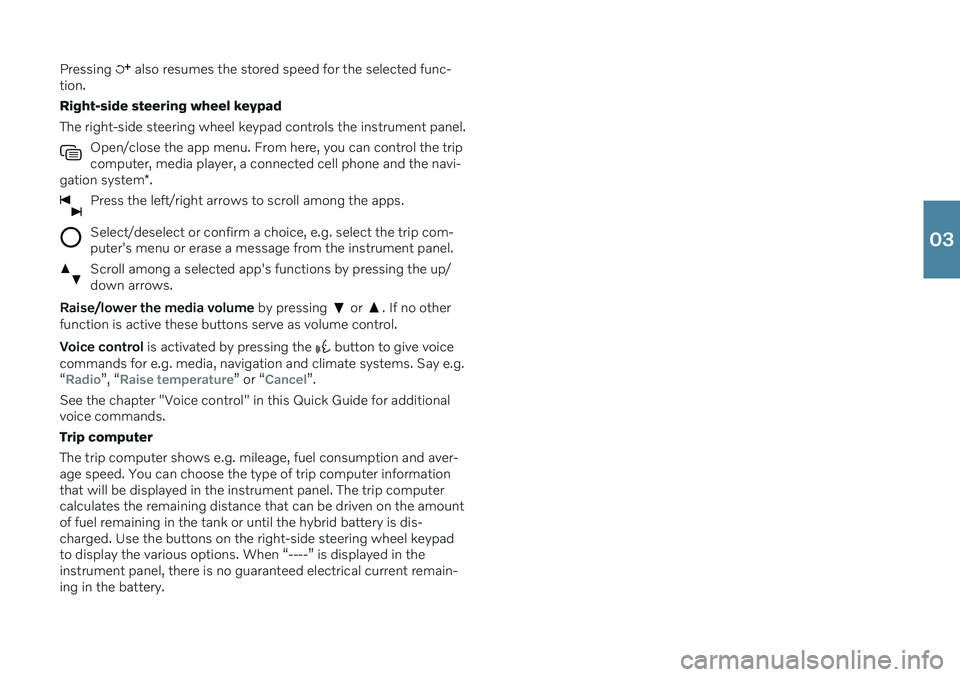
tion. Right-side steering wheel keypadThe right-side steering wheel keypad controls the instrument panel.
Open/close the app menu. From here, you can control the trip computer, media player, a connected cell phone and the navi-
gation system *.
Press the left/right arrows to scroll among the apps.
Select/deselect or confirm a choice, e.g. select the trip com- puter's menu or erase a message from the instrument panel.
Scroll among a selected app's functions by pressing the up/ down arrows.
Raise/lower the media volume by pressing or . If no other
function is active these buttons serve as volume control. Voice control is activated by pressing the
button to give voice
commands for e.g. media, navigation and climate systems. Say e.g. “
Radio”, “Raise temperature” or “Cancel”.
See the chapter "Voice control" in this Quick Guide for additional voice commands. Trip computerThe trip computer shows e.g. mileage, fuel consumption and aver- age speed. You can choose the type of trip computer information that will be displayed in the instrument panel. The trip computer calculates the remaining distance that can be driven on the amountof fuel remaining in the tank or until the hybrid battery is dis-charged. Use the buttons on the right-side steering wheel keypadto display the various options. When “----” is displayed in theinstrument panel, there is no guaranteed electrical current remain-ing in the battery.
03
Page 26 of 48

CONNECTIONSThe vehicle's various types of connections can be used to play or voice-control media, send or receive text messages, make orreceive phone calls, connect to the Internet, etc. from an externaldevice such as a smartphone. In order to connect your devices tothe vehicle, the ignition must be in at least mode I.
Vehicle's modem 6
The easiest and most efficient way to connect the vehicle to theInternet is to use its own modem. This provides the highest per-formance, is activated automatically each time the engine is startedand does not require the use of a smartphone.
1. Insert a personal SIM card in the holder in the cargo compart- ment. 2. Tap
SettingsCommunicationVehicle Modem Internet in
top view.
3. Activate by checking the box for
Vehicle modem Internet.
Sharing Internet connection (tethering) When the vehicle is connected to the Internet via the vehicle's modem, you can share the vehicle's Internet connection (Wi-Fi hot-spot) with other devices. Tap
Settings in Top view and
CommunicationVehicle Wi-Fi Hotspot.
Bluetooth Use Bluetooth as first choice for handling phone calls, text mes- sages and media from your phone to the vehicle's systems.Bluetooth can also be used to connect the vehicle to the Internet.Two Bluetooth devices can be connected at the same time but only
03
Page 27 of 48
one of them can be used to stream media. The two most recently connected phones will connect automatically when the ignition isswitched on (if the phone's Bluetooth function is activated). Up to20 devices are saved in a list to facilitate connection at a later time.
1. Activate Bluetooth in the phone. Also activate tethering/personalhotspot if you would like to connect to the Internet.
2. Open the phone tile in the center display.
3. Tap
Add phone or, if a phone is already connected, tap Changeand then Add phone.
4. Select the phone to be connected and then follow the steps on the center display and in the phone. Note that in certain phones, the message function is activated.
Wi-Fi Wi-Fi connections can be used to connect the vehicle to the Inter- net at greater speeds than are possible using Bluetooth to streamonline services such as web radio and music via apps in the vehicle,download/upload software, etc. A Wi-Fi connection from a smart-phone acts as a hotspot for the vehicle and any external devicesthat may be in the vehicle.
1. Activate tethering in the phone.
2. Tap
Settings in the center display's top view.
3. Tap
CommunicationWi-Fi and activate by checking the box
for Wi-Fi connection.
Please note that in certain phones, tethering is closed after contact with the vehicle has been broken. The phone's tethering functionwill then need to be reactivated before it can be used again. USB A USB port can be used to connect an external device to e.g. play music. You can also use the USB port for Apple CarPlay *7
and
Android Auto *7
. Plug the device into one of the USB ports with a
white frame. The external device will also be recharged while it is connected to the vehicle.
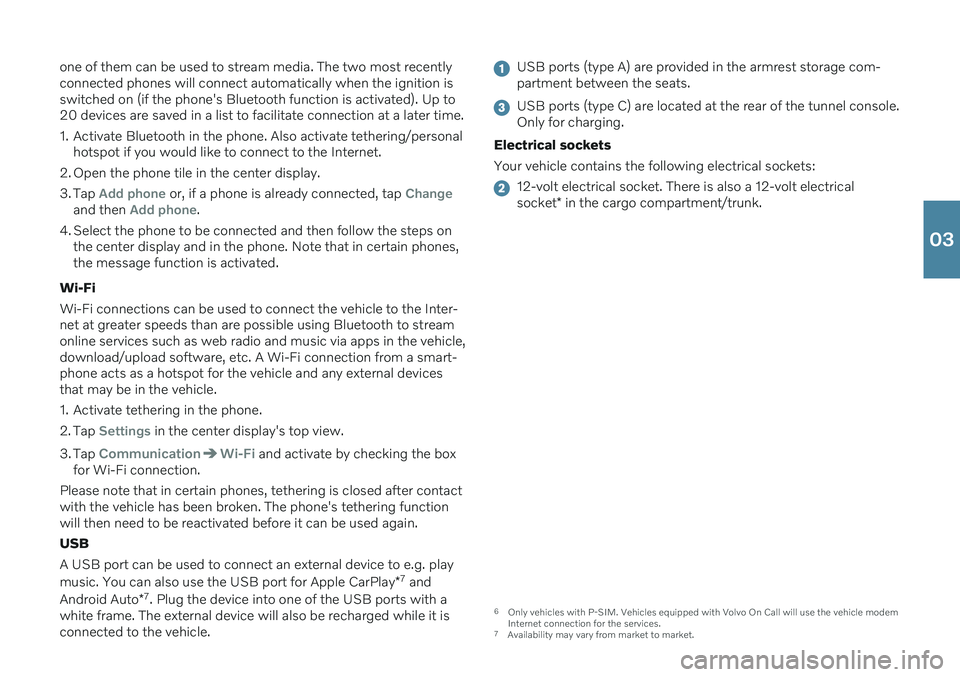
USB ports (type A) are provided in the armrest storage com- partment between the seats.
USB ports (type C) are located at the rear of the tunnel console. Only for charging.
Electrical sockets Your vehicle contains the following electrical sockets:
12-volt electrical socket. There is also a 12-volt electrical socket * in the cargo compartment/trunk.
6
Only vehicles with P-SIM. Vehicles equipped with Volvo On Call will use the vehicle modem
Internet connection for the services.
7 Availability may vary from market to market.
03
Page 28 of 48
USING CONNECTED DEVICES
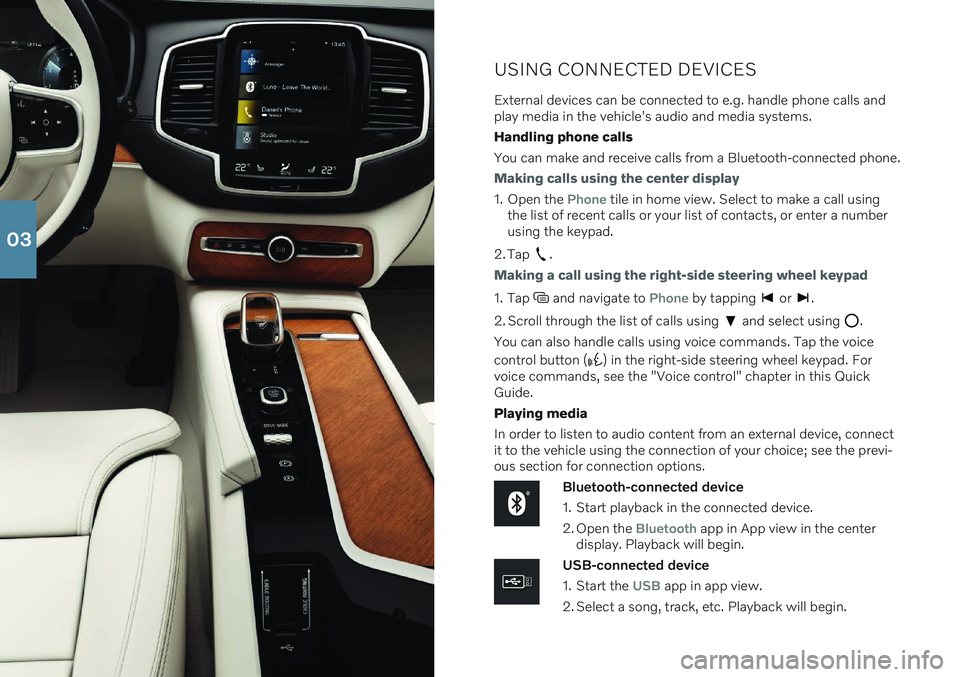
External devices can be connected to e.g. handle phone calls and play media in the vehicle's audio and media systems. Handling phone callsYou can make and receive calls from a Bluetooth-connected phone.
Making calls using the center display
1. Open the Phone tile in home view. Select to make a call using
the list of recent calls or your list of contacts, or enter a number using the keypad.
2. Tap
.
Making a call using the right-side steering wheel keypad
1. Tap and navigate to Phone by tapping or .
2. Scroll through the list of calls using
and select using .
You can also handle calls using voice commands. Tap the voice control button (
) in the right-side steering wheel keypad. For
voice commands, see the "Voice control" chapter in this Quick Guide. Playing media In order to listen to audio content from an external device, connect it to the vehicle using the connection of your choice; see the previ-ous section for connection options.
Bluetooth-connected device
1. Start playback in the connected device.
2. Open the
Bluetooth app in App view in the center
display. Playback will begin.
USB-connected device
1. Start the
USB app in app view.
2. Select a song, track, etc. Playback will begin.
03
Page 31 of 48
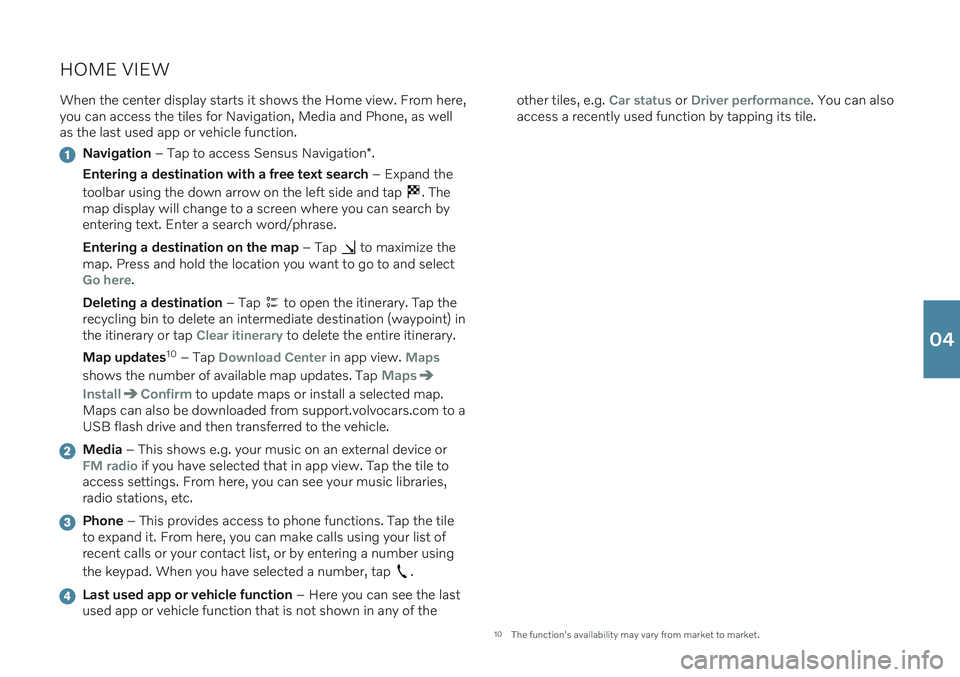
HOME VIEWWhen the center display starts it shows the Home view. From here, you can access the tiles for Navigation, Media and Phone, as wellas the last used app or vehicle function.
Navigation – Tap to access Sensus Navigation *.
Entering a destination with a free text search – Expand the
toolbar using the down arrow on the left side and tap
. The
map display will change to a screen where you can search by entering text. Enter a search word/phrase. Entering a destination on the map – Tap
to maximize the
map. Press and hold the location you want to go to and select
Go here.
Deleting a destination – Tap
to open the itinerary. Tap the
recycling bin to delete an intermediate destination (waypoint) in the itinerary or tap
Clear itinerary to delete the entire itinerary.
Map updates 10
– Tap
Download Center in app view. Maps
shows the number of available map updates. Tap Maps
InstallConfirm to update maps or install a selected map.
Maps can also be downloaded from support.volvocars.com to a USB flash drive and then transferred to the vehicle.
Media – This shows e.g. your music on an external device orFM radio if you have selected that in app view. Tap the tile to
access settings. From here, you can see your music libraries, radio stations, etc.
Phone – This provides access to phone functions. Tap the tile
to expand it. From here, you can make calls using your list of recent calls or your contact list, or by entering a number using the keypad. When you have selected a number, tap
.
Last used app or vehicle function – Here you can see the last
used app or vehicle function that is not shown in any of the other tiles, e.g.
Car status or Driver performance. You can also
access a recently used function by tapping its tile.
10 The function's availability may vary from market to market.
04
Page 42 of 48
VOICE COMMANDSThe voice control system makes it possible to control certain func- tions in the media player, Bluetooth-connected phones, climate system and the Volvo navigation system * using predefined voice
commands 14
. To activate voice control, press the voice control but-
ton in the right-side steering wheel keypad. The following commands can usually be used in any situation:
Repeat: Repeats the most recent voice command in the current
dialog.
Help: initiates a help dialog. The system responds with com-
mands that can be used in the current situation, an instruction or an example.
Cancel: Cancels the dialog 15
. Cell phone voice commands
Call [contact]
Call [phone number]
Recent calls
Read message
Message to [contact]
Radio and media voice commands
Media
Play [artist]
Play [song title]
Play [song title] from [album]
Play [radio station]
Tune to [frequency]
Tune to [frequency] [waveband]
Radio
Radio FM
SiriusXM*
USB
iPod
Bluetooth
Similar music
Climate system voice commands
Climate
Set temperature to X degrees
Raise temperature/Lower temperature
Sync temperature
Air on feet/Air on body
Air on feet off/Air on body off
06
Page 44 of 48
SUPPLEMENTARY INFORMATION
The Owner's Manual and other manuals contain safety instructions and all warning, caution andnote texts, which must be read. Some functionsonly apply to certain markets.
WARNING
GETTING STARTED Volvo On Call – The system's services only
work in areas in which Volvo On Call's partners have cellular coverage and in markets whereVolvo On Call is available. Just as with cellular phones, atmospheric distur- bances or areas with fewer transmitters, e.g.sparsely populated rural areas, can make con-nection impossible. For warning, caution and note texts for Volvo On Call services, see the Owner's Manual andthe applicable agreement for the Volvo On Callsubscription. Sensus Navigation * – Direct all your attention
to the road and make sure that your concentra- tion is focused on driving. Follow applicable traf-fic laws and use good judgment while driving.Road conditions can be affected by weather orseason, which may make certain recommenda-tions less reliable. EXTERIOR OVERVIEW Tailgate – Bear in mind the risk of pinching
when opening/closing the tailgate. Make sure that no one is in the path of the tailgate whocould be injured by its movement. Always oper-ate the tailgate with caution. Keyless locking/unlocking * – Check that chil-
dren or other passengers are not at risk of crush- ing when all the windows are closed with key- less closing *.
INTERIOR OVERVIEW Passenger airbag – Volvo recommends that all
occupants (adults and children) shorter than 140 cm (4 foot 7 inches) be seated in the rear seat of any vehicle with a front passenger sideairbag and be properly restrained for their heightand weight. Occupant Weight Sensor (OWS)
No objects that add to the total weight on the seat should be placed on the front passenger'sseat. If a child is seated in the front passeng-er's seat with any additional weight, this extraweight could cause the OWS system to ena-ble the airbag, which might cause it to deployin the event of a collision, thereby injuring thechild.
The seat belt should never be wrapped aroundan object on the front passenger's seat. Thiscould interfere with the OWS system's func-tion.
The front passenger's seat belt should neverbe used in a way that exerts more pressure onthe passenger than normal. This couldincrease the pressure exerted on the weightsensor by a child, and could result in the air-bag being enabled, which might cause it todeploy in the event of a collision, thereby injur-ing the child.
Always take the remote key with you when you
leave the vehicle. Make sure the ignition is inmode 0, especially if there are children in the
vehicle. Always apply the parking brake when parking
on an incline. Selecting a gear or putting the automatic transmission in P may not be suffi-
cient to keep the vehicle stationary in all situa-tions. CHARGING THE HYBRID BATTERY
Charging the hybrid battery may only be done from approved, grounded 120/240 V outlets(AC, alternating current). If the electrical circuitor electrical socket's capacity is not known, leta licensed electrician inspect the electrical cir-cuit's capacity. Using a charge level thatexceeds the electrical circuit's or electricaloutlet's capacity may start a fire or damagethe electrical circuit.
The charging cable must be grounded when inuse. It is equipped with a cord with a ground- ing conductor and a grounding plug. The plugmust be inserted into an appropriate outletthat is properly installed and grounded inaccordance with all local codes and ordinan-ces and is not damaged in any way.
Children should be supervised when in thevicinity of the charging cable when it is plug-ged in.
The charging cable and its components mustnot be rinsed or immersed in water.
High voltage is present in your electric meterhousing and power distribution service panel.Contact with high voltage can cause death orserious personal injury.
Do not use the charging cable if it is damagedin any way. A damaged or malfunctioningcharging cable may only be repaired by aworkshop – an authorized Volvo workshop isrecommended.
Always position the charging cable so that itwill not be driven over, stepped on, trippedover or otherwise damaged, or cause personalinjury.
Disconnect the charger from the wall outletbefore cleaning it.
Never connect the charging cable to an exten-sion cord or a multiple plug socket.
Avoid visibly worn or damaged electrical out-lets since they may lead to fire damage and/orpersonal injury if used.
Do not use one or more adapters between thecharging cable and the electric outlet.
Do not use an external timer between thecharging cable and the electrical outlet.
Also, refer to the manufacturer's instructions forusing the charging cable and its components. POWER FRONT SEATS Do not adjust the seat while driving. The seat must be positioned in a way that allows thedriver to fully depress the brake pedal. Adjust theseat as far rearward as comfort and controlallow. After adjusting the seat, make sure that itis securely locked into position before starting todrive. FOLDING DOWN THE REAR SEAT BACK- RESTS Make sure the backrest is correctly engaged before folding up and down and that the headrestraint is correctly engaged after folding up.The head restraints on the outboard second-rowseats must always be folded up when there are passengers in the third row of seats
*.
CONNECTIONS Do not use accessories with large or heavy plugs – they could damage the outlet or comeloose while you are driving.
Do not use accessories that could cause dis-ruptions to e.g. the vehicle's radio receiver orelectrical system.
Position the accessory so that there is no riskof it injuring the driver or passengers in theevent of heavy braking or a collision.
Pay attention to connected accessories asthey can generate heat that could burn pas-sengers or the interior.
DRIVER SUPPORT The vehicle's driver support systems are designed to offer supplementary assistance tothe driver, but cannot handle all situations in alltraffic, weather and road conditions. They arenever a substitute for the driver's attention andjudgment. The driver is always responsible forensuring the vehicle is driven in a safe manner,at the appropriate speed, with an appropriatedistance to other vehicles, and in accordancewith current traffic rules and regulations. Thedriver always has ultimate responsibility forbraking and steering the vehicle. Before driving your vehicle, read all sections of the Owner's Manual concerning driver supportsystems in the vehicle. PARKING ASSISTANCE SYSTEMS Park Assist Pilot is a supplementary driver sup-
port but cannot handle all situations. The func- tion is only intended to assist the driver whenparallel and perpendicular parking. The driverbears full responsibility for parking the vehiclesafely and braking when necessary. Objectslocated far into the parking space may not be
07
Page 45 of 48
detected when scanning. The driver is always responsible for assessing whether the spacesuggested by Park Assist Pilot is suitable forparking. Park Assist Camera is supplementary driver
support intended to assist when parking the vehicle. The function is never a substitute for thedriver's attention and judgment. The camerashave dead/blind spots where objects cannot bedetected. Pay particular attention to people andanimals near the vehicle. Bear in mind that thefront end of the vehicle may swing out towardsoncoming traffic during the parking maneuver. Before driving your vehicle, read all sections of the Owner's Manual concerning driver supportsystems in the vehicle. VOICE COMMANDS The driver is always responsible for ensuring that the vehicle is operated in a safe manner and thatall applicable traffic regulations are followed.
CAUTION
INTERIOR OVERVIEW Start knob – The vehicle cannot be started if the
charging cable is still plugged in. Make sure that the charging cable is removed from the chargingsocket before starting the vehicle. Do not use the OFF ROAD drive mode when
towing a trailer without an electrical connection. This could result in damage to the pneumaticsuspension system's bellows. The information is projected from a head-up
display unit * located in the dashboard. To help
prevent damage to the display unit's glass cover, do not place any objects on the glass and pre-vent objects from falling onto it. Wireless phone charger Keep cellular phones
and charger stations away from other objects while charging to help avoid overheating. Do notplace cards with NFC (Near Field Communica-tion), e.g. debit cards for contactless payment,next to the phone. This type of card could bedestroyed during charging. CENTER DISPLAY When cleaning
the center display, use a micro-
fiber cloth that is free from sand and similar deb- ris. When cleaning the center display, apply onlylight pressure to the display. Pressing too hardcould damage the display. Do not spray liquid or corrosive chemicals directly onto the center display. Do not use win-dow cleaners, cleaning agents, aerosol sprays,solvents, alcohol, ammonia or detergents thatcontain abrasives. Never use abrasive cloths,paper towels or tissue paper, as these mayscratch the display. CHARGING THE HYBRID BATTERY Charging cable - Never connect the charging
cable if there is a risk of a thunderstorm or there is lightning. Never detach the charging cablefrom the 120/240-volt outlet while charging isin progress – the 120/240-volt outlet could bedamaged in such circumstances. Always inter-rupt charging first and then disconnect thecharging cable – first from the vehicle's chargingsocket and then from the 120/240 V outlet. Power strips, extension cords, surge protectors or similar devices must not be used togetherwith the charging cable since this may involve arisk of fire, electric shocks, etc. An adapter maynot be used between the 120/240-volt outletand the charging cable. Control unit – Avoid exposing the control unit
and its plug to direct sunlight. In such cases, the overheating protection in the plug could reduceor cut off charging of the hybrid battery. Check that the 120/240-volt outlet has a power supply sufficient for charging electric vehicles –if uncertain, you should have the outlet checkedby a professional. Wipe the charging cable with a clean cloth lightly moistened with water or a mild detergent.Do not use chemicals or solvents. Do not sub-merge the charging cable. Only use the charging cable provided with your vehicle or a replacement cable purchased from aVolvo retailer.
Check the capacity of the socket.
Other electronic equipment connected on thesame fuse circuit must be disconnected if thetotal load is exceeded.
Do not connect the charging cable if thesocket is damaged.
Make sure that the fuse to the wall outlet canhandle the current specified for the chargingcable.
FOLDING DOWN THE REAR SEAT BACK- RESTS When the backrest is folded down, make sure there are no objects in the rear seat, and the seatbelts are not buckled. The integrated booster cushion */armrest * on the center seating position
must be in the stowed position. RIGHT-SIDE STEERING WHEEL LEVER Wiper blades in service position - Before plac-
ing the wipers in service position, ensure that they have not frozen to the windshield. If thewiper arms in service position are raised fromthe windshield, they must be folded backagainst the windshield before activating wiping,washing or rain sensor as well as before depar-ture. This is to prevent scratching the paint onthe hood. CONNECTIONS Electrical outlet – Each 12-volt socket can sup-
ply a maximum of 120 W (10 A).
NOTE
EXTERIOR OVERVIEW Foot-operated tailgate - There is a risk of
reduced or lost function if there are large amounts of snow, ice, dirt, etc. on the rearbumper. Make sure to keep the bumper clean. Please note that the system could be inadver- tently activated in a car wash or similar if theremote key is within range. Setting maximum opening height – If the sys-
tem has been working continuously for a pro- longed period of time, it will be switched off toavoid overload. It can be used again afterapproximately 2 minutes Electromagnetic fields and obstructing objectsmay interfere with
remote key functions . Avoid
storing the remote key near metal objects orelectronic devices, e.g. cell phones, tablets, lap-tops or chargers – preferably no closer than10-15 cm (4-6 in.). INTERIOR OVERVIEW OFF ROAD drive mode is not designed to be
used for normal street driving. With a cold start , idling speed may be consider-
ably higher than normal for certain engine types. This is done to get the emissions system up tonormal operating temperature as quickly as pos-sible, which minimizes exhaust emissions andprotects the environment. Head-up display * – When a City Safety function
is activated, the information in the head-up dis- play will be replaced by a City Safety graphic.This graphic will illuminate even if the head-updisplay is turned off. The driver's ability to see information in the head-up display may be impeded by the use ofe.g. polarizing sunglasses, a driving posture inwhich the driver is not centered in the seat,objects on the display unit's glass cover and/orunfavorable lighting conditions. People with cer-tain types of vision problems may experienceheadaches or eye strain when using the head-updisplay. STEERING WHEEL Trip computer - Calculation of driving range
may vary if your driving style changes. PASSENGER COMPARTMENT CLIMATE Heating/cooling cannot be accelerated by choosing a higher/lower temperature than thedesired temperature. Preconditioning is only available when the vehi-
cle is connected to an electrical outlet. A charg- ing post that is not always active, for examplebecause of a timer, can cause loss of function forpreconditioning. If the vehicle is not connectedto an electrical socket it is still possible in awarm climate to achieve brief cooling of the pas-senger compartment by direct starting precondi-tioning. The vehicle doors and windows should
07