light VOLVO XC90 T8 2016 Owner´s Manual
[x] Cancel search | Manufacturer: VOLVO, Model Year: 2016, Model line: XC90 T8, Model: VOLVO XC90 T8 2016Pages: 546, PDF Size: 10.26 MB
Page 334 of 546
DRIVER SUPPORT
* Option/accessory, for more information, see Introduction.
332
Blind Spot Information (BLIS) *
On/Off The Blind Spot Information function can be acti- vated/deactivated.
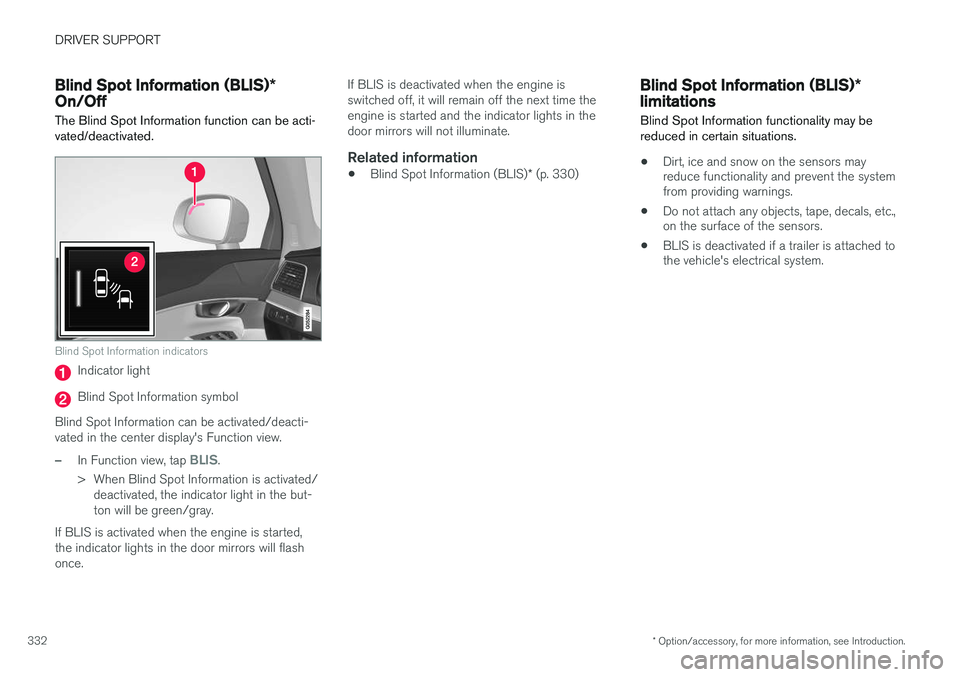
Blind Spot Information indicators
Indicator light
Blind Spot Information symbol
Blind Spot Information can be activated/deacti- vated in the center display's Function view.
–In Function view, tap BLIS.
> When Blind Spot Information is activated/ deactivated, the indicator light in the but- ton will be green/gray.
If BLIS is activated when the engine is started,the indicator lights in the door mirrors will flashonce. If BLIS is deactivated when the engine isswitched off, it will remain off the next time theengine is started and the indicator lights in thedoor mirrors will not illuminate.
Related information
•
Blind Spot Information (BLIS)
* (p. 330)
Blind Spot Information (BLIS) *
limitations
Blind Spot Information functionality may be reduced in certain situations.
• Dirt, ice and snow on the sensors may reduce functionality and prevent the systemfrom providing warnings.
• Do not attach any objects, tape, decals, etc.,on the surface of the sensors.
• BLIS is deactivated if a trailer is attached tothe vehicle's electrical system.
Page 335 of 546
DRIVER SUPPORT
}}
* Option/accessory, for more information, see Introduction.333
Maintenance
The BLIS/CTA5
sensors are located on the
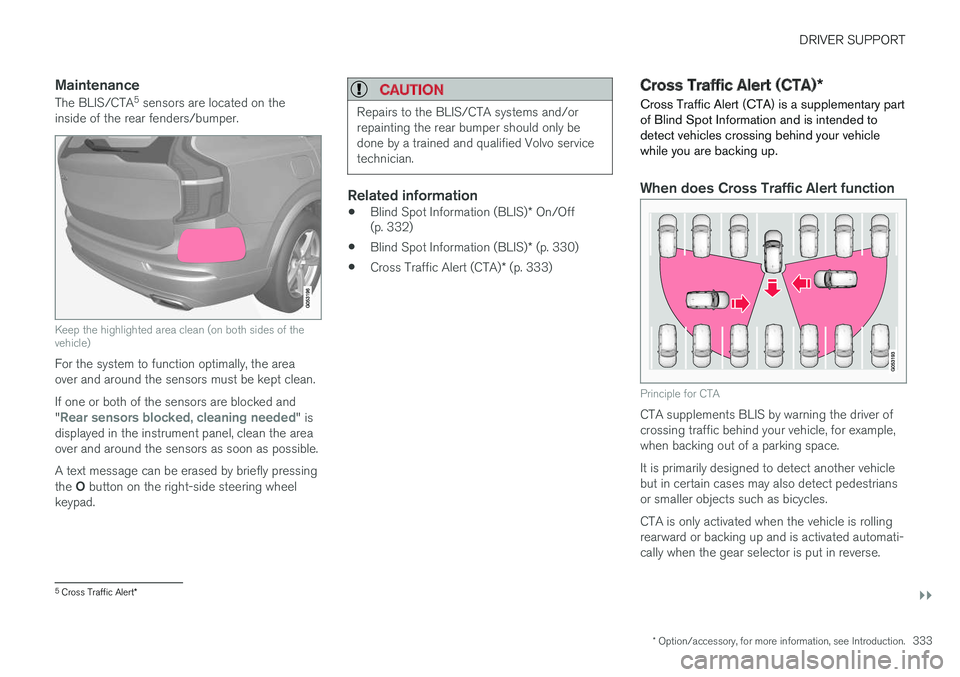
inside of the rear fenders/bumper.
Keep the highlighted area clean (on both sides of the vehicle)
For the system to function optimally, the area over and around the sensors must be kept clean. If one or both of the sensors are blocked and "
Rear sensors blocked, cleaning needed" is
displayed in the instrument panel, clean the area over and around the sensors as soon as possible. A text message can be erased by briefly pressing the O button on the right-side steering wheel
keypad.
CAUTION
Repairs to the BLIS/CTA systems and/or repainting the rear bumper should only bedone by a trained and qualified Volvo servicetechnician.
Related information
• Blind Spot Information (BLIS)
* On/Off
(p. 332)
• Blind Spot Information (BLIS)
* (p. 330)
• Cross Traffic Alert (CTA)
* (p. 333)
Cross Traffic Alert (CTA) *
Cross Traffic Alert (CTA) is a supplementary part of Blind Spot Information and is intended todetect vehicles crossing behind your vehiclewhile you are backing up.
When does Cross Traffic Alert function
Principle for CTA
CTA supplements BLIS by warning the driver of crossing traffic behind your vehicle, for example,when backing out of a parking space. It is primarily designed to detect another vehicle but in certain cases may also detect pedestriansor smaller objects such as bicycles. CTA is only activated when the vehicle is rolling rearward or backing up and is activated automati-cally when the gear selector is put in reverse.
5 Cross Traffic Alert *
Page 336 of 546
||
DRIVER SUPPORT
* Option/accessory, for more information, see Introduction.
334 •
An audible signal indicates that CTA has detected something that is approaching fromthe side. The signal will come from either theleft or right infotainment system speakers,depending on which the side of your vehiclethe approaching vehicle/ object has beendetected.
• A warning is indicated using the Park Assist
*
system's graphic in the instrument panel.
• An icon is also shown in the Park Assist Camera's
* Top view.
Related information
• Activating/deactivating Cross Traffic Alert(CTA)
* (p. 334)
• Blind Spot Information (BLIS)
* with Cross
Traffic Alert (CTA) * symbols and messages
(p. 337)
• Cross Traffic Alert (CTA)
* limitations (p. 335)
Activating/deactivating Cross Traffic Alert (CTA) *
Cross Traffic Alert (CTA) can be activated/deac- tivated separately from Blind Spot Information(BLIS).
CTA is activated/deactivated in the center display's Functionview.
–Tap Cross Traffic Alert in Function view.
> CTA activates/deactivates (the indicator light in the button will be green/gray).
CTA is activated when the engine is started.
WARNING
• BLIS and CTA are information systems, NOT warning or safety systems and donot function in all situations.
• BLIS and CTA do not eliminate the needfor you to visually confirm the conditionsaround you, and the need for you to turnyour head and shoulders to make surethat you can safely change lanes or backup.
• As the driver, you have full responsibilityfor changing lanes/backing up in a safemanner.
Related information
•
Cross Traffic Alert (CTA)
* (p. 333)
• Blind Spot Information (BLIS)
* On/Off
(p. 332)
Page 337 of 546
DRIVER SUPPORT
}}
* Option/accessory, for more information, see Introduction.335
Cross Traffic Alert (CTA)* limitations
CTA functionality may be reduced in certain sit- uations.
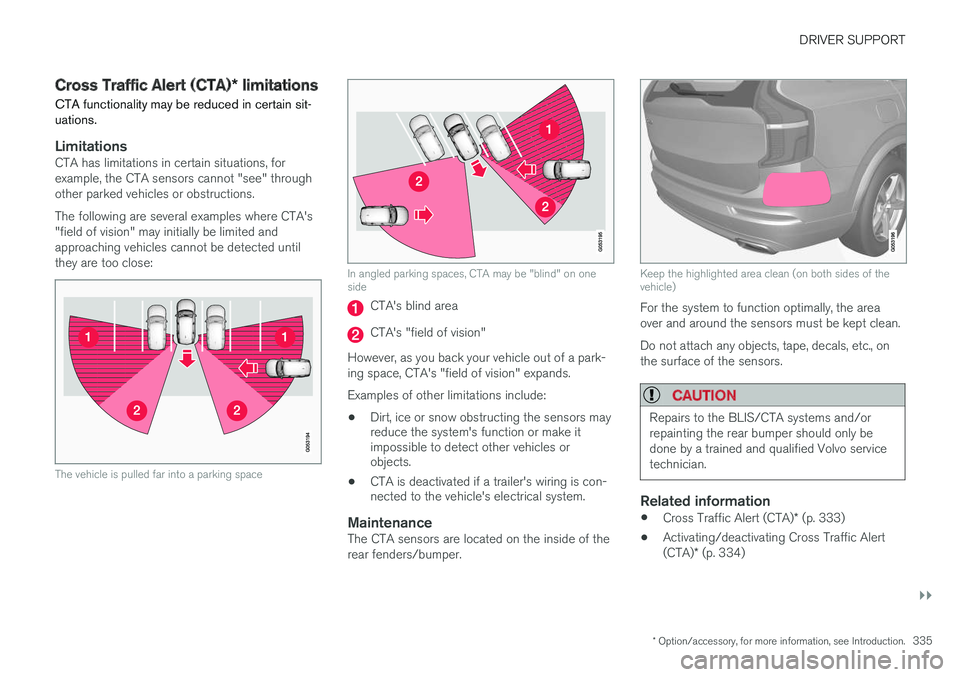
LimitationsCTA has limitations in certain situations, for example, the CTA sensors cannot "see" throughother parked vehicles or obstructions. The following are several examples where CTA's "field of vision" may initially be limited andapproaching vehicles cannot be detected untilthey are too close:
The vehicle is pulled far into a parking space
In angled parking spaces, CTA may be "blind" on one side
CTA's blind area
CTA's "field of vision"
However, as you back your vehicle out of a park- ing space, CTA's "field of vision" expands. Examples of other limitations include:
• Dirt, ice or snow obstructing the sensors may reduce the system's function or make itimpossible to detect other vehicles orobjects.
• CTA is deactivated if a trailer's wiring is con-nected to the vehicle's electrical system.
MaintenanceThe CTA sensors are located on the inside of the rear fenders/bumper.
Keep the highlighted area clean (on both sides of the vehicle)
For the system to function optimally, the area over and around the sensors must be kept clean. Do not attach any objects, tape, decals, etc., on the surface of the sensors.
CAUTION
Repairs to the BLIS/CTA systems and/or repainting the rear bumper should only bedone by a trained and qualified Volvo servicetechnician.
Related information
•
Cross Traffic Alert (CTA)
* (p. 333)
• Activating/deactivating Cross Traffic Alert (CTA)
* (p. 334)
Page 342 of 546
DRIVER SUPPORT
* Option/accessory, for more information, see Introduction.
340
Activating/deactivating Lane Departure Warning (LDW)
LDW can be activated/deactivated.
Activating/deactivating
The function can be activated/deactivated in the center display's Function view.
–Tap the Lane Departure Warning button.
> LDW is activated (GREEN indicator light in the button), or is deactivated (GRAY indicator light in the button).
Type of warningChoose the type of warning that the driver willreceive if the vehicle starts to leave its drivinglane. 1. Tap
Settings in the center display's Top
view.
2. Tap
My CarIntelliSafeLane
Departure Warning. 3.
Under
Lane Departure Warning feedback,
select: •
Sound: an audible warning signal will be
provided
•
Vibrations: the driver will be warned by
vibrations in the steering wheel
Related information
• Driving lane assistance (p. 338)
Activating/deactivating Lane Keeping Aid (LKA)
*
LKA can be activated/deactivated.
Activating/deactivating
The function can be activated/deactivated in the center display's Function view.
–Tap Lane Keeping Aid.
> LKA is activated (GREEN indicator light in the button), or is deactivated (GRAY indi- cator light in the button).
Type of warningChoose the type of warning that the driver willreceive if the vehicle starts to leave its drivinglane. 1. Tap
Settings in the center display's Top
view.
2. Tap
My CarIntelliSafeLane Keeping
Aid.
Page 348 of 546
STARTING AND DRIVING
* Option/accessory, for more information, see Introduction.
346
Starting and driving
The vehicle is equipped with an automatic trans- mission that also makes it possible to shift gearsmanually. Certain functions can also be used when the engine is not running, depending on the ignitionmode being used.
Related information
• Starting the engine (p. 372)
• Ignition modes (p. 370)
• Automatic transmission (p. 395)
• Opening/closing the fuel filler door (p. 363)
• Parking brake (p. 352)
Brakes The brake system is a hydraulic system consist- ing of two separate brake circuits. If a problemshould occur in one of these circuits, it is stillpossible to stop the vehicle with the other brakecircuit.
Brake systemIf one of the brake circuits is not functioning, more pressure will be needed on the brake pedal(and the pedal will go down farther) for normalbraking effect. If the brake pedal must be depressed farther than normal and requires greater foot pressure,the stopping distance will be longer. Pressure on the brake pedal is enhanced by the power braking function.
WARNING
If vehicle does not have electrical current and both the electric motor and gasoline engineare switched off, the brakes cannot be usedto stop the vehicle.
When the Hill Start Assist function is being used, it will take slightly longer for the brake pedal toreturn to its normal position if the vehicle isparked on an incline or uneven surface. When driving in very hilly areas or if the vehicle is carrying a heavy load, using brake mode B to augment the brakes or the
Off Road* drive mode can also be used to increase the engine braking effect at low speeds.
Anti-lock Braking System
ABS
The ABS system helps to improve vehicle control (stopping and steering) during severe brakingconditions by limiting brake lockup. When ABS is operating, there may be some vibration in the brake pedal, which is normal. The system performs a brief self-diagnostic test when the engine has been started and driverreleases the brake pedal. Another automatic testmay be performed when the vehicle first reachesa speed of approximately 6 mph (10 km/h). Thebrake pedal will pulsate several times and asound may be audible from the ABS controlmodule, which is normal.
Function check when the engine is
started
A Plug-in Hybrid is equipped with a "brake bywire" brake system. A function check is per-formed each time the engine is started and thedriver depresses the brake pedal to move the gear selector from P.
In certain cases, a message may appear in the instrument panel saying that pressure on thebrake pedal is too low. Press harder on the pedal.
Light braking charges the hybrid batteryWhen the brakes are applied lightly, the electricmotor's braking function is used, which converts
Page 350 of 546
||
STARTING AND DRIVING
* Option/accessory, for more information, see Introduction.
348
Instrument panel symbols
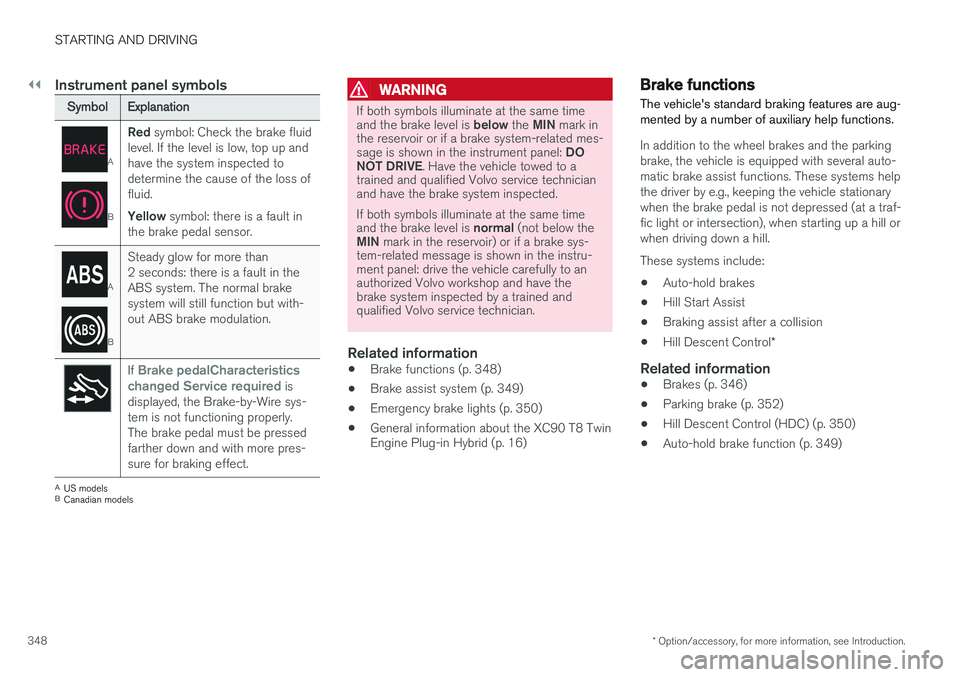
SymbolExplanation
A
B
Red symbol: Check the brake fluid
level. If the level is low, top up and have the system inspected todetermine the cause of the loss offluid. Yellow symbol: there is a fault in
the brake pedal sensor.
A
B
Steady glow for more than 2 seconds: there is a fault in theABS system. The normal brakesystem will still function but with-out ABS brake modulation.
If Brake pedalCharacteristics
changed Service required is
displayed, the Brake-by-Wire sys- tem is not functioning properly.The brake pedal must be pressedfarther down and with more pres-sure for braking effect.
A US models
B Canadian models
WARNING
If both symbols illuminate at the same time and the brake level is below the MIN mark in
the reservoir or if a brake system-related mes-sage is shown in the instrument panel: DO
NOT DRIVE . Have the vehicle towed to a
trained and qualified Volvo service technician and have the brake system inspected. If both symbols illuminate at the same time and the brake level is normal (not below the
MIN mark in the reservoir) or if a brake sys-
tem-related message is shown in the instru- ment panel: drive the vehicle carefully to anauthorized Volvo workshop and have thebrake system inspected by a trained andqualified Volvo service technician.
Related information
• Brake functions (p. 348)
• Brake assist system (p. 349)
• Emergency brake lights (p. 350)
• General information about the XC90 T8 Twin Engine Plug-in Hybrid (p. 16)
Brake functions
The vehicle's standard braking features are aug- mented by a number of auxiliary help functions.
In addition to the wheel brakes and the parking brake, the vehicle is equipped with several auto-matic brake assist functions. These systems helpthe driver by e.g., keeping the vehicle stationarywhen the brake pedal is not depressed (at a traf-fic light or intersection), when starting up a hill orwhen driving down a hill. These systems include: • Auto-hold brakes
• Hill Start Assist
• Braking assist after a collision
• Hill Descent Control
*
Related information
•Brakes (p. 346)
• Parking brake (p. 352)
• Hill Descent Control (HDC) (p. 350)
• Auto-hold brake function (p. 349)
Page 351 of 546
STARTING AND DRIVING
349
Auto-hold brake function
With the Auto-hold brake function, the driver can release the brake pedal and the brakes willremain applied, for example, when the vehiclehas stopped at a traffic light or intersection.
When the vehicle is no longer moving forward, Auto-hold applies the brakes automatically, eitherusing the normal brakes or the parking brake.The brakes will be released when the acceleratorpedal is depressed. If the driver's door is opened or the engine is turned off, the parking brake will be applied auto-matically.
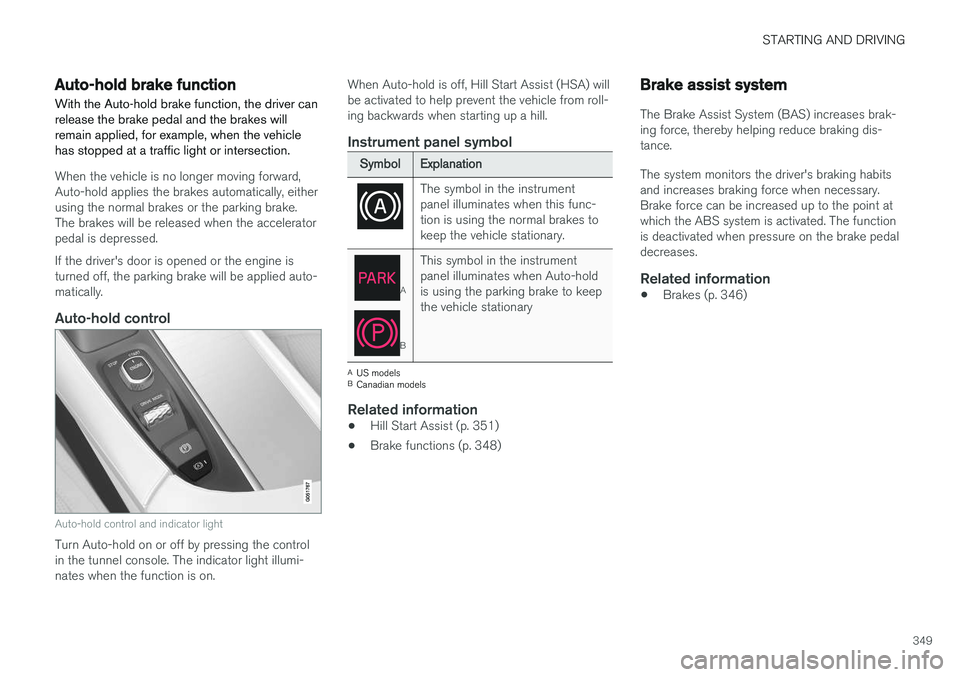
Auto-hold control
Auto-hold control and indicator light
Turn Auto-hold on or off by pressing the control in the tunnel console. The indicator light illumi-nates when the function is on. When Auto-hold is off, Hill Start Assist (HSA) willbe activated to help prevent the vehicle from roll-ing backwards when starting up a hill.
Instrument panel symbol
SymbolExplanation
The symbol in the instrument panel illuminates when this func-tion is using the normal brakes tokeep the vehicle stationary.
A
B
This symbol in the instrument panel illuminates when Auto-holdis using the parking brake to keepthe vehicle stationary
A
US models
B Canadian models
Related information
• Hill Start Assist (p. 351)
• Brake functions (p. 348)
Brake assist system
The Brake Assist System (BAS) increases brak- ing force, thereby helping reduce braking dis-tance. The system monitors the driver's braking habits and increases braking force when necessary.Brake force can be increased up to the point atwhich the ABS system is activated. The functionis deactivated when pressure on the brake pedaldecreases.
Related information
• Brakes (p. 346)
Page 352 of 546
STARTING AND DRIVING
350
Braking effect after a collisionIn certain types of collisions, the vehicle's brakes are applied to help prevent or mitigate a secon-dary collision.
Maintaining control of the vehicle after a collision may be difficult. To help avoid or mitigate theeffect of a secondary collision, the brakes areapplied automatically to help bring the vehicle toa stop. The brake lights and hazard warning flashers will be activated and the flashers will remain on afterthe vehicle has come to a standstill. The parkingbrake will then be applied automatically. In a situation where stopping the vehicle may not be desirable, the driver can override this systemby pressing the accelerator pedal. This feature can only function if the brake system is intact after the collision.
Related information
• Brake functions (p. 348)
• Airbag system (p. 89)
• Rear Collision Warning (RCW) (p. 292)
Emergency brake lights
The emergency brake lights activate in the event of hard braking/rapid deceleration at most nor-mal driving speeds or if the ABS system is acti-vated. This function causes an additional taillighton each side of the vehicle to illuminate to helpalert vehicles traveling behind.
Once the emergency brake lights have been acti- vated, if the driver releases the brake pedal, thebrake lights will return to their normal function.
Related information
• Brakes (p. 346)
• Hazard warning flashers (p. 147)
• Brake lights (p. 146)
Hill Descent Control (HDC) HDC is a type of low-speed automatic engine brake and makes it possible to increase ordecrease the vehicle's speed on steep downhillgradients using only the accelerator pedal, with-out applying the brakes. HDC is integrated into the
Off Road drive
mode.
HDC is particularly useful when driving down steep hills with rough surfaces, and where theroad may have slippery patches.
WARNING
HDC does not function in all situations, and is a supplementary braking aid. The driver hasfull responsibility for driving in a safe manner.
FunctionHDC allows the vehicle to roll forward or in reverse at very low speed with enhanced enginebraking. However, speed can be adjusted withthe accelerator pedal. When the acceleratorpedal is released, the vehicle will return to verylow speed. The driver can use the brakes to slow or stop the vehicle at any time. HDC is activated along with Low Speed Control (LSC), which together make driving on slipperysurfaces at low speeds easier.
Page 354 of 546
STARTING AND DRIVING
352
Parking brake The electric parking brake helps to keep the vehicle stationary when it is parked.
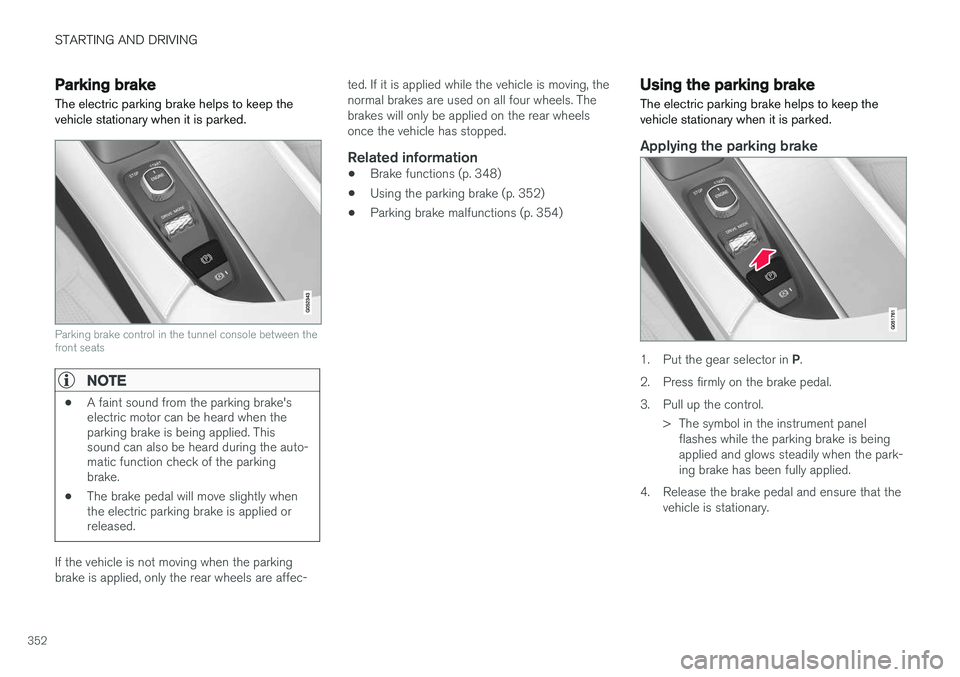
Parking brake control in the tunnel console between the front seats
NOTE
•A faint sound from the parking brake's electric motor can be heard when theparking brake is being applied. Thissound can also be heard during the auto-matic function check of the parkingbrake.
• The brake pedal will move slightly whenthe electric parking brake is applied orreleased.
If the vehicle is not moving when the parking brake is applied, only the rear wheels are affec- ted. If it is applied while the vehicle is moving, thenormal brakes are used on all four wheels. Thebrakes will only be applied on the rear wheelsonce the vehicle has stopped.
Related information
•
Brake functions (p. 348)
• Using the parking brake (p. 352)
• Parking brake malfunctions (p. 354)
Using the parking brake
The electric parking brake helps to keep the vehicle stationary when it is parked.
Applying the parking brake
1. Put the gear selector in P.
2. Press firmly on the brake pedal.
3. Pull up the control. > The symbol in the instrument panelflashes while the parking brake is being applied and glows steadily when the park-ing brake has been fully applied.
4. Release the brake pedal and ensure that the vehicle is stationary.