transmission VOLVO XC90 T8 2016 Owner´s Manual
[x] Cancel search | Manufacturer: VOLVO, Model Year: 2016, Model line: XC90 T8, Model: VOLVO XC90 T8 2016Pages: 546, PDF Size: 10.26 MB
Page 394 of 546
||
STARTING AND DRIVING
392
SAVE
This mode makes it possible to save electrical energy (hybrid battery charge) for times whenusing the electric motor is more suitable (e.g., citydriving). Using the electric motor only saves more fuel at low speeds than at high ones. Therefore, use theSAVE mode primarily when the hybrid battery'scharge level is high and driving will initially be athighway speeds but will end with city drivingwhen electric driving is preferable. If the hybrid battery's charge level is low when this mode is selected, the gasoline engine willstart and charge the hybrid battery up to approx.33%. If the battery's charge level is already above33%, this level will be maintained by the enginemanagement system, which will start/stop the gasoline engine in the same way as in
Hybriddrive mode. This mode increases fuel consumption because the gasoline engine is used to conserve batterycharge for later use.
OFF ROAD
This mode helps maximize the vehicle's capacity to traverse difficult terrain or poor roads. In OFF ROAD, ground clearance is maximized, the steering is light, All Wheel Drive and HillDescent Control are activated and a compassand altimeter will be displayed in the instrumentpanel.This drive mode can only be activated at lowspeeds (the permissible speed range will beshown on the speedometer). At higher speeds,OFF ROAD mode will be cancelled and AWD willbe activated. This mode is not intended for normal street driv- ing.
CAUTION
OFF ROAD drive mode may not be used if the vehicle is towing a trailer without an elec-trical connection. This could result in damageto the pneumatic suspension system's bel-lows.
Due to the increased ground clearance, if the OFF ROAD mode was selected when the enginewas switched off, it will also restart in this mode.
AWD
This mode offers improved traction using four- wheel drive and is intended primarily for low-speed driving on slippery surfaces. However, italso helps increase directional stability at higherspeeds. In this mode, both the electric motor and the gas- oline engine are used continuously, which resultsin higher fuel consumption.
POWER
Power mode is intended for sportier, more active
driving. This mode maximizes the combined effects of the electric motor and the gasoline engine andprovides power to all four wheels. Response topressure on the accelerator pedal is more imme-diate and the transmission shifts up at higherspeeds. Steering response is also more immedi-ate, the suspension is stiffer and lower groundclearance reduces body roll when cornering. In this mode, both the electric motor and the gas- oline engine are used continuously, which resultsin higher fuel consumption.
Page 396 of 546
STARTING AND DRIVING
* Option/accessory, for more information, see Introduction.
394
ECO drive mode
The Eco drive mode is a function designed to give the driver the opportunity to drive more eco-nomically and to help reduce fuel consumption.
When this mode is activated, the following cha- racteristics are modified:
• The automatic transmission's shifting points
• The engine management system and accel- erator pedal response
• Climate system settings: certain functionswill be temporarily reduced or deactivated
• The suspension's self-leveling function
* low-
ers ground clearance to help reduce windresistance
• Information is shown in an ECO gauge in theinstrument panel to help promote more eco-nomical driving
NOTE
When Eco is activated, several climate system parameters are changed and the function ofcertain current-consuming systems will bereduced. Some of these functions can be restarted manually but full functionality will not berestored until Eco is deactivated.
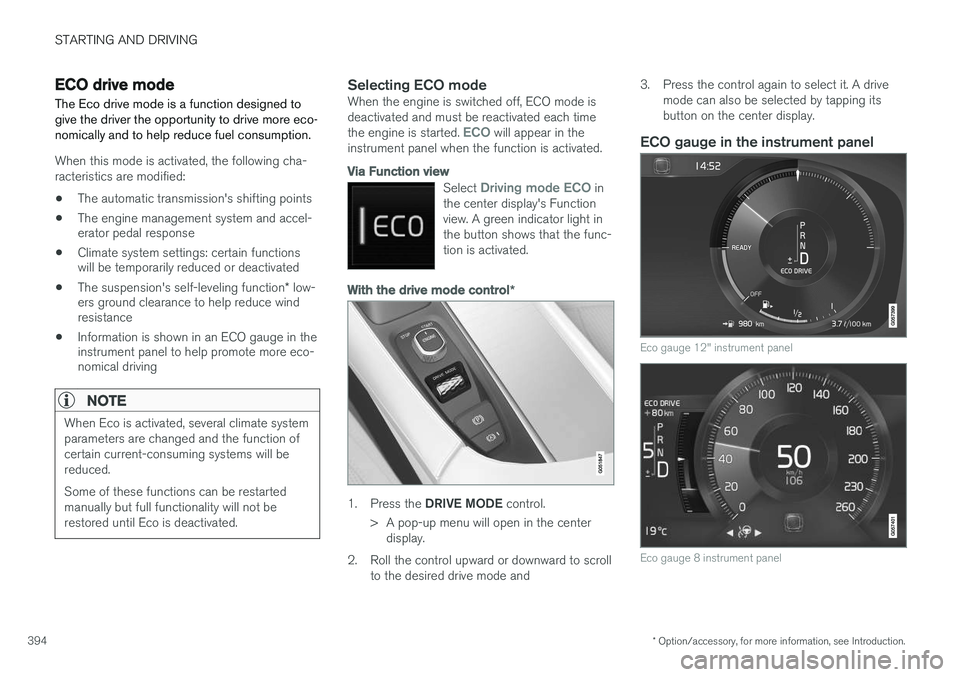
Selecting ECO modeWhen the engine is switched off, ECO mode is deactivated and must be reactivated each time the engine is started.
ECO will appear in the
instrument panel when the function is activated.
Via Function view
Select Driving mode ECO in
the center display's Function view. A green indicator light inthe button shows that the func-tion is activated.
With the drive mode control *
1.
Press the DRIVE MODE control.
> A pop-up menu will open in the center display.
2. Roll the control upward or downward to scroll to the desired drive mode and 3. Press the control again to select it. A drive
mode can also be selected by tapping its button on the center display.
ECO gauge in the instrument panel
Eco gauge 12" instrument panel
Eco gauge 8 instrument panel
Page 397 of 546
STARTING AND DRIVING
* Option/accessory, for more information, see Introduction.395
The ECO gauge in the instrument panel helps improve driving economy.
• A low reading in the green area indicates economical driving.
• A higher reading indicates higher fuel con-sumption.
The ECO gauge also has an indicator showing how a "reference" driver would drive in the samesituation. This is indicated by a diamond in thegauge.
Related information
• Driving economically (p. 355)
• Drive modes (p. 390)
Automatic transmission
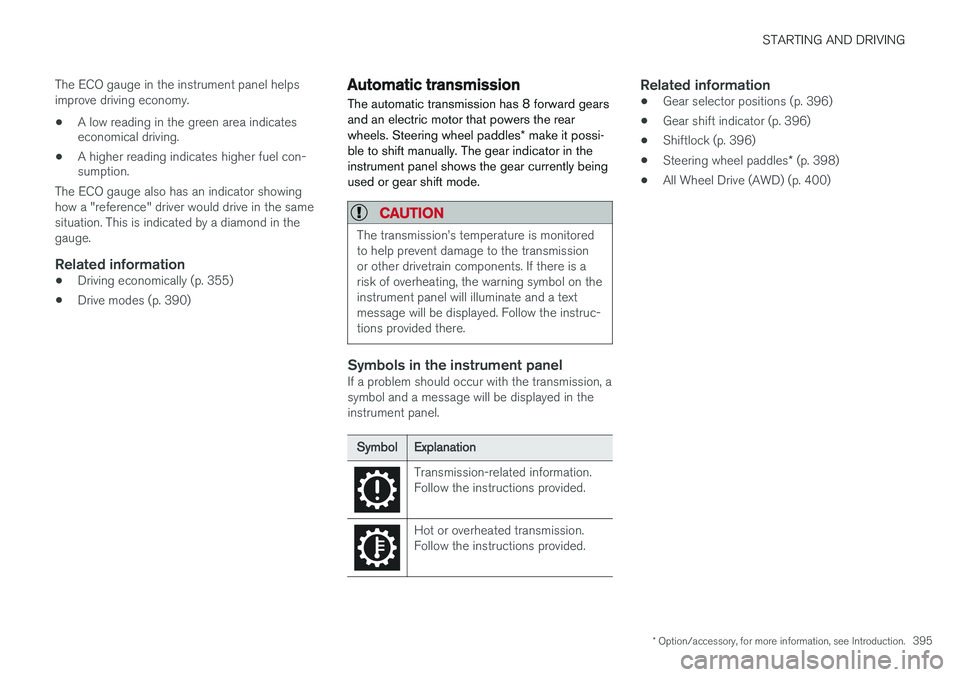
The automatic transmission has 8 forward gears and an electric motor that powers the rear wheels. Steering wheel paddles * make it possi-
ble to shift manually. The gear indicator in the instrument panel shows the gear currently beingused or gear shift mode.
CAUTION
The transmission
Page 398 of 546
STARTING AND DRIVING
* Option/accessory, for more information, see Introduction.
396
Shiftlock The automatic transmission's shiftlock feature helps prevent inadvertently moving the gearselector between different positions.
Automatic shiftlock
From Park – P
In order to move the gear selector from the P
position, the brake pedal must be depressed and the ignition must be in mode II.
From neutral – N
If the gear selector is in N and the vehicle has
been stationary for more than 3 seconds (regard- less of whether or not the engine is running), theshiftlock feature will lock the gear selector in thisposition. In order to move the gear selector from the N
position, the brake pedal must be depressed and the ignition must be in mode II.
Messages in the instrument panelIf the gear selector is locked in position, a mes- sage such as: Gear lever Press brake pedal
to activate gear lever will be displayed.
There is no mechanical shiftlock function.
Related information
• Gear selector positions (p. 396)
• Automatic transmission (p. 395)
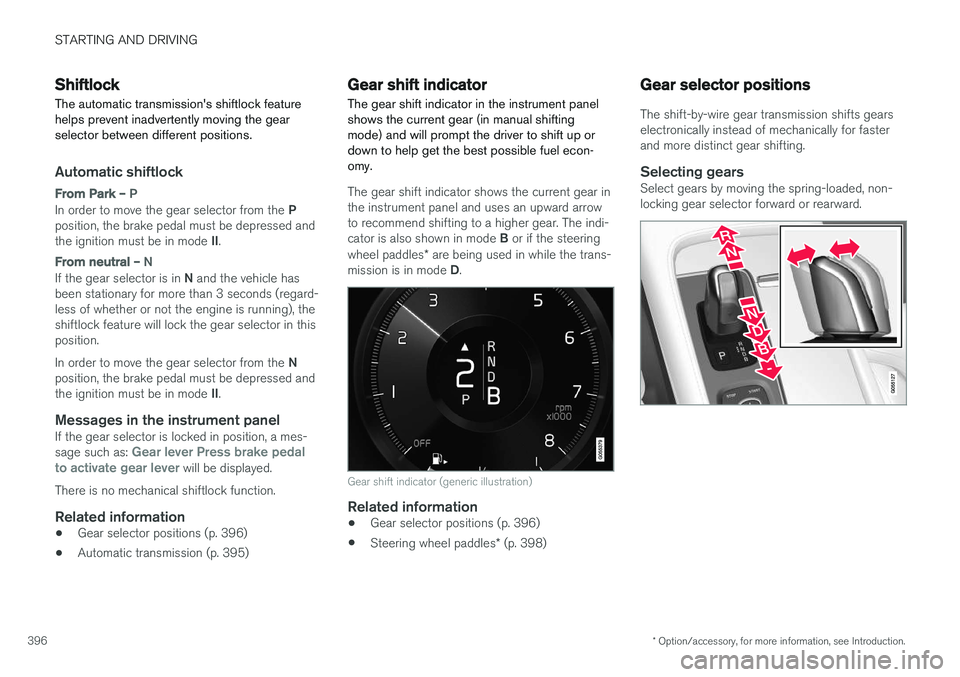
Gear shift indicator
The gear shift indicator in the instrument panel shows the current gear (in manual shiftingmode) and will prompt the driver to shift up ordown to help get the best possible fuel econ-omy.
The gear shift indicator shows the current gear in the instrument panel and uses an upward arrowto recommend shifting to a higher gear. The indi- cator is also shown in mode B or if the steering
wheel paddles * are being used in while the trans-
mission is in mode D.
Gear shift indicator (generic illustration)
Related information
• Gear selector positions (p. 396)
• Steering wheel paddles
* (p. 398)
Gear selector positions
The shift-by-wire gear transmission shifts gears electronically instead of mechanically for fasterand more distinct gear shifting.
Selecting gearsSelect gears by moving the spring-loaded, non-locking gear selector forward or rearward.
Page 399 of 546
STARTING AND DRIVING
}}
397
Gear selector positions
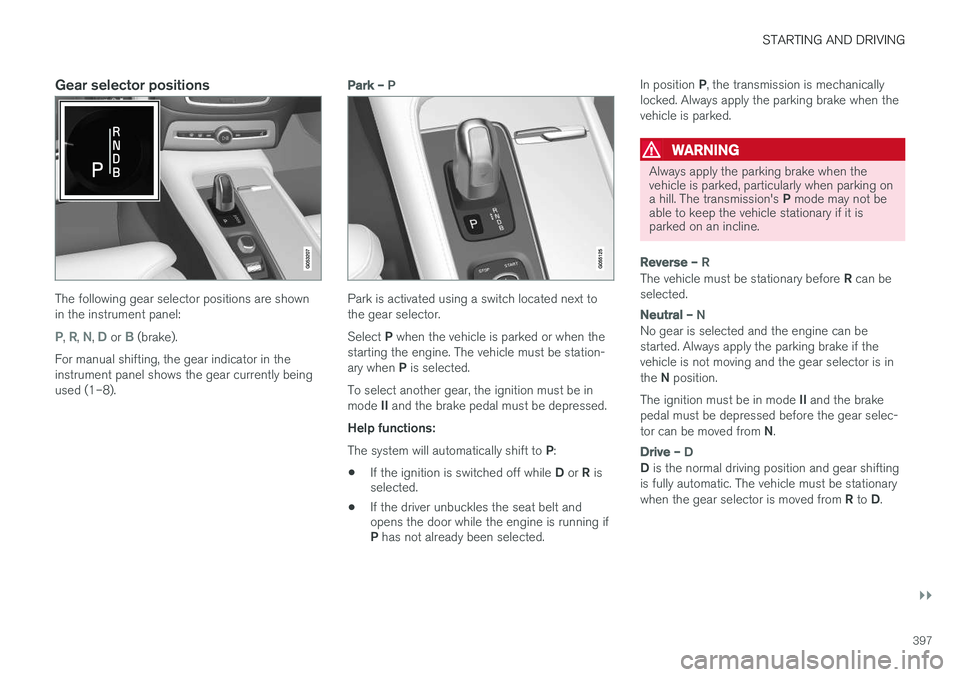
The following gear selector positions are shown in the instrument panel:
P, R, N, D or B (brake).
For manual shifting, the gear indicator in the instrument panel shows the gear currently beingused (1–8).
Park – P
Park is activated using a switch located next to the gear selector. Select P when the vehicle is parked or when the
starting the engine. The vehicle must be station- ary when P is selected.
To select another gear, the ignition must be inmode II and the brake pedal must be depressed.
Help functions: The system will automatically shift to P:
• If the ignition is switched off while
D or R is
selected.
• If the driver unbuckles the seat belt and opens the door while the engine is running if P
has not already been selected. In position
P, the transmission is mechanically
locked. Always apply the parking brake when the vehicle is parked.
WARNING
Always apply the parking brake when the vehicle is parked, particularly when parking on a hill. The transmission's P mode may not be
able to keep the vehicle stationary if it is parked on an incline.
Reverse – R
The vehicle must be stationary before R can be
selected.
Neutral – N
No gear is selected and the engine can be started. Always apply the parking brake if thevehicle is not moving and the gear selector is in the N position.
The ignition must be in mode II and the brake
pedal must be depressed before the gear selec-tor can be moved from N.
Drive – D
D is the normal driving position and gear shifting
is fully automatic. The vehicle must be stationary when the gear selector is moved from R to D.
Page 400 of 546
||
STARTING AND DRIVING
* Option/accessory, for more information, see Introduction.
398
Brake – B
B can be selected at any time during a drive. In
this mode, the engine braking function is acti- vated when the accelerator pedal is released,which helps charge the hybrid battery. Thismeans that the hybrid battery is charged even ifthe brake pedal is not depressed.
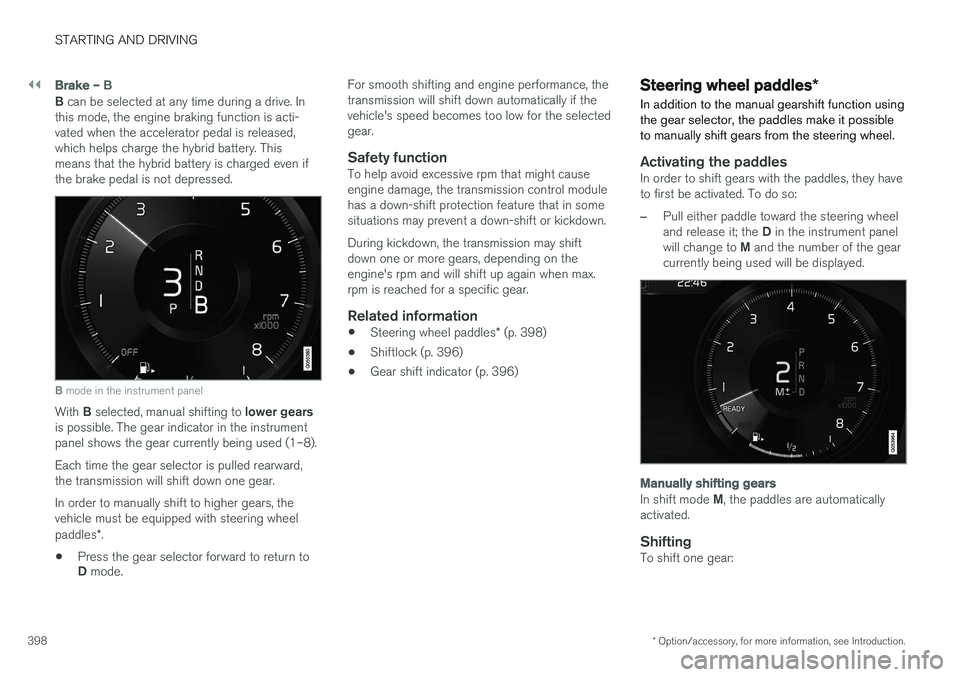
B mode in the instrument panel
With B selected, manual shifting to lower gears
is possible. The gear indicator in the instrument panel shows the gear currently being used (1–8). Each time the gear selector is pulled rearward, the transmission will shift down one gear. In order to manually shift to higher gears, the vehicle must be equipped with steering wheel paddles *.
• Press the gear selector forward to return to D
mode. For smooth shifting and engine performance, the transmission will shift down automatically if thevehicle's speed becomes too low for the selectedgear.
Safety functionTo help avoid excessive rpm that might causeengine damage, the transmission control modulehas a down-shift protection feature that in somesituations may prevent a down-shift or kickdown. During kickdown, the transmission may shift down one or more gears, depending on theengine's rpm and will shift up again when max.rpm is reached for a specific gear.
Related information
•
Steering wheel paddles
* (p. 398)
• Shiftlock (p. 396)
• Gear shift indicator (p. 396)
Steering wheel paddles
*
In addition to the manual gearshift function using the gear selector, the paddles make it possibleto manually shift gears from the steering wheel.
Activating the paddlesIn order to shift gears with the paddles, they have to first be activated. To do so:
–Pull either paddle toward the steering wheel and release it; the D in the instrument panel
will change to M and the number of the gear
currently being used will be displayed.
Manually shifting gears
In shift mode M, the paddles are automatically
activated.
ShiftingTo shift one gear:
Page 437 of 546
INFOTAINMENT
}}
435
Uninstalling an appAn app being used must be closed before it can be uninstalled. 1.Open the
Remote update service app.
2. Select
Application updates to open a list
of apps that have been installed.
3. Find the desired app and select
Uninstall to
begin uninstalling the app.
> When the app has been uninstalled, it will be removed from the list.
Related information
• Internet connected vehicle (p. 431)
• Media player (p. 421)
• System updates (p. 474)
Internet connection troubleshooting The following are factors that may affect the vehicle's Internet connection.
The amount of data being transmitted depends on the services or apps that are currently in use.For example, streaming audio requires a greatdeal of data to be transmitted, which requires agood connection and a strong signal.
Cell phone to the vehicleConnection speed may vary depending on thelocation of the cell phone in the vehicle. Move thephone closer to the center display to increasesignal strength. Be sure that there are noobstructing/screening objects between thephone and the screen.
Cell phone to the network operatorThe speed of the mobile network may varydepending on coverage/reception in the vehicle'slocation. Reception is generally poorer in tunnels,in mountainous areas, in deep valleys or indoors.Connection speed may also depend on the typeof subscription that you have with the serviceprovider. Contact your service provider in the event of data transmission problems.
Related information
• Internet connected vehicle (p. 431)
• Connecting to the Internet (p. 431)
Tethering (Wi-Fi sharing)
When the vehicle is connected to the Internet, this connection can be shared (tethered) with other devices 6
.
The network service provider (the SIM card) must support tethering.
1. Open the center display's Top view.2. Tap
SettingsCommunicationVehicle Wi-Fi Hotspot.
3. Tap
Network name and assign a name to
the hotspot.
4. Tap
Password and create a password to be
used by devices trying to connect (tether) to the hotspot.
5. Tap
Frequency band and select a fre-
quency that the hotspot will use to transmit data. This may not be possible in all markets.
6. Activate/deactivate by tapping the
Vehicle
Wi-Fi Hotspot box.
7. If another connection has been used previ- ously, confirm the change of connections.
> It is now possible for external devices toconnect to the vehicle's Wi-Fi hotspot.
Connection status will be indicated in a symbol in the center display's status bar.
6 Does not apply for a Wi-Fi connection.
Page 479 of 546
MAINTENANCE AND SERVICING
477
8. When you have submitted your workshop
booking, your appointment will be confirmed online directly by email and by a message inthe center display after a short delay.
9. One day prior to your appointment, you will receive a reminder via email and a messagewill appear on the center display. You can setthe interval for other reminders (e.g., twodays, three days) at your My Volvo website.
10. On the day of your appointment, a reminder will appear again on the center display.
Sending vehicle-related information
Information about the vehicle can be sent at any time using its Internet connection. Using this function does not send a workshop
appointment request to your retailer ; only
vehicle data will be transmitted to Volvo. This vehicle data can be accessed by any retailer ifyou call the retailer and provide your VehicleIdentification Number (VIN).
1. Open the Car status app in the center dis-
play's App view.
2. Tap
Appointments. 3.
Under
Appointments, tap Send vehicle
data.
> A message confirming that vehicle infor- mation has been sent via the Internet connection will appear on the center dis-play. Transmission of the vehicle informa-tion can be cancelled at any time by tap-ping the X in the activity indicator.
Viewing workshop information
1. Open the Car status app in the center dis-
play's App view.
2. Tap
Appointments.
3. Under
Appointments, tap Workshop
information.
> A window with retailer information will appear.
4. If you prefer, call the retailer, or select an address or GPS coordinates to activate the navigation system.
Booking and vehicle informationWhen you make an appointment or send vehicleinformation from you vehicle, this information will be sent using the Internet connection. Informa-tion about the vehicle includes:
• service requirements
• time since service was last performed
• function status
• fluid levels
• mileage (odometer reading)
• VIN (Vehicle Identification Number)
• The vehicle's software version
• Diagnostic information
Related information
•Internet connected vehicle (p. 431)
• Volvo ID (p. 31)
Page 489 of 546
![VOLVO XC90 T8 2016 Owner´s Manual MAINTENANCE AND SERVICING
}}
* Option/accessory, for more information, see Introduction.487
Function[A]
––
Horn20
Alarm siren*5
Brake system control module (valves, parking brake)40
Windshield wip](/img/45/36400/w960_36400-488.png "VOLVO XC90 T8 2016 Owner´s Manual MAINTENANCE AND SERVICING
}}
* Option/accessory, for more information, see Introduction.487
Function[A]
––
Horn20
Alarm siren*5
Brake system control module (valves, parking brake)40
Windshield wip")
MAINTENANCE AND SERVICING
}}
* Option/accessory, for more information, see Introduction.487
Function[A]
––
Horn20
Alarm siren*5
Brake system control module (valves, parking brake)40
Windshield wipers30
Tailgate window washer25
Heated windshield *, passenger
side40
––
Brake system control module (ABS pump)40
––
Heated windshield *, passenger
sideShunt
Feed when ignition is switched on to: engine control module,transmission components, elec-trical power steering, centralelectrical module5
Exterior vehicle sound (certain markets)5
Function[A]
Passenger side headlight7,5
––
––
––
Air bags; Occupant Weight Sen- sor (OWS)5
Driver side headlight7,5
Accelerator pedal sensor5
Transmission control module; Gear selector control module15
Engine control module5
––
––
––
––
Engine control module; Turbo- charger valve20
Solenoids; Valves; Engine cool- ing system thermostat10
Function[A]
Vacuum regulators; Valve7,5
Spoiler shutter control module; Radiator shutter control module;Fuel leakage detection5
––
Heated oxygen sensors (front and rear)15
Oil pump solenoid; A/C mag- netic coupling; heated oxygensensor (center)15
––
Engine control module20
Ignition coil; Spark plugs15
––
––
Transmission oil pump control module30
Vacuum pump control module40
Transmission actuator25
––
Page 494 of 546
||
MAINTENANCE AND SERVICING
* Option/accessory, for more information, see Introduction.
492
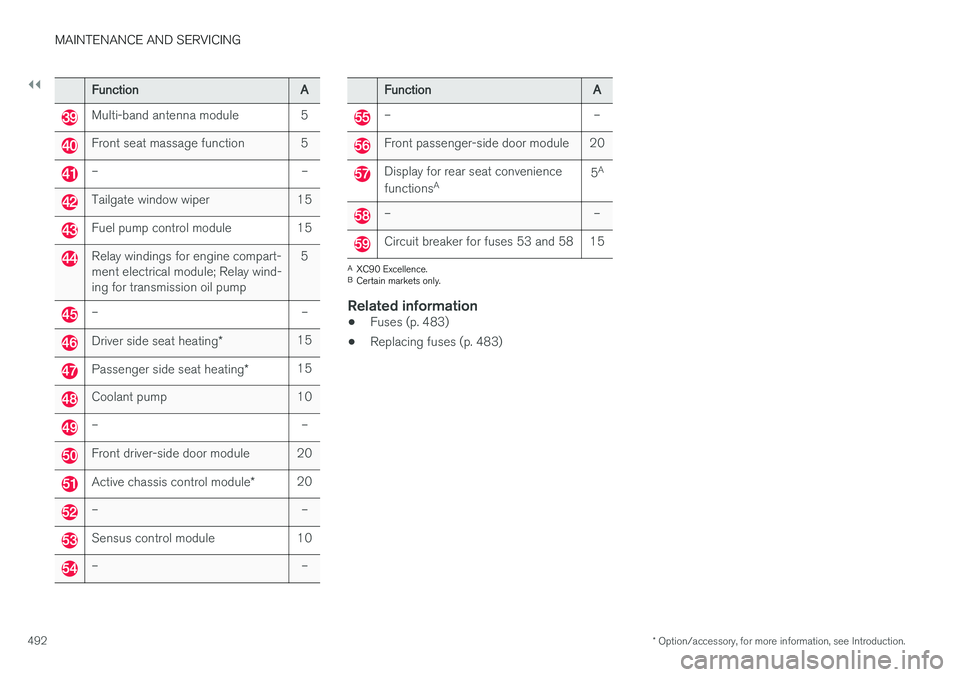
FunctionA
Multi-band antenna module5
Front seat massage function5
––
Tailgate window wiper15
Fuel pump control module15
Relay windings for engine compart- ment electrical module; Relay wind-ing for transmission oil pump5
––
Driver side seat heating *15
Passenger side seat heating *15
Coolant pump10
––
Front driver-side door module20
Active chassis control module *20
––
Sensus control module10
––
FunctionA
––
Front passenger-side door module20
Display for rear seat convenience functionsA5A
––
Circuit breaker for fuses 53 and 5815
A
XC90 Excellence.
B Certain markets only.
Related information
• Fuses (p. 483)
• Replacing fuses (p. 483)