ECU VOLVO XC90 T8 2016 Owner´s Manual
[x] Cancel search | Manufacturer: VOLVO, Model Year: 2016, Model line: XC90 T8, Model: VOLVO XC90 T8 2016Pages: 546, PDF Size: 10.26 MB
Page 222 of 546
||
LOADING AND STORAGE
* Option/accessory, for more information, see Introduction.
220
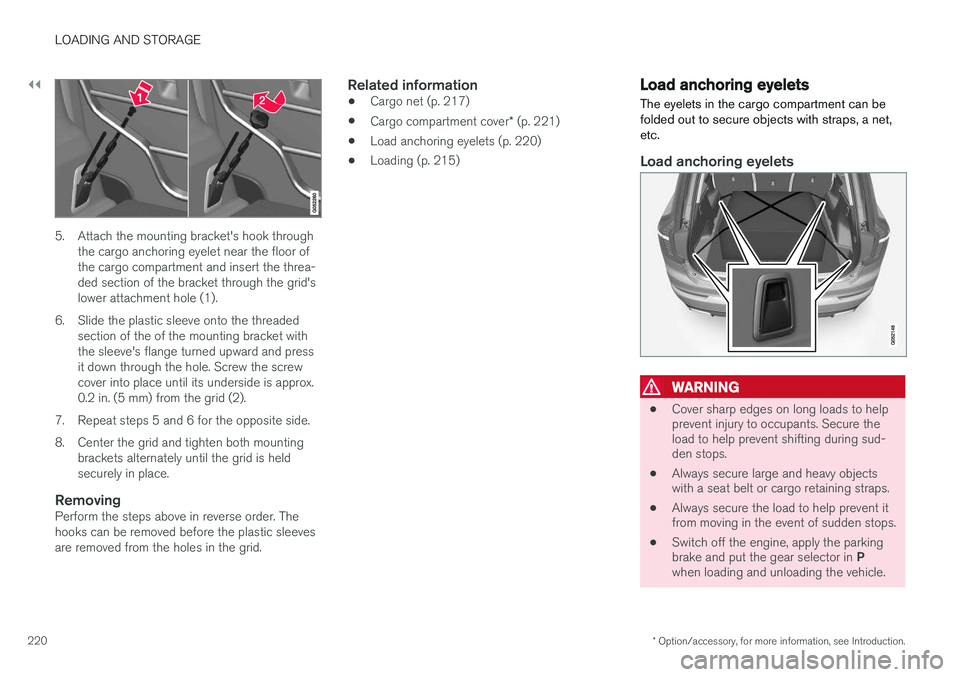
5. Attach the mounting bracket's hook through
the cargo anchoring eyelet near the floor of the cargo compartment and insert the threa-ded section of the bracket through the grid'slower attachment hole (1).
6. Slide the plastic sleeve onto the threaded section of the of the mounting bracket withthe sleeve's flange turned upward and pressit down through the hole. Screw the screwcover into place until its underside is approx.0.2 in. (5 mm) from the grid (2).
7. Repeat steps 5 and 6 for the opposite side.
8. Center the grid and tighten both mounting brackets alternately until the grid is held securely in place.
RemovingPerform the steps above in reverse order. Thehooks can be removed before the plastic sleevesare removed from the holes in the grid.
Related information
• Cargo net (p. 217)
• Cargo compartment cover
* (p. 221)
• Load anchoring eyelets (p. 220)
• Loading (p. 215)
Load anchoring eyelets
The eyelets in the cargo compartment can be folded out to secure objects with straps, a net,etc.
Load anchoring eyelets
WARNING
• Cover sharp edges on long loads to help prevent injury to occupants. Secure theload to help prevent shifting during sud-den stops.
• Always secure large and heavy objectswith a seat belt or cargo retaining straps.
• Always secure the load to help prevent itfrom moving in the event of sudden stops.
• Switch off the engine, apply the parking brake and put the gear selector in
P
when loading and unloading the vehicle.
Page 223 of 546
LOADING AND STORAGE
}}
* Option/accessory, for more information, see Introduction.221
Related information
•Loading (p. 215)
Cargo compartment cover
*
The cover can be used to conceal objects in the cargo area.
Installing the cover 5
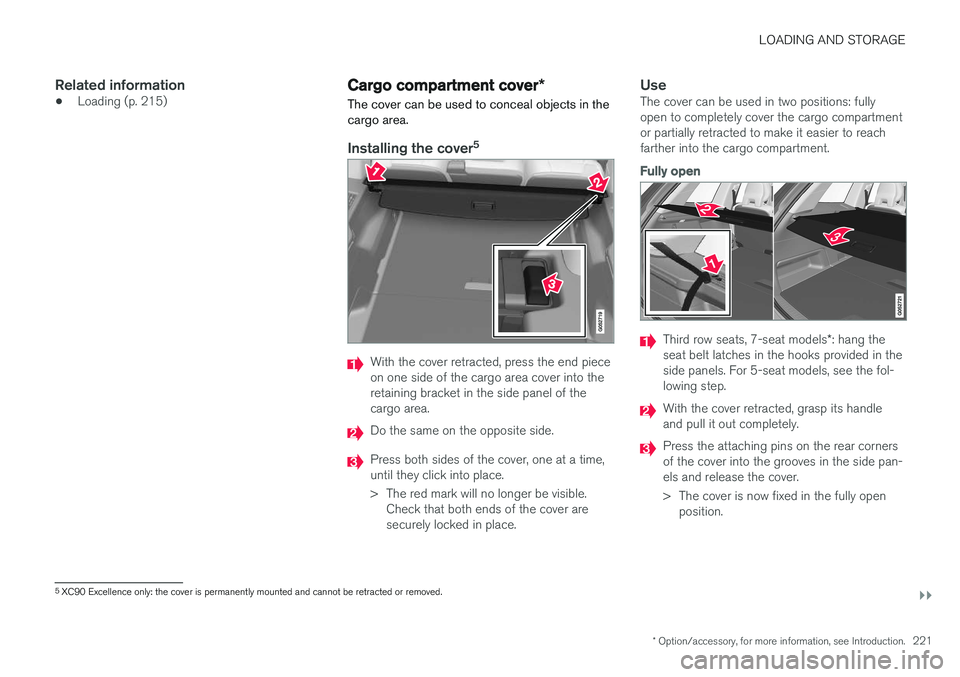
With the cover retracted, press the end piece on one side of the cargo area cover into theretaining bracket in the side panel of thecargo area.
Do the same on the opposite side.
Press both sides of the cover, one at a time, until they click into place.
> The red mark will no longer be visible.
Check that both ends of the cover are securely locked in place.
UseThe cover can be used in two positions: fullyopen to completely cover the cargo compartmentor partially retracted to make it easier to reachfarther into the cargo compartment.
Fully open
Third row seats, 7-seat models *: hang the
seat belt latches in the hooks provided in the side panels. For 5-seat models, see the fol-lowing step.
With the cover retracted, grasp its handle and pull it out completely.
Press the attaching pins on the rear corners of the cover into the grooves in the side pan-els and release the cover.
> The cover is now fixed in the fully open position.
5XC90 Excellence only: the cover is permanently mounted and cannot be retracted or removed.
Page 224 of 546
||
LOADING AND STORAGE
222
Partially retracted
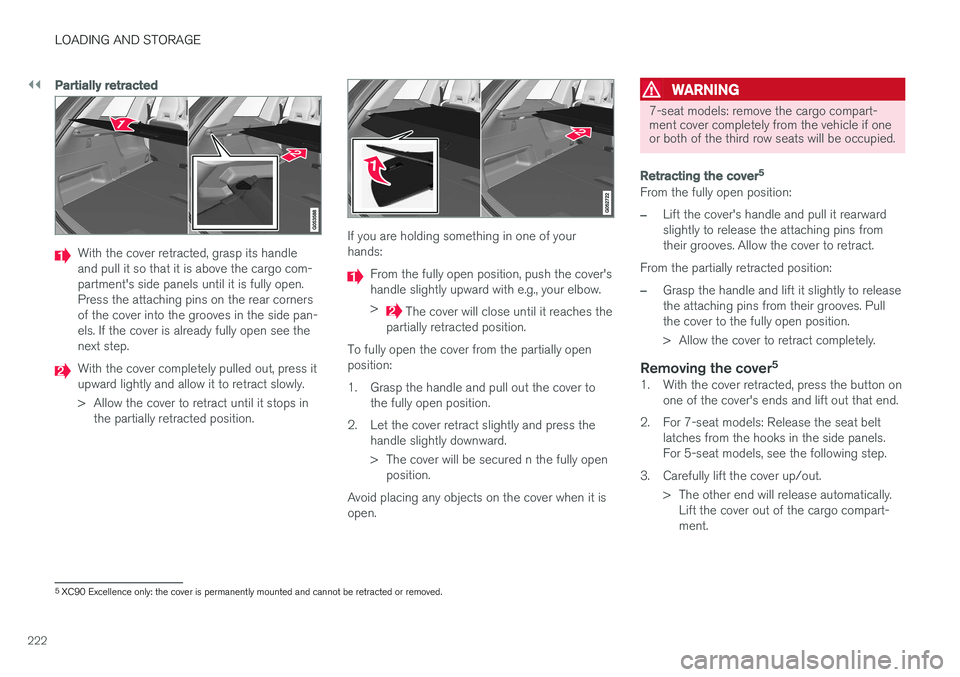
With the cover retracted, grasp its handle and pull it so that it is above the cargo com-partment's side panels until it is fully open.Press the attaching pins on the rear cornersof the cover into the grooves in the side pan-els. If the cover is already fully open see thenext step.
With the cover completely pulled out, press it upward lightly and allow it to retract slowly.
> Allow the cover to retract until it stops inthe partially retracted position.
If you are holding something in one of your hands:
From the fully open position, push the cover's handle slightly upward with e.g., your elbow. >
The cover will close until it reaches the
partially retracted position.
To fully open the cover from the partially open position:
1. Grasp the handle and pull out the cover to the fully open position.
2. Let the cover retract slightly and press the handle slightly downward.
> The cover will be secured n the fully openposition.
Avoid placing any objects on the cover when it is open.
WARNING
7-seat models: remove the cargo compart- ment cover completely from the vehicle if oneor both of the third row seats will be occupied.
Retracting the cover 5
From the fully open position:
–Lift the cover's handle and pull it rearward slightly to release the attaching pins fromtheir grooves. Allow the cover to retract.
From the partially retracted position:
–Grasp the handle and lift it slightly to release the attaching pins from their grooves. Pullthe cover to the fully open position.
> Allow the cover to retract completely.
Removing the cover 51. With the cover retracted, press the button on
one of the cover's ends and lift out that end.
2. For 7-seat models: Release the seat belt latches from the hooks in the side panels. For 5-seat models, see the following step.
3. Carefully lift the cover up/out. > The other end will release automatically.Lift the cover out of the cargo compart-ment.
5XC90 Excellence only: the cover is permanently mounted and cannot be retracted or removed.
Page 287 of 546
DRIVER SUPPORT
* Option/accessory, for more information, see Introduction.285
Adaptive Cruise Control (ACC) - fault tracing
If this symbol is displayed in the instru- ment panel and the message
Windscreen sensor Sensor
blocked, see Owner's manual
appears, the ACC radar sensor is blocked and cannot detect vehicles ahead.
This message also indicates that the following systems may have reduced functionality:
• Distance Alert
• City Safety
• Driver Alert Control
• Pilot Assist
• Lane Departure Warning (LDW) •
Lane Keeping Aid (LKA)
• Traffic Sign Information (TSI)
The following table lists possible causes for thismessage being displayed and suitable actions:
CauseAction
The windshield in front of the radar is dirty or covered with snow/ice.Clean/clear the windshield in front of the radar.
Heavy rain or snow is interfering with the radar signals.No action possible. Heavy precipitation may affect the function of the radar.
Swirling water or snow from the surface of the road may interfere with the radar signals.No action possible. A very wet or snow-covered road surface may affect the function of the radar.
The windshield in front of the radar is clean but the message remains in the display.Wait a short time. It may take several minutes for the radar to detect that it is no longer obstructed.
A text message can be erased by briefly pressing the O button on the right-side steering wheel
keypad. If the message recurs, contact a trained and authorized Volvo service technician orretailer.
Related information
• Adaptive Cruise Control (ACC)
* (p. 266)
Page 324 of 546
DRIVER SUPPORT
* Option/accessory, for more information, see Introduction.
322
Park Assist Pilot (PAP) * symbols
and messages
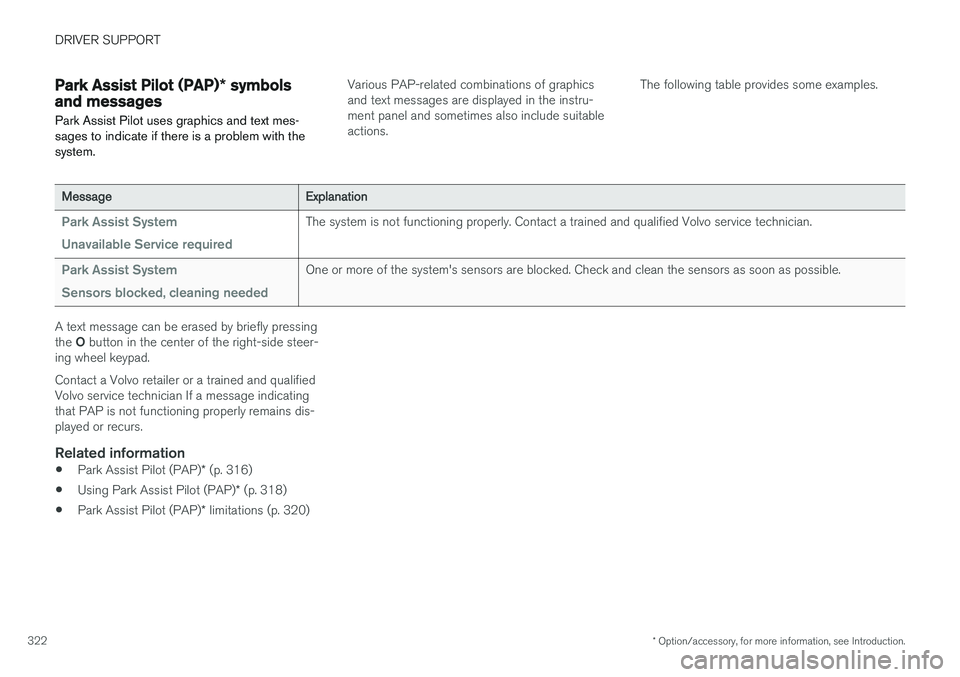
Park Assist Pilot uses graphics and text mes- sages to indicate if there is a problem with thesystem.Various PAP-related combinations of graphics and text messages are displayed in the instru-ment panel and sometimes also include suitableactions. The following table provides some examples.
MessageExplanation
Park Assist System Unavailable Service requiredThe system is not functioning properly. Contact a trained and qualified Volvo service technician.
Park Assist System Sensors blocked, cleaning neededOne or more of the system's sensors are blocked. Check and clean the sensors as soon as possible.
A text message can be erased by briefly pressing the
O button in the center of the right-side steer-
ing wheel keypad. Contact a Volvo retailer or a trained and qualified Volvo service technician If a message indicatingthat PAP is not functioning properly remains dis-played or recurs.
Related information
• Park Assist Pilot (PAP)
* (p. 316)
• Using Park Assist Pilot (PAP)
* (p. 318)
• Park Assist Pilot (PAP)
* limitations (p. 320)
Page 361 of 546
STARTING AND DRIVING
359
Towing eyelet
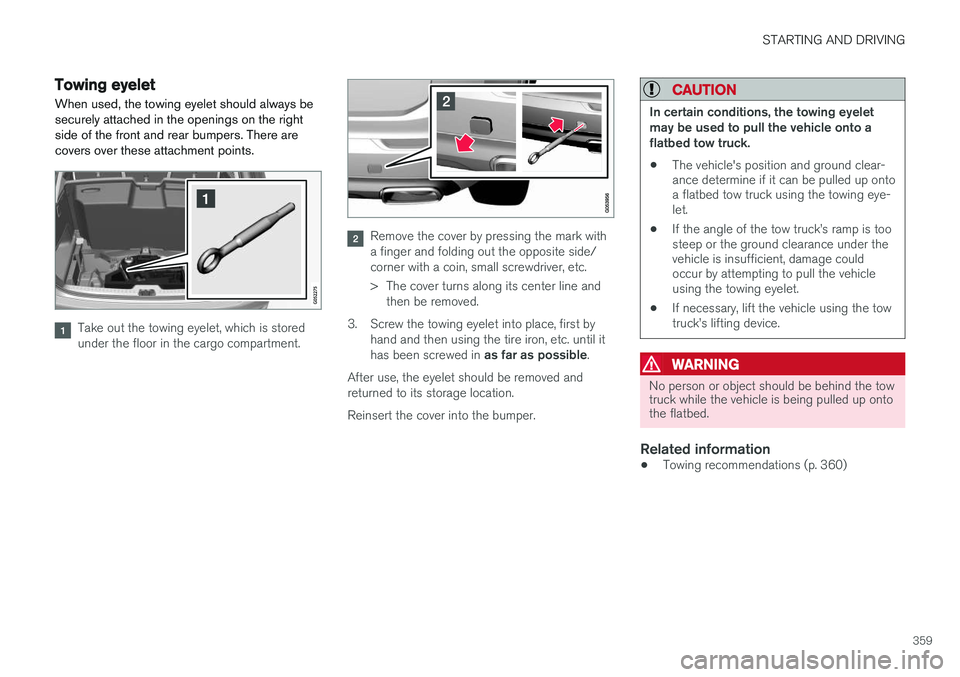
When used, the towing eyelet should always be securely attached in the openings on the rightside of the front and rear bumpers. There arecovers over these attachment points.
Take out the towing eyelet, which is stored under the floor in the cargo compartment.
Remove the cover by pressing the mark with a finger and folding out the opposite side/corner with a coin, small screwdriver, etc.
> The cover turns along its center line and then be removed.
3. Screw the towing eyelet into place, first by hand and then using the tire iron, etc. until it has been screwed in as far as possible.
After use, the eyelet should be removed and returned to its storage location. Reinsert the cover into the bumper.
CAUTION
In certain conditions, the towing eyelet may be used to pull the vehicle onto aflatbed tow truck.
• The vehicle's position and ground clear- ance determine if it can be pulled up ontoa flatbed tow truck using the towing eye-let.
• If the angle of the tow truck
Page 368 of 546
||
STARTING AND DRIVING
3661.
Switch the ignition off completely (mode 0).
2. Ensure that the auxiliary battery to be used is 12-volt.
3. If the 12-volt auxiliary battery to be used is in another vehicle, switch off that vehicle's igni- tion and be sure that the vehicles are nottouching each other.
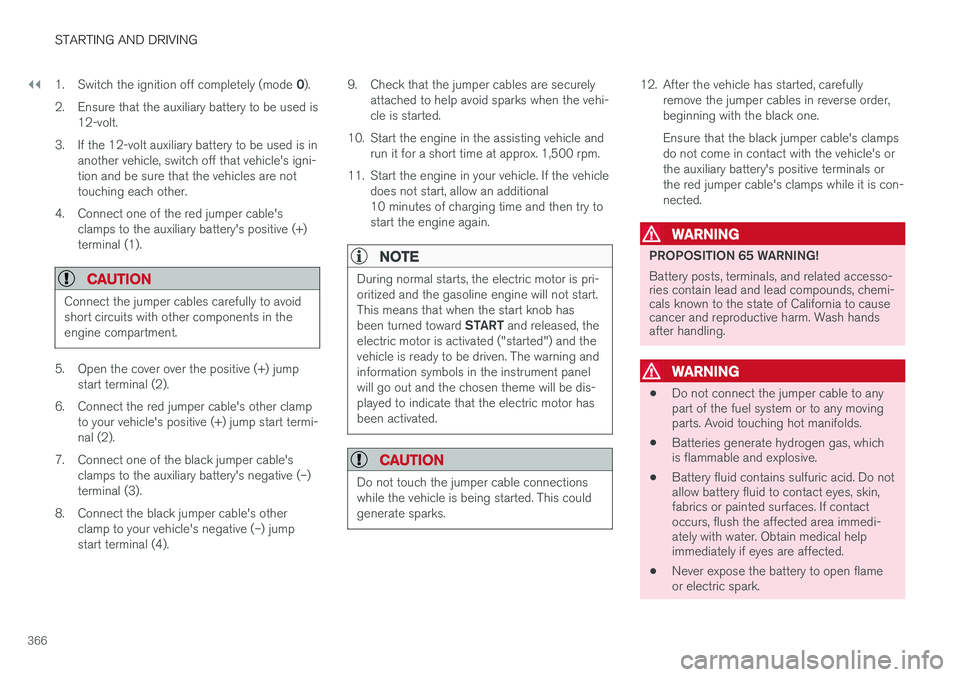
4. Connect one of the red jumper cable's clamps to the auxiliary battery's positive (+)terminal (1).
CAUTION
Connect the jumper cables carefully to avoid short circuits with other components in theengine compartment.
5. Open the cover over the positive (+) jump start terminal (2).
6. Connect the red jumper cable's other clamp to your vehicle's positive (+) jump start termi- nal (2).
7. Connect one of the black jumper cable's clamps to the auxiliary battery's negative (–)terminal (3).
8. Connect the black jumper cable's other clamp to your vehicle's negative (–) jumpstart terminal (4). 9. Check that the jumper cables are securely
attached to help avoid sparks when the vehi-cle is started.
10. Start the engine in the assisting vehicle and run it for a short time at approx. 1,500 rpm.
11. Start the engine in your vehicle. If the vehicle does not start, allow an additional10 minutes of charging time and then try tostart the engine again.
NOTE
During normal starts, the electric motor is pri- oritized and the gasoline engine will not start.This means that when the start knob has been turned toward START and released, the
electric motor is activated ("started") and the vehicle is ready to be driven. The warning andinformation symbols in the instrument panelwill go out and the chosen theme will be dis-played to indicate that the electric motor hasbeen activated.
CAUTION
Do not touch the jumper cable connections while the vehicle is being started. This couldgenerate sparks.
12. After the vehicle has started, carefully remove the jumper cables in reverse order, beginning with the black one. Ensure that the black jumper cable's clamps do not come in contact with the vehicle's orthe auxiliary battery's positive terminals orthe red jumper cable's clamps while it is con-nected.
WARNING
PROPOSITION 65 WARNING! Battery posts, terminals, and related accesso- ries contain lead and lead compounds, chemi-cals known to the state of California to causecancer and reproductive harm. Wash handsafter handling.
WARNING
• Do not connect the jumper cable to any part of the fuel system or to any movingparts. Avoid touching hot manifolds.
• Batteries generate hydrogen gas, whichis flammable and explosive.
• Battery fluid contains sulfuric acid. Do notallow battery fluid to contact eyes, skin,fabrics or painted surfaces. If contactoccurs, flush the affected area immedi-ately with water. Obtain medical helpimmediately if eyes are affected.
• Never expose the battery to open flameor electric spark.
Page 375 of 546
STARTING AND DRIVING
}}
373
WARNING
•Never use more than one floor mat at a time on the driver's floor. Before driving,remove the original mat from the driver'sseat floor before using any other type offloor mat. Any mat used in this positionshould be securely and properly anchoredin the attaching pins. An extra mat on thedriver's floor can cause the acceleratorand/or brake pedal to catch. Check thatthe movement of these pedals is notimpeded.
• Volvo's floor mats are specially manufac-tured for your car. They must be firmlysecured in the clips on the floor so thatthey cannot slide and become trappedunder the pedals on the driver's side.
During normal starts, the electric motor is priori- tized and the gasoline engine will not start. Thismeans that when the start knob has been turned toward START and released, the electric motor is
activated ("started") and the vehicle is ready to be driven. The warning and information symbolsin the instrument panel will go out and thechosen theme will be displayed to indicate thatthe electric motor has been activated. However, in certain situations, such as in cold weather or if the hybrid battery is not sufficientlycharged, the gasoline engine will start instead.
NOTE
The vehicle cannot be started if the hybrid battery is discharged.
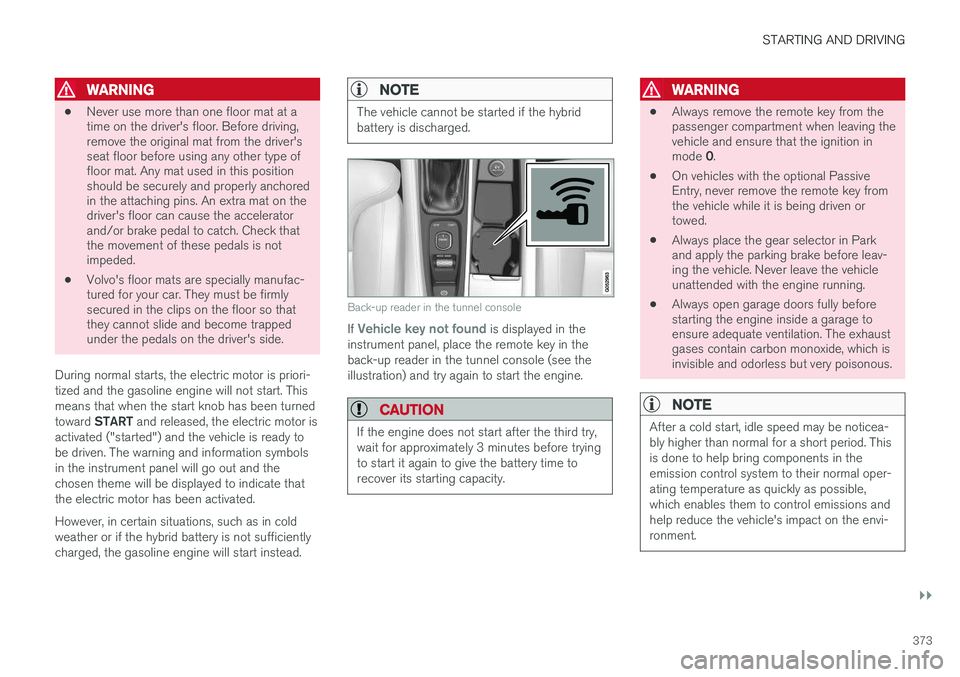
Back-up reader in the tunnel console
If Vehicle key not found is displayed in the
instrument panel, place the remote key in the back-up reader in the tunnel console (see theillustration) and try again to start the engine.
CAUTION
If the engine does not start after the third try, wait for approximately 3 minutes before tryingto start it again to give the battery time torecover its starting capacity.
WARNING
• Always remove the remote key from the passenger compartment when leaving thevehicle and ensure that the ignition in mode
0.
• On vehicles with the optional Passive Entry, never remove the remote key fromthe vehicle while it is being driven ortowed.
• Always place the gear selector in Parkand apply the parking brake before leav-ing the vehicle. Never leave the vehicleunattended with the engine running.
• Always open garage doors fully beforestarting the engine inside a garage toensure adequate ventilation. The exhaustgases contain carbon monoxide, which isinvisible and odorless but very poisonous.
NOTE
After a cold start, idle speed may be noticea- bly higher than normal for a short period. Thisis done to help bring components in theemission control system to their normal oper-ating temperature as quickly as possible,which enables them to control emissions andhelp reduce the vehicle's impact on the envi-ronment.
Page 403 of 546
STARTING AND DRIVING
401
Suspension leveling settings
Easy entry
The vehicle can be lowered to entering and exit- ing easier. Select
SettingsVehicleEasy Entry/Exit
Control via the center display's Top view to lower
the vehicle when getting in or out. When the vehicle is parked and the engine is turned off, the level is lowered (if a side door isopened, the level adjustment will stop). When theengine is started and the vehicle begins to move,the level will be raised to the height set by theselected drive mode.
Turning off suspension and leveling control
In certain situations, this function has to be turned off, for example when lifting the vehicle ona jack or garage hoist. 1. Tap
Settings in the center display's Top
view.
2. Tap
My CarSuspension .
3. Select
Deactivate Suspension & Leveling
Control.
Changing suspension control
Three different levels of suspension control can be selected from the center display: 1. Tap
Settings in the center display's Top
view. 2.
Tap
My CarDrive Mode.
3. Under
Suspension Control, select Eco,Comfort or Dynamic.
Loading mode
Use the buttons in the cargo compartment to raise or lower the vehicle to make loading orunloading easier or when attaching a trailer.
Parking the vehicleWhen parking, be sure that there is adequatespace above and below the vehicle since itsground clearance may vary, e.g., depending onthe ambient temperature, how the vehicle is loa-ded, if loading mode is being used or the drivemode selected after the engine is started. The level may also be adjusted for a certain time after the vehicle has been parked to compensatefor possible height adjustments due to tempera-ture changes in the pneumatic suspension whenthe vehicle has cooled.
TransportWhen transporting the vehicle on a ferry, train ora tow truck, it may only be secured (lashed)around the tires, not using any other chassiscomponents. Changes in the pneumatic suspen-sion may occur during transport that could nega-tively affect the lashing and result in damage.
Related information
• Drive modes (p. 390)
• Driving with a trailer (p. 367)
• Loading (p. 215)
8
Standard equipment on certain models.
Page 434 of 546
||
INFOTAINMENT
4321. Activate tethering/personal hotspot in the
cell phone.
2. Tap
Settings in the center display's Top
view.
3. Tap
CommunicationWi-Fi.
4. Tap Wi-Fi to activate/deactivate.
5. Tap the name of the network to be used.
6. Enter the network password.
7. If a different connection was used previously, confirm the connection change.
> The vehicle will connect to the network.
Please be aware that certain cell phones disable tethering when the connection to the vehicle hasbeen broken, e.g., when the phone has beenremoved from the vehicle. In such cases, thephone's tethering function will have to be reacti-vated the next time the phone is used to connectto the Internet. When a phone is connected to the vehicle, it is saved for future use. When a max. number of 50have been saved, the first one connected will bedeleted. To show the list of saved networks or to manually delete a network, tap
SettingsWi-Fi
Saved networks.
See the article "Wi-Fi technology and security" for network connection requirements.
Connect using a cable connected to the USB socket
1. Connect the phone via a cable to the USB socket in the tunnel console storage com- partment.
2. Activate USB tethering in the cell phone.
3. If a different connection was used previously, confirm the connection change.
> The vehicle will connect to the network.
Connect using the vehicle's integrated modem
When the vehicle is connected using the modem, Volvo On Call services will use the connection.
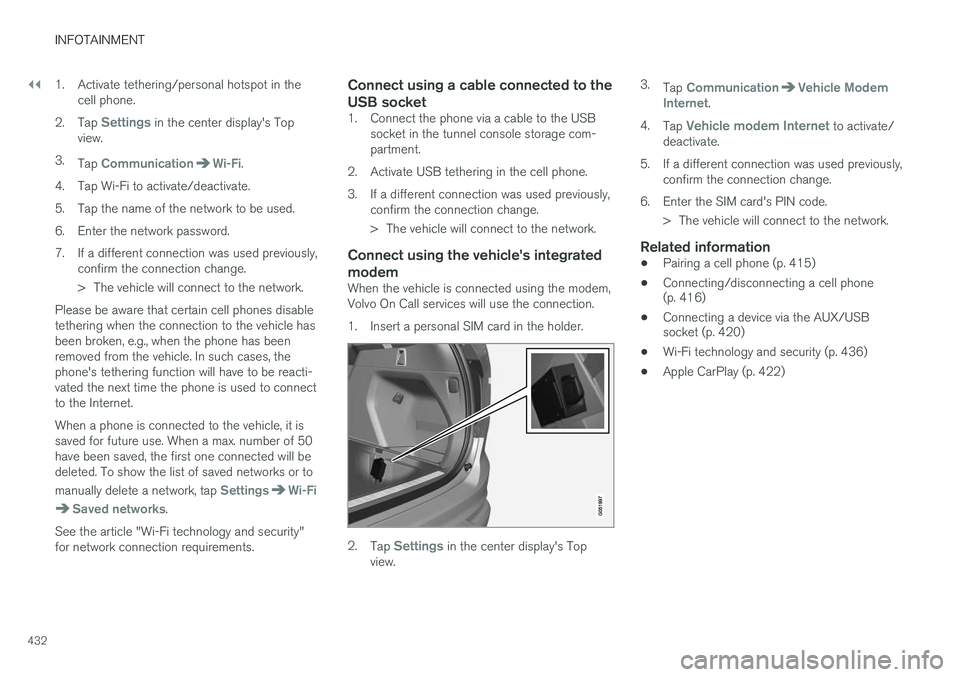
1. Insert a personal SIM card in the holder.
2.Tap Settings in the center display's Top
view. 3.
Tap
CommunicationVehicle Modem
Internet.
4. Tap
Vehicle modem Internet to activate/
deactivate.
5. If a different connection was used previously, confirm the connection change.
6. Enter the SIM card's PIN code. > The vehicle will connect to the network.
Related information
• Pairing a cell phone (p. 415)
• Connecting/disconnecting a cell phone (p. 416)
• Connecting a device via the AUX/USBsocket (p. 420)
• Wi-Fi technology and security (p. 436)
• Apple CarPlay (p. 422)