instrument panel VOLVO XC90 T8 2016 Owner´s Manual
[x] Cancel search | Manufacturer: VOLVO, Model Year: 2016, Model line: XC90 T8, Model: VOLVO XC90 T8 2016Pages: 546, PDF Size: 10.26 MB
Page 260 of 546
DRIVER SUPPORT
258
Radar sensor limitations
The radar sensor used by several of the driver support systems has certain limitations, whichalso affect the systems using it.
Obstructions
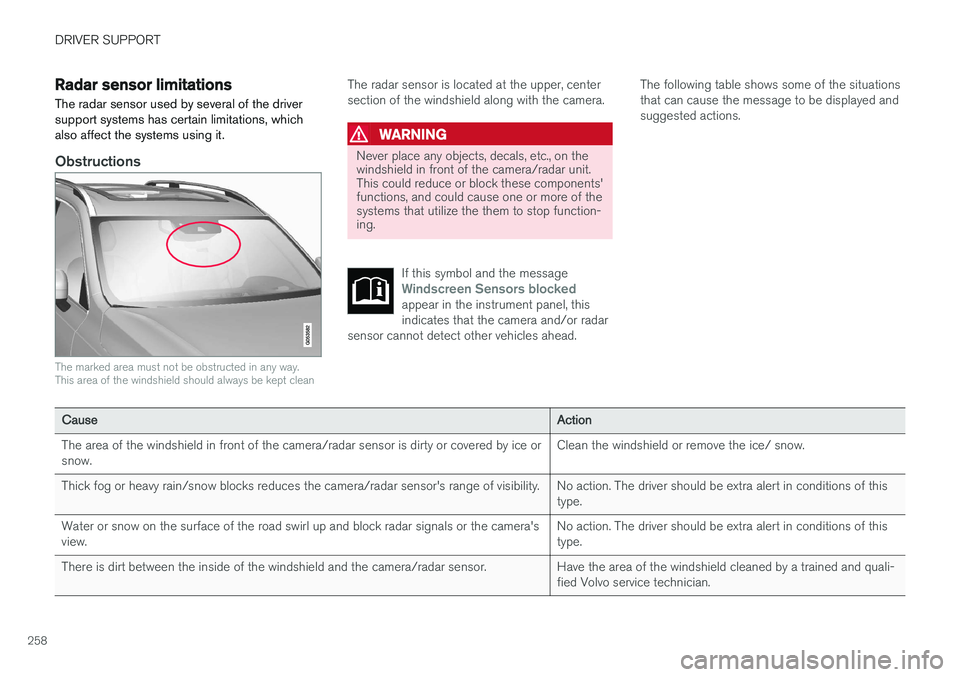
The marked area must not be obstructed in any way. This area of the windshield should always be kept clean
The radar sensor is located at the upper, center section of the windshield along with the camera.
WARNING
Never place any objects, decals, etc., on the windshield in front of the camera/radar unit.This could reduce or block these components'functions, and could cause one or more of thesystems that utilize the them to stop function-ing.
If this symbol and the message
Windscreen Sensors blockedappear in the instrument panel, this indicates that the camera and/or radar
sensor cannot detect other vehicles ahead.
The following table shows some of the situations that can cause the message to be displayed andsuggested actions.
CauseAction
The area of the windshield in front of the camera/radar sensor is dirty or covered by ice or snow.Clean the windshield or remove the ice/ snow.
Thick fog or heavy rain/snow blocks reduces the camera/radar sensor's range of visibility.No action. The driver should be extra alert in conditions of this type.
Water or snow on the surface of the road swirl up and block radar signals or the camera's view.No action. The driver should be extra alert in conditions of this type.
There is dirt between the inside of the windshield and the camera/radar sensor.Have the area of the windshield cleaned by a trained and quali- fied Volvo service technician.
Page 263 of 546
DRIVER SUPPORT
}}
* Option/accessory, for more information, see Introduction.261
Cruise Control (CC)
Cruise Control (CC) is designed to assist the driver by maintaining a set speed. It is primarilyintended for use on long straight roads in steadytraffic, such as on highways and other mainroads in smoothly flowing traffic.
Overview
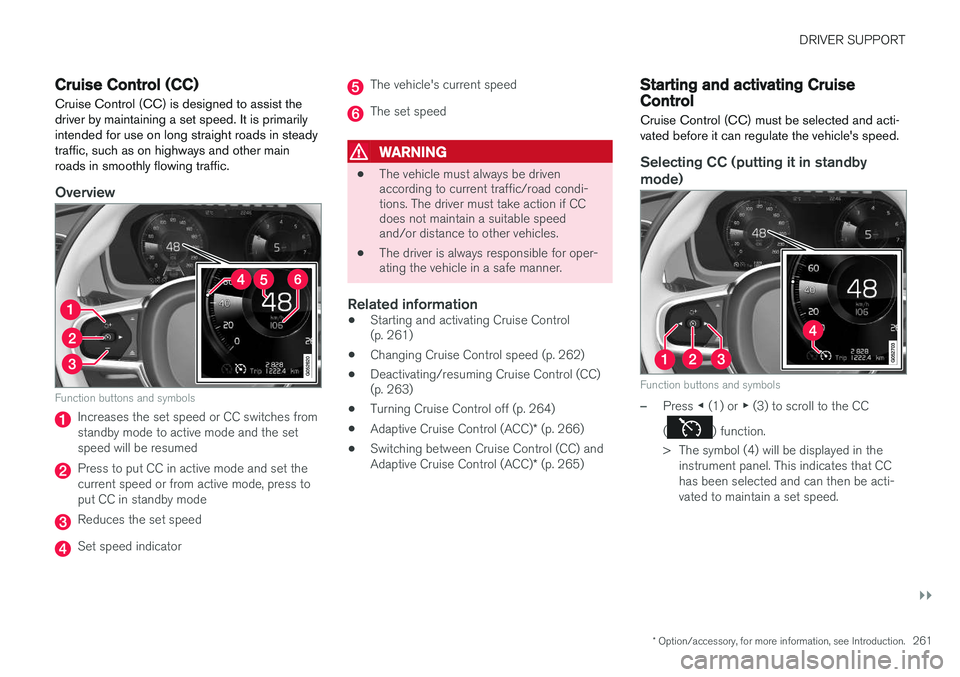
Function buttons and symbols
Increases the set speed or CC switches from standby mode to active mode and the setspeed will be resumed
Press to put CC in active mode and set the current speed or from active mode, press toput CC in standby mode
Reduces the set speed
Set speed indicator
The vehicle's current speed
The set speed
WARNING
• The vehicle must always be driven according to current traffic/road condi-tions. The driver must take action if CCdoes not maintain a suitable speedand/or distance to other vehicles.
• The driver is always responsible for oper-ating the vehicle in a safe manner.
Related information
•
Starting and activating Cruise Control(p. 261)
• Changing Cruise Control speed (p. 262)
• Deactivating/resuming Cruise Control (CC)(p. 263)
• Turning Cruise Control off (p. 264)
• Adaptive Cruise Control (ACC)
* (p. 266)
• Switching between Cruise Control (CC) and Adaptive Cruise Control (ACC)
* (p. 265)
Starting and activating Cruise Control
Cruise Control (CC) must be selected and acti- vated before it can regulate the vehicle's speed.
Selecting CC (putting it in standby
mode)
Function buttons and symbols
–Press ◀ (1) or ▶ (3) to scroll to the CC
(
) function.
> The symbol (4) will be displayed in the instrument panel. This indicates that CC has been selected and can then be acti-vated to maintain a set speed.
Page 267 of 546
DRIVER SUPPORT
* Option/accessory, for more information, see Introduction.265
Switching between Cruise Control (CC) and Adaptive Cruise Control (ACC)*
In models equipped with the optional ACC, the driver can toggle between CC and ACC.
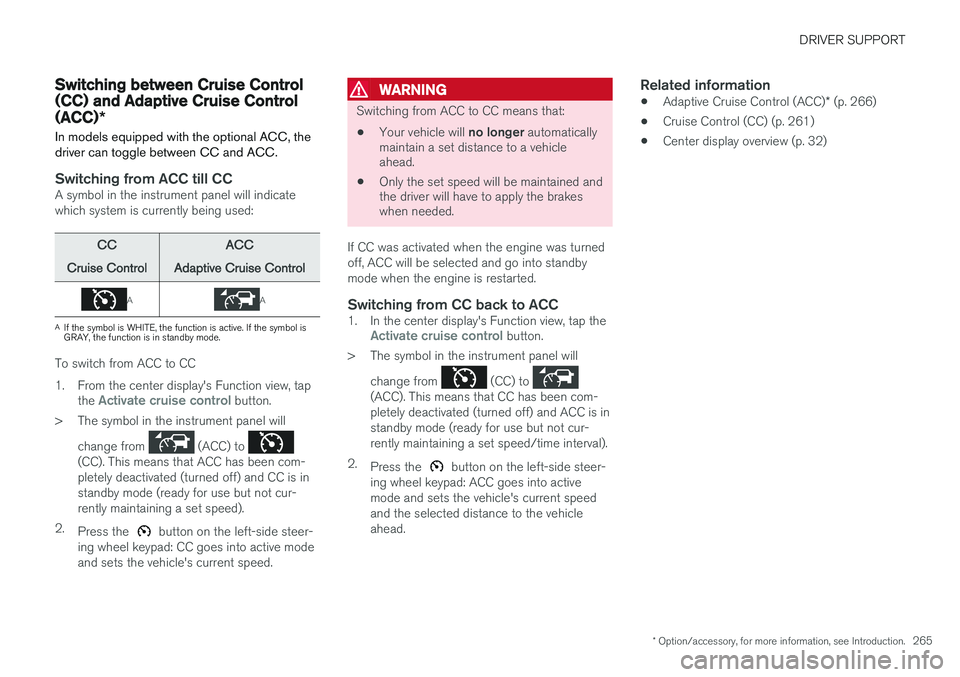
Switching from ACC till CCA symbol in the instrument panel will indicate which system is currently being used:
CC
Cruise ControlACC
Adaptive Cruise Control
AA
A If the symbol is WHITE, the function is active. If the symbol is GRAY, the function is in standby mode.
To switch from ACC to CC
1. From the center display's Function view, tap
the
Activate cruise control button.
> The symbol in the instrument panel will
change from
(ACC) to (CC). This means that ACC has been com- pletely deactivated (turned off) and CC is instandby mode (ready for use but not cur-rently maintaining a set speed).
2. Press the
button on the left-side steer-
ing wheel keypad: CC goes into active mode and sets the vehicle's current speed.
WARNING
Switching from ACC to CC means that:
• Your vehicle will
no longer automatically
maintain a set distance to a vehicle ahead.
• Only the set speed will be maintained andthe driver will have to apply the brakeswhen needed.
If CC was activated when the engine was turned off, ACC will be selected and go into standbymode when the engine is restarted.
Switching from CC back to ACC1. In the center display's Function view, tap theActivate cruise control button.
> The symbol in the instrument panel will
change from
(CC) to (ACC). This means that CC has been com- pletely deactivated (turned off) and ACC is instandby mode (ready for use but not cur-rently maintaining a set speed/time interval).
2. Press the
button on the left-side steer-
ing wheel keypad: ACC goes into active mode and sets the vehicle's current speedand the selected distance to the vehicleahead.
Related information
• Adaptive Cruise Control (ACC)
* (p. 266)
• Cruise Control (CC) (p. 261)
• Center display overview (p. 32)
Page 269 of 546
DRIVER SUPPORT
}}
267
Controls
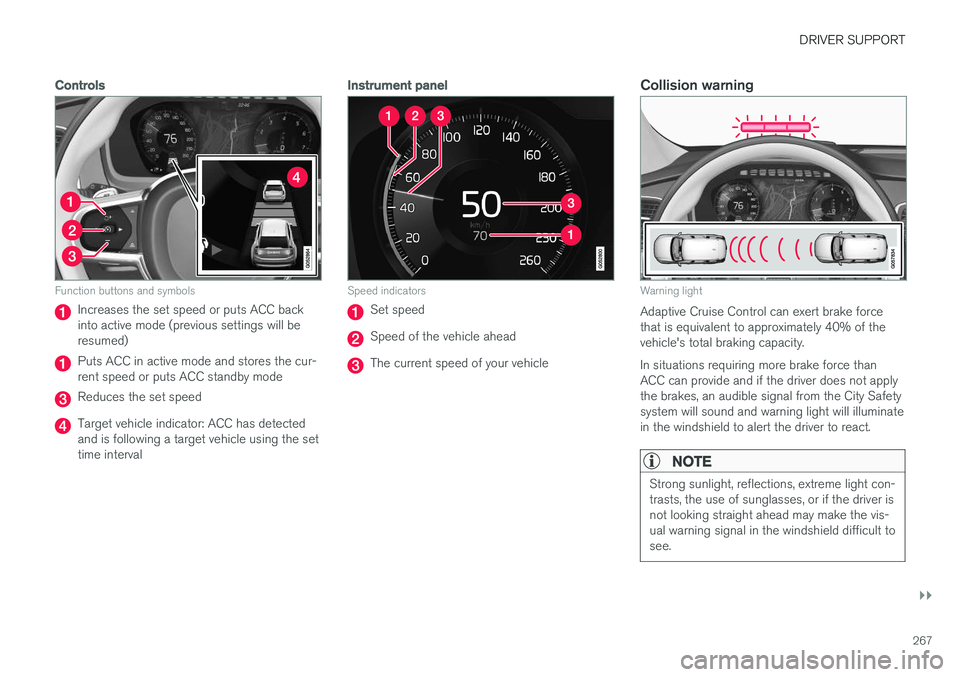
Function buttons and symbols
Increases the set speed or puts ACC back into active mode (previous settings will beresumed)
Puts ACC in active mode and stores the cur- rent speed or puts ACC standby mode
Reduces the set speed
Target vehicle indicator: ACC has detected and is following a target vehicle using the settime interval
Instrument panel
Speed indicators
Set speed
Speed of the vehicle ahead
The current speed of your vehicle
Collision warning
Warning light
Adaptive Cruise Control can exert brake force that is equivalent to approximately 40% of thevehicle's total braking capacity. In situations requiring more brake force than ACC can provide and if the driver does not applythe brakes, an audible signal from the City Safetysystem will sound and warning light will illuminatein the windshield to alert the driver to react.
NOTE
Strong sunlight, reflections, extreme light con- trasts, the use of sunglasses, or if the driver isnot looking straight ahead may make the vis-ual warning signal in the windshield difficult tosee.
Page 270 of 546
||
DRIVER SUPPORT
* Option/accessory, for more information, see Introduction.
268
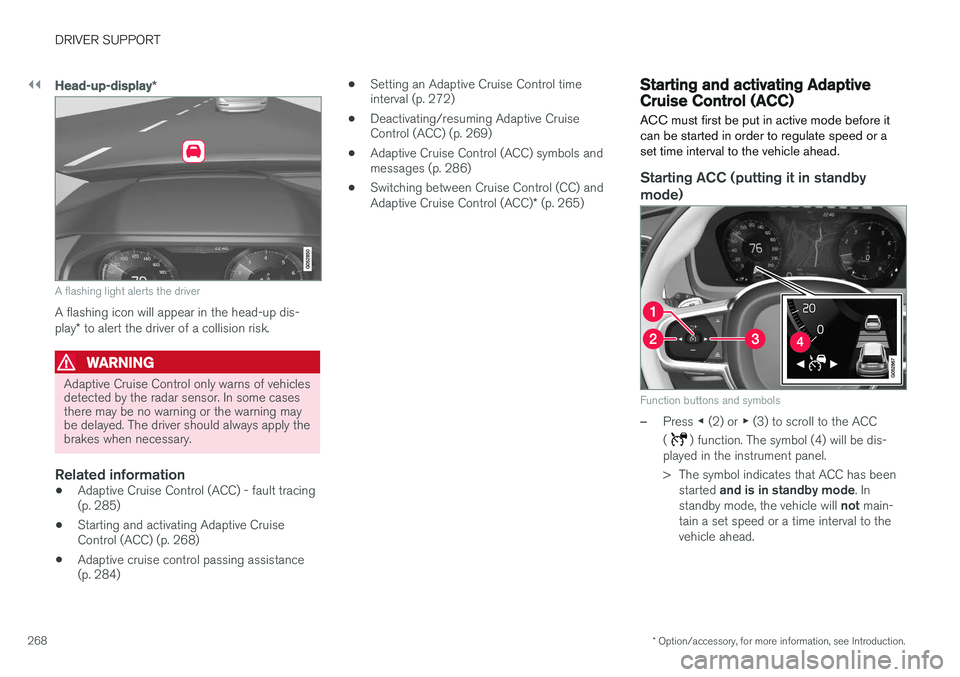
Head-up-display *
A flashing light alerts the driver
A flashing icon will appear in the head-up dis- play* to alert the driver of a collision risk.
WARNING
Adaptive Cruise Control only warns of vehicles detected by the radar sensor. In some casesthere may be no warning or the warning maybe delayed. The driver should always apply thebrakes when necessary.
Related information
• Adaptive Cruise Control (ACC) - fault tracing (p. 285)
• Starting and activating Adaptive CruiseControl (ACC) (p. 268)
• Adaptive cruise control passing assistance(p. 284) •
Setting an Adaptive Cruise Control timeinterval (p. 272)
• Deactivating/resuming Adaptive CruiseControl (ACC) (p. 269)
• Adaptive Cruise Control (ACC) symbols andmessages (p. 286)
• Switching between Cruise Control (CC) and Adaptive Cruise Control (ACC)
* (p. 265)
Starting and activating Adaptive Cruise Control (ACC)
ACC must first be put in active mode before it can be started in order to regulate speed or aset time interval to the vehicle ahead.
Starting ACC (putting it in standby
mode)
Function buttons and symbols
–Press ◀ (2) or ▶ (3) to scroll to the ACC
(
) function. The symbol (4) will be dis-
played in the instrument panel.
> The symbol indicates that ACC has been
started and is in standby mode . In
standby mode, the vehicle will not main-
tain a set speed or a time interval to the vehicle ahead.
Page 272 of 546
||
DRIVER SUPPORT
* Option/accessory, for more information, see Introduction.
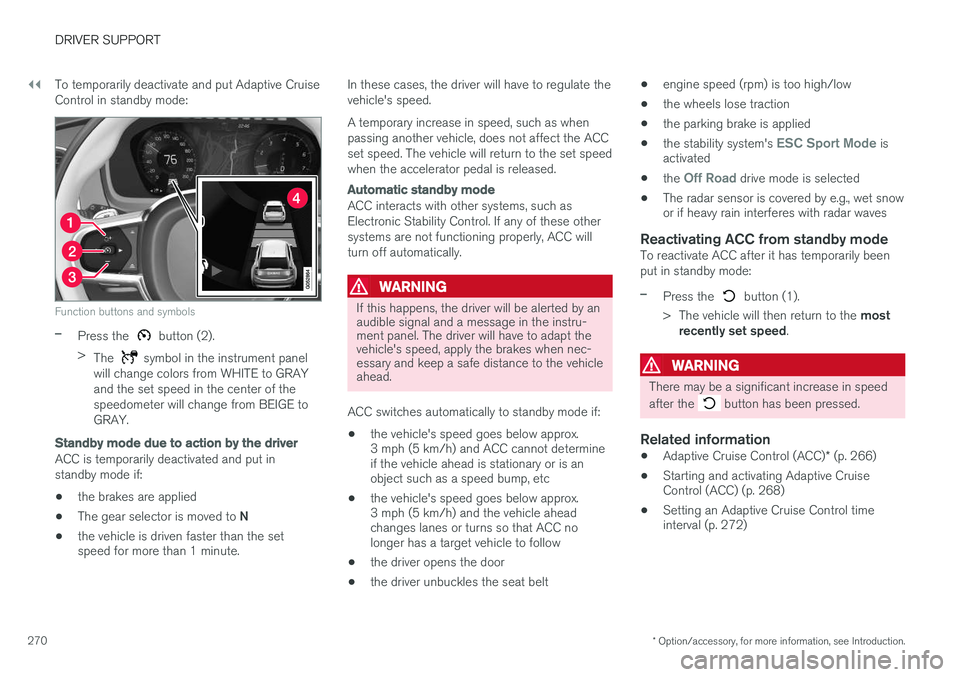
270 To temporarily deactivate and put Adaptive Cruise Control in standby mode:
Function buttons and symbols
–Press the button (2).
> The
symbol in the instrument panel
will change colors from WHITE to GRAY and the set speed in the center of thespeedometer will change from BEIGE toGRAY.
Standby mode due to action by the driver
ACC is temporarily deactivated and put in standby mode if:
• the brakes are applied
• The gear selector is moved to
N
• the vehicle is driven faster than the set speed for more than 1 minute. In these cases, the driver will have to regulate the vehicle's speed. A temporary increase in speed, such as when passing another vehicle, does not affect the ACCset speed. The vehicle will return to the set speedwhen the accelerator pedal is released.
Automatic standby mode
ACC interacts with other systems, such as Electronic Stability Control. If any of these othersystems are not functioning properly, ACC willturn off automatically.
WARNING
If this happens, the driver will be alerted by an audible signal and a message in the instru-ment panel. The driver will have to adapt thevehicle's speed, apply the brakes when nec-essary and keep a safe distance to the vehicleahead.
ACC switches automatically to standby mode if: • the vehicle's speed goes below approx. 3 mph (5 km/h) and ACC cannot determineif the vehicle ahead is stationary or is anobject such as a speed bump, etc
• the vehicle's speed goes below approx.3 mph (5 km/h) and the vehicle aheadchanges lanes or turns so that ACC nolonger has a target vehicle to follow
• the driver opens the door
• the driver unbuckles the seat belt •
engine speed (rpm) is too high/low
• the wheels lose traction
• the parking brake is applied
• the stability system's
ESC Sport Mode is
activated
• the
Off Road drive mode is selected
• The radar sensor is covered by e.g., wet snow or if heavy rain interferes with radar waves
Reactivating ACC from standby modeTo reactivate ACC after it has temporarily been put in standby mode:
–Press the button (1).
> The vehicle will then return to the most
recently set speed .
WARNING
There may be a significant increase in speed after the
button has been pressed.
Related information
•Adaptive Cruise Control (ACC)
* (p. 266)
• Starting and activating Adaptive Cruise Control (ACC) (p. 268)
• Setting an Adaptive Cruise Control timeinterval (p. 272)
Page 277 of 546
DRIVER SUPPORT
}}
* Option/accessory, for more information, see Introduction.275
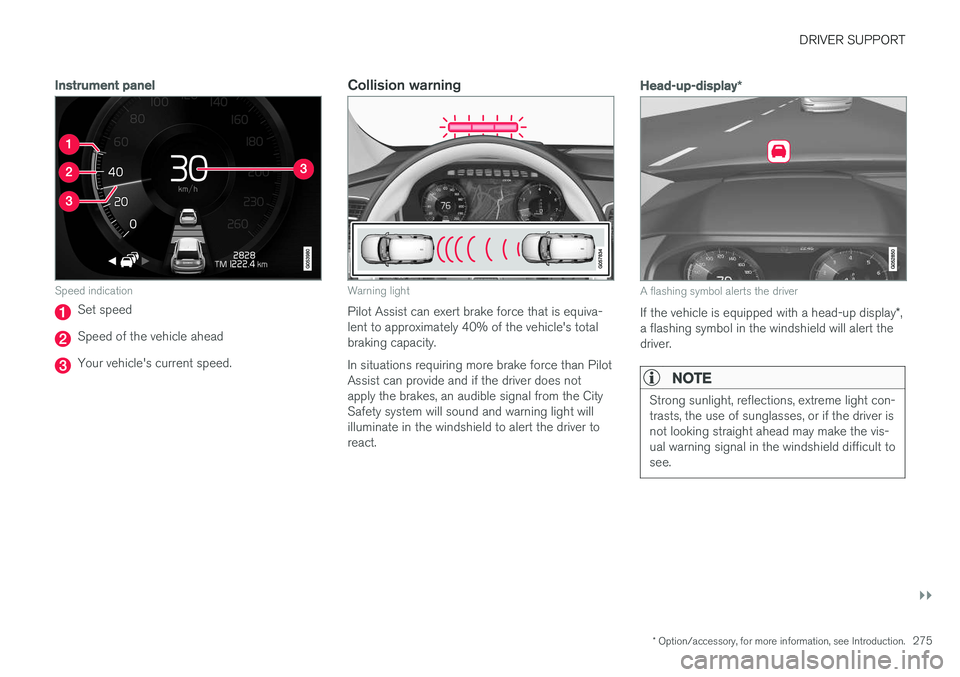
Instrument panel
Speed indication
Set speed
Speed of the vehicle ahead
Your vehicle's current speed.
Collision warning
Warning light
Pilot Assist can exert brake force that is equiva- lent to approximately 40% of the vehicle's totalbraking capacity. In situations requiring more brake force than Pilot Assist can provide and if the driver does notapply the brakes, an audible signal from the CitySafety system will sound and warning light willilluminate in the windshield to alert the driver toreact.
Head-up-display*
A flashing symbol alerts the driver
If the vehicle is equipped with a head-up display *,
a flashing symbol in the windshield will alert the driver.
NOTE
Strong sunlight, reflections, extreme light con- trasts, the use of sunglasses, or if the driver isnot looking straight ahead may make the vis-ual warning signal in the windshield difficult tosee.
Page 279 of 546
DRIVER SUPPORT
}}
* Option/accessory, for more information, see Introduction.277
•the lane's side market lines are missing, badly faded or cross each other.
• the division of lanes is not clear, e.g.,when a line divides or merges withanother, at exits or if there are many roadsigns/markers.
• if there are edges or other lines on ornear the lane, e.g., curbs, cracks, repairedareas, sharp shadows, etc.
• the lane is narrow or winding.
• the weather conditions (rain, snow, fog,slush, poor visibility, backlighting, etc).
The driver should also be aware that Pilot Assist has the following limitations: • High curbs, barriers and temporary obsta- cles (cones, barriers etc) may not bedetected or could be detected incorrectlyas side marker lines, which may create arisk of collision. The driver must ensure asafe distance to these obstacles.
• The camera or radar sensor may not beable to detect objects if there are pot-holes or if there are stationary objectspartially or completely blocking the road.
• Pilot Assist does not "see" pedestrians,animals, etc.
• Pilot Assist's steering capacity is limitedand may not always be able to help thedriver keep the vehicle in the lane.Hands on the steering wheel
Pilot Assist only functions when the driver's hands are on the steering wheel
, which is con-
tinuously monitored by the system. If this is notthe case, the driver will be alerted by a text mes-sage in the instrument panel. If the driver's handsare not returned to the steering wheel, an audiblesignal will sound. If the driver does not return his/her hands to the steering wheel after the audible signal, PilotAssist will go into standby mode and must be reactivated by pressing
.
Related information
• Pilot Assist
* (p. 273)
Deactivating/resuming Pilot Assist
Putting Pilot Assist in standby mode
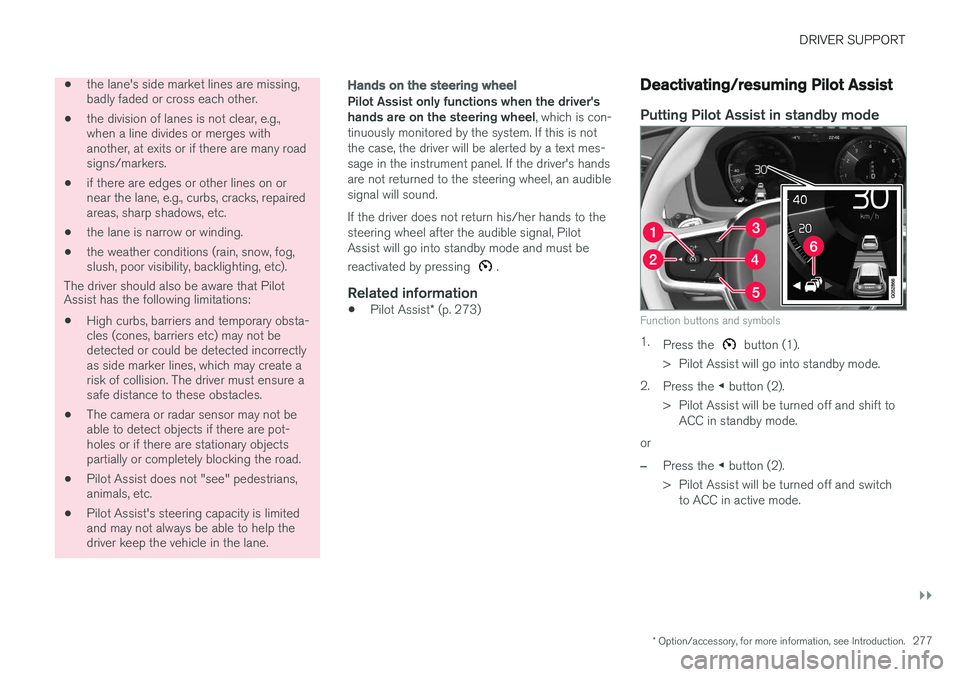
Function buttons and symbols
1.
Press the button (1).
> Pilot Assist will go into standby mode.
2. Press the ◀ button (2).
> Pilot Assist will be turned off and shift to ACC in standby mode.
or
–Press the ◀ button (2).
> Pilot Assist will be turned off and switch to ACC in active mode.
Page 280 of 546
||
DRIVER SUPPORT
* Option/accessory, for more information, see Introduction.
278
Standby mode due to driver action
If a turn signal is used or if the accelerator pedal is pressed, Pilot Assist will temporarily go intostandby mode. When the turn signal is switchedoff or the accelerator pedal is released, PilotAssist will reactivate automatically. Automatic reactivation from standby mode can be done within 1 minute. After 1 minute haselapsed, Pilot Assist must be reactivated man- ually by pressing the
button.
Pilot Assist will temporarily go into standby mode if: • the brakes are applied
• the gear selector is moved to the
N position.
The driver will then have to regulate speed and distance to the vehicle ahead, or reactivate Pilot Assist manually by pressing the
button on
the left-side steering wheel keypad.
Automatic standby mode
Pilot Assist interacts with other systems, such as Electronic Stability Control. If any of these othersystems are not functioning properly, Pilot Assistwill automatically be deactivated.
WARNING
If this happens, the driver will be alerted by an audible signal and a message in the instru-ment panel. The driver will have to adapt thevehicle's speed, apply the brakes when nec-essary and keep a safe distance to the vehicleahead.
Pilot Assist switches automatically to standby mode if: • the camera cannot detect the traffic lane's side marker lines
• the vehicle ahead is not within a reasonable(detectable) distance
• the driver's hands are not on the steeringwheel
• the driver unbuckles the seat belt
• engine speed (rpm) is too high/low
• the wheels lose traction
• brake temperature is too high
• The camera lens/radar sensor is covered bye.g., wet snow or if heavy rain interferes withradar waves
Reactivating Pilot Assist from standby mode
–Press the button (1).
> The most recently set speed will be used.
Related information
• Pilot Assist
* (p. 273)
Setting a Pilot Assist time interval
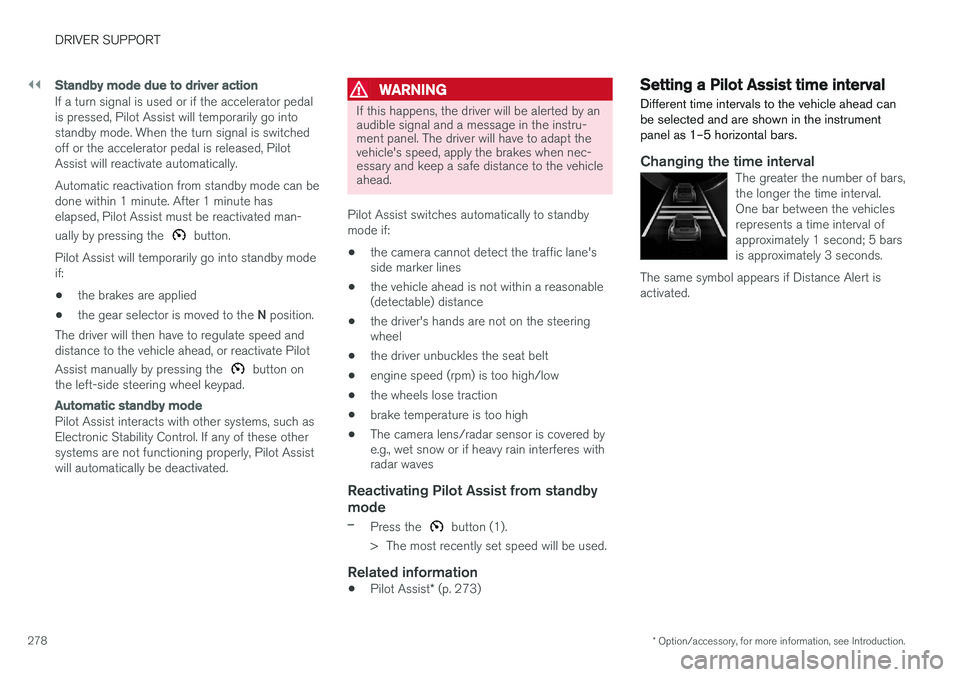
Different time intervals to the vehicle ahead can be selected and are shown in the instrumentpanel as 1–5 horizontal bars.
Changing the time intervalThe greater the number of bars, the longer the time interval.One bar between the vehiclesrepresents a time interval ofapproximately 1 second; 5 barsis approximately 3 seconds.
The same symbol appears if Distance Alert isactivated.
Page 291 of 546
DRIVER SUPPORT
}}}}
289
When City Safety applies the brakes, the brake lights will illuminate. When City Safety is triggered and applies the brakes, a text message will be displayed in theinstrument panel.
Related information
•
City Safety
™ troubleshooting (p. 295)
• City Safety in crossing traffic (p. 291)
• City Safety limitations (p. 293)
• City Safety symbols and messages (p. 297)
• Detecting cyclists and pedestrians with City Safety (p. 290)
• Rear Collision Warning (RCW) (p. 292)
• City Safety warning level settings (p. 289)
• City Safety in crossing traffic (p. 291)
• Seat belts (p. 64)
City Safety warning level settings
City Safety is always activated but the function's warning distance can be adjusted.
NOTE
City Safety cannot be turned off and activates automatically each time the engine/electricmotor is started.
Setting a warning level (distance)
The distance set for warnings determines the system's responsiveness and sets the distance atwhich visual, audible and tangible (haptic) warn-ings will be triggered. To do so:1. Tap
Settings in the center display's Top
view.
2. Tap
My CarIntelliSafeCity Safety.
3. Choose among
Earlier, Normal or Later.
Begin by choosing
Earlier. If too many warnings
are given, change to Normal.
If the driver feels that warnings are given too often, the warning level can be lowered. Thismeans that warnings will be provided later, result-ing in fewer warnings being given. The setting
Later should only used in exceptional
circumstances, e.g., for a more dynamic driving style.
WARNING
• No automatic system can be guaranteed to function 100% correctly in all situa-tions. For that reason, never test CitySafety by driving toward a person orobject. This could result in serious injuryor death.
• Even if the setting
Earlier has been
selected, warnings may be perceived as being given late, e.g., if the difference inspeed is great or if the vehicle aheadbrakes suddenly.
• City Safety can provide a warning for apotential collision but it can never shortenthe driver's reaction time.
• To help make City Safety as effective as possible, always using the setting
Earlieris recommended.
NOTE
•Due to local traffic regulations in certain markets, RCW will
not activate the rear
turn signals. That part of the function will be deactivated.
• The use of the rear turn signals will alsobe deactivated if the City Safety warning level is set at
Later. See also the section
"Setting a warning level (distance)" in the article "City Safety settings."
• If RCW detects a vehicle approachingfrom behind, the seat belt pretensioners