buttons VOLVO XC90 T8 2016 Owner´s Manual
[x] Cancel search | Manufacturer: VOLVO, Model Year: 2016, Model line: XC90 T8, Model: VOLVO XC90 T8 2016Pages: 546, PDF Size: 10.26 MB
Page 274 of 546
||
DRIVER SUPPORT
* Option/accessory, for more information, see Introduction.
272
Related information
• Adaptive Cruise Control (ACC)
* (p. 266)
• Starting and activating Pilot Assist (p. 276)
• Setting an Adaptive Cruise Control time interval (p. 272)
Setting an Adaptive Cruise Control time interval
ACC makes it possible to set various time inter- vals to the vehicle ahead.
Different time intervals to the vehicle ahead can be selectedand are shown in the instru-ment panel as 1–5 horizontalbars. The greater the number ofbars, the longer the time inter-val. One bar between the vehi-
cles represents a time interval of approximately1 second; 5 bars is approximately 3 seconds. The same symbol appears if Distance Alert is activated.
• If the symbol shows two vehicle's, ACC is actively following the vehicle ahead.
• If only one vehicle is displayed, ACC is
not
actively following another vehicle.
Changing a time interval
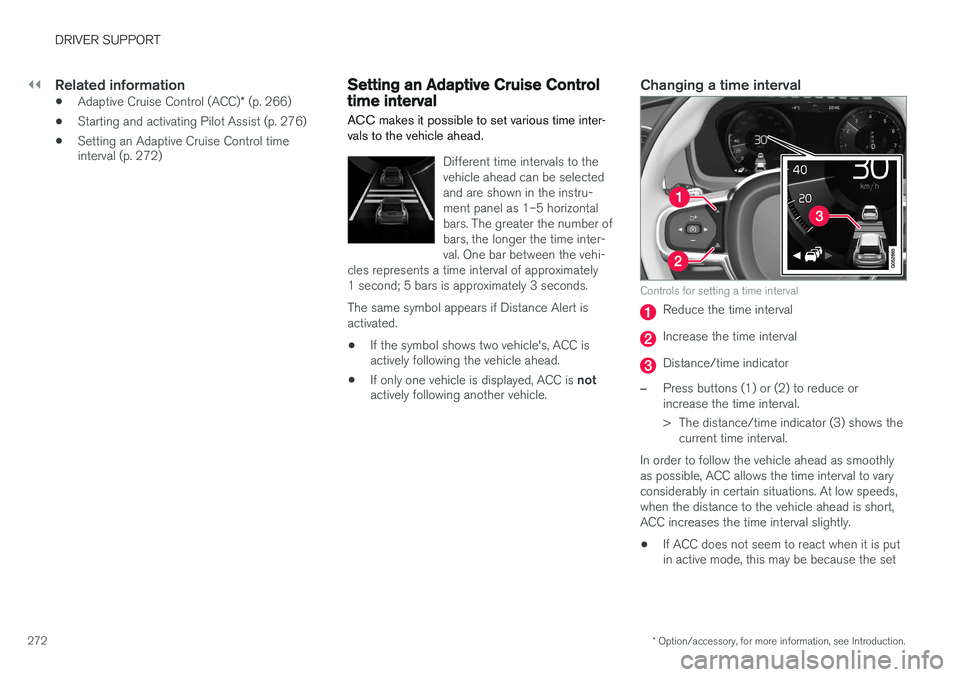
Controls for setting a time interval
Reduce the time interval
Increase the time interval
Distance/time indicator
–Press buttons (1) or (2) to reduce or increase the time interval.
> The distance/time indicator (3) shows the
current time interval.
In order to follow the vehicle ahead as smoothly as possible, ACC allows the time interval to varyconsiderably in certain situations. At low speeds,when the distance to the vehicle ahead is short,ACC increases the time interval slightly. • If ACC does not seem to react when it is put in active mode, this may be because the set
Page 276 of 546
||
DRIVER SUPPORT
274
WARNING
•Pilot Assist is designed to be a supple- mentary driving aid and cannot cover alldriving situations, traffic, weather and/orroad conditions.
• The driver should be familiar with all ofthe information in this article regardingPilot Assist, including its limitations.
• Pilot Assist is not intended to replace thedriver's attention and judgement.
• Pilot Assist must only be used wherethere are clearly visible traffic lane sidemarker lines on both sides of the currenttraffic lane. In other circumstances thereis an increased risk of collision with sur-rounding obstacles that are not detectedby the system.
• The driver is always responsible for steer-ing the vehicle and maintaining a suitablespeed and distance to the vehicle aheadand must intervene if necessary, even ifPilot Assist is being used.
Pilot Assist is designed to regulate speed smoothly but in situations calling for fast braking,the driver must apply the brakes. This applies tosituations where there are considerable differen-ces in speed or if the vehicle ahead brakes sud-denly. Due to the limitations of the camera andradar sensor, the system may apply the brakes inyour vehicle suddenly or not at all. The default speed for Pilot Assist is preset toapprox. 30 mph (50 km/h) and cannot bechanged. If the vehicle ahead increases speed toover 30 mph (50 km/h) and pulls away from yourvehicle, Pilot Assist will go into standby mode.
NOTE
•
Pilot Assist maintenance should only be carried out by a trained and qualifiedVolvo service technician.
• Pilot Assist regulates your vehicle'sspeed using the accelerator pedal andthe brakes. Please be aware that theremay be a faint sound from the brakeswhen the system is using them.
WARNING
•Pilot Assist does not react to people or animals, or small vehicles such as bicy-cles and motorcycles. It also does notreact to low trailers, slow moving, parkedor approaching vehicles, or stationaryobjects.
• Do not use Pilot Assist in demandingdriving conditions such as city driving orother heavy traffic situations, in slipperyconditions, when there is a great deal ofwater or slush on the road, during heavyrain or snow, in poor visibility, on windingroads or on highway on- or off-ramps.
Pilot Assist overview
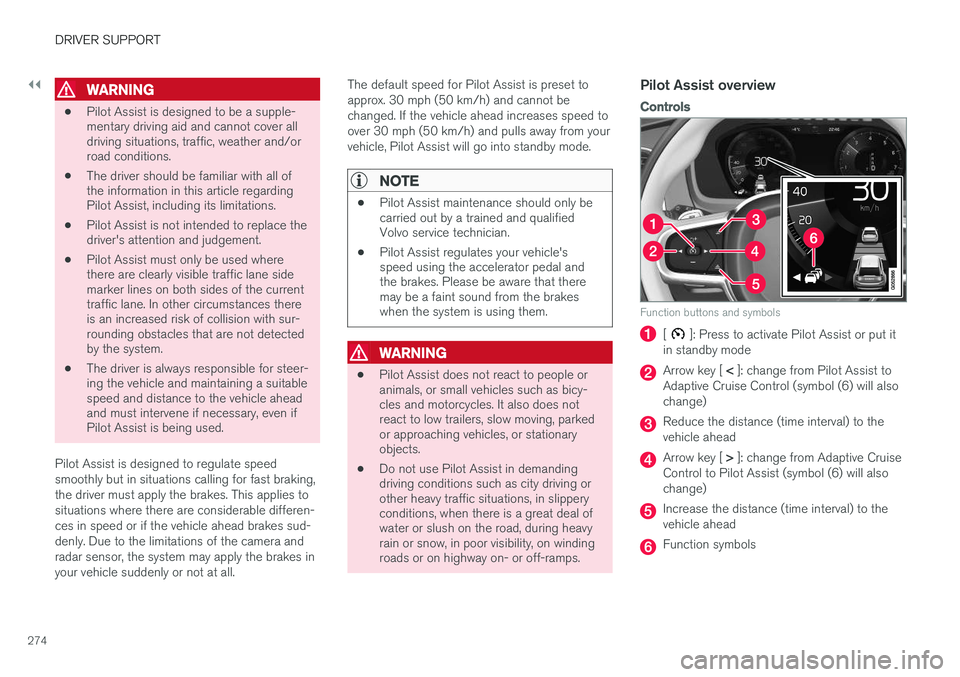
Controls
Function buttons and symbols
[]: Press to activate Pilot Assist or put it
in standby mode
Arrow key [ < ]: change from Pilot Assist to
Adaptive Cruise Control (symbol (6) will also change)
Reduce the distance (time interval) to the vehicle ahead
Arrow key [ > ]: change from Adaptive Cruise
Control to Pilot Assist (symbol (6) will also change)
Increase the distance (time interval) to the vehicle ahead
Function symbols
Page 278 of 546
||
DRIVER SUPPORT
* Option/accessory, for more information, see Introduction.
276
WARNING
Pilot Assist only provides warnings for vehi- cles that its radar sensor and camera havedetected. For this reason, a warning may begiven later than expected or not at all. Thedriver should never wait for a warning beforeapplying the brakes.
Related information
• Pilot Assist limitations (p. 280)
• Pilot Assist auto-hold brake function (p. 279)
• Distance Alert
* (p. 329)
• Other Adaptive Cruise Control (ACC) func-tions (p. 282)
• Setting an Adaptive Cruise Control timeinterval (p. 272)
Starting and activating Pilot Assist
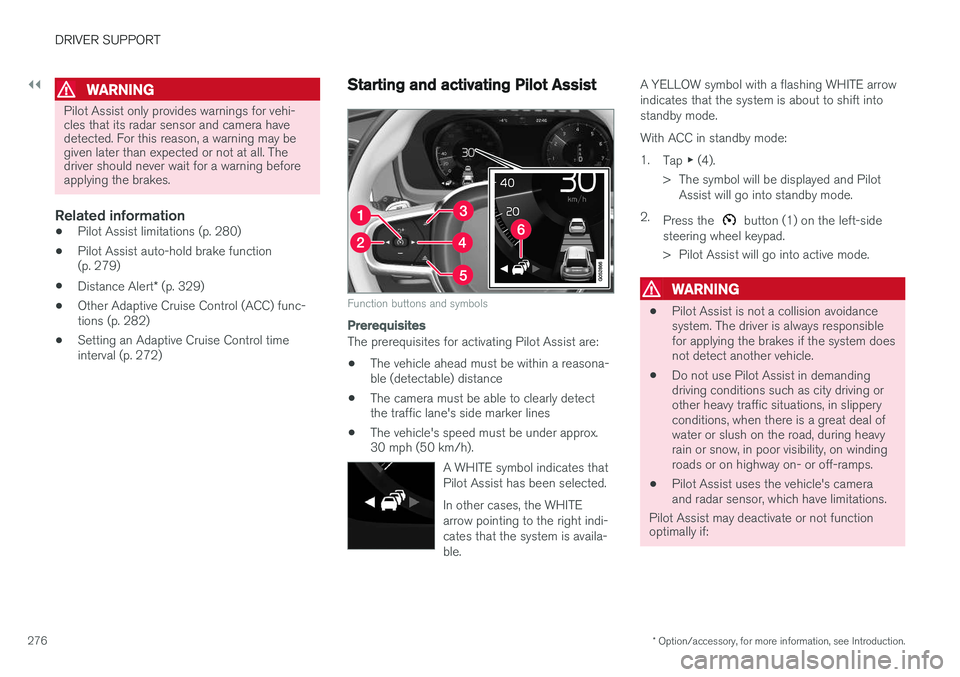
Function buttons and symbols
Prerequisites
The prerequisites for activating Pilot Assist are:
• The vehicle ahead must be within a reasona- ble (detectable) distance
• The camera must be able to clearly detectthe traffic lane's side marker lines
• The vehicle's speed must be under approx.30 mph (50 km/h).
A WHITE symbol indicates that Pilot Assist has been selected. In other cases, the WHITE arrow pointing to the right indi-cates that the system is availa-ble.
A YELLOW symbol with a flashing WHITE arrow indicates that the system is about to shift intostandby mode. With ACC in standby mode:1.Tap ▶ (4).
> The symbol will be displayed and Pilot Assist will go into standby mode.
2. Press the
button (1) on the left-side
steering wheel keypad.
> Pilot Assist will go into active mode.
WARNING
• Pilot Assist is not a collision avoidance system. The driver is always responsiblefor applying the brakes if the system doesnot detect another vehicle.
• Do not use Pilot Assist in demandingdriving conditions such as city driving orother heavy traffic situations, in slipperyconditions, when there is a great deal ofwater or slush on the road, during heavyrain or snow, in poor visibility, on windingroads or on highway on- or off-ramps.
• Pilot Assist uses the vehicle's cameraand radar sensor, which have limitations.
Pilot Assist may deactivate or not function optimally if:
Page 279 of 546
DRIVER SUPPORT
}}
* Option/accessory, for more information, see Introduction.277
•the lane's side market lines are missing, badly faded or cross each other.
• the division of lanes is not clear, e.g.,when a line divides or merges withanother, at exits or if there are many roadsigns/markers.
• if there are edges or other lines on ornear the lane, e.g., curbs, cracks, repairedareas, sharp shadows, etc.
• the lane is narrow or winding.
• the weather conditions (rain, snow, fog,slush, poor visibility, backlighting, etc).
The driver should also be aware that Pilot Assist has the following limitations: • High curbs, barriers and temporary obsta- cles (cones, barriers etc) may not bedetected or could be detected incorrectlyas side marker lines, which may create arisk of collision. The driver must ensure asafe distance to these obstacles.
• The camera or radar sensor may not beable to detect objects if there are pot-holes or if there are stationary objectspartially or completely blocking the road.
• Pilot Assist does not "see" pedestrians,animals, etc.
• Pilot Assist's steering capacity is limitedand may not always be able to help thedriver keep the vehicle in the lane.Hands on the steering wheel
Pilot Assist only functions when the driver's hands are on the steering wheel
, which is con-
tinuously monitored by the system. If this is notthe case, the driver will be alerted by a text mes-sage in the instrument panel. If the driver's handsare not returned to the steering wheel, an audiblesignal will sound. If the driver does not return his/her hands to the steering wheel after the audible signal, PilotAssist will go into standby mode and must be reactivated by pressing
.
Related information
• Pilot Assist
* (p. 273)
Deactivating/resuming Pilot Assist
Putting Pilot Assist in standby mode
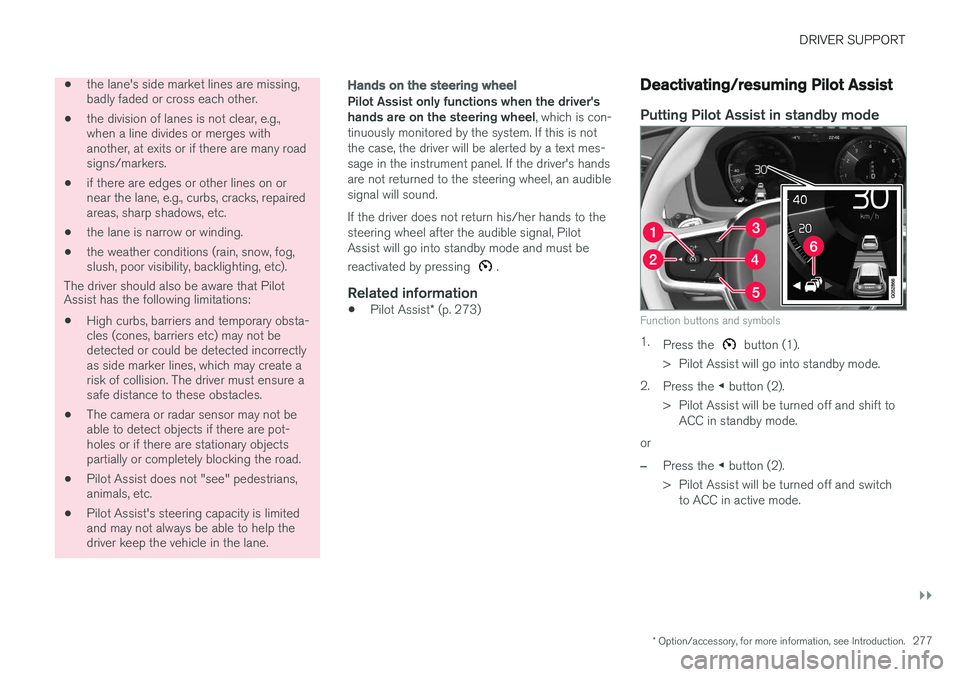
Function buttons and symbols
1.
Press the button (1).
> Pilot Assist will go into standby mode.
2. Press the ◀ button (2).
> Pilot Assist will be turned off and shift to ACC in standby mode.
or
–Press the ◀ button (2).
> Pilot Assist will be turned off and switch to ACC in active mode.
Page 300 of 546
DRIVER SUPPORT
* Option/accessory, for more information, see Introduction.
298
Speed limiter (SL) *
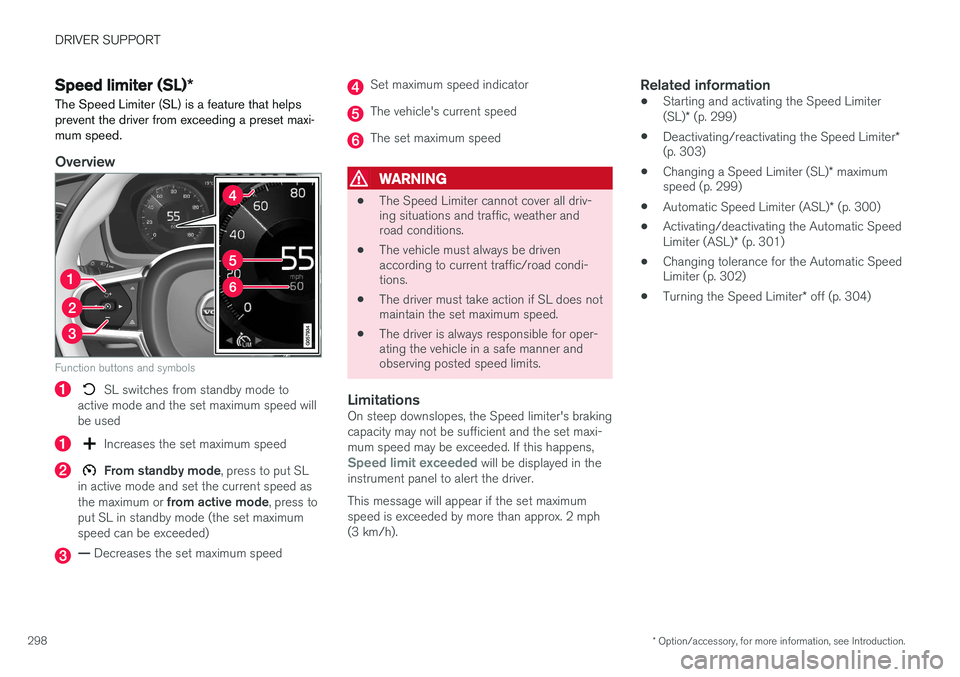
The Speed Limiter (SL) is a feature that helps prevent the driver from exceeding a preset maxi-mum speed.
Overview
Function buttons and symbols
SL switches from standby mode to
active mode and the set maximum speed will be used
Increases the set maximum speed
From standby mode , press to put SL
in active mode and set the current speed as the maximum or from active mode , press to
put SL in standby mode (the set maximum speed can be exceeded)
— Decreases the set maximum speed
Set maximum speed indicator
The vehicle's current speed
The set maximum speed
WARNING
• The Speed Limiter cannot cover all driv- ing situations and traffic, weather androad conditions.
• The vehicle must always be drivenaccording to current traffic/road condi-tions.
• The driver must take action if SL does notmaintain the set maximum speed.
• The driver is always responsible for oper-ating the vehicle in a safe manner andobserving posted speed limits.
LimitationsOn steep downslopes, the Speed limiter's braking capacity may not be sufficient and the set maxi-mum speed may be exceeded. If this happens,
Speed limit exceeded will be displayed in the
instrument panel to alert the driver. This message will appear if the set maximum speed is exceeded by more than approx. 2 mph(3 km/h).
Related information
• Starting and activating the Speed Limiter (SL)
* (p. 299)
• Deactivating/reactivating the Speed Limiter
*
(p. 303)
• Changing a Speed Limiter (SL)
* maximum
speed (p. 299)
• Automatic Speed Limiter (ASL)
* (p. 300)
• Activating/deactivating the Automatic SpeedLimiter (ASL)
* (p. 301)
• Changing tolerance for the Automatic Speed Limiter (p. 302)
• Turning the Speed Limiter
* off (p. 304)
Page 301 of 546
DRIVER SUPPORT
}}
* Option/accessory, for more information, see Introduction.299
Starting and activating the Speed Limiter (SL)*
The Speed Limiter (SL) is a feature that has to be selected and activated in order to set a maxi-mum speed.
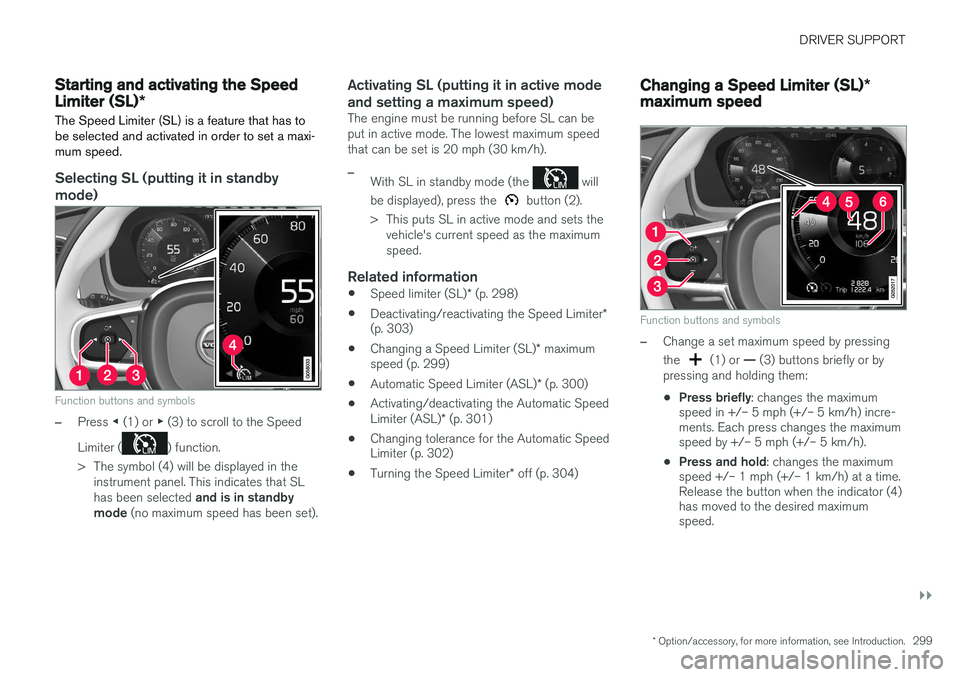
Selecting SL (putting it in standby mode)
Function buttons and symbols
–Press ◀ (1) or ▶ (3) to scroll to the Speed
Limiter (
) function.
> The symbol (4) will be displayed in the instrument panel. This indicates that SL has been selected and is in standby
mode (no maximum speed has been set).
Activating SL (putting it in active mode and setting a maximum speed)
The engine must be running before SL can be put in active mode. The lowest maximum speedthat can be set is 20 mph (30 km/h).
–With SL in standby mode (the will
be displayed), press the
button (2).
> This puts SL in active mode and sets the vehicle's current speed as the maximum speed.
Related information
• Speed limiter (SL)
* (p. 298)
• Deactivating/reactivating the Speed Limiter
*
(p. 303)
• Changing a Speed Limiter (SL)
* maximum
speed (p. 299)
• Automatic Speed Limiter (ASL)
* (p. 300)
• Activating/deactivating the Automatic Speed Limiter (ASL)
* (p. 301)
• Changing tolerance for the Automatic Speed Limiter (p. 302)
• Turning the Speed Limiter
* off (p. 304)
Changing a Speed Limiter (SL) *
maximum speed
Function buttons and symbols
–Change a set maximum speed by pressing the
(1) or — (3) buttons briefly or by
pressing and holding them: • Press briefly
: changes the maximum
speed in +/– 5 mph (+/– 5 km/h) incre- ments. Each press changes the maximumspeed by +/– 5 mph (+/– 5 km/h).
• Press and hold
: changes the maximum
speed +/– 1 mph (+/– 1 km/h) at a time.Release the button when the indicator (4)has moved to the desired maximumspeed.
Page 304 of 546
DRIVER SUPPORT
* Option/accessory, for more information, see Introduction.
302
Changing tolerance for the Automatic Speed Limiter
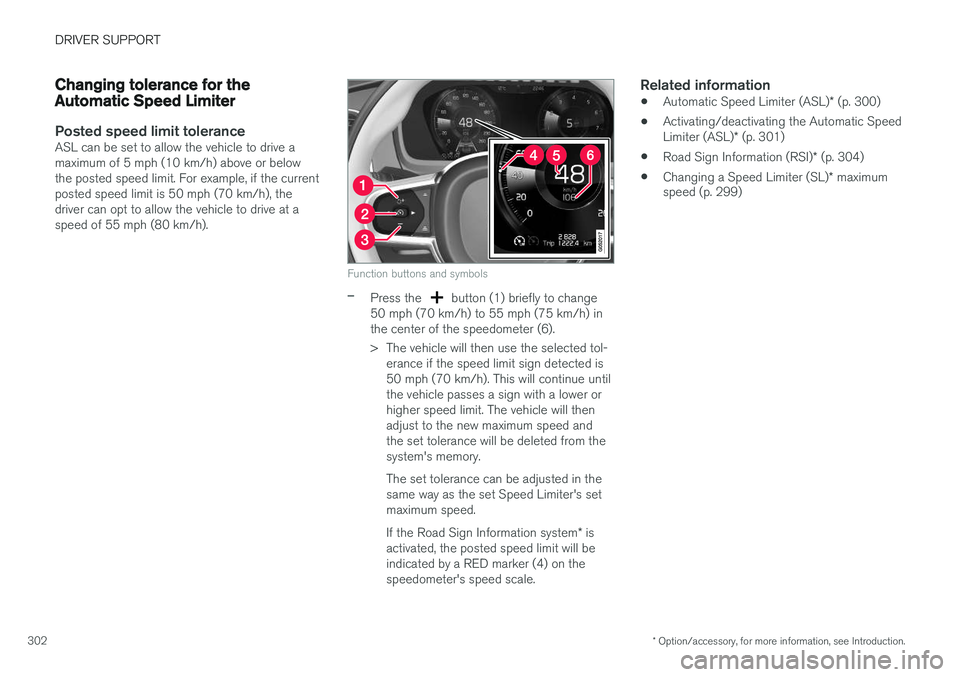
Posted speed limit toleranceASL can be set to allow the vehicle to drive a maximum of 5 mph (10 km/h) above or belowthe posted speed limit. For example, if the currentposted speed limit is 50 mph (70 km/h), thedriver can opt to allow the vehicle to drive at aspeed of 55 mph (80 km/h).
Function buttons and symbols
–Press the button (1) briefly to change
50 mph (70 km/h) to 55 mph (75 km/h) in the center of the speedometer (6).
> The vehicle will then use the selected tol- erance if the speed limit sign detected is 50 mph (70 km/h). This will continue untilthe vehicle passes a sign with a lower orhigher speed limit. The vehicle will thenadjust to the new maximum speed andthe set tolerance will be deleted from thesystem's memory. The set tolerance can be adjusted in the same way as the set Speed Limiter's setmaximum speed. If the Road Sign Information system * is
activated, the posted speed limit will be indicated by a RED marker (4) on thespeedometer's speed scale.
Related information
• Automatic Speed Limiter (ASL)
* (p. 300)
• Activating/deactivating the Automatic Speed Limiter (ASL)
* (p. 301)
• Road Sign Information (RSI)
* (p. 304)
• Changing a Speed Limiter (SL)
* maximum
speed (p. 299)
Page 305 of 546
DRIVER SUPPORT
* Option/accessory, for more information, see Introduction.303
Deactivating/reactivating the Speed Limiter*
The Speed Limiter (SL) can be temporarily deac- tivated and put in standby mode.
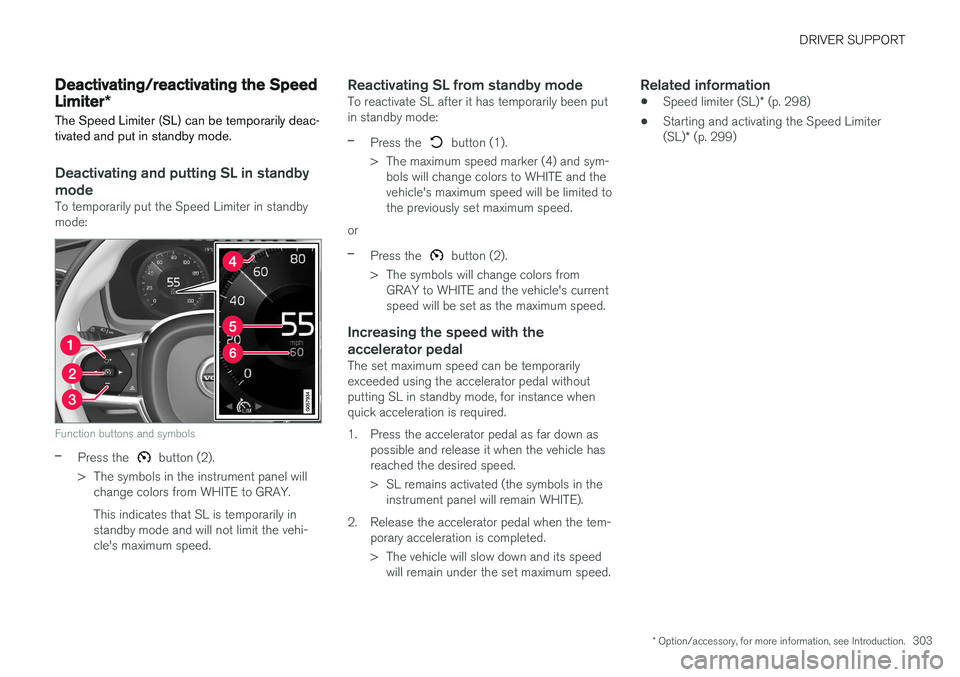
Deactivating and putting SL in standby
mode
To temporarily put the Speed Limiter in standby mode:
Function buttons and symbols
–Press the button (2).
> The symbols in the instrument panel will change colors from WHITE to GRAY. This indicates that SL is temporarily in standby mode and will not limit the vehi-cle's maximum speed.
Reactivating SL from standby modeTo reactivate SL after it has temporarily been putin standby mode:
–Press the button (1).
> The maximum speed marker (4) and sym- bols will change colors to WHITE and the vehicle's maximum speed will be limited tothe previously set maximum speed.
or
–Press the button (2).
> The symbols will change colors from GRAY to WHITE and the vehicle's current speed will be set as the maximum speed.
Increasing the speed with the accelerator pedal
The set maximum speed can be temporarily exceeded using the accelerator pedal withoutputting SL in standby mode, for instance whenquick acceleration is required.
1. Press the accelerator pedal as far down as possible and release it when the vehicle has reached the desired speed.
> SL remains activated (the symbols in theinstrument panel will remain WHITE).
2. Release the accelerator pedal when the tem- porary acceleration is completed.
> The vehicle will slow down and its speedwill remain under the set maximum speed.
Related information
• Speed limiter (SL)
* (p. 298)
• Starting and activating the Speed Limiter (SL)
* (p. 299)
Page 306 of 546
DRIVER SUPPORT
* Option/accessory, for more information, see Introduction.
304
Turning the Speed Limiter * off
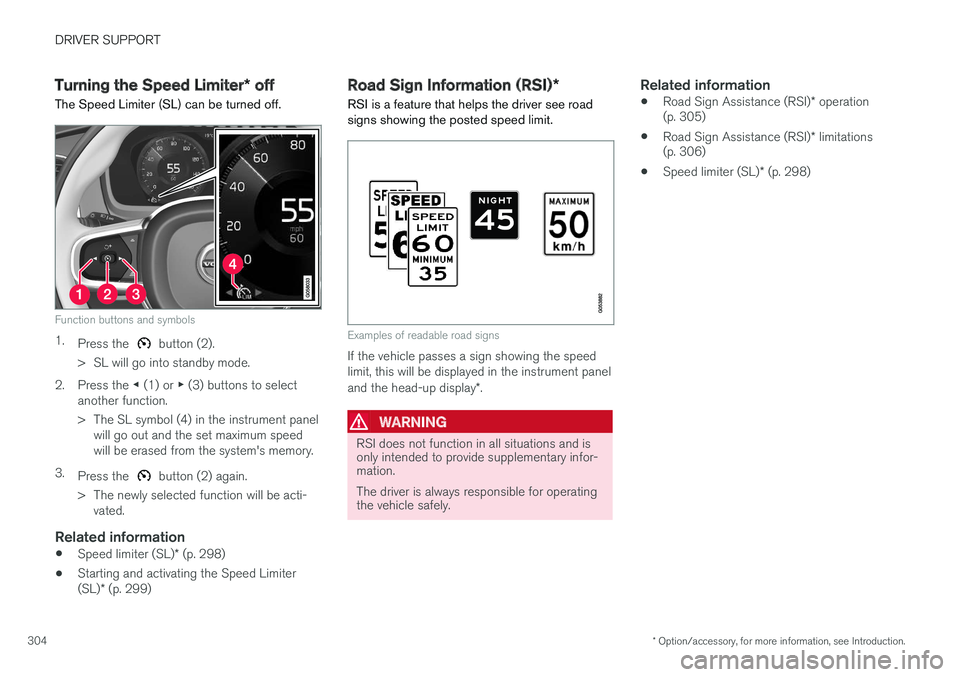
The Speed Limiter (SL) can be turned off.
Function buttons and symbols
1. Press the button (2).
> SL will go into standby mode.
2. Press the ◀ (1) or ▶ (3) buttons to select
another function.
> The SL symbol (4) in the instrument panel will go out and the set maximum speed will be erased from the system's memory.
3. Press the
button (2) again.
> The newly selected function will be acti- vated.
Related information
• Speed limiter (SL)
* (p. 298)
• Starting and activating the Speed Limiter (SL)
* (p. 299)
Road Sign Information (RSI) *
RSI is a feature that helps the driver see road signs showing the posted speed limit.
Examples of readable road signs
If the vehicle passes a sign showing the speed limit, this will be displayed in the instrument panel and the head-up display *.
WARNING
RSI does not function in all situations and is only intended to provide supplementary infor-mation. The driver is always responsible for operating the vehicle safely.
Related information
• Road Sign Assistance (RSI)
* operation
(p. 305)
• Road Sign Assistance (RSI)
* limitations
(p. 306)
• Speed limiter (SL)
* (p. 298)
Page 393 of 546
STARTING AND DRIVING
}}
391
Available drive modes
HYBRID
This is the default mode. The vehicle normally starts in
Hybrid mode 4
. The
engine management system uses both the elec- tric motor and gasoline engine (separately or intandem) and calculates the optimal levels of per-formance, fuel consumption and comfort. Athigher speeds, ground clearance is reducedautomatically to help reduce wind resistance. The amount of driving done using only the elec- tric motor in
Hybrid mode is determined by the
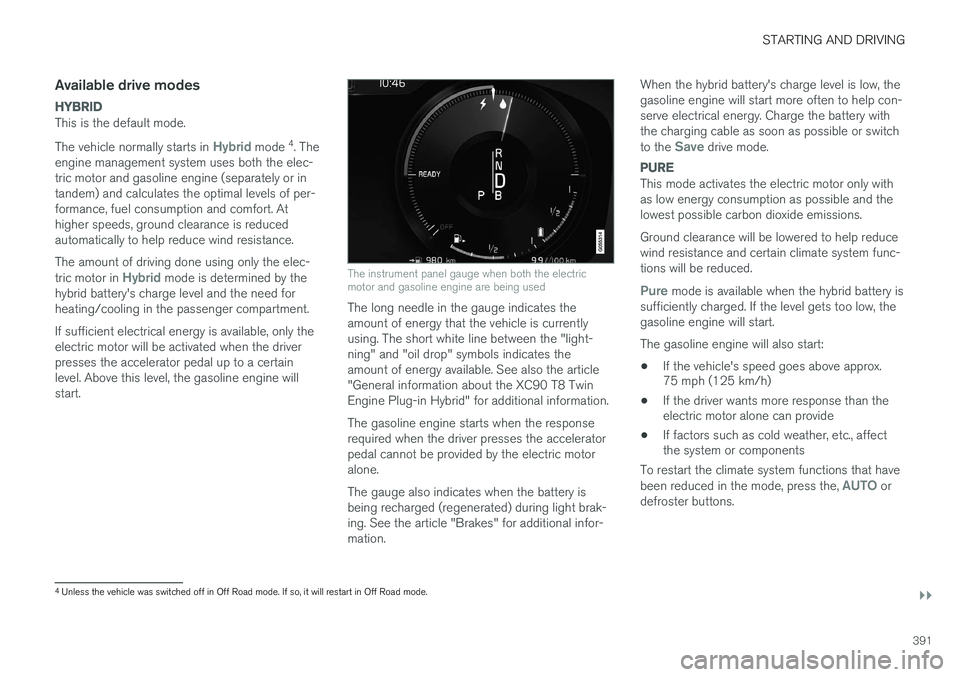
hybrid battery's charge level and the need for heating/cooling in the passenger compartment. If sufficient electrical energy is available, only the electric motor will be activated when the driverpresses the accelerator pedal up to a certainlevel. Above this level, the gasoline engine willstart.The instrument panel gauge when both the electric motor and gasoline engine are being used
The long needle in the gauge indicates the amount of energy that the vehicle is currentlyusing. The short white line between the "light-ning" and "oil drop" symbols indicates theamount of energy available. See also the article"General information about the XC90 T8 TwinEngine Plug-in Hybrid" for additional information. The gasoline engine starts when the response required when the driver presses the acceleratorpedal cannot be provided by the electric motoralone. The gauge also indicates when the battery is being recharged (regenerated) during light brak-ing. See the article "Brakes" for additional infor-mation. When the hybrid battery's charge level is low, thegasoline engine will start more often to help con-serve electrical energy. Charge the battery withthe charging cable as soon as possible or switch to the
Save drive mode.
PURE
This mode activates the electric motor only with as low energy consumption as possible and thelowest possible carbon dioxide emissions. Ground clearance will be lowered to help reduce wind resistance and certain climate system func-tions will be reduced.
Pure mode is available when the hybrid battery is
sufficiently charged. If the level gets too low, the gasoline engine will start. The gasoline engine will also start: • If the vehicle's speed goes above approx. 75 mph (125 km/h)
• If the driver wants more response than theelectric motor alone can provide
• If factors such as cold weather, etc., affectthe system or components
To restart the climate system functions that have been reduced in the mode, press the,
AUTO or
defroster buttons.
4 Unless the vehicle was switched off in Off Road mode. If so, it will restart in Off Road mode.