key VOLVO XC90 T8 2016 Owner´s Manual
[x] Cancel search | Manufacturer: VOLVO, Model Year: 2016, Model line: XC90 T8, Model: VOLVO XC90 T8 2016Pages: 546, PDF Size: 10.26 MB
Page 266 of 546
||
DRIVER SUPPORT
264
–Press the button (2).
> The set speed marker (4) and symbols will change colors from GRAY to WHITE. CC will then set and maintain the vehicle's current speed.
Related information
•Cruise Control (CC) (p. 261)
• Starting and activating Cruise Control (p. 261)
Turning Cruise Control off
Cruise Control (CC) can be deactivated (turned off).
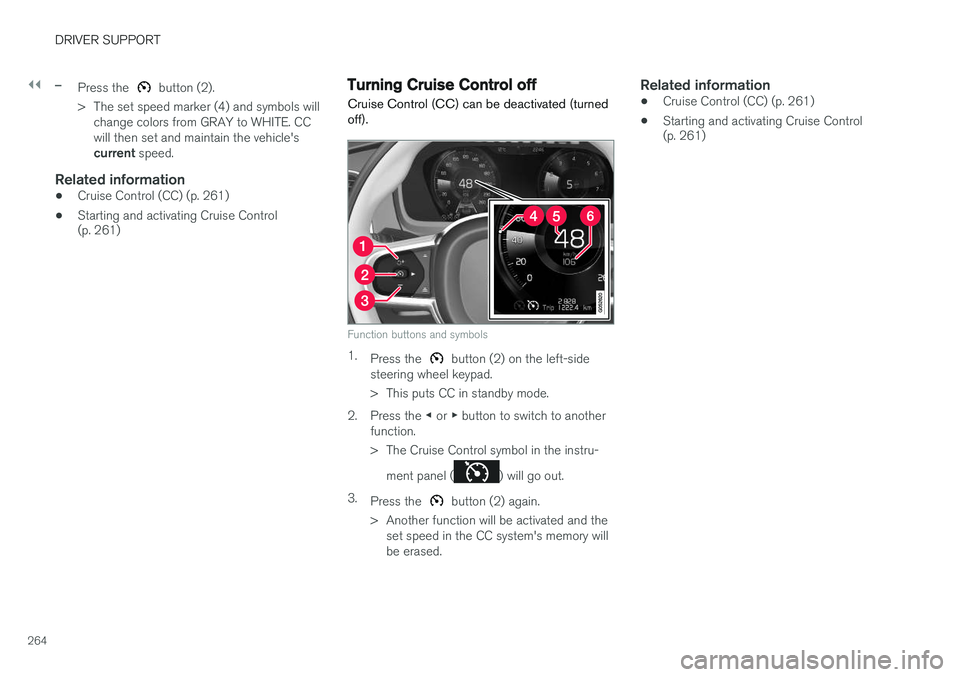
Function buttons and symbols
1. Press the button (2) on the left-side
steering wheel keypad.
> This puts CC in standby mode.
2. Press the ◀ or ▶ button to switch to another
function.
> The Cruise Control symbol in the instru-
ment panel (
) will go out.
3. Press the
button (2) again.
> Another function will be activated and the set speed in the CC system's memory will be erased.
Related information
• Cruise Control (CC) (p. 261)
• Starting and activating Cruise Control (p. 261)
Page 267 of 546
DRIVER SUPPORT
* Option/accessory, for more information, see Introduction.265
Switching between Cruise Control (CC) and Adaptive Cruise Control (ACC)*
In models equipped with the optional ACC, the driver can toggle between CC and ACC.
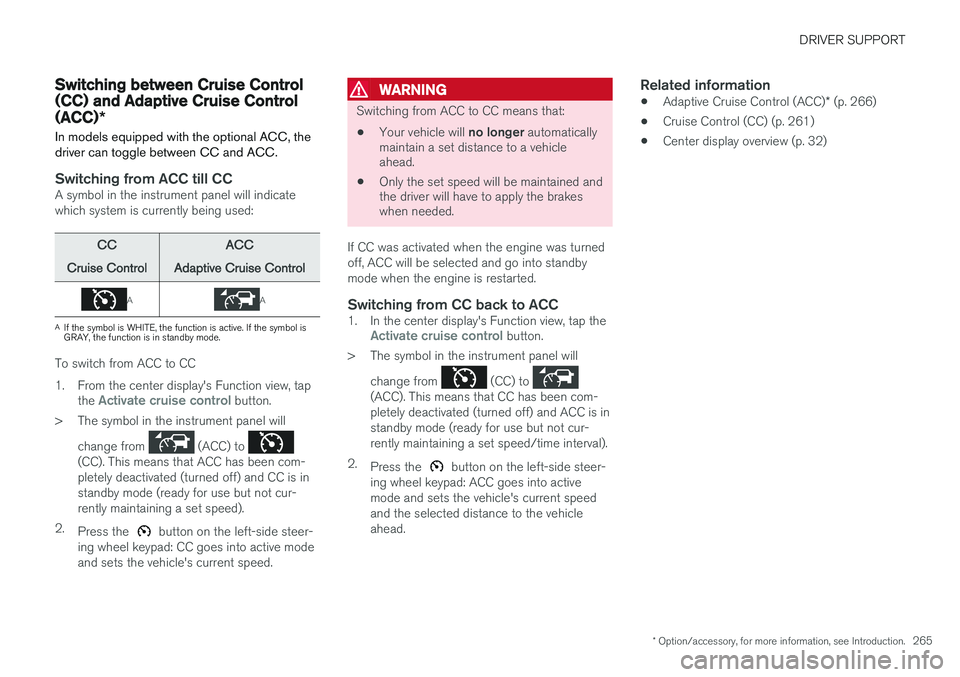
Switching from ACC till CCA symbol in the instrument panel will indicate which system is currently being used:
CC
Cruise ControlACC
Adaptive Cruise Control
AA
A If the symbol is WHITE, the function is active. If the symbol is GRAY, the function is in standby mode.
To switch from ACC to CC
1. From the center display's Function view, tap
the
Activate cruise control button.
> The symbol in the instrument panel will
change from
(ACC) to (CC). This means that ACC has been com- pletely deactivated (turned off) and CC is instandby mode (ready for use but not cur-rently maintaining a set speed).
2. Press the
button on the left-side steer-
ing wheel keypad: CC goes into active mode and sets the vehicle's current speed.
WARNING
Switching from ACC to CC means that:
• Your vehicle will
no longer automatically
maintain a set distance to a vehicle ahead.
• Only the set speed will be maintained andthe driver will have to apply the brakeswhen needed.
If CC was activated when the engine was turned off, ACC will be selected and go into standbymode when the engine is restarted.
Switching from CC back to ACC1. In the center display's Function view, tap theActivate cruise control button.
> The symbol in the instrument panel will
change from
(CC) to (ACC). This means that CC has been com- pletely deactivated (turned off) and ACC is instandby mode (ready for use but not cur-rently maintaining a set speed/time interval).
2. Press the
button on the left-side steer-
ing wheel keypad: ACC goes into active mode and sets the vehicle's current speedand the selected distance to the vehicleahead.
Related information
• Adaptive Cruise Control (ACC)
* (p. 266)
• Cruise Control (CC) (p. 261)
• Center display overview (p. 32)
Page 271 of 546
DRIVER SUPPORT
}}
* Option/accessory, for more information, see Introduction.269
Activating ACC (putting it in active mode and setting a speed)
Before ACC can be put in active mode:
• The driver's seat belt must be buckled and the driver's door must be closed.
• There must be a vehicle ahead (a target vehi-cle) or your vehicle's current speed must beat least 10 mph (15 km/h).
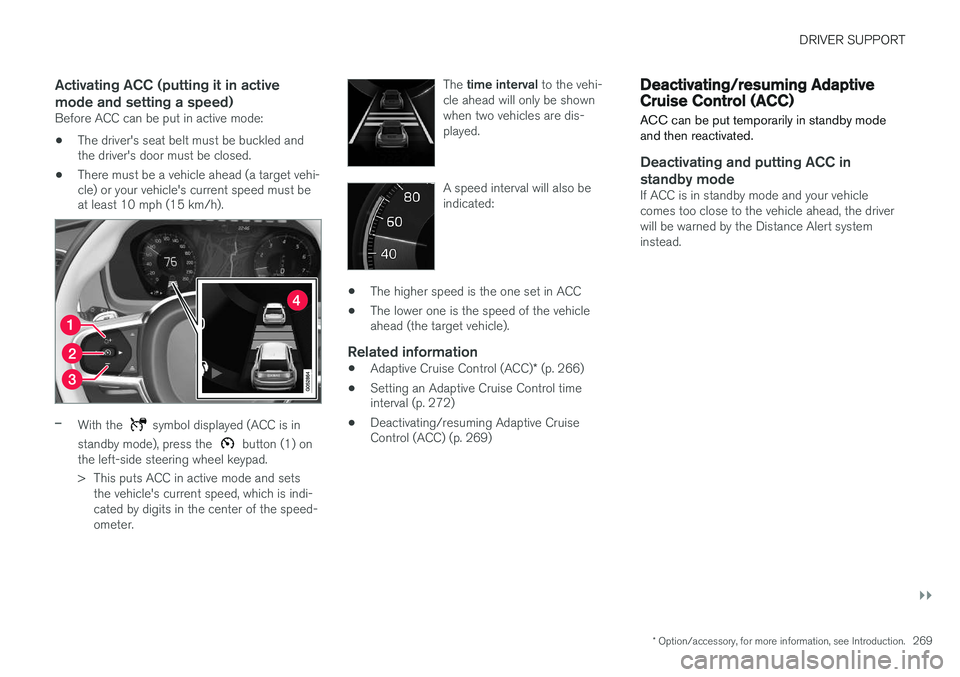
–With the symbol displayed (ACC is in
standby mode), press the
button (1) on
the left-side steering wheel keypad.
> This puts ACC in active mode and sets the vehicle's current speed, which is indi- cated by digits in the center of the speed-ometer. The
time interval to the vehi-
cle ahead will only be shownwhen two vehicles are dis-played.
A speed interval will also be indicated:
• The higher speed is the one set in ACC
• The lower one is the speed of the vehicle ahead (the target vehicle).
Related information
•
Adaptive Cruise Control (ACC)
* (p. 266)
• Setting an Adaptive Cruise Control timeinterval (p. 272)
• Deactivating/resuming Adaptive CruiseControl (ACC) (p. 269)
Deactivating/resuming Adaptive Cruise Control (ACC)
ACC can be put temporarily in standby mode and then reactivated.
Deactivating and putting ACC in standby mode
If ACC is in standby mode and your vehicle comes too close to the vehicle ahead, the driverwill be warned by the Distance Alert systeminstead.
Page 276 of 546
||
DRIVER SUPPORT
274
WARNING
•Pilot Assist is designed to be a supple- mentary driving aid and cannot cover alldriving situations, traffic, weather and/orroad conditions.
• The driver should be familiar with all ofthe information in this article regardingPilot Assist, including its limitations.
• Pilot Assist is not intended to replace thedriver's attention and judgement.
• Pilot Assist must only be used wherethere are clearly visible traffic lane sidemarker lines on both sides of the currenttraffic lane. In other circumstances thereis an increased risk of collision with sur-rounding obstacles that are not detectedby the system.
• The driver is always responsible for steer-ing the vehicle and maintaining a suitablespeed and distance to the vehicle aheadand must intervene if necessary, even ifPilot Assist is being used.
Pilot Assist is designed to regulate speed smoothly but in situations calling for fast braking,the driver must apply the brakes. This applies tosituations where there are considerable differen-ces in speed or if the vehicle ahead brakes sud-denly. Due to the limitations of the camera andradar sensor, the system may apply the brakes inyour vehicle suddenly or not at all. The default speed for Pilot Assist is preset toapprox. 30 mph (50 km/h) and cannot bechanged. If the vehicle ahead increases speed toover 30 mph (50 km/h) and pulls away from yourvehicle, Pilot Assist will go into standby mode.
NOTE
•
Pilot Assist maintenance should only be carried out by a trained and qualifiedVolvo service technician.
• Pilot Assist regulates your vehicle'sspeed using the accelerator pedal andthe brakes. Please be aware that theremay be a faint sound from the brakeswhen the system is using them.
WARNING
•Pilot Assist does not react to people or animals, or small vehicles such as bicy-cles and motorcycles. It also does notreact to low trailers, slow moving, parkedor approaching vehicles, or stationaryobjects.
• Do not use Pilot Assist in demandingdriving conditions such as city driving orother heavy traffic situations, in slipperyconditions, when there is a great deal ofwater or slush on the road, during heavyrain or snow, in poor visibility, on windingroads or on highway on- or off-ramps.
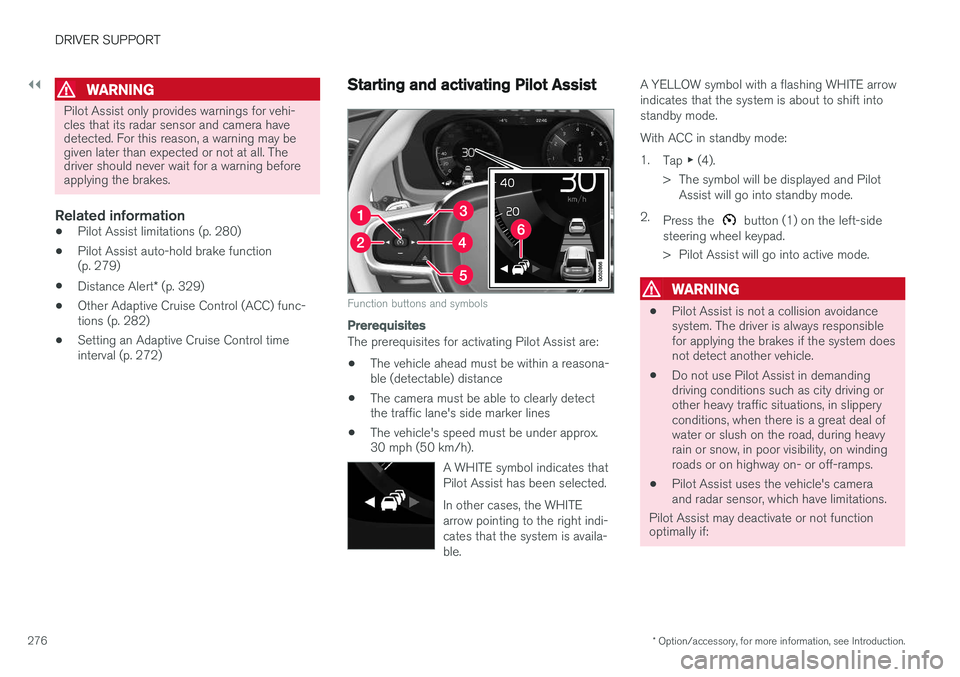
Pilot Assist overview
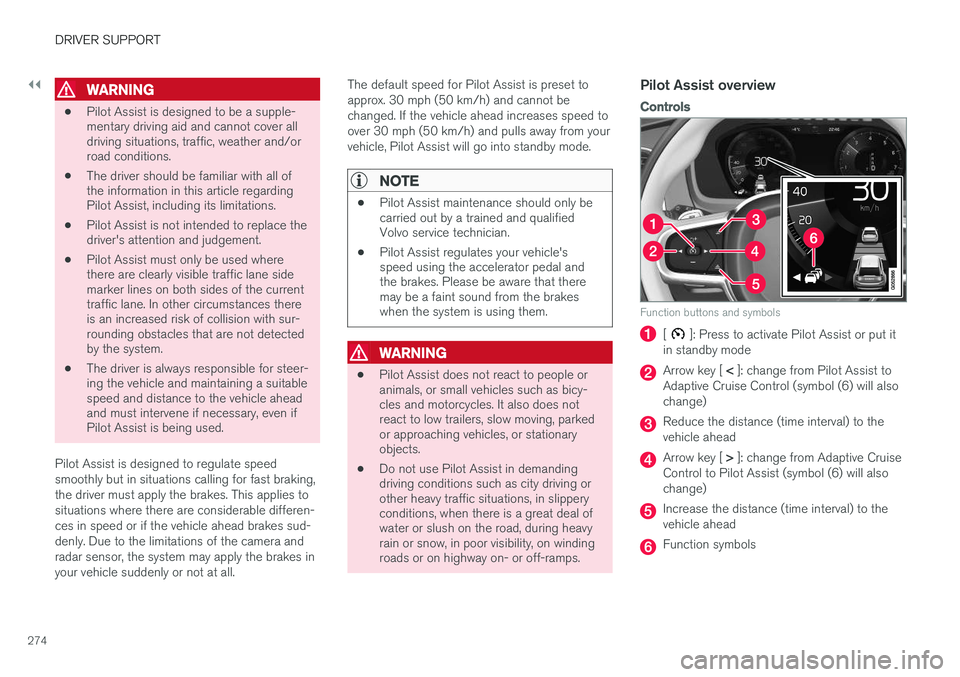
Controls
Function buttons and symbols
[]: Press to activate Pilot Assist or put it
in standby mode
Arrow key [ < ]: change from Pilot Assist to
Adaptive Cruise Control (symbol (6) will also change)
Reduce the distance (time interval) to the vehicle ahead
Arrow key [ > ]: change from Adaptive Cruise
Control to Pilot Assist (symbol (6) will also change)
Increase the distance (time interval) to the vehicle ahead
Function symbols
Page 278 of 546
||
DRIVER SUPPORT
* Option/accessory, for more information, see Introduction.
276
WARNING
Pilot Assist only provides warnings for vehi- cles that its radar sensor and camera havedetected. For this reason, a warning may begiven later than expected or not at all. Thedriver should never wait for a warning beforeapplying the brakes.
Related information
• Pilot Assist limitations (p. 280)
• Pilot Assist auto-hold brake function (p. 279)
• Distance Alert
* (p. 329)
• Other Adaptive Cruise Control (ACC) func-tions (p. 282)
• Setting an Adaptive Cruise Control timeinterval (p. 272)
Starting and activating Pilot Assist
Function buttons and symbols
Prerequisites
The prerequisites for activating Pilot Assist are:
• The vehicle ahead must be within a reasona- ble (detectable) distance
• The camera must be able to clearly detectthe traffic lane's side marker lines
• The vehicle's speed must be under approx.30 mph (50 km/h).
A WHITE symbol indicates that Pilot Assist has been selected. In other cases, the WHITE arrow pointing to the right indi-cates that the system is availa-ble.
A YELLOW symbol with a flashing WHITE arrow indicates that the system is about to shift intostandby mode. With ACC in standby mode:1.Tap ▶ (4).
> The symbol will be displayed and Pilot Assist will go into standby mode.
2. Press the
button (1) on the left-side
steering wheel keypad.
> Pilot Assist will go into active mode.
WARNING
• Pilot Assist is not a collision avoidance system. The driver is always responsiblefor applying the brakes if the system doesnot detect another vehicle.
• Do not use Pilot Assist in demandingdriving conditions such as city driving orother heavy traffic situations, in slipperyconditions, when there is a great deal ofwater or slush on the road, during heavyrain or snow, in poor visibility, on windingroads or on highway on- or off-ramps.
• Pilot Assist uses the vehicle's cameraand radar sensor, which have limitations.
Pilot Assist may deactivate or not function optimally if:
Page 280 of 546
||
DRIVER SUPPORT
* Option/accessory, for more information, see Introduction.
278
Standby mode due to driver action
If a turn signal is used or if the accelerator pedal is pressed, Pilot Assist will temporarily go intostandby mode. When the turn signal is switchedoff or the accelerator pedal is released, PilotAssist will reactivate automatically. Automatic reactivation from standby mode can be done within 1 minute. After 1 minute haselapsed, Pilot Assist must be reactivated man- ually by pressing the
button.
Pilot Assist will temporarily go into standby mode if: • the brakes are applied
• the gear selector is moved to the
N position.
The driver will then have to regulate speed and distance to the vehicle ahead, or reactivate Pilot Assist manually by pressing the
button on
the left-side steering wheel keypad.
Automatic standby mode
Pilot Assist interacts with other systems, such as Electronic Stability Control. If any of these othersystems are not functioning properly, Pilot Assistwill automatically be deactivated.
WARNING
If this happens, the driver will be alerted by an audible signal and a message in the instru-ment panel. The driver will have to adapt thevehicle's speed, apply the brakes when nec-essary and keep a safe distance to the vehicleahead.
Pilot Assist switches automatically to standby mode if: • the camera cannot detect the traffic lane's side marker lines
• the vehicle ahead is not within a reasonable(detectable) distance
• the driver's hands are not on the steeringwheel
• the driver unbuckles the seat belt
• engine speed (rpm) is too high/low
• the wheels lose traction
• brake temperature is too high
• The camera lens/radar sensor is covered bye.g., wet snow or if heavy rain interferes withradar waves
Reactivating Pilot Assist from standby mode
–Press the button (1).
> The most recently set speed will be used.
Related information
• Pilot Assist
* (p. 273)
Setting a Pilot Assist time interval
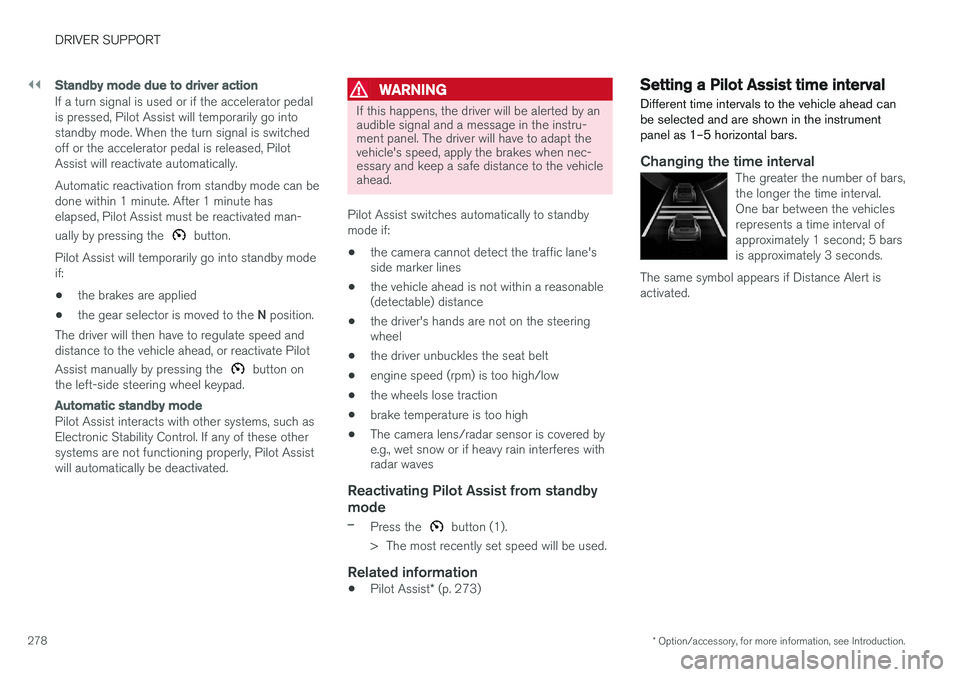
Different time intervals to the vehicle ahead can be selected and are shown in the instrumentpanel as 1–5 horizontal bars.
Changing the time intervalThe greater the number of bars, the longer the time interval.One bar between the vehiclesrepresents a time interval ofapproximately 1 second; 5 barsis approximately 3 seconds.
The same symbol appears if Distance Alert isactivated.
Page 284 of 546
DRIVER SUPPORT
282
Other Adaptive Cruise Control (ACC) functions
ACC has several supplementary functions:
• Changing target vehicles
• Automatic standby mode when changing tar- gets
• Auto-hold brake function
• Deactivation of the auto-hold brake function
• Automatically setting the parking brake
Changing target vehicles
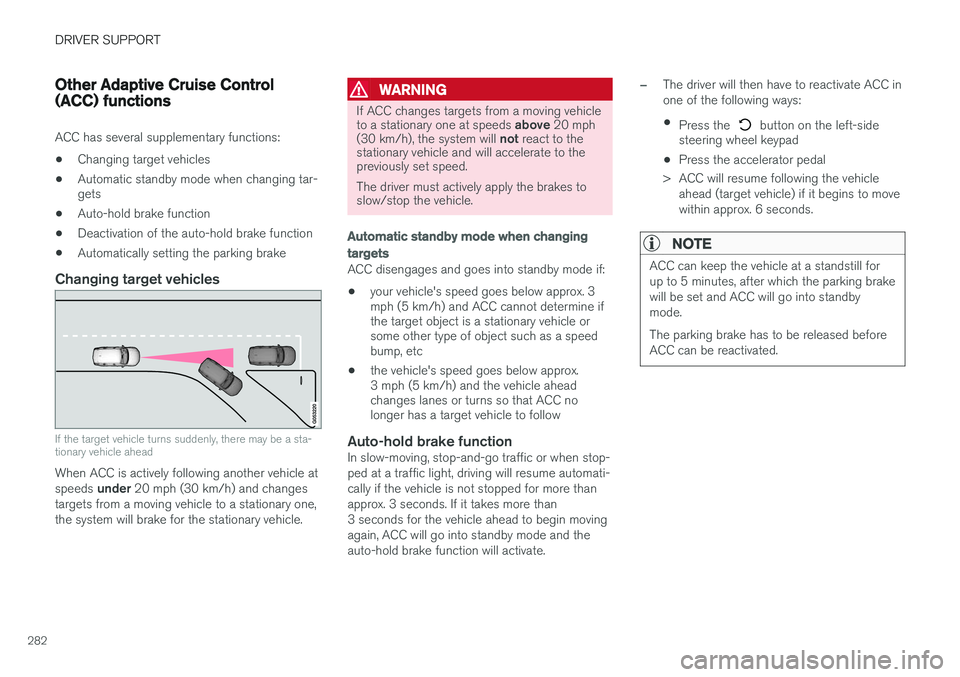
If the target vehicle turns suddenly, there may be a sta- tionary vehicle ahead
When ACC is actively following another vehicle at speeds
under 20 mph (30 km/h) and changes
targets from a moving vehicle to a stationary one, the system will brake for the stationary vehicle.
WARNING
If ACC changes targets from a moving vehicle to a stationary one at speeds above 20 mph
(30 km/h), the system will not react to the
stationary vehicle and will accelerate to the previously set speed. The driver must actively apply the brakes to slow/stop the vehicle.
Automatic standby mode when changing targets
ACC disengages and goes into standby mode if:
• your vehicle's speed goes below approx. 3 mph (5 km/h) and ACC cannot determine ifthe target object is a stationary vehicle orsome other type of object such as a speedbump, etc
• the vehicle's speed goes below approx.3 mph (5 km/h) and the vehicle aheadchanges lanes or turns so that ACC nolonger has a target vehicle to follow
Auto-hold brake functionIn slow-moving, stop-and-go traffic or when stop- ped at a traffic light, driving will resume automati-cally if the vehicle is not stopped for more thanapprox. 3 seconds. If it takes more than3 seconds for the vehicle ahead to begin movingagain, ACC will go into standby mode and theauto-hold brake function will activate.
–The driver will then have to reactivate ACC in one of the following ways:
• Press the
button on the left-side
steering wheel keypad
• Press the accelerator pedal
> ACC will resume following the vehicle ahead (target vehicle) if it begins to move
within approx. 6 seconds.
NOTE
ACC can keep the vehicle at a standstill for up to 5 minutes, after which the parking brakewill be set and ACC will go into standbymode. The parking brake has to be released before ACC can be reactivated.
Page 287 of 546
DRIVER SUPPORT
* Option/accessory, for more information, see Introduction.285
Adaptive Cruise Control (ACC) - fault tracing
If this symbol is displayed in the instru- ment panel and the message
Windscreen sensor Sensor
blocked, see Owner's manual
appears, the ACC radar sensor is blocked and cannot detect vehicles ahead.
This message also indicates that the following systems may have reduced functionality:
• Distance Alert
• City Safety
• Driver Alert Control
• Pilot Assist
• Lane Departure Warning (LDW) •
Lane Keeping Aid (LKA)
• Traffic Sign Information (TSI)
The following table lists possible causes for thismessage being displayed and suitable actions:
CauseAction
The windshield in front of the radar is dirty or covered with snow/ice.Clean/clear the windshield in front of the radar.
Heavy rain or snow is interfering with the radar signals.No action possible. Heavy precipitation may affect the function of the radar.
Swirling water or snow from the surface of the road may interfere with the radar signals.No action possible. A very wet or snow-covered road surface may affect the function of the radar.
The windshield in front of the radar is clean but the message remains in the display.Wait a short time. It may take several minutes for the radar to detect that it is no longer obstructed.
A text message can be erased by briefly pressing the O button on the right-side steering wheel
keypad. If the message recurs, contact a trained and authorized Volvo service technician orretailer.
Related information
• Adaptive Cruise Control (ACC)
* (p. 266)
Page 303 of 546
DRIVER SUPPORT
* Option/accessory, for more information, see Introduction.301
•
Deactivating/reactivating the Speed Limiter
*
(p. 303)
• Road Sign Information (RSI)
* (p. 304)
Activating/deactivating the Automatic Speed Limiter (ASL) *
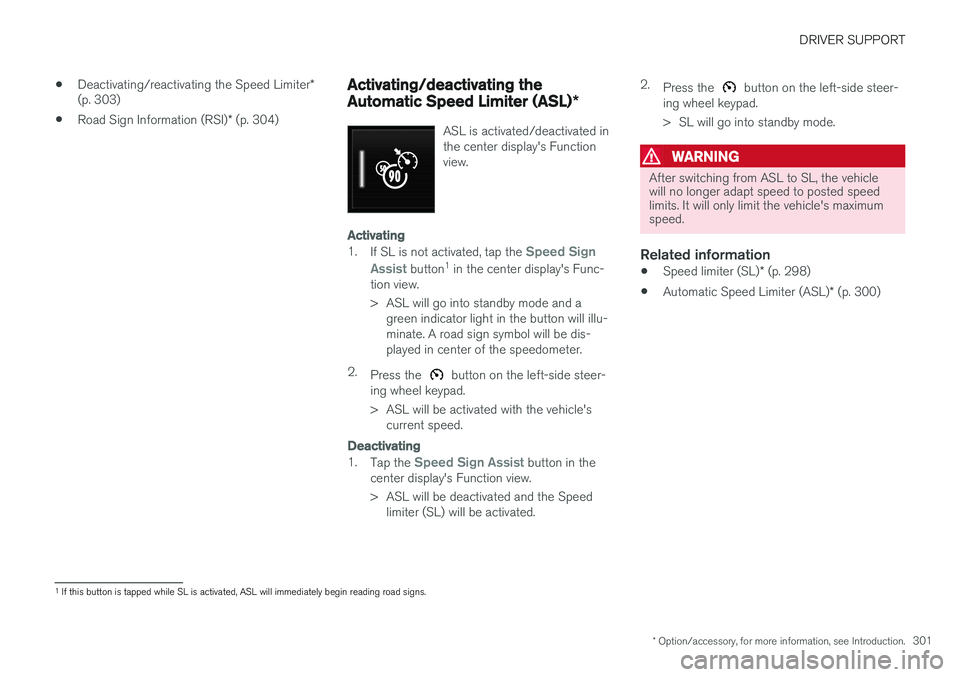
ASL is activated/deactivated in the center display's Functionview.
Activating
1.
If SL is not activated, tap the Speed Sign
Assist
button 1
in the center display's Func-
tion view.
> ASL will go into standby mode and a green indicator light in the button will illu- minate. A road sign symbol will be dis-played in center of the speedometer.
2. Press the
button on the left-side steer-
ing wheel keypad.
> ASL will be activated with the vehicle's current speed.
Deactivating
1. Tap the Speed Sign Assist button in the
center display's Function view.
> ASL will be deactivated and the Speed limiter (SL) will be activated. 2.
Press the
button on the left-side steer-
ing wheel keypad.
> SL will go into standby mode.
WARNING
After switching from ASL to SL, the vehicle will no longer adapt speed to posted speedlimits. It will only limit the vehicle's maximumspeed.
Related information
• Speed limiter (SL)
* (p. 298)
• Automatic Speed Limiter (ASL)
* (p. 300)
1
If this button is tapped while SL is activated, ASL will immediately begin reading road signs.
Page 324 of 546
DRIVER SUPPORT
* Option/accessory, for more information, see Introduction.
322
Park Assist Pilot (PAP) * symbols
and messages
Park Assist Pilot uses graphics and text mes- sages to indicate if there is a problem with thesystem.Various PAP-related combinations of graphics and text messages are displayed in the instru-ment panel and sometimes also include suitableactions. The following table provides some examples.
MessageExplanation
Park Assist System Unavailable Service requiredThe system is not functioning properly. Contact a trained and qualified Volvo service technician.
Park Assist System Sensors blocked, cleaning neededOne or more of the system's sensors are blocked. Check and clean the sensors as soon as possible.
A text message can be erased by briefly pressing the
O button in the center of the right-side steer-
ing wheel keypad. Contact a Volvo retailer or a trained and qualified Volvo service technician If a message indicatingthat PAP is not functioning properly remains dis-played or recurs.
Related information
• Park Assist Pilot (PAP)
* (p. 316)
• Using Park Assist Pilot (PAP)
* (p. 318)
• Park Assist Pilot (PAP)
* limitations (p. 320)