reset VOLVO XC90 T8 2017 Owner´s Manual
[x] Cancel search | Manufacturer: VOLVO, Model Year: 2017, Model line: XC90 T8, Model: VOLVO XC90 T8 2017Pages: 580, PDF Size: 10.37 MB
Page 251 of 580
LOCKS AND ALARM
}}
* Option/accessory.249
–Press the button14
on the lower edge of
the tailgate.
> The tailgate will close automatically but will not be locked .
–Press the button14
on the lower edge of
the tailgate.
> The tailgate will close automatically. The tailgate and doors will also be locked and
the alarm will be armed.
If the remote key is not close enough to the tail- gate, automatic locking/unlocking/opening/clos-ing will not be possible. Three short audible sig-nals will sound.
Interrupting opening/closing
–This can be done in five ways: • Press the button on the lighting panel
• Press the button on the remote key
• Press either of the buttons on the lower edge of the tailgate
• Press lightly on the rubber-covered buttonunder the tailgate's outside handle
• Move your foot under a sensor beneath the rear bumper
*
> The tailgate will stop moving
Programming the tailgate's maximum opening angle
The tailgate's maximum opening angle can be programmed, for example, if the tailgate has to beopened in a garage with a low ceiling. Programming the opening angle:
–Open the tailgate manually to the desired angle and press and hold the closing buttonon the tailgate's lower edge for at least 3seconds. Release the tailgate.
> Two audible signals will sound to indicate that the selected opening angle has been stored.
Erasing tailgate programming
–Open the tailgate manually to its highest position and press and hold the closing but-ton on the tailgate's lower edge for at least 3seconds. Release the tailgate.
> Two audible signals will sound to indicate that the programmed opening angle has been erased.
NOTE
If the tailgate has been opened and closed continuously too long, the automatic functionwill be deactivated to avoid overloading theelectrical system. The automatic function canbe used again after approximately 2 minutes. If the vehicle's battery has been discharged or disconnected, or if the tailgate has been openfor more than 24 hours, the tailgate must beopened and closed once manually to resetthe system.
Pinch protectionIf the tailgate is obstructed when being opened/ closed, a pinch protection mechanism is acti-vated.
• While opening: the tailgate will stop movingand an audible signal will sound.
• While closing: the tailgate will stop andreturn to the currently programmed maximumopening position. An audible signal willsound.
WARNING
Pay attention to the risk of injury when open- ing/ closing the tailgate. Before opening/closing: Make sure that no one is in the pathof the tailgate as an injury could occur.
14
Models equipped with the optional Passive Entry system have a button to close the tailgate and a button to close and lock the tailgate.
Page 277 of 580
DRIVER SUPPORT
}}
* Option/accessory.275
Distance Alert *
Distance Alert is a function that alerts the driver if the time interval to the vehicle ahead is too short.
Distance Alert is active at speeds above approxi- mately 20 mph (30 km/h) and only reacts to avehicle ahead that is driving in the same direc-tion. No information is provided for vehicles driv-ing toward you, moving very slowly, or at a stand-still.
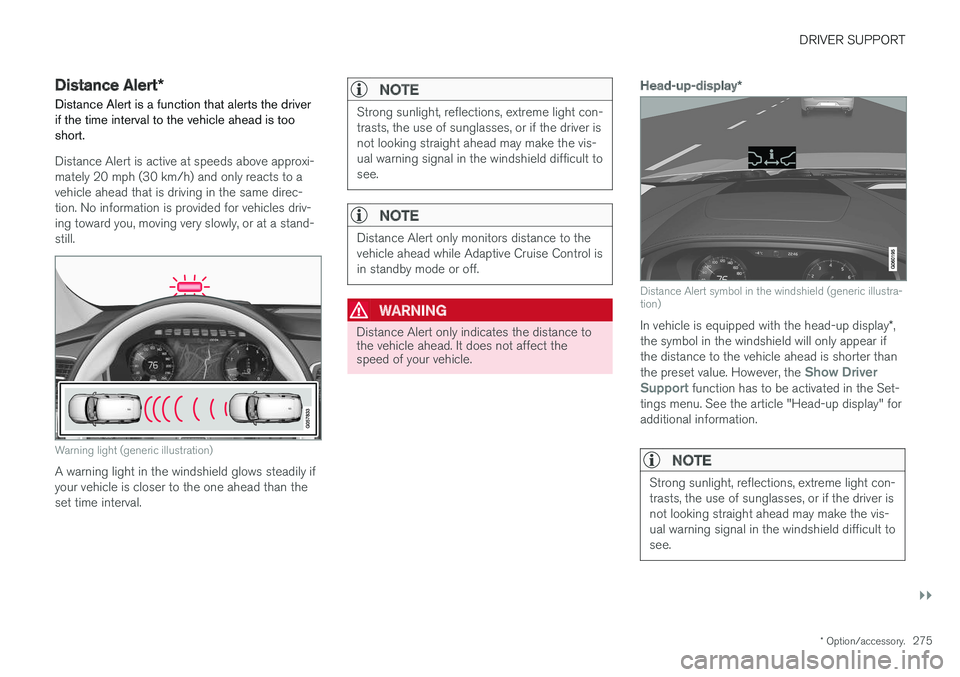
Warning light (generic illustration)
A warning light in the windshield glows steadily if your vehicle is closer to the one ahead than theset time interval.
NOTE
Strong sunlight, reflections, extreme light con- trasts, the use of sunglasses, or if the driver isnot looking straight ahead may make the vis-ual warning signal in the windshield difficult tosee.
NOTE
Distance Alert only monitors distance to the vehicle ahead while Adaptive Cruise Control isin standby mode or off.
WARNING
Distance Alert only indicates the distance to the vehicle ahead. It does not affect thespeed of your vehicle.
Head-up-display *
Distance Alert symbol in the windshield (generic illustra- tion)
In vehicle is equipped with the head-up display *,
the symbol in the windshield will only appear if the distance to the vehicle ahead is shorter than the preset value. However, the
Show Driver
Support function has to be activated in the Set-
tings menu. See the article "Head-up display" for additional information.
NOTE
Strong sunlight, reflections, extreme light con- trasts, the use of sunglasses, or if the driver isnot looking straight ahead may make the vis-ual warning signal in the windshield difficult tosee.
Page 294 of 580
||
DRIVER SUPPORT
292sensor, the system may apply the brakes in your vehicle suddenly or not at all. Pilot Assist is designed to follow a vehicle ahead in the same traffic lane at a preset time intervalset by the driver. If the radar sensor does notdetect a vehicle ahead, the vehicle will insteadmaintain the speed set by the driver. This will alsobe the case if a vehicle ahead accelerates andexceeds the set speed.
• Pilot Assist can follow another vehicle from astandstill up to a speed of approx. 125 mph(200 km/h)
• Pilot Assist can provide steering assistancefrom very low speeds up to approx. 87 mph(140 km/h).
Never exceed posted speed limits.
WARNING
• Pilot Assist is not a collision avoidance system. The driver must react if the sys-tem does not detect another vehicle.
• Pilot Assist does not react to people, ani-mals, stationary objects, small vehicles(such as bicycles and motorcycles), lowtrailers and slow moving, parked orapproaching vehicles.
• Do not use Pilot Assist in demandingdriving conditions such as city driving orother heavy traffic situations, in areas withintersections, in slippery conditions, whenthere is a great deal of water or slush onthe road, during heavy rain or snow, inpoor visibility, on winding roads, on high-way on- or off-ramps or if the vehicle istowing a trailer, boat, etc.
NOTE
•Pilot Assist maintenance should only be carried out by a trained and qualifiedVolvo service technician.
• Pilot Assist regulates your vehicle'sspeed using the accelerator pedal andthe brakes. Please be aware that theremay be a faint sound from the brakeswhen the system is using them.
Pilot Assist overview
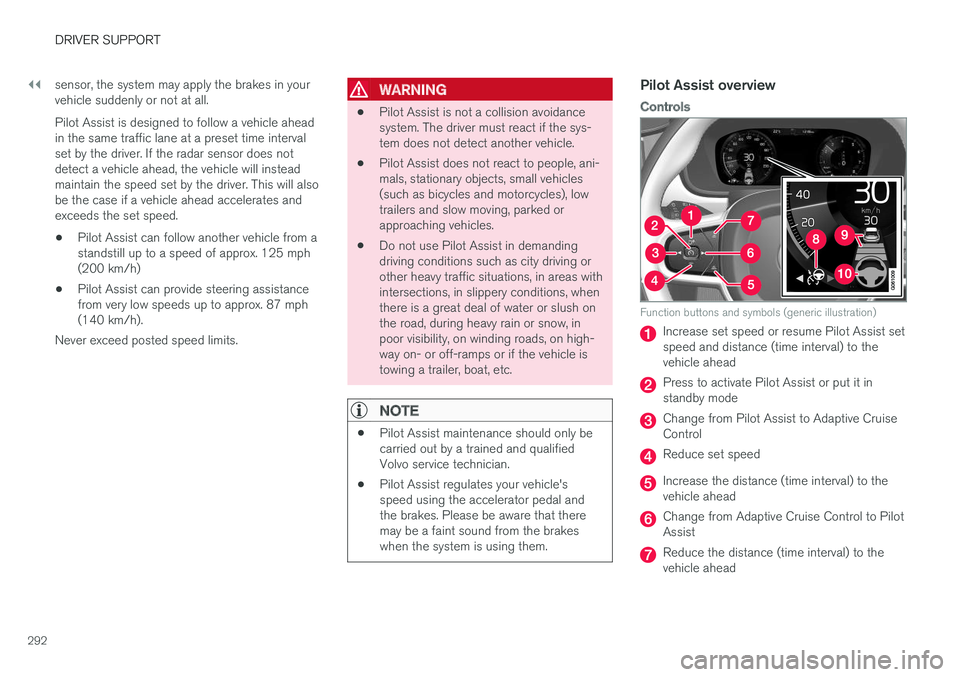
Controls
Function buttons and symbols (generic illustration)
Increase set speed or resume Pilot Assist set speed and distance (time interval) to thevehicle ahead
Press to activate Pilot Assist or put it in standby mode
Change from Pilot Assist to Adaptive Cruise Control
Reduce set speed
Increase the distance (time interval) to the vehicle ahead
Change from Adaptive Cruise Control to Pilot Assist
Reduce the distance (time interval) to the vehicle ahead
Page 312 of 580
||
DRIVER SUPPORT
310
CauseAction
Water or snow on the surface of the road swirl up and block radar signals or the camera's view. No action. The driver should be extra alert in conditions of this type.
There is dirt between the inside of the windshield and the camera/radar sensor. Have the area of the windshield cleaned by a trained and qualified Volvo service technician.
Strong backlighting No action required. The came will reset automatically when lightingconditions improve.
High temperaturesIf the temperature in the passenger compartment is very high, the camera and radar sensor may betemporarily turned off for approx. 15 minutesafter the engine has been started to protect theirelectronic components. When the temperaturehas cooled sufficiently, the camera and radarsensor will restart automatically.
Damaged windshield
CAUTION
•Service and maintenance on City Safety may only be carried out by a trained andqualified Volvo service technician.
• If a crack, scratch or stone chip shouldoccur in the section of the windshield infront the camera/radar sensor, contact atrained and qualified Volvo service techni-cian to repair or replace the windshield.Failing to do so may result in reducedCity Safety functionality.
• This can also result in certain functionsbeing reduced or disabled, or they mayrespond incorrectly.
To help avoid the risk of incorrect, reduced ordisabled functionality for driver support sys-tems using the camera or radar sensors:
• Volvo recommends that cracks, scratchesor stone chips on the windshield in front of the camera/radar sensor should
not
be repaired; in such cases, the entire windshield should be replaced.
• Before the windshield is replaced, con-tact a Volvo retailer to ensure that thecorrect windshield is ordered and instal-led. If the wrong type of windshield isused, this may cause City Safety to func-tion improperly or not at all.
• Volvo recommends the use of only Genu-ine Volvo Replacement Windshields.
• When replacing windshield wipers, usethe same type or ones approved by Volvo.
After the windshield has been replaced, thecamera/radar sensor will have to be recalibra-ted by a trained and qualified Volvo servicetechnician to help ensure proper function ofall of the vehicle's camera-/radar-based sys-tems.
Page 415 of 580
STARTING AND DRIVING
}}
413
•
If the vehicle's speed goes above approx. 78 mph (125 km/h)
• If the driver wants more response than theelectric motor alone can provide
• If factors such as cold weather, etc., affectthe system or components
ECO climate
In the Pure drive mode, ECO climate in the pas-
senger compartment is activated automatically to help reduce energy consumption.
NOTE
When the Pure drive mode is activated, set-
tings for certain climate system/electricity- consuming functions are reduced. Some ofthese settings can be reset manually but fullfunctionality will only be restored by leaving the
Pure drive mode or by adapting the set-
tings in the Individual drive mode to full cli-
mate system functionality.
If condensation forms on the windows, tap the max. defroster button, which will function nor-mally.
OFF ROAD
This mode helps maximize the vehicle's capacity to traverse difficult terrain or poor roads. In OFF ROAD, ground clearance is maximized, the steering is light, All Wheel Drive and HillDescent Control are activated and a compass will be displayed between the speedometer and tach-ometer in the instrument panel. This drive mode can only be activated at low speeds (the permissible speed range will beshown on the speedometer). At higher speeds,OFF ROAD mode will be cancelled and AWD willbe activated.
CAUTION
OFF ROAD drive mode may not be used if the vehicle is towing a trailer without an elec-trical connection. This could result in damageto the pneumatic suspension system's bel-lows.
NOTE
•
This mode is not intended for normal street driving.
• Due to the increased ground clearance, ifthe OFF ROAD mode was selected whenthe engine was switched off, the suspen-sion will lower when the engine is restar-ted.
AWD
This mode offers improved traction on slippery surfaces by using four-wheel drive. It also helpsincrease directional stability at higher speeds, forexample when towing a trailer. In this mode, both the electric motor and the gas-oline engine are utilized, which results in higherfuel consumption. In the other drive modes, the vehicle automati- cally adapts the need for all-wheel drive accord-ing to the road surface and may activate the elec-tric motor or start the gasoline engine asrequired.
POWER
Power mode is intended for sportier, more active
driving. This mode maximizes the combined effects of the electric motor and the gasoline engine andprovides power to all four wheels. Response topressure on the accelerator pedal is more imme-diate and the transmission shifts up at higherrpm. Steering response is also more immediate,the suspension is stiffer and lower ground clear-ance reduces body roll when cornering. In this mode, both the electric motor and the gas- oline engine are utilized, which results in higherfuel consumption.
Page 416 of 580
||
STARTING AND DRIVING
* Option/accessory.
414
INDIVIDUAL
This setting allows you to adapt a drive mode to your personal preferences. Select one of the other drive modes as a basis and change the settings to provide the drivingcharacteristics that you prefer. These settingscan be saved in a driver profile. INDIVIDUAL is only available if it has been acti- vated in the center display. 1.
Tap
Settings in the center display's Top
view.
2. Tap
My CarIndividual Drive Mode and
tap Individual Drive Mode.
3. Under
Presets, select: Pure, Hybrid orPower.
The following settings can be modified: •
Driver Display
•Steering force
•Powertrain Characteristics
•Brake Characteristics
•Pneumatic suspension and shock absorbers
•ECO Climate
Use of the gasoline engineAn advanced control system determines the dis- tance that the vehicle can be driven using the gasoline engine, electric motor or both at thesame time. Its primary function is to use the motor/engine and the current available in the hybrid battery asefficiently as possible based on the characteris-tics of the various drive modes and the poweroutput requested by the driver by pressing theaccelerator pedal. In certain cases, temporary limitations in the sys- tem or mandatory functions to help maintain alow overall emissions level may result in greateruse of the gasoline engine.
Related information
•
Adjustable steering force
* (p. 258)
• Loading (p. 216)
• Driver profiles (p. 179)
• General information about Twin Engine Plug-in Hybrid vehicles (p. 16)
• All Wheel Drive (AWD) (p. 419)
• Hill Descent Control (HDC) (p. 366)
• Brakes (p. 362)
• Hybrid-related information in the instrumentpanel (p. 133)
• Maintaining/increasing the hybrid battery'scharge while driving (p. 410)
Automatic transmission
The automatic transmission has 8 forward gears and an electric motor that powers the rear wheels. Steering wheel paddles * make it possi-
ble to shift manually. The gear indicator in the instrument panel shows the gear currently beingused or gear shift mode.
CAUTION
The transmission
Page 431 of 580
INFOTAINMENT
}}
* Option/accessory.429
HD Radio limitations
Limitations
•Main channel vs. sub-channels (FM only)
:
The main channel is the only channel that can receive in hybrid mode (both digital andanalogue). If a frequency has sub-channels,they are broadcast in digital mode only. Themain FM channel will be displayed as, forexample, "WRIF-FM HD1". The sub-FMchannels will be displayed as"WRIF-FMHD2", "WRIF-FM HD3", etc.
• Reception coverage area
: Due to current
IBOC transmitter power limitations, thereception coverage area in digital mode issomewhat more limited than the station'sanalogue coverage area. Please be awarethat as with any radio broadcast technology,terrain, time of day, foliage level and buildinglocation can have positive or negative effectson radio reception.
• Analogue to digital/digital to analogueblending
: Analogue to digital blending will
occur as the signal strength reaches a presetthreshold in the receiver. This will be noticea-ble in fringe areas (areas with weak recep-tion) and is normal.
NOTE
There may be a noticeable difference in sound quality when a change from analogueto digital or digital to analogue occurs, suchas:
• Volume increase or decrease
• Equalizer settings, i.e., Bass/ Midrange/Treble cut or boost
• Time alignment (Digital program materialin extreme cases can be as much as 8seconds behind the analogue). This willnoticeable as a "stuttering" effect.
The above items are dependant on thebroadcaster's equipment settings and donot indicate a fault in the vehicle's radioreceiver or antenna systems .
Related information
•HD Radio sub-channels (p. 428)
• HD Radio
™reception (p. 426)
SiriusXM ®
Satellite radio *
The SiriusXM ®
Satellite system broadcasts from
of a number of high elevation satellites in geo- synchronous orbit.
Listening to satellite radioThe digital signals from the satellites are line-of- sight, which means that physical obstructionssuch as bridges, tunnels, etc, may temporarilyinterfere with signal reception. Avoid any obstructions, such as metallic objects transported on roof racks or in a ski box, or otherantennas that may impede signals from the SiriusXM ®
satellites.
Selecting SiriusXM ®
Satellite radio
mode
1. From the center display's Home view, swipe from right to left to come to App view.
2.Tap the SiriusXM ®
Satellite radio icon.
Page 451 of 580
INFOTAINMENT
}}
* Option/accessory.449
Apple CarPlay settings This article explains settings for a cell phone connected through Apple CarPlay.
Automatic start1.
Tap Settings in the center display's Top
view.
2. Tap
CommunicationApple CarPlay and
select the following settings:
• Select the Apple CarPlay box for auto- matic start when the device's USB cableis connected.
• Deselect the Apple CarPlay box to
disa-
ble automatic start when the device's
USB cable is connected.
A maximum of 20 Apple devices can be stored inthe list. When the list is full, the first (oldest)device stored will be deleted. To erase the entire list, a factory reset has to be performed. See the article "Resetting the set-tings view."
System volume levels1. Tap Settings in the center display's Top
view. 2.
Tap
SoundSystem Volumes and select
the following settings: •
Voice Control
•Navi Voice Guidance
•Phone Ringtone
Related information
• Apple CarPlay (p. 447)
• Resetting the settings view (p. 117)
Android auto
*
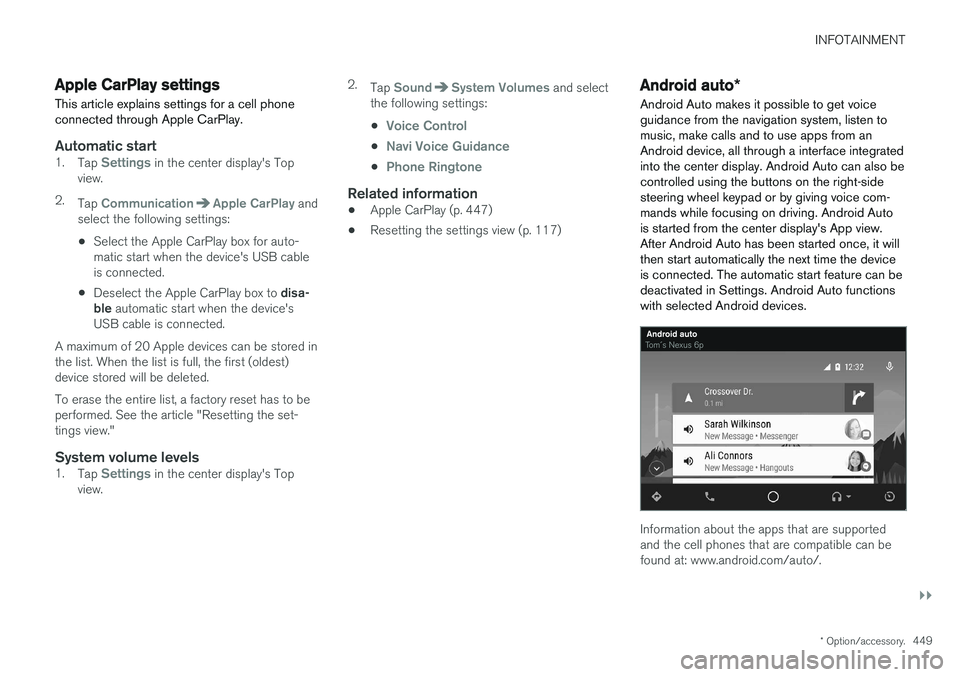
Android Auto makes it possible to get voice guidance from the navigation system, listen tomusic, make calls and to use apps from anAndroid device, all through a interface integratedinto the center display. Android Auto can also becontrolled using the buttons on the right-sidesteering wheel keypad or by giving voice com-mands while focusing on driving. Android Autois started from the center display's App view.After Android Auto has been started once, it willthen start automatically the next time the deviceis connected. The automatic start feature can bedeactivated in Settings. Android Auto functionswith selected Android devices.
Information about the apps that are supported and the cell phones that are compatible can befound at: www.android.com/auto/.
Page 453 of 580
INFOTAINMENT
* Option/accessory.451
Android Auto * settings
The following settings can be made for Android Auto.
Automatic start1. Tap Settings in the center display's Top
view.
2. Tap
CommunicationAndroid Auto and
select the following settings:
• Select the Android Auto box for automatic start when the device's USB cable is con-nected.
• Deselect the Android Auto box to
disable
automatic start when the device's USBcable is connected.
A maximum of 20 Android devices can be storedin the list. When the list is full, the first (oldest)device stored will be deleted. To erase the entire list, a factory reset has to be performed. See the article "Resetting the set-tings view."
System volume levels1. Tap Settings in the center display's Top
view. 2.
Tap
SoundSystem Volumes and select
the following settings: •
Voice Control
•Navi Voice Guidance
•Phone Ringtone
Related information
• Android auto
* (p. 449)
• Resetting the settings view (p. 117)
CD (media) player
*
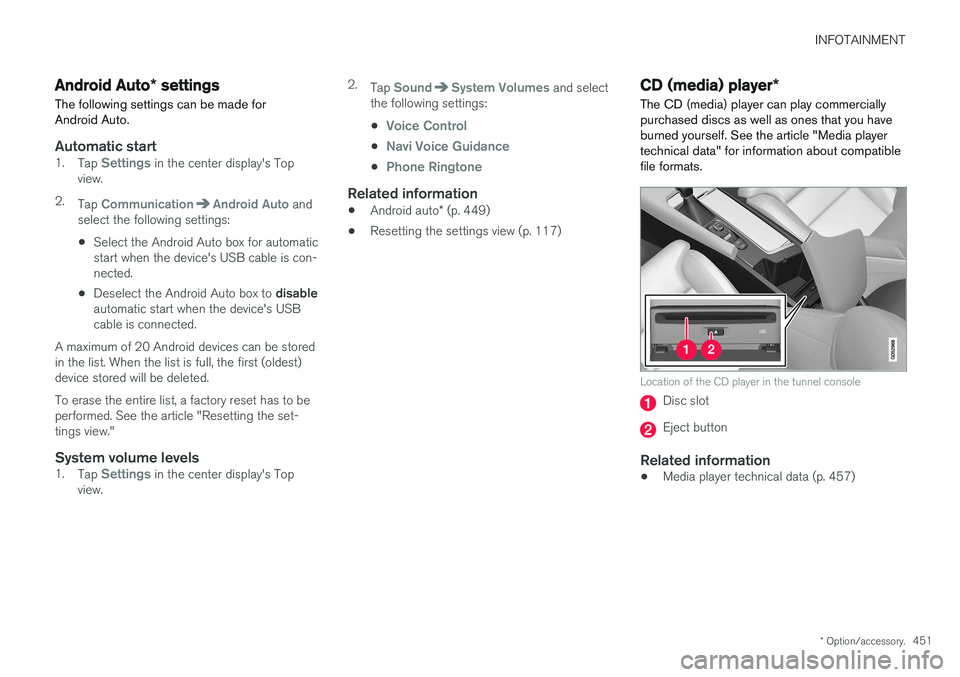
The CD (media) player can play commercially purchased discs as well as ones that you haveburned yourself. See the article "Media playertechnical data" for information about compatiblefile formats.
Location of the CD player in the tunnel console
Disc slot
Eject button
Related information
• Media player technical data (p. 457)
Page 465 of 580
INFOTAINMENT
463
2.
Tap
SettingsCommunicationVehicle Wi-Fi Hotspot.
3. Tap
Network name and assign a name to
the hotspot.
4. Tap
Password and create a password to be
used by devices trying to connect (tether) to the hotspot.
5. Tap
Frequency band and select a fre-
quency that the hotspot will use to transmit data. This may not be possible in all markets.
6. Activate/deactivate by tapping the
Vehicle
Wi-Fi Hotspot box.
7. If another connection has been used previ- ously, confirm the change of connections.
> It is now possible for external devices toconnect to the vehicle's Wi-Fi hotspot.
Connection status will be indicated in a symbol in the center display's status bar. Tap
Connected devices to see a list of con-
nected devices.
Related information
• Internet connected vehicle (p. 458)
• Wi-Fi technology and security (p. 463)
• Symbols in the center display status bar (p. 48)
• Internet connection troubleshooting (p. 462)
Deleting Wi-Fi networks
Networks that are not used can be deleted.
1. Tap Settings in the center display's Top
view.
2. Tap
Wi-FiSaved networks.
3. Tap
Forget to remove the network.
4. Confirm the selection. > The vehicle will no longer connect to thedeleted network.
Deleting all networksAll networks can be deleted at the same time by returning (resetting) to factory settings. If this is done, all user data and settings will be reset to their default settings.
Related information
• Internet connected vehicle (p. 458)
• Connecting to the Internet (p. 459)
Wi-Fi technology and security
The following are types of networks can be con- nect to.
It is possible to connect to the following types of networks:
• Frequency: 2.4 or 5 GHz 8
.
• Standards: 802.11 a/b/g/n.
• Security type: WPA2-AES-CCMP.
The vehicle's Wi-Fi system is designed to man-age Wi-Fi devices in the vehicle. If several devices are using a frequency at the same time, this may result in poorer performance.
Related information
• Internet connected vehicle (p. 458)
• Connecting to the Internet (p. 459)
• Tethering (Wi-Fi sharing) (p. 462)
• Internet connection troubleshooting (p. 462)
8
Selecting a frequency is not possible in all markets.