tow VOLVO XC90 T8 2017 Owner´s Manual
[x] Cancel search | Manufacturer: VOLVO, Model Year: 2017, Model line: XC90 T8, Model: VOLVO XC90 T8 2017Pages: 580, PDF Size: 10.37 MB
Page 350 of 580
DRIVER SUPPORT
* Option/accessory.
348
Park Assist Camera (PAC) *
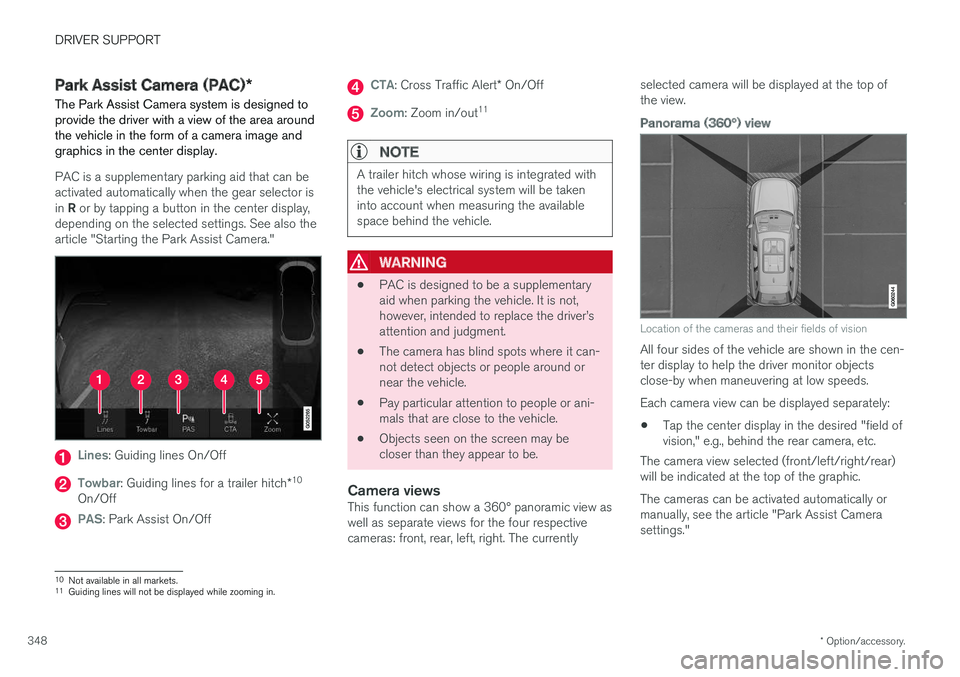
The Park Assist Camera system is designed to provide the driver with a view of the area aroundthe vehicle in the form of a camera image andgraphics in the center display.
PAC is a supplementary parking aid that can be activated automatically when the gear selector is in R or by tapping a button in the center display,
depending on the selected settings. See also the article "Starting the Park Assist Camera."
Lines: Guiding lines On/Off
Towbar: Guiding lines for a trailer hitch *10
On/Off
PAS: Park Assist On/Off
CTA: Cross Traffic Alert * On/Off
Zoom: Zoom in/out 11
NOTE
A trailer hitch whose wiring is integrated with the vehicle's electrical system will be takeninto account when measuring the availablespace behind the vehicle.
WARNING
•
PAC is designed to be a supplementary aid when parking the vehicle. It is not,however, intended to replace the driver
Page 353 of 580
DRIVER SUPPORT
}}
* Option/accessory.351
Models with the 360° panorama camera system and Park Assist sensors *
Location of the cameras and their fields of vision (generic illustration)
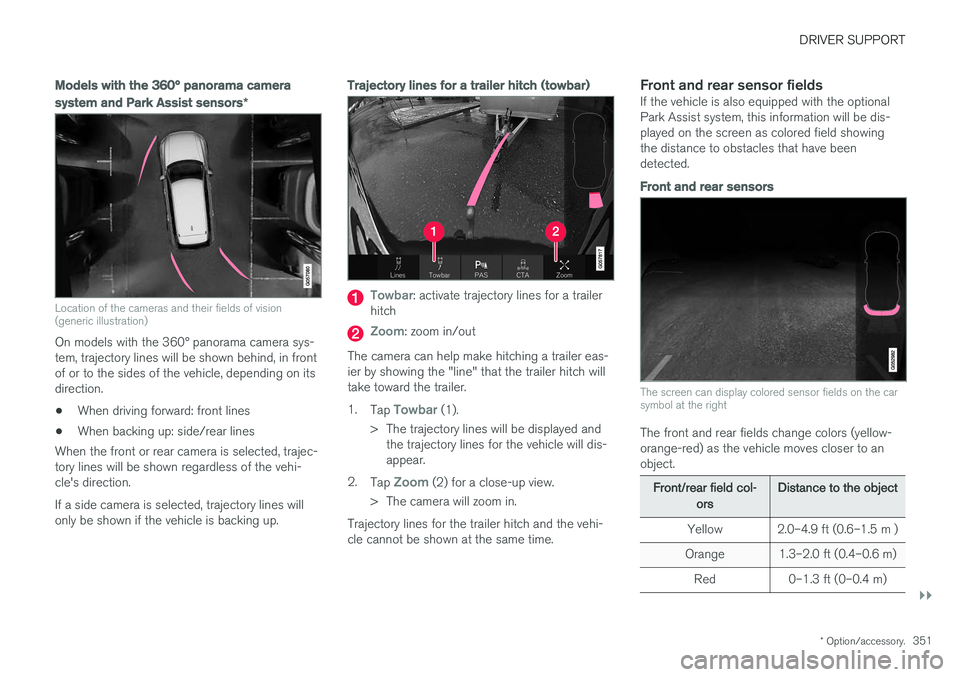
On models with the 360° panorama camera sys- tem, trajectory lines will be shown behind, in frontof or to the sides of the vehicle, depending on itsdirection.
• When driving forward: front lines
• When backing up: side/rear lines
When the front or rear camera is selected, trajec-tory lines will be shown regardless of the vehi-cle's direction. If a side camera is selected, trajectory lines will only be shown if the vehicle is backing up.
Trajectory lines for a trailer hitch (towbar)
Towbar: activate trajectory lines for a trailer
hitch
Zoom: zoom in/out
The camera can help make hitching a trailer eas- ier by showing the "line" that the trailer hitch willtake toward the trailer. 1. Tap
Towbar (1).
> The trajectory lines will be displayed and the trajectory lines for the vehicle will dis- appear.
2. Tap
Zoom (2) for a close-up view.
> The camera will zoom in.
Trajectory lines for the trailer hitch and the vehi- cle cannot be shown at the same time.
Front and rear sensor fieldsIf the vehicle is also equipped with the optionalPark Assist system, this information will be dis-played on the screen as colored field showingthe distance to obstacles that have beendetected.
Front and rear sensors
The screen can display colored sensor fields on the car symbol at the right
The front and rear fields change colors (yellow- orange-red) as the vehicle moves closer to anobject.
Front/rear field col- ors Distance to the object
Yellow 2.0–4.9 ft (0.6–1.5 m )
Orange 1.3–2.0 ft (0.4–0.6 m) Red 0–1.3 ft (0–0.4 m)
Page 357 of 580
DRIVER SUPPORT
}}
* Option/accessory.355
Perpendicular parking
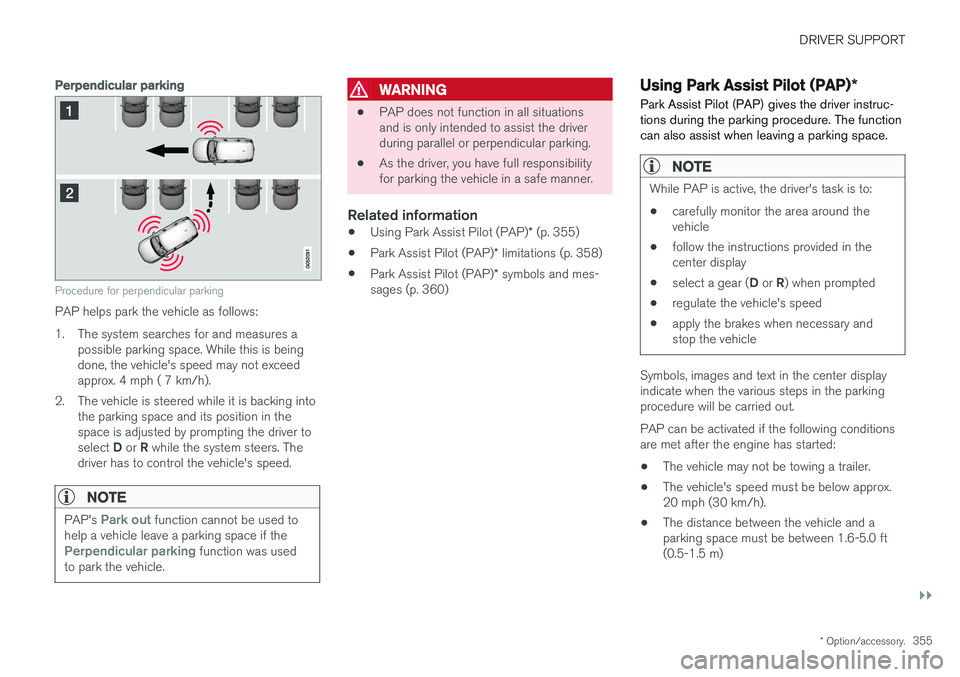
Procedure for perpendicular parking
PAP helps park the vehicle as follows:
1. The system searches for and measures a
possible parking space. While this is being done, the vehicle's speed may not exceedapprox. 4 mph ( 7 km/h).
2. The vehicle is steered while it is backing into the parking space and its position in thespace is adjusted by prompting the driver to select D or R while the system steers. The
driver has to control the vehicle's speed.
NOTE
PAP's Park out function cannot be used to
help a vehicle leave a parking space if the
Perpendicular parking function was used
to park the vehicle.
WARNING
• PAP does not function in all situations and is only intended to assist the driverduring parallel or perpendicular parking.
• As the driver, you have full responsibilityfor parking the vehicle in a safe manner.
Related information
•
Using Park Assist Pilot (PAP)
* (p. 355)
• Park Assist Pilot (PAP)
* limitations (p. 358)
• Park Assist Pilot (PAP)
* symbols and mes-
sages (p. 360)
Using Park Assist Pilot (PAP) *
Park Assist Pilot (PAP) gives the driver instruc- tions during the parking procedure. The functioncan also assist when leaving a parking space.
NOTE
While PAP is active, the driver's task is to:
• carefully monitor the area around the vehicle
• follow the instructions provided in thecenter display
• select a gear (
D or R) when prompted
• regulate the vehicle's speed
• apply the brakes when necessary andstop the vehicle
Symbols, images and text in the center display indicate when the various steps in the parkingprocedure will be carried out. PAP can be activated if the following conditions are met after the engine has started:
• The vehicle may not be towing a trailer.
• The vehicle's speed must be below approx.20 mph (30 km/h).
• The distance between the vehicle and aparking space must be between 1.6-5.0 ft(0.5-1.5 m)
Page 361 of 580
DRIVER SUPPORT
* Option/accessory.359
Points to keep in mindPAP is a parking aid only and the driver should always be prepared to take control and cancel aparking sequence. This can be due to one ormore of the following factors:
• PAP's function is based on the way that thevehicles are parked behind and in front ofyour parking space. If they are, for example,parked too close to the curb, there is a riskthat your vehicle's tires or wheel rims couldbe damaged by the curb during the parkingprocedure.
• PAP is intended to provide parking assis-tance on straight streets, not sections ofstreet with curved or irregular curbs. Be surethat your vehicle is parallel to the curb whenPAP measures the parking space.
• PAP may not be able to provide parkingassistance on narrow streets due to lack ofspace to maneuver the vehicle. In situationslike this, it may help to drive between1.5-5.0 ft (0.5-1.5 m) from the side of theroad where the parking space is located.
• Use only approved tires with the correct infla-tion pressure because this affects PAP'scapacity to provide parking assistance.Changing to a different approved tire sizemay affect PAP's parameters. Consult atrained and qualified Volvo service technician. •
Heavy rain or snow may inhibit PAP'scapacity to correctly measure a parkingspace.
• Do not use PAP when using snow chainsand/or a temporary spare tire.
• Do not use PAP if there are any objects pro-truding from the vehicle.
WARNING
•
The front end of your vehicle may turn out toward oncoming traffic during the park-ing procedure.
• Objects located above the parking sen-sors' field of vision are not included whenPAP measures a parking space. For thisreason, PAP may turn into the parkingspace too soon. Avoid parking spaces ofthis type.
• The driver is always responsible for deter-mining if PAP has selected a suitableparking space.
Maintenance
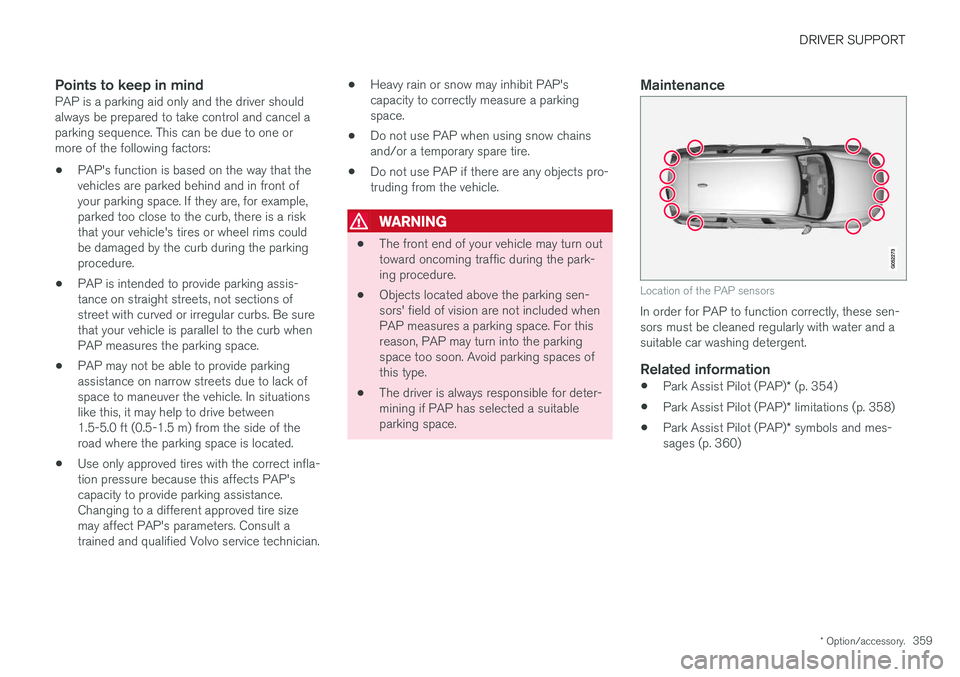
Location of the PAP sensors
In order for PAP to function correctly, these sen- sors must be cleaned regularly with water and asuitable car washing detergent.
Related information
•
Park Assist Pilot (PAP)
* (p. 354)
• Park Assist Pilot (PAP)
* limitations (p. 358)
• Park Assist Pilot (PAP)
* symbols and mes-
sages (p. 360)
Page 366 of 580
||
STARTING AND DRIVING
* Option/accessory.
364
Instrument panel symbols
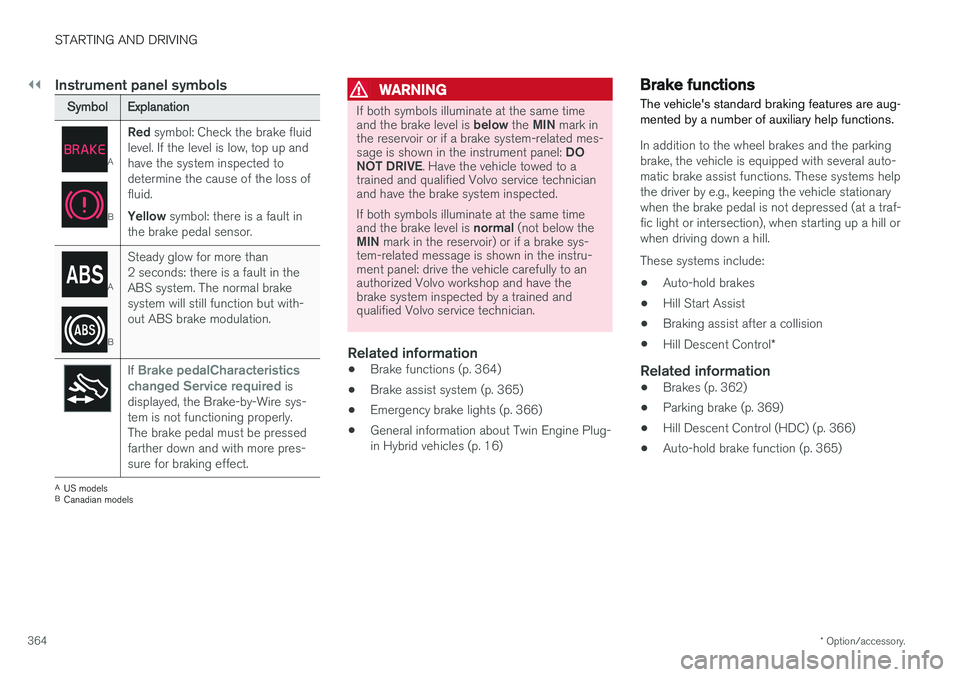
Symbol Explanation
A
BRed
symbol: Check the brake fluid
level. If the level is low, top up and have the system inspected todetermine the cause of the loss offluid. Yellow symbol: there is a fault in
the brake pedal sensor.
A
B Steady glow for more than 2 seconds: there is a fault in theABS system. The normal brakesystem will still function but with-out ABS brake modulation.
If Brake pedalCharacteristics
changed Service required is
displayed, the Brake-by-Wire sys- tem is not functioning properly.The brake pedal must be pressedfarther down and with more pres-sure for braking effect.
A US models
B Canadian models
WARNING
If both symbols illuminate at the same time and the brake level is below the MIN mark in
the reservoir or if a brake system-related mes-sage is shown in the instrument panel: DO
NOT DRIVE . Have the vehicle towed to a
trained and qualified Volvo service technician and have the brake system inspected. If both symbols illuminate at the same time and the brake level is normal (not below the
MIN mark in the reservoir) or if a brake sys-
tem-related message is shown in the instru- ment panel: drive the vehicle carefully to anauthorized Volvo workshop and have thebrake system inspected by a trained andqualified Volvo service technician.
Related information
• Brake functions (p. 364)
• Brake assist system (p. 365)
• Emergency brake lights (p. 366)
• General information about Twin Engine Plug- in Hybrid vehicles (p. 16)
Brake functions
The vehicle's standard braking features are aug- mented by a number of auxiliary help functions.
In addition to the wheel brakes and the parking brake, the vehicle is equipped with several auto-matic brake assist functions. These systems helpthe driver by e.g., keeping the vehicle stationarywhen the brake pedal is not depressed (at a traf-fic light or intersection), when starting up a hill orwhen driving down a hill. These systems include: • Auto-hold brakes
• Hill Start Assist
• Braking assist after a collision
• Hill Descent Control
*
Related information
•Brakes (p. 362)
• Parking brake (p. 369)
• Hill Descent Control (HDC) (p. 366)
• Auto-hold brake function (p. 365)
Page 369 of 580
STARTING AND DRIVING
}}
367
HDC is activated along with Low Speed Control (LSC), which together make driving on slipperysurfaces at low speeds easier. When HDC and LSC are activated, this changes the response from the accelerator pedal andengine.
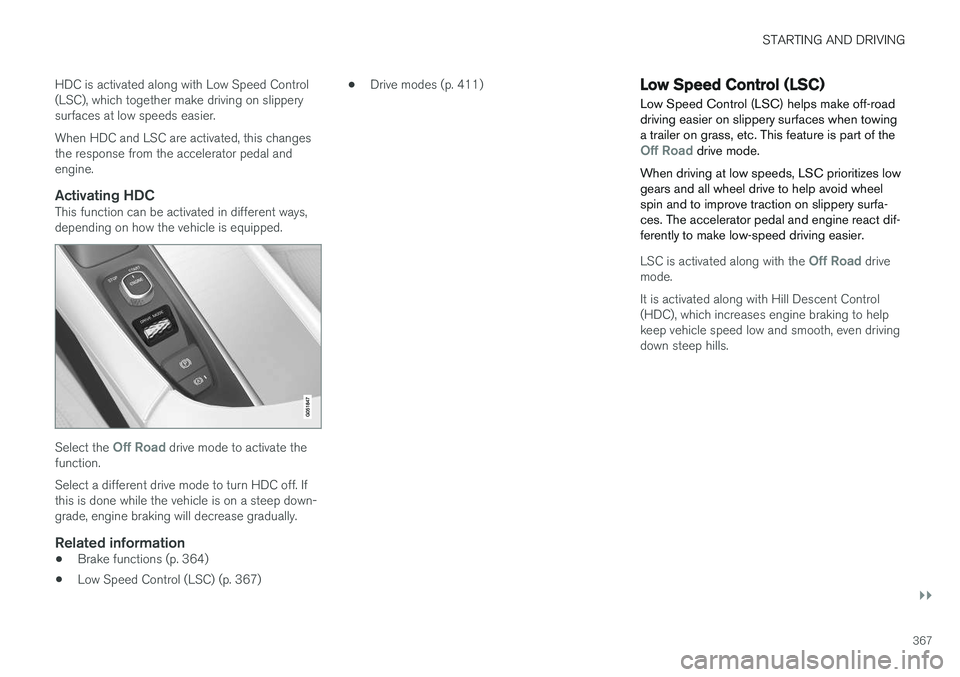
Activating HDCThis function can be activated in different ways,depending on how the vehicle is equipped.
Select the Off Road drive mode to activate the
function. Select a different drive mode to turn HDC off. If this is done while the vehicle is on a steep down-grade, engine braking will decrease gradually.
Related information
• Brake functions (p. 364)
• Low Speed Control (LSC) (p. 367) •
Drive modes (p. 411)
Low Speed Control (LSC) Low Speed Control (LSC) helps make off-road driving easier on slippery surfaces when towinga trailer on grass, etc. This feature is part of the
Off Road drive mode.
When driving at low speeds, LSC prioritizes low gears and all wheel drive to help avoid wheelspin and to improve traction on slippery surfa-ces. The accelerator pedal and engine react dif-ferently to make low-speed driving easier.
LSC is activated along with the Off Road drive
mode. It is activated along with Hill Descent Control (HDC), which increases engine braking to helpkeep vehicle speed low and smooth, even drivingdown steep hills.
Page 372 of 580
||
STARTING AND DRIVING
370
Symbol in the instrument panel
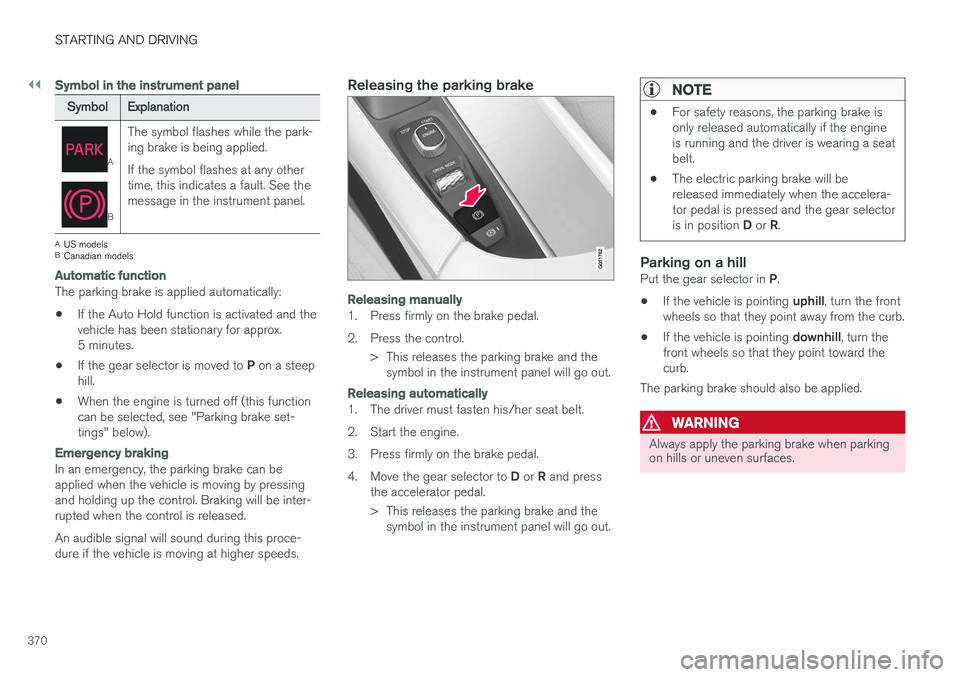
SymbolExplanation
A
BThe symbol flashes while the park- ing brake is being applied. If the symbol flashes at any other time, this indicates a fault. See themessage in the instrument panel.
A
US models
B Canadian models
Automatic function
The parking brake is applied automatically:
• If the Auto Hold function is activated and the vehicle has been stationary for approx.5 minutes.
• If the gear selector is moved to
P on a steep
hill.
• When the engine is turned off (this functioncan be selected, see "Parking brake set-tings" below).
Emergency braking
In an emergency, the parking brake can be applied when the vehicle is moving by pressing and holding up the control. Braking will be inter-rupted when the control is released. An audible signal will sound during this proce- dure if the vehicle is moving at higher speeds.
Releasing the parking brake
Releasing manually
1. Press firmly on the brake pedal.
2. Press the control.
> This releases the parking brake and thesymbol in the instrument panel will go out.
Releasing automatically
1. The driver must fasten his/her seat belt.
2. Start the engine.
3. Press firmly on the brake pedal.4. Move the gear selector to D or R and press
the accelerator pedal.
> This releases the parking brake and the symbol in the instrument panel will go out.
NOTE
• For safety reasons, the parking brake is only released automatically if the engineis running and the driver is wearing a seatbelt.
• The electric parking brake will bereleased immediately when the accelera-tor pedal is pressed and the gear selector is in position
D or R.
Parking on a hillPut the gear selector in P.
• If the vehicle is pointing
uphill, turn the front
wheels so that they point away from the curb.
• If the vehicle is pointing
downhill, turn the
front wheels so that they point toward the curb.
The parking brake should also be applied.
WARNING
Always apply the parking brake when parking on hills or uneven surfaces.
Page 373 of 580
STARTING AND DRIVING
371
Heavy load uphill
A heavy load, such as a trailer, can cause the vehicle to roll backward when the parking brakeis released automatically on a steep incline. Tohelp avoid this:
1. Keep the electric parking brake controlpushed in.
2. While pressing the accelerator pedal to pull away, release the parking brake control only after the vehicle begins to move.
Parking brake settingsAutomatically setting the parking brake can beturned on or off in the center display's Top view. 1.Tap
Settings in Top view.
2. Tap
My CarParking Brake and
Suspension and deselect Auto Activate
Parking Brake.
Related information
• Parking brake (p. 369)
• Parking brake malfunctions (p. 371)
• Auto-hold brake function (p. 365)
Parking brake malfunctions
If it has not been possible to apply or release the parking brake after several attempts, consult atrained and authorized Volvo service technicianor retailer.
An audible signal will sound if the parking brake is applied when the vehicle is being driven. If thevehicle must be parked while the parking brake isnot functioning properly: • Put the gear selector in
P.
• If the vehicle is pointing
uphill, turn the front
wheels so that they point away from the curb.
• If the vehicle is pointing
downhill, turn the
front wheels so that they point toward the curb.
• Put the gear selector in
P.
Low battery charge levelIf the battery is discharged, the parking brakecannot be operated. Connect an auxiliary batteryto the vehicle.
Replacing brake padsThe rear brake pads have to be replaced by atrained and authorized Volvo service techniciandue to the design of the electric parking brake.
Symbols in the instrument panel
Symbol Explanation
A
BIf the symbol flashes, a parking brake fault has been detected.See the message in the instru-ment panel.
A
B
Fault in the brake system.
A
US models
B Canadian models
Related information
• Using the parking brake (p. 369)
• Using the parking brake (p. 369)
• Brake functions (p. 364)
• Jump starting (p. 382)
Page 376 of 580
STARTING AND DRIVING
374•
Gear selector positions (p. 416)
• Using the electric motor in city driving (p. 408)
Driving through standing water
The vehicle should be driven with extreme cau- tion if it is necessary to drive through standingwater.
The vehicle can be driven through water up to a depth approximately level with the floor at walk-ing speed to help prevent water from enteringthe differential and/or the transmission or dam-aging electrical components. • If possible, check the depth of the water at its deepest point before driving through it.Take particular care when driving throughflowing water.
• Before driving through water, always select the
Off Road drive mode to ensure that the
gasoline engine is running and to maximize ground clearance.
• After driving through water, apply the brakesand check that they are functioning correctly.
• Clean the electrical connections for trailerwiring after driving in mud or water.
• When driving through water, maintain lowspeed and do not stop in the water.
CAUTION
•Damage may occur to the engine, trans- mission, electrical components, etc. if thevehicle is driven through water higherthan its floor level. Be aware that wavescreated by other vehicles could cause thelevel to temporarily be above the vehicle'sfloor level.
• Damage to any components due to waterabove the floor level, vapor lock or insuffi-cient oil is not covered under warranty.
• If the engine has been stopped while thevehicle is in water, do not attempt torestart it. Have the vehicle towed out ofthe water and inspected by a trained andqualified Volvo service technician.
WARNING
•Avoid driving through standing or rushing water. Doing so can be dangerous and itmay also be difficult to determine theactual depth of the water.
• If water cannot be avoided, after drivingthrough the water, press lightly on thebrake pedal to ensure that the brakes arefunctioning normally. Water or mud canmake the brake linings slippery, resultingin delayed braking effect.
Page 377 of 580
STARTING AND DRIVING
375
Related information
•Towing recommendations (p. 377)
Overheating the engine and transmission
In demanding driving conditions, such as when transporting heavy loads, driving in mountainousareas or in very hot weather there is a risk ofoverheating the engine or transmission.
• The engine's output may be slightly limited if there is a risk of overheating.
• Remove e.g., auxiliary lights mounted in frontof the grille in hot weather.
• If the temperature of the engine coolantbecomes too high, the warning symbol will illuminate and the message
Engine
temperature/Stop safely will be displayed.
Stop the vehicle as soon as possible in a safe place and let the engine idle for severalminutes.
• If the message
Engine temperature/High
temperature Turn off engine or Engine
coolant/Stop safely is displayed, stop
safely and turn off the engine.
• If the transmission begins to overheat, an alternative gear shifting program will beselected. An integrated protective functionwill also by activated, the warning symbol will illuminate and the message
Transmission
warmHigh temperature Reduce speed
or Transmission warmStop safely, wait
for cooling will be displayed in the instru-
ment panel. •
The air conditioning may be switched off temporarily.
• After a prolonged period of driving, do notturn off the engine immediately after stop-ping.
• The engine cooling fan commonly continuesto run for several minutes after the enginehas been turned off.
WARNING
The cooling fan (located at the front of the engine compartment, behind the radiator) maystart or continue to operate (for up to6 minutes) after the engine has beenswitched off.
Related information
•
Driving with a trailer (p. 384)
• Before a long distance trip (p. 372)