steering VOLVO XC90 T8 2017 Owner´s Manual
[x] Cancel search | Manufacturer: VOLVO, Model Year: 2017, Model line: XC90 T8, Model: VOLVO XC90 T8 2017Pages: 580, PDF Size: 10.37 MB
Page 344 of 580
||
DRIVER SUPPORT
* Option/accessory.
342 To activate Run-off Mitigation:
• Select (tap) the box for
Collision
Avoidance Assistance, Steering aid
during increased collision risk.
The setting selected when the engine was switched off will be used the next time theengine is started.
LimitationsIn certain situations, it may be difficult for Run-offMitigation to assist the driver. In such cases, it isadvisable to deactivate the function. Examples of these situations include:
• road construction
• winter driving conditions
• poor road surfaces
• narrow roads
• a very active driving style
• bad weather with reduced visibility
• edges or lines other than the lane's marker lines
• roads with indistinct or no lane marker lines
The Run-off Mitigation function use the vehicle'scamera, which has general limitations. See thearticle "Camera limitations".
WARNING
• Run-off Mitigation is only intended to assist the driver and does not function inall driving, weather, traffic or road condi-tions.
• This function cannot detect barriers, railsor similar obstructions at the side of aroad or traffic lane.
• As the driver, you have full responsibilityfor operating the vehicle in a safe man-ner.
Related information
•
Run-off Mitigation
* symbols and messages
(p. 343)
• Driving lane assistance (p. 336)
• Camera limitations (p. 309)
Page 349 of 580
DRIVER SUPPORT
* Option/accessory.347
Park assist symbols and messages
A number of messages relating to Park Assist will appear in the instrument panel.
The following table provides some examples.
Message Explanation
Park Assist System Unavailable Service requiredThe system is not functioning properly. Contact a trained and qualified Volvo service technician.
Park Assist System Sensors blocked, cleaning neededOne or more of the system's sensors are blocked. Check and clean the sensors as soon as possible.
A text message can be erased by briefly pressing the O button on the right-side steering wheel
keypad. If the message recurs, contact a trained and authorized Volvo service technician orretailer.
Related information
• Park Assist limitations (p. 346)
• Park Assist
* (p. 344)
• Activating/deactivating Park Assist (p. 345)
Page 352 of 580
DRIVER SUPPORT
* Option/accessory.
350 •
Park Assist
* (p. 344)
• Cross Traffic Alert (CTA)
* (p. 327)
• Park Assist Pilot (PAP)
* (p. 354)
Park Assist Camera (PAC) *
trajectory lines and fields
The Park Assist Camera system uses trajectory lines and fields to indicate the vehicle's positionin relation to its immediate surroundings.
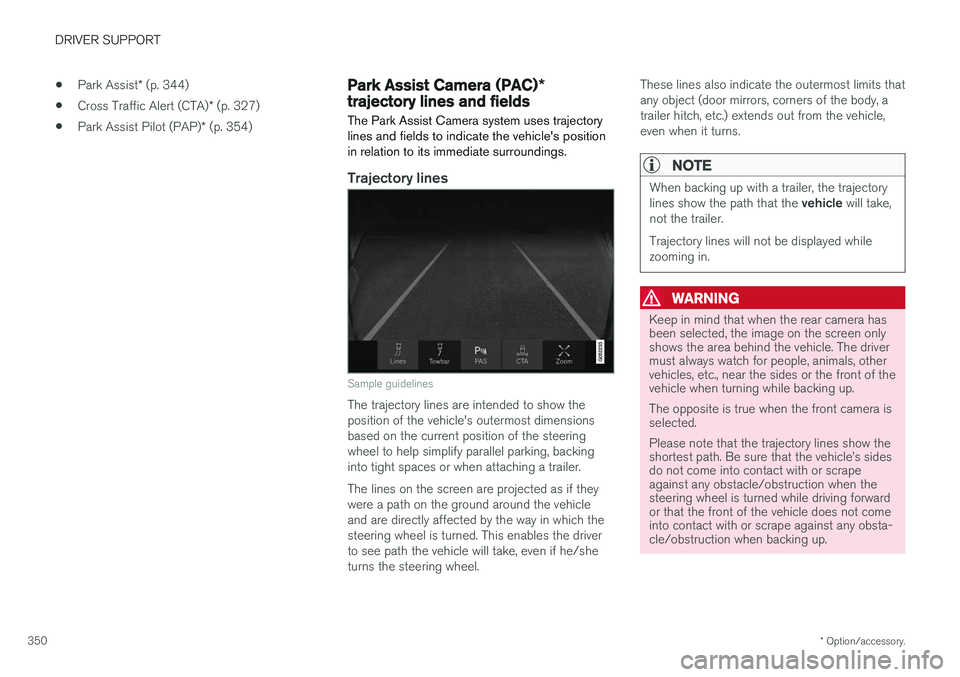
Trajectory lines
Sample guidelines
The trajectory lines are intended to show the position of the vehicle's outermost dimensionsbased on the current position of the steeringwheel to help simplify parallel parking, backinginto tight spaces or when attaching a trailer. The lines on the screen are projected as if they were a path on the ground around the vehicleand are directly affected by the way in which thesteering wheel is turned. This enables the driverto see path the vehicle will take, even if he/sheturns the steering wheel. These lines also indicate the outermost limits thatany object (door mirrors, corners of the body, atrailer hitch, etc.) extends out from the vehicle,even when it turns.
NOTE
When backing up with a trailer, the trajectory lines show the path that the
vehicle will take,
not the trailer. Trajectory lines will not be displayed while zooming in.
WARNING
Keep in mind that when the rear camera has been selected, the image on the screen onlyshows the area behind the vehicle. The drivermust always watch for people, animals, othervehicles, etc., near the sides or the front of thevehicle when turning while backing up. The opposite is true when the front camera is selected. Please note that the trajectory lines show the shortest path. Be sure that the vehicle
Page 356 of 580
||
DRIVER SUPPORT
* Option/accessory.
354
Dark camera sectors
A dark camera sector may also be displayed in the following situations but without the defective
camera symbol. A sector may be dark because: • the door mirror is folded in
• the door is open
• the tailgate is open
Ambient lightingThe camera images are adjusted automatically to the ambient light, which means the image mayvary slightly in terms of light and quality. Poorambient lighting may reduce the quality of theimage.
Maintenance
•Keep the camera's lens free of dirt, ice andsnow. This is particularly important in poorambient lighting conditions.
• Remove dirt, ice and snow carefully to avoidscratching the lenses.
• Clean the lens regularly with warm water anda suitable car washing detergent.
Related information
•
Park Assist Camera (PAC)
* (p. 348)
Park Assist Pilot (PAP) *
Park Assist Pilot (PAP) helps the driver drive into parallel or perpendicular parking spaces andleave parallel parking spaces.
Park Assist Pilot provides assistance when park- ing by measuring the parking space and turningthe steering wheel to guide the vehicle into thespace. Information about the actions required by the driver is provided in the center display in the formof symbols, images and text.
NOTE
While PAP is active, the driver's task is to:
• carefully monitor the area around the vehicle
• follow the instructions provided in thecenter display
• select a gear (
D or R) when prompted
• regulate the vehicle's speed
• apply the brakes when necessary andstop the vehicle
Types of parking
Parallel parking
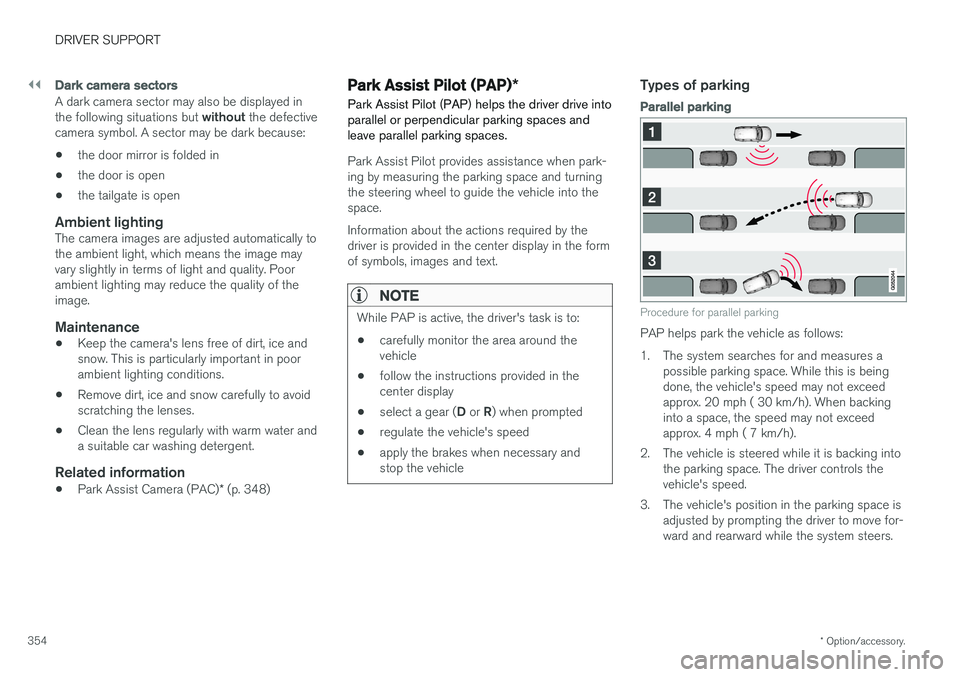
Procedure for parallel parking
PAP helps park the vehicle as follows:
1. The system searches for and measures a
possible parking space. While this is being done, the vehicle's speed may not exceedapprox. 20 mph ( 30 km/h). When backinginto a space, the speed may not exceedapprox. 4 mph ( 7 km/h).
2. The vehicle is steered while it is backing into the parking space. The driver controls thevehicle's speed.
3. The vehicle's position in the parking space is adjusted by prompting the driver to move for-ward and rearward while the system steers.
Page 359 of 580
DRIVER SUPPORT
}}
357
2: Backing into the parking space
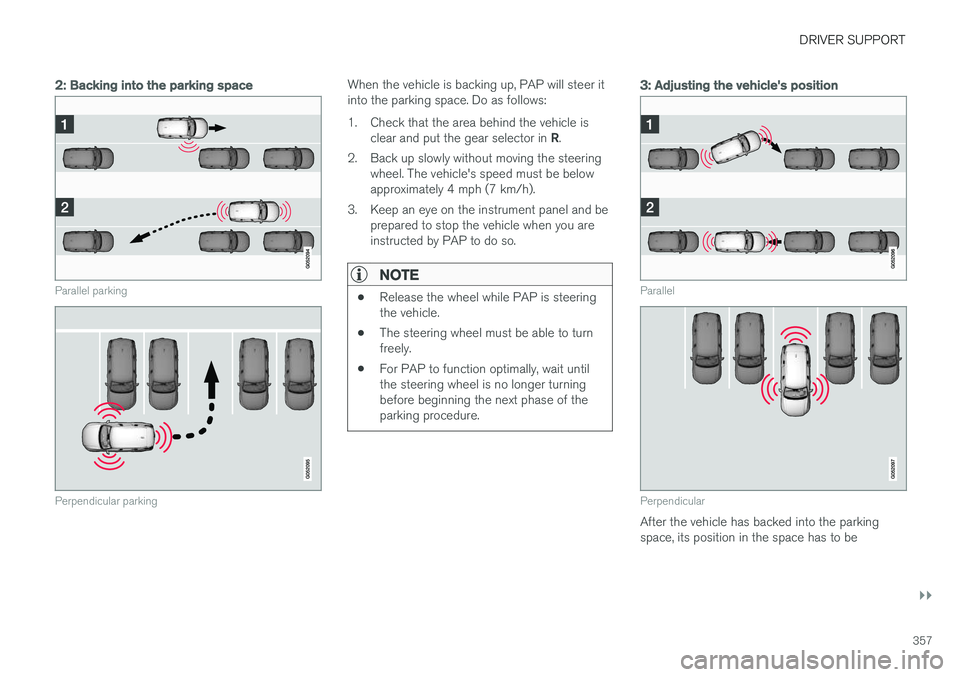
Parallel parking
Perpendicular parking
When the vehicle is backing up, PAP will steer it into the parking space. Do as follows:
1. Check that the area behind the vehicle isclear and put the gear selector in R.
2. Back up slowly without moving the steering wheel. The vehicle's speed must be below approximately 4 mph (7 km/h).
3. Keep an eye on the instrument panel and be prepared to stop the vehicle when you areinstructed by PAP to do so.
NOTE
• Release the wheel while PAP is steering the vehicle.
• The steering wheel must be able to turnfreely.
• For PAP to function optimally, wait untilthe steering wheel is no longer turningbefore beginning the next phase of theparking procedure.
3: Adjusting the vehicle's position
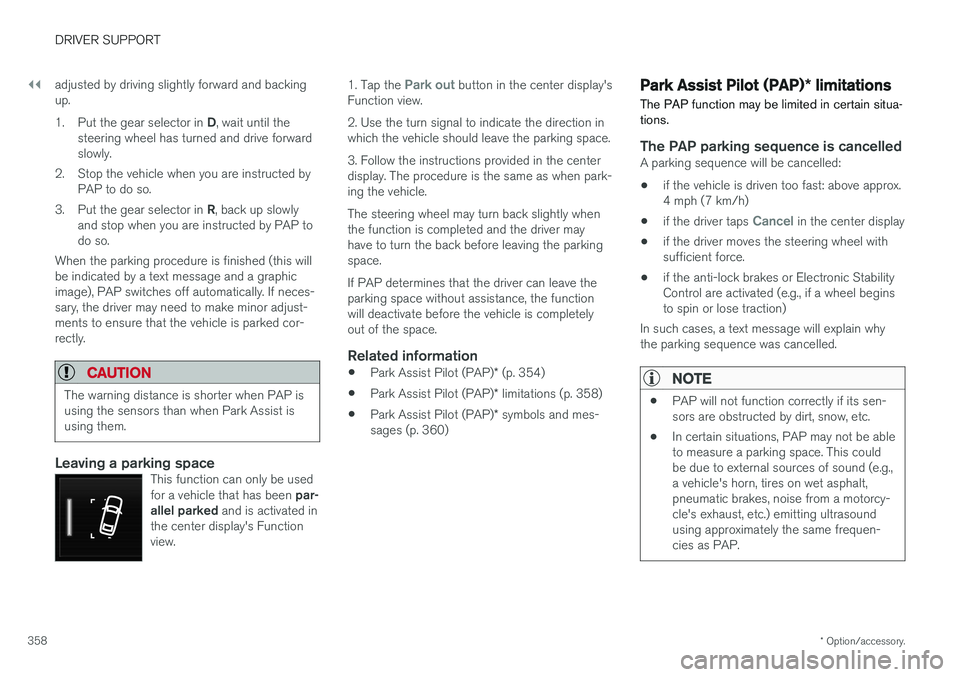
Parallel
Perpendicular
After the vehicle has backed into the parking space, its position in the space has to be
Page 360 of 580
||
DRIVER SUPPORT
* Option/accessory.
358 adjusted by driving slightly forward and backing up. 1.
Put the gear selector in D, wait until the
steering wheel has turned and drive forward slowly.
2. Stop the vehicle when you are instructed by PAP to do so.
3. Put the gear selector in R, back up slowly
and stop when you are instructed by PAP todo so.
When the parking procedure is finished (this willbe indicated by a text message and a graphicimage), PAP switches off automatically. If neces-sary, the driver may need to make minor adjust-ments to ensure that the vehicle is parked cor-rectly.
CAUTION
The warning distance is shorter when PAP is using the sensors than when Park Assist isusing them.
Leaving a parking spaceThis function can only be used for a vehicle that has been par-
allel parked and is activated in
the center display's Function view.
1. Tap the Park out button in the center display's
Function view. 2. Use the turn signal to indicate the direction in which the vehicle should leave the parking space. 3. Follow the instructions provided in the center display. The procedure is the same as when park-ing the vehicle. The steering wheel may turn back slightly when the function is completed and the driver mayhave to turn the back before leaving the parkingspace. If PAP determines that the driver can leave the parking space without assistance, the functionwill deactivate before the vehicle is completelyout of the space.
Related information
• Park Assist Pilot (PAP)
* (p. 354)
• Park Assist Pilot (PAP)
* limitations (p. 358)
• Park Assist Pilot (PAP)
* symbols and mes-
sages (p. 360)
Park Assist Pilot (PAP) * limitations
The PAP function may be limited in certain situa- tions.
The PAP parking sequence is cancelledA parking sequence will be cancelled:
• if the vehicle is driven too fast: above approx. 4 mph (7 km/h)
• if the driver taps
Cancel in the center display
• if the driver moves the steering wheel with sufficient force.
• if the anti-lock brakes or Electronic StabilityControl are activated (e.g., if a wheel beginsto spin or lose traction)
In such cases, a text message will explain whythe parking sequence was cancelled.
NOTE
• PAP will not function correctly if its sen- sors are obstructed by dirt, snow, etc.
• In certain situations, PAP may not be ableto measure a parking space. This couldbe due to external sources of sound (e.g.,a vehicle's horn, tires on wet asphalt,pneumatic brakes, noise from a motorcy-cle's exhaust, etc.) emitting ultrasoundusing approximately the same frequen-cies as PAP.
Page 364 of 580
STARTING AND DRIVING
* Option/accessory.
362
Starting and driving The vehicle is equipped with features that sup- plement its basic functions, such as shifting gears with steering wheel paddles *.
The vehicle is equipped with an automatic trans- mission that also makes it possible to shift gearsmanually. Certain functions can also be used when the engine is not running, depending on the ignitionmode being used.
Related information
• Starting the engine (p. 390)
• Ignition modes (p. 389)
• Automatic transmission (p. 414)
• Opening/closing the fuel filler door (p. 380)
• Parking brake (p. 369)
Brakes The brake system is a hydraulic system consist- ing of two separate brake circuits. If a problemshould occur in one of these circuits, it is stillpossible to stop the vehicle with the other brakecircuit.
Brake systemIf one of the brake circuits is not functioning, more pressure will be needed on the brake pedal(and the pedal will go down farther) for normalbraking effect. If the brake pedal must be depressed farther than normal and requires greater foot pressure,the stopping distance will be longer. Pressure on the brake pedal is enhanced by the power braking function.
WARNING
If the vehicle does not have electrical current and both the electric motor and gasolineengine are switched off, the brakes cannot beused to stop the vehicle.
When the Hill Start Assist function is being used, it will take slightly longer for the brake pedal toreturn to its normal position if the vehicle isparked on an incline or uneven surface. When driving in very hilly areas or if the vehicle is carrying a heavy load, using brake mode B to
augment the brakes or the
Off Road* drive mode can also be used on steep downgrades to increase the engine braking effect at low speeds.
Anti-lock Braking System
ABS
The ABS system helps to improve vehicle control (stopping and steering) during severe brakingconditions by limiting brake lockup. When ABS is operating, there may be some vibration in the brake pedal, which is normal. The system performs a brief self-diagnostic test when the engine has been started and driverreleases the brake pedal. Another automatic testmay be performed when the vehicle first reachesa speed of approximately 6 mph (10 km/h). Thebrake pedal will pulsate several times and asound may be audible from the ABS controlmodule, which is normal.
Function check when the engine is
started
A Plug-in Hybrid is equipped with a "brake bywire" brake system. A function check is per-formed each time the engine is started and thedriver depresses the brake pedal to move the gear selector from P.
In certain cases, a message may appear in the instrument panel saying that pressure on thebrake pedal is too low. Press harder on the pedal.
Light braking charges the hybrid batteryWhen the brakes are applied lightly, the electricmotor's braking function is used, which converts
Page 375 of 580
STARTING AND DRIVING
}}
373
Preconditioning
•If possible, precondition the vehicle with the charging cable before driving.
• Avoid parking the vehicle so that the passen-ger compartment becomes too hot or cold.Park, if possible, in a climate controlled park-ing garage.
• For short drives after using the precondition-ing function, turn off the climate systemblower if possible.
• If preconditioning is not possible in coldweather, use the seat and steering wheelheating primarily. Avoid heating the entirepassenger compartment, which reduces thehybrid battery's charge level.
Driving
•
Choose the Pure drive mode to help mini-
mize electric power consumption.
• Maintain a constant speed and an adequate distance to the vehicle ahead to minimizeuse of the brakes.
• Balance energy requirements using theaccelerator pedal and utilize the gauge onthe instrument panel to see the amount ofpower available from the electric motor. Thishelps avoid starting the gasoline engineunnecessarily. The electric motor is moreenergy-efficient than the gasoline engine,especially at lower speeds. See also the arti-cle "Hybrid-related symbols and messages". •
Brake as gently as possible; doing socharges the hybrid battery. There is a regen-erative function in the brake pedal which canbe augmented by the electric motor's brakingcapacity when the gear selector is in mode B
.
• Higher speeds increase energy consumption and the vehicle's wind resistance increasesalong with speed. Do not exceed postedspeed limits.
• In hilly terrain, put the gear selector in mode B
to utilize the electric motor's braking func-
tion when the accelerator pedal is released. This helps charge the hybrid battery.
• Use the
Hold function at highway speeds
when traveling farther than is possible using the hybrid battery's capacity.
• Whenever possible, avoid using the
Chargefunction to charge the hybrid battery. Charg- ing the battery using the gasoline engineincreases fuel consumption and carbon diox-ide emissions.
• Avoid carrying unnecessary items (extra load)in the vehicle.
• Maintain correct tire pressure. Check tirepressure regularly (when the tires are cold).
• Use tires recommended by Volvo for yourvehicle.
• Remove snow tires when threat of snow orice has ended. •
Note that roof racks, ski racks, etc, increaseair resistance and also energy consumption.
• Avoid driving with open windows.
Handling and roadholding
• Vehicle load, tire design and inflation pres-sure all affect vehicle handling. Therefore,check that the tires are inflated to the rec-ommended pressure according to the vehicleload. Loads should be distributed so thatcapacity weight or maximum permissible axleloads are not exceeded.
• At the specified curb weight your vehicle hasa tendency to understeer, which means thatthe steering wheel has to be turned morethan might seem appropriate for the curva-ture of a bend. This ensures good stabilityand reduces the risk of rear wheel skid.Remember that these properties can alterwith the vehicle load. The heavier the load inthe cargo compartment, the less the ten-dency to understeer.
Related information
•Hybrid-related information in the instrumentpanel (p. 133)
• Parking climate (preconditioning) (p. 187)
• Tire inflation pressure table (p. 563)
• Volvo and the environment (p. 20)
• Hybrid-related symbols and messages(p. 397)
Page 388 of 580
||
STARTING AND DRIVING
* Option/accessory.
386
Symbol Message
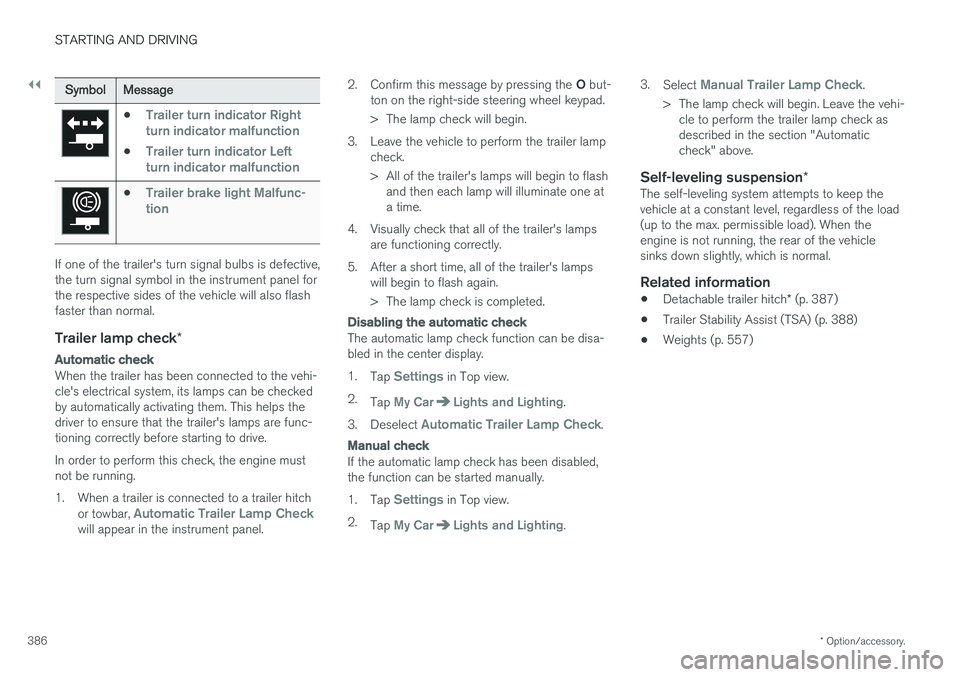
•Trailer turn indicator Right
turn indicator malfunction
•Trailer turn indicator Left
turn indicator malfunction
•Trailer brake light Malfunc-
tion
If one of the trailer's turn signal bulbs is defective, the turn signal symbol in the instrument panel forthe respective sides of the vehicle will also flashfaster than normal.
Trailer lamp check *
Automatic check
When the trailer has been connected to the vehi- cle's electrical system, its lamps can be checkedby automatically activating them. This helps thedriver to ensure that the trailer's lamps are func-tioning correctly before starting to drive. In order to perform this check, the engine must not be running.
1. When a trailer is connected to a trailer hitch
or towbar,
Automatic Trailer Lamp Checkwill appear in the instrument panel. 2.
Confirm this message by pressing the O but-
ton on the right-side steering wheel keypad.
> The lamp check will begin.
3. Leave the vehicle to perform the trailer lamp check.
> All of the trailer's lamps will begin to flashand then each lamp will illuminate one at a time.
4. Visually check that all of the trailer's lamps are functioning correctly.
5. After a short time, all of the trailer's lamps will begin to flash again.
> The lamp check is completed.
Disabling the automatic check
The automatic lamp check function can be disa- bled in the center display. 1.Tap
Settings in Top view.
2. Tap
My CarLights and Lighting.
3. Deselect
Automatic Trailer Lamp Check.
Manual check
If the automatic lamp check has been disabled, the function can be started manually. 1.Tap
Settings in Top view.
2. Tap
My CarLights and Lighting. 3.
Select
Manual Trailer Lamp Check.
> The lamp check will begin. Leave the vehi- cle to perform the trailer lamp check as described in the section "Automaticcheck" above.
Self-leveling suspension *The self-leveling system attempts to keep thevehicle at a constant level, regardless of the load(up to the max. permissible load). When theengine is not running, the rear of the vehiclesinks down slightly, which is normal.
Related information
•Detachable trailer hitch
* (p. 387)
• Trailer Stability Assist (TSA) (p. 388)
• Weights (p. 557)
Page 390 of 580
STARTING AND DRIVING
* Option/accessory.
388
Trailer Stability Assist (TSA)
Trailer Stability Assist is a system designed to help stabilize a vehicle that is towing a trailerwhen the vehicle and trailer have begun to swayand is part of the Electronic Stability Control sys-tem.
FunctionA vehicle towing a trailer may begin to sway for various reasons. Normally this only occurs at highspeeds but, for example, if the trailer is overloa-ded or if the load is unevenly distributed in thetrailer, there is risk of swaying. Swaying may be caused by factors such as:
• The vehicle and trailer are hit by a sudden, strong crosswind
• The vehicle and trailer are traveling on anuneven road surface or drive over a bump
• Sudden movements of the steering wheel
Facts about TSA
• The stability system symbol in the instrumentpanel will flash when TSA is working
• If the driver switches off the stability system'sSpin Control function, TSA will also beswitched off (but will be on again the nexttime the engine is started)
• TSA may not intervene when the vehicle andtrailer begin to sway if the driver tries to com-pensate for the swaying motion by movingthe steering wheel rapidly
How TSA worksOnce swaying has begun, it can be very difficultto stop, which makes it difficult to control thevehicle and trailer. The TSA system continuously monitors the vehi- cle's movements, particularly lateral movement. Ifthe system detects a tendency to sway, thebrakes are applied individually on the frontwheels, which has a stabilizing effect on the vehi-cle and trailer. This is often enough to enable thedriver to regain control of the vehicle. If this is not adequate to stop the swaying motion, the brakes are applied to all of the wheels on thevehicle and on the trailer if it is equipped withbrakes, and engine power is temporarily reduced.As the swaying motion begins to decrease andthe vehicle-trailer have once again become sta-ble, TSA will now stop regulating the brakes/engine power and the driver regains control ofthe vehicle. TSA is deactivated if the driver deactivates
ESCin the center display's menu system.
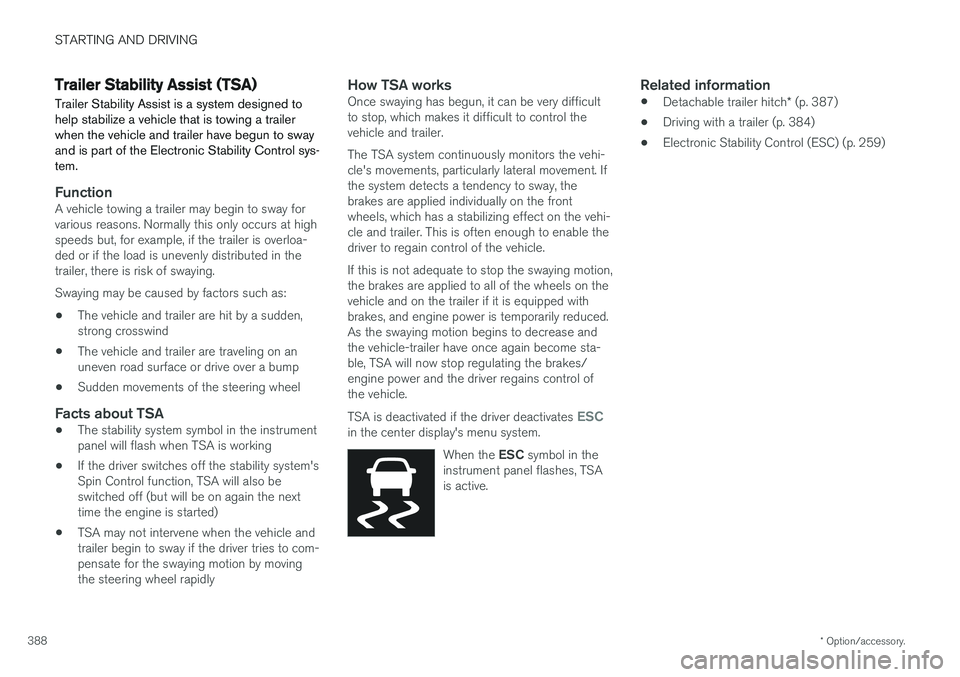
When the ESC symbol in the
instrument panel flashes, TSA is active.
Related information
• Detachable trailer hitch
* (p. 387)
• Driving with a trailer (p. 384)
• Electronic Stability Control (ESC) (p. 259)