mirror VOLVO XC90 T8 2017 Owner´s Manual
[x] Cancel search | Manufacturer: VOLVO, Model Year: 2017, Model line: XC90 T8, Model: VOLVO XC90 T8 2017Pages: 580, PDF Size: 10.37 MB
Page 5 of 580
3
Top tether anchors91
Integrated booster cushion *
92
Raising the integrated booster cushion *
93
Stowing the integrated booster cushion *
95
INSTRUMENTS AND CONTROLS
Instruments and controls
98
Trip computer 99
Displaying trip computer information 100
Displaying trip statistics 102
HomeLink ®
Wireless Control System *102
Programming the HomeLink ®
Wire-
less Control System * 103
Adjusting the power door mirrors 106
Laminated panoramic roof *
108
Operating the laminated panoramic roof *
109
Power windows 111
Operating the power windows 111
Rearview mirror 112
Using sun curtains *
113
Settings view 113
Categories in Settings view 114
Changing system settings in Set- tings view 116
Changing settings in apps 117
Resetting the settings view 117
Resetting user data when the vehiclechanges owners 118
Ambient temperature sensor 118
Clock 119
Head-up display (HUD) *
120
Voice control
123
Using voice commands 123
Voice control for cell phones 124
Voice control for radio and media 125
Climate system voice commands 126
Navigation system voice commands 127
Voice control settings 128
Instrument panel 128
Instrument panel settings 130
Indicator symbols in the instrument panel 131
Hybrid-related information in the instrument panel 133
Instrument panel licenses 135
Warning symbols in the instrument panel 140
Compass 141
Calibrating the compass 142
Lighting panel and controls 143
Parking lights 145
Daytime Running Lights (DRL) 145
Low beam headlights 146
High and low beam headlights 147
Active Bending Lights *
148
Rear fog lights (certain models only) 149
Brake lights 150
Hazard warning flashers 150
Page 7 of 580
5
Defrosting windows and mirrors204
Turning steering wheel heating * on
and off 206
Air conditioning 207
Turning seat heating * on and off
208
Turning front seat ventilation * on and off
209
Air distribution 210
Opening/closing/directing air vents 211
Adjusting air distribution 211
Air distribution table 213
LOADING AND STORAGE
Cargo space216
Loading 216
Passenger compartment storage spaces 218
Using the glove compartment 219
Tunnel console 220
Grocery bag holder 221
Cargo net 221
Steel cargo grid *
223
Load anchoring eyelets 224
Cargo compartment cover *
225
Sun visors 227
Electrical sockets 228
LOCKS AND ALARM
Locks and remote keys232
Immobilizer 232
Changing the remote key's battery 233
Remote key 235
Remote key's range 237
Red Key *
238
Detachable key blade 239
Foot movement tailgate operation *
240
Locking/unlocking from outside the vehicle 241
Locking/unlocking from inside thevehicle 243
Antenna locations for the start andlock system 244
Locking and unlocking confirmation 245
Locking/unlocking the tailgate 246
Power tailgate *
248
Private (valet) locking 250
Locking/unlocking with the detacha-ble key blade 251
Automatically arming/disarming thealarm 252
Alarm 253
Deactivating the alarm without afunctioning remote key 254
Child safety locks 254
Page 60 of 580
||
INTRODUCTION
* Option/accessory.
58
Using the search function
1.
Tap the magnifying glass icon () in the
owner's manual's upper menu. A keyboard will appear at the bottom of the screen.
2. Enter a word, e.g., "seat belt." > Suggested articles will be displayed asmore characters are entered.
3. Confirm by tapping the article. To leave search mode tap the up-arrow next to thesearch box.
Related information
• On-board digital owner's manual (p. 55)
• Using the center display keyboard (p. 36)
Glass
Laminated glass
The windshield and panoramic roof
* are made of
laminated glass, which is reinforced to help pre- vent break-ins and to provide additional sound-proofing. Laminated glass is optional for theother side windows.
Laminated glass symbol 5
Related information
•
Laminated panoramic roof
* (p. 108)
• Power windows (p. 111)
• Defrosting windows and mirrors (p. 204)
• Using sun curtains
* (p. 113)
• Rearview mirror (p. 112)
• Power windows (p. 111)
• Head-up display (HUD)
* (p. 120)
• Activating/deactivating the rain sensor (p. 161)
• Windshield and headlight washers (p. 162)
• Tailgate window wiper and washer (p. 163)
Technician certification
In addition to Volvo factory training, Volvo sup- ports certification by the National Institute forAutomotive Service Excellence (A.S.E.).
Certified technicians have demonstrated a high degree of competence in specific areas. Besidespassing exams, each technician must also haveworked in the field for two or more years before acertificate is issued. These professional techni-cians are best able to analyze vehicle problemsand perform the necessary maintenance proce-dures to keep your Volvo at peak operating con-dition.
Twin Engine Plug-in Hybrid vehicles
Technicians performing work on a vehicle with electrification should also have the necessarytraining and specialized certification required forperforming repairs and/or maintenance on avehicle with electrification.
WARNING
A number of electrical components in Twin Engine Plug-in Hybrid vehicles use high-volt-age current and can be extremely dangerousif handled incorrectly. These components andany orange wiring in the vehicle may only behandled by trained and qualified Volvo servicetechnicians.
5
This symbol is not shown on the windshield or panoramic roof.
Page 70 of 580
||
SAFETY
68
Unbuckling the seat beltTo remove the seat belt, press the red section on the seat belt receptacle. Before exiting the vehi-cle, check that the seat belt retracts fully afterbeing unbuckled. If necessary, guide the beltback into the retractor slot. Be sure that the seat belt in the center position of the second row of seats is correctly positionedin the seat belt guide.
Related information
•Door and seat belt reminders (p. 68)
• Seat belts (p. 64)
Door and seat belt reminders
The door and seat belt reminders are intended to alert all occupants of the vehicle that theirseat belts should be buckled before the vehiclebegins to move or if a door, the hood, tailgate orfuel filler door have not been closed properly.
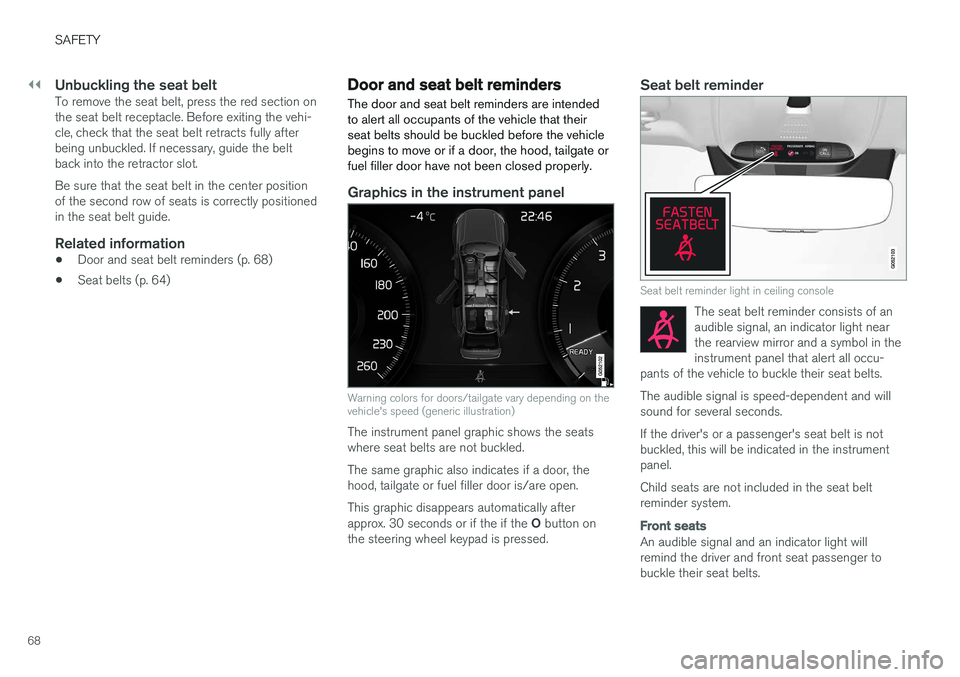
Graphics in the instrument panel
Warning colors for doors/tailgate vary depending on the vehicle's speed (generic illustration)
The instrument panel graphic shows the seats where seat belts are not buckled. The same graphic also indicates if a door, the hood, tailgate or fuel filler door is/are open. This graphic disappears automatically after approx. 30 seconds or if the if the O button on
the steering wheel keypad is pressed.
Seat belt reminder
Seat belt reminder light in ceiling console
The seat belt reminder consists of an audible signal, an indicator light nearthe rearview mirror and a symbol in theinstrument panel that alert all occu-
pants of the vehicle to buckle their seat belts.
The audible signal is speed-dependent and will sound for several seconds. If the driver's or a passenger's seat belt is not buckled, this will be indicated in the instrumentpanel. Child seats are not included in the seat belt reminder system.
Front seats
An audible signal and an indicator light will remind the driver and front seat passenger tobuckle their seat belts.
Page 75 of 580
SAFETY
}}
73
Occupant weight sensor
The Occupant Weight Sensor (OWS) is designed to meet the regulatory requirements ofFederal Motor Vehicle Safety Standard (FMVSS)208 and is designed to disable (will not inflate)the passenger's side front airbag under certainconditions.
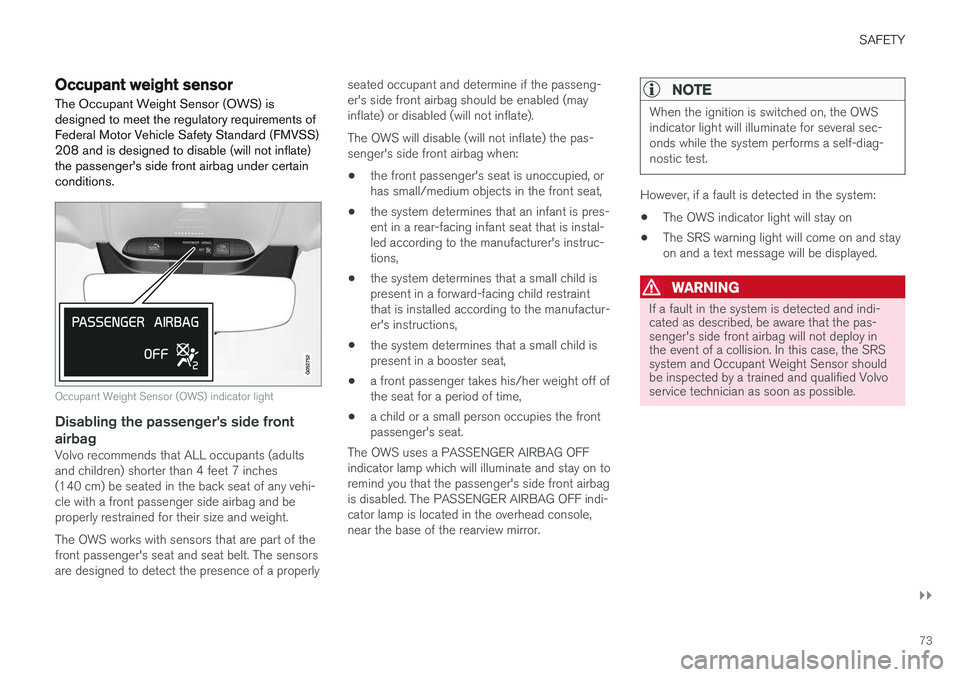
Occupant Weight Sensor (OWS) indicator light
Disabling the passenger's side front airbag
Volvo recommends that ALL occupants (adults and children) shorter than 4 feet 7 inches(140 cm) be seated in the back seat of any vehi-cle with a front passenger side airbag and beproperly restrained for their size and weight. The OWS works with sensors that are part of the front passenger's seat and seat belt. The sensorsare designed to detect the presence of a properly seated occupant and determine if the passeng-er's side front airbag should be enabled (mayinflate) or disabled (will not inflate). The OWS will disable (will not inflate) the pas- senger's side front airbag when:
• the front passenger's seat is unoccupied, orhas small/medium objects in the front seat,
• the system determines that an infant is pres-ent in a rear-facing infant seat that is instal-led according to the manufacturer's instruc-tions,
• the system determines that a small child ispresent in a forward-facing child restraintthat is installed according to the manufactur-er's instructions,
• the system determines that a small child ispresent in a booster seat,
• a front passenger takes his/her weight off ofthe seat for a period of time,
• a child or a small person occupies the frontpassenger's seat.
The OWS uses a PASSENGER AIRBAG OFFindicator lamp which will illuminate and stay on toremind you that the passenger's side front airbagis disabled. The PASSENGER AIRBAG OFF indi-cator lamp is located in the overhead console,near the base of the rearview mirror.
NOTE
When the ignition is switched on, the OWS indicator light will illuminate for several sec-onds while the system performs a self-diag-nostic test.
However, if a fault is detected in the system:
• The OWS indicator light will stay on
• The SRS warning light will come on and stay on and a text message will be displayed.
WARNING
If a fault in the system is detected and indi- cated as described, be aware that the pas-senger's side front airbag will not deploy inthe event of a collision. In this case, the SRSsystem and Occupant Weight Sensor shouldbe inspected by a trained and qualified Volvoservice technician as soon as possible.
Page 100 of 580
INSTRUMENTS AND CONTROLS
* Option/accessory.
98
Instruments and controls
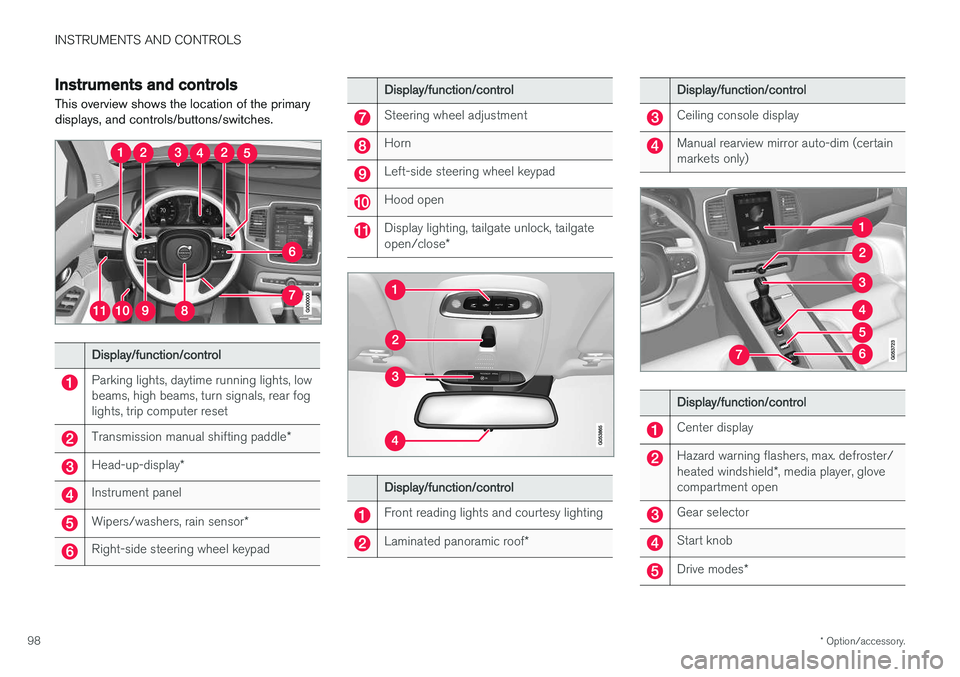
This overview shows the location of the primary displays, and controls/buttons/switches.
Display/function/control
Parking lights, daytime running lights, low beams, high beams, turn signals, rear foglights, trip computer reset
Transmission manual shifting paddle *
Head-up-display*
Instrument panel
Wipers/washers, rain sensor *
Right-side steering wheel keypad
Display/function/control
Steering wheel adjustment
Horn
Left-side steering wheel keypad
Hood open
Display lighting, tailgate unlock, tailgate open/close*
Display/function/control
Front reading lights and courtesy lighting
Laminated panoramic roof *
Display/function/control
Ceiling console display
Manual rearview mirror auto-dim (certain markets only)
Display/function/control
Center display
Hazard warning flashers, max. defroster/ heated windshield*, media player, glove
compartment open
Gear selector
Start knob
Drive modes *
Page 101 of 580
INSTRUMENTS AND CONTROLS
}}
* Option/accessory.99
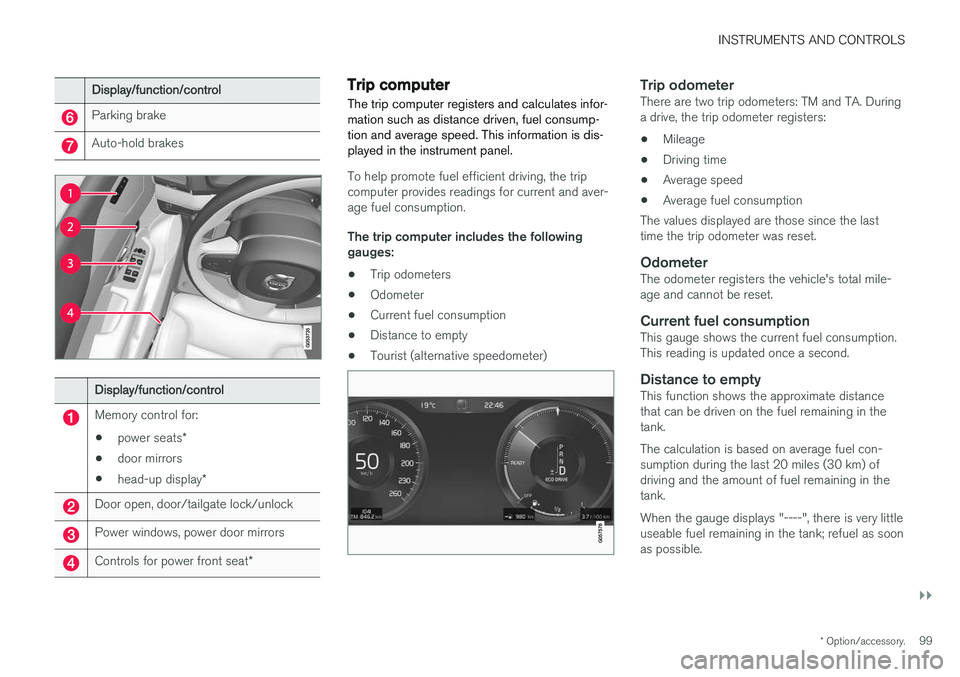
Display/function/control
Parking brake
Auto-hold brakes
Display/function/control
Memory control for:
• power seats
*
• door mirrors
• head-up display
*
Door open, door/tailgate lock/unlock
Power windows, power door mirrors
Controls for power front seat *
Trip computer The trip computer registers and calculates infor- mation such as distance driven, fuel consump-tion and average speed. This information is dis-played in the instrument panel.
To help promote fuel efficient driving, the trip computer provides readings for current and aver-age fuel consumption. The trip computer includes the following gauges:
• Trip odometers
• Odometer
• Current fuel consumption
• Distance to empty
• Tourist (alternative speedometer)
Trip odometerThere are two trip odometers: TM and TA. During a drive, the trip odometer registers:
• Mileage
• Driving time
• Average speed
• Average fuel consumption
The values displayed are those since the lasttime the trip odometer was reset.
OdometerThe odometer registers the vehicle's total mile-age and cannot be reset.
Current fuel consumptionThis gauge shows the current fuel consumption.This reading is updated once a second.
Distance to emptyThis function shows the approximate distancethat can be driven on the fuel remaining in thetank. The calculation is based on average fuel con- sumption during the last 20 miles (30 km) ofdriving and the amount of fuel remaining in thetank. When the gauge displays "----", there is very little useable fuel remaining in the tank; refuel as soonas possible.
Page 102 of 580
||
INSTRUMENTS AND CONTROLS
100The accuracy of this figure may vary if your driv- ing style changes. An economical driving style willgenerally increase this distance.
Distance to discharged batteryThis gauge shows the approximate dis-tance that can be driven on the chargeremaining in the hybrid battery.
When the gauge displays "----" there is no guar- anteed driving charge remaining in the battery. This calculation is based on the average electrical current consumption in a normally loaded vehicleduring normal driving, and whether the A/C is on or off. Changing drive modes from
Hybrid toPure may increase the calculated distance to a
discharged battery since Pure mode reduces
certain climate system functions. An economical driving style will generally increase this distance.
Distance using the electric motor
To get the optimal driving distance using the electric motor, it is essential to conserve current.Functions that use a great deal of current (e.g.,audio system, electrical heating in the steeringwheel/door mirrors/rear window/seats, very coldair from the climate system, etc.) reduce the pos-sible driving distance.
NOTE
In addition to high electrical consumption in the passenger compartment, fast accelera-tion, sudden braking, heavy loads, low ambienttemperatures and driving up hills can reducethe possible driving distance.
Tourist (alternative speedometer)This is an alternative digital speedometer can be used when driving in areas in which the speedlimit is listed in a different unit of measure. If the speedometer is in mph, this gauge will show the
vehicle's speed in km/h and vice versa.
Related information
•Displaying trip computer information (p. 100)
• Displaying trip statistics (p. 102)
Displaying trip computer information
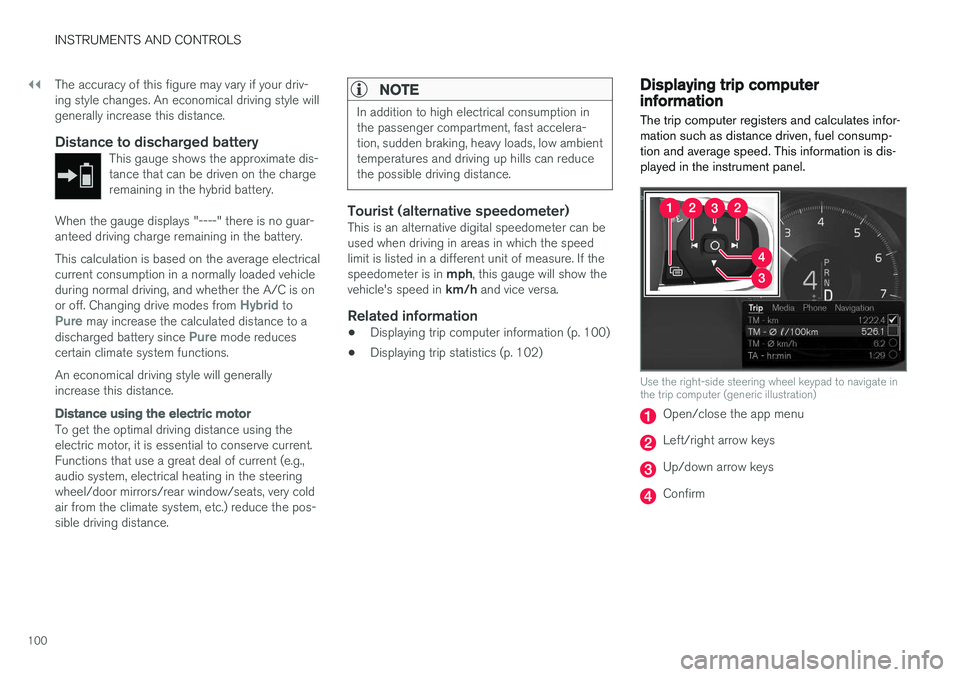
The trip computer registers and calculates infor- mation such as distance driven, fuel consump-tion and average speed. This information is dis-played in the instrument panel.
Use the right-side steering wheel keypad to navigate in the trip computer (generic illustration)
Open/close the app menu
Left/right arrow keys
Up/down arrow keys
Confirm
Page 109 of 580

INSTRUMENTS AND CONTROLS
* Option/accessory.107
NOTE
Only one mirror can be tilted down at a time.
Automatically tilting the door mirrors when parking5
This function can be activated/deactivated in the center display. 1.
Tap
Settings in Top view.
2. Tap
My CarMirrors and Easy Entry.
3. Under
Exterior Mirror Tilt at Reverse,
select Off, Driver, Passenger or Both to
activate/deactivate and select which mirror to tilt.
Folding mirrors *When parking in a limited space, the mirrors canbe folded in: 1.
Press the L and R buttons at the same time
(the ignition must be in at least mode I).
2. Release the buttons after approx. 1 second. The mirrors will stop automatically when they are completely folded in.
Fold out the mirrors by pressing the L and R at
the same time. The mirrors will stop automaticallywhen they return to their original positions.
Automatic folding when the vehicle is locked 5
The mirrors can be folded in/out automatically when the vehicle is locked/unlocked. This function can be activated/deactivated in the center display. 1.
Tap
Settings in Top view.
2. Tap
My CarMirrors and Easy Entry.
3. Select
Fold Mirror When Locked to acti-
vate/deactivate.
Resetting the mirrors' positionA mirror that has been moved manually (e.g., bumped into in a parking lot, etc.) has to bereturned to its normal position electrically beforeautomatic folding will function correctly. 1. Fold in the mirrors with the L and R buttons.
2. Fold out the mirrors with the L and R buttons.
The mirrors have now been reset to their original positions.
Auto-dim *Settings can be made for the auto-dim functionin the rearview and door mirrors. The auto-dim function is always active while the vehicle is being driven except when the reversegear has been selected. The level of sensitivity for this function can be set to three levels, whichaffect the rearview mirror and door mirrors.
NOTE
When the level of sensitivity is changed, this change will not be noticeable immediately butwill take effect after a short period of time.
The level of sensitivity is set from the center dis- play: 1.
Tap
Settings in Top view.
2. Tap
My CarMirrors and Easy Entry.
3. Under
Rearview Mirror Auto Dimming,
select Normal, Dark or Light.
Related information
• Using the power seat memory function
*
(p. 168)
• Rearview mirror (p. 112)
5
Only on models equipped with a power driver's seat.
Page 110 of 580

INSTRUMENTS AND CONTROLS
* Option/accessory.
108
Laminated panoramic roof *
The laminated panoramic roof is divided into two sections and only the front section can beopened; it can be slid horizontally to the open orclosed positions or its rear edge can be raisedand lowered to allow ventilation.
The laminated panoramic roof also has a sun shade made of perforated fabric that is locatedbelow the sections of glass. This shade can beopened or closed, for example when driving inbright sunlight. The laminated panoramic roof also has a wind blocker that folds up when the roof is open.
CAUTION
The optional panoramic roof should not be opened while load carriers are installed onthe vehicle.
The laminated panoramic roof and the sun shade are operated using the controls in the ceilingconsole, near the rear-view mirror. The controlsare activated when the vehicle's ignition is in mode I or II.
CAUTION
• Remove ice and snow before opening the laminated panoramic roof.
• Do not operate the laminated panoramicroof if it is frozen closed.
• Never place heavy objects on the lamina-ted panoramic roof.
Wind blocker
The laminated panoramic roof is equipped with a wind blocker that folds up when the roof is open.
Related information
•
Operating the laminated panoramic roof
*
(p. 109)