engine VOLVO XC90 T8 2018 Owner´s Manual
[x] Cancel search | Manufacturer: VOLVO, Model Year: 2018, Model line: XC90 T8, Model: VOLVO XC90 T8 2018Pages: 686, PDF Size: 11.51 MB
Page 54 of 686
||
SAFETY
52
Seat belt reminder
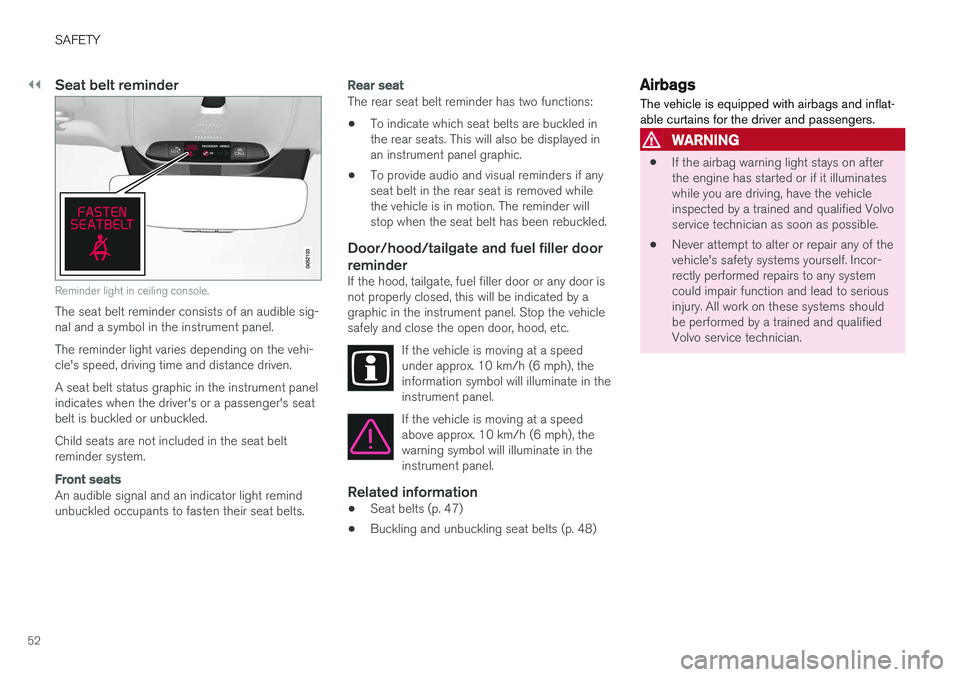
Reminder light in ceiling console.
The seat belt reminder consists of an audible sig- nal and a symbol in the instrument panel. The reminder light varies depending on the vehi- cle's speed, driving time and distance driven. A seat belt status graphic in the instrument panel indicates when the driver's or a passenger's seatbelt is buckled or unbuckled. Child seats are not included in the seat belt reminder system.
Front seats
An audible signal and an indicator light remind unbuckled occupants to fasten their seat belts.
Rear seat
The rear seat belt reminder has two functions:• To indicate which seat belts are buckled in the rear seats. This will also be displayed inan instrument panel graphic.
• To provide audio and visual reminders if anyseat belt in the rear seat is removed whilethe vehicle is in motion. The reminder willstop when the seat belt has been rebuckled.
Door/hood/tailgate and fuel filler door
reminder
If the hood, tailgate, fuel filler door or any door isnot properly closed, this will be indicated by agraphic in the instrument panel. Stop the vehiclesafely and close the open door, hood, etc.
If the vehicle is moving at a speedunder approx. 10 km/h (6 mph), theinformation symbol will illuminate in theinstrument panel.
If the vehicle is moving at a speed above approx. 10 km/h (6 mph), thewarning symbol will illuminate in theinstrument panel.
Related information
•Seat belts (p. 47)
• Buckling and unbuckling seat belts (p. 48)
Airbags
The vehicle is equipped with airbags and inflat- able curtains for the driver and passengers.
WARNING
• If the airbag warning light stays on after the engine has started or if it illuminateswhile you are driving, have the vehicleinspected by a trained and qualified Volvoservice technician as soon as possible.
• Never attempt to alter or repair any of thevehicle's safety systems yourself. Incor-rectly performed repairs to any systemcould impair function and lead to seriousinjury. All work on these systems shouldbe performed by a trained and qualifiedVolvo service technician.
Page 55 of 686
SAFETY
}}
53
WARNING
If your vehicle has become water-damaged in any way (e.g., soaked floor mats/standingwater on the floor of the vehicle), do notattempt to start the engine. This may causeairbag deployment, which could result in seri-ous injury. Volvo recommends towing thevehicle directly to an authorized Volvo work-shop. Before attempting to tow the vehicle:
1. Switch off the ignition for at least 10minutes and disconnect the battery.
2. Follow the instructions for manually over- riding the shiftlock system.
Deployed airbags
WARNING
If any of the airbags have deployed:
• Do not attempt to drive the vehicle. Have it towed to an authorized workshop.
• If necessary, seek medical attention.
Related information
•
Safety (p. 42)
• Driver/passenger-side airbags (p. 53)
• Side airbags (p. 60)
• Inflatable curtain (p. 60)
Driver/passenger-side airbags
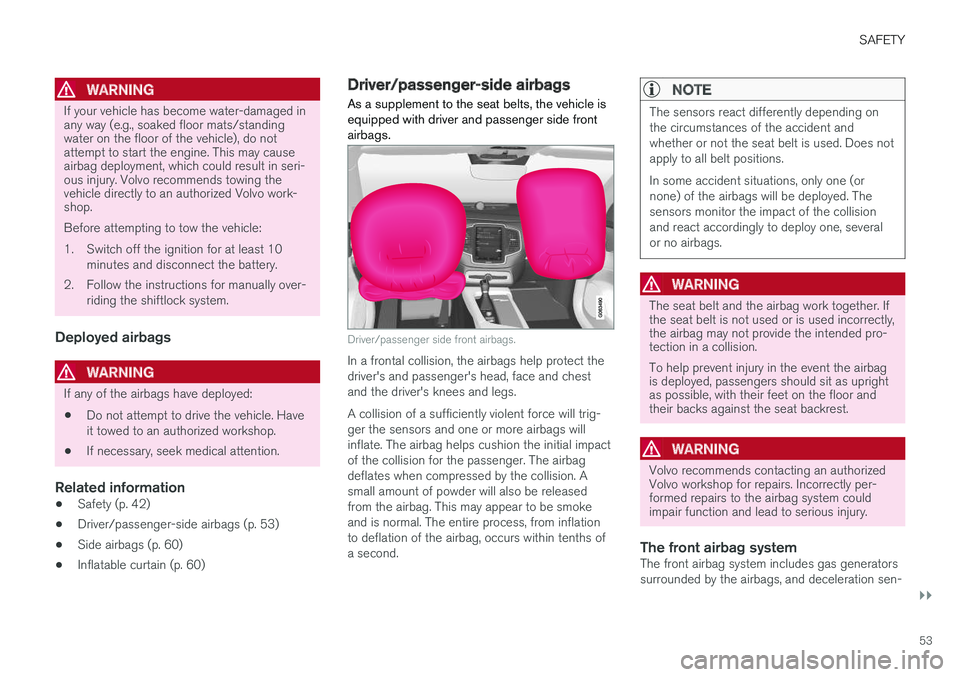
As a supplement to the seat belts, the vehicle is equipped with driver and passenger side frontairbags.
Driver/passenger side front airbags.
In a frontal collision, the airbags help protect the driver's and passenger's head, face and chestand the driver's knees and legs. A collision of a sufficiently violent force will trig- ger the sensors and one or more airbags willinflate. The airbag helps cushion the initial impactof the collision for the passenger. The airbagdeflates when compressed by the collision. Asmall amount of powder will also be releasedfrom the airbag. This may appear to be smokeand is normal. The entire process, from inflationto deflation of the airbag, occurs within tenths ofa second.
NOTE
The sensors react differently depending on the circumstances of the accident andwhether or not the seat belt is used. Does notapply to all belt positions. In some accident situations, only one (or none) of the airbags will be deployed. Thesensors monitor the impact of the collisionand react accordingly to deploy one, severalor no airbags.
WARNING
The seat belt and the airbag work together. If the seat belt is not used or is used incorrectly,the airbag may not provide the intended pro-tection in a collision. To help prevent injury in the event the airbag is deployed, passengers should sit as uprightas possible, with their feet on the floor andtheir backs against the seat backrest.
WARNING
Volvo recommends contacting an authorized Volvo workshop for repairs. Incorrectly per-formed repairs to the airbag system couldimpair function and lead to serious injury.
The front airbag systemThe front airbag system includes gas generators surrounded by the airbags, and deceleration sen-
Page 64 of 686
||
SAFETY
62
WARNING
Never attempt to perform repairs or reset electrical components on your own after thevehicle has been in safety mode. This couldresult in injury or prevent the vehicle fromfunctioning properly. Volvo recommends hav-ing the vehicle inspected and reset to normaloperating status by an authorized Volvo work- shop after
Safety mode See Owner's
manual has been displayed.
WARNING
When the vehicle is in safety mode, it should not be towed behind another vehicle. It shouldbe towed from the site on a tow truck. Volvorecommends towing the vehicle directly to anauthorized Volvo workshop.
Related information
• Safety (p. 42)
• Starting and moving the vehicle when it is in safety mode (p. 62)
• Recovery (p. 477)
Starting and moving the vehiclewhen it is in safety mode If safety mode has been set, it may be possible to reset the system in order to start and movethe vehicle a short distance, for example, if it isblocking traffic.
Starting the vehicle when it is in safety mode
1. Check the vehicle for damage, particularly for
fuel leakage. Make sure you do not detect any gasoline fumes. If the damage to the vehicle is minor and there is no fuel leakage/fumes, you mayattempt to start the engine.
WARNING
Never attempt to restart the vehicle if you smell fuel fumes when the message Safety
mode See Owner's manual is displayed in
the instrument panel. Leave the vehicle imme- diately.
2. Switch off the ignition.
3. Then try to start the vehicle. >The message
Vehicle start System
check, wait will appear in the instrument
panel while the electrical system performs a system check and then attempts toreset to normal operating mode. This maytake up to a minute. 4.
When
Vehicle start System check, wait is
no longer displayed in the instrument panel, try again to start the vehicle.
CAUTION
If the message Safety mode See Owner's
manual is still displayed, the vehicle should
not be driven or towed behind another vehi- cle. If the vehicle needs to be moved, it mustbe towed on a tow truck. Even if no damageis apparent, there may be hidden damage thatcould make the vehicle impossible to control.
Moving the vehicle when it is in safety mode
1. If the message Normal mode The vehicle
is now in normal mode is displayed after
attempting to start the engine, the vehicle may be moved carefully from its presentposition if, for example, it is blocking traffic.
2. Do not move the vehicle farther than abso- lutely necessary.
WARNING
When the vehicle is in safety mode, it should not be towed behind another vehicle. It shouldbe towed from the site on a tow truck. Volvorecommends towing the vehicle directly to anauthorized Volvo workshop.
Page 89 of 686
DISPLAYS AND VOICE CONTROL
}}
87
Hybrid gauge
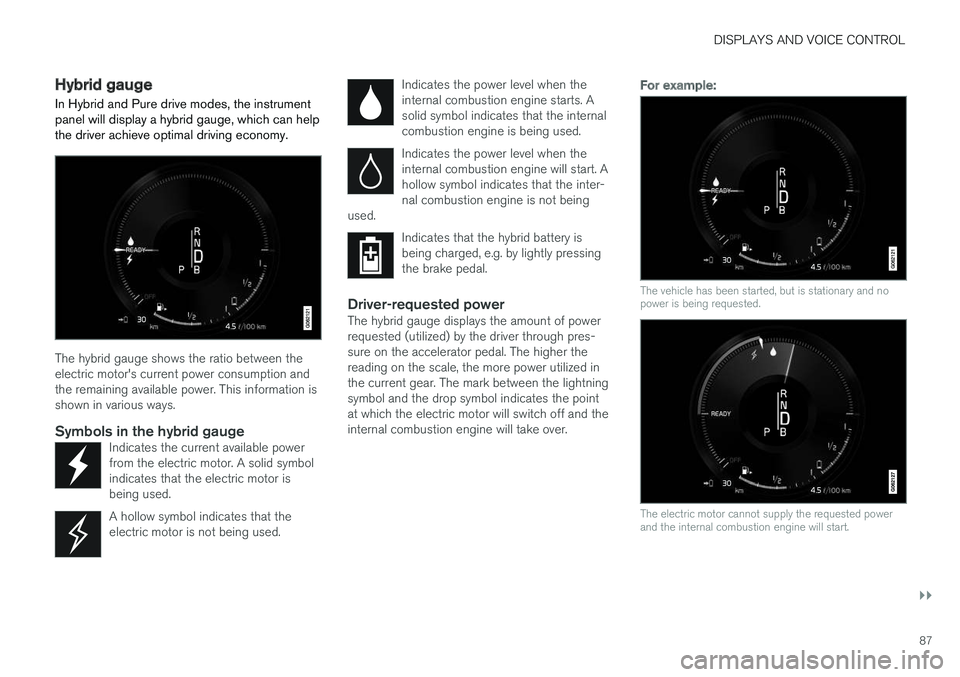
In Hybrid and Pure drive modes, the instrument panel will display a hybrid gauge, which can help the driver achieve optimal driving economy.
The hybrid gauge shows the ratio between the electric motor's current power consumption andthe remaining available power. This information isshown in various ways.
Symbols in the hybrid gaugeIndicates the current available powerfrom the electric motor. A solid symbolindicates that the electric motor isbeing used.
A hollow symbol indicates that the electric motor is not being used.
Indicates the power level when the internal combustion engine starts. Asolid symbol indicates that the internalcombustion engine is being used.
Indicates the power level when the internal combustion engine will start. Ahollow symbol indicates that the inter-nal combustion engine is not being
used.
Indicates that the hybrid battery is being charged, e.g. by lightly pressingthe brake pedal.
Driver-requested powerThe hybrid gauge displays the amount of power requested (utilized) by the driver through pres-sure on the accelerator pedal. The higher thereading on the scale, the more power utilized inthe current gear. The mark between the lightningsymbol and the drop symbol indicates the pointat which the electric motor will switch off and theinternal combustion engine will take over.
For example:
The vehicle has been started, but is stationary and no power is being requested.
The electric motor cannot supply the requested power and the internal combustion engine will start.
Page 90 of 686
||
DISPLAYS AND VOICE CONTROL
88
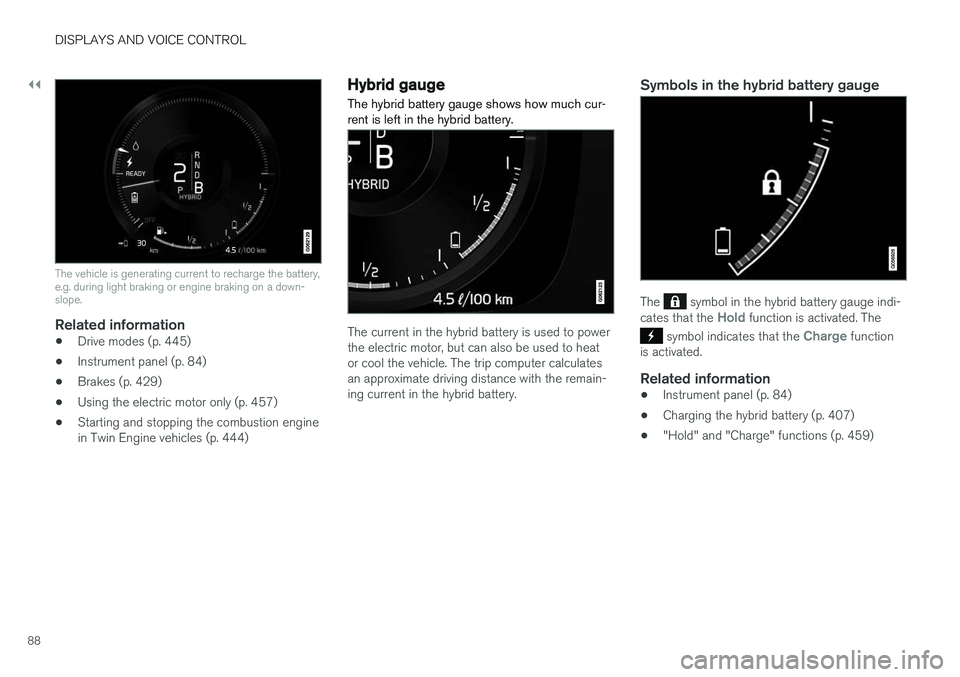
The vehicle is generating current to recharge the battery, e.g. during light braking or engine braking on a down-slope.
Related information
•Drive modes (p. 445)
• Instrument panel (p. 84)
• Brakes (p. 429)
• Using the electric motor only (p. 457)
• Starting and stopping the combustion engine in Twin Engine vehicles (p. 444)
Hybrid gauge
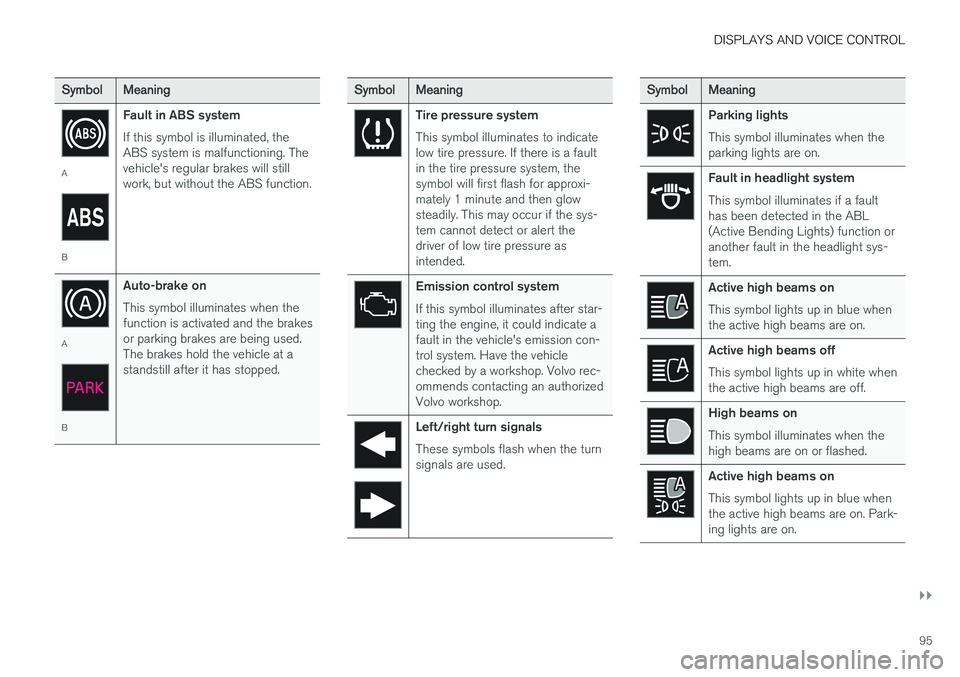
The hybrid battery gauge shows how much cur- rent is left in the hybrid battery.
The current in the hybrid battery is used to power the electric motor, but can also be used to heator cool the vehicle. The trip computer calculatesan approximate driving distance with the remain-ing current in the hybrid battery.
Symbols in the hybrid battery gauge
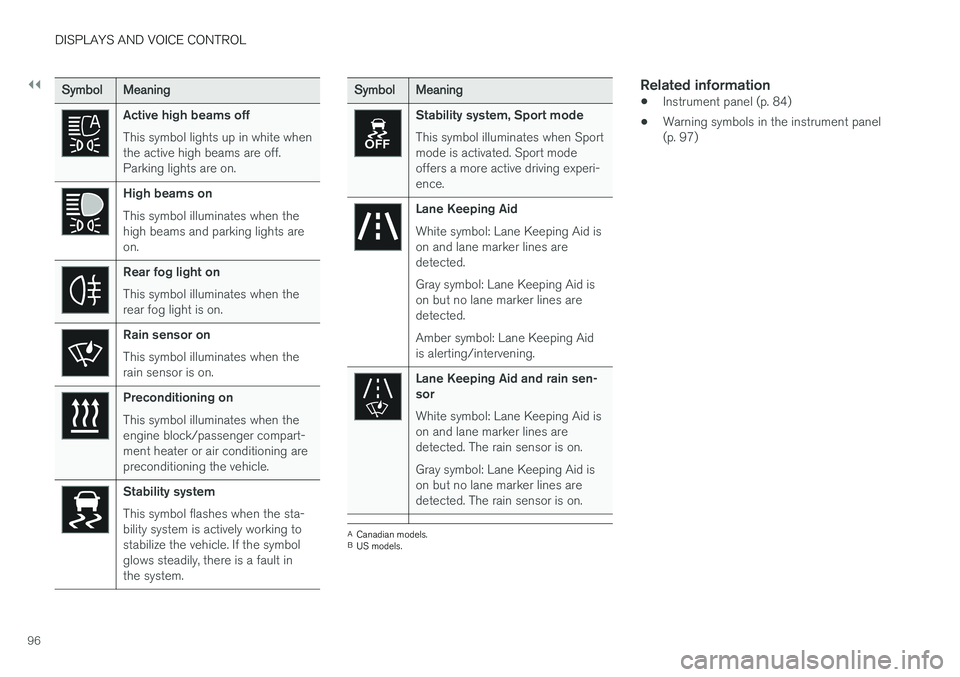
The symbol in the hybrid battery gauge indi-
cates that the Hold function is activated. The
symbol indicates that the Charge function
is activated.
Related information
• Instrument panel (p. 84)
• Charging the hybrid battery (p. 407)
• "Hold" and "Charge" functions (p. 459)
Page 97 of 686
DISPLAYS AND VOICE CONTROL
}}
95
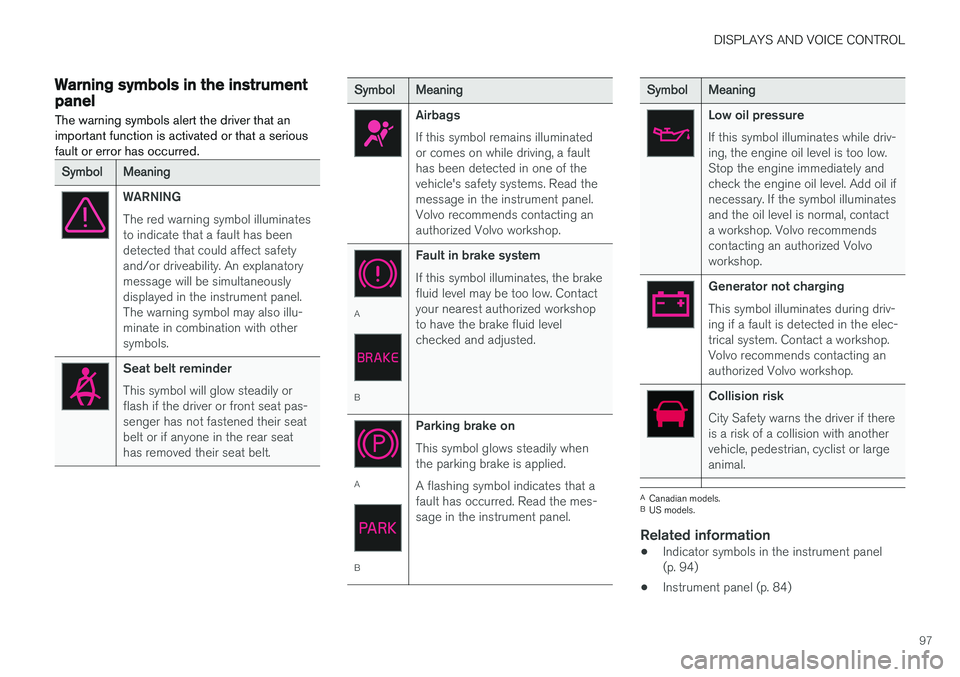
SymbolMeaning
A
BFault in ABS system If this symbol is illuminated, the ABS system is malfunctioning. Thevehicle's regular brakes will stillwork, but without the ABS function.
A
BAuto-brake on This symbol illuminates when the function is activated and the brakesor parking brakes are being used.The brakes hold the vehicle at astandstill after it has stopped.
SymbolMeaning
Tire pressure system This symbol illuminates to indicate low tire pressure. If there is a faultin the tire pressure system, thesymbol will first flash for approxi-mately 1 minute and then glowsteadily. This may occur if the sys-tem cannot detect or alert thedriver of low tire pressure asintended.
Emission control system If this symbol illuminates after star- ting the engine, it could indicate afault in the vehicle's emission con-trol system. Have the vehiclechecked by a workshop. Volvo rec-ommends contacting an authorizedVolvo workshop.
Left/right turn signals These symbols flash when the turn signals are used.
SymbolMeaning
Parking lights This symbol illuminates when the parking lights are on.
Fault in headlight system This symbol illuminates if a fault has been detected in the ABL(Active Bending Lights) function oranother fault in the headlight sys-tem.
Active high beams on This symbol lights up in blue when the active high beams are on.
Active high beams off This symbol lights up in white when the active high beams are off.
High beams on This symbol illuminates when the high beams are on or flashed.
Active high beams on This symbol lights up in blue when the active high beams are on. Park-ing lights are on.
Page 98 of 686
||
DISPLAYS AND VOICE CONTROL
96
SymbolMeaning
Active high beams off This symbol lights up in white when the active high beams are off.Parking lights are on.
High beams on This symbol illuminates when the high beams and parking lights areon.
Rear fog light on This symbol illuminates when the rear fog light is on.
Rain sensor on This symbol illuminates when the rain sensor is on.
Preconditioning on This symbol illuminates when the engine block/passenger compart-ment heater or air conditioning arepreconditioning the vehicle.
Stability system This symbol flashes when the sta- bility system is actively working tostabilize the vehicle. If the symbolglows steadily, there is a fault inthe system.
SymbolMeaning
Stability system, Sport mode This symbol illuminates when Sport mode is activated. Sport modeoffers a more active driving experi-ence.
Lane Keeping Aid White symbol: Lane Keeping Aid is on and lane marker lines aredetected. Gray symbol: Lane Keeping Aid is on but no lane marker lines aredetected. Amber symbol: Lane Keeping Aid is alerting/intervening.
Lane Keeping Aid and rain sen- sor White symbol: Lane Keeping Aid is on and lane marker lines aredetected. The rain sensor is on. Gray symbol: Lane Keeping Aid is on but no lane marker lines aredetected. The rain sensor is on.
ACanadian models.
B US models.
Related information
• Instrument panel (p. 84)
• Warning symbols in the instrument panel (p. 97)
Page 99 of 686
DISPLAYS AND VOICE CONTROL
97
Warning symbols in the instrumentpanelThe warning symbols alert the driver that an important function is activated or that a seriousfault or error has occurred.
SymbolMeaning
WARNING The red warning symbol illuminates to indicate that a fault has beendetected that could affect safetyand/or driveability. An explanatorymessage will be simultaneouslydisplayed in the instrument panel.The warning symbol may also illu-minate in combination with othersymbols.
Seat belt reminder This symbol will glow steadily or flash if the driver or front seat pas-senger has not fastened their seatbelt or if anyone in the rear seathas removed their seat belt.
SymbolMeaning
Airbags If this symbol remains illuminated or comes on while driving, a faulthas been detected in one of thevehicle's safety systems. Read themessage in the instrument panel.Volvo recommends contacting anauthorized Volvo workshop.
A
B Fault in brake system If this symbol illuminates, the brake fluid level may be too low. Contactyour nearest authorized workshopto have the brake fluid levelchecked and adjusted.
A
BParking brake on This symbol glows steadily when the parking brake is applied. A flashing symbol indicates that a fault has occurred. Read the mes-sage in the instrument panel.
SymbolMeaning
Low oil pressure If this symbol illuminates while driv- ing, the engine oil level is too low.Stop the engine immediately andcheck the engine oil level. Add oil ifnecessary. If the symbol illuminatesand the oil level is normal, contacta workshop. Volvo recommendscontacting an authorized Volvoworkshop.
Generator not charging This symbol illuminates during driv- ing if a fault is detected in the elec-trical system. Contact a workshop.Volvo recommends contacting anauthorized Volvo workshop.
Collision risk City Safety warns the driver if there is a risk of a collision with anothervehicle, pedestrian, cyclist or largeanimal.
A
Canadian models.
B US models.
Related information
• Indicator symbols in the instrument panel (p. 94)
• Instrument panel (p. 84)
Page 102 of 686
||
DISPLAYS AND VOICE CONTROL
100
FreeType Project License
1. 1 Copyright 1996-1999 by David Turner,Robert Wilhelm, and Werner Lemberg Introduction The FreeType Project isdistributed in several archive packages; someof them may contain, in addition to theFreeType font engine, various tools andcontributions which rely on, or relate to, theFreeType Project. This license applies to allfiles found in such packages, and which donot fall under their own explicit license. Thelicense affects thus the FreeType fontengine, the test programs, documentationand makefiles, at the very least. This licensewas inspired by the BSD, Artistic, and IJG(Independent JPEG Group) licenses, whichall encourage inclusion and use of freesoftware in commercial and freewareproducts alike. As a consequence, its mainpoints are that: o We don't promise that thissoftware works. However, we are beinterested in any kind of bug reports. (`as is'distribution) o You can use this software forwhatever you want, in parts or full form,without having to pay us. (`royalty-free'usage) o You may not pretend that you wrotethis software. If you use it, or only parts of it,in a program, you must acknowledgesomewhere in your documentation thatyou've used the FreeType code. (`credits')We specifically permit and encourage theinclusion of this software, with or withoutmodifications, in commercial products, provided that all warranty or liability claimsare assumed by the product vendor. LegalTerms 0. Definitions Throughout this license,the terms `package', `FreeType Project', and`FreeType archive' refer to the set of filesoriginally distributed by the authors (DavidTurner, Robert Wilhelm, and WernerLemberg) as the `FreeType project', be theynamed as alpha, beta or final release. `You'refers to the licensee, or person using theproject, where `using' is a generic termincluding compiling the project's source codeas well as linking it to form a `program' or`executable'. This program is referred to as `aprogram using the FreeType engine'. Thislicense applies to all files distributed in theoriginal FreeType archive, including all sourcecode, binaries and documentation, unlessotherwise stated in the file in its original,unmodified form as distributed in the originalarchive. If you are unsure whether or not aparticular file is covered by this license, youmust contact us to verify this. The FreeTypeproject is copyright (C) 1996-1999 by DavidTurner, Robert Wilhelm, and WernerLemberg. All rights reserved except asspecified below. 1. No Warranty THEFREETYPE ARCHIVE IS PROVIDED `AS IS'WITHOUT WARRANTY OF ANY KIND,EITHER EXPRESSED OR IMPLIED,INCLUDING, BUT NOT LIMITED TO,WARRANTIES OF MERCHANTABILITY ANDFITNESS FOR A PARTICULAR PURPOSE.
IN NO EVENT WILL ANY OF THEAUTHORS OR COPYRIGHT HOLDERS BELIABLE FOR ANY DAMAGES CAUSED BYTHE USE OR THE INABILITY TO USE, OFTHE FREETYPE PROJECT. As you have notsigned this license, you are not required toaccept it. However, as the FreeType projectis copyrighted material, only this license, oranother one contracted with the authors,grants you the right to use, distribute, andmodify it. Therefore, by using, distributing, ormodifying the FreeType project, you indicatethat you understand and accept all the termsof this license.
2. Redistribution Redistribution and use in source and binary forms, with or withoutmodification, are permitted provided that thefollowing conditions are met: o Redistributionof source code must retain this license file(`licence.txt') unaltered; any additions,deletions or changes to the original filesmust be clearly indicated in accompanyingdocumentation. The copyright notices of theunaltered, original files must be preserved inall copies of source files. o Redistribution inbinary form must provide a disclaimer thatstates that the software is based in part ofthe work of the FreeType Team, in thedistribution documentation. We alsoencourage you to put an URL to theFreeType web page in your documentation,though this isn't mandatory. These conditionsapply to any software derived from or based
Page 103 of 686
DISPLAYS AND VOICE CONTROL
}}
101
on the FreeType code, not just the unmodified files. If you use our work, youmust acknowledge us. However, no fee needbe paid to us.
3. Advertising The names of FreeType's authors and contributors may not be used to endorseor promote products derived from thissoftware without specific prior writtenpermission. We suggest, but do not require,that you use one or more of the followingphrases to refer to this software in yourdocumentation or advertising materials:`FreeType Project', `FreeType Engine',`FreeType library', or `FreeType Distribution'.
4. Contacts There are two mailing lists related to FreeType: o [email protected] general use and applications ofFreeType, as well as future and wantedadditions to the library and distribution. If youare looking for support, start in this list if youhaven't found anything to help you in thedocumentation. o [email protected] bugs, as well as engine internals,design issues, specific licenses, porting, etc.o http://www.freetype.org Holds the currentFreeType web page, which will allow you todownload our latest development version andread online documentation. You can alsocontact us individually at: David Turner
< [email protected] > Werner
Lemberg <
[email protected] >
Libpng License
This copy of the libpng notices is provided for your convenience. In case of any discrepancybetween this copy and the notices in the filepng.h that is included in the libpng distribution,the latter shall prevail. COPYRIGHT NOTICE, DISCLAIMER, and LICENSE: If you modify libpng you may insert additional notices immediately following this sentence. libpng versions 1.0.7, July 1, 2000, through 1.0.13, April 15, 2002, are Copyright (c)2000-2002 Glenn Randers-Pehrson and aredistributed according to the same disclaimer andlicense as libpng-1.0.6 with the followingindividuals added to the list of ContributingAuthors Simon-Pierre CadieuxEric S. RaymondGilles Vollantand with the following additions to the disclaimer:There is no warranty against interference with your enjoyment of the library or againstinfringement. There is no warranty that our effortsor the library will fulfill any of your particularpurposes or needs. This library is provided with allfaults, and the entire risk of satisfactory quality,performance, accuracy, and effort is with the user. libpng versions 0.97, January 1998, through1.0.6, March 20, 2000, are Copyright (c) 1998,1999 Glenn Randers-Pehrson, and aredistributed according to the same disclaimer andlicense as libpng-0.96, with the followingindividuals added to the list of ContributingAuthors: Tom LaneGlenn Randers-PehrsonWillem van Schaiklibpng versions 0.89, June 1996, through 0.96, May 1997, are Copyright (c) 1996, 1997Andreas Dilger Distributed according to the samedisclaimer and license as libpng-0.88, with thefollowing individuals added to the list ofContributing Authors: John BowlerKevin BraceySam BushellMagnus HolmgrenGreg RoelofsTom Tannerlibpng versions 0.5, May 1995, through 0.88, January 1996, are Copyright (c) 1995, 1996 GuyEric Schalnat, Group 42, Inc.