key battery VOLVO XC90 T8 2018 Owner´s Manual
[x] Cancel search | Manufacturer: VOLVO, Model Year: 2018, Model line: XC90 T8, Model: VOLVO XC90 T8 2018Pages: 686, PDF Size: 11.51 MB
Page 253 of 686
KEY, LOCKS AND ALARM
}}
251
Locking and unlocking withdetachable key blade
The detachable key blade can be used to unlock the vehicle from the outside, e.g. if the battery inthe remote key is discharged.
Unlocking
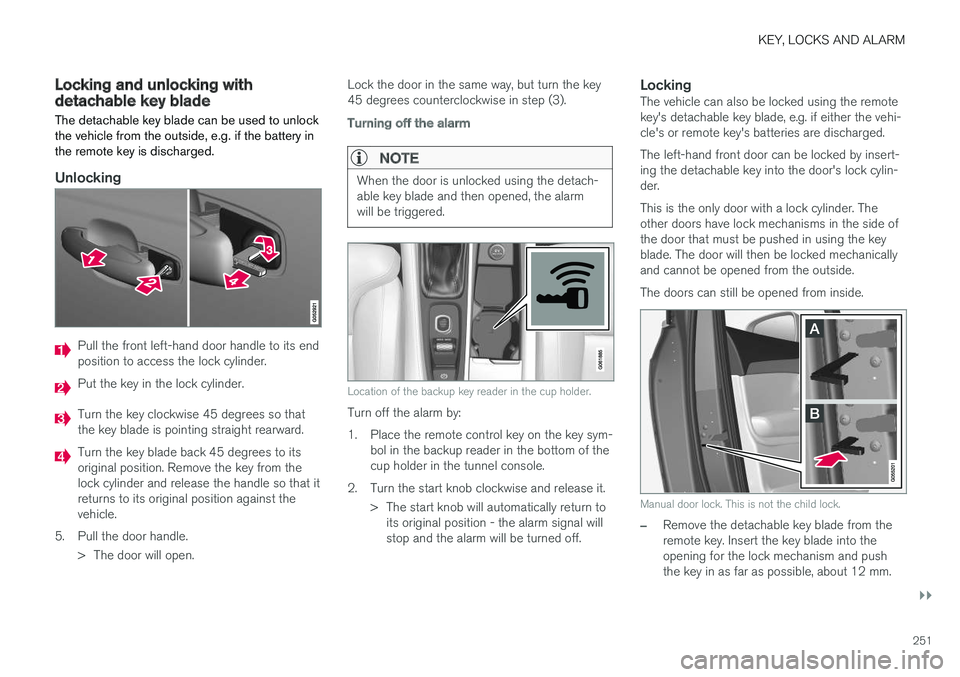
Pull the front left-hand door handle to its end position to access the lock cylinder.
Put the key in the lock cylinder.
Turn the key clockwise 45 degrees so that the key blade is pointing straight rearward.
Turn the key blade back 45 degrees to its original position. Remove the key from thelock cylinder and release the handle so that itreturns to its original position against thevehicle.
5. Pull the door handle. > The door will open. Lock the door in the same way, but turn the key45 degrees counterclockwise in step (3).
Turning off the alarm
NOTE
When the door is unlocked using the detach- able key blade and then opened, the alarmwill be triggered.
Location of the backup key reader in the cup holder.
Turn off the alarm by:
1. Place the remote control key on the key sym-
bol in the backup reader in the bottom of the cup holder in the tunnel console.
2. Turn the start knob clockwise and release it. > The start knob will automatically return toits original position - the alarm signal willstop and the alarm will be turned off.
LockingThe vehicle can also be locked using the remotekey's detachable key blade, e.g. if either the vehi-cle's or remote key's batteries are discharged. The left-hand front door can be locked by insert- ing the detachable key into the door's lock cylin-der. This is the only door with a lock cylinder. The other doors have lock mechanisms in the side ofthe door that must be pushed in using the keyblade. The door will then be locked mechanicallyand cannot be opened from the outside. The doors can still be opened from inside.
Manual door lock. This is not the child lock.
–Remove the detachable key blade from the remote key. Insert the key blade into theopening for the lock mechanism and pushthe key in as far as possible, about 12 mm.
Page 254 of 686
||
KEY, LOCKS AND ALARM
* Option/accessory.
252
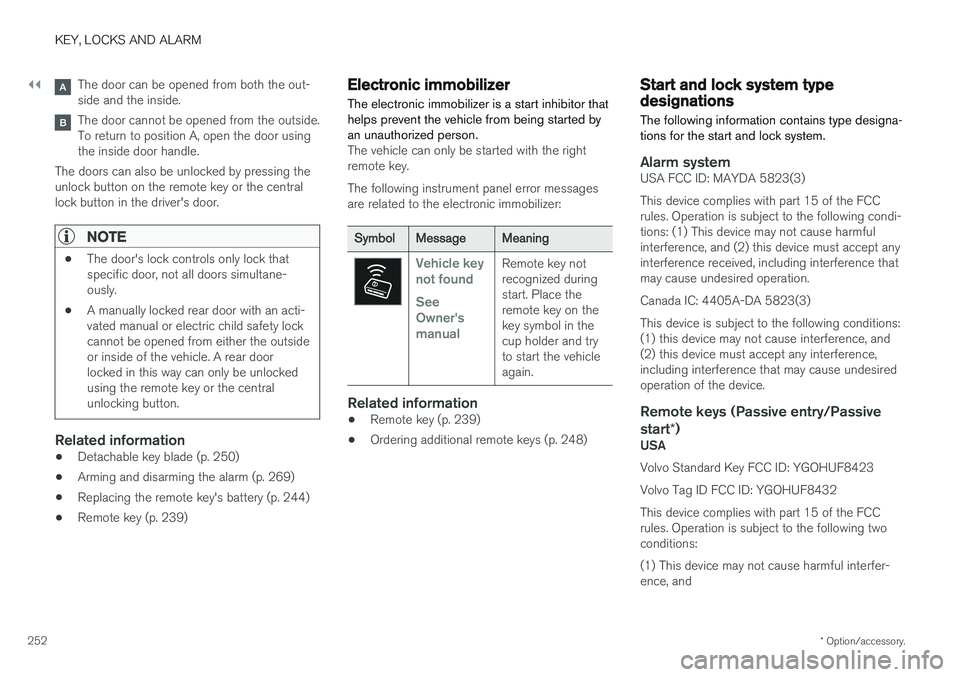
The door can be opened from both the out- side and the inside.
The door cannot be opened from the outside. To return to position A, open the door usingthe inside door handle.
The doors can also be unlocked by pressing theunlock button on the remote key or the centrallock button in the driver's door.
NOTE
• The door's lock controls only lock that specific door, not all doors simultane-ously.
• A manually locked rear door with an acti-vated manual or electric child safety lockcannot be opened from either the outsideor inside of the vehicle. A rear doorlocked in this way can only be unlockedusing the remote key or the centralunlocking button.
Related information
• Detachable key blade (p. 250)
• Arming and disarming the alarm (p. 269)
• Replacing the remote key's battery (p. 244)
• Remote key (p. 239)
Electronic immobilizer
The electronic immobilizer is a start inhibitor that helps prevent the vehicle from being started byan unauthorized person.
The vehicle can only be started with the right remote key. The following instrument panel error messages are related to the electronic immobilizer:
SymbolMessageMeaning
Vehicle key not found See Owner'smanualRemote key not recognized duringstart. Place theremote key on thekey symbol in thecup holder and tryto start the vehicleagain.
Related information
• Remote key (p. 239)
• Ordering additional remote keys (p. 248)
Start and lock system typedesignations
The following information contains type designa- tions for the start and lock system.
Alarm systemUSA FCC ID: MAYDA 5823(3) This device complies with part 15 of the FCC rules. Operation is subject to the following condi-tions: (1) This device may not cause harmfulinterference, and (2) this device must accept anyinterference received, including interference thatmay cause undesired operation. Canada IC: 4405A-DA 5823(3)This device is subject to the following conditions: (1) this device may not cause interference, and(2) this device must accept any interference,including interference that may cause undesiredoperation of the device.
Remote keys (Passive entry/Passive start *)
USA Volvo Standard Key FCC ID: YGOHUF8423 Volvo Tag ID FCC ID: YGOHUF8432This device complies with part 15 of the FCC rules. Operation is subject to the following two conditions: (1) This device may not cause harmful interfer- ence, and
Page 270 of 686
||
KEY, LOCKS AND ALARM
268
Related information
•Private Locking (p. 266)
Alarm
The alarm emits sound and light signals if any- one without a valid remote key attempts to breakinto the vehicle or interferes with the start batteryor alarm siren.
When armed, the alarm will be triggered if:
• the hood, tailgate or any door is opened.
• a battery cable is disconnected
• the alarm siren is disconnected.
Alarm signalsThe following occurs if the alarm is triggered:
• A siren will sound for 30 seconds or until the alarm is turned off.
• All turn signals will flash for 5 minutes oruntil the alarm is turned off.
If the reason the alarm was triggered is not recti- fied, the alarm cycle will repeat up to 10 times 20
.
Alarm indicator
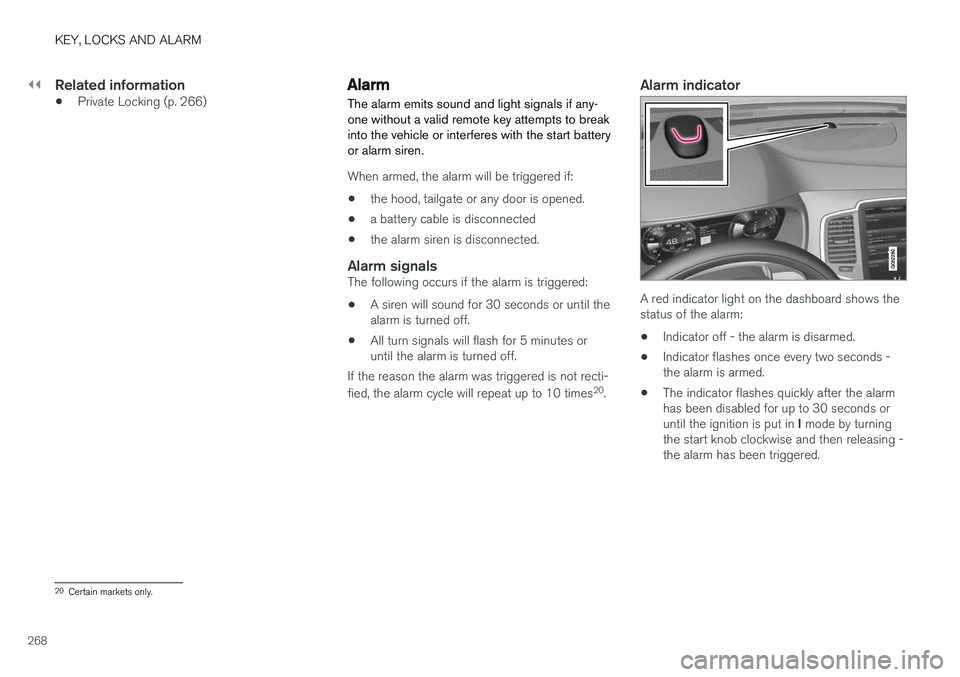
A red indicator light on the dashboard shows the status of the alarm:
• Indicator off - the alarm is disarmed.
• Indicator flashes once every two seconds -the alarm is armed.
• The indicator flashes quickly after the alarmhas been disabled for up to 30 seconds or until the ignition is put in
I mode by turning
the start knob clockwise and then releasing - the alarm has been triggered.
20 Certain markets only.
Page 272 of 686
||
KEY, LOCKS AND ALARM
* Option/accessory.
270
Disarming the alarm without a functioning
remote key
The vehicle can be unlocked and disarmed even if the remote key is not functioning, e.g. if thebattery is discharged.
1. Open the driver's door using the detachable
key blade.
> This will trigger the alarm.
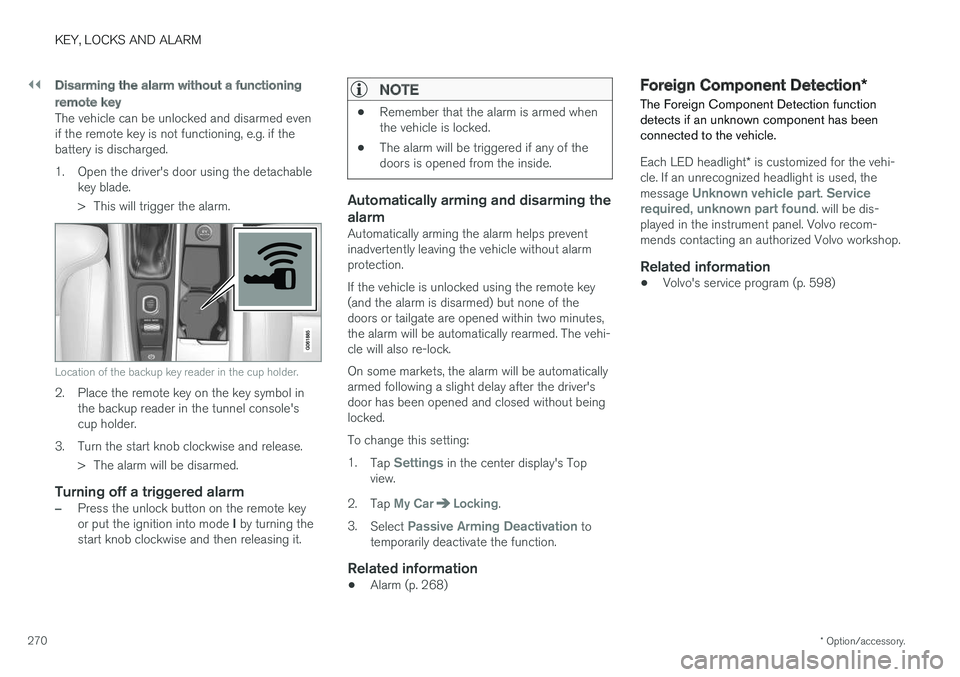
Location of the backup key reader in the cup holder.
2. Place the remote key on the key symbol inthe backup reader in the tunnel console's cup holder.
3. Turn the start knob clockwise and release. > The alarm will be disarmed.
Turning off a triggered alarm
–Press the unlock button on the remote key or put the ignition into mode I by turning the
start knob clockwise and then releasing it.
NOTE
• Remember that the alarm is armed when the vehicle is locked.
• The alarm will be triggered if any of thedoors is opened from the inside.
Automatically arming and disarming the alarm
Automatically arming the alarm helps prevent inadvertently leaving the vehicle without alarmprotection. If the vehicle is unlocked using the remote key (and the alarm is disarmed) but none of thedoors or tailgate are opened within two minutes,the alarm will be automatically rearmed. The vehi-cle will also re-lock. On some markets, the alarm will be automatically armed following a slight delay after the driver'sdoor has been opened and closed without beinglocked. To change this setting:1.
Tap
Settings in the center display's Top
view.
2. Tap
My CarLocking.
3. Select
Passive Arming Deactivation to
temporarily deactivate the function.
Related information
• Alarm (p. 268)
Foreign Component Detection
*
The Foreign Component Detection function detects if an unknown component has beenconnected to the vehicle.
Each LED headlight * is customized for the vehi-
cle. If an unrecognized headlight is used, the message
Unknown vehicle part. Service
required, unknown part found. will be dis-
played in the instrument panel. Volvo recom- mends contacting an authorized Volvo workshop.
Related information
• Volvo's service program (p. 598)
Page 413 of 686
HYBRID INFORMATION
}}
411
WARNING
•The charging cable's residual current breaker helps protect the vehicle's charg-ing system but cannot ensure that an cur-rent overload will never occur.
• Never use visibly worn or damaged elec-trical sockets. Doing so could lead to firesor serious injury.
• Never connect the charging cable to anextension cord.
• Maintenance or replacement of the hybridbattery may only be performed by atrained and qualified Volvo service techni-cian.
Related information
• Charge cable (p. 409)
• Charging status in the charging cable'scharging module (p. 415)
Charging cable temperaturemonitoring
To help ensure the vehicle's hybrid battery is reli- ably charged each time it is connected, chargingis stopped if the temperature in the chargingcable becomes too high and reaches a criticallimit.
CAUTION
If charging is often inadvertently interrupted, have the charging cable and the vehicle'scharging system inspected by a trained andqualified Volvo service technician.
Related information
• Charge cable (p. 409)
Opening and closing the chargingsocket cover
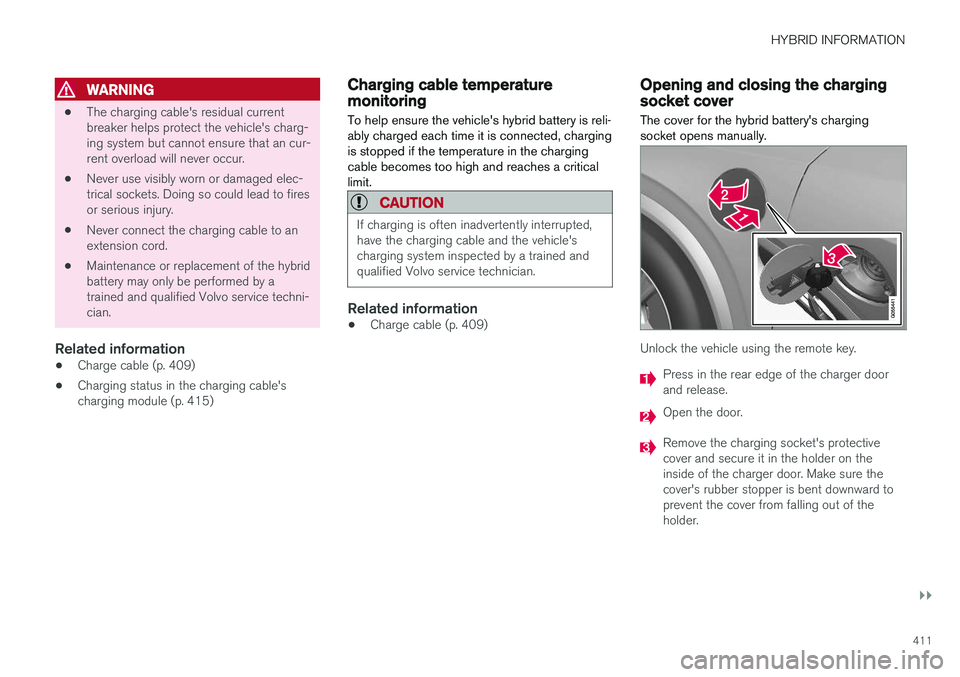
The cover for the hybrid battery's charging socket opens manually.
Unlock the vehicle using the remote key.
Press in the rear edge of the charger door and release.
Open the door.
Remove the charging socket's protective cover and secure it in the holder on theinside of the charger door. Make sure thecover's rubber stopper is bent downward toprevent the cover from falling out of theholder.
Page 420 of 686
HYBRID INFORMATION
* Option/accessory.
418
Stopping hybrid battery charging
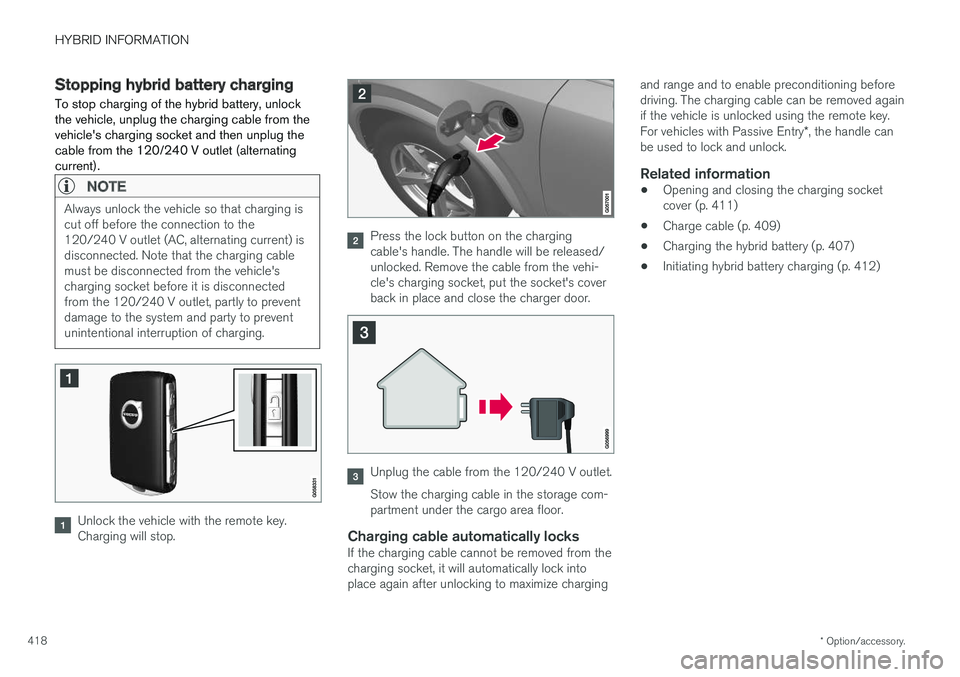
To stop charging of the hybrid battery, unlock the vehicle, unplug the charging cable from thevehicle's charging socket and then unplug thecable from the 120/240 V outlet (alternatingcurrent).
NOTE
Always unlock the vehicle so that charging is cut off before the connection to the120/240 V outlet (AC, alternating current) isdisconnected. Note that the charging cablemust be disconnected from the vehicle'scharging socket before it is disconnectedfrom the 120/240 V outlet, partly to preventdamage to the system and party to preventunintentional interruption of charging.
Unlock the vehicle with the remote key. Charging will stop.
Press the lock button on the charging cable's handle. The handle will be released/unlocked. Remove the cable from the vehi-cle's charging socket, put the socket's coverback in place and close the charger door.
Unplug the cable from the 120/240 V outlet. Stow the charging cable in the storage com- partment under the cargo area floor.
Charging cable automatically locksIf the charging cable cannot be removed from thecharging socket, it will automatically lock intoplace again after unlocking to maximize charging and range and to enable preconditioning beforedriving. The charging cable can be removed againif the vehicle is unlocked using the remote key. For vehicles with Passive Entry
*, the handle can
be used to lock and unlock.
Related information
• Opening and closing the charging socket cover (p. 411)
• Charge cable (p. 409)
• Charging the hybrid battery (p. 407)
• Initiating hybrid battery charging (p. 412)
Page 427 of 686
STARTING AND DRIVING
}}
425
In some situations, such as in cold weather or if the hybrid battery's charge level is too low, thegasoline engine will start instead. The vehicle should not be started with the charg- ing cable connected. However, if the cable can-not be pulled out or if the vehicle incorrectlydetects a cable that is not connected, the vehiclecan be started using an override procedure:
1. Press the brake pedal and turn the start
knob clockwise.
2.
Charge cable Remove before start will
appear in the instrument panel.
3. Turn the start knob clockwise again. 4.
Removed? Turn and hold start knob 7swill appear. Turn the knob clockwise and hold it for 7 seconds to start the vehicle.
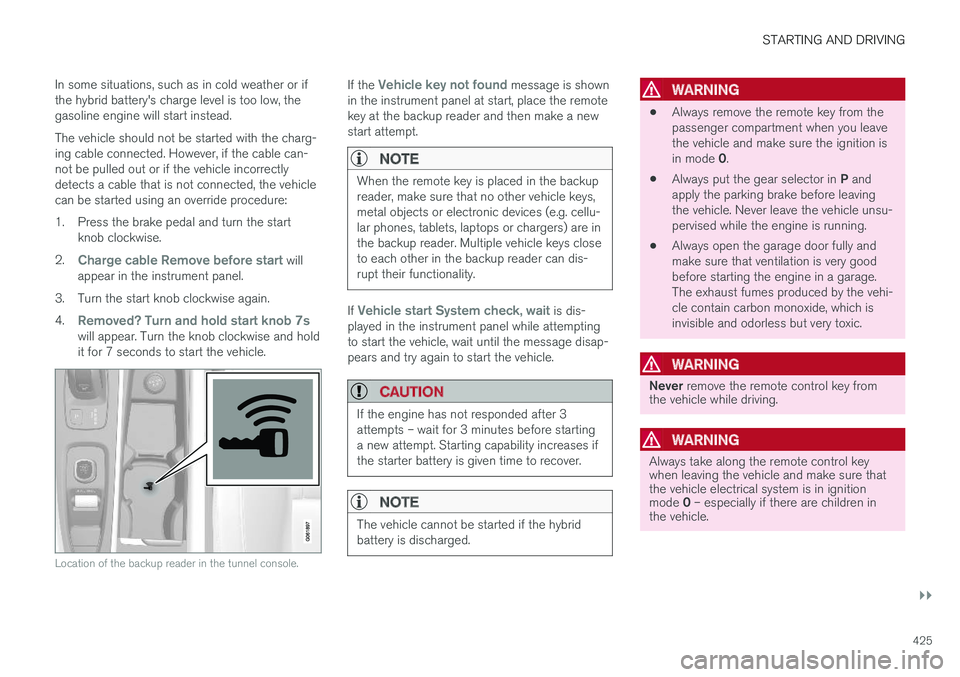
Location of the backup reader in the tunnel console.
If the Vehicle key not found message is shown
in the instrument panel at start, place the remote key at the backup reader and then make a newstart attempt.
NOTE
When the remote key is placed in the backup reader, make sure that no other vehicle keys,metal objects or electronic devices (e.g. cellu-lar phones, tablets, laptops or chargers) are inthe backup reader. Multiple vehicle keys closeto each other in the backup reader can dis-rupt their functionality.
If Vehicle start System check, wait is dis-
played in the instrument panel while attempting to start the vehicle, wait until the message disap-pears and try again to start the vehicle.
CAUTION
If the engine has not responded after 3 attempts – wait for 3 minutes before startinga new attempt. Starting capability increases ifthe starter battery is given time to recover.
NOTE
The vehicle cannot be started if the hybrid battery is discharged.
WARNING
• Always remove the remote key from the passenger compartment when you leavethe vehicle and make sure the ignition is in mode
0.
• Always put the gear selector in
P and
apply the parking brake before leaving the vehicle. Never leave the vehicle unsu-pervised while the engine is running.
• Always open the garage door fully andmake sure that ventilation is very goodbefore starting the engine in a garage.The exhaust fumes produced by the vehi-cle contain carbon monoxide, which isinvisible and odorless but very toxic.
WARNING
Never
remove the remote control key from
the vehicle while driving.
WARNING
Always take along the remote control key when leaving the vehicle and make sure thatthe vehicle electrical system is in ignition mode 0 – especially if there are children in
the vehicle.
Page 430 of 686
||
STARTING AND DRIVING
428
ModeFunctions
II •The headlights illuminate.
• Warning/indicator lights illumi- nate for 5 seconds.
• A number of other systems areactivated. However, seat and rearwindow heating can only be acti-vated when the engine is running.
This ignition mode uses a lot ofcurrent from the battery andshould be avoided whenever pos-sible!
A Also activated when the door is opened.
Related information
• Starting the vehicle (p. 424)
• Adjusting the steering wheel (p. 199)
• Jump starting using another battery (p. 469)
• Selecting ignition mode (p. 428)
Selecting ignition mode
The vehicle's ignition can be put in various modes (levels) to make different functions availa-ble.
Selecting an ignition mode
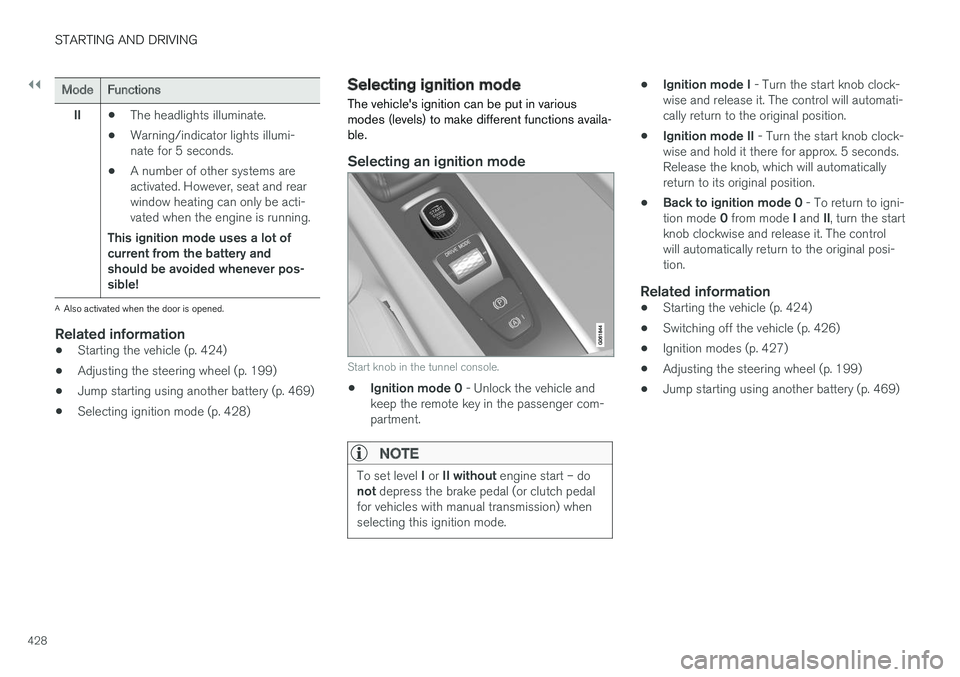
Start knob in the tunnel console.
• Ignition mode 0
- Unlock the vehicle and
keep the remote key in the passenger com- partment.
NOTE
To set level I or II without engine start – do
not depress the brake pedal (or clutch pedal
for vehicles with manual transmission) when selecting this ignition mode.
• Ignition mode I
- Turn the start knob clock-
wise and release it. The control will automati- cally return to the original position.
• Ignition mode II
- Turn the start knob clock-
wise and hold it there for approx. 5 seconds.Release the knob, which will automaticallyreturn to its original position.
• Back to ignition mode 0
- To return to igni-
tion mode 0 from mode I and II, turn the start
knob clockwise and release it. The controlwill automatically return to the original posi-tion.
Related information
• Starting the vehicle (p. 424)
• Switching off the vehicle (p. 426)
• Ignition modes (p. 427)
• Adjusting the steering wheel (p. 199)
• Jump starting using another battery (p. 469)
Page 602 of 686
||
MAINTENANCE AND SERVICE
600
Monthly:
•Check cold tire pressure in all tires. Inspect the tires for wear.
• Check that engine coolant and other fluidlevels are between the indicated "min" and"max" markings.
• Clean interior glass surfaces with a glasscleaner and soft paper towels.
• Wipe driver information displays with a softcloth.
• Visually inspect battery terminals for corro-sion. Corrosion may indicate a loose terminalconnector, or a battery near the end of itsuseful service life. Consult your Volvo retailerfor additional information.
As needed:
Wash the car, including the undercarriage, to reduce wear that can be caused by a buildup ofdirt, and corrosion that can be caused by salt res-idues. Clean leaves and twigs from air intake vents at the base of the windshield, and from other placeswhere they may collect.
NOTE
Complete service information for qualified technicians is available online for purchase orsubscription at www.volvotechinfo.com.
Related information
•Vehicle status (p. 602)
• Scheduling service and repairs (p. 603)
• Connecting equipment to the vehicle's data link connector (p. 36)
• Technician certification (p. 37)
• Climate control system service (p. 608)
• Maintenance of the brake system (p. 432)
• Engine compartment overview (p. 609)
Data transfer between vehicle andworkshop over Wi-Fi
Volvo workshops have a designated Wi-Fi net- work for secure data transfer between your vehi-cle and the workshop. Your visit to the workshopwill be easier and more effective when diagnos-tics information and software can be transferredover the workshop's network.
When you arrive at the workshop, your technician can connect your vehicle to the workshop's Wi-Finetwork to perform troubleshooting and down-load software. For this type of communication,the vehicle only connects to the workshop's net-work. The vehicle can only be connected to thedesignated workshop networks, not to any othernetwork, e.g. your home network.
Manual connection to workshop Wi-FiManual connection is usually performed by aservice technician. Because the technician usesthe buttons on your remote key to connect thevehicle, it is important that you bring a key withbuttons when taking the vehicle in to a workshop.Pressing the lock button on the remote key threetimes will connect the vehicle to the workshop'sWi-Fi network. When the car is connected to a Wi-Fi network, the
symbol appears in the center display.
Page 670 of 686
INDEX
668
B
Backrestfront seat, adjusting 184, 185, 188, 189 , 190
rear seat, adjusting 196, 197
rear seat, folding 192, 197, 198
Battery Hybrid 619
jump-start 469
Maintenance 615
start 615
symbols on the battery 620
warning symbols 620
BLIS 348, 349, 350, 351 Blower adjusting 224, 225
air distribution 208
air vents 209
Bluetooth connect 513
connecting vehicle to Internet 531
phone 520
settings 529
Book service and repair 603
Booster cushions 71 Brake assist after collision 437
Brake fluid
grade 663
Brake functions 429
Brake light 160
Brake position 439
Brakes 429 anti-lock brakes, ABS 429
automatic when stationary 436
Brake Assist System, BAS 431
brake lights 160
brake system 429
emergency brake lights 160
handbrake 432
Maintenance 432
on salted roads 431
on wet roads 431
brake system fluid 663
C
Camera sensor 344
Camera unit 331
Capacity weight 578, 659
Cargo compartment 586 attachment points 589
cargo net 593
electrical outlet 582, 584
Lighting 163
Cargo compartment cover 589, 590
cargo net 593
Car wash 638, 639, 641, 642, 643, 644
Catalytic converter 467 recovery 476
CD player 511
Cell phone, see Phone 521
Center console 581Center display change appearance 131
cleaning 633
climate controls 213
Function view 122
keyboard 126
messages 140, 141, 142
operation 112, 115, 119, 124
overview 109
settings 132, 133, 134
switch off and change volume 131
symbols in status bar 124
views 115
Central locking 257
Change of owner 134
Changing a wheel 564