battery VOLVO XC90 T8 2018 Owner´s Manual
[x] Cancel search | Manufacturer: VOLVO, Model Year: 2018, Model line: XC90 T8, Model: VOLVO XC90 T8 2018Pages: 686, PDF Size: 11.51 MB
Page 247 of 686
KEY, LOCKS AND ALARM
}}
* Option/accessory.245
The battery in the smaller key without buttons
9
(the Key Tag) cannot be replaced. A new key can be ordered from an authorized Volvo workshop.
CAUTION
An end-of-life Key Tag must be turned in to an authorized Volvo workshop. The key mustbe deleted from the vehicle because it canstill be used to start the vehicle via backupstart.
Opening the key and replacing the battery
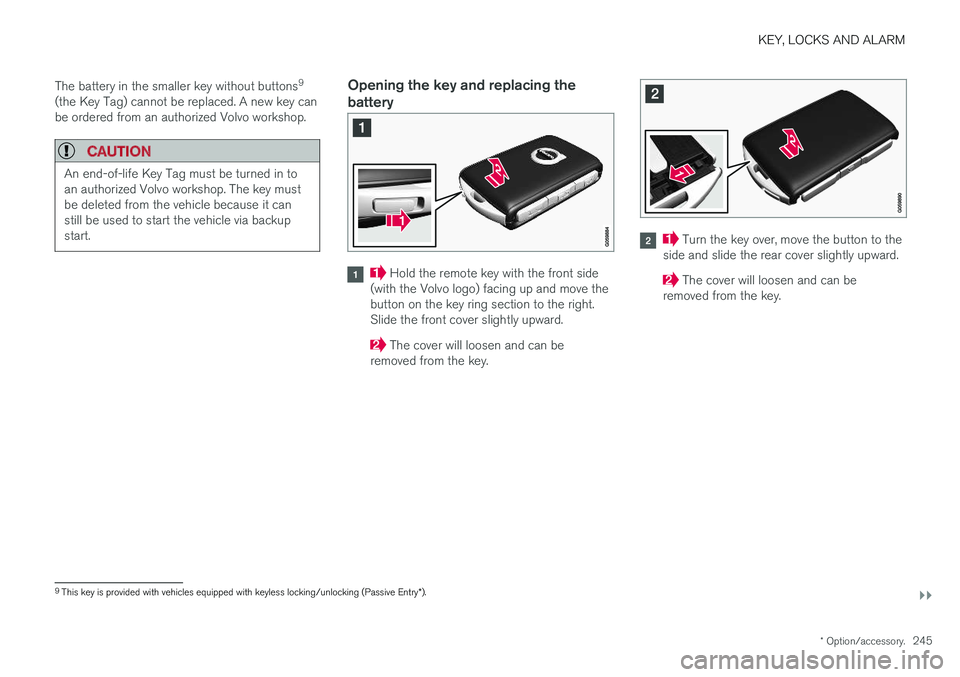
Hold the remote key with the front side
(with the Volvo logo) facing up and move the button on the key ring section to the right.Slide the front cover slightly upward.
The cover will loosen and can be
removed from the key.
Turn the key over, move the button to the
side and slide the rear cover slightly upward.
The cover will loosen and can be
removed from the key.
9 This key is provided with vehicles equipped with keyless locking/unlocking (Passive Entry *).
Page 248 of 686
||
KEY, LOCKS AND ALARM
246
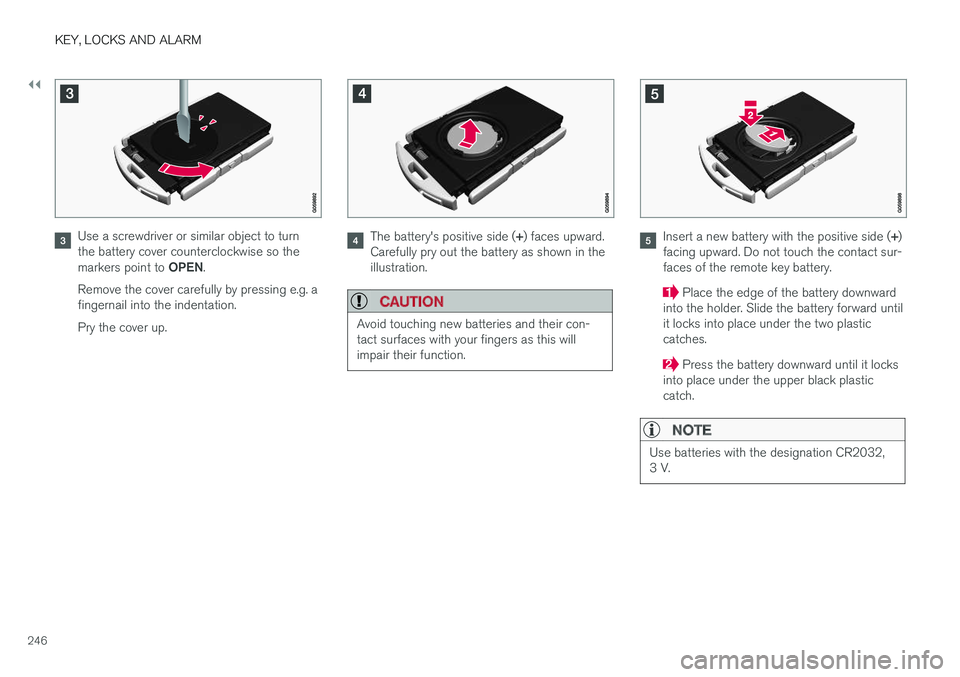
Use a screwdriver or similar object to turn the battery cover counterclockwise so the markers point to OPEN.
Remove the cover carefully by pressing e.g. a fingernail into the indentation. Pry the cover up.The battery's positive side ( +) faces upward.
Carefully pry out the battery as shown in the illustration.
CAUTION
Avoid touching new batteries and their con- tact surfaces with your fingers as this willimpair their function.
Insert a new battery with the positive side ( +)
facing upward. Do not touch the contact sur- faces of the remote key battery.
Place the edge of the battery downward
into the holder. Slide the battery forward until it locks into place under the two plasticcatches.
Press the battery downward until it locks
into place under the upper black plastic catch.
NOTE
Use batteries with the designation CR2032, 3 V.
Page 249 of 686
KEY, LOCKS AND ALARM
247
NOTE
Volvo recommends that batteries used in the remote control key satisfy UN Manual of Testand Criteria, Part III, sub-section 38.3. Thefactory installed batteries and batteriesreplaced by an authorized Volvo workshopsatisfy the above criterion.
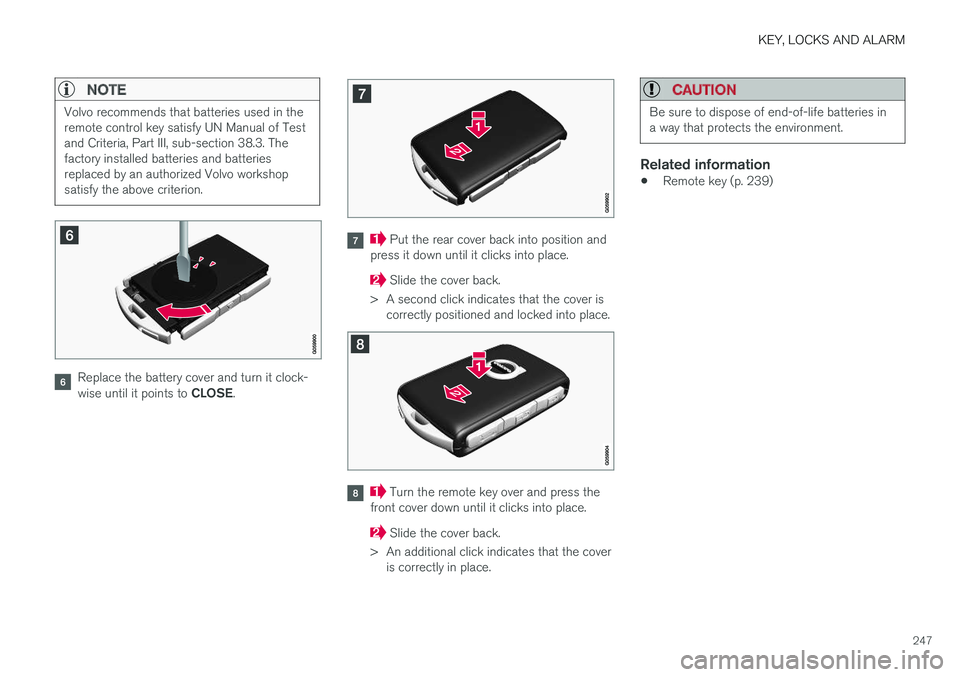
Replace the battery cover and turn it clock- wise until it points to CLOSE.
Put the rear cover back into position and
press it down until it clicks into place.
Slide the cover back.
> A second click indicates that the cover is correctly positioned and locked into place.
Turn the remote key over and press the
front cover down until it clicks into place.
Slide the cover back.
> An additional click indicates that the cover is correctly in place.
CAUTION
Be sure to dispose of end-of-life batteries in a way that protects the environment.
Related information
• Remote key (p. 239)
Page 253 of 686
KEY, LOCKS AND ALARM
}}
251
Locking and unlocking withdetachable key blade
The detachable key blade can be used to unlock the vehicle from the outside, e.g. if the battery inthe remote key is discharged.
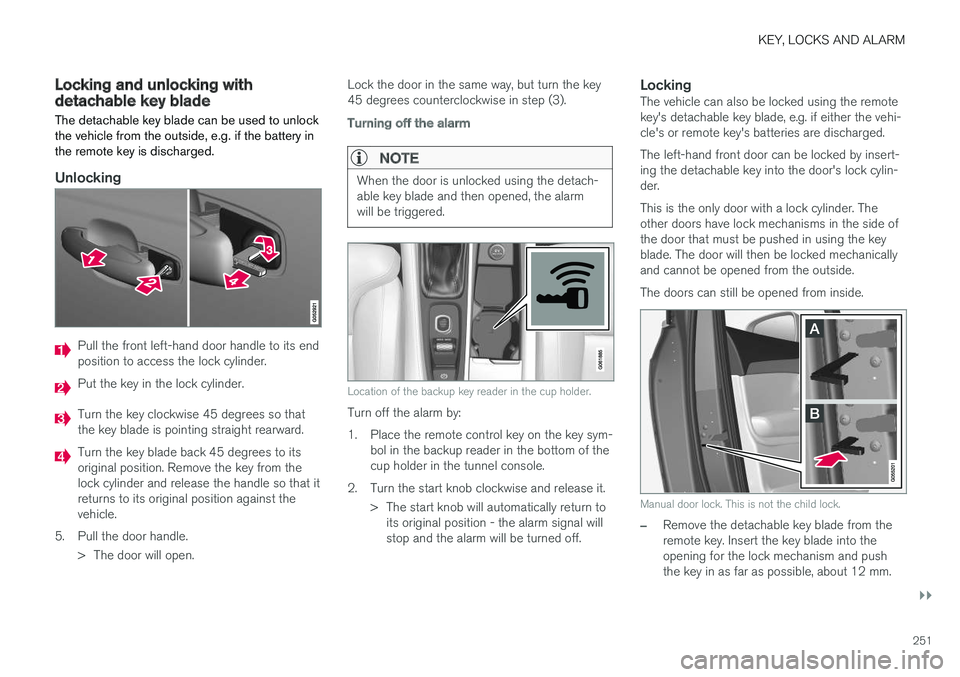
Unlocking
Pull the front left-hand door handle to its end position to access the lock cylinder.
Put the key in the lock cylinder.
Turn the key clockwise 45 degrees so that the key blade is pointing straight rearward.
Turn the key blade back 45 degrees to its original position. Remove the key from thelock cylinder and release the handle so that itreturns to its original position against thevehicle.
5. Pull the door handle. > The door will open. Lock the door in the same way, but turn the key45 degrees counterclockwise in step (3).
Turning off the alarm
NOTE
When the door is unlocked using the detach- able key blade and then opened, the alarmwill be triggered.
Location of the backup key reader in the cup holder.
Turn off the alarm by:
1. Place the remote control key on the key sym-
bol in the backup reader in the bottom of the cup holder in the tunnel console.
2. Turn the start knob clockwise and release it. > The start knob will automatically return toits original position - the alarm signal willstop and the alarm will be turned off.
LockingThe vehicle can also be locked using the remotekey's detachable key blade, e.g. if either the vehi-cle's or remote key's batteries are discharged. The left-hand front door can be locked by insert- ing the detachable key into the door's lock cylin-der. This is the only door with a lock cylinder. The other doors have lock mechanisms in the side ofthe door that must be pushed in using the keyblade. The door will then be locked mechanicallyand cannot be opened from the outside. The doors can still be opened from inside.
Manual door lock. This is not the child lock.
–Remove the detachable key blade from the remote key. Insert the key blade into theopening for the lock mechanism and pushthe key in as far as possible, about 12 mm.
Page 254 of 686
||
KEY, LOCKS AND ALARM
* Option/accessory.
252
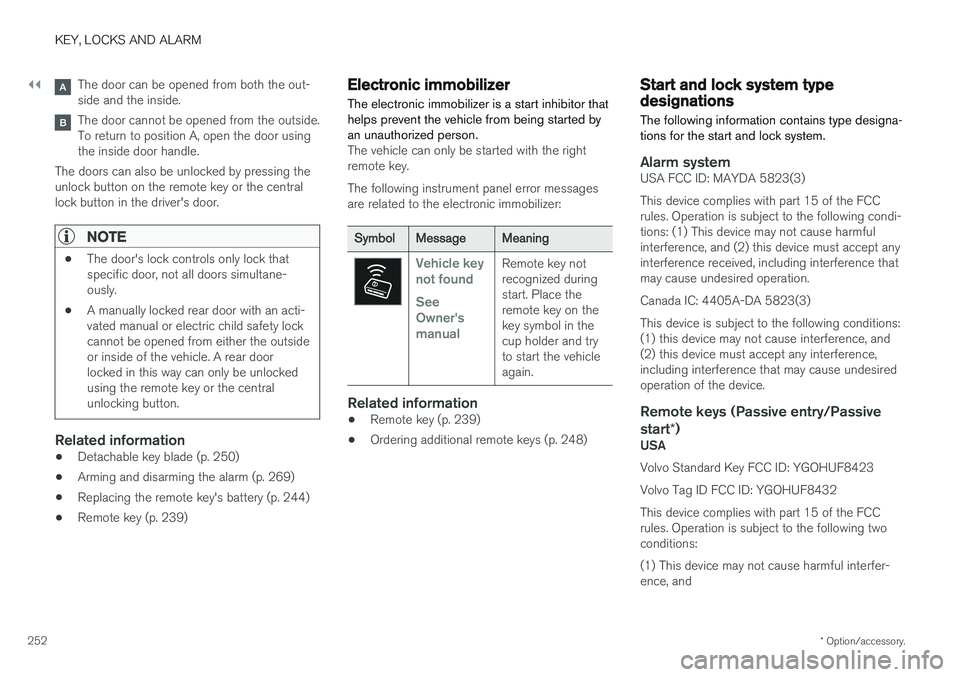
The door can be opened from both the out- side and the inside.
The door cannot be opened from the outside. To return to position A, open the door usingthe inside door handle.
The doors can also be unlocked by pressing theunlock button on the remote key or the centrallock button in the driver's door.
NOTE
• The door's lock controls only lock that specific door, not all doors simultane-ously.
• A manually locked rear door with an acti-vated manual or electric child safety lockcannot be opened from either the outsideor inside of the vehicle. A rear doorlocked in this way can only be unlockedusing the remote key or the centralunlocking button.
Related information
• Detachable key blade (p. 250)
• Arming and disarming the alarm (p. 269)
• Replacing the remote key's battery (p. 244)
• Remote key (p. 239)
Electronic immobilizer
The electronic immobilizer is a start inhibitor that helps prevent the vehicle from being started byan unauthorized person.
The vehicle can only be started with the right remote key. The following instrument panel error messages are related to the electronic immobilizer:
SymbolMessageMeaning
Vehicle key not found See Owner'smanualRemote key not recognized duringstart. Place theremote key on thekey symbol in thecup holder and tryto start the vehicleagain.
Related information
• Remote key (p. 239)
• Ordering additional remote keys (p. 248)
Start and lock system typedesignations
The following information contains type designa- tions for the start and lock system.
Alarm systemUSA FCC ID: MAYDA 5823(3) This device complies with part 15 of the FCC rules. Operation is subject to the following condi-tions: (1) This device may not cause harmfulinterference, and (2) this device must accept anyinterference received, including interference thatmay cause undesired operation. Canada IC: 4405A-DA 5823(3)This device is subject to the following conditions: (1) this device may not cause interference, and(2) this device must accept any interference,including interference that may cause undesiredoperation of the device.
Remote keys (Passive entry/Passive start *)
USA Volvo Standard Key FCC ID: YGOHUF8423 Volvo Tag ID FCC ID: YGOHUF8432This device complies with part 15 of the FCC rules. Operation is subject to the following two conditions: (1) This device may not cause harmful interfer- ence, and
Page 270 of 686
||
KEY, LOCKS AND ALARM
268
Related information
•Private Locking (p. 266)
Alarm
The alarm emits sound and light signals if any- one without a valid remote key attempts to breakinto the vehicle or interferes with the start batteryor alarm siren.
When armed, the alarm will be triggered if:
• the hood, tailgate or any door is opened.
• a battery cable is disconnected
• the alarm siren is disconnected.
Alarm signalsThe following occurs if the alarm is triggered:
• A siren will sound for 30 seconds or until the alarm is turned off.
• All turn signals will flash for 5 minutes oruntil the alarm is turned off.
If the reason the alarm was triggered is not recti- fied, the alarm cycle will repeat up to 10 times 20
.
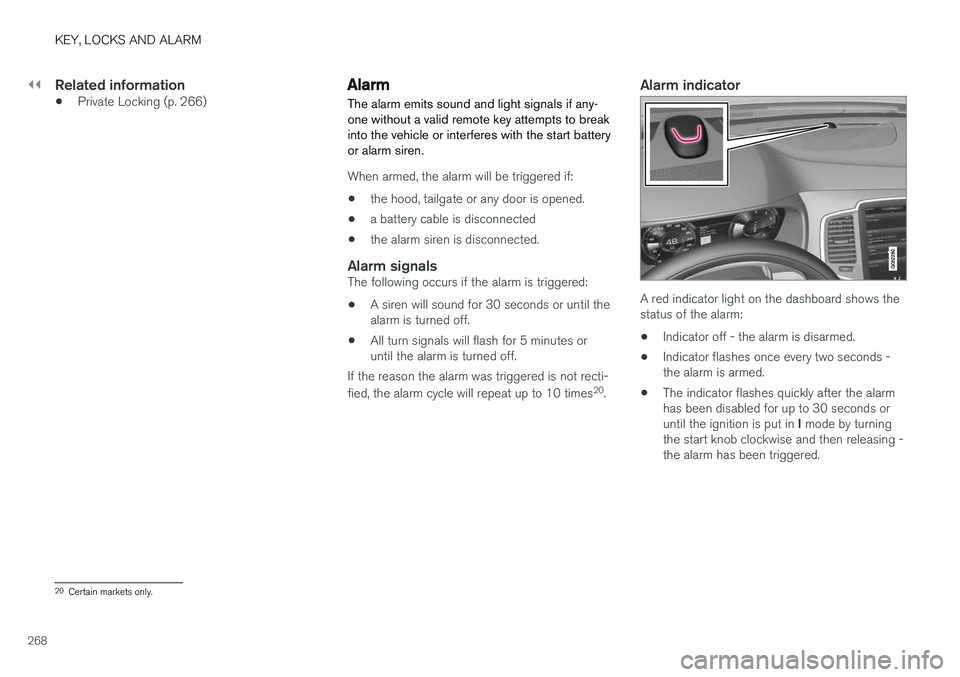
Alarm indicator
A red indicator light on the dashboard shows the status of the alarm:
• Indicator off - the alarm is disarmed.
• Indicator flashes once every two seconds -the alarm is armed.
• The indicator flashes quickly after the alarmhas been disabled for up to 30 seconds or until the ignition is put in
I mode by turning
the start knob clockwise and then releasing - the alarm has been triggered.
20 Certain markets only.
Page 272 of 686
||
KEY, LOCKS AND ALARM
* Option/accessory.
270
Disarming the alarm without a functioning
remote key
The vehicle can be unlocked and disarmed even if the remote key is not functioning, e.g. if thebattery is discharged.
1. Open the driver's door using the detachable
key blade.
> This will trigger the alarm.
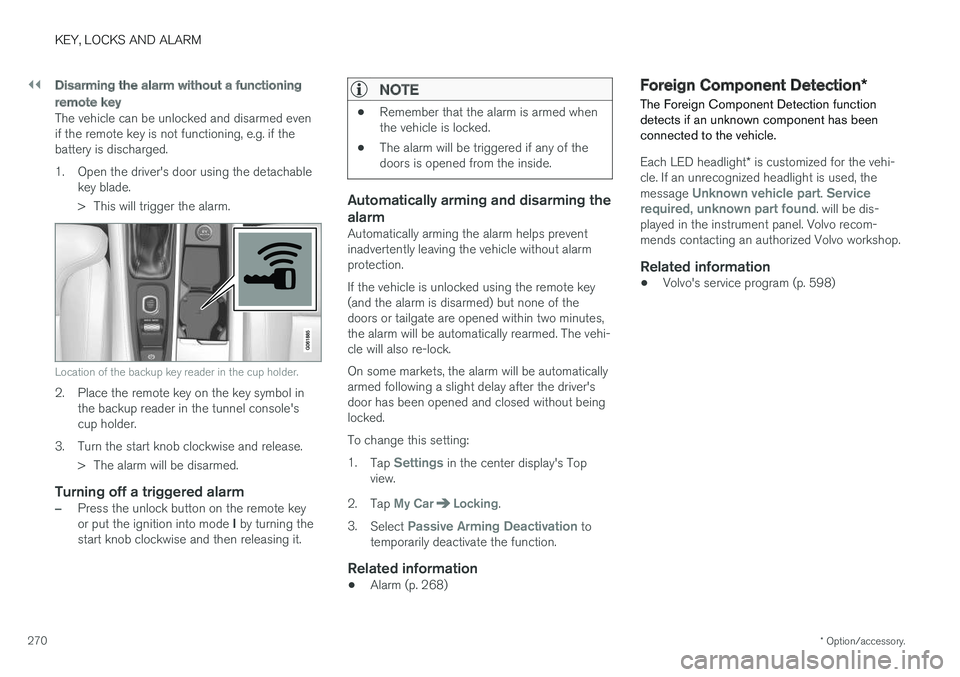
Location of the backup key reader in the cup holder.
2. Place the remote key on the key symbol inthe backup reader in the tunnel console's cup holder.
3. Turn the start knob clockwise and release. > The alarm will be disarmed.
Turning off a triggered alarm
–Press the unlock button on the remote key or put the ignition into mode I by turning the
start knob clockwise and then releasing it.
NOTE
• Remember that the alarm is armed when the vehicle is locked.
• The alarm will be triggered if any of thedoors is opened from the inside.
Automatically arming and disarming the alarm
Automatically arming the alarm helps prevent inadvertently leaving the vehicle without alarmprotection. If the vehicle is unlocked using the remote key (and the alarm is disarmed) but none of thedoors or tailgate are opened within two minutes,the alarm will be automatically rearmed. The vehi-cle will also re-lock. On some markets, the alarm will be automatically armed following a slight delay after the driver'sdoor has been opened and closed without beinglocked. To change this setting:1.
Tap
Settings in the center display's Top
view.
2. Tap
My CarLocking.
3. Select
Passive Arming Deactivation to
temporarily deactivate the function.
Related information
• Alarm (p. 268)
Foreign Component Detection
*
The Foreign Component Detection function detects if an unknown component has beenconnected to the vehicle.
Each LED headlight * is customized for the vehi-
cle. If an unrecognized headlight is used, the message
Unknown vehicle part. Service
required, unknown part found. will be dis-
played in the instrument panel. Volvo recom- mends contacting an authorized Volvo workshop.
Related information
• Volvo's service program (p. 598)
Page 408 of 686
HYBRID INFORMATION
406
General information about TwinEngine
Twin Engine vehicles are driven just like any other vehicle, but certain functions differ from avehicle powered exclusively by gasoline. Theelectric motor powers the vehicle primarily at lowspeeds; the gasoline engine is used at higherspeeds or during more active driving.
The instrument panel displays Twin Engine-spe- cific information - charging information, selecteddrive mode, distance to discharged battery andhybrid battery charge level. Different drive modes can be selected while driv- ing, e.g. electric power only or, if more power isneeded, a combination of electric and gasolinepower. The vehicle calculates the optimal combi-nation of driveability, driving experience, environ-mental impact and fuel economy for the selecteddrive mode. In order to function optimally, the hybrid battery (and its electrical drive systems) and the gasolineengine (and its drive systems) must be at thecorrect operating temperature. Battery capacitycan be considerably reduced if the battery is toocold or too hot. Preconditioning prepares thevehicle's drive systems and passenger compart-ment before driving to help reduce both wear andenergy consumption. It also helps increase thehybrid battery's range. The hybrid battery, which powers the electric motor, is recharged using the charging cable. Itcan also be recharged during light braking and through engine braking in gear position
B. The
combustion engine can also help recharge thehybrid battery.
Important
No electrical current
Keep in mind that if there is no electrical current to the vehicle, i.e. the ignition is switched off orthe start battery is discharged, certain functionssuch as brakes, power steering, etc. will not work.
WARNING
If the vehicle does not have electrical current and both the electric motor and the gasolineengine are switched off, the brakes cannot beused to stop the vehicle.
Towing not permitted
Never tow a Twin Engine vehicle behind another vehicle, as this could damage the electric motor.
Exterior engine noise
WARNING
Keep in mind that the vehicle does not emit any engine noise when using the electricmotor and may therefore be difficult to detectfor children, pedestrians, cyclists or animals.This is especially true at low speeds, e.g. inparking lots.
High-voltage electrical current
WARNING
Several components in the vehicle work with high voltage that can be hazardous in case ofan incorrect procedure. These componentsand any orange wiring in the vehicle may onlybe handled by trained and qualified Volvoservice technicians.
Do not touch anything that is not clearly descri- bed in this Owner's Manual.
Related information
• Charging the hybrid battery (p. 407)
• Hybrid gauge (p. 87)
• Drive modes (p. 445)
• Starting and stopping preconditioning(p. 231)
• Hybrid battery (p. 619)
• Factors affecting electric motor range(p. 458)
• Gear selector positions for automatic trans-missions (p. 439)
• Towing using a towline (p. 476)
Page 409 of 686
HYBRID INFORMATION
}}
407
Charging the hybrid battery In addition to the conventional fuel tank, your vehicle is also equipped with a rechargeablelithium-ion hybrid battery.
The hybrid battery can be recharged using the charging cable stored in a storage space in thecargo compartment.
WARNING
The hybrid electrical system in your vehicle uses high voltage electrical current. Any dam-age to this system or to the hybrid batterymay result in the danger of overheating, fire,or serious injury. If the vehicle is involved in acollision or subjected to flooding, fire, etc.,have it inspected by a trained and qualifiedVolvo service technician. Prior to this inspec-tion, the vehicle should be parked outdoors ata safe distance from any building or poten-tially flammable materials.
The hybrid battery's charging time depends on the charging current used.
NOTE
The capacity of the hybrid battery diminishes somewhat with age and use, which couldresult in increased use of the gasoline engineand consequently, slightly higher fuel con-sumption.
WARNING
If the hybrid battery needs to be replaced, this may only be done by Volvo retailer or author-ized Volvo workshop.
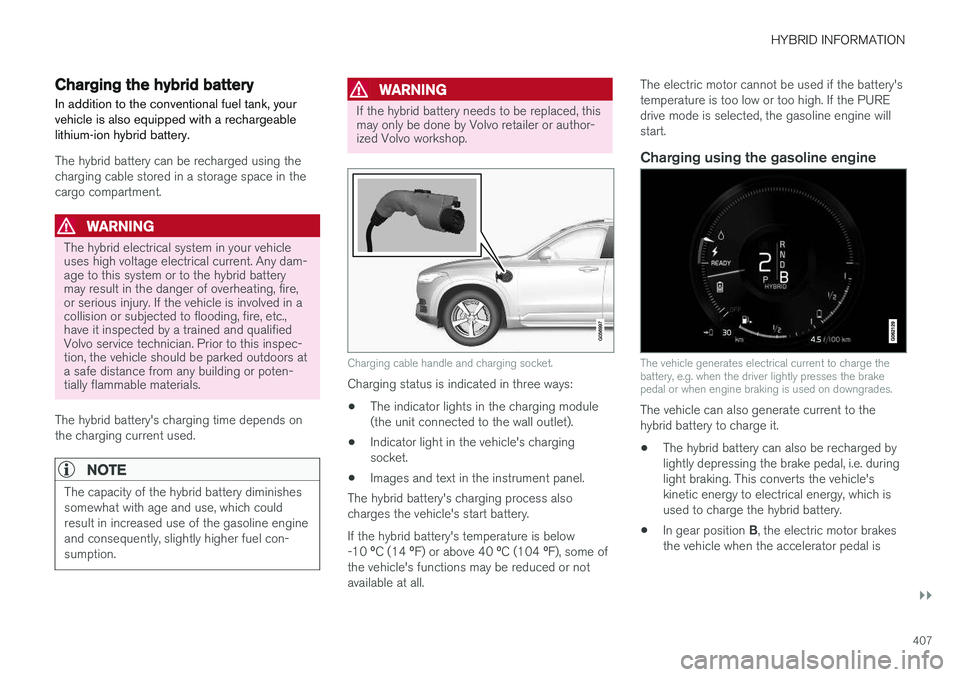
Charging cable handle and charging socket.
Charging status is indicated in three ways: • The indicator lights in the charging module (the unit connected to the wall outlet).
• Indicator light in the vehicle's chargingsocket.
• Images and text in the instrument panel.
The hybrid battery's charging process alsocharges the vehicle's start battery. If the hybrid battery's temperature is below -10 ºC (14 ºF) or above 40 ºC (104 ºF), some of
the vehicle's functions may be reduced or not available at all. The electric motor cannot be used if the battery'stemperature is too low or too high. If the PUREdrive mode is selected, the gasoline engine willstart.
Charging using the gasoline engine
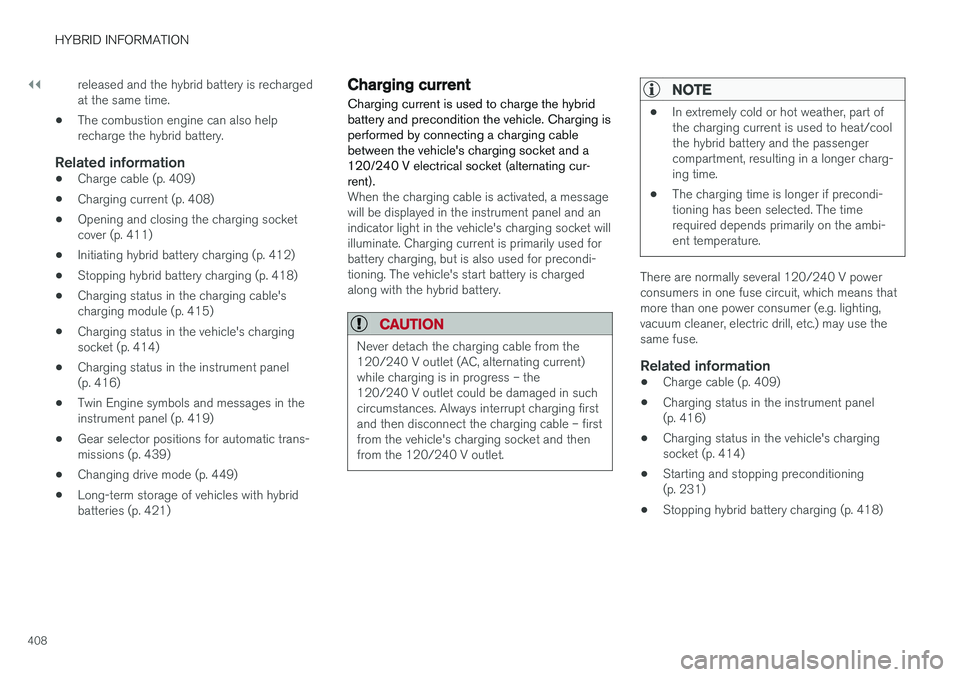
The vehicle generates electrical current to charge the battery, e.g. when the driver lightly presses the brakepedal or when engine braking is used on downgrades.
The vehicle can also generate current to the hybrid battery to charge it.
• The hybrid battery can also be recharged bylightly depressing the brake pedal, i.e. duringlight braking. This converts the vehicle'skinetic energy to electrical energy, which isused to charge the hybrid battery.
• In gear position
B, the electric motor brakes
the vehicle when the accelerator pedal is
Page 410 of 686
||
HYBRID INFORMATION
408released and the hybrid battery is recharged at the same time.
• The combustion engine can also helprecharge the hybrid battery.
Related information
• Charge cable (p. 409)
• Charging current (p. 408)
• Opening and closing the charging socketcover (p. 411)
• Initiating hybrid battery charging (p. 412)
• Stopping hybrid battery charging (p. 418)
• Charging status in the charging cable'scharging module (p. 415)
• Charging status in the vehicle's chargingsocket (p. 414)
• Charging status in the instrument panel(p. 416)
• Twin Engine symbols and messages in theinstrument panel (p. 419)
• Gear selector positions for automatic trans-missions (p. 439)
• Changing drive mode (p. 449)
• Long-term storage of vehicles with hybridbatteries (p. 421)
Charging current Charging current is used to charge the hybrid battery and precondition the vehicle. Charging isperformed by connecting a charging cablebetween the vehicle's charging socket and a120/240 V electrical socket (alternating cur-rent).
When the charging cable is activated, a message will be displayed in the instrument panel and anindicator light in the vehicle's charging socket willilluminate. Charging current is primarily used forbattery charging, but is also used for precondi-tioning. The vehicle's start battery is chargedalong with the hybrid battery.
CAUTION
Never detach the charging cable from the 120/240 V outlet (AC, alternating current)while charging is in progress – the120/240 V outlet could be damaged in suchcircumstances. Always interrupt charging firstand then disconnect the charging cable – firstfrom the vehicle's charging socket and thenfrom the 120/240 V outlet.
NOTE
• In extremely cold or hot weather, part of the charging current is used to heat/coolthe hybrid battery and the passengercompartment, resulting in a longer charg-ing time.
• The charging time is longer if precondi-tioning has been selected. The timerequired depends primarily on the ambi-ent temperature.
There are normally several 120/240 V power consumers in one fuse circuit, which means thatmore than one power consumer (e.g. lighting,vacuum cleaner, electric drill, etc.) may use thesame fuse.
Related information
•Charge cable (p. 409)
• Charging status in the instrument panel(p. 416)
• Charging status in the vehicle's chargingsocket (p. 414)
• Starting and stopping preconditioning(p. 231)
• Stopping hybrid battery charging (p. 418)