display VOLVO XC90 T8 2018 Owner´s Manual
[x] Cancel search | Manufacturer: VOLVO, Model Year: 2018, Model line: XC90 T8, Model: VOLVO XC90 T8 2018Pages: 686, PDF Size: 11.51 MB
Page 604 of 686
||
MAINTENANCE AND SERVICE
* Option/accessory.
602
NOTE
Data downloading can affect other services such as transfer data, e.g. web radio. If theaffect on other services is experienced asproblematic, the download can be interrupted.Alternatively, it may be appropriate to switchoff or cancel other services.
NOTE
An update can be interrupted when the igni- tion is switched off and the vehicle is left. However, the update does not have to be completed before the vehicle is left as theupdate is resumed the next time the vehicle isused.
Updating all system software
–Select Install all at the bottom of the list.
To avoid displaying a list, select
Install all via theSystem updates button.
Updating individual system software
–Select Install to choose the software you
would like to download.
Canceling software download
–Tap the checkbox in the activity indicator that replaced the Install button when the down-
load began. Note that only a download can be cancelled. An installation cannot be cancelled once it hasbegun.
Deactivating the background search for
software update
Automatic background searching for softwareupdates is activated as the default factory setting,but the function can be deactivated. 1. Tap
Settings in the center display's Top
view.
2. Tap
SystemDownload Center.
3. Tap to deselect
Auto Software Update.
Related information
• Download Center (p. 601)
• Internet-connected vehicle
* (p. 529)
• Navigating in the center display's views (p. 115)
Vehicle status
The vehicle's general status can be displayed in the center display along with the option to schedule service 3
.
The Car status app is started
from the center display's App view and has four tabs:
•Messages - status messages
•
Status - engine oil level check
•
TPMS - tire inflation pressure check
•
Appointments - appointment information
and vehicle information 3
.
Related information
• Handling messages saved from the instru- ment panel (p. 107)
• Checking and filling engine oil (p. 611)
• Tire pressure monitoring system
* (p. 559)
• Scheduling service and repairs (p. 603)
• Sending vehicle information to the workshop(p. 604)
• Navigating in the center display's views(p. 115)
Page 605 of 686
MAINTENANCE AND SERVICE
}}
603
Scheduling service and repairs4
This service offers a convenient way to schedule service and workshop appoints directly from thevehicle.
When it is time for service, and in certain cases if the vehicle requires repairs, a message will bedisplayed in the instrument panel and at the topof the center display. The time for service isdetermined by how much time has elapsed, thenumber of hours the engine has run, or the dis-tance driven since the last service.
To use the service
• Create a Volvo ID and register the Volvo IDto the vehicle.
• To select a Volvo retailer you would like tocontact, go to www.volvocars.com and log in.
• To send and receive appointment informa-tion, the vehicle must be connected to the Internet 5
.
Book serviceWhen you schedule service from your vehicle, theinformation is sent via your Internet connection 5
.
Submit an appointment request whenever you need service or when a message regarding theneed for service or repairs has been displayed in the instrument panel and at the top of the centerdisplay.
1.
Open the Car status app from App view in
the center display.
2. Tap the
Appointments button.
3. Tap the
Request appointment button.
4. Check that your
Volvo ID is correct.
5. Make sure your preferred
Workshop is cor-
rect.
6. In the
Tap to write information to the
Workshop field, you can provide details on
what you would like performed during the visit or other important information to yourworkshop. 7.
Tap the
Send appointment request but-
ton.
> You will receive an appointment sugges- tion to your vehicle within a couple of days 6
. You will also receive the same
message via email and when you log in to www.volvocars.com. On some markets, the message in the instrument panel indicating that the vehi-cle requires service will go out once theappointment request has been sent.
8. Tap
Cancel request if you would like to
cancel your request.
The appointment request contains information about your vehicle that helps the workshop planfor your visit. The retailer will send you a digital appointment suggestion. Information about your retailer is alsoavailable in the vehicle so that you can contactyour workshop at any time.
Accepting an appointment suggestionWhen the vehicle has received an appointmentsuggestion, a message will be displayed at thetop of the center display.
1. Tap the message.
3 Certain markets only.
4 Certain markets only.
5 There may be a charge for transmitting data over the Internet, depending on your service plan.
6 Timespan may vary depending on market.
Page 606 of 686
||
MAINTENANCE AND SERVICE
* Option/accessory.
604 2. To accept the suggested appointment, tap
Accept. To decline the suggested appoint-
ment, tap Send new proposal or Decline.
For some markets, the system reminds you when an appointment time is approaching and the navi- gation system 7
can also guide you to the work-
shop at the appointed time.
Related information
• Vehicle status (p. 602)
• Sending vehicle information to the workshop (p. 604)
• Navigating in the center display's views (p. 115)
• Volvo ID (p. 26)
• Internet-connected vehicle
* (p. 529)
Sending vehicle information to the
workshop8
Vehicle-related information can be sent at any time from the vehicle, e.g. if you schedule a visitto a workshop and would like to assist yourworkshop by providing additional basic informa-tion. Sending vehicle information is not the sameas scheduling service.
1. Open the Car status app from App view in
the center display.
2. Tap the
Appointments button.
3. Tap the
Send vehicle data button.
> A message confirming that vehicle-related information has been sent will appear at the top of the center display. You cancancel data transmission by tapping thecheckbox in the activity indicator. Information is sent via the vehicle's Inter- net connection 9
. Vehicle information can be accessed by any retailer if they are provided with your vehicle iden- tification number (VIN
10
).
Vehicle information contentsThe most recently saved vehicle-related informa- tion will be sent (the last time the vehicle wasturned on). This includes information regarding:
• service requirements
• time since last service was performed
• function status
• fluid levels
• mileage (odometer reading)
• Vehicle Identification Number (VIN 10
)
• software version
• diagnostic information.
Related information
•Scheduling service and repairs (p. 603)
• Vehicle status (p. 602)
• Navigating in the center display's views(p. 115)
• Internet-connected vehicle
* (p. 529)
7
For vehicles with Sensus Navigation *.
8 Certain markets only.
9 There may be a charge for transmitting data over the Internet, depending on your service plan.
10 Vehicle Identification Number.
Page 607 of 686
MAINTENANCE AND SERVICE
}}
* Option/accessory.605
Hoisting the vehicle When hoisting the vehicle, it is important to ensure the jack/vehicle hoist is correctlyengaged in the designated attachment pointsunder the vehicle.
For vehicles with self-leveling *, pneumatic sus-
pension (if installed) must be turned off before the vehicle is lifted. Turning off the function in thecenter display.
WARNING
If the vehicle is lifted on a garage jack, the jack must be placed under one of the four lift-ing points. Make sure that the vehicle is cor-rectly positioned on the jack and that it can-not slide off. Make sure the jack plate has arubber pad to help keep the vehicle stableand prevent damage. Always use axle standsor similar.
NOTE
Volvo recommends only using the jack intended for your specific vehicle model. If ajack other than that recommended by Volvo isused, follow the instructions included with theequipment. The vehicle's ordinary jack is only intended to be used in temporary situations for short peri-ods of time, such as when changing wheels inthe event of a flat tire. If the vehicle needs tobe lifted more frequently, or for a longerperiod of time than for a wheel change, agarage jack or hoist is recommended. Alwaysfollow the instructions for use provided withthe equipment.
Page 609 of 686
MAINTENANCE AND SERVICE
}}
607
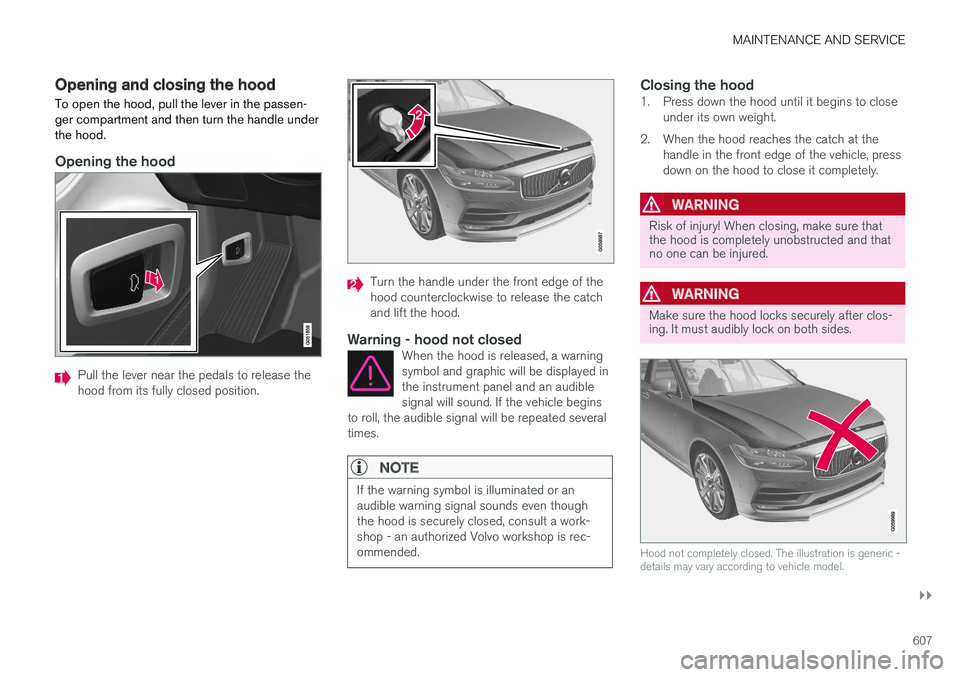
Opening and closing the hood To open the hood, pull the lever in the passen- ger compartment and then turn the handle underthe hood.
Opening the hood
Pull the lever near the pedals to release the hood from its fully closed position.
Turn the handle under the front edge of the hood counterclockwise to release the catchand lift the hood.
Warning - hood not closedWhen the hood is released, a warningsymbol and graphic will be displayed inthe instrument panel and an audiblesignal will sound. If the vehicle begins
to roll, the audible signal will be repeated severaltimes.
NOTE
If the warning symbol is illuminated or an audible warning signal sounds even thoughthe hood is securely closed, consult a work-shop - an authorized Volvo workshop is rec-ommended.
Closing the hood1. Press down the hood until it begins to close under its own weight.
2. When the hood reaches the catch at the handle in the front edge of the vehicle, press down on the hood to close it completely.
WARNING
Risk of injury! When closing, make sure that the hood is completely unobstructed and thatno one can be injured.
WARNING
Make sure the hood locks securely after clos- ing. It must audibly lock on both sides.
Hood not completely closed. The illustration is generic - details may vary according to vehicle model.
Page 610 of 686
||
MAINTENANCE AND SERVICE
* Option/accessory.
608
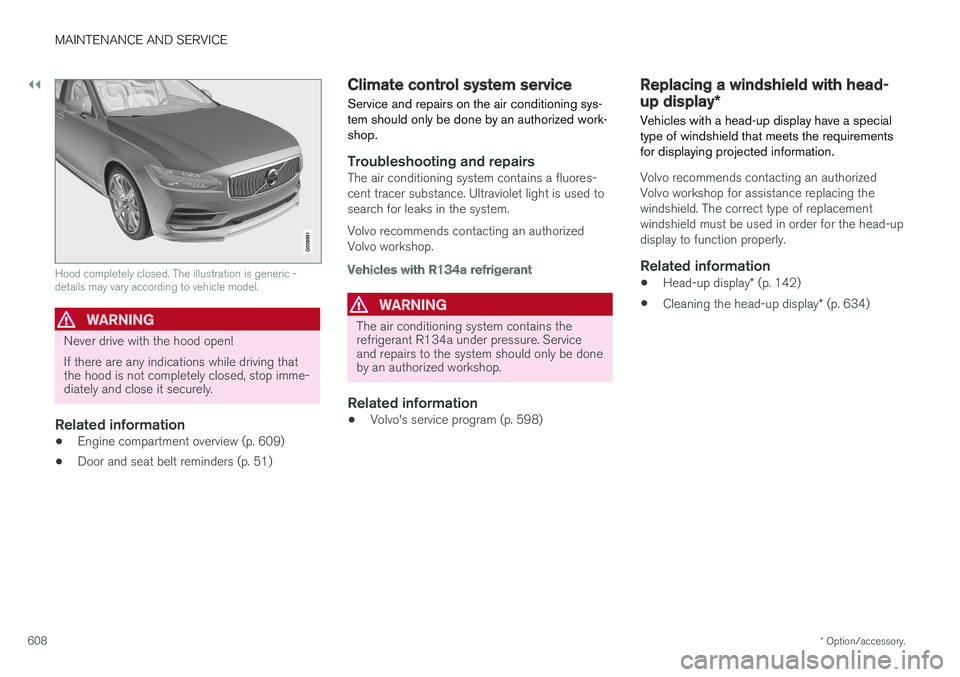
Hood completely closed. The illustration is generic - details may vary according to vehicle model.
WARNING
Never drive with the hood open! If there are any indications while driving that the hood is not completely closed, stop imme-diately and close it securely.
Related information
• Engine compartment overview (p. 609)
• Door and seat belt reminders (p. 51)
Climate control system service Service and repairs on the air conditioning sys- tem should only be done by an authorized work-shop.
Troubleshooting and repairsThe air conditioning system contains a fluores- cent tracer substance. Ultraviolet light is used tosearch for leaks in the system. Volvo recommends contacting an authorized Volvo workshop.
Vehicles with R134a refrigerant
WARNING
The air conditioning system contains the refrigerant R134a under pressure. Serviceand repairs to the system should only be doneby an authorized workshop.
Related information
•Volvo's service program (p. 598)
Replacing a windshield with head-
up display
*
Vehicles with a head-up display have a special type of windshield that meets the requirementsfor displaying projected information.
Volvo recommends contacting an authorized Volvo workshop for assistance replacing thewindshield. The correct type of replacementwindshield must be used in order for the head-updisplay to function properly.
Related information
• Head-up display
* (p. 142)
• Cleaning the head-up display
* (p. 634)
Page 612 of 686
MAINTENANCE AND SERVICE
610
Engine oil
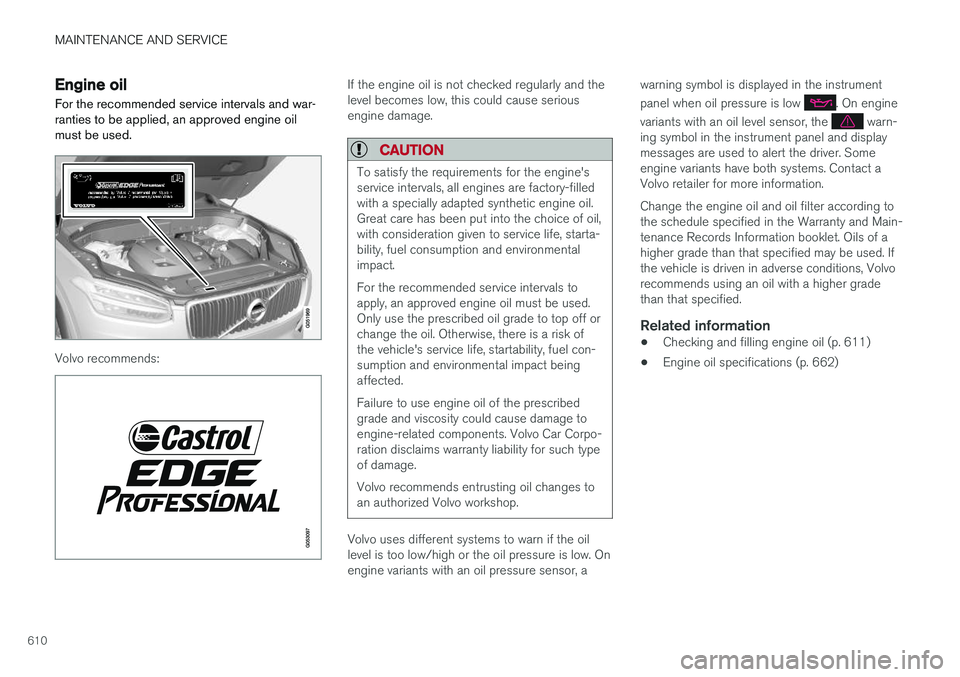
For the recommended service intervals and war- ranties to be applied, an approved engine oilmust be used.
Volvo recommends:
If the engine oil is not checked regularly and the level becomes low, this could cause seriousengine damage.
CAUTION
To satisfy the requirements for the engine's service intervals, all engines are factory-filledwith a specially adapted synthetic engine oil.Great care has been put into the choice of oil,with consideration given to service life, starta-bility, fuel consumption and environmentalimpact. For the recommended service intervals to apply, an approved engine oil must be used.Only use the prescribed oil grade to top off orchange the oil. Otherwise, there is a risk ofthe vehicle's service life, startability, fuel con-sumption and environmental impact beingaffected. Failure to use engine oil of the prescribed grade and viscosity could cause damage toengine-related components. Volvo Car Corpo-ration disclaims warranty liability for such typeof damage. Volvo recommends entrusting oil changes to an authorized Volvo workshop.
Volvo uses different systems to warn if the oil level is too low/high or the oil pressure is low. Onengine variants with an oil pressure sensor, a warning symbol is displayed in the instrument panel when oil pressure is low
. On engine
variants with an oil level sensor, the
warn-
ing symbol in the instrument panel and display messages are used to alert the driver. Someengine variants have both systems. Contact aVolvo retailer for more information. Change the engine oil and oil filter according to the schedule specified in the Warranty and Main-tenance Records Information booklet. Oils of ahigher grade than that specified may be used. Ifthe vehicle is driven in adverse conditions, Volvorecommends using an oil with a higher gradethan that specified.
Related information
• Checking and filling engine oil (p. 611)
• Engine oil specifications (p. 662)
Page 613 of 686
MAINTENANCE AND SERVICE
}}
611
Checking and filling engine oilThe engine oil level is monitored by an electronic oil level sensor.
Filler pipe 12
.
It may be necessary to top up engine oil between regularly scheduled services. No action is necessary with regard to engine oil level until a message appears in the instrumentpanel.
WARNING
If this symbol is shown together with the message Engine oil level
Service required, visit a workshop
– an authorized Volvo workshop is
recommended. The oil level may be too high.
CAUTION
If this symbol is shown together with a message about low oil level, for example
Engine oil level low
Refill 1 liter, fill only with the indi-
cated volume, e.g. 1 liter (1 quart).
WARNING
Do not spill oil on the hot exhaust pipes as this could cause a fire.
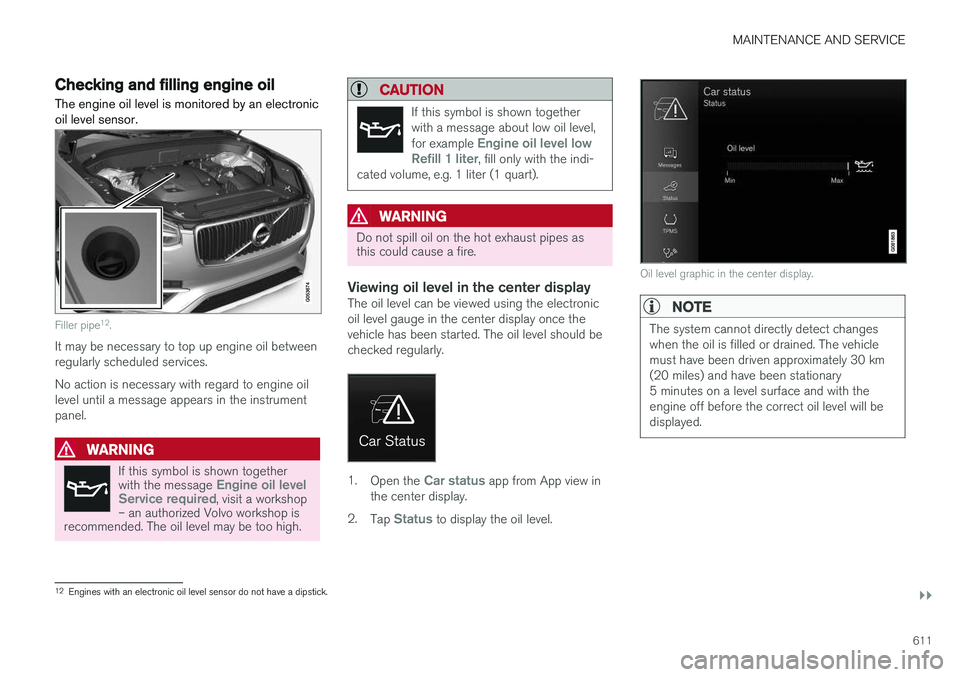
Viewing oil level in the center displayThe oil level can be viewed using the electronic oil level gauge in the center display once thevehicle has been started. The oil level should bechecked regularly.
1. Open the Car status app from App view in
the center display.
2. Tap
Status to display the oil level.
Oil level graphic in the center display.
NOTE
The system cannot directly detect changes when the oil is filled or drained. The vehiclemust have been driven approximately 30 km(20 miles) and have been stationary5 minutes on a level surface and with theengine off before the correct oil level will bedisplayed.
12
Engines with an electronic oil level sensor do not have a dipstick.
Page 614 of 686
||
MAINTENANCE AND SERVICE
612
NOTE
If the conditions for measuring oil level are not properly fulfilled (time after engine shut-down, vehicle inclination, ambient tempera- ture, etc.) the message
No value availablewill be shown in the center display. This does not mean that anything is wrong in the vehi-
cle systems.
Related information
• Engine oil (p. 610)
• Engine oil specifications (p. 662)
• Ignition modes (p. 427)
• Vehicle status (p. 602)
Refilling coolant
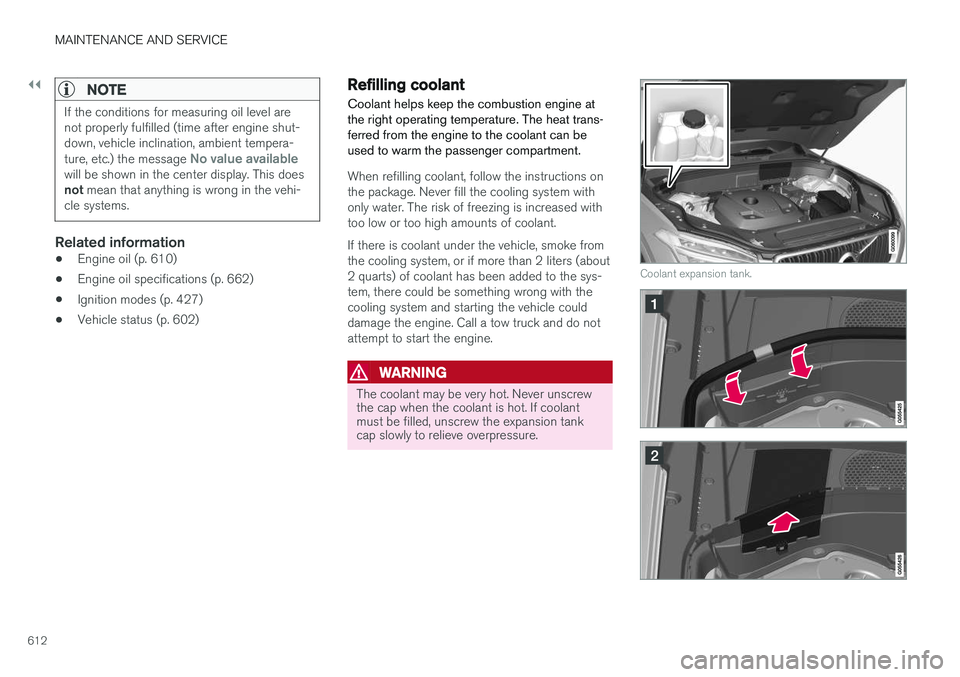
Coolant helps keep the combustion engine at the right operating temperature. The heat trans-ferred from the engine to the coolant can beused to warm the passenger compartment.
When refilling coolant, follow the instructions on the package. Never fill the cooling system withonly water. The risk of freezing is increased withtoo low or too high amounts of coolant. If there is coolant under the vehicle, smoke from the cooling system, or if more than 2 liters (about2 quarts) of coolant has been added to the sys-tem, there could be something wrong with thecooling system and starting the vehicle coulddamage the engine. Call a tow truck and do notattempt to start the engine.
WARNING
The coolant may be very hot. Never unscrew the cap when the coolant is hot. If coolantmust be filled, unscrew the expansion tankcap slowly to relieve overpressure.
Coolant expansion tank.
Page 618 of 686
||
MAINTENANCE AND SERVICE
616
CAUTION
Only a modern battery charger with controlled charge voltage should be used to charge thestarter battery. The rapid charging functionshould not be used as this could damage thebattery.
NOTE
If both the starter battery and the hybrid bat- tery are discharged, both batteries must be
charged. In such cases, it is not possible to charge only the hybrid battery first. The starter battery must have a certain level of charge for it to be possible to charge thehybrid battery.
CAUTION
Failure to observe the following could cause the infotainment energy save mode to tempo-rarily stop working and/or a message in thedriver's display regarding the state of chargeof the starter battery may be temporarilyincorrect after an external starter battery orbattery charger has been connected:
• The negative battery terminal of the vehi- cle's starter battery must
never be used
to connect an external starter battery orbattery charger – only the vehicle's neg-
ative charging point should be used as
a grounding point.
NOTE
If the starter battery becomes discharged too many times, it will shorten its service life. The service life of the starter battery is affec- ted by several factors, such as driving condi-tions and climate. The starting capacity of thebattery reduces gradually over time. The bat-tery must therefore be recharged if the vehi-cle is not used or a long period of time or if itis only driven short distances. Severe cold fur-ther limits the starting capacity. To keep the starter battery in a good condi- tion, the vehicle should be driven at least15 minutes per week or the battery should beconnected to a battery charger with automatictrickle charging. A starter battery that is always kept fully charged has the maximum service life.