cruise control VOLVO XC90 T8 2018 Owner´s Manual
[x] Cancel search | Manufacturer: VOLVO, Model Year: 2018, Model line: XC90 T8, Model: VOLVO XC90 T8 2018Pages: 686, PDF Size: 11.51 MB
Page 322 of 686
||
DRIVER SUPPORT
320
Automatic standby mode
Pilot Assist is dependent on other systems, such as Electronic Stability Control (ESC66
). If any of
these other systems stops working, Pilot Assist will automatically switch off.
WARNING
With automatic standby mode, the driver is warned by an acoustic signal and a messageon the instrument panel. • The driver must then regulate vehicle speed, apply the brakes if necessary, andmaintain a safe distance to other vehicles.
Adaptive Cruise Control may go into standbymode if, e.g.: • the driver opens the door.
• the brake temperature is high.
• the driver's hands are not on the steering wheel.
• the parking brake is applied.
• the engine speed (rpm) is too low/high.
• the driver unbuckles the seat belt.
• one or more of the wheels lose traction.
• the camera/radar sensor is covered by snowor heavy rain (the camera lens/radar wavesare blocked) •
your vehicle's speed goes below 5 km/h(3 mph) and Pilot Assist cannot determine ifthe vehicle ahead is stationary or if it isanother object, e.g. a speed bump.
• your vehicle's speed goes under 5 km/h(3 mph) and the vehicle ahead turns so thatPilot Assist no longer has a vehicle to follow.Reactivating Pilot Assist from standby
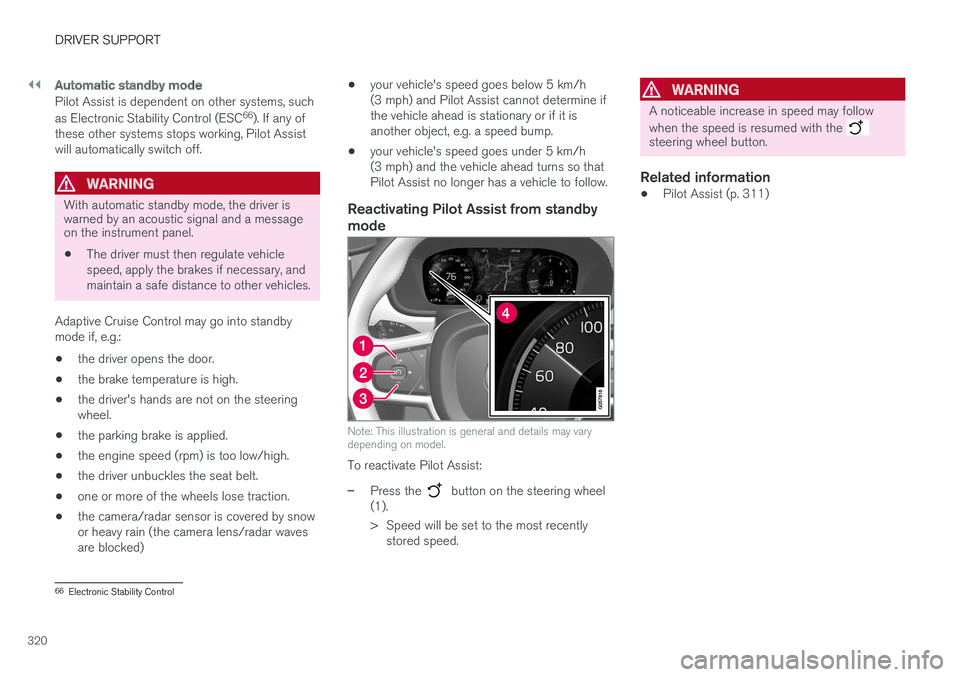
mode
Note: This illustration is general and details may vary depending on model.
To reactivate Pilot Assist:
–Press the button on the steering wheel
(1).
> Speed will be set to the most recently stored speed.
WARNING
A noticeable increase in speed may follow when the speed is resumed with the
steering wheel button.
Related information
• Pilot Assist (p. 311)
66
Electronic Stability Control
Page 328 of 686
||
DRIVER SUPPORT
* Option/accessory.
326
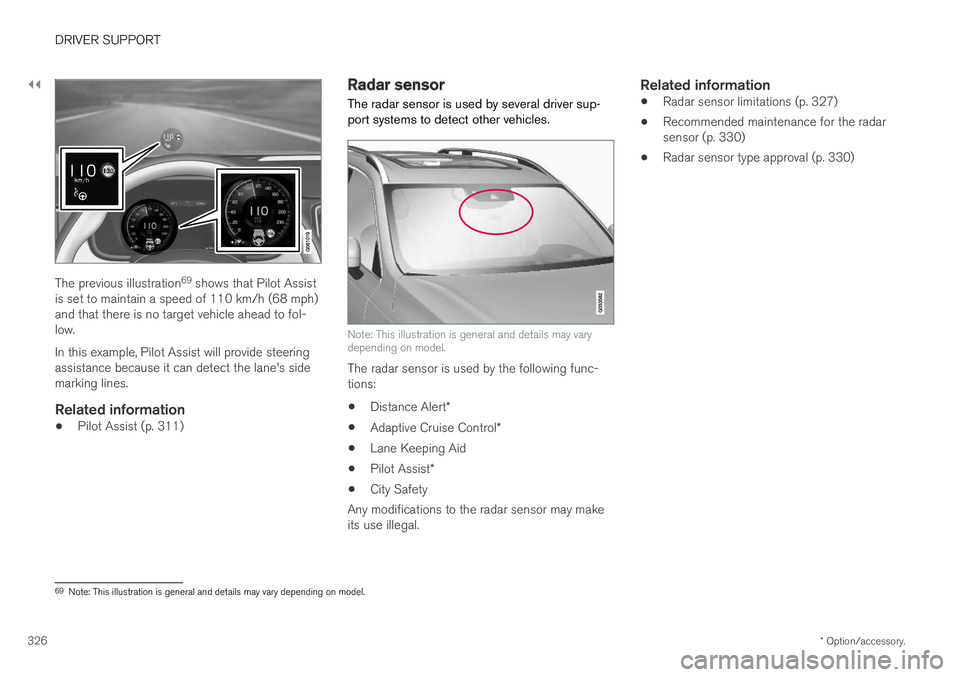
The previous illustration 69
shows that Pilot Assist
is set to maintain a speed of 110 km/h (68 mph) and that there is no target vehicle ahead to fol-low. In this example, Pilot Assist will provide steering assistance because it can detect the lane's sidemarking lines.
Related information
• Pilot Assist (p. 311)
Radar sensor
The radar sensor is used by several driver sup- port systems to detect other vehicles.
Note: This illustration is general and details may vary depending on model.
The radar sensor is used by the following func- tions:
• Distance Alert
*
• Adaptive Cruise Control
*
• Lane Keeping Aid
• Pilot Assist
*
• City Safety
Any modifications to the radar sensor may makeits use illegal.
Related information
• Radar sensor limitations (p. 327)
• Recommended maintenance for the radarsensor (p. 330)
• Radar sensor type approval (p. 330)
69
Note: This illustration is general and details may vary depending on model.
Page 330 of 686
||
DRIVER SUPPORT
328
CauseAction
Water or snow is spraying/swirling up and blocking the radar signals or the camera's range of visibility. No action. Very wet or snow-covered roads may sometimes prevent the cam-era/radar sensor from functioning.
There is dirt between the inside of the windshield and the camera/radarsensor. Consult a workshop to have the area of the windshield on the inside of the cam-era's casing cleaned. An authorized Volvo workshop is recommended.
NOTE
Keep the windshield in front of the camera and radar unit clean.
Vehicle speedThe radar sensor's ability to detect a vehicle ahead is significantly reduced if:
• the speed of the vehicle ahead differs greatlyfrom your vehicle's speed
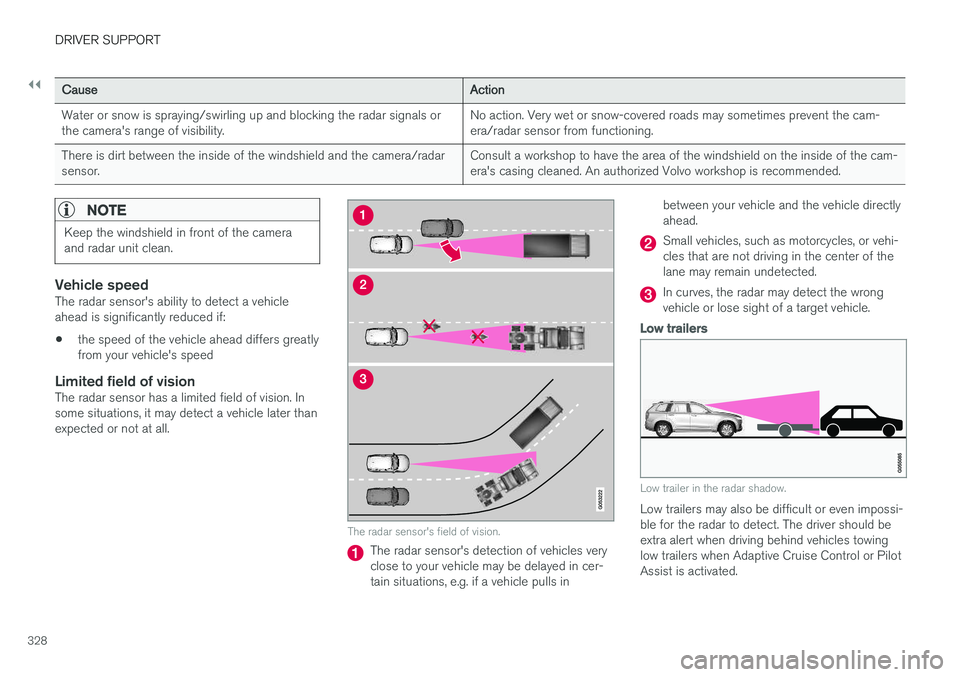
Limited field of visionThe radar sensor has a limited field of vision. Insome situations, it may detect a vehicle later thanexpected or not at all.
The radar sensor's field of vision.
The radar sensor's detection of vehicles very close to your vehicle may be delayed in cer-tain situations, e.g. if a vehicle pulls in between your vehicle and the vehicle directlyahead.
Small vehicles, such as motorcycles, or vehi- cles that are not driving in the center of thelane may remain undetected.
In curves, the radar may detect the wrong vehicle or lose sight of a target vehicle.
Low trailers
Low trailer in the radar shadow.
Low trailers may also be difficult or even impossi- ble for the radar to detect. The driver should beextra alert when driving behind vehicles towing low trailers when Adaptive Cruise Control or Pilot Assist is activated.
Page 333 of 686
DRIVER SUPPORT
* Option/accessory.331
Camera
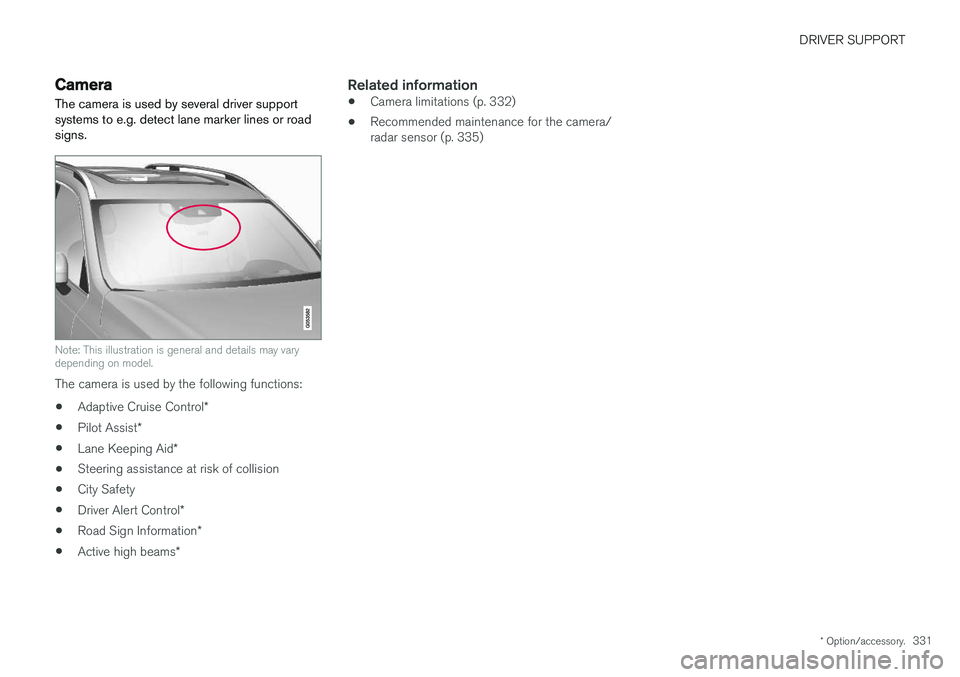
The camera is used by several driver support systems to e.g. detect lane marker lines or roadsigns.
Note: This illustration is general and details may vary depending on model.
The camera is used by the following functions:
• Adaptive Cruise Control
*
• Pilot Assist
*
• Lane Keeping Aid
*
• Steering assistance at risk of collision
• City Safety
• Driver Alert Control
*
• Road Sign Information
*
• Active high beams
*
Related information
•Camera limitations (p. 332)
• Recommended maintenance for the camera/ radar sensor (p. 335)
Page 669 of 686
INDEX
667
1, 2, 3 ...
4WD 443
A
ABSanti-lock brakes 429
AC (Air conditioning) 228
ACC - Adaptive Cruise Control 295, 298, 299, 300, 301, 302, 304, 305, 306, 307, 309
Accessories and extra equipment 35 installation 36
Accessory installation warning 36
Active Bending Lights 159
Adapting driving characteristics 272, 445
Adaptive Cruise Control 295, 298, 299, 300, 301, 302, 304, 305, 306, 307, 309
change cruise control functionality 307
function 295
manage speed 299, 300
pass 304, 305
radar sensor 326
set time interval 301, 302
troubleshooting 307
Adjusting the steering wheel 199
Airbag 52 activation/deactivation 56
driver's side 53
passenger side 53, 56
Air bag, see Airbag 52
Air conditioning 228Air conditioning, fluid volume and grade 664
Air distribution 207 air vents 207, 209
changing 208
defrosting 220
recirculation 219
table showing options 210
Air quality 204, 206 allergy and asthma 206
passenger compartment filter 207
Air recirculation 219
Alarm 268 deactivating 269
Allergy and asthma-inducing substances 206
All Wheel Drive, AWD 443
All Wheel Drive (AWD) 443
All Wheel Drive (four-wheel drive) 443
Android Auto 518, 520 Antenna location 257Apple CarPlay 515, 517
Approach lighting 161
Apps 487
Assistance at risk of collision 372, 373, 374, 375, 376, 377, 378, 380
Audio and media 486Audio system HD digital radio 497 SiriusXM ® Satellite radio 498, 499, 500
Auto-climate 219
Auto hold 436
Auto-hold brakes 436 activate and deactivate 436
after collision 437
Automatic car wash 641
Automatic high beam 157
Automatic locking 261
Automatic relocking 241, 254
Automatic Speed Limiter 282, 284, 285
Automatic transmission 439 kickdown 442
oil 663
Trailer 472
INDEX
Page 672 of 686
INDEX
670Cooling system
overheating 468
Corner Traction Control 274
Corrosion protection 644Covering cargo compartment 590
Crash, see Collision 42
Crash event data 33
Cross Traffic Alert – CTA 353, 354, 355, 356
Cruise control 286, 287 manage speed 287, 288
temporary deactivation 289, 290
turn off 290
CTA – Cross Traffic Alert 353, 354, 355, 356
Curb weight 659
CZIP (Clean Zone Interior Package) 206
D
Data recording 33 transferring between vehicle and work-
shop 600
Data sharing 536
Daytime running lights 154
Decals location of 654
Defrosting 220
Detection of cyclist 339
Dimensions 657
Dipstick, electronic 611
Direction of rotation 552
Display lighting 164
Distance Alert 291, 292, 293 limitations 294
DivX ®
512
Door mirrors 169, 171 compass 481, 482
dimming 170
outer 169, 171
power folding 171
resetting 171
Driveline transmission 438
Drive mode 445 changing 449
Driver Alert Control 362 operation 363, 364
Driver Alert Control limitations 364
Driver performance 92Driver profile 137 edit 139
select 138
Driver support system 272
Drive systems 443Driving cooling system 468
with a trailer 472
Driving economy 456
Driving through standing water 462 driving with a trailer towball load 660
towing capacity 660
E
Economical driving 456
Electrical outlet 582
use 584
Electrical system 615 Electric drive motor specifications 661
electric motor 443 Driving 457
Range 458
Electric parking brake 432
Page 673 of 686
INDEX
671
Electronic immobilizer 252
emergency brake lights 160
Emission inspection readiness 598Engine
automatic start and stop of combustion
engine 444
overheating 468
start 424
turn off 426
Engine braking, automatic 454 Engine compartment coolant 612
engine oil 610
overview 609
Engine drag control 274
Engine oil 610 filling 611
filter 610
grade and volume 662
Engine shutdown 426
Engine specifications 661Engine temperature high 468
Environment 27 Error messages Adaptive Cruise Control 309
see Messages and symbols 309, 324
Error messages in BLIS 352 Ethanol content
max. 10% by volume 464
Exterior dimensions 657
F
Federal Clean Air Act 598
Ferry transport 450
Flat tire 572
Flooded road 462
Fluids, volumes 650, 664
Fluids and oils 663, 664Fog lights rear 159
Four-C 450 Front seat blower 224
climate 213
heating 215, 216
temperature 226
ventilation 217
Front seat manual 184
Front seats, power 185 adjusting passenger seat from driver's
seat 191
adjusting seat 185
Lumbar support 190
massage 188, 189
memory function 186, 187
multifunction control 188, 189, 190
Side bolsters 190
FSC, environmental labeling 23
Fuel 464 Travel Link service 505
Fuel filling 463
Fuel gauge 86
Fuel requirements 464, 465 Fuel tank volume 664
Fuse box 621Fuses below the glove compartment 626
general 620
in engine compartment 622
in the cargo compartment 629
replacing 621
G
Gasoline grade 464 Gauge
fuel gauge 86
Page 676 of 686
INDEX
674high beams 156, 157
home safe lighting 161
in passenger compartment 162, 164
instrument illumination 164
instrument lighting 164
light bulbs, specifications 614
low beams 155
position lights 154
rear fog light 159
settings 153
Turn signals 158
Lighting, replacing bulbs 613
Limp home 438 Load anchoring eyelets cargo compartment 589
Load anchoring hooks 588
Load carriers 588
Load index 554Loading general 586
load anchoring eyelets 589
long load 587
Lock indication 238 setting 239
Locking/unlocking Tailgate 243, 256
Locking wheel bolts 565
Locks Locking 241
unlocking 241
Long-term storage 421 Low battery charge level start battery 469
Low beams 155
Lower the rear end 587
Low oil level 611
Low-speed driving 453 activate with function button 454
M
Maintained climate comfort 234start/stop 234
Maintenance 598 corrosion protection 644
Max. axle weight 659
Max. roof load 659
Media player 507, 508, 509 compatible file formats 536, 537
voice control 148
Messages and symbols Adaptive Cruise Control 309
Collision warner with auto-brake 346
Messages in BLIS 352
Messages in display 105, 140handling 106, 141
saved 107, 142
Mileage 89 electric motor 458
Misting condensation in headlights 638, 641
Mood lighting 163, 164
N
Net cargo compartment 593
O
Occupant safety 43
Occupant weight sensor 56
Octane rating 465
Oil, see also Engine oil 662
On-board diagnostics 598
On-board Diagnostic socket 36
Option/accessory 21
Outside temperature gauge 94
Page 680 of 686
INDEX
678Start battery 469, 615
overload 469
Start engine 424 Starting the engine after a collision 62
Start the vehicle 424
Steel cargo grid 592Steering assistance at risk of colli-
sion 372, 373, 374, 375, 376, 377, 378, 380 Steering assistance at risk of rear-end col-
lision 377, 378 Steering power level, see Steering wheel
resistance 272 Steering resistance at risk of head-on colli-
sion 375, 376
Steering wheel 199 heating 218
keypad 199
paddle 199
steering wheel adjustment 199
Steering wheel keypad 199
Steering wheel paddles 441Steering wheel resistance, speed-depend- ent 272
Stone chips and scratches 645, 646
Storage compartments 580 center console 581
glove compartment 585
sun visor 586
Sunroof pinch protection 166
Sun shade panoramic roof 172, 175
pinch protection 166
rear door 169
Sun visor 586 mirror lighting 163
Symbols indicator symbols 94
Symbols and messages Adaptive Cruise Control 309
center display's status bar 124
Collision warner with auto-brake 346
hybrid-related 419
parking climate 236
Symbols and messages for Assistance at
risk of collision 380
system updates 601
T
Tailgate locking/unlocking 243, 256
open/close with foot movement 265
power 261
unlocking from inside 259
Technician certification 37 Temperature adjusting 226, 227, 228
perceived 203
Temperature monitoring 411 Temporary spare spare tire 569
Temporary tire sealing system execution, checking 573
Inflating tires 577
location 572
overview 572
sealing compound 572
Terms and conditions services 34
users 536
Tire dimensions 554, 564
Tire pressure decal 559Tire pressure monitoring calibrating 561
Tires 550 direction of rotation 552
glossary of terms 553
inflation pressure table 665
mounting 568
pressure 665
Page 681 of 686
INDEX
679
removal 566
rotation 551
specifications 554, 665
storage 550
tire pressure monitoring 559
tire sealing 572
Tread depth 571
tread wear indicator 553
winter tires 571
Tire sealing system 573
Tire tread 553
Tools 564 Top tether anchors (child restraint sys- tems) 72
Total airing function 239, 257
Towbar 471 removable, attaching, installing, mount-
ing 471
removable, removing, detaching 471
Towing 476
Towing capacity and towball load 660
Towing eyelet 476
TPMS - Tire Pressure Monitoring System 559
Traction control 274
Traffic information 493
Trailer 474 driving with a trailer 472
Lamps 475
swaying 474
Trailer Stability Assist 474 trailer 474
Trailer stabilizer 274 Trailer towing trailer hitch 471
Transmission 438 automatic 439
Transmission fluid grade 663
Travel Link 502 Fuel 505
Notifications 504
Sports 506
weather 503
Tread depth 553, 571
Tread wear indicator 553
Trip computer 89, 90
Trip odometer 89
Trip odometer resetting 91
Trip statistics 92 Troubleshooting Adaptive Cruise Control 307
Troubleshooting the camera sensor 332
TSA - Trailer Stability Assist 274, 474Tunnel detection 155
Turn off engine 426
Turn signals 158Twin Engine general 406
Type approval radar system 330
U
Uniform Tire Quality Grading 556
Units 132
Unknown vehicle component 270 Unlockingsettings 242
with key blade 251
USB socket for connecting media 514
V
Vehicle care 638, 639, 641, 642, 643, 644leather upholstery 636
Vehicle Event Data 33 Vehicle functions in the center display 122