cooling VOLVO XC90 T8 2018 Owner´s Manual
[x] Cancel search | Manufacturer: VOLVO, Model Year: 2018, Model line: XC90 T8, Model: VOLVO XC90 T8 2018Pages: 686, PDF Size: 11.51 MB
Page 212 of 686
CLIMATE CONTROL
210
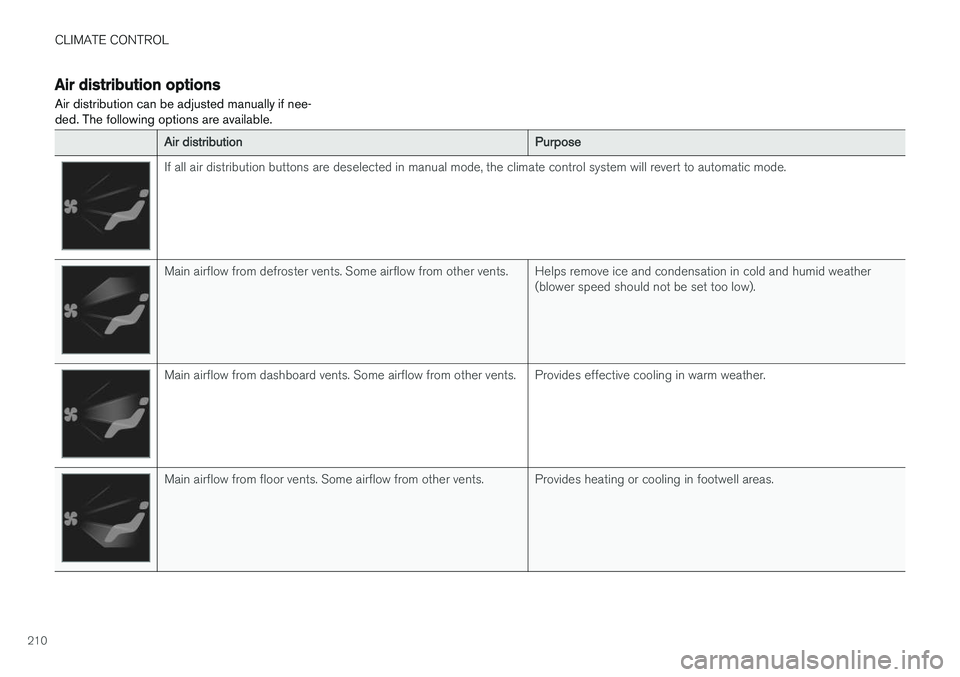
Air distribution options Air distribution can be adjusted manually if nee- ded. The following options are available.
Air distributionPurpose
If all air distribution buttons are deselected in manual mode, the climate control system will revert to automatic mode.
Main airflow from defroster vents. Some airflow from other vents. Helps remove ice and condensation in cold and humid weather(blower speed should not be set too low).
Main airflow from dashboard vents. Some airflow from other vents. Provides effective cooling in warm weather.
Main airflow from floor vents. Some airflow from other vents. Provides heating or cooling in footwell areas.
Page 219 of 686
CLIMATE CONTROL
* Option/accessory.217
Activating and deactivating the heated rear seats from the rear seat
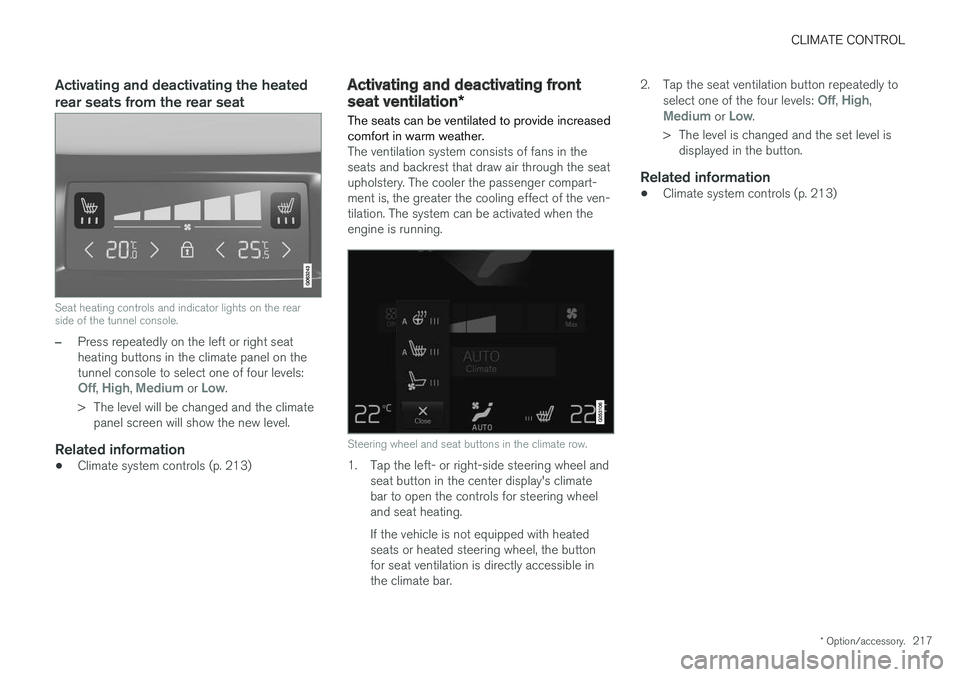
Seat heating controls and indicator lights on the rear side of the tunnel console.
–Press repeatedly on the left or right seat heating buttons in the climate panel on thetunnel console to select one of four levels:
Off, High, Medium or Low.
> The level will be changed and the climate panel screen will show the new level.
Related information
• Climate system controls (p. 213)
Activating and deactivating front
seat ventilation
*
The seats can be ventilated to provide increased comfort in warm weather.
The ventilation system consists of fans in the seats and backrest that draw air through the seatupholstery. The cooler the passenger compart-ment is, the greater the cooling effect of the ven-tilation. The system can be activated when theengine is running.
Steering wheel and seat buttons in the climate row.
1. Tap the left- or right-side steering wheel and seat button in the center display's climate bar to open the controls for steering wheeland seat heating. If the vehicle is not equipped with heated seats or heated steering wheel, the buttonfor seat ventilation is directly accessible inthe climate bar. 2. Tap the seat ventilation button repeatedly to
select one of the four levels:
Off, High,Medium or Low.
> The level is changed and the set level is displayed in the button.
Related information
• Climate system controls (p. 213)
Page 228 of 686
||
CLIMATE CONTROL
226
NOTE
The climate system automatically adapts air- flow as needed within the set blower speed,which means that airflow speed may varyslightly within the same blower speed.
Related information
•Climate system controls (p. 213)
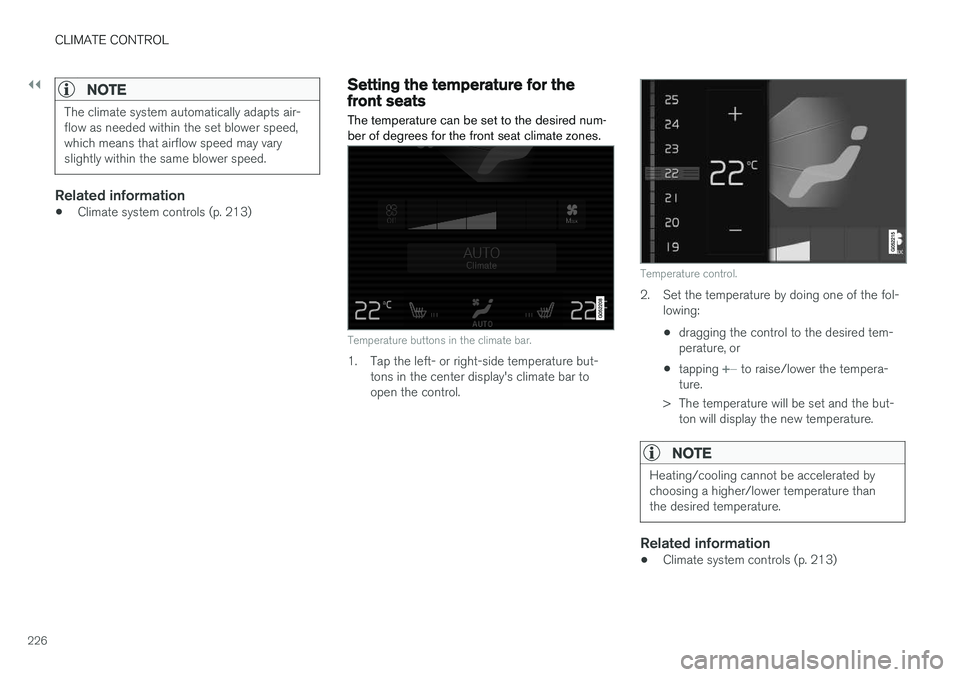
Setting the temperature for thefront seats The temperature can be set to the desired num- ber of degrees for the front seat climate zones.
Temperature buttons in the climate bar.
1. Tap the left- or right-side temperature but-
tons in the center display's climate bar to open the control.
Temperature control.
2. Set the temperature by doing one of the fol-lowing:
• dragging the control to the desired tem- perature, or
• tapping
+
− to raise/lower the tempera-
ture.
> The temperature will be set and the but- ton will display the new temperature.
NOTE
Heating/cooling cannot be accelerated by choosing a higher/lower temperature thanthe desired temperature.
Related information
• Climate system controls (p. 213)
Page 229 of 686
CLIMATE CONTROL
227
Setting the temperature for the rearseats
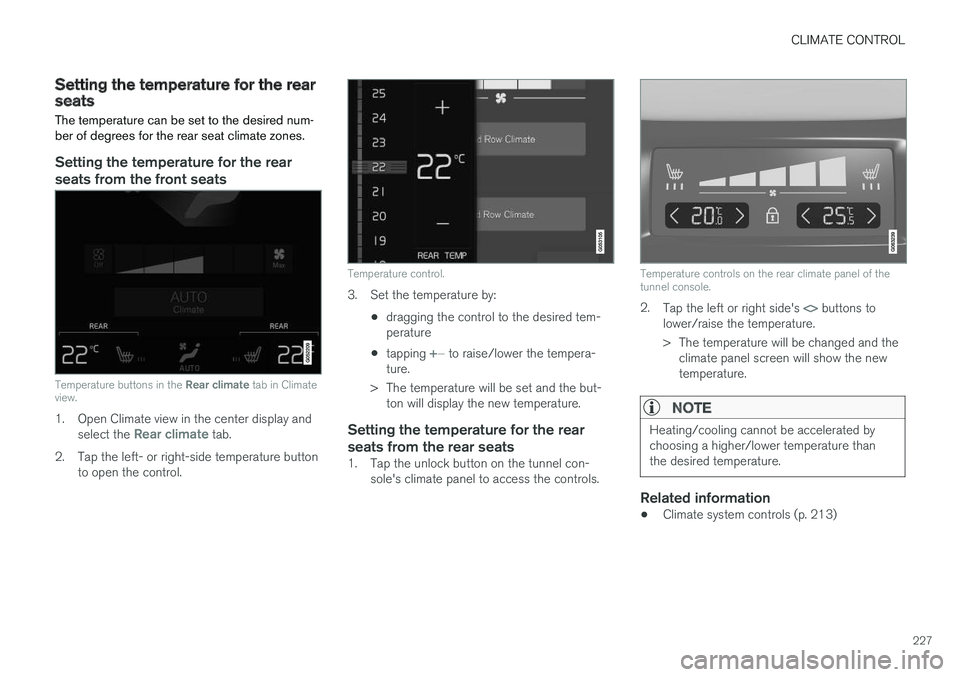
The temperature can be set to the desired num- ber of degrees for the rear seat climate zones.
Setting the temperature for the rear seats from the front seats
Temperature buttons in the Rear climate tab in Climate
view.
1. Open Climate view in the center display and
select the Rear climate tab.
2. Tap the left- or right-side temperature button to open the control.
Temperature control.
3. Set the temperature by:
•dragging the control to the desired tem- perature
• tapping
+
− to raise/lower the tempera-
ture.
> The temperature will be set and the but- ton will display the new temperature.
Setting the temperature for the rear seats from the rear seats
1. Tap the unlock button on the tunnel con- sole's climate panel to access the controls.
Temperature controls on the rear climate panel of the tunnel console.
2.Tap the left or right side's <> buttons to
lower/raise the temperature.
> The temperature will be changed and the climate panel screen will show the new temperature.
NOTE
Heating/cooling cannot be accelerated by choosing a higher/lower temperature thanthe desired temperature.
Related information
• Climate system controls (p. 213)
Page 233 of 686
CLIMATE CONTROL
}}
231
NOTE
Preconditioning is only available when the car is connected to an electrical outlet. A charg-ing post that is not always active, for examplebecause of a timer, can cause loss of functionfor preconditioning. If the car is not connected to an electrical socket it is still possible in a warm climate toachieve brief cooling of the passenger com-partment by direct starting preconditioning.
NOTE
During preconditioning of the passenger compartment, the vehicle works to reach acomfortable temperature and not the tem-perature set in the climate system.
Related information
•Parking climate (p. 230)
• Starting and stopping preconditioning (p. 231)
• Preconditioning timer settings (p. 232)
Starting and stoppingpreconditioning
Preconditioning heats or cools the passenger compartment before driving. Preconditioningcan be started in the center display or from acellular phone.
Starting/stopping from the center display
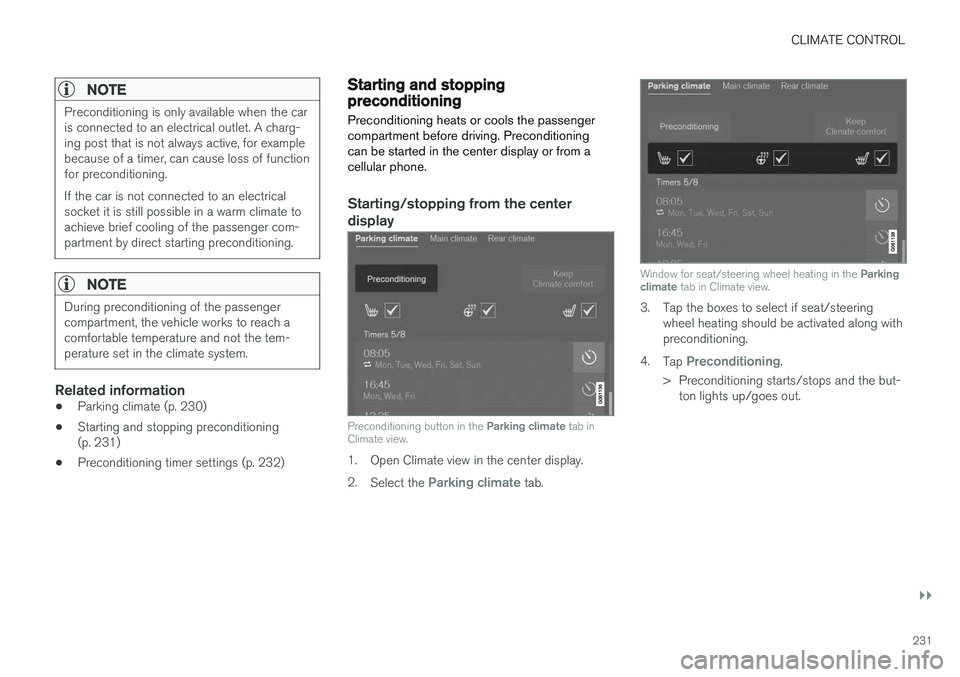
Preconditioning button in the Parking climate tab in
Climate view.
1. Open Climate view in the center display. 2. Select the
Parking climate tab.
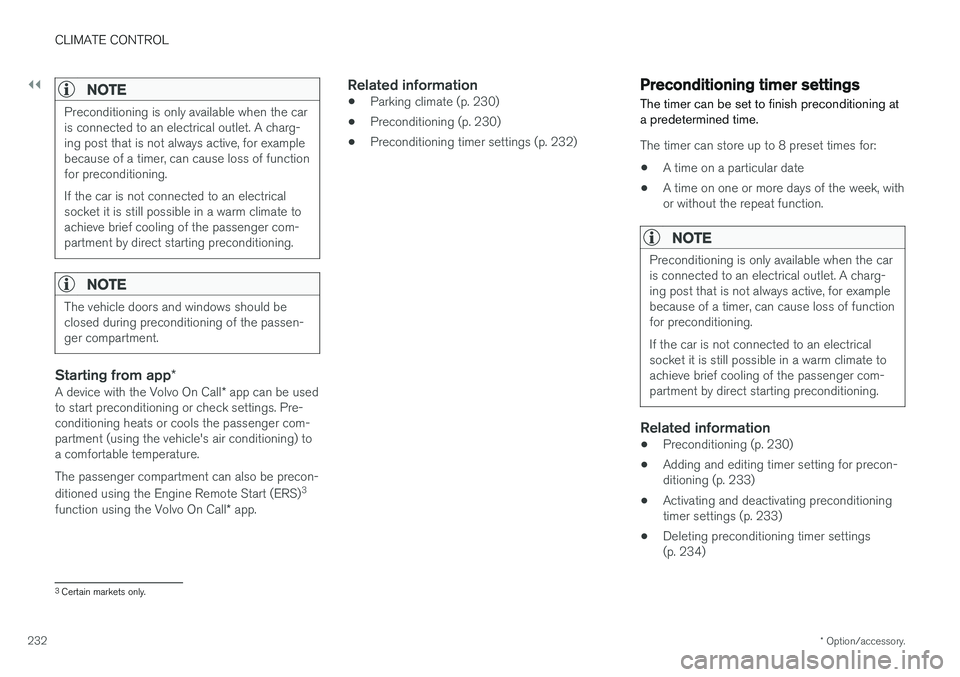
Window for seat/steering wheel heating in the Parking
climate tab in Climate view.
3. Tap the boxes to select if seat/steering
wheel heating should be activated along with preconditioning.
4. Tap
Preconditioning.
> Preconditioning starts/stops and the but- ton lights up/goes out.
Page 234 of 686
||
CLIMATE CONTROL
* Option/accessory.
232
NOTE
Preconditioning is only available when the car is connected to an electrical outlet. A charg-ing post that is not always active, for examplebecause of a timer, can cause loss of functionfor preconditioning. If the car is not connected to an electrical socket it is still possible in a warm climate toachieve brief cooling of the passenger com-partment by direct starting preconditioning.
NOTE
The vehicle doors and windows should be closed during preconditioning of the passen-ger compartment.
Starting from app *
A device with the Volvo On Call * app can be used
to start preconditioning or check settings. Pre- conditioning heats or cools the passenger com-partment (using the vehicle's air conditioning) toa comfortable temperature. The passenger compartment can also be precon- ditioned using the Engine Remote Start (ERS) 3
function using the Volvo On Call * app.
Related information
• Parking climate (p. 230)
• Preconditioning (p. 230)
• Preconditioning timer settings (p. 232)
Preconditioning timer settings
The timer can be set to finish preconditioning at a predetermined time.
The timer can store up to 8 preset times for:
• A time on a particular date
• A time on one or more days of the week, with or without the repeat function.
NOTE
Preconditioning is only available when the car is connected to an electrical outlet. A charg-ing post that is not always active, for examplebecause of a timer, can cause loss of functionfor preconditioning. If the car is not connected to an electrical socket it is still possible in a warm climate toachieve brief cooling of the passenger com-partment by direct starting preconditioning.
Related information
• Preconditioning (p. 230)
• Adding and editing timer setting for precon- ditioning (p. 233)
• Activating and deactivating preconditioningtimer settings (p. 233)
• Deleting preconditioning timer settings(p. 234)
3
Certain markets only.
Page 326 of 686
||
DRIVER SUPPORT
* Option/accessory.
324
The driver is responsible for ensuring that the vehicle maintains a suitable distancefrom such obstacles.
• The camera and radar sensors do nothave the capacity to detect all oncomingobjects and obstacles in traffic environ-ments, e.g. potholes, stationary obstaclesor objects that completely or partiallyblock the route.
• Pilot Assist does not "see" pedestrians,animals, etc.
• The recommended steering input is lim-ited in force, which means that it cannotalways help the driver to steer and keepthe vehicle within the lane.
• Pilot Assist is switched off if the powersteering is working with reduced power -e.g. during cooling due to overheating(see section "Speed-dependent steeringforce").
The driver can always correct or adjust steeringassistance provided by Pilot Assist by turning thesteering wheel to the desired position.
Steep roads and/or heavy loadsPilot Assist is primarily intended to be driven onflat roads. The function may not be able to main-tain the correct time interval to the vehicle aheadwhen driving down steep hills. The driver should be extra attentive and prepared to apply thebrakes.
• Do not use Pilot Assist if the vehicle is carry-ing a heavy load or towing a trailer.
NOTE
Pilot Assist cannot be activated if a trailer, bike carrier or similar is connected to thevehicle electrical system.
Other limitations
•
The Off Road drive mode cannot be
selected when Pilot Assist is activated.
NOTE
The function uses the vehicle's camera unit, which has some general limitations – see thesection "Camera unit limitations".
NOTE
The function uses the vehicle's radar unit, which has some general limitations – see thesection "Radar unit limitations".
Related information
• Pilot Assist (p. 311)
• Speed-dependent steering wheel resistance (p. 272)
Pilot Assist
* symbols and messages
A number of symbols and messages relating to Pilot Assist may be displayed in the instrument panel and/or the head-up display *.
Page 369 of 686
DRIVER SUPPORT
}}
367
Activating/deactivating LaneKeeping Aid The Lane Keeping Aid (LKA111
) function can be
switched On or Off.
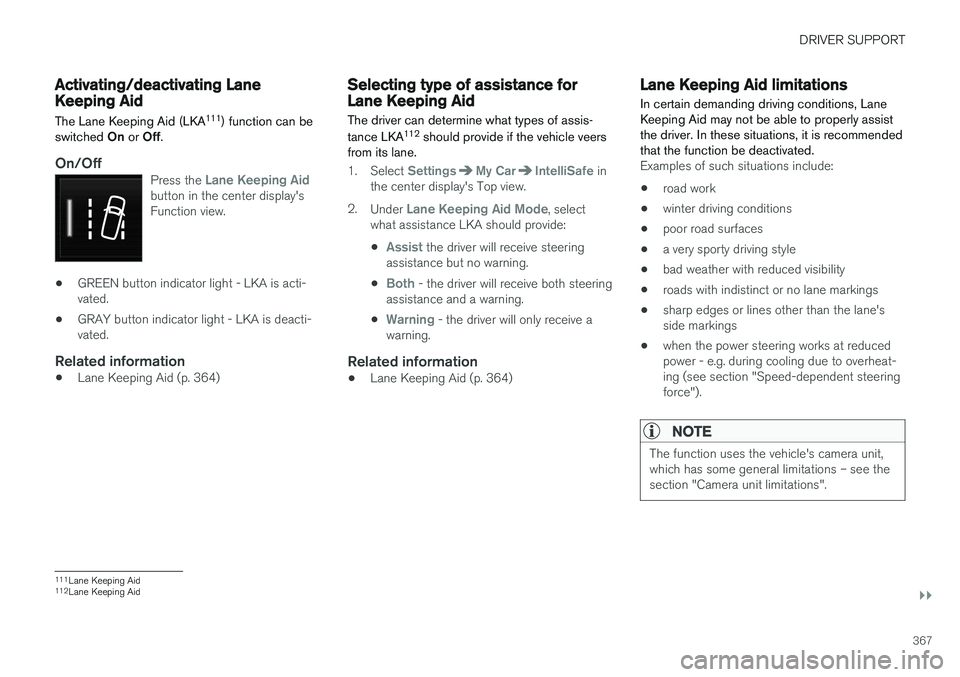
On/OffPress the Lane Keeping Aidbutton in the center display's Function view.
• GREEN button indicator light - LKA is acti- vated.
• GRAY button indicator light - LKA is deacti-vated.
Related information
•Lane Keeping Aid (p. 364)
Selecting type of assistance forLane Keeping Aid
The driver can determine what types of assis- tance LKA 112
should provide if the vehicle veers
from its lane.
1. Select SettingsMy CarIntelliSafe in
the center display's Top view.
2. Under
Lane Keeping Aid Mode, select
what assistance LKA should provide:
•
Assist the driver will receive steering
assistance but no warning.
•
Both - the driver will receive both steering
assistance and a warning.
•
Warning - the driver will only receive a
warning.
Related information
• Lane Keeping Aid (p. 364)
Lane Keeping Aid limitations
In certain demanding driving conditions, Lane Keeping Aid may not be able to properly assistthe driver. In these situations, it is recommendedthat the function be deactivated.
Examples of such situations include:
• road work
• winter driving conditions
• poor road surfaces
• a very sporty driving style
• bad weather with reduced visibility
• roads with indistinct or no lane markings
• sharp edges or lines other than the lane's side markings
• when the power steering works at reducedpower - e.g. during cooling due to overheat-ing (see section "Speed-dependent steeringforce").
NOTE
The function uses the vehicle's camera unit, which has some general limitations – see thesection "Camera unit limitations".
111
Lane Keeping Aid
112 Lane Keeping Aid
Page 376 of 686
||
DRIVER SUPPORT
* Option/accessory.
374
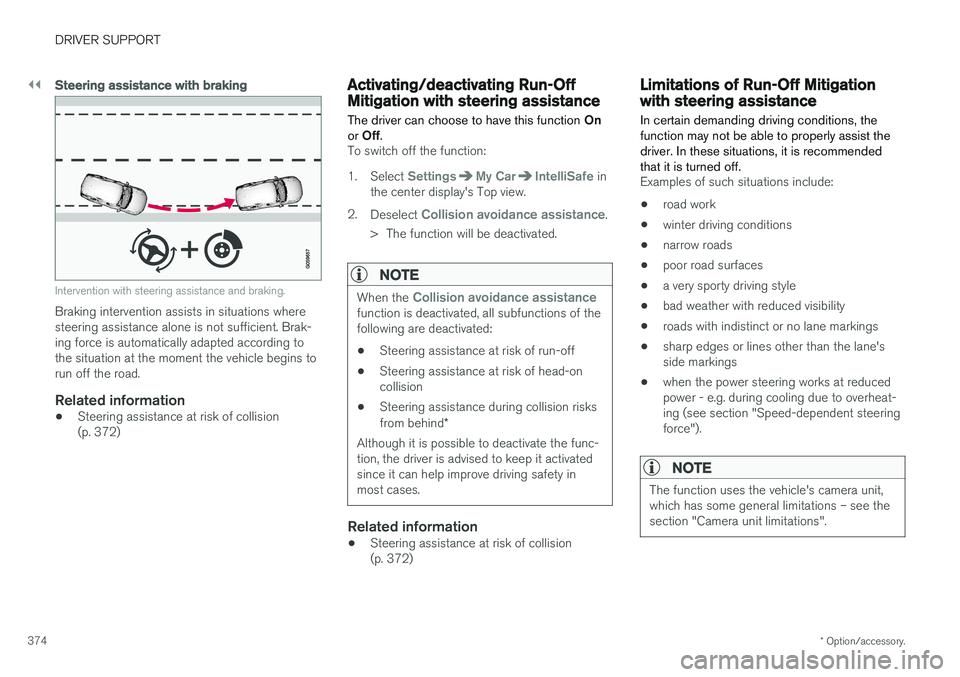
Steering assistance with braking
Intervention with steering assistance and braking.
Braking intervention assists in situations where steering assistance alone is not sufficient. Brak-ing force is automatically adapted according tothe situation at the moment the vehicle begins torun off the road.
Related information
• Steering assistance at risk of collision(p. 372)
Activating/deactivating Run-OffMitigation with steering assistance The driver can choose to have this function
On
or Off .
To switch off the function:
1. Select
SettingsMy CarIntelliSafe in
the center display's Top view.
2. Deselect
Collision avoidance assistance.
> The function will be deactivated.
NOTE
When the Collision avoidance assistancefunction is deactivated, all subfunctions of the following are deactivated: • Steering assistance at risk of run-off
• Steering assistance at risk of head-on collision
• Steering assistance during collision risks from behind
*
Although it is possible to deactivate the func- tion, the driver is advised to keep it activatedsince it can help improve driving safety inmost cases.
Related information
• Steering assistance at risk of collision (p. 372)
Limitations of Run-Off Mitigationwith steering assistance
In certain demanding driving conditions, the function may not be able to properly assist thedriver. In these situations, it is recommendedthat it is turned off.
Examples of such situations include:
• road work
• winter driving conditions
• narrow roads
• poor road surfaces
• a very sporty driving style
• bad weather with reduced visibility
• roads with indistinct or no lane markings
• sharp edges or lines other than the lane's side markings
• when the power steering works at reducedpower - e.g. during cooling due to overheat-ing (see section "Speed-dependent steeringforce").
NOTE
The function uses the vehicle's camera unit, which has some general limitations – see thesection "Camera unit limitations".
Page 378 of 686
||
DRIVER SUPPORT
* Option/accessory.
376
Related information
• Steering assistance at risk of collision (p. 372)
Activating/deactivating Steeringassistance during collision riskswith oncoming vehicles The driver can choose to have this function
On
or Off .
To switch off the function:
1. Select
SettingsMy CarIntelliSafe in
the center display's Top view.
2. Deselect
Collision avoidance assistance.
> The function will be deactivated.
NOTE
When the Collision avoidance assistancefunction is deactivated, all subfunctions of the following are deactivated: • Steering assistance at risk of run-off
• Steering assistance at risk of head-on collision
• Steering assistance during collision risks from behind
*
Although it is possible to deactivate the func- tion, the driver is advised to keep it activatedsince it can help improve driving safety inmost cases.
Related information
• Steering assistance at risk of collision (p. 372)
Limitations of steering assistanceduring collision risks fromoncoming traffic The function may have limited functionality in certain situations and not intervene, e.g.:
•
for smaller vehicles such as motorcycles
• on roads that do not have clear lane mark- ings
• if more than half of your vehicle has movedinto the adjacent lane
• outside the speed range 60-140 km/h(37-87 mph)
• when the power steering works at reducedpower - e.g. during cooling due to overheat-ing (see section "Speed-dependent steeringforce").
Functionality may also be reduced in other situa-tions, such as: • road work
• winter driving conditions
• narrow roads
• poor road surfaces
• a very sporty driving style
• bad weather with reduced visibility.
In these demanding driving conditions, the func-tion may not be able to properly assist the driver.In these situations, it is recommended that it isturned off.