brake VOLVO XC90 T8 2018 Owner´s Manual
[x] Cancel search | Manufacturer: VOLVO, Model Year: 2018, Model line: XC90 T8, Model: VOLVO XC90 T8 2018Pages: 686, PDF Size: 11.51 MB
Page 397 of 686
DRIVER SUPPORT
}}
* Option/accessory.395
Park Assist Pilot *
Park Assist Pilot (PAP 124
) helps the driver pull
into and out of parking spaces.
PAP first checks whether there is sufficient space and then steers the car into the space. The center display uses symbols, graphics and messages to inform the driver of what steps needto be taken and when.
WARNING
• The PAP function is supplementary driver support intended to facilitate driving andhelp make it safer – it cannot handle allsituations in all traffic, weather and roadconditions.
• Pay particular attention to people andanimals near the vehicle.
• PAP is not a substitute for the driver'sattention and judgment. The driver isalways responsible for ensuring the vehi-cle is driven in a safe manner, at theappropriate speed, with an appropriatedistance to other vehicles, and in accord-ance with current traffic rules and regula-tions.
NOTE
The PAP function measures the space and steers the vehicle – the driver's role is to:
• keep close watch of the area around thevehicle
• follow the instructions on the center dis-play
• change gears (reverse/forward) – a"ping" sound indicates when the drivershould change gears
• regulate and maintain a safe speed
• apply the brakes and stop.
Related information
•Types of parking with Park Assist Pilot (p. 395)
• Parking with Park Assist Pilot (p. 396)
• Leaving a parking space with Park AssistPilot (p. 399)
• Park Assist Pilot
* limitations (p. 400)
• Recommended maintenance for Park AssistPilot (p. 402)
• Park Assist Pilot
* messages (p. 403)
Types of parking with Park AssistPilot
Park Assist Pilot (PAP 125
) can be used for the
following types of parking.
124 Park Assist Pilot
125 Park Assist Pilot
Page 398 of 686
||
DRIVER SUPPORT
* Option/accessory.
396
Parallel parking
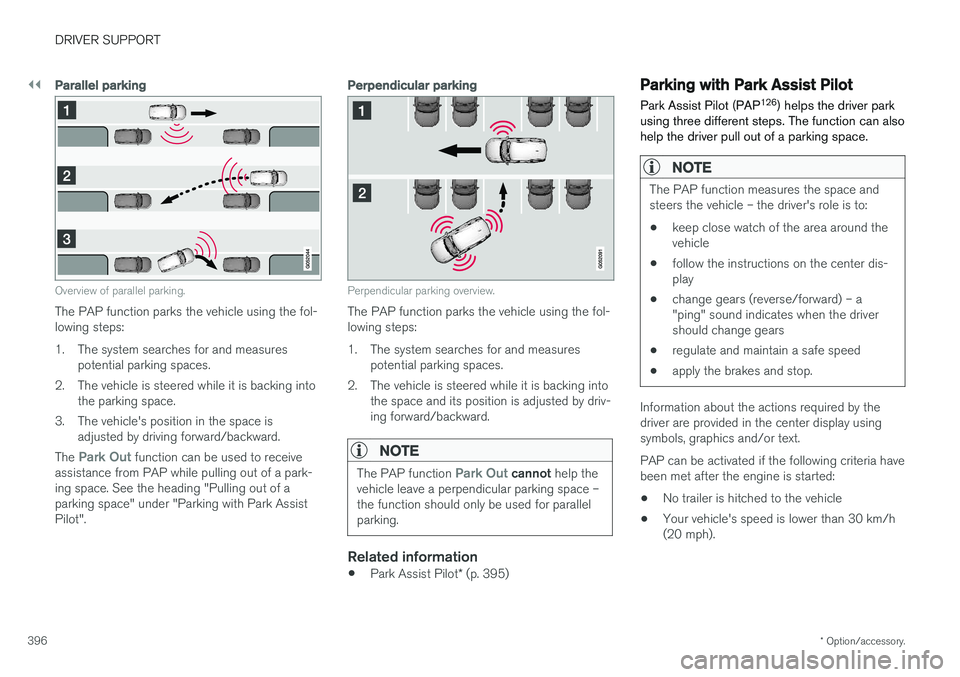
Overview of parallel parking.
The PAP function parks the vehicle using the fol- lowing steps:
1. The system searches for and measures
potential parking spaces.
2. The vehicle is steered while it is backing into the parking space.
3. The vehicle's position in the space is adjusted by driving forward/backward.
The
Park Out function can be used to receive
assistance from PAP while pulling out of a park- ing space. See the heading "Pulling out of aparking space" under "Parking with Park AssistPilot".
Perpendicular parking
Perpendicular parking overview.
The PAP function parks the vehicle using the fol- lowing steps:
1. The system searches for and measures potential parking spaces.
2. The vehicle is steered while it is backing into the space and its position is adjusted by driv-ing forward/backward.
NOTE
The PAP function Park Out cannot help the
vehicle leave a perpendicular parking space – the function should only be used for parallelparking.
Related information
• Park Assist Pilot
* (p. 395)
Parking with Park Assist Pilot Park Assist Pilot (PAP 126
) helps the driver park
using three different steps. The function can also help the driver pull out of a parking space.
NOTE
The PAP function measures the space and steers the vehicle – the driver's role is to:
• keep close watch of the area around thevehicle
• follow the instructions on the center dis-play
• change gears (reverse/forward) – a"ping" sound indicates when the drivershould change gears
• regulate and maintain a safe speed
• apply the brakes and stop.
Information about the actions required by the driver are provided in the center display usingsymbols, graphics and/or text. PAP can be activated if the following criteria have been met after the engine is started: •
No trailer is hitched to the vehicle
• Your vehicle's speed is lower than 30 km/h (20 mph).
Page 402 of 686
DRIVER SUPPORT
* Option/accessory.
400
Park Assist Pilot * limitations
Park Assist Pilot PAP 127
may not be able to
detect all conditions in all situations and func- tionality may therefore be limited.WARNING
• The PAP function is supplementary driver support intended to facilitate driving andhelp make it safer – it cannot handle allsituations in all traffic, weather and roadconditions.
• Pay particular attention to people andanimals near the vehicle.
• Bear in mind that the front end of thevehicle may swing out towards oncomingtraffic during the parking maneuver.
• Objects situated higher than the detec-tion area of the sensors are not includedwhen the parking maneuver is calculated,which could cause PAP to swing into theparking space too early. Such parkingspaces should be avoided for this reason.
• PAP is not a substitute for the driver'sattention and judgment. The driver isalways responsible for ensuring the vehi-cle is driven in a safe manner, at theappropriate speed, with an appropriatedistance to other vehicles, and in accord-ance with current traffic rules and regula-tions.
The driver should be aware of the following limi-tations for Park Assist Pilot:
The parking sequence is cancelledA parking sequence will be cancelled if:
• the driver moves the steering wheel
• the vehicle's speed exceeds 7 km/h (4 mph)
• the driver taps
Cancel in the center display
• when the anti-lock brakes or the Electronic stability control are engaged - e.g. when awheel loses grip on a slippery road
• when the power steering works at reduced power - e.g. during cooling due to overheat- ing (see section "Speed-dependent steeringforce").
A message in the center display will explain whythe parking sequence was cancelled.
CAUTION
Under certain circumstances, PAP may not be able to find parking spaces – one reason maybe that the sensors are disrupted by externalsound sources that emit the same ultrasonicfrequencies that the system works with. Examples of such sources include horns, wet tires on asphalt, pneumatic brakes, exhaustnoise from motorcycles, etc.
127 Park Assist Pilot
Page 408 of 686
HYBRID INFORMATION
406
General information about TwinEngine
Twin Engine vehicles are driven just like any other vehicle, but certain functions differ from avehicle powered exclusively by gasoline. Theelectric motor powers the vehicle primarily at lowspeeds; the gasoline engine is used at higherspeeds or during more active driving.
The instrument panel displays Twin Engine-spe- cific information - charging information, selecteddrive mode, distance to discharged battery andhybrid battery charge level. Different drive modes can be selected while driv- ing, e.g. electric power only or, if more power isneeded, a combination of electric and gasolinepower. The vehicle calculates the optimal combi-nation of driveability, driving experience, environ-mental impact and fuel economy for the selecteddrive mode. In order to function optimally, the hybrid battery (and its electrical drive systems) and the gasolineengine (and its drive systems) must be at thecorrect operating temperature. Battery capacitycan be considerably reduced if the battery is toocold or too hot. Preconditioning prepares thevehicle's drive systems and passenger compart-ment before driving to help reduce both wear andenergy consumption. It also helps increase thehybrid battery's range. The hybrid battery, which powers the electric motor, is recharged using the charging cable. Itcan also be recharged during light braking and through engine braking in gear position
B. The
combustion engine can also help recharge thehybrid battery.
Important
No electrical current
Keep in mind that if there is no electrical current to the vehicle, i.e. the ignition is switched off orthe start battery is discharged, certain functionssuch as brakes, power steering, etc. will not work.
WARNING
If the vehicle does not have electrical current and both the electric motor and the gasolineengine are switched off, the brakes cannot beused to stop the vehicle.
Towing not permitted
Never tow a Twin Engine vehicle behind another vehicle, as this could damage the electric motor.
Exterior engine noise
WARNING
Keep in mind that the vehicle does not emit any engine noise when using the electricmotor and may therefore be difficult to detectfor children, pedestrians, cyclists or animals.This is especially true at low speeds, e.g. inparking lots.
High-voltage electrical current
WARNING
Several components in the vehicle work with high voltage that can be hazardous in case ofan incorrect procedure. These componentsand any orange wiring in the vehicle may onlybe handled by trained and qualified Volvoservice technicians.
Do not touch anything that is not clearly descri- bed in this Owner's Manual.
Related information
• Charging the hybrid battery (p. 407)
• Hybrid gauge (p. 87)
• Drive modes (p. 445)
• Starting and stopping preconditioning(p. 231)
• Hybrid battery (p. 619)
• Factors affecting electric motor range(p. 458)
• Gear selector positions for automatic trans-missions (p. 439)
• Towing using a towline (p. 476)
Page 409 of 686
HYBRID INFORMATION
}}
407
Charging the hybrid battery In addition to the conventional fuel tank, your vehicle is also equipped with a rechargeablelithium-ion hybrid battery.
The hybrid battery can be recharged using the charging cable stored in a storage space in thecargo compartment.
WARNING
The hybrid electrical system in your vehicle uses high voltage electrical current. Any dam-age to this system or to the hybrid batterymay result in the danger of overheating, fire,or serious injury. If the vehicle is involved in acollision or subjected to flooding, fire, etc.,have it inspected by a trained and qualifiedVolvo service technician. Prior to this inspec-tion, the vehicle should be parked outdoors ata safe distance from any building or poten-tially flammable materials.
The hybrid battery's charging time depends on the charging current used.
NOTE
The capacity of the hybrid battery diminishes somewhat with age and use, which couldresult in increased use of the gasoline engineand consequently, slightly higher fuel con-sumption.
WARNING
If the hybrid battery needs to be replaced, this may only be done by Volvo retailer or author-ized Volvo workshop.
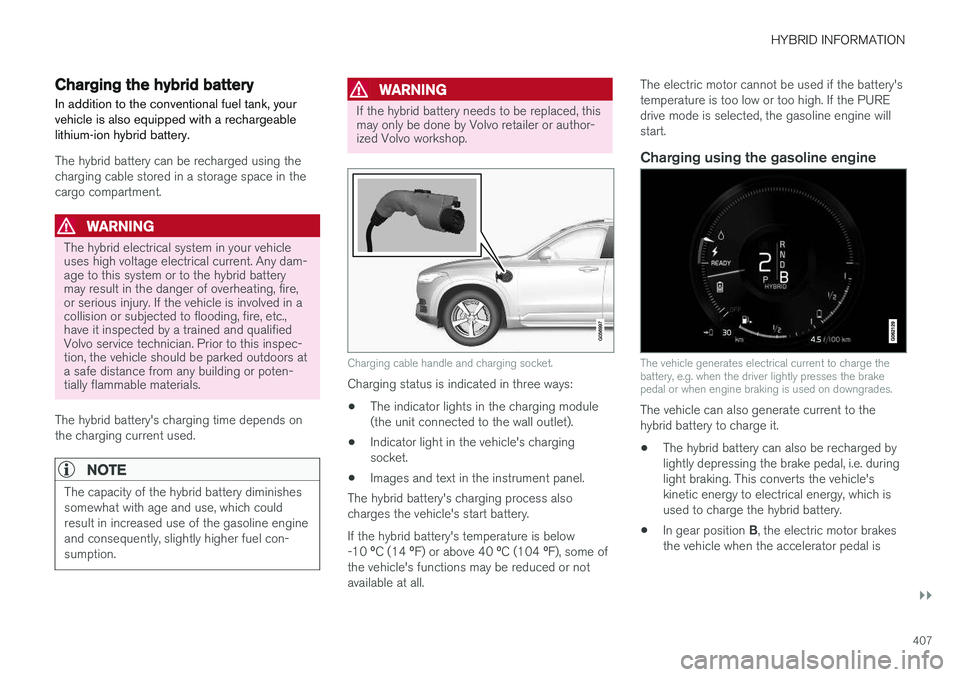
Charging cable handle and charging socket.
Charging status is indicated in three ways: • The indicator lights in the charging module (the unit connected to the wall outlet).
• Indicator light in the vehicle's chargingsocket.
• Images and text in the instrument panel.
The hybrid battery's charging process alsocharges the vehicle's start battery. If the hybrid battery's temperature is below -10 ºC (14 ºF) or above 40 ºC (104 ºF), some of
the vehicle's functions may be reduced or not available at all. The electric motor cannot be used if the battery'stemperature is too low or too high. If the PUREdrive mode is selected, the gasoline engine willstart.
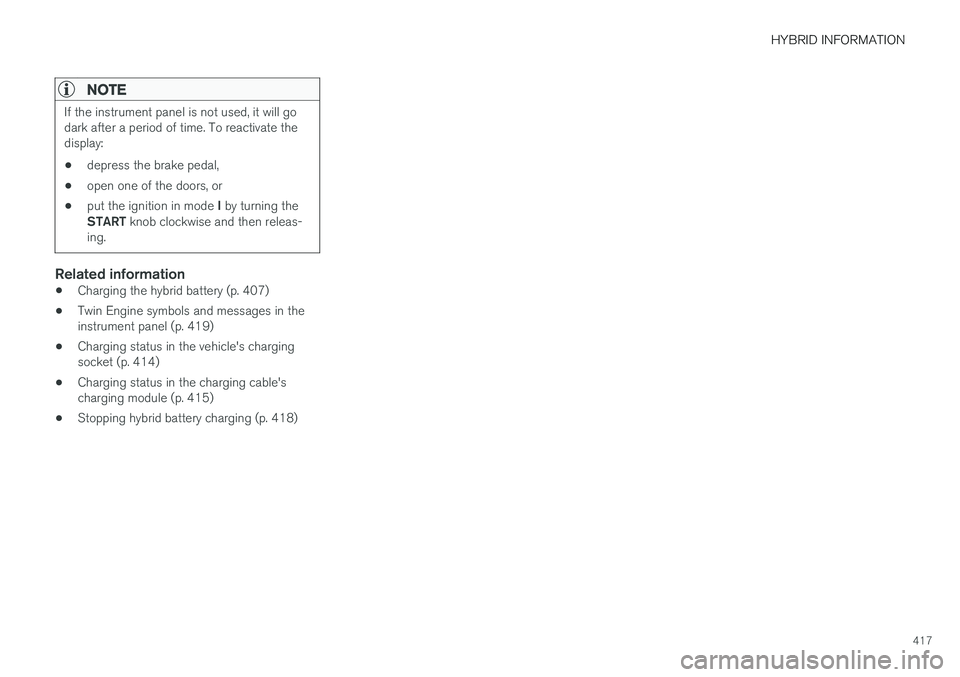
Charging using the gasoline engine
The vehicle generates electrical current to charge the battery, e.g. when the driver lightly presses the brakepedal or when engine braking is used on downgrades.
The vehicle can also generate current to the hybrid battery to charge it.
• The hybrid battery can also be recharged bylightly depressing the brake pedal, i.e. duringlight braking. This converts the vehicle'skinetic energy to electrical energy, which isused to charge the hybrid battery.
• In gear position
B, the electric motor brakes
the vehicle when the accelerator pedal is
Page 419 of 686
HYBRID INFORMATION
417
NOTE
If the instrument panel is not used, it will go dark after a period of time. To reactivate thedisplay: •depress the brake pedal,
• open one of the doors, or
• put the ignition in mode
I by turning the
START knob clockwise and then releas-
ing.
Related information
• Charging the hybrid battery (p. 407)
• Twin Engine symbols and messages in the instrument panel (p. 419)
• Charging status in the vehicle's chargingsocket (p. 414)
• Charging status in the charging cable'scharging module (p. 415)
• Stopping hybrid battery charging (p. 418)
Page 426 of 686
STARTING AND DRIVING
* Option/accessory.
424
Starting the vehicle
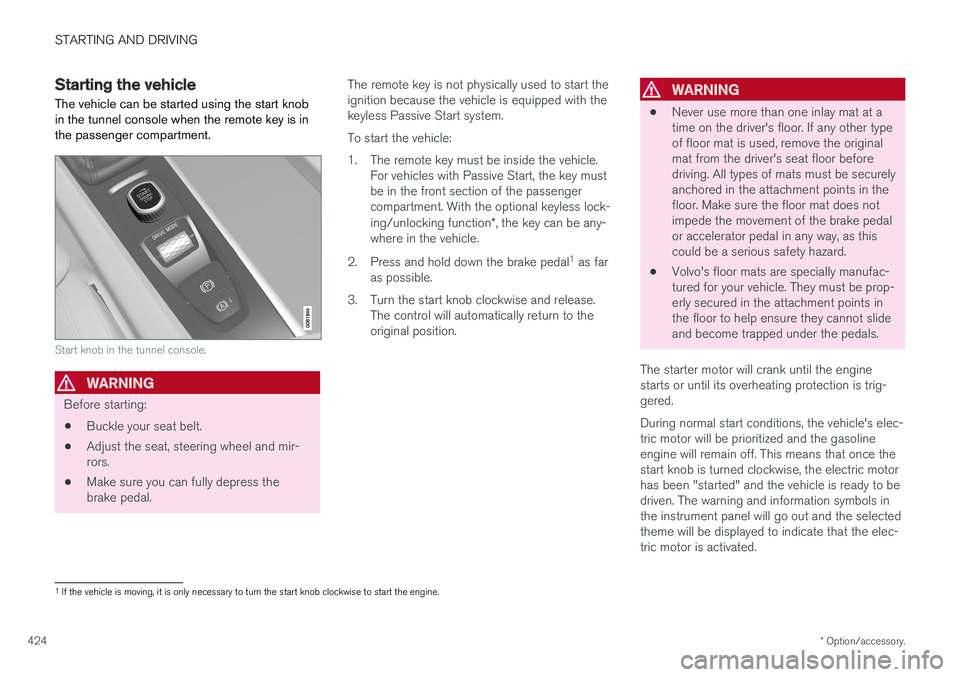
The vehicle can be started using the start knob in the tunnel console when the remote key is inthe passenger compartment.
Start knob in the tunnel console.
WARNING
Before starting:
• Buckle your seat belt.
• Adjust the seat, steering wheel and mir- rors.
• Make sure you can fully depress thebrake pedal. The remote key is not physically used to start theignition because the vehicle is equipped with thekeyless Passive Start system. To start the vehicle:
1. The remote key must be inside the vehicle.
For vehicles with Passive Start, the key must be in the front section of the passengercompartment. With the optional keyless lock- ing/unlocking function *, the key can be any-
where in the vehicle.
2. Press and hold down the brake pedal 1
as far
as possible.
3. Turn the start knob clockwise and release. The control will automatically return to the original position.
WARNING
• Never use more than one inlay mat at a time on the driver's floor. If any other typeof floor mat is used, remove the originalmat from the driver's seat floor beforedriving. All types of mats must be securelyanchored in the attachment points in thefloor. Make sure the floor mat does notimpede the movement of the brake pedalor accelerator pedal in any way, as thiscould be a serious safety hazard.
• Volvo's floor mats are specially manufac-tured for your vehicle. They must be prop-erly secured in the attachment points inthe floor to help ensure they cannot slideand become trapped under the pedals.
The starter motor will crank until the enginestarts or until its overheating protection is trig-gered. During normal start conditions, the vehicle's elec- tric motor will be prioritized and the gasolineengine will remain off. This means that once thestart knob is turned clockwise, the electric motorhas been "started" and the vehicle is ready to bedriven. The warning and information symbols inthe instrument panel will go out and the selectedtheme will be displayed to indicate that the elec-tric motor is activated.
1 If the vehicle is moving, it is only necessary to turn the start knob clockwise to start the engine.
Page 427 of 686
STARTING AND DRIVING
}}
425
In some situations, such as in cold weather or if the hybrid battery's charge level is too low, thegasoline engine will start instead. The vehicle should not be started with the charg- ing cable connected. However, if the cable can-not be pulled out or if the vehicle incorrectlydetects a cable that is not connected, the vehiclecan be started using an override procedure:
1. Press the brake pedal and turn the start
knob clockwise.
2.
Charge cable Remove before start will
appear in the instrument panel.
3. Turn the start knob clockwise again. 4.
Removed? Turn and hold start knob 7swill appear. Turn the knob clockwise and hold it for 7 seconds to start the vehicle.
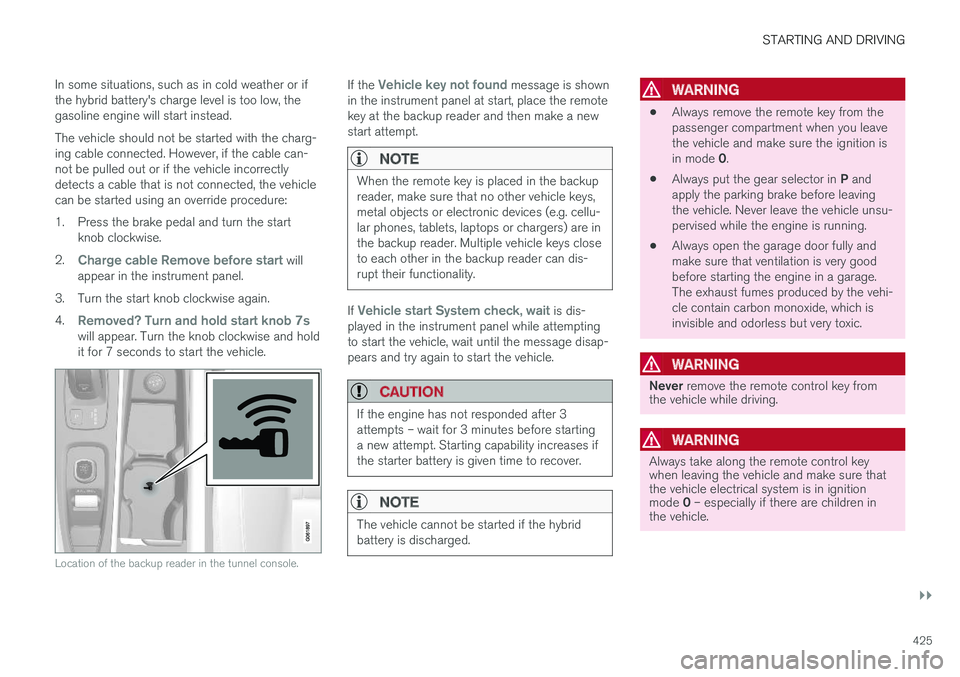
Location of the backup reader in the tunnel console.
If the Vehicle key not found message is shown
in the instrument panel at start, place the remote key at the backup reader and then make a newstart attempt.
NOTE
When the remote key is placed in the backup reader, make sure that no other vehicle keys,metal objects or electronic devices (e.g. cellu-lar phones, tablets, laptops or chargers) are inthe backup reader. Multiple vehicle keys closeto each other in the backup reader can dis-rupt their functionality.
If Vehicle start System check, wait is dis-
played in the instrument panel while attempting to start the vehicle, wait until the message disap-pears and try again to start the vehicle.
CAUTION
If the engine has not responded after 3 attempts – wait for 3 minutes before startinga new attempt. Starting capability increases ifthe starter battery is given time to recover.
NOTE
The vehicle cannot be started if the hybrid battery is discharged.
WARNING
• Always remove the remote key from the passenger compartment when you leavethe vehicle and make sure the ignition is in mode
0.
• Always put the gear selector in
P and
apply the parking brake before leaving the vehicle. Never leave the vehicle unsu-pervised while the engine is running.
• Always open the garage door fully andmake sure that ventilation is very goodbefore starting the engine in a garage.The exhaust fumes produced by the vehi-cle contain carbon monoxide, which isinvisible and odorless but very toxic.
WARNING
Never
remove the remote control key from
the vehicle while driving.
WARNING
Always take along the remote control key when leaving the vehicle and make sure thatthe vehicle electrical system is in ignition mode 0 – especially if there are children in
the vehicle.
Page 430 of 686
||
STARTING AND DRIVING
428
ModeFunctions
II •The headlights illuminate.
• Warning/indicator lights illumi- nate for 5 seconds.
• A number of other systems areactivated. However, seat and rearwindow heating can only be acti-vated when the engine is running.
This ignition mode uses a lot ofcurrent from the battery andshould be avoided whenever pos-sible!
A Also activated when the door is opened.
Related information
• Starting the vehicle (p. 424)
• Adjusting the steering wheel (p. 199)
• Jump starting using another battery (p. 469)
• Selecting ignition mode (p. 428)
Selecting ignition mode
The vehicle's ignition can be put in various modes (levels) to make different functions availa-ble.
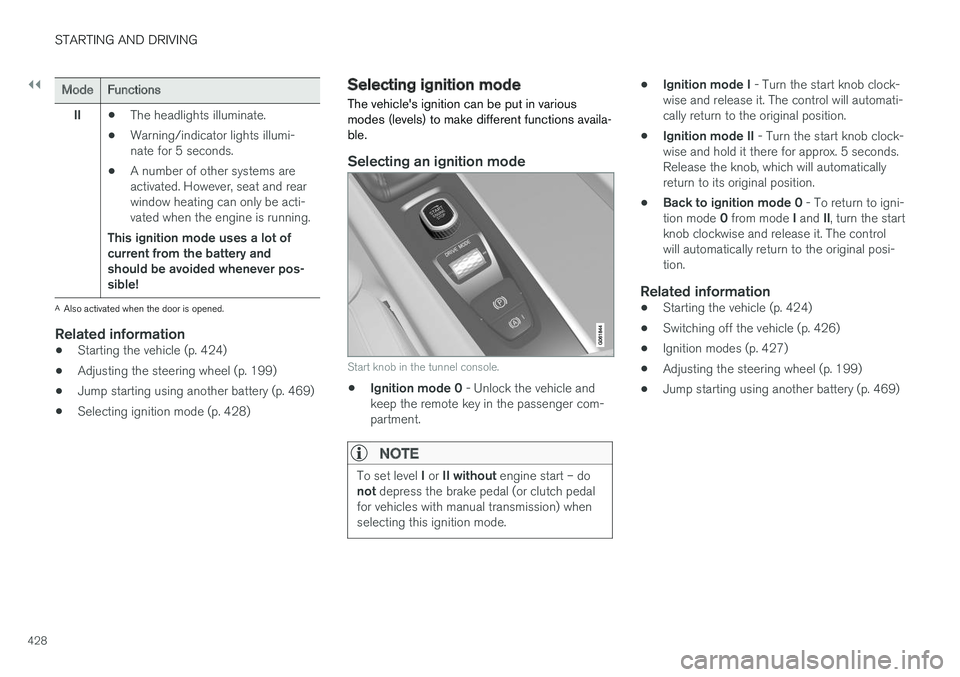
Selecting an ignition mode
Start knob in the tunnel console.
• Ignition mode 0
- Unlock the vehicle and
keep the remote key in the passenger com- partment.
NOTE
To set level I or II without engine start – do
not depress the brake pedal (or clutch pedal
for vehicles with manual transmission) when selecting this ignition mode.
• Ignition mode I
- Turn the start knob clock-
wise and release it. The control will automati- cally return to the original position.
• Ignition mode II
- Turn the start knob clock-
wise and hold it there for approx. 5 seconds.Release the knob, which will automaticallyreturn to its original position.
• Back to ignition mode 0
- To return to igni-
tion mode 0 from mode I and II, turn the start
knob clockwise and release it. The controlwill automatically return to the original posi-tion.
Related information
• Starting the vehicle (p. 424)
• Switching off the vehicle (p. 426)
• Ignition modes (p. 427)
• Adjusting the steering wheel (p. 199)
• Jump starting using another battery (p. 469)
Page 431 of 686
STARTING AND DRIVING
}}
429
Brake functions
The vehicle's brakes are used to reduce speed or prevent the vehicle from rolling.
In addition to the wheel brakes and parking brakes, the vehicle is also equipped with a num-ber of automatic brake assist functions. Thesesystems help the driver by e.g. keeping the vehi-cle stationary when the brake pedal is notdepressed (e.g. at a traffic light or intersection),when starting up a hill or when driving down a hill. Depending on how the vehicle is equipped, the following brake assist functions may be included:
• Auto-hold brakes (Auto Hold)
• Hill Start Assist (Hill Start Assist)
• Braking assist after a collision
• City Safety
• Hill Descent Control (Hill Descent Control)
Related information
•
Brakes (p. 429)
• Parking brake (p. 432)
• Auto-hold brakes (p. 436)
• Braking assist after a collision (p. 437)
• Hill Start Assist (p. 437)
• City Safety
™ (p. 335)
• Hill Descent Control (p. 454)
Brakes The brake pedal is used to apply the vehicle's regular brakes, which are part of the brake sys-tem.
The vehicle is equipped with two brake circuits. If one brake circuit is damaged, the brake pedal willgo down further when depressed. More pressurewill then be required from the driver for normalbraking effect.
WARNING
If the vehicle does not have electrical current and both the electric motor and the gasolineengine are switched off, the brakes cannot beused to stop the vehicle.
In very hilly areas or when driving with a heavy load, gear position B can be used to augment the
brakes with engine braking. Use the Off Road drive mode to increase the engine braking effect when driving on steepdowngrades at low speeds.
Anti-lock brakesThe vehicle is equipped with an Anti-lock BrakingSystem (ABS), which can help prevent thewheels from locking and help maintain steeringcontrol when braking. Vibrations may be felt fromthe brake pedal when ABS is operating, which isnormal. After the vehicle is started, a brief test of the ABS system is automatically performed when the driver releases the brake pedal. An additionalautomatic test of the system may be performedwhen the vehicle is traveling at a low speed. Dur-ing the test, the brake pedal may feel as though itis pulsating.
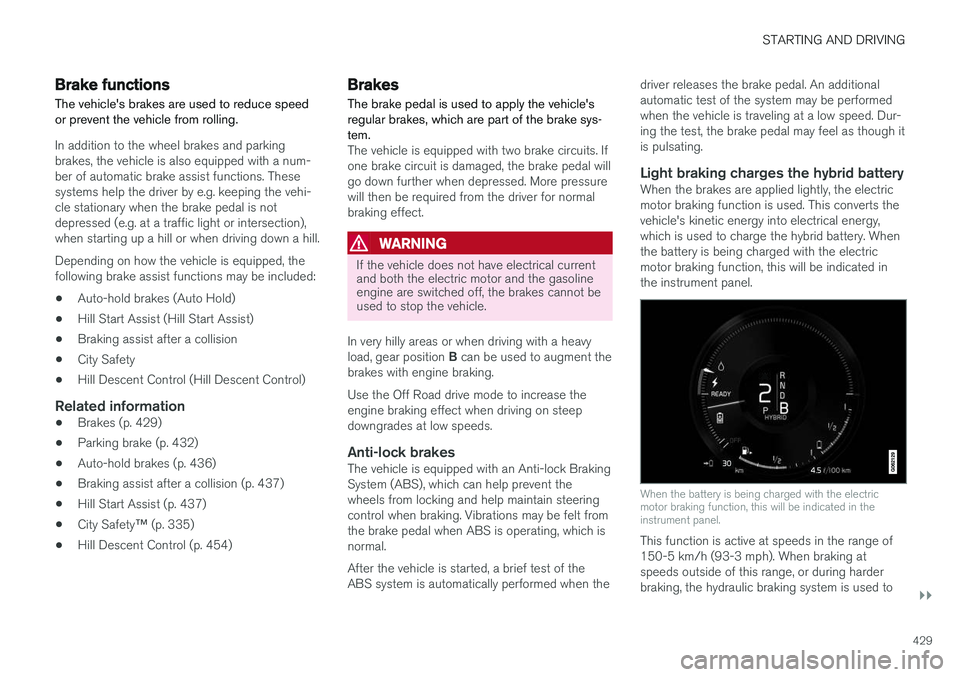
Light braking charges the hybrid batteryWhen the brakes are applied lightly, the electricmotor braking function is used. This converts thevehicle's kinetic energy into electrical energy,which is used to charge the hybrid battery. Whenthe battery is being charged with the electricmotor braking function, this will be indicated inthe instrument panel.
When the battery is being charged with the electric motor braking function, this will be indicated in theinstrument panel.
This function is active at speeds in the range of 150-5 km/h (93-3 mph). When braking atspeeds outside of this range, or during harderbraking, the hydraulic braking system is used to