ABS VOLVO XC90 TWIN ENGINE 2018 User Guide
[x] Cancel search | Manufacturer: VOLVO, Model Year: 2018, Model line: XC90 TWIN ENGINE, Model: VOLVO XC90 TWIN ENGINE 2018Pages: 686, PDF Size: 17 MB
Page 433 of 686

STARTING AND DRIVING
431
Brake Assist System
The brake enhancing system, Brake Assist
System (BAS
), helps increase braking force and
thereby reduce braking distance. The system monitors the driver's braking habits
and increases braking force when necessary.
Braking force can be increased up to the point at
which the ABS intervenes. The function is deacti-
vated when pressure on the brake pedal is
decreased.
Related information
• Brakes (p. 429) Braking on wet roads
Prolonged driving in heavy rain without braking
may cause braking effect to be slightly delayed
the first time the brakes are applied.
This may also occur after washing the vehicle. It
will then be necessary to apply greater pressure
to the brake pedal. You should therefore maintain
a greater distance to the vehicle ahead.
Firmly apply the brakes after washing the vehicle
or driving on wet roads. This helps warm up the
brake discs, enabling them to dry more quickly
and protecting them against corrosion. Consider
the current traffic situation when braking.
Related information
• Brakes (p. 429)
• Braking on salted roads (p. 431) Braking on salted roads
When driving on salted roads, a layer of salt may
form on the brake discs and brake pads.
This could increase stopping distance. Maintain
an extra large safety distance to the vehicle
ahead. Make sure to also:
• Apply the brakes from time to time to help
remove salt. Make sure braking does not
pose a risk to any other road users.
• Gently apply the brakes when you have fin-
ished driving and before driving again.
Related information
•Brakes (p. 429)
• Braking on wet roads (p. 431)
Page 447 of 686

STARTING AND DRIVING
}}
* Option/accessory. 445
Drive modes
Drive modes affect the vehicle's driving charac-
teristics in different ways to enhance and sim-
plify the driving experience in certain types of sit-
uations. Drive modes enable easy access to the vehicle's
many functions and settings in different driving
situations. The following systems are adapted to
help optimize driving characteristics in each drive
mode:
• Steering
• Engine/transmission/all-wheel drive
• Brakes
• Pneumatic suspension* and shock absorbers
• Instrument panel
• Climate control settings
Select the drive mode that is best suited to the
current driving conditions. Keep in mind that not
all drive modes are available in all situations.
Available drive modes
WARNING Keep in mind that the vehicle does not emit
any engine noise when using the electric
motor and may therefore be difficult to detect
for children, pedestrians, cyclists or animals.
This is particularly true at low speeds, e.g. in
parking lots.
WARNING
Do not leave the vehicle in an unventilated
area with a drive mode activated and the com-
bustion engine switched off. The engine will
start automatically if the charge level in the
hybrid battery is low and the resulting exhaust
gases can be very harmful to people and ani-
mals.
HYBRID
•
This is the default mode in which the electric
motor and combustion engine work together.
The vehicle starts in Hybrid mode. The control
system uses both the electric motor and the gas-
oline engine - separately or in tandem - and cal-
culates optimal utilization with regard to perform-
ance, fuel consumption and comfort. At high
speeds, ground clearance is automatically low-
ered 4
to reduce air resistance. Driving capacity on
the electric motor alone is determined by factors such as the hybrid battery's charge level, the
need for heat/cooling in the passenger compart-
ment, etc.
If there is sufficient charge in the battery, it is
possible to drive solely on electric power. When
the accelerator pedal is pressed, only the electric
motor will be activated until the battery reaches a
certain charge level. Above this level, the current
in the battery cannot supply the power requested
by the accelerator pedal and the combustion
engine will start.
When the hybrid battery's charge level is low, the
combustion engine will start more frequently to
save the remaining current in the battery. Charge
the hybrid battery from a 120-240 volt outlet
using a charging cable, or activate
Charge in
Function view to reset the option of only using
the electric motor.
This drive mode is designed for low energy con-
sumption with an optimized mix between the
electric motor and gasoline engine, without com-
promising on climate comfort or driving experi-
ence. When faster acceleration is requested by
the driver, the electric driveline will be utilized to
help provide maximum additional power. The
vehicle also monitors the driving conditions and
automatically engages all-wheel drive if neces-
sary. All-wheel drive and extra electric power are
always available regardless of the battery's
charging status. 4
For vehicles with pneumatic suspension.
Page 452 of 686

STARTING AND DRIVING
* Option/accessory.
450 Leveling control* and suspension
The vehicle's leveling control system adjusts the
suspension and shock absorbers automatically
to help provide good comfort and control while
driving. Leveling can also be controlled manually
to facilitate loading or getting in and out of the
vehicle.
Pneumatic suspension and shock
absorbers
The system is adapted to the selected drive
mode and vehicle speed. The pneumatic suspen-
sion reduces the vehicle's ground clearance at
higher speeds to reduce air resistance and
increase stability. The shock absorbers are nor-
mally set to provide the best possible comfort and are adjusted continuously according to the
road surface and the vehicle's acceleration, brak-
ing and cornering.
The instrument panel indicates
when the suspension level is
being adjusted. The level cannot be adjusted when any of the
side doors or the tailgate is open.
ParkingWhen parking, make sure that there is adequate
space above and below the vehicle since ground
clearance may vary depending on e.g. ambient
temperature, how the vehicle is loaded, if loading
mode is used, which drive mode is selected after
the engine is started, etc.
The level may also be adjusted a period after the
vehicle is parked. This is to compensate for any
height changes that may occur due to tempera-
ture changes in the air springs when the vehicle
cools.
TransportingWhen transporting the vehicle on a ferry, train or
truck, only secure (lash) the vehicle around the
tires, not using any other parts of the chassis.
Changes in the pneumatic suspension may occur
during transport, which could adversely affect the
lashing and result in damage.
Page 461 of 686
STARTING AND DRIVING
}}
459
Factors the driver can control
The driver should be aware that the following fac-
tors help conserve energy and improve driving
range: • charging the battery regularly
• preconditioning
• Pure drive mode
• climate control settings
• speed and acceleration
• the
Hold function
• tires and tire pressure.
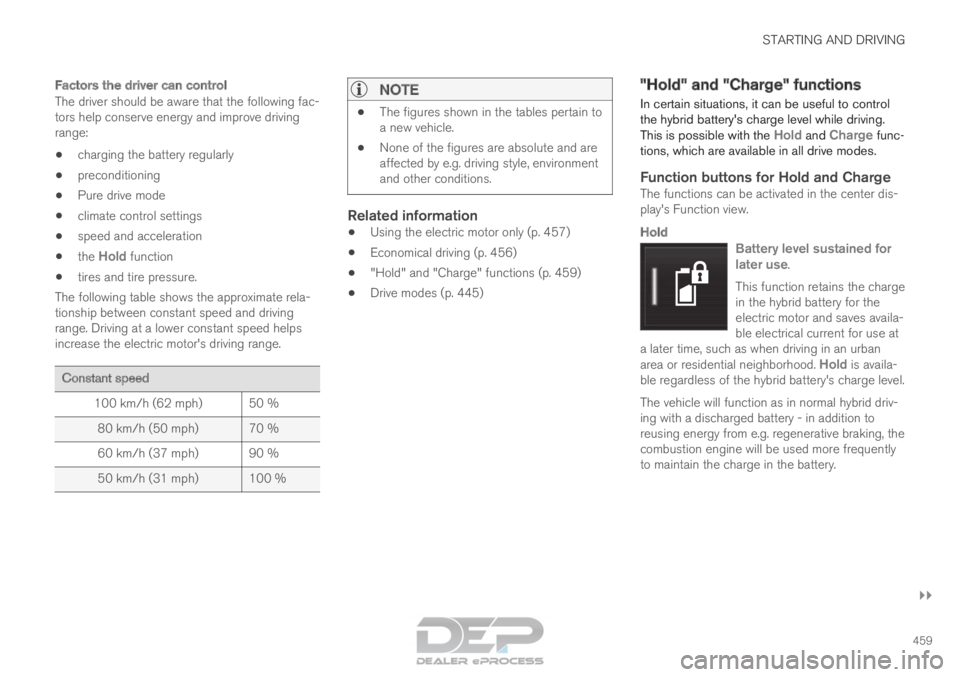
The following table shows the approximate rela-
tionship between constant speed and driving
range. Driving at a lower constant speed helps
increase the electric motor's driving range. Constant speed
100 km/h (62 mph)
50 %
80 km/h (50 mph) 70 %
60 km/h (37 mph) 90 %
50 km/h (31 mph) 100 %
NOTE •
The figures shown in the tables pertain to
a new vehicle.
• None of the figures are absolute and are
affected by e.g. driving style, environment
and other conditions.
Related information
• Using the electric motor only (p. 457)
• Economical driving (p. 456)
• "Hold" and "Charge" functions (p. 459)
• Drive modes (p. 445) "Hold" and "Charge" functions
In certain situations, it can be useful to control
the hybrid battery's charge level while driving.
This is possible with the Hold and Charge func-
tions, which are available in all drive modes.
Function buttons for Hold and ChargeThe functions can be activated in the center dis-
play's Function view.
Hold
Battery level sustained for
later use.
This function retains the charge
in the hybrid battery for the
electric motor and saves availa-
ble electrical current for use at
a later time, such as when driving in an urban
area or residential neighborhood. Hold is availa-
ble regardless of the hybrid battery's charge level.
The vehicle will function as in normal hybrid driv-
ing with a discharged battery - in addition to
reusing energy from e.g. regenerative braking, the
combustion engine will be used more frequently
to maintain the charge in the battery.
Page 561 of 686
WHEELS AND TIRES
}}
* Option/accessory. 559
Recommended tire pressure
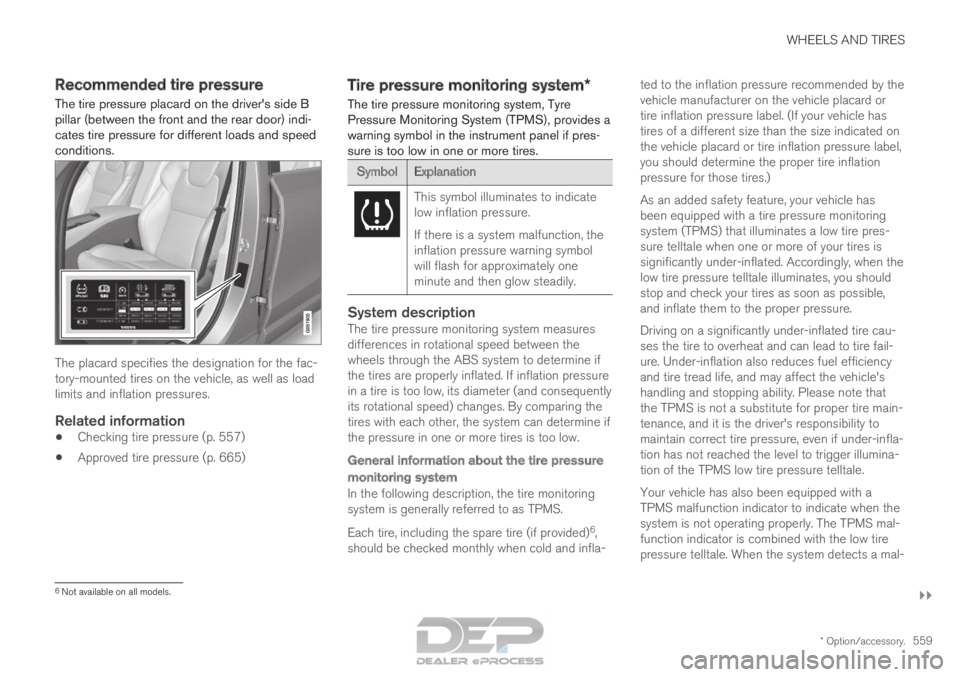
The tire pressure placard on the driver's side B
pillar (between the front and the rear door) indi-
cates tire pressure for different loads and speed
conditions. The placard specifies the designation for the fac-
tory-mounted tires on the vehicle, as well as load
limits and inflation pressures.
Related information
•
Checking tire pressure (p. 557)
• Approved tire pressure (p. 665) Tire pressure monitoring system*
The tire pressure monitoring system, Tyre
Pressure Monitoring System (TPMS), provides a
warning symbol in the instrument panel if pres-
sure is too low in one or more tires. Symbol
Explanation This symbol illuminates to indicate
low inflation pressure.
If there is a system malfunction, the
inflation pressure warning symbol
will flash for approximately one
minute and then glow steadily.
System descriptionThe tire pressure monitoring system measures
differences in rotational speed between the
wheels through the ABS system to determine if
the tires are properly inflated. If inflation pressure
in a tire is too low, its diameter (and consequently
its rotational speed) changes. By comparing the
tires with each other, the system can determine if
the pressure in one or more tires is too low.
General information about the tire pressure
monitoring system
In the following description, the tire monitoring
system is generally referred to as TPMS.
Each tire, including the spare tire (if provided)
6
,
should be checked monthly when cold and infla- ted to the inflation pressure recommended by the
vehicle manufacturer on the vehicle placard or
tire inflation pressure label. (If your vehicle has
tires of a different size than the size indicated on
the vehicle placard or tire inflation pressure label,
you should determine the proper tire inflation
pressure for those tires.)
As an added safety feature, your vehicle has
been equipped with a tire pressure monitoring
system (TPMS) that illuminates a low tire pres-
sure telltale when one or more of your tires is
significantly under-inflated. Accordingly, when the
low tire pressure telltale illuminates, you should
stop and check your tires as soon as possible,
and inflate them to the proper pressure.
Driving on a significantly under-inflated tire cau-
ses the tire to overheat and can lead to tire fail-
ure. Under-inflation also reduces fuel efficiency
and tire tread life, and may affect the vehicle's
handling and stopping ability. Please note that
the TPMS is not a substitute for proper tire main-
tenance, and it is the driver's responsibility to
maintain correct tire pressure, even if under-infla-
tion has not reached the level to trigger illumina-
tion of the TPMS low tire pressure telltale.
Your vehicle has also been equipped with a
TPMS malfunction indicator to indicate when the
system is not operating properly. The TPMS mal-
function indicator is combined with the low tire
pressure telltale. When the system detects a mal-
6
Not available on all models.
Page 604 of 686
||MAINTENANCE AND SERVICE
* Option/accessory.
602
NOTE Data downloading can affect other services
such as transfer data, e.g. web radio. If the
affect on other services is experienced as
problematic, the download can be interrupted.
Alternatively, it may be appropriate to switch
off or cancel other services.
NOTE
An update can be interrupted when the igni-
tion is switched off and the vehicle is left.
However, the update does not have to be
completed before the vehicle is left as the
update is resumed the next time the vehicle is
used.
Updating all system software
–
Select Install all at the bottom of the list.
To avoid displaying a list, select Install all via the
System updates button.
Updating individual system software
–Select Install to choose the software you
would like to download.
Canceling software download
– Tap the checkbox in the activity indicator that
replaced the
Install button when the down-
load began. Note that only a download can be cancelled. An
installation cannot be cancelled once it has
begun.
Deactivating the background search for
software update
Automatic background searching for software
updates is activated as the default factory setting,
but the function can be deactivated.
1. Tap Settings in the center display's Top
view.
2.
Tap System Download Center
.
3. Tap to deselect Auto Software Update.
Related information
•Download Center (p. 601)
• Internet-connected vehicle* (p. 529)
• Navigating in the center display's views
(p. 115) Vehicle status
The vehicle's general status can be displayed in
the center display along with the option to
schedule service 3
.
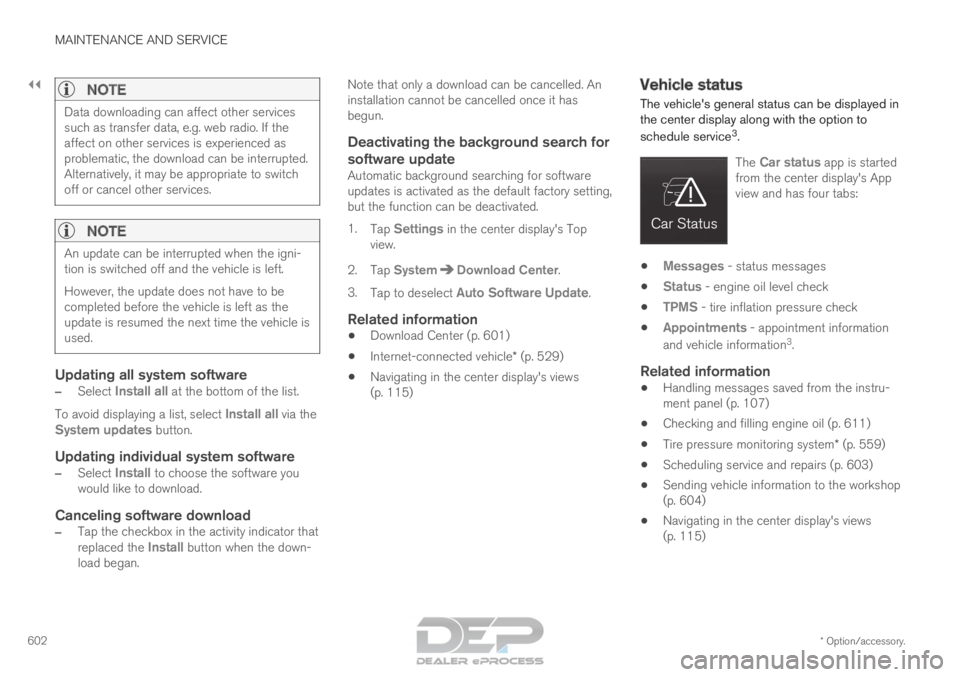
The
Car status app is started
from the center display's App
view and has four tabs: •
Messages - status messages
• Status - engine oil level check
• TPMS - tire inflation pressure check
• Appointments - appointment information
and vehicle information 3
.
Related information
• Handling messages saved from the instru-
ment panel (p. 107)
• Checking and filling engine oil (p. 611)
• Tire pressure monitoring system* (p. 559)
• Scheduling service and repairs (p. 603)
• Sending vehicle information to the workshop
(p. 604)
• Navigating in the center display's views
(p. 115)
Page 617 of 686
MAINTENANCE AND SERVICE
}}
615
Start battery
The vehicle has a single-pole electrical system
that uses the chassis and engine mount as con-
ductors.
The start battery is used to start the electrical
system and power electrical equipment in the
vehicle. The hybrid battery is used to start the
combustion engine.
The start battery should only be replaced by a
workshop 15
.
The start battery is a 12 V AGM (Absorbed Glass
Mat) battery, dimensioned for regenerative charg-
ing and to support the function of the vehicle's
various systems.
The service life and performance of the start bat-
tery are affected by factors such as driving style,
driving conditions, climate, battery discharges,
number of starts, etc.
• Never disconnect the start battery while the
engine is running.
• Make sure the cables to the start battery are
correctly connected and the clamps are
securely tightened.
WARNING •
Batteries generate hydrogen gas, which
is flammable and explosive.
• Do not connect the jumper cable to any
part of the fuel system or to any moving
parts. Avoid touching hot manifolds.
• Battery fluid contains sulfuric acid. Do not
allow battery fluid to contact eyes, skin,
fabrics or painted surfaces.
• If contact occurs, flush the affected area
immediately with water. Obtain medical
help immediately if eyes are affected.
• Never expose the battery to open flame
or electric spark. Do not smoke near the
battery. Failure to follow the instructions
for jump starting can lead to injury.
Connection points
WARNING PROPOSITION 65 WARNING
Battery posts, terminals, and related accesso-
ries contain lead and lead compounds, chemi-
cals known to the state of California to cause
cancer and reproductive harm. Wash hands
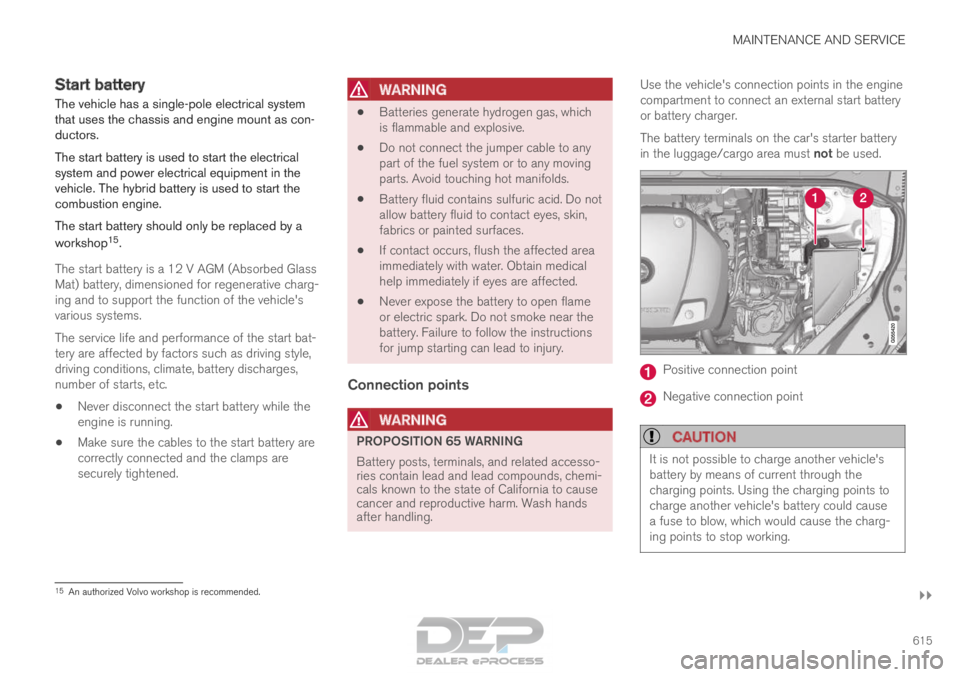
after handling.Use the vehicle's connection points in the engine
compartment to connect an external start battery
or battery charger.
The battery terminals on the car's starter battery
in the luggage/cargo area must not be used.
Positive connection point
Negative connection point
CAUTION
It is not possible to charge another vehicle's
battery by means of current through the
charging points. Using the charging points to
charge another vehicle's battery could cause
a fuse to blow, which would cause the charg-
ing points to stop working.
15
An authorized Volvo workshop is recommended.
Page 619 of 686
MAINTENANCE AND SERVICE
}}
617
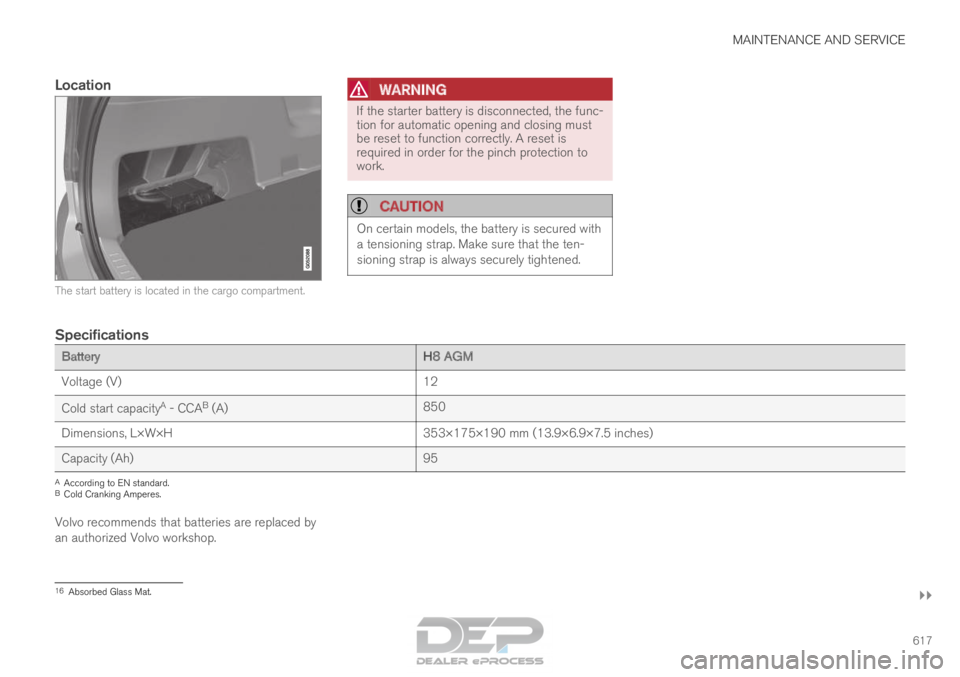
Location The start battery is located in the cargo compartment.WARNING If the starter battery is disconnected, the func-
tion for automatic opening and closing must
be reset to function correctly. A reset is
required in order for the pinch protection to
work.
CAUTION
On certain models, the battery is secured with
a tensioning strap. Make sure that the ten-
sioning strap is always securely tightened.
Specifications
Battery
H8 AGM
Voltage (V) 12
Cold start capacity A
- CCA B
(A) 850
Dimensions, L×W×H 353×175×190 mm (13.9×6.9×7.5 inches)
Capacity (Ah) 95A
According to EN standard.
B Cold Cranking Amperes.
Volvo recommends that batteries are replaced by
an authorized Volvo workshop. 16
Absorbed Glass Mat.
Page 626 of 686
||MAINTENANCE AND SERVICE
* Option/accessory.
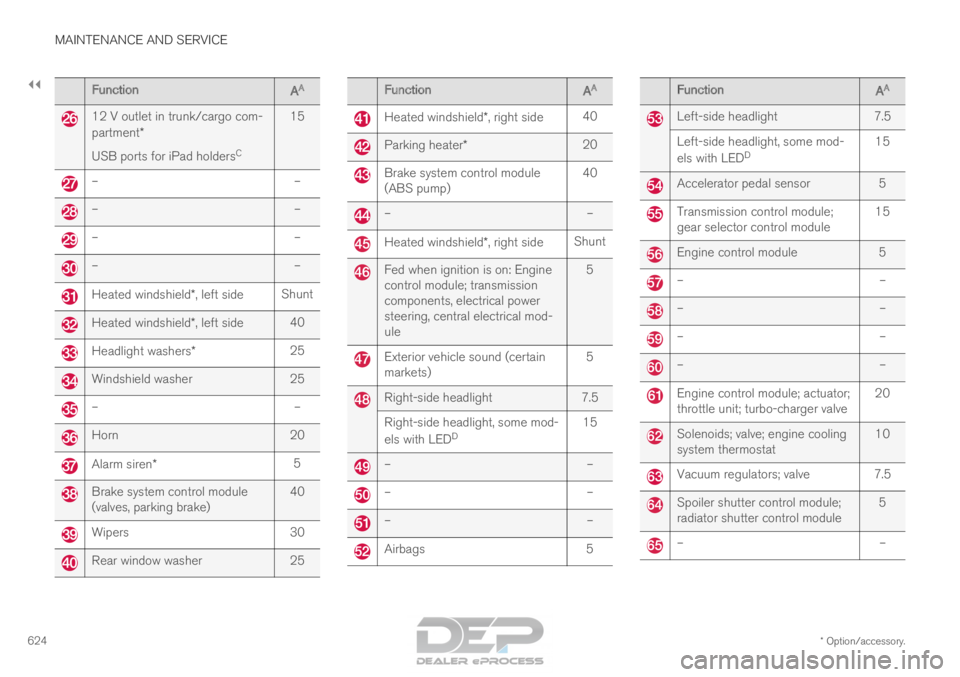
624 Function
AA 12 V outlet in trunk/cargo com-
partment*
USB ports for iPad holders
C15 –
––
––
––
–Heated windshield*, left side
ShuntHeated windshield*, left side
40Headlight washers*
25Windshield washer
25–
–Horn
20Alarm siren*
5Brake system control module
(valves, parking brake)
40Wipers
30Rear window washer
25 Function
AA Heated windshield*, right side
40 Parking heater*
20 Brake system control module
(ABS pump)
40 –
– Heated windshield*, right side
Shunt Fed when ignition is on: Engine
control module; transmission
components, electrical power
steering, central electrical mod-
ule
5 Exterior vehicle sound (certain
markets)
5 Right-side headlight
7.5
Right-side headlight, some mod-
els with LED D 15 –
– –
– –
– Airbags
5 Function
AA Left-side headlight
7.5
Left-side headlight, some mod-
els with LED D 15 Accelerator pedal sensor
5 Transmission control module;
gear selector control module
15 Engine control module
5 –
– –
– –
– –
– Engine control module; actuator;
throttle unit; turbo-charger valve
20 Solenoids; valve; engine cooling
system thermostat
10 Vacuum regulators; valve 7.5
Spoiler shutter control module;
radiator shutter control module
5 –
–
Page 639 of 686

MAINTENANCE AND SERVICE
637
Cleaning the leather upholstery
1. Apply the leather cleaner to a damp spongeand squeeze it until the cleaner foams.
2. Move the sponge in circular motions to apply the foam to the stain.
3. Dampen the stain thoroughly with the sponge. Let the sponge absorb the stain and
do not rub.
4. Dry the stain using a soft towel and let the leather dry completely.
Protecting the leather upholstery
1. Apply a small amount of leather protector toa cloth and then apply the protector to the
leather using light circular movements.
2. Let it dry for approximately 20 minutes.
Protecting the leather upholstery makes it better
able to withstand sunlight's harmful UV rays.
Related information
• Cleaning the interior (p. 633)
• Cleaning the center display (p. 633)
• Cleaning fabric upholstery and ceiling liner
(p. 635)
• Cleaning the seat belt (p. 635)
• Cleaning floor mats and inlay mats (p. 635)
• Cleaning the leather steering wheel
(p. 637)
• Cleaning interior plastic, metal and wood sur-
faces (p. 638) Cleaning the leather steering wheel
Only use cleaning agents and car care products
recommended by Volvo. Clean regularly and
treat stains immediately for best results. It is
important to vacuum before using a cleaning
agent.
Leather steering wheelLeather needs to breathe. Never cover the
leather steering wheel with a plastic protector.
Volvo Leather Care Kit 951 0251 and Leather
Softener 943 7429 are recommended for clean-
ing the leather steering wheel. First, remove dirt,
dust, etc. with a damp sponge or cloth.
CAUTION Sharp objects such as rings could damage
the leather on the steering wheel.
If there are stains on the steering wheel:
Type 1(ink, wine, coffee, milk, sweat or blood)
–
Use a soft cloth or sponge. Wipe the steering
wheel using a solution of 5% ammonia. For
blood stains, mix approximately 2 dl(1 cup) of
water with 25 g (one ounce) of salt and wipe
the stain.
Type 2(grease, oil, sauces or chocolate)
1.
Same procedure as for Type 1 stains.
2. Finish by wiping the wheel with an absorbent paper or towel. Type 3(dry dirt or dust)
1. Remove the dirt/dust using a soft brush.
2. Same procedure as for Type 1 stains.
Related information
•
Cleaning the interior (p. 633)
• Cleaning the center display (p. 633)
• Cleaning fabric upholstery and ceiling liner
(p. 635)
• Cleaning the seat belt (p. 635)
• Cleaning floor mats and inlay mats (p. 635)
• Cleaning leather upholstery (p. 636)
• Cleaning interior plastic, metal and wood sur-
faces (p. 638)