ABS VOLVO XC90 TWIN ENGINE 2018 Owners Manual
[x] Cancel search | Manufacturer: VOLVO, Model Year: 2018, Model line: XC90 TWIN ENGINE, Model: VOLVO XC90 TWIN ENGINE 2018Pages: 686, PDF Size: 17 MB
Page 40 of 686
YOUR VOLVO
38
Viewing the Vehicle IdentificationNumber (VIN)
When contacting a Volvo retailer, about e.g. yourVolvo On Call subscription, your Vehicle Identifi-
cation Number (VIN5) may be needed.1.Tap Settings in the Top view in the centerdisplay.
2.Proceed to SystemSystem Information
Vehicle Identification Number.
> The vehicle identification number will bedisplayed.
Volvo Structural Parts Statement
Volvo is one of the leading companies for carsafety.
Volvo engineers and manufactures vehiclesdesigned to help protect vehicle occupants in theevent of a collision.
Volvos are designed to absorb the impact of acollision. This energy absorption system including,but not limited to, structural components such asbumper reinforcement bars, bumper energyabsorbers, frames, rails, fender aprons, A-pillars,B-pillars and body panels must work together tomaintain cabin integrity and protect the vehicleoccupants.
The supplemental restraint system including butnot limited to air bags, side curtain air bags, anddeployment sensors work together with theabove components to provide proper timing forair bag deployment.
Due to the above, Volvo Car USA does not sup-port the use of aftermarket, alternative or any-thing other than original Volvo parts for collisionrepair.
Volvo Car USA also recommends using Volvo-approved replacement glass. The use of after-market glass, particularly a windshield, can havean adverse effect on collision avoidance andadvanced lighting systems.
In addition Volvo does not support the use or re-use of structural components from an existingvehicle that has been previously damaged.Although these parts may appear equivalent, it isdifficult to tell if the parts have been previouslyreplaced with non-OE parts or if the part hasbeen damaged as a result of a prior collision. Thequality of these used parts may also have beenaffected due to environmental exposure.
Related information
•Data recording (p. 33)
5Vehicle Identification Number
Page 45 of 686
SAFETY
}}
* Option/accessory.43
Safety during pregnancy
It is important that seat belts are worn correctlyduring pregnancy and that pregnant driversadjust their seating position accordingly.
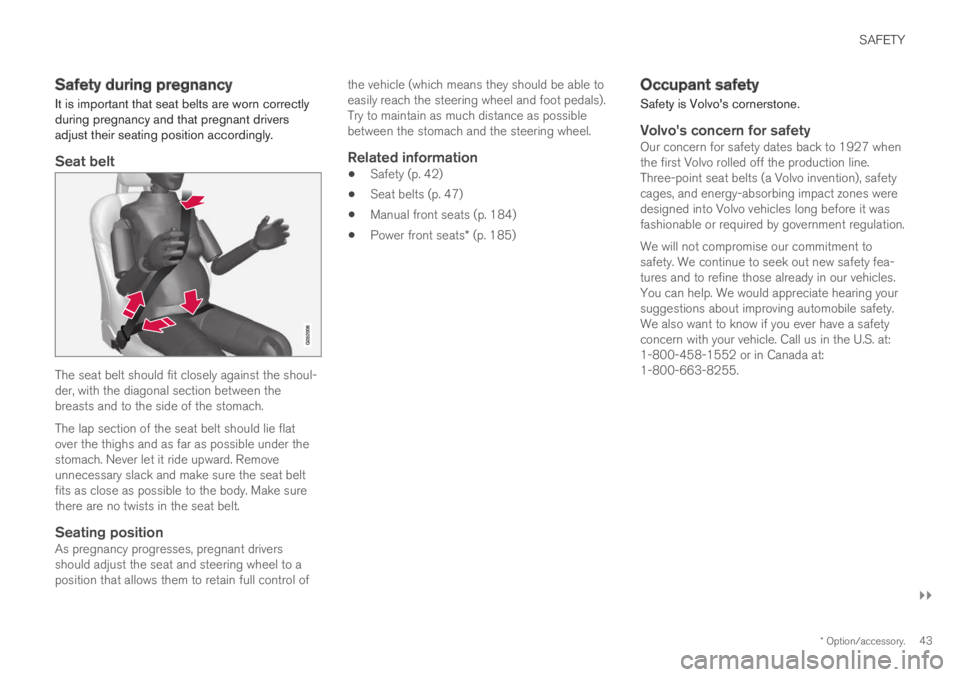
Seat belt
The seat belt should fit closely against the shoul-der, with the diagonal section between thebreasts and to the side of the stomach.
The lap section of the seat belt should lie flatover the thighs and as far as possible under thestomach. Never let it ride upward. Removeunnecessary slack and make sure the seat beltfits as close as possible to the body. Make surethere are no twists in the seat belt.
Seating position
As pregnancy progresses, pregnant driversshould adjust the seat and steering wheel to aposition that allows them to retain full control of
the vehicle (which means they should be able toeasily reach the steering wheel and foot pedals).Try to maintain as much distance as possiblebetween the stomach and the steering wheel.
Related information
•Safety (p. 42)
•Seat belts (p. 47)
•Manual front seats (p. 184)
•Power front seats* (p. 185)
Occupant safety
Safety is Volvo's cornerstone.
Volvo's concern for safety
Our concern for safety dates back to 1927 whenthe first Volvo rolled off the production line.Three-point seat belts (a Volvo invention), safetycages, and energy-absorbing impact zones weredesigned into Volvo vehicles long before it wasfashionable or required by government regulation.
We will not compromise our commitment tosafety. We continue to seek out new safety fea-tures and to refine those already in our vehicles.You can help. We would appreciate hearing yoursuggestions about improving automobile safety.We also want to know if you ever have a safetyconcern with your vehicle. Call us in the U.S. at:1-800-458-1552 or in Canada at:1-800-663-8255.
Page 48 of 686
||
SAFETY
46
Related information
•Safety (p. 42)
•Reporting safety defects (p. 44)
•Occupant safety (p. 43)
Whiplash Protection System
The Whiplash Protection System (WHIPS) isdesigned to help reduce the risk of whiplash-type injuries. The system consists of energyabsorbing backrests and seat cushions as wellas specially designed head restraints in the frontseats.WHIPS is activated in the event of a rear-endcollision and adapted to the angle and speed ofthe collision and to the characteristics of the col-liding vehicle.
When WHIPS is activated, the front seat back-rests move rearward and the seat cushions movedownward to change the seating positions of thedriver and front seat passenger. This movementhelps absorb some of the forces that could resultin whiplash.
WARNING
WHIPS is a supplement to the seat belt.Always wear your seat belt.
WARNING
Do not attempt to alter or repair the seat orWHIPS on your own. Volvo recommends con-tacting an authorized Volvo workshop.
If the front seats have been subjected tosevere stress, e.g. in a collision, the seatsmust be replaced. Even if the seats appearundamaged, some of their protective proper-ties may have been lost.
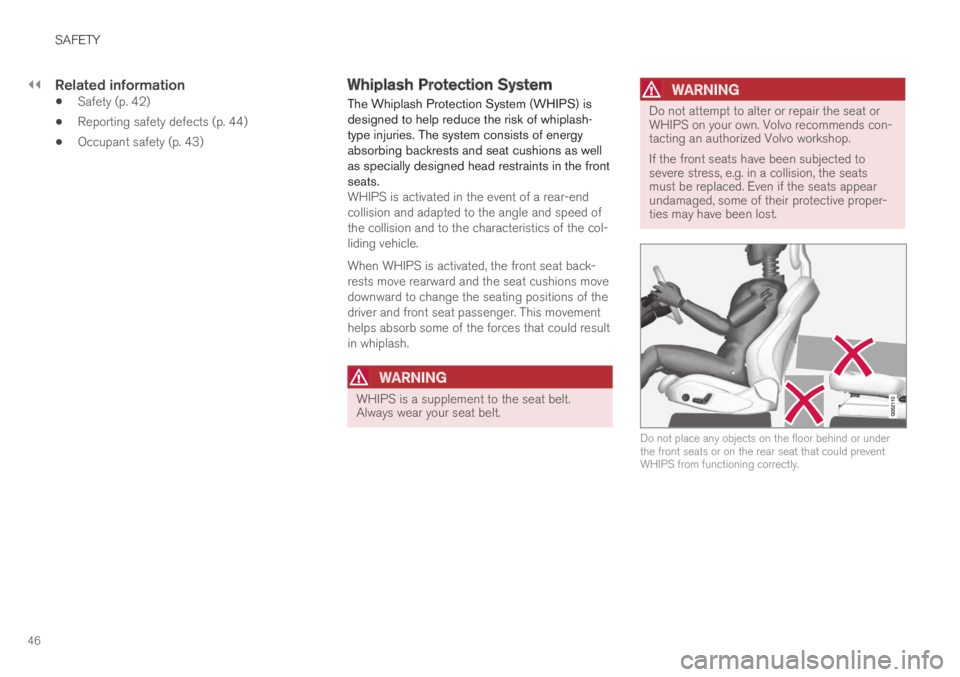
Do not place any objects on the floor behind or underthe front seats or on the rear seat that could preventWHIPS from functioning correctly.
Page 64 of 686
||SAFETY
62
WARNING
Never attempt to perform repairs or reset
electrical components on your own after the
vehicle has been in safety mode. This could
result in injury or prevent the vehicle from
functioning properly. Volvo recommends hav-
ing the vehicle inspected and reset to normal
operating status by an authorized Volvo work-
shop after
Safety mode See Owner's
manual has been displayed.
WARNING When the vehicle is in safety mode, it should
not be towed behind another vehicle. It should
be towed from the site on a tow truck. Volvo
recommends towing the vehicle directly to an
authorized Volvo workshop.
Related information
•
Safety (p. 42)
• Starting and moving the vehicle when it is in
safety mode (p. 62)
• Recovery (p. 477) Starting and moving the vehicle
when it is in safety mode
If safety mode has been set, it may be possible
to reset the system in order to start and move
the vehicle a short distance, for example, if it is
blocking traffic.
Starting the vehicle when it is in safety
mode
1. Check the vehicle for damage, particularly for
fuel leakage. Make sure you do not detect
any gasoline fumes.
If the damage to the vehicle is minor and
there is no fuel leakage/fumes, you may
attempt to start the engine.
WARNING Never attempt to restart the vehicle if you
smell fuel fumes when the message
Safety
mode See Owner's manual is displayed in the instrument panel. Leave the vehicle imme-
diately.
2.
Switch off the ignition.
3. Then try to start the vehicle. >The message Vehicle start System
check, wait will appear in the instrument
panel while the electrical system performs
a system check and then attempts to
reset to normal operating mode. This may
take up to a minute. 4.
When Vehicle start System check, wait is
no longer displayed in the instrument panel,
try again to start the vehicle.
CAUTION If the message
Safety mode See Owner's
manual is still displayed, the vehicle should not be driven or towed behind another vehi-
cle. If the vehicle needs to be moved, it must
be towed on a tow truck. Even if no damage
is apparent, there may be hidden damage that
could make the vehicle impossible to control.
Moving the vehicle when it is in safety
mode
1. If the message Normal mode The vehicle
is now in normal mode is displayed after
attempting to start the engine, the vehicle
may be moved carefully from its present
position if, for example, it is blocking traffic.
2.
Do not move the vehicle farther than abso-
lutely necessary.
WARNING When the vehicle is in safety mode, it should
not be towed behind another vehicle. It should
be towed from the site on a tow truck. Volvo
recommends towing the vehicle directly to an
authorized Volvo workshop.
Page 97 of 686
DISPLAYS AND VOICE CONTROL
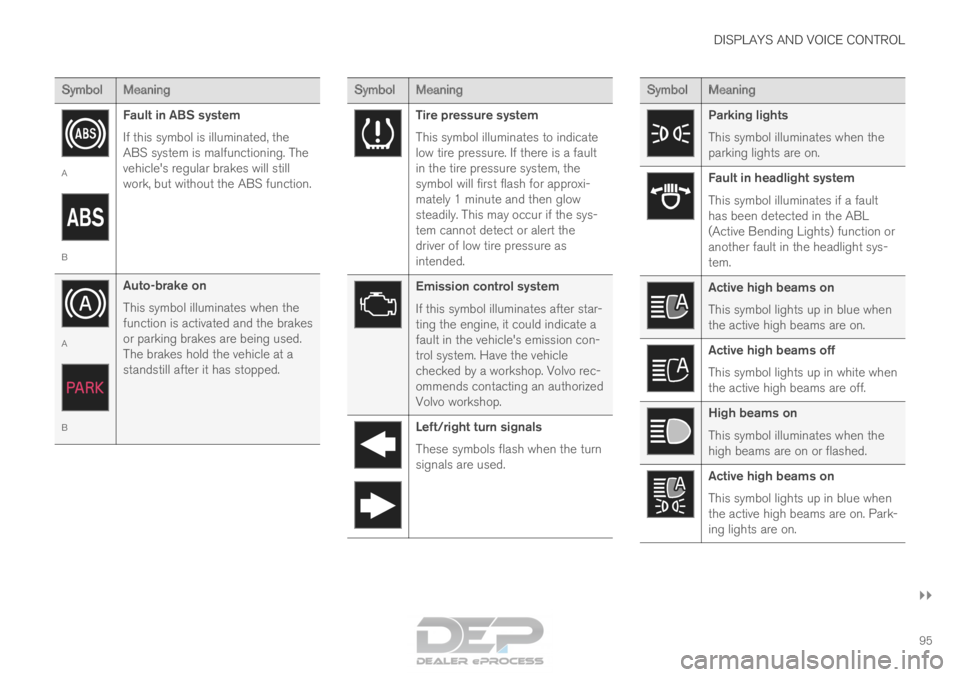
}}95 Symbol
Meaning A
B
Fault in ABS system
If this symbol is illuminated, the
ABS system is malfunctioning. The
vehicle's regular brakes will still
work, but without the ABS function. A
B
Auto-brake on
This symbol illuminates when the
function is activated and the brakes
or parking brakes are being used.
The brakes hold the vehicle at a
standstill after it has stopped. Symbol
Meaning Tire pressure system
This symbol illuminates to indicate
low tire pressure. If there is a fault
in the tire pressure system, the
symbol will first flash for approxi-
mately 1 minute and then glow
steadily. This may occur if the sys-
tem cannot detect or alert the
driver of low tire pressure as
intended.
Emission control system
If this symbol illuminates after star-
ting the engine, it could indicate a
fault in the vehicle's emission con-
trol system. Have the vehicle
checked by a workshop. Volvo rec-
ommends contacting an authorized
Volvo workshop.
Left/right turn signals
These symbols flash when the turn
signals are used. Symbol
Meaning Parking lights
This symbol illuminates when the
parking lights are on.
Fault in headlight system
This symbol illuminates if a fault
has been detected in the ABL
(Active Bending Lights) function or
another fault in the headlight sys-
tem.
Active high beams on
This symbol lights up in blue when
the active high beams are on.
Active high beams off
This symbol lights up in white when
the active high beams are off.
High beams on
This symbol illuminates when the
high beams are on or flashed.
Active high beams on
This symbol lights up in blue when
the active high beams are on. Park-
ing lights are on.
Page 114 of 686
DISPLAYS AND VOICE CONTROL
* Option/accessory.
112 Handling the center display
Many of the vehicle's functions and features can
be controlled and adjusted from the center dis-
play. The center display is a touchscreen that
reacts to taps and other gestures.
Using the center display's touchscreenThe touchscreen reacts differently depending on
whether the user taps, drags or swipes the
screen. It is possible to e.g. move between differ- ent views, mark objects, scroll in a list and move
apps by touching the screen in various ways.
An infrared light curtain just above the surface of
the screen enables the screen to detect when a
finger is directly in front of the screen. This tech-
nology makes it possible to use the screen even
while wearing gloves.
Two people can interact with the screen at the
same time, e.g. to adjust climate system settings
for both the driver and passenger sides.
CAUTION Do not use sharp objects on the screen as
this could cause scratches.
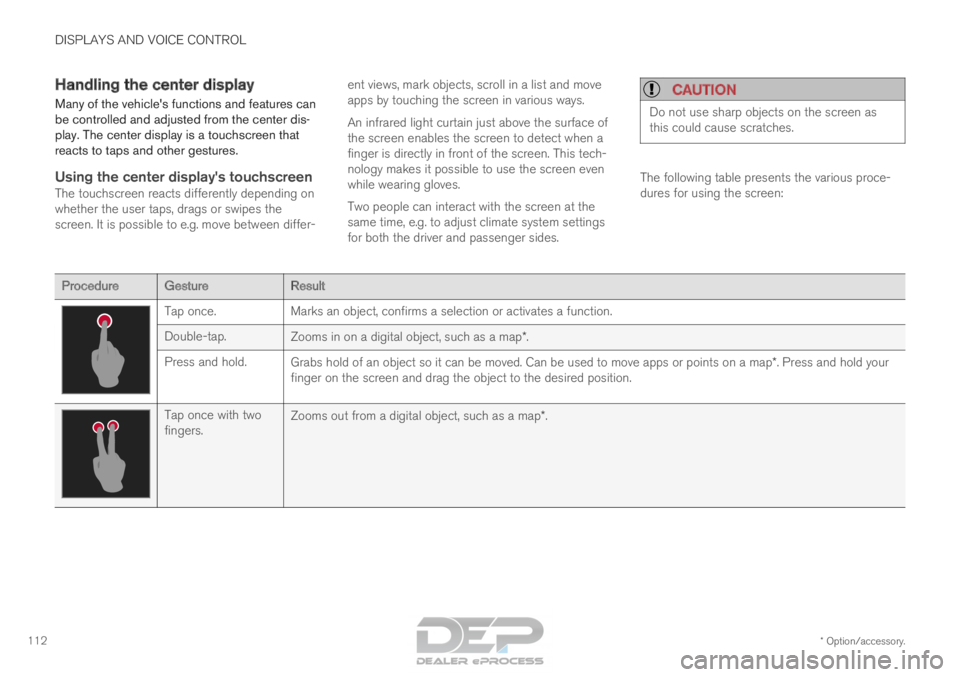
The following table presents the various proce-
dures for using the screen:
Procedure
Gesture Result Tap once.
Marks an object, confirms a selection or activates a function.
Double-tap. Zooms in on a digital object, such as a map*.
Press and hold. Grabs hold of an object so it can be moved. Can be used to move apps or \
points on a map*. Press and hold your
finger on the screen and drag the object to the desired position. Tap once with two
fingers.
Zooms out from a digital object, such as a map*.
Page 162 of 686

||LIGHTING
160
The rear fog light turns off automatically when
the start knob is turned clockwise to turn off the
ignition or when the lighting ring is turned to the
or position.
NOTE
Regulations concerning rear fog light use vary
from country to country.
Related information
•
Lighting panel and controls (p. 152)
• Ignition modes (p. 427) Brake lights
The brake lights are automatically illuminated
when braking.
The brake lights illuminate when the brake pedal
is depressed. They also illuminate when the
brakes are automatically applied by one of the
driver support systems.
Related information
•
Emergency brake lights (p. 160)
• Brake functions (p. 429) Emergency brake lights
The emergency brake lights are activated to
warn following vehicles of hard braking.
This function causes an additional taillight on
each side of the vehicle to illuminate.
The emergency brake lights are activated in the
event of hard braking or if the ABS system is
activated and the vehicle is traveling at a high
speed.
After the driver decelerates to a low speed and
then releases the brake, the brake lights resume
their normal brightness.
Related information
• Brake lights (p. 160)
• Brakes (p. 429)
• Hazard warning flashers (p. 161)
Page 215 of 686

CLIMATE CONTROL
}}
* Option/accessory. 213
Climate system controls
The climate system functions are controlled from
physical buttons on the center console, the cen-
ter display, and the climate panel on the rear
side of the tunnel console.
Physical buttons in the center console Button for heated windshield* and max
defroster. Button for heated rear window and door mir-
rors.
Climate bar in the center displayThe most common climate system functions can
be controlled from the climate bar. Temperature control for the driver and pas-
senger sides.
Control for heated* and ventilated* driver and
passenger seats, and heated steering
wheel*. Button for opening Climate view. The graphic
in the button shows activated climate system
settings.
Climate view in the center displayTap the center button on the climate bar to open
Climate view. Climate view is divided into the fol-
lowing tabs:
• Main climate
• Rear climate
• Parking climate Toggle between the tabs by swiping the screen
to the left/right or by tapping the desired head-
ing.
Page 431 of 686

STARTING AND DRIVING
}}
429
Brake functions
The vehicle's brakes are used to reduce speed
or prevent the vehicle from rolling.
In addition to the wheel brakes and parking
brakes, the vehicle is also equipped with a num-
ber of automatic brake assist functions. These
systems help the driver by e.g. keeping the vehi-
cle stationary when the brake pedal is not
depressed (e.g. at a traffic light or intersection),
when starting up a hill or when driving down a hill.
Depending on how the vehicle is equipped, the
following brake assist functions may be included:
• Auto-hold brakes (Auto Hold)
• Hill Start Assist (Hill Start Assist)
• Braking assist after a collision
• City Safety
• Hill Descent Control (Hill Descent Control)
Related information
•Brakes (p. 429)
• Parking brake (p. 432)
• Auto-hold brakes (p. 436)
• Braking assist after a collision (p. 437)
• Hill Start Assist (p. 437)
• City Safety™ (p. 335)
• Hill Descent Control (p. 454) Brakes
The brake pedal is used to apply the vehicle's
regular brakes, which are part of the brake sys-
tem.
The vehicle is equipped with two brake circuits. If
one brake circuit is damaged, the brake pedal will
go down further when depressed. More pressure
will then be required from the driver for normal
braking effect.
WARNING
If the vehicle does not have electrical current
and both the electric motor and the gasoline
engine are switched off, the brakes cannot be
used to stop the vehicle.
In very hilly areas or when driving with a heavy
load, gear position B can be used to augment the
brakes with engine braking.
Use the Off Road drive mode to increase the
engine braking effect when driving on steep
downgrades at low speeds.
Anti-lock brakesThe vehicle is equipped with an Anti-lock Braking
System (ABS), which can help prevent the
wheels from locking and help maintain steering
control when braking. Vibrations may be felt from
the brake pedal when ABS is operating, which is
normal.
After the vehicle is started, a brief test of the
ABS system is automatically performed when the driver releases the brake pedal. An additional
automatic test of the system may be performed
when the vehicle is traveling at a low speed. Dur-
ing the test, the brake pedal may feel as though it
is pulsating.
Light braking charges the hybrid batteryWhen the brakes are applied lightly, the electric
motor braking function is used. This converts the
vehicle's kinetic energy into electrical energy,
which is used to charge the hybrid battery. When
the battery is being charged with the electric
motor braking function, this will be indicated in
the instrument panel.
When the battery is being charged with the electric
motor braking function, this will be indicated in the
instrument panel.
This function is active at speeds in the range of
150-5 km/h (93-3 mph). When braking at
speeds outside of this range, or during harder
braking, the hydraulic braking system is used to
Page 432 of 686

||STARTING AND DRIVING
430
augment braking. This is indicated in the instru-
ment panel with the pointer down in the red area.
Symbols in the instrument panel
Symbol
Meaning A
B
Check the brake fluid level. If the
level is low, fill brake fluid and
check to determine the reason for
the loss of brake fluid. A
B
Fault in pedal sensor. Symbol
Meaning A
B
Steady glow for 2 seconds after
the engine is started: Automatic
function check.
Steady glow for more than 2 sec-
onds: Fault in the ABS system. The
vehicle's regular brake system is
still working, but without the ABS
function. If the message Brake pedal Cha-
racteristics changed Service
required is displayed, the "Brake-
by-wire" system is not functioning
properly. The brake pedal will go
down further than normal and
greater pressure will be needed on
the pedal to achieve braking effect. A
Canadian models.
B US models.
WARNING •
If both symbols illuminate at the same
time and the brake level is below the MIN
mark in the reservoir or if a brake system-
related message is shown in the instru-
ment panel: DO NOT DRIVE. Have the
vehicle towed to a trained and qualified
Volvo service technician and have the
brake system inspected.
• If both symbols illuminate at the same
time and the brake level is normal (not
below the MIN mark in the reservoir) or if
a brake system-related message is
shown in the instrument panel: drive the
vehicle carefully to an authorized Volvo
workshop and have the brake system
inspected by a trained and qualified Volvo
service technician.
Related information
• Brake Assist System (p. 431)
• Auto-hold brakes (p. 436)
• Hill Start Assist (p. 437)
• Braking on wet roads (p. 431)
• Braking on salted roads (p. 431)
• Maintenance of the brake system (p. 432)
• Brake lights (p. 160)