oil VOLVO XC90 TWIN ENGINE 2018 User Guide
[x] Cancel search | Manufacturer: VOLVO, Model Year: 2018, Model line: XC90 TWIN ENGINE, Model: VOLVO XC90 TWIN ENGINE 2018Pages: 686, PDF Size: 17 MB
Page 601 of 686
MAINTENANCE AND SERVICE
}}
599
Periodic maintenance helps minimize
emissions
NOTE •
Refer to your Service and Warranty Book-
let for a comprehensive service and main-
tenance schedule up to 240,000 km
(150,000 miles). This program contains
inspections and services necessary for
the proper function of your vehicle and
includes components that affect vehicle
emissions.
• The Warranty and Service Records Infor-
mation booklet also contains detailed
information concerning the warranties
that apply to your vehicle.
On-board Diagnostic SystemOBD II is part of your vehicle's computerized
engine management system. It stores diagnostic
information about your vehicle's emission con-
trols. It can light the Check Engine light (MIL) if it
detects an emission control "fault." A "fault" is a
component or system that is not performing
within an expected range. A fault may be perma-
nent or temporary. OBD II will store a message
about any fault.
Emission inspection readiness
How do states use OBD II for emission
inspections?
Many states connect a computer directly to a
vehicle's OBD II system. The inspector can then
read "faults." In some states, this type of inspec-
tion has replaced the tailpipe emission test.
How can my vehicle fail OBD II emission
inspection?
Your vehicle can fail OBD II emission inspection
for any of the following reasons:
• If your Check Engine (MIL) light is lit, your
vehicle may fail inspection.
• If your vehicle's Check Engine light was lit,
but went out without any action on your part,
OBD II will still have a recorded fault. Your
vehicle may pass or fail, depending on the
inspection practices in your area.
• If you had recent service that required dis-
connecting the battery, OBD II diagnostic
information may be incomplete and "not
ready" for inspection. A vehicle that is not
ready may fail inspection.
How can I prepare for my next
OBD II
emission inspection?
• If your Check Engine (MIL) light is lit - or was
lit but went out without service, have your vehicle diagnosed and, if necessary, serviced
by a qualified Volvo technician.
• If you recently had service for a lit Check
Engine light, or if you had service that
required disconnecting the battery, a period
of driving is necessary to bring the OBD II
system to "ready" for inspection. Two half-
hour trips of mixed stop-and-go/highway
driving are typically needed to allow OBD II to
reach readiness. Your Volvo retailer can pro-
vide you with more information on planning a
trip.
• Maintain your vehicle in accordance with your
vehicle's maintenance schedule.
Owner maintenancePeriodic maintenance requirements and intervals
are described in your vehicle's Warranty and
Service Records Information booklet.
The following points can be carried out between
the normally scheduled maintenance services.
Each time the car is refueled:
•Check the engine oil level.
• Clean the windshield, windshield wipers,
headlights, and taillights.
Page 604 of 686
||MAINTENANCE AND SERVICE
* Option/accessory.
602
NOTE Data downloading can affect other services
such as transfer data, e.g. web radio. If the
affect on other services is experienced as
problematic, the download can be interrupted.
Alternatively, it may be appropriate to switch
off or cancel other services.
NOTE
An update can be interrupted when the igni-
tion is switched off and the vehicle is left.
However, the update does not have to be
completed before the vehicle is left as the
update is resumed the next time the vehicle is
used.
Updating all system software
–
Select Install all at the bottom of the list.
To avoid displaying a list, select Install all via the
System updates button.
Updating individual system software
–Select Install to choose the software you
would like to download.
Canceling software download
– Tap the checkbox in the activity indicator that
replaced the
Install button when the down-
load began. Note that only a download can be cancelled. An
installation cannot be cancelled once it has
begun.
Deactivating the background search for
software update
Automatic background searching for software
updates is activated as the default factory setting,
but the function can be deactivated.
1. Tap Settings in the center display's Top
view.
2.
Tap System Download Center
.
3. Tap to deselect Auto Software Update.
Related information
•Download Center (p. 601)
• Internet-connected vehicle* (p. 529)
• Navigating in the center display's views
(p. 115) Vehicle status
The vehicle's general status can be displayed in
the center display along with the option to
schedule service 3
.
The
Car status app is started
from the center display's App
view and has four tabs: •
Messages - status messages
• Status - engine oil level check
• TPMS - tire inflation pressure check
• Appointments - appointment information
and vehicle information 3
.
Related information
• Handling messages saved from the instru-
ment panel (p. 107)
• Checking and filling engine oil (p. 611)
• Tire pressure monitoring system* (p. 559)
• Scheduling service and repairs (p. 603)
• Sending vehicle information to the workshop
(p. 604)
• Navigating in the center display's views
(p. 115)
Page 611 of 686
MAINTENANCE AND SERVICE
609
Engine compartment overview
This overview shows some service-related com-
ponents. Some of the components included in the vehi-
cle's electric drive system are located in the
engine compartment. Exercise caution when
accessing the engine compartment and only
touch what is required for normal maintenance.
WARNING Orange wiring may only be handled by quali-
fied personnel.
WARNING
Several components in the vehicle work with
high voltage that can be hazardous in case of
an incorrect procedure.
• Do not touch anything that is not clearly
described in this Owner's Manual.
• Be careful when checking/filling fluids in
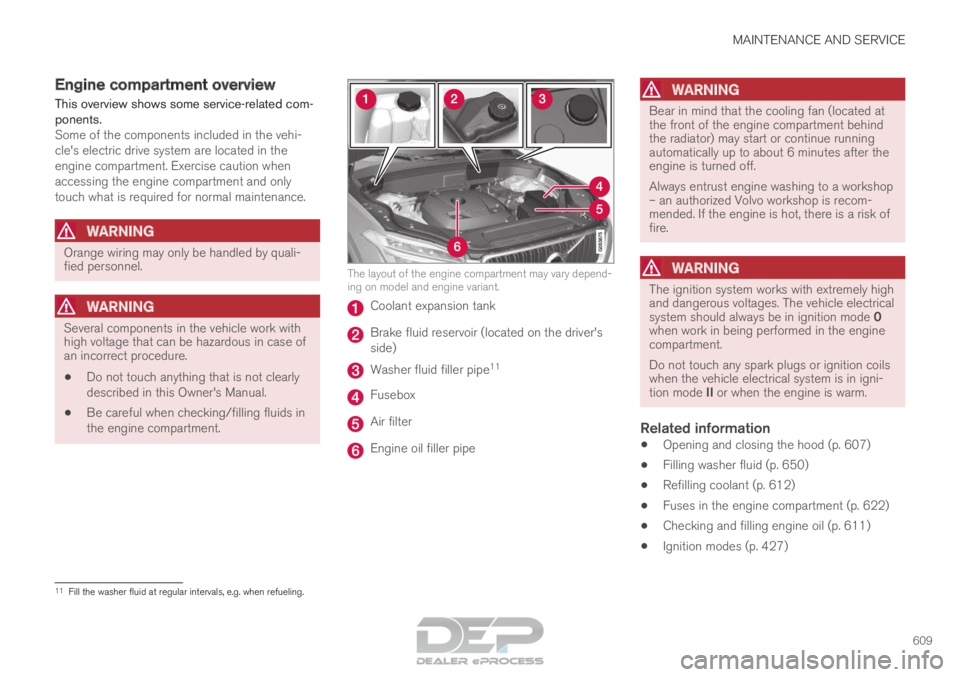
the engine compartment. The layout of the engine compartment may vary depend-
ing on model and engine variant.
Coolant expansion tank
Brake fluid reservoir (located on the driver's
side)
Washer fluid filler pipe
11 Fusebox
Air filter
Engine oil filler pipe
WARNING Bear in mind that the cooling fan (located at
the front of the engine compartment behind
the radiator) may start or continue running
automatically up to about 6 minutes after the
engine is turned off.
Always entrust engine washing to a workshop
– an authorized Volvo workshop is recom-
mended. If the engine is hot, there is a risk of
fire.
WARNING
The ignition system works with extremely high
and dangerous voltages. The vehicle electrical
system should always be in ignition mode 0
when work in being performed in the engine
compartment.
Do not touch any spark plugs or ignition coils
when the vehicle electrical system is in igni-
tion mode II or when the engine is warm.
Related information
•
Opening and closing the hood (p. 607)
• Filling washer fluid (p. 650)
• Refilling coolant (p. 612)
• Fuses in the engine compartment (p. 622)
• Checking and filling engine oil (p. 611)
• Ignition modes (p. 427) 11
Fill the washer fluid at regular intervals, e.g. when refueling.
Page 612 of 686
MAINTENANCE AND SERVICE
610Engine oil
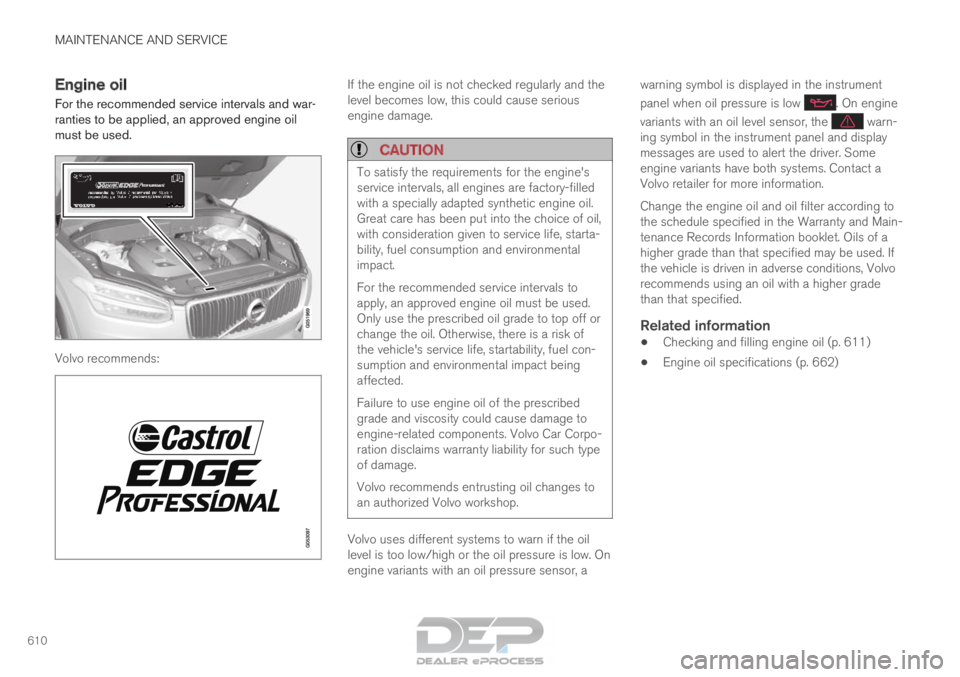
For the recommended service intervals and war-
ranties to be applied, an approved engine oil
must be used. Volvo recommends: If the engine oil is not checked regularly and the
level becomes low, this could cause serious
engine damage.
CAUTION
To satisfy the requirements for the engine's
service intervals, all engines are factory-filled
with a specially adapted synthetic engine oil.
Great care has been put into the choice of oil,
with consideration given to service life, starta-
bility, fuel consumption and environmental
impact.
For the recommended service intervals to
apply, an approved engine oil must be used.
Only use the prescribed oil grade to top off or
change the oil. Otherwise, there is a risk of
the vehicle's service life, startability, fuel con-
sumption and environmental impact being
affected.
Failure to use engine oil of the prescribed
grade and viscosity could cause damage to
engine-related components. Volvo Car Corpo-
ration disclaims warranty liability for such type
of damage.
Volvo recommends entrusting oil changes to
an authorized Volvo workshop.
Volvo uses different systems to warn if the oil
level is too low/high or the oil pressure is low. On
engine variants with an oil pressure sensor, awarning symbol is displayed in the instrument
panel when oil pressure is low . On engine
variants with an oil level sensor, the warn-
ing symbol in the instrument panel and display
messages are used to alert the driver. Some
engine variants have both systems. Contact a
Volvo retailer for more information.
Change the engine oil and oil filter according to
the schedule specified in the Warranty and Main-
tenance Records Information booklet. Oils of a
higher grade than that specified may be used. If
the vehicle is driven in adverse conditions, Volvo
recommends using an oil with a higher grade
than that specified.
Related information
• Checking and filling engine oil (p. 611)
• Engine oil specifications (p. 662)
Page 613 of 686
MAINTENANCE AND SERVICE
}}
611
Checking and filling engine oil
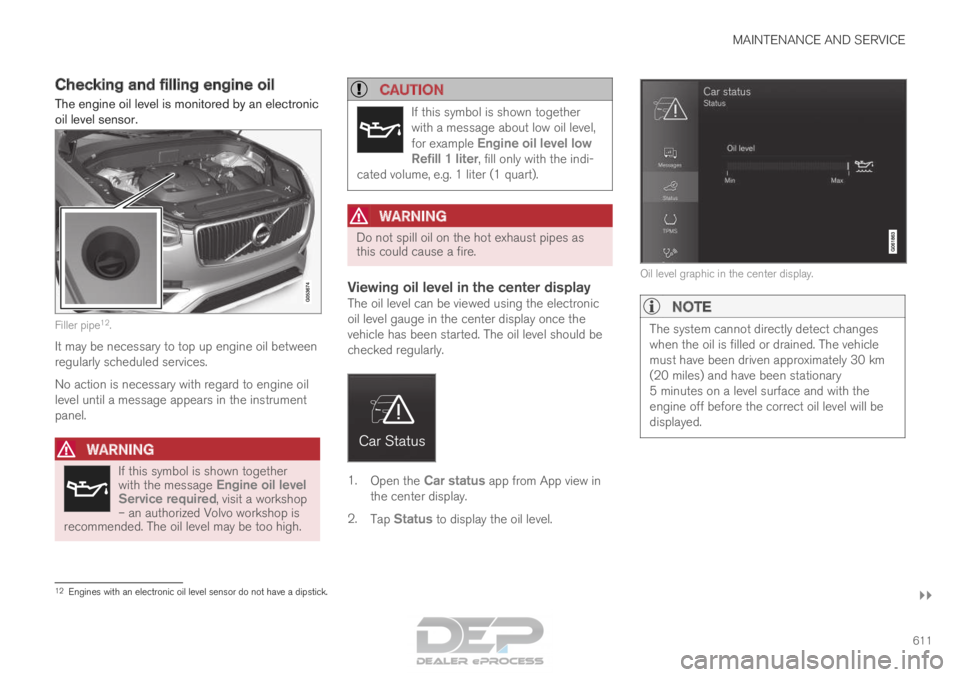
The engine oil level is monitored by an electronic
oil level sensor. Filler pipe
12
.
It may be necessary to top up engine oil between
regularly scheduled services.
No action is necessary with regard to engine oil
level until a message appears in the instrument
panel.
WARNING If this symbol is shown together
with the message
Engine oil level
Service required, visit a workshop – an authorized Volvo workshop is
recommended. The oil level may be too high.
CAUTION If this symbol is shown together
with a message about low oil level,
for example
Engine oil level low
Refill 1 liter, fill only with the indi-
cated volume, e.g. 1 liter (1 quart).
WARNING Do not spill oil on the hot exhaust pipes as
this could cause a fire.
Viewing oil level in the center displayThe oil level can be viewed using the electronic
oil level gauge in the center display once the
vehicle has been started. The oil level should be
checked regularly.
1.
Open the Car status app from App view in
the center display.
2. Tap Status to display the oil level. Oil level graphic in the center display.NOTE
The system cannot directly detect changes
when the oil is filled or drained. The vehicle
must have been driven approximately 30 km
(20 miles) and have been stationary
5 minutes on a level surface and with the
engine off before the correct oil level will be
displayed.
12
Engines with an electronic oil level sensor do not have a dipstick.
Page 614 of 686
||MAINTENANCE AND SERVICE
612
NOTE
If the conditions for measuring oil level are
not properly fulfilled (time after engine shut-
down, vehicle inclination, ambient tempera-
ture, etc.) the message
No value available
will be shown in the center display. This does
not mean that anything is wrong in the vehi-
cle systems.
Related information
• Engine oil (p. 610)
• Engine oil specifications (p. 662)
• Ignition modes (p. 427)
• Vehicle status (p. 602) Refilling coolant
Coolant helps keep the combustion engine at
the right operating temperature. The heat trans-
ferred from the engine to the coolant can be
used to warm the passenger compartment.
When refilling coolant, follow the instructions on
the package. Never fill the cooling system with
only water. The risk of freezing is increased with
too low or too high amounts of coolant.
If there is coolant under the vehicle, smoke from
the cooling system, or if more than 2 liters (about
2 quarts) of coolant has been added to the sys-
tem, there could be something wrong with the
cooling system and starting the vehicle could
damage the engine. Call a tow truck and do not
attempt to start the engine.
WARNING The coolant may be very hot. Never unscrew
the cap when the coolant is hot. If coolant
must be filled, unscrew the expansion tank
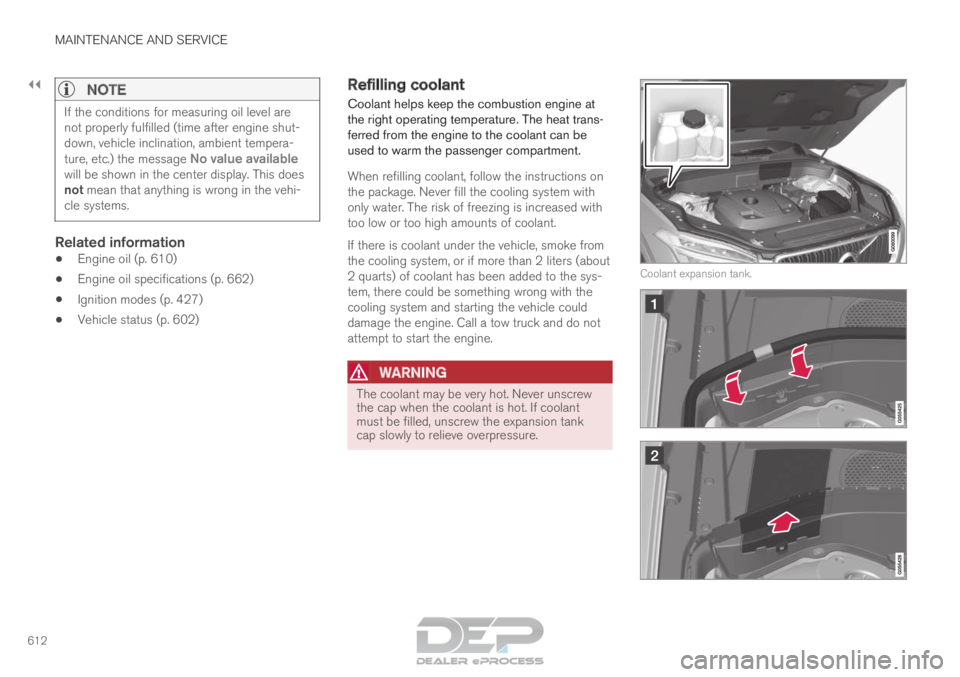
cap slowly to relieve overpressure. Coolant expansion tank.
Page 626 of 686
||MAINTENANCE AND SERVICE
* Option/accessory.
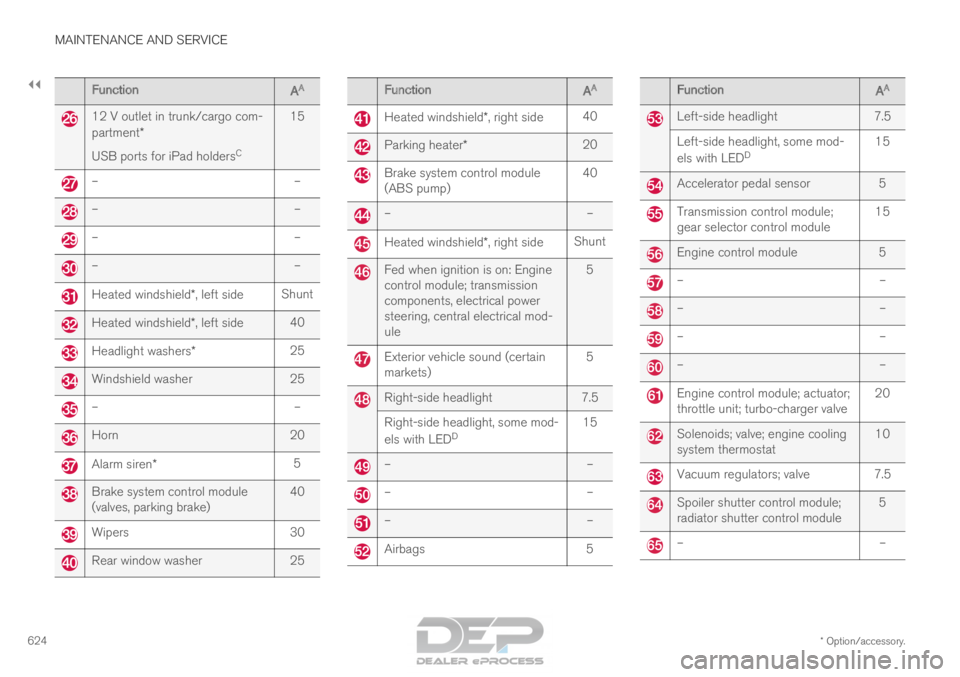
624 Function
AA 12 V outlet in trunk/cargo com-
partment*
USB ports for iPad holders
C15 –
––
––
––
–Heated windshield*, left side
ShuntHeated windshield*, left side
40Headlight washers*
25Windshield washer
25–
–Horn
20Alarm siren*
5Brake system control module
(valves, parking brake)
40Wipers
30Rear window washer
25 Function
AA Heated windshield*, right side
40 Parking heater*
20 Brake system control module
(ABS pump)
40 –
– Heated windshield*, right side
Shunt Fed when ignition is on: Engine
control module; transmission
components, electrical power
steering, central electrical mod-
ule
5 Exterior vehicle sound (certain
markets)
5 Right-side headlight
7.5
Right-side headlight, some mod-
els with LED D 15 –
– –
– –
– Airbags
5 Function
AA Left-side headlight
7.5
Left-side headlight, some mod-
els with LED D 15 Accelerator pedal sensor
5 Transmission control module;
gear selector control module
15 Engine control module
5 –
– –
– –
– –
– Engine control module; actuator;
throttle unit; turbo-charger valve
20 Solenoids; valve; engine cooling
system thermostat
10 Vacuum regulators; valve 7.5
Spoiler shutter control module;
radiator shutter control module
5 –
–
Page 627 of 686
MAINTENANCE AND SERVICE
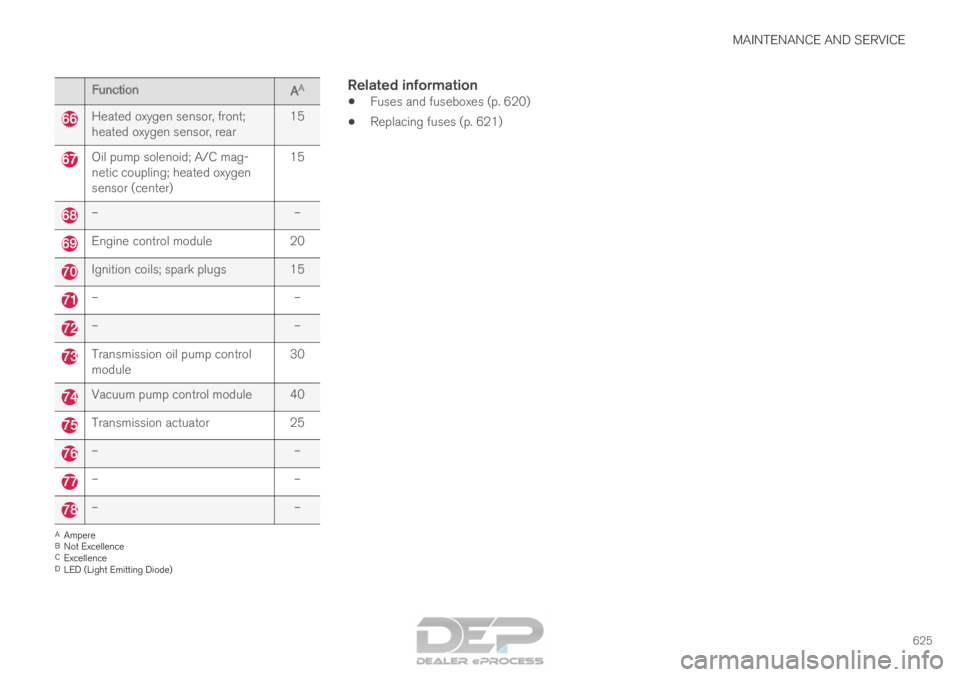
625Function
AA Heated oxygen sensor, front;
heated oxygen sensor, rear
15Oil pump solenoid; A/C mag-
netic coupling; heated oxygen
sensor (center)
15–
–Engine control module
20Ignition coils; spark plugs 15
–
––
–Transmission oil pump control
module
30Vacuum pump control module 40
Transmission actuator
25–
––
––
–A
Ampere
B Not Excellence
C Excellence
D LED (Light Emitting Diode)
Related information
• Fuses and fuseboxes (p. 620)
• Replacing fuses (p. 621)
Page 630 of 686
||MAINTENANCE AND SERVICE
* Option/accessory.
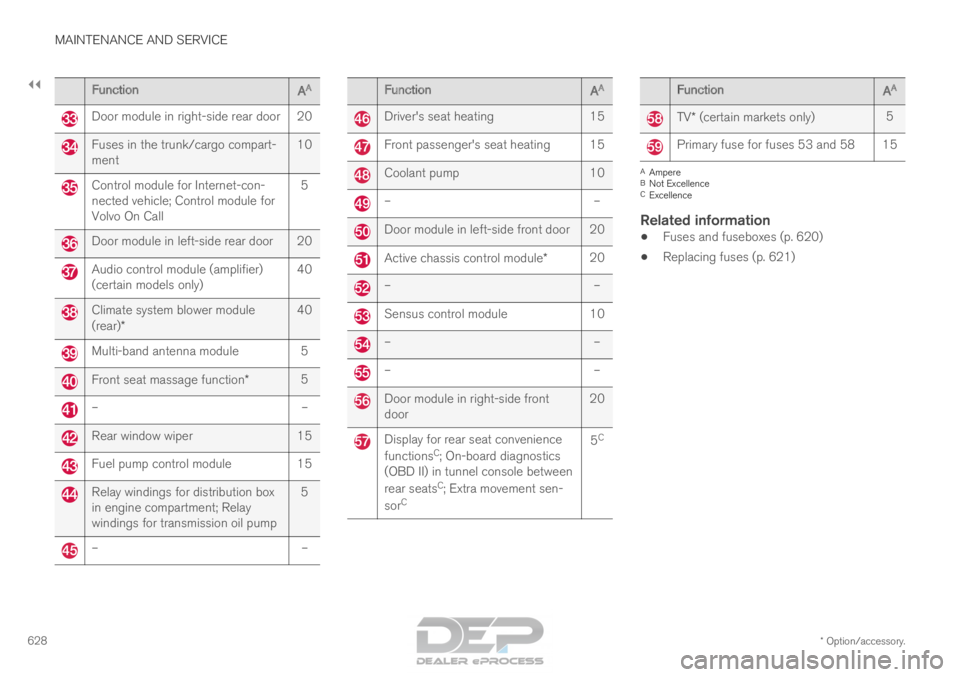
628 Function
AA Door module in right-side rear door 20
Fuses in the trunk/cargo compart-
ment
10Control module for Internet-con-
nected vehicle; Control module for
Volvo On Call
5Door module in left-side rear door 20
Audio control module (amplifier)
(certain models only)
40Climate system blower module
(rear)*
40Multi-band antenna module 5
Front seat massage function*
5–
–Rear window wiper
15Fuel pump control module
15Relay windings for distribution box
in engine compartment; Relay
windings for transmission oil pump
5–
– Function
AA Driver's seat heating
15 Front passenger's seat heating 15
Coolant pump
10 –
– Door module in left-side front door 20
Active chassis control module*
20 –
– Sensus control module
10 –
– –
– Door module in right-side front
door
20 Display for rear seat convenience
functions
C
; On-board diagnostics
(OBD II) in tunnel console between
rear seats C
; Extra movement sen-
sor C 5
C Function
AA TV* (certain markets only)
5 Primary fuse for fuses 53 and 58 15
A
Ampere
B Not Excellence
C Excellence
Related information
• Fuses and fuseboxes (p. 620)
• Replacing fuses (p. 621)
Page 637 of 686
MAINTENANCE AND SERVICE
}}
635
Cleaning fabric upholstery and
ceiling liner
Only use cleaning agents and car care products
recommended by Volvo. Clean regularly and
treat stains immediately for best results. It is
important to vacuum before using a cleaning
agent.
Fabric upholstery and ceiling linerNever scrape or rub a stain, as this could damage
the upholstery. Never use strong stain removers,
as this could change the color of the upholstery.
Use soapy water or a similar detergent. For more
difficult stains caused by oil, ice cream, shoe pol-
ish, etc., use a stain remover. Consult with your
Volvo retailer.
Related information
•
Cleaning the interior (p. 633)
• Cleaning the center display (p. 633)
• Cleaning the seat belt (p. 635)
• Cleaning floor mats and inlay mats (p. 635)
• Cleaning leather upholstery (p. 636)
• Cleaning the leather steering wheel
(p. 637)
• Cleaning interior plastic, metal and wood sur-
faces (p. 638) Cleaning the seat belt
Only use cleaning agents and car care products
recommended by Volvo. Clean regularly and
treat stains immediately for best results. It is
important to vacuum before using a cleaning
agent.
Seat beltsUse water and a synthetic soap solution. Spe-
cially designed textile cleaning agents are availa-
ble for purchase at Volvo retailers. Make sure the
belt is dry before it is retracted.
Related information
• Cleaning the interior (p. 633)
• Cleaning the center display (p. 633)
• Cleaning fabric upholstery and ceiling liner
(p. 635)
• Cleaning floor mats and inlay mats (p. 635)
• Cleaning leather upholstery (p. 636)
• Cleaning the leather steering wheel
(p. 637)
• Cleaning interior plastic, metal and wood sur-
faces (p. 638) Cleaning floor mats and inlay mats
Only use cleaning agents and car care products
recommended by Volvo. Clean regularly and
treat stains immediately for best results. It is
important to vacuum before using a cleaning
agent.
Inlay mats and floor matsRemove the inlay mats to clean the floor mats
and inlay mats separately. Use a vacuum to
remove dust and dirt. Each inlay mat is secured
into place with pins.
Remove the inlay mat by grasping the inlay mat
at each pin and lifting the mat straight up.
Put the inlay mat back into place by pressing it in
at each pin.