change time VOLVO XC90 TWIN ENGINE 2018 Owners Manual
[x] Cancel search | Manufacturer: VOLVO, Model Year: 2018, Model line: XC90 TWIN ENGINE, Model: VOLVO XC90 TWIN ENGINE 2018Pages: 686, PDF Size: 17 MB
Page 6 of 686
4
Resetting user data when the vehiclechanges owners134
Resetting center display settings135
Setting types in the center display135
Table of settings in the center display136
Driver profiles137
Selecting a driver profile138
Changing a driver profile's name139
Resetting driver profile settings139
Linking a remote key to a driver profile139
Messages in the center display140
Handling messages in the center display141
Handling messages saved from thecenter display142
Head-up display*142
Activating and deactivating the head-up display*144
Head-up display settings*144
Voice control145
Using voice commands146
Voice control for cellular phones147
Voice control for radio and media148
Voice control settings148
LIGHTING
Lighting panel and controls152
Adjusting light functions via the cen-ter display153
Parking lights154
Daytime running lights154
Low beams155
Using high beam156
Active high beam157
Using turn signals158
Active Bending Lights*159
Rear fog light159
Brake lights160
Emergency brake lights160
Hazard warning flashers161
Using home safe lighting161
Welcome Light161
Interior Lighting162
Adjusting interior lighting164
WINDOWS, GLASS AND MIRRORS
Windows, glass and mirrors166
Pinch protection for windows andsun curtains166
Reset procedure for pinch protection167
Power windows167
Operating the power windows168
Using sun curtains*169
Rearview/door mirrors169
Adjusting the rearview mirror dim-ming function170
Adjusting the door mirrors171
Panoramic roof*172
Operating the panoramic roof*173
Auto closing the panoramic roof* suncurtain175
Using the windshield wipers176
Heated windshield washer nozzles*177
Using the rain sensor177
Using the rain sensor's memory function178
Using the windshield and headlightwashers179
Using the rear window wiper/washer180
Using automatic rear window wipingwhen backing up181
Page 23 of 686
OWNER'S INFORMATION
}}
* Option/accessory.21
Contact
Contact information for customer support andyour nearest Volvo retailer are available on thesupport site.
Related information
•Contacting Volvo (p. 26)
•Volvo ID (p. 26)
Using the Owner's Manual
Reading your Owner's Manual is a good way toget to know your new Volvo, preferably beforedriving it for the first time.Reading your Owner's Manual is a good way tofamiliarize yourself with new features and func-tions, get advice on the best way to handle yourvehicle in different situations, and to learn how toget the most out of everything your Volvo has tooffer. Pay particular attention to the safety warn-ings provided in the Owner's Manual.
The intention of this owner's information is toexplain all of the possible features, functions andoptions included in a Volvo vehicle. It is notintended as an indication or guarantee that all ofthese features, functions and options areincluded in every vehicle. Some terminology usedmay not exactly match terminology used in sales,marketing and advertising materials.
Volvo continuously works to develop and improveour products. Modifications can mean that infor-mation, descriptions and illustrations in theOwner's Manual differ from the equipment in thevehicle. We reserve the right to make changeswithout prior notice.
Do not remove this manual from the vehicle. If aproblem should occur, you will not have the nec-essary information on where and how to get pro-fessional assistance.
© Volvo Car Corporation
Option/accessory
In addition to standard equipment, the Owner'sManual also describes options (factory-installedequipment) and certain accessories (extra retro-fitted equipment).
All options and accessories are marked with anasterisk: *.
The equipment described in the Owner's Manualis not available in all vehicles. Vehicles may beequipped differently depending on marketrequirements and national or local laws and regu-lations.
For more information on which equipment isstandard and which is an option or accessory,please contact your Volvo retailer.
Footnotes
Certain parts of the Owner's Manual containinformation in the form of footnotes at the bot-tom of the page or at the end of a table. Thisinformation supplements the text that the foot-note number refers to. If the footnote refers totext in a table, a letter is used instead of a num-ber.
Messages
There are several displays in the vehicle thatshow messages and menu texts. The appearanceof these texts differs from the normal texts provi-ded. Example of messages and menu texts:Phone, New message.
Page 28 of 686
YOUR VOLVO
26
Contacting Volvo
Use the following contact information if youwould like to get in touch with Volvo in the Uni-ted States or Canada.
In the USA:
Volvo Car USA, LLC
Customer Care Center
1 Volvo Drive,
P.O. Box 914
Rockleigh, New Jersey 07647
1-800-458-1552
www.volvocars.com/us
In Canada:
Volvo Car Canada Ltd.
Customer Care Centre
9130 Leslie Street, Suite 101
Richmond Hill, Ontario L4B 0B9
1-800-663-8255
www.volvocars.com/ca
Volvo ID
A Volvo ID gives you access to a wide range of
personalized Volvo services1 online.
A Volvo ID can be created from the vehicle or the
Volvo On Call app2. To access certain functionsand services, the vehicle must be registered to apersonal Volvo ID. Registering a Volvo ID to thevehicle gives you access to a wide range of Volvoservices directly from the vehicle.
Examples of services:
•Volvo On Call - Volvo ID is used to log in tothe Volvo On Call app.
•Send to Car - Send an address from anonline map service directly to the vehicle.
•Book service and repairs - Register your pre-ferred workshop/retailer on volvocars.com toschedule service directly from the vehicle.
Advantages of having a Volvo ID
•Only one username and password are nee-ded to access online services (i.e. you onlyneed to remember one username and onepassword).
•If you change your username or password forone service (e.g. Volvo On Call), it will also beautomatically changed for the other services.
Related information
•Creating and registering a Volvo ID (p. 27)
•Scheduling service and repairs (p. 603)
1The services available may vary over time and depending on equipment level and market.2For Volvo On Call users.
Page 88 of 686
DISPLAYS AND VOICE CONTROL
* Option/accessory.
86 Instrument panel settings
Display settings for the instrument panel can be
set in the instrument panel's app menu and in
the center display's Settings menu.
Settings in instrument panel's app
menu
The app menu can be used to set what informa-
tion will be displayed in the instrument panel:
• trip computer
• media player
• phone
• navigation system*.
Center display settings
Selecting type of information
1. Tap Settings in the center display's Top
view.
2.
Tap My Car Displays Driver Display
Information .
3.
Select a background:
• Show no information in the
background
• Show information for current playing
media
• Show navigation even if no route is
set.
Select theme
1.
Tap Settings in the center display's Top
view.
2.
Tap My Car Displays Display
Themes
3. Select a theme (appearance) for the instru- ment panel:
• Glass
• Minimalistic
• Performance
• Chrome Rings.
Select language
1.
Tap Settings in the center display's Top
view.
2.
Tap System System Languages and
Units System Language
to select lan-
guage.
> A change made here will affect the lan- guage in all displays.
The settings are personal and saved automati-
cally in the active driver profile.
Related information
• Instrument panel (p. 84)
• Handling the App menu in the instrument
panel (p. 104)
• Changing settings in the center display
(p. 134) Fuel gauge
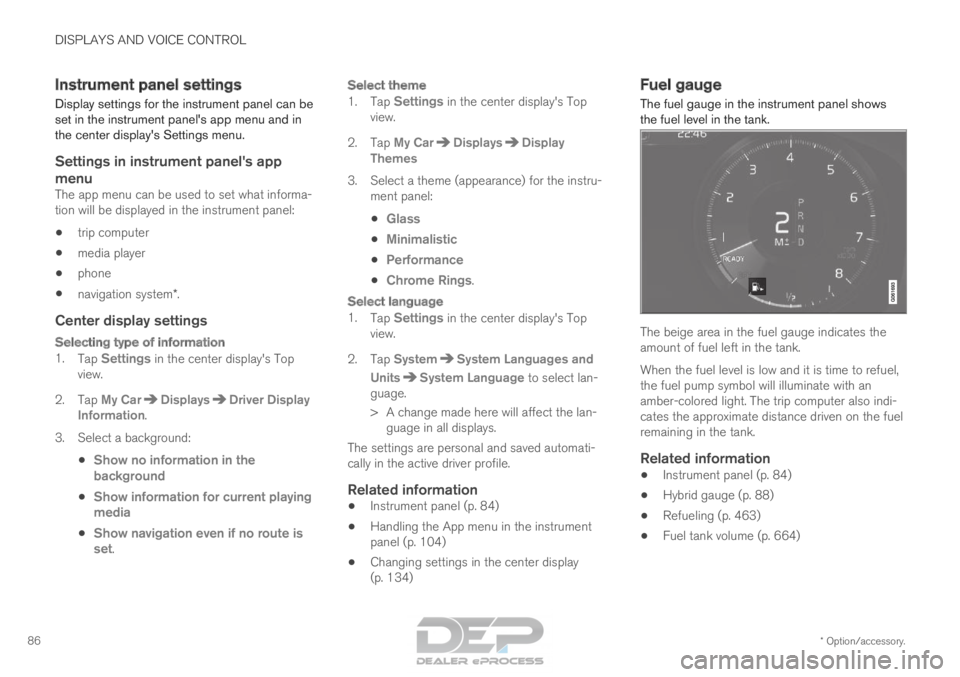
The fuel gauge in the instrument panel shows
the fuel level in the tank. The beige area in the fuel gauge indicates the
amount of fuel left in the tank.
When the fuel level is low and it is time to refuel,
the fuel pump symbol will illuminate with an
amber-colored light. The trip computer also indi-
cates the approximate distance driven on the fuel
remaining in the tank.
Related information
•
Instrument panel (p. 84)
• Hybrid gauge (p. 88)
• Refueling (p. 463)
• Fuel tank volume (p. 664)
Page 91 of 686
DISPLAYS AND VOICE CONTROL
}}89
Trip computer
The vehicle's trip computer registers and calcu-
lates data while driving such as mileage, fuel
consumption and average speed.
To help promote fuel-efficient driving, data is
recorded on both current and average fuel con-
sumption. Data from the trip computer can be
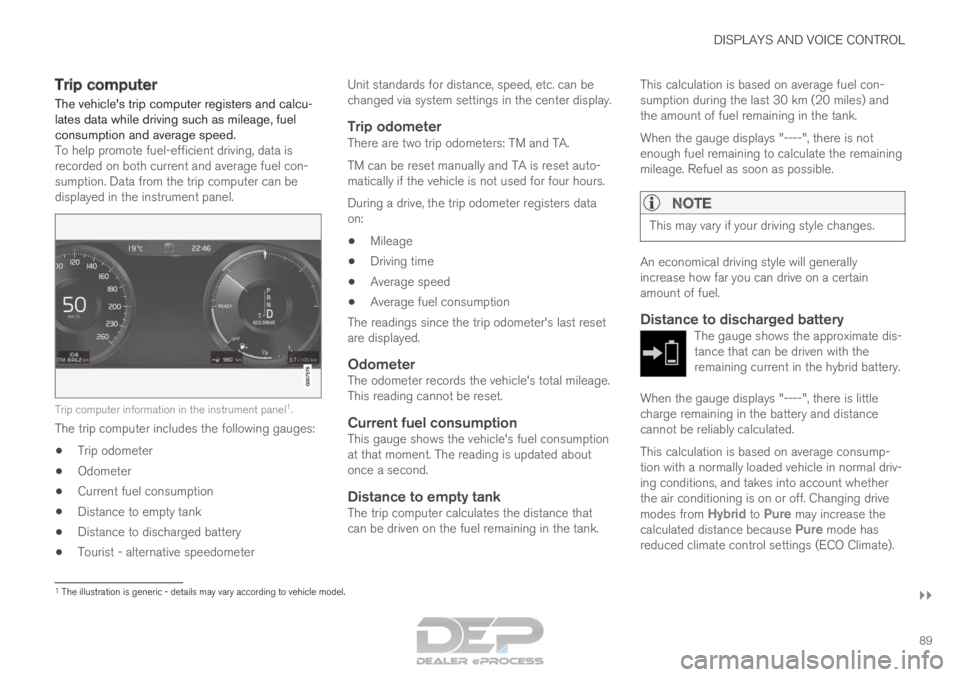
displayed in the instrument panel.
Trip computer information in the instrument panel
1
.
The trip computer includes the following gauges:
• Trip odometer
• Odometer
• Current fuel consumption
• Distance to empty tank
• Distance to discharged battery
• Tourist - alternative speedometer Unit standards for distance, speed, etc. can be
changed via system settings in the center display.
Trip odometerThere are two trip odometers: TM and TA.
TM can be reset manually and TA is reset auto-
matically if the vehicle is not used for four hours.
During a drive, the trip odometer registers data
on:
• Mileage
• Driving time
• Average speed
• Average fuel consumption
The readings since the trip odometer's last reset
are displayed.
OdometerThe odometer records the vehicle's total mileage.
This reading cannot be reset.
Current fuel consumptionThis gauge shows the vehicle's fuel consumption
at that moment. The reading is updated about
once a second.
Distance to empty tankThe trip computer calculates the distance that
can be driven on the fuel remaining in the tank. This calculation is based on average fuel con-
sumption during the last 30 km (20 miles) and
the amount of fuel remaining in the tank.
When the gauge displays "----", there is not
enough fuel remaining to calculate the remaining
mileage. Refuel as soon as possible.
NOTE This may vary if your driving style changes.
An economical driving style will generally
increase how far you can drive on a certain
amount of fuel.
Distance to discharged batteryThe gauge shows the approximate dis-
tance that can be driven with the
remaining current in the hybrid battery.
When the gauge displays "----", there is little
charge remaining in the battery and distance
cannot be reliably calculated.
This calculation is based on average consump-
tion with a normally loaded vehicle in normal driv-
ing conditions, and takes into account whether
the air conditioning is on or off. Changing drive
modes from
Hybrid to Pure may increase the
calculated distance because Pure mode has
reduced climate control settings (ECO Climate). 1
The illustration is generic - details may vary according to vehicle mode\
l.
Page 93 of 686

DISPLAYS AND VOICE CONTROL
91
1. Open the app menu in the instrument panel
by pressing (1).
(The App menu cannot be opened while
there is an unacknowledged message in the
instrument panel. The message must be con-
firmed before the App menu can be opened.)
2. Navigate to the trip computer app by moving left or right using (2).
> The top four menu rows show measuredvalues for trip odometer TM. The next four
menu rows show measured values for trip
odometer TA. Scroll up or down in the list
using (3).
3. Scroll down to the option buttons to choose which information to show in the instrument
panel:
• Distance to empty tank
• Odometer
• Mileage for trip odometer TM, TA or no
display of mileage
• Current fuel consumption, average fuel
consumption for TM or TA, or no display
of fuel consumption
• Tourist (alternative speedometer).
• Distance to discharged battery
Select or clear a selection using the O but-
ton (4). The change will apply immediately.
Related information
• Trip computer (p. 89)
• Resetting the trip odometer (p. 91) Resetting the trip odometer
Resetting the trip odometer using the left-side
steering wheel lever. –
Reset all information in trip odometer TM (i.e.
mileage, average fuel consumption, average
speed and driving time) by pressing and
holding the RESET button on the left-hand
steering wheel lever.
Tapping the RESET button only resets the
distance driven.
The TA trip odometer can not be manually reset.
It resets automatically if the vehicle is not used
for four hours or more.
Related information
• Trip computer (p. 89)
Page 94 of 686

DISPLAYS AND VOICE CONTROL
92Displaying trip statistics in the
center display
Trip computer statistics can be displayed graphi-
cally in the center display, providing an overview
that facilitates more fuel-efficient driving.
Open the Driver performance
app in the App view to display
trip statistics.
Each bar in the graph repre-
sents a driving distance of 1
kilometers, 10 kilometers or
100 kilometers (or miles). The bars are added
from the right as you drive. The bar at the far right
shows the data for the current trip.
Average fuel consumption and total driving time
are calculated from the most recent reset of the
trip statistics.
Fuel and electricity consumption are shown in
separate graphs. The electricity consumption
shows "net" consumption, i.e. consumed current
minus regenerated current generated by braking. Trip computer statistics
2
.
Related information
• Trip statistics settings (p. 92)
• Trip computer (p. 89) Trip statistics settings
Trip statistics settings can be reset or adjusted.
1. Open the Driver performance app in the
App view to display trip statistics. 2.
Tap Preferences to
• change the graph scale. Select 1, 10 or
100 km/miles for the bar.
• reset data after each trip. Performed when
the vehicle remains stationary for more
than 4 hours.
• reset data for current trip.
Trip statistics, calculated average consump-
tion, and total driving time are always reset
simultaneously.
Unit standards for distance, speed, etc. can be
changed via system settings in the center display. 2
The illustration is generic - details may vary according to vehicle mode\
l.
Page 95 of 686
DISPLAYS AND VOICE CONTROL
93
Related information
•Displaying trip statistics in the center display
(p. 92)
• Trip computer (p. 89)
• Resetting the trip odometer (p. 91) Date and time
The clock is displayed in both the instrument
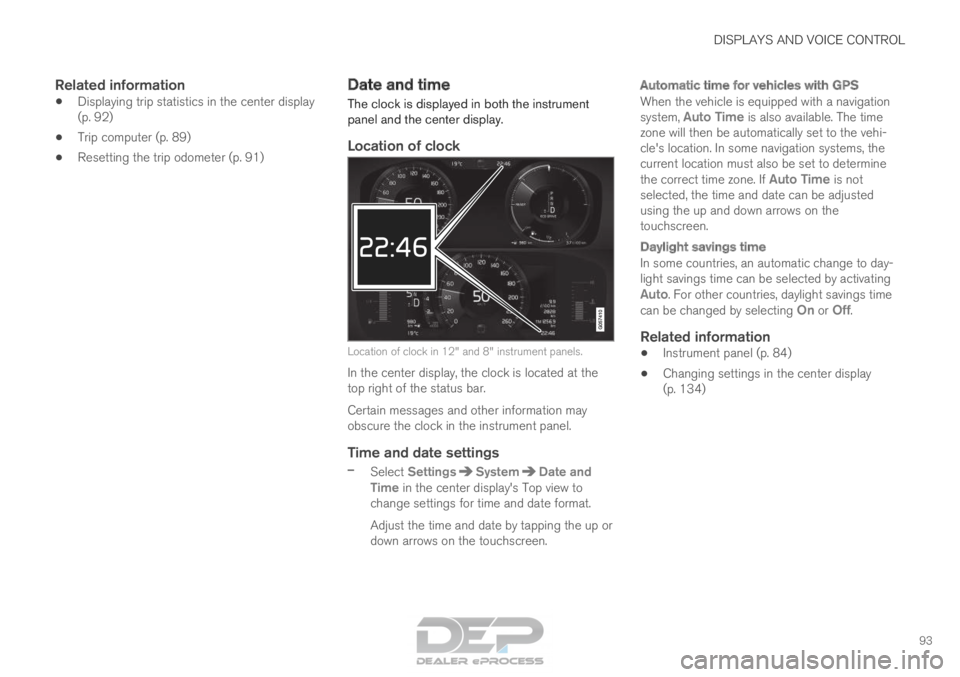
panel and the center display.
Location of clock Location of clock in 12" and 8" instrument panels.
In the center display, the clock is located at the
top right of the status bar.
Certain messages and other information may
obscure the clock in the instrument panel.
Time and date settings
– Select Settings System Date and
Time in the center display's Top view to
change settings for time and date format.
Adjust the time and date by tapping the up or
down arrows on the touchscreen.
Automatic time for vehicles with GPS
When the vehicle is equipped with a navigation
system, Auto Time is also available. The time
zone will then be automatically set to the vehi-
cle's location. In some navigation systems, the
current location must also be set to determine
the correct time zone. If Auto Time is not selected, the time and date can be adjusted
using the up and down arrows on the
touchscreen.
Daylight savings time
In some countries, an automatic change to day-
light savings time can be selected by activating
Auto. For other countries, daylight savings time
can be changed by selecting On or
Off.
Related information
• Instrument panel (p. 84)
• Changing settings in the center display
(p. 134)
Page 106 of 686

||DISPLAYS AND VOICE CONTROL
104
App
Functions
Trip com-
puter Select a trip odometer, change
instrument panel display set-
tings, etc.
Media player
Select active source for media
player.
Phone Call a contact from the call list.
Navigation Guide to destination, etc.
Related information
• Instrument panel (p. 84)
• Center display overview (p. 109)
• Handling the App menu in the instrument
panel (p. 104) Handling the App menu in the
instrument panel
The App (application) menu in the instrument
panel is controlled using the right-side steering
wheel keypad. App menu and right-side steering wheel keypad.
Open/close
Left/right
Up/down
Confirm
Opening and closing the app menu
–
Tap open/close (1).
(The App menu cannot be opened while
there is an unacknowledged message in the
instrument panel. The message must be con-
firmed before the App menu can be opened.)
>
The App men opens/closes.
The App menu turns off automatically after a
period of inactivity or after certain selections are
made.
Navigating and making selections in the
App menu
1. Navigate among the apps available by press- ing the left/right arrow keys (2).
> Functions for the previous/next app willbe shown in the App menu.
2. Scroll through the functions for the selected app using the up or down arrows (3).
3. Confirm or make a selection for the function by pressing confirm (4).
> The function will be activated and, forsome selections, the App menu will then
close.
The next time the App menu is opened, the func-
tions for the most recently selected app will be
displayed automatically.
Page 126 of 686
DISPLAYS AND VOICE CONTROL
124Moving apps and buttons in the
center display
The apps and buttons for vehicle functions can
be moved and organized in the App and Func-
tion views. 1. Swipe from right to left 8
to access App view
or swipe from left to right 8
to access Func-
tion view.
2.
Press and hold an app or button.
> The app or button will change size and become slightly transparent. It can then
be moved.
3. Drag the app or button to an available posi- tion in the view.
A maximum of 48 rows can be used to position
apps or buttons. To move an app or button out-
side the visible view, drag it to the bottom of the
view. New rows will be added and the app or but-
ton can be placed in one of these.
Apps or buttons placed below the view's normal
display will not be visible on the screen.
Swipe the screen to scroll up or down in the view
to display information outside the view.
NOTE Hide the apps that are rarely or never used by
moving them far down, outside of the visible
view. This makes it easier to find the apps
used more frequently.
NOTE
Apps and vehicle function buttons cannot be
situated at spots already in use.
Related information
•
Function view in the center display (p. 122)
• Apps (p. 487)
• Handling the center display (p. 112) Symbols in the center display status
bar
Overview of symbols displayed in the center dis-
play status bar.
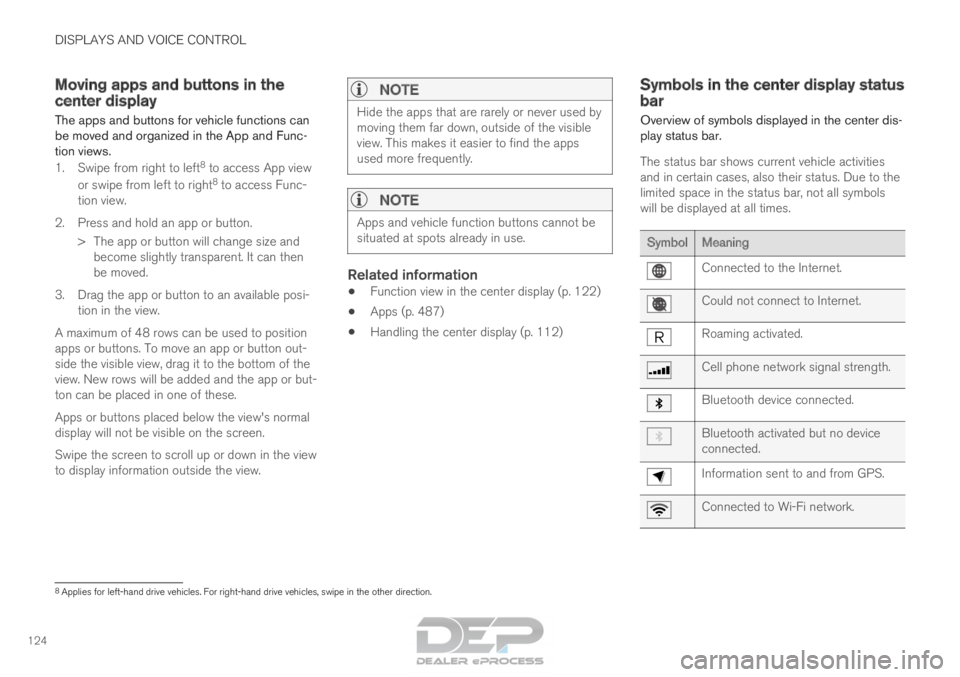
The status bar shows current vehicle activities
and in certain cases, also their status. Due to the
limited space in the status bar, not all symbols
will be displayed at all times. Symbol
Meaning Connected to the Internet.
Could not connect to Internet.
Roaming activated.
Cell phone network signal strength.
Bluetooth device connected.
Bluetooth activated but no device
connected.
Information sent to and from GPS.
Connected to Wi-Fi network.
8
Applies for left-hand drive vehicles. For right-hand drive vehicles, swi\
pe in the other direction.