seats VOLVO XC90 TWIN ENGINE 2018 Owner's Manual
[x] Cancel search | Manufacturer: VOLVO, Model Year: 2018, Model line: XC90 TWIN ENGINE, Model: VOLVO XC90 TWIN ENGINE 2018Pages: 686, PDF Size: 17 MB
Page 72 of 686
||SAFETY
70
WARNING
•
A small child's head represents a consider-
able part of its total weight and its neck is
still very weak. Volvo recommends that
children up to age 4 travel, properly
restrained, facing rearward. In addition,
Volvo recommends that children should
ride rearward facing, properly restrained, as
long as possible.
• Convertible child seats should be installed
in the rear seat only.
• A rear-facing convertible seat should not
be positioned behind the driver's seat
unless there is adequate space for safe
installation.
2.
Attach the seat belt to the convertible seat
according to the child restraint manufactur-
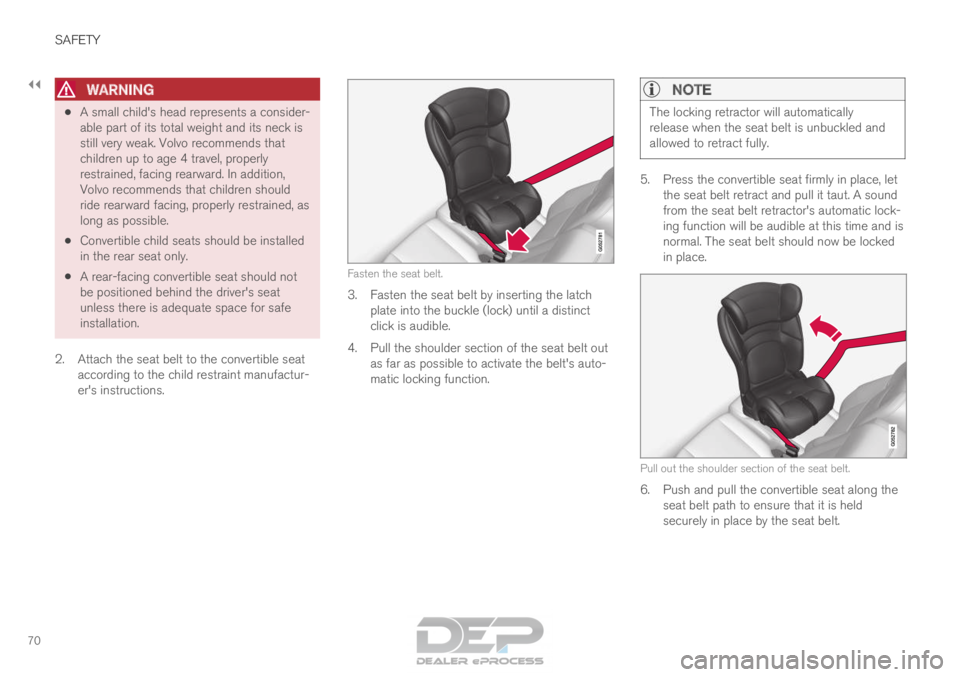
er's instructions. Fasten the seat belt.
3. Fasten the seat belt by inserting the latch
plate into the buckle (lock) until a distinct
click is audible.
4.
Pull the shoulder section of the seat belt out
as far as possible to activate the belt's auto-
matic locking function.
NOTE The locking retractor will automatically
release when the seat belt is unbuckled and
allowed to retract fully.
5. Press the convertible seat firmly in place, let
the seat belt retract and pull it taut. A sound
from the seat belt retractor's automatic lock-
ing function will be audible at this time and is
normal. The seat belt should now be locked
in place. Pull out the shoulder section of the seat belt.
6. Push and pull the convertible seat along the
seat belt path to ensure that it is held
securely in place by the seat belt.
Page 73 of 686
SAFETY
}}71
WARNING It should not be possible to move the child
restraint more than 2.5 cm (1 in.) in any direc-
tion along the seat belt path.
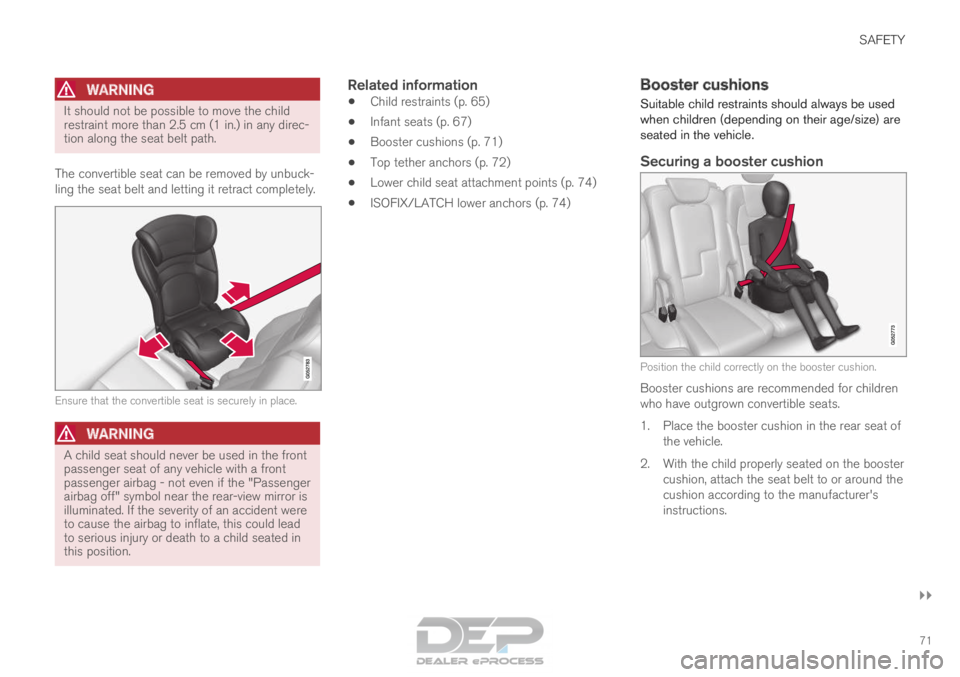
The convertible seat can be removed by unbuck-
ling the seat belt and letting it retract completely. Ensure that the convertible seat is securely in place.
WARNING
A child seat should never be used in the front
passenger seat of any vehicle with a front
passenger airbag - not even if the "Passenger
airbag off" symbol near the rear-view mirror is
illuminated. If the severity of an accident were
to cause the airbag to inflate, this could lead
to serious injury or death to a child seated in
this position.
Related information
•
Child restraints (p. 65)
• Infant seats (p. 67)
• Booster cushions (p. 71)
• Top tether anchors (p. 72)
• Lower child seat attachment points (p. 74)
• ISOFIX/LATCH lower anchors (p. 74) Booster cushions
Suitable child restraints should always be used
when children (depending on their age/size) are
seated in the vehicle.
Securing a booster cushion Position the child correctly on the booster cushion.
Booster cushions are recommended for children
who have outgrown convertible seats.
1.
Place the booster cushion in the rear seat of
the vehicle.
2. With the child properly seated on the booster cushion, attach the seat belt to or around the
cushion according to the manufacturer's
instructions.
Page 74 of 686
||SAFETY
72
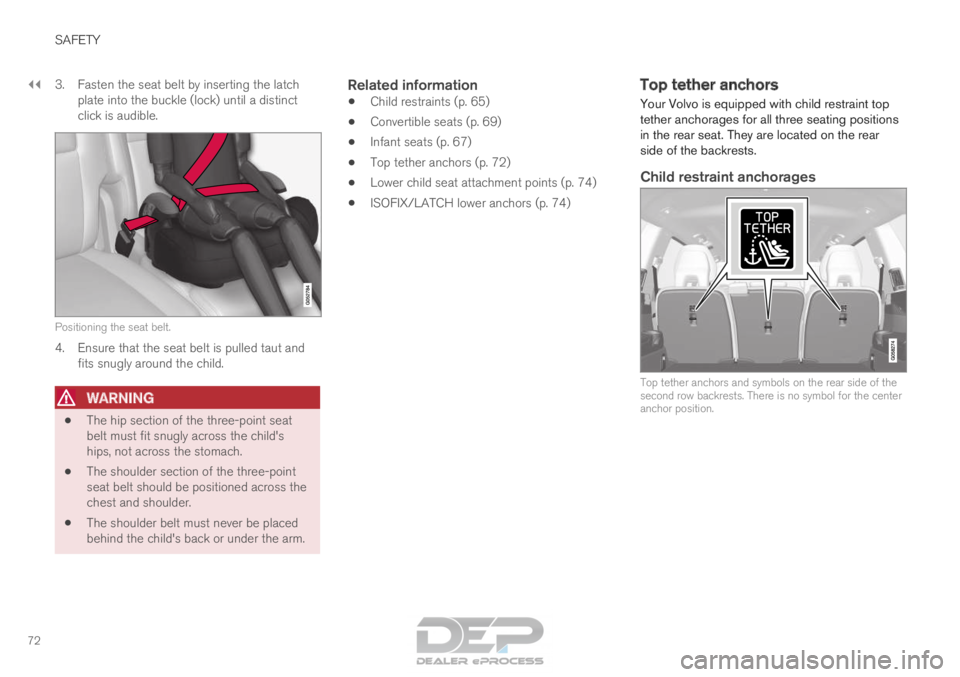
3. Fasten the seat belt by inserting the latch
plate into the buckle (lock) until a distinct
click is audible. Positioning the seat belt.
4. Ensure that the seat belt is pulled taut and
fits snugly around the child.
WARNING •
The hip section of the three-point seat
belt must fit snugly across the child's
hips, not across the stomach.
• The shoulder section of the three-point
seat belt should be positioned across the
chest and shoulder.
• The shoulder belt must never be placed
behind the child's back or under the arm.
Related information
• Child restraints (p. 65)
• Convertible seats (p. 69)
• Infant seats (p. 67)
• Top tether anchors (p. 72)
• Lower child seat attachment points (p. 74)
• ISOFIX/LATCH lower anchors (p. 74) Top tether anchors
Your Volvo is equipped with child restraint top
tether anchorages for all three seating positions
in the rear seat. They are located on the rear
side of the backrests.
Child restraint anchorages Top tether anchors and symbols on the rear side of the
second row backrests. There is no symbol for the center
anchor position.
Page 76 of 686

SAFETY
74Lower child seat attachment points
The vehicle is equipped with lower child restraint
attachment points in the second row of seats. The lower child seat attachment points are
intended for use with certain rear-facing child
restraints.
Always follow the manufacturer's installation
instructions when attaching a child seat to the
lower child seat attachment points.
Location of child seat attachment
points Location of the child seat attachment points in the sec-
ond row of seats.
The child seat attachment points in the second
row of seats are located on the rear section of
the front seat floor rails.
Related information
• Child restraints (p. 65)
• Top tether anchors (p. 72)
• ISOFIX/LATCH lower anchors (p. 74) ISOFIX/LATCH lower anchors
Lower anchors for ISOFIX/LATCH-equipped
child seats are located in the second row, out-
board seats, hidden below the backrest cush-
ions.
Using the ISOFIX/LATCH lower child
seat anchors Location of the ISOFIX/LATCH anchors
Symbols on the seat back upholstery mark the
ISOFIX/LATCH anchor positions as shown. To
access the anchors, kneel on the seat cushion
and locate the anchors by feel. Always follow your
child seat manufacturer's installation instructions,
and use both ISOFIX/LATCH lower anchors and
top tethers whenever possible.
Page 77 of 686

SAFETY
75
To access the anchors
1. Put the child restraint in position.
2. Kneel on the child restraint to press downthe seat cushion and locate the anchors by
feel.
3. Fasten the attachment on the child restraint's lower straps to the ISOFIX/LATCH
lower anchors.
4. Firmly tension the lower child seat straps according to the manufacturer's instructions.
WARNING Volvo's ISOFIX/LATCH anchors conform to
FMVSS/CMVSS standards. Always refer to
the child restraint system's manual for weight
and size ratings.
NOTE •
The rear center seat is not equipped with
ISOFIX/LATCH lower tether anchors. If a
child restraint is used in this seat, attach
the restraint's upper anchor strap (if
equipped with these) to the top tether
anchor point for this strap and secure the
child restraint with the vehicle's center
seat belt.
• Always follow your child seat manufactur-
er's installation instructions, and use both
ISOFIX/LATCH lower anchors and top
tethers whenever possible. Fasten the attachment correctly to the ISOFIX/LATCH
lower anchorsWARNING •
Be sure to fasten the attachment cor-
rectly to the anchor (see the illustration).
If the attachment is not correctly fas-
tened, the child restraint may not be
properly secured in the event of a colli-
sion.
• The ISOFIX/LATCH lower child restraint
anchors are only intended for use with
child seats positioned in the outboard
seating positions. These anchors are not
certified for use with any child restraint
that is positioned in the center seating
position. When securing a child restraint
in the center seating position, use only
the vehicle's center seat belt.
Related information
• Child restraints (p. 65)
• Top tether anchors (p. 72)
• ISOFIX/LATCH lower anchors (p. 74)
Page 85 of 686
DISPLAYS AND VOICE CONTROL
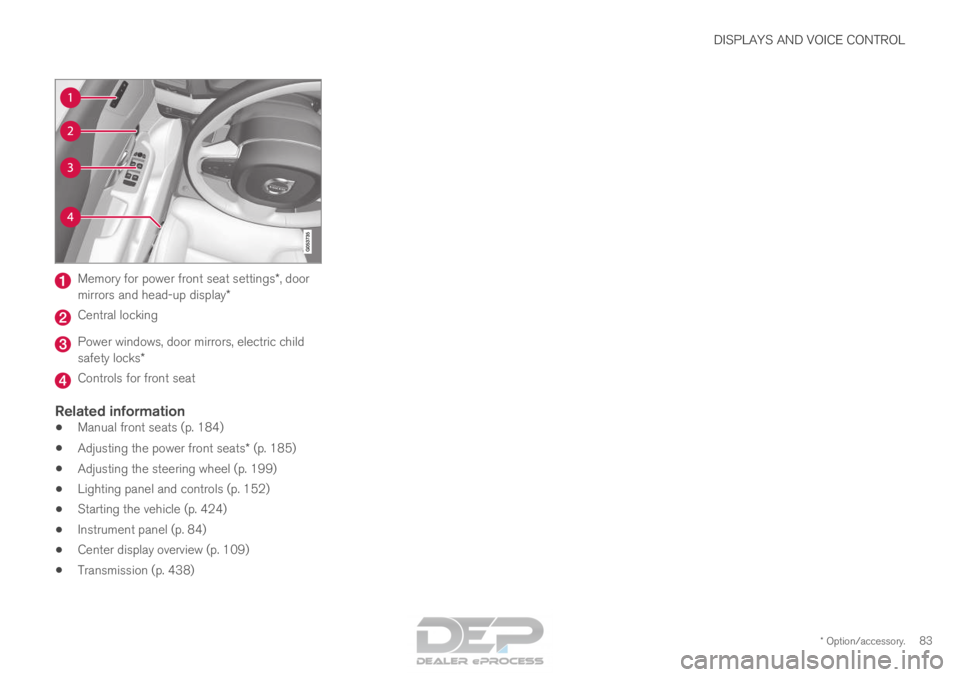
* Option/accessory.83Memory for power front seat settings*, door
mirrors and head-up display* Central locking
Power windows, door mirrors, electric child
safety locks*
Controls for front seat
Related information
•
Manual front seats (p. 184)
• Adjusting the power front seats* (p. 185)
• Adjusting the steering wheel (p. 199)
• Lighting panel and controls (p. 152)
• Starting the vehicle (p. 424)
• Instrument panel (p. 84)
• Center display overview (p. 109)
• Transmission (p. 438)
Page 92 of 686
||DISPLAYS AND VOICE CONTROL
90
NOTE
This may vary if your driving style changes.
An economical driving style will generally
increase how far you can drive on a certain
amount of fuel.
Starting values for fully charged hybrid
battery
Because it is difficult to predict driving style and
other factors that affect the range of electric
motors, Volvo uses a starting value when the
vehicle is fully charged. This starting value pro-
vides an "up to" amount instead of a prediction
on the range of the electric current in the motor.
The difference in starting value between
Hybrid
and Pure is because the vehicle is permitted to
use more current from the hybrid battery in
Pure
mode, and because the vehicle switches to ECO
Climate.
Mileage when using electric motor
To achieve the longest possible mileage when
using the electric motor, the driver of an electric
vehicle also needs to think about conserving
electricity. The more electricity consumers
(stereo, heated windows/mirrors/seats, very cold
air from climate control system, etc.) that are
active, the shorter the potential mileage.
NOTE In addition to high electrical consumption in
the passenger compartment, rapid accelera-
tion, sudden braking, high speeds, heavy
loads, low ambient temperatures and driving
up hills can reduce possible driving distance.
Tourist - alternative speedometerThe alternative digital speedometer makes it eas-
ier to drive in countries where speed limit signs
are shown in a different measurement unit than
the one shown in the vehicle's gauges.
When used, the digital speed is displayed in the
opposite unit to that shown in the analog speed-
ometer. If mph is used in the analog speedome-
ter, the equivalent speed in km/h will be shown
in the digital speedometer.
Related information
• Displaying trip data in the instrument panel
(p. 90)
• Resetting the trip odometer (p. 91)
• Displaying trip statistics in the center display
(p. 92)
• Instrument panel (p. 84) Displaying trip data in the
instrument panel
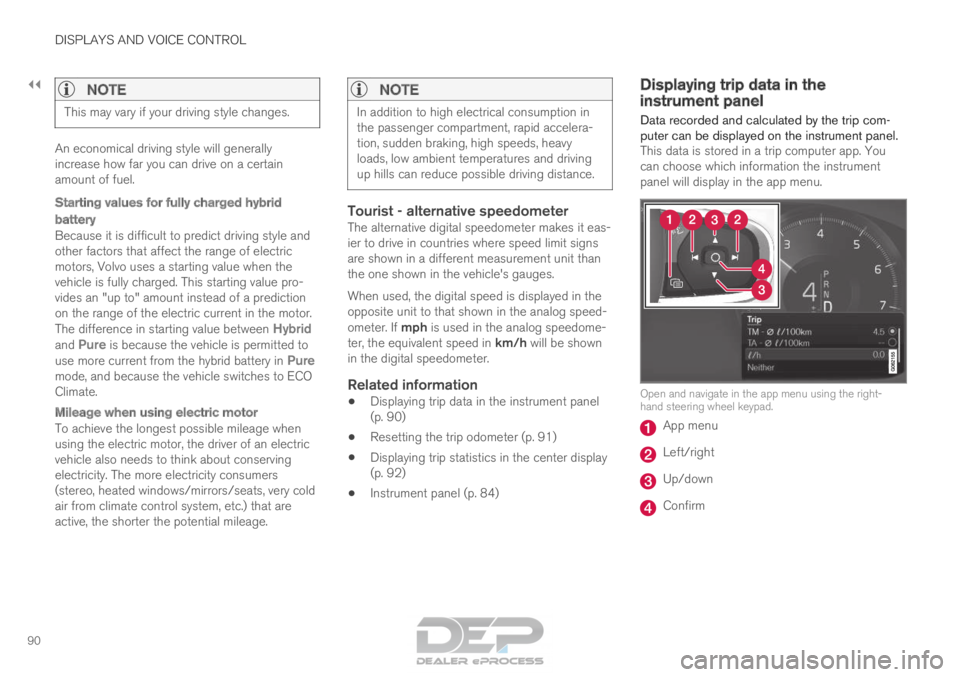
Data recorded and calculated by the trip com-
puter can be displayed on the instrument panel. This data is stored in a trip computer app. You
can choose which information the instrument
panel will display in the app menu. Open and navigate in the app menu using the right-
hand steering wheel keypad.
App menu
Left/right
Up/down
Confirm
Page 137 of 686
DISPLAYS AND VOICE CONTROL
}}
135
Resetting center display settings
All settings made in the center display's Settings
menu can be reset to default values.
Two types of resetThere are two ways to reset the settings in the
Settings menu:
• Factory Reset- erases all data and files and
resets all settings to factory default.
• Reset Personal Settings- erases personal
data and resets personalized settings to fac-
tory default.
Resetting settingsFollow these instructions to reset the settings.
NOTE Factory Reset is only possible when the
vehicle is stationary. 1.
Tap Settings in the Top view in the center
display.
2.
Proceed to System Factory Reset
.
3. Select the type of reset you would like to do. > A pop-up window will appear. 4.
Tap OK to confirm the reset.
For Reset Personal Settings, confirm the reset by tapping
Reset for the active
profile or Reset for all profiles.
>
The selected settings will be reset.
Related information
• Center display overview (p. 109)
• Opening settings in the center display
(p. 132)
• Changing settings in the center display
(p. 134)
• Table of settings in the center display
(p. 136) Setting types in the center display
Different types of settings are changed in differ-
ent ways. Refer to the table below for a descrip-
tion of the different types of settings.
Types of settings Type of
setting
Description
Trigger
function Starts an app or a separate view
for more advanced settings. Tap
the text to e.g. connect a
Bluetooth
®
device.
Radio but-
ton Select one of the possible set-
tings by tapping the desired radio
button to e.g. change the system
language.
Multi-
selection
button Select a level for a particular set-
ting by pressing the desired part
of the button, e.g. to select sensi-
tivity level for City Safety.
Checkbox
Tap the checkbox to activate/
deactivate a function, e.g. to
select automatic start for heated
seats.
Page 139 of 686
DISPLAYS AND VOICE CONTROL
}}
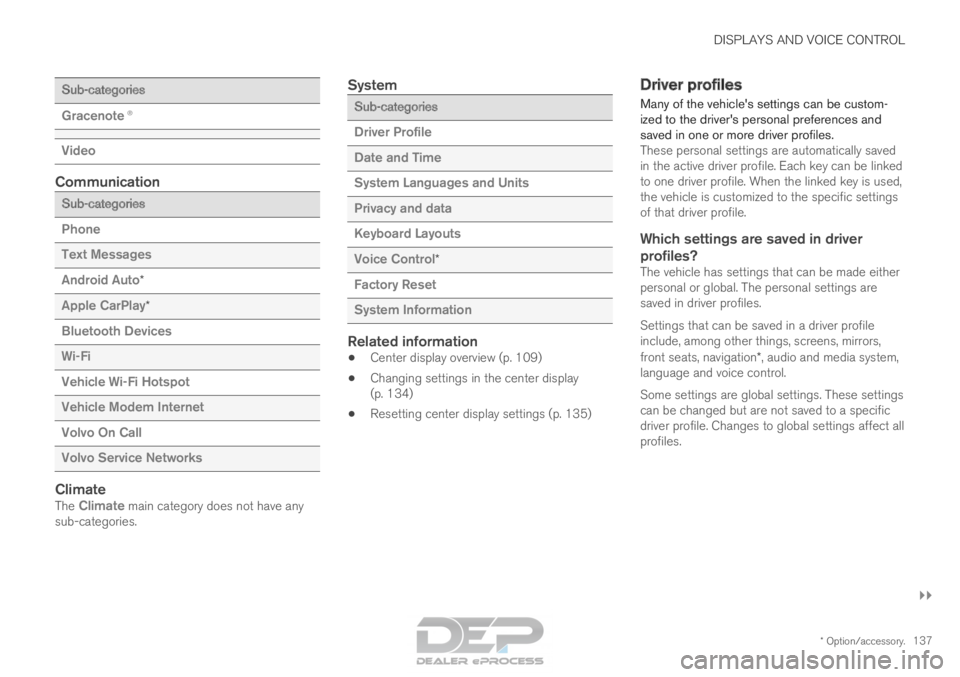
* Option/accessory. 137Sub-categories
Gracenote®
Video
Communication
Sub-categories
Phone
Text Messages
Android Auto
*
Apple CarPlay*
Bluetooth Devices
Wi-Fi
Vehicle Wi-Fi Hotspot
Vehicle Modem Internet
Volvo On Call
Volvo Service Networks
ClimateThe Climate main category does not have any sub-categories.
System Sub-categories
Driver Profile
Date and Time
System Languages and Units
Privacy and data
Keyboard Layouts
Voice Control
*
Factory Reset
System Information
Related information
• Center display overview (p. 109)
• Changing settings in the center display
(p. 134)
• Resetting center display settings (p. 135) Driver profiles
Many of the vehicle's settings can be custom-
ized to the driver's personal preferences and
saved in one or more driver profiles. These personal settings are automatically saved
in the active driver profile. Each key can be linked
to one driver profile. When the linked key is used,
the vehicle is customized to the specific settings
of that driver profile.
Which settings are saved in driver
profiles?
The vehicle has settings that can be made either
personal or global. The personal settings are
saved in driver profiles.
Settings that can be saved in a driver profile
include, among other things, screens, mirrors,
front seats, navigation*, audio and media system,
language and voice control.
Some settings are global settings. These settings
can be changed but are not saved to a specific
driver profile. Changes to global settings affect all
profiles.
Page 165 of 686
LIGHTING
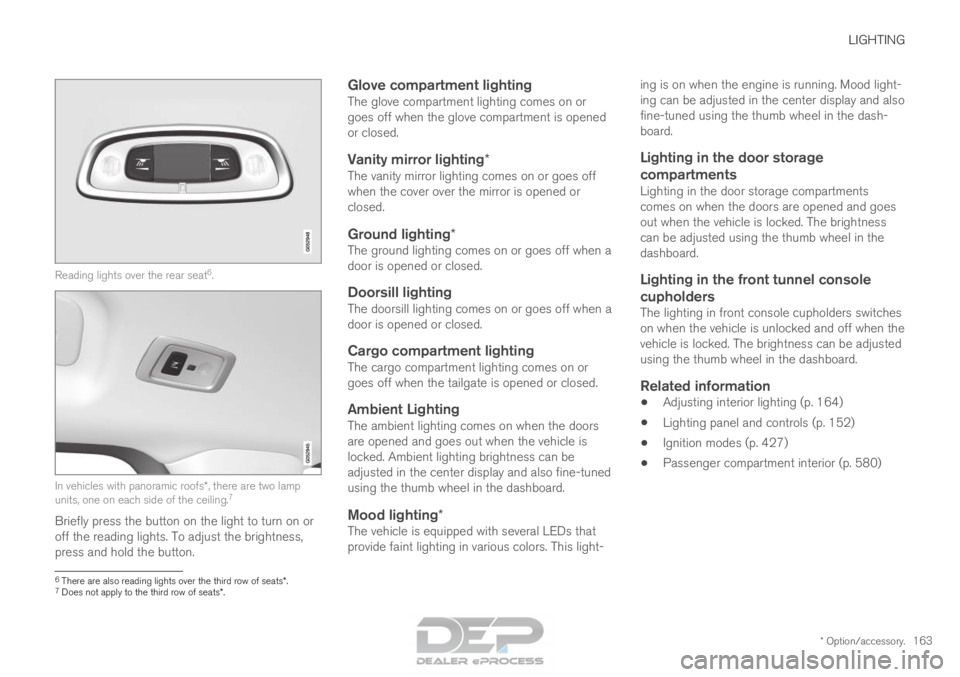
* Option/accessory.163Reading lights over the rear seat
6
. In vehicles with panoramic roofs*, there are two lamp
units, one on each side of the ceiling. 7
Briefly press the button on the light to turn on or
off the reading lights. To adjust the brightness,
press and hold the button.
Glove compartment lightingThe glove compartment lighting comes on or
goes off when the glove compartment is opened
or closed.
Vanity mirror lighting*The vanity mirror lighting comes on or goes off
when the cover over the mirror is opened or
closed.
Ground lighting*The ground lighting comes on or goes off when a
door is opened or closed.
Doorsill lightingThe doorsill lighting comes on or goes off when a
door is opened or closed.
Cargo compartment lightingThe cargo compartment lighting comes on or
goes off when the tailgate is opened or closed.
Ambient LightingThe ambient lighting comes on when the doors
are opened and goes out when the vehicle is
locked. Ambient lighting brightness can be
adjusted in the center display and also fine-tuned
using the thumb wheel in the dashboard.
Mood lighting*The vehicle is equipped with several LEDs that
provide faint lighting in various colors. This light- ing is on when the engine is running. Mood light-
ing can be adjusted in the center display and also
fine-tuned using the thumb wheel in the dash-
board.
Lighting in the door storage
compartments
Lighting in the door storage compartments
comes on when the doors are opened and goes
out when the vehicle is locked. The brightness
can be adjusted using the thumb wheel in the
dashboard.
Lighting in the front tunnel console
cupholders
The lighting in front console cupholders switches
on when the vehicle is unlocked and off when the
vehicle is locked. The brightness can be adjusted
using the thumb wheel in the dashboard.
Related information
• Adjusting interior lighting (p. 164)
• Lighting panel and controls (p. 152)
• Ignition modes (p. 427)
• Passenger compartment interior (p. 580) 6
There are also reading lights over the third row of seats*.
7 Does not apply to the third row of seats*.