transmission VOLVO XC90 TWIN ENGINE 2018 Owner's Manual
[x] Cancel search | Manufacturer: VOLVO, Model Year: 2018, Model line: XC90 TWIN ENGINE, Model: VOLVO XC90 TWIN ENGINE 2018Pages: 686, PDF Size: 17 MB
Page 475 of 686

STARTING AND DRIVING
* Option/accessory.473
CAUTION•
Bumper-attached trailer hitches must not
be used on Volvos, nor should safety
chains be attached to the bumper.
• Trailer hitches attaching to the vehicle
rear axle must not be used.
• Never connect a trailer's hydraulic brake
system directly to the vehicle brake sys-
tem, nor a trailer's lighting system directly
to the vehicle lighting system. Consult
your nearest authorized Volvo retailer for
correct installation.
• When towing a trailer, the trailer's safety
chains or wire must be correctly fastened
to the attachment points provided in the
trailer hitch on the vehicle. The safety
chain or wire must never be fastened to
or wound around the towing ball.
NOTE The optional detachable trailer hitch may not
be available in all markets or on all models.
Consult your Volvo retailer.
NOTE
Extreme weather conditions, towing a trailer,
driving at high altitudes and fuel quality are
factors that significantly increase a vehicle's
fuel consumption.
Trailer weights
WARNING Please adhere to the recommendations provi-
ded for trailer weight. If the recommendations
are not followed, the vehicle and trailer may
be difficult to control during evasive maneu-
vers and braking.
NOTE
The specified maximum trailer weights are
those permitted by Volvo. National vehicle
regulations may set additional restrictions on
trailer weight and speed. The trailer hitches
may be certified for higher towing weights
than the vehicle is permitted to tow.
Self-leveling suspension*The vehicle's self-leveling system attempts to
keep the vehicle at a constant level, regardless of
load (up to the maximum permitted weight).
When the vehicle is stationary, the rear end of the
vehicle will be slightly lowered, which is normal.
Driving in hilly terrain or hot weatherIn certain conditions, there is a risk of overheat-
ing when driving with a trailer. If overheating of
the engine and drive system is detected, a warn-
ing symbol will illuminate in the instrument panel
along with a message.The automatic transmission selects the optimal
gear for the current load and engine speed.
Steep inclines
Do not lock the automatic transmission into a
higher gear than what the engine can handle ‒ it
is not always preferable to drive in high gears at
low rpm.
Parking on a hill
1. Depress the brake pedal.
2. Apply the parking brake.
3. Put the gear selector in P.
4. Release the brake pedal.
Put chocks behind the wheels when the vehicle
is parked on a hill with a trailer attached.
Starting on a hill
1. Depress the brake pedal.
2. Put the gear selector in D.
3. Release the parking brake.
4. Release the brake pedal and start driving.
Related information
• Trailer Stability Assist* (p. 474)
• Checking trailer lights (p. 475)
• Towing capacity and tongue weight (p. 660)
• Overheating of engine and transmission
(p. 468)
Page 499 of 686

AUDIO, MEDIA AND INTERNET
497
Selecting sub-channels
To listen to a station's sub-channel(s), tap the
station on the screen or press the forward/back
arrow keys on the right-side steering wheel key-
pad or below the screen.
Sub-channels can also be saved as radio favor-
ites.
If you tap a sub-channel favorite, it may take up
to 6 seconds before the channel becomes audi-
ble. If you tap a station while you are out of digital
range of the transmitter, No reception will be
displayed.
Related information
• HD Radio™ (p. 494)
• Activating and deactivating the HD Radio
™
(p. 496)
• Changing waveband and radio station
(p. 491)
• Searching for a radio station (p. 492)
• HD Radio™ limitations (p. 497) HD Radio
™ limitations
Limitations
•
Main channel vs. sub-channels (FM only):
The main channel is the only channel that
can receive in hybrid mode (both digital and
analog). If a frequency has sub-channels,
they are broadcast in digital mode only. The
main FM channel will be displayed as, for
example, "WRIF-FM HD1". The sub-FM
channels will be displayed as"WRIF-FM
HD2", "WRIF-FM HD3", etc.
• Reception coverage area: Due to current
IBOC transmitter power limitations, the
reception coverage area in digital mode is
somewhat more limited than the station's
analog coverage area. Be aware that, like all
radio transmission technology, terrain, time of
day, vegetation and buildings can have a
positive or negative effect on radio reception.
• Analog to digital/digital to analog blend-
ing: Analog to digital blending will occur as
the signal strength reaches a preset thresh-
old in the receiver. This will be noticeable in
fringe areas (areas with weak reception) and
is normal.
NOTE There may be a noticeable difference in
sound quality when a change from analogue
to digital or digital to analogue occurs, such
as:
• Volume increase or decrease
• Equalizer settings, i.e., Bass/ Midrange/
Treble cut or boost
• Time alignment (Digital program material
in extreme cases can be as much as 8
seconds behind the analogue). This will
noticeable as a "stuttering" effect.
The above items are dependant on the
broadcaster's equipment settings and do
not indicate a fault in the vehicle's radio
receiver or antenna systems.
Related information
• HD Radio™ (p. 494)
• Activating and deactivating the HD Radio™
(p. 496)
• HD Radio
™
sub-channels (p. 496)
Page 572 of 686
||WHEELS AND TIRES
* Option/accessory.
570
WARNING •
The vehicle must never be driven with
more than one "Temporary spare" tire
mounted.
• Driving with a spare wheel may alter the
driving characteristics of the vehicle.
Replace the spare wheel with a normal
wheel as soon as possible.
• The spare wheel is smaller than the nor-
mal wheel, which affects the vehicle's
ground clearance. Watch for high curbs
and do not wash the vehicle in an auto-
matic car wash when a spare wheel is
mounted.
• Follow the manufacturer's recommended
tire inflation pressure for the spare wheel.
• On all-wheel drive vehicles, the drive on
the rear axle can be disconnected.
• If the spare wheel is mounted on the
front axle, snow chains must not be used.
• The spare wheel must not be repaired.
CAUTION The vehicle must not be driven with wheels of
different dimensions or with a spare tire other
than the one that came with the vehicle. The
use of different size wheels can seriously
damage your vehicle's transmission.
Related information
•
When changing wheels (p. 564)
• Recommended tire pressure (p. 559) Accessing the spare wheel
Follow these instructions regarding handling the
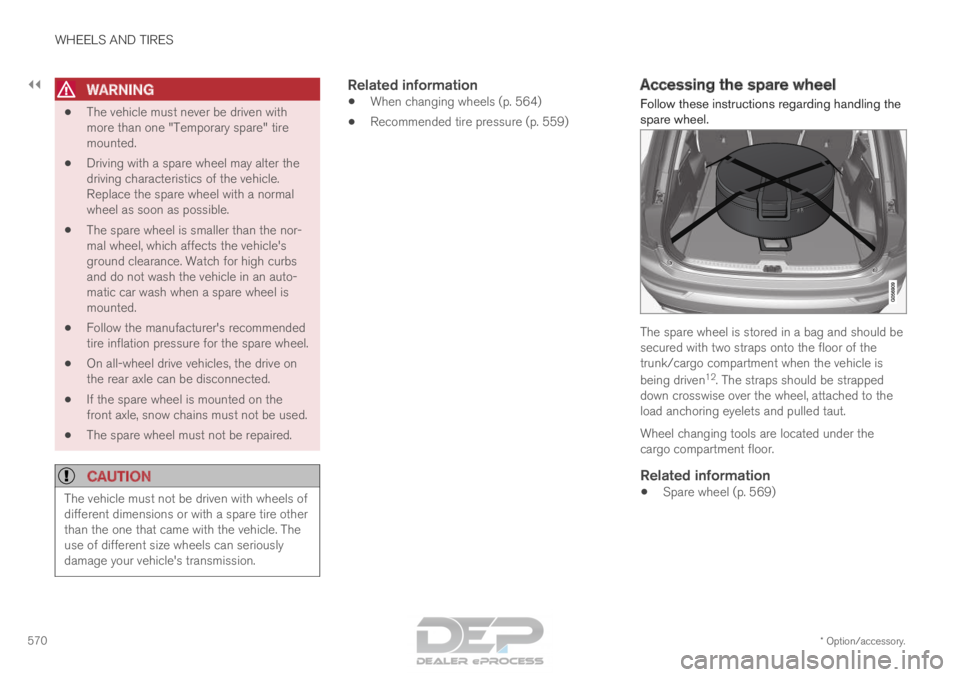
spare wheel. The spare wheel is stored in a bag and should be
secured with two straps onto the floor of the
trunk/cargo compartment when the vehicle is
being driven
12
. The straps should be strapped
down crosswise over the wheel, attached to the
load anchoring eyelets and pulled taut.
Wheel changing tools are located under the
cargo compartment floor.
Related information
• Spare wheel (p. 569)
Page 606 of 686
||MAINTENANCE AND SERVICE
* Option/accessory.
604 2. To accept the suggested appointment, tap
Accept. To decline the suggested appoint-
ment, tap Send new proposal or Decline.
For some markets, the system reminds you when
an appointment time is approaching and the navi-
gation system 7
can also guide you to the work-
shop at the appointed time.
Related information
• Vehicle status (p. 602)
• Sending vehicle information to the workshop
(p. 604)
• Navigating in the center display's views
(p. 115)
• Volvo ID (p. 26)
• Internet-connected vehicle* (p. 529) Sending vehicle information to the
workshop
8
Vehicle-related information can be sent at any
time from the vehicle, e.g. if you schedule a visit
to a workshop and would like to assist your
workshop by providing additional basic informa-
tion. Sending vehicle information is not the same
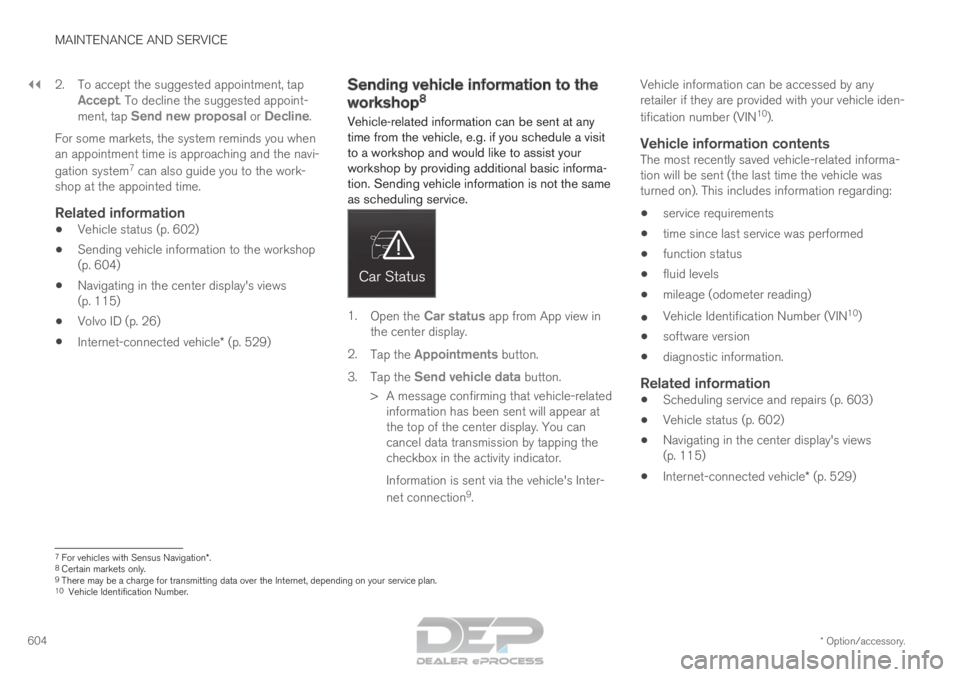
as scheduling service. 1.
Open the Car status app from App view in
the center display.
2. Tap the Appointments button.
3. Tap the Send vehicle data button.
>
A message confirming that vehicle-related
information has been sent will appear at
the top of the center display. You can
cancel data transmission by tapping the
checkbox in the activity indicator.
Information is sent via the vehicle's Inter-
net connection 9
. Vehicle information can be accessed by any
retailer if they are provided with your vehicle iden-
tification number (VIN
10
).
Vehicle information contentsThe most recently saved vehicle-related informa-
tion will be sent (the last time the vehicle was
turned on). This includes information regarding:
• service requirements
• time since last service was performed
• function status
• fluid levels
• mileage (odometer reading)
• Vehicle Identification Number (VIN 10
)
• software version
• diagnostic information.
Related information
•Scheduling service and repairs (p. 603)
• Vehicle status (p. 602)
• Navigating in the center display's views
(p. 115)
• Internet-connected vehicle* (p. 529) 7
For vehicles with Sensus Navigation*.
8 Certain markets only.
9 There may be a charge for transmitting data over the Internet, depending\
on your service plan.
10 Vehicle Identification Number.
Page 625 of 686
MAINTENANCE AND SERVICE
}}
623
Fuse pliers are provided on the inside of the fuse
box cover to assist in removing and inserting
fuses.
There are also spaces for several extra fuses in
the fusebox.
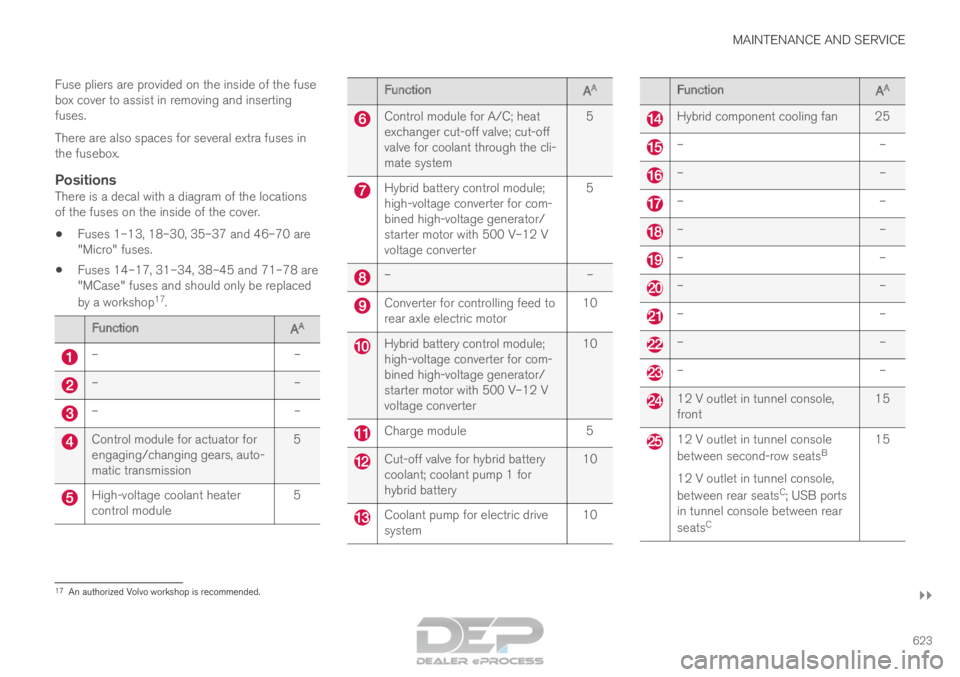
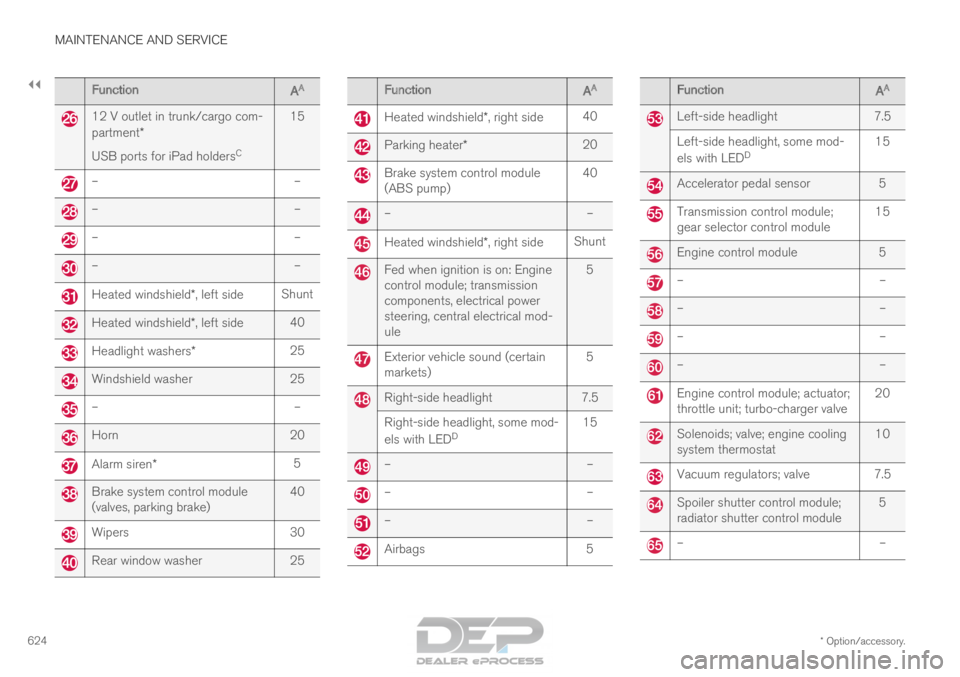
PositionsThere is a decal with a diagram of the locations
of the fuses on the inside of the cover.
• Fuses 1–13, 18–30, 35–37 and 46–70 are
"Micro" fuses.
• Fuses 14–17, 31–34, 38–45 and 71–78 are
"MCase" fuses and should only be replaced
by a workshop 17
. Function
AA –
––
––
–Control module for actuator for
engaging/changing gears, auto-
matic transmission
5High-voltage coolant heater
control module
5 Function
AA Control module for A/C; heat
exchanger cut-off valve; cut-off
valve for coolant through the cli-
mate system
5 Hybrid battery control module;
high-voltage converter for com-
bined high-voltage generator/
starter motor with 500 V–12 V
voltage converter
5 –
– Converter for controlling feed to
rear axle electric motor
10 Hybrid battery control module;
high-voltage converter for com-
bined high-voltage generator/
starter motor with 500 V–12 V
voltage converter
10 Charge module
5 Cut-off valve for hybrid battery
coolant; coolant pump 1 for
hybrid battery
10 Coolant pump for electric drive
system
10 Function
AA Hybrid component cooling fan 25
–
– –
– –
– –
– –
– –
– –
– –
– –
– 12 V outlet in tunnel console,
front
15 12 V outlet in tunnel console
between second-row seats
B
12 V outlet in tunnel console,
between rear seats C
; USB ports
in tunnel console between rear
seats C 15
17
An authorized Volvo workshop is recommended.
Page 626 of 686
||MAINTENANCE AND SERVICE
* Option/accessory.
624 Function
AA 12 V outlet in trunk/cargo com-
partment*
USB ports for iPad holders
C15 –
––
––
––
–Heated windshield*, left side
ShuntHeated windshield*, left side
40Headlight washers*
25Windshield washer
25–
–Horn
20Alarm siren*
5Brake system control module
(valves, parking brake)
40Wipers
30Rear window washer
25 Function
AA Heated windshield*, right side
40 Parking heater*
20 Brake system control module
(ABS pump)
40 –
– Heated windshield*, right side
Shunt Fed when ignition is on: Engine
control module; transmission
components, electrical power
steering, central electrical mod-
ule
5 Exterior vehicle sound (certain
markets)
5 Right-side headlight
7.5
Right-side headlight, some mod-
els with LED D 15 –
– –
– –
– Airbags
5 Function
AA Left-side headlight
7.5
Left-side headlight, some mod-
els with LED D 15 Accelerator pedal sensor
5 Transmission control module;
gear selector control module
15 Engine control module
5 –
– –
– –
– –
– Engine control module; actuator;
throttle unit; turbo-charger valve
20 Solenoids; valve; engine cooling
system thermostat
10 Vacuum regulators; valve 7.5
Spoiler shutter control module;
radiator shutter control module
5 –
–
Page 627 of 686
MAINTENANCE AND SERVICE
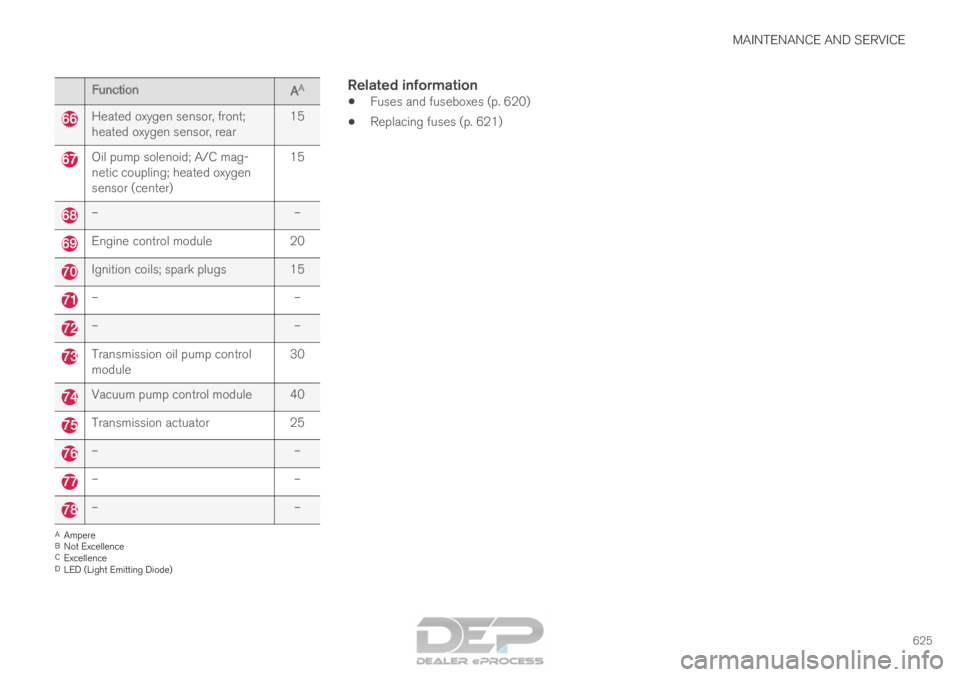
625Function
AA Heated oxygen sensor, front;
heated oxygen sensor, rear
15Oil pump solenoid; A/C mag-
netic coupling; heated oxygen
sensor (center)
15–
–Engine control module
20Ignition coils; spark plugs 15
–
––
–Transmission oil pump control
module
30Vacuum pump control module 40
Transmission actuator
25–
––
––
–A
Ampere
B Not Excellence
C Excellence
D LED (Light Emitting Diode)
Related information
• Fuses and fuseboxes (p. 620)
• Replacing fuses (p. 621)
Page 630 of 686
||MAINTENANCE AND SERVICE
* Option/accessory.
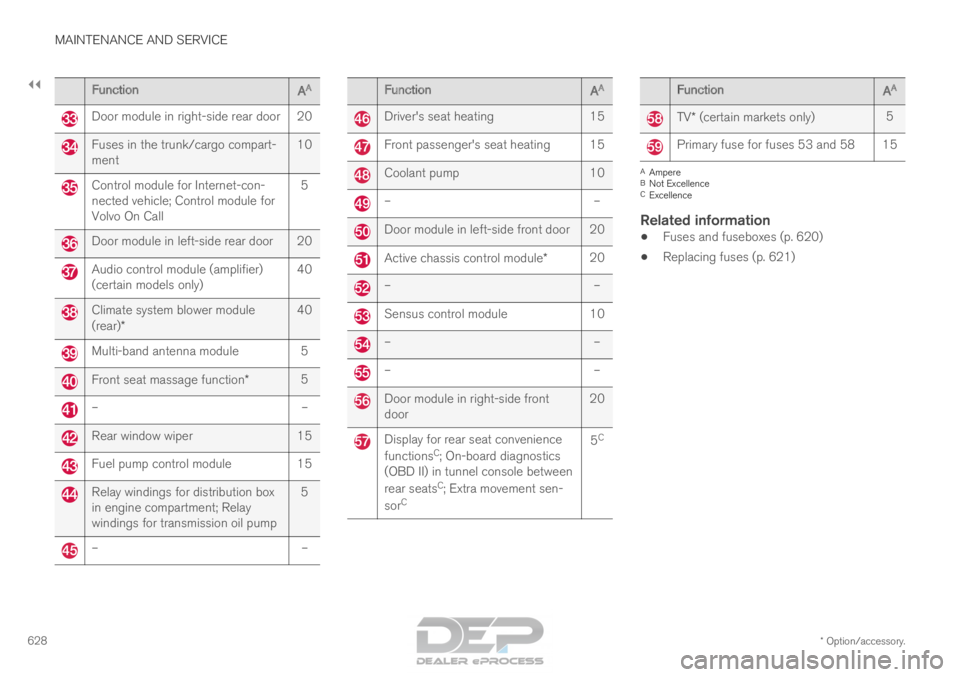
628 Function
AA Door module in right-side rear door 20
Fuses in the trunk/cargo compart-
ment
10Control module for Internet-con-
nected vehicle; Control module for
Volvo On Call
5Door module in left-side rear door 20
Audio control module (amplifier)
(certain models only)
40Climate system blower module
(rear)*
40Multi-band antenna module 5
Front seat massage function*
5–
–Rear window wiper
15Fuel pump control module
15Relay windings for distribution box
in engine compartment; Relay
windings for transmission oil pump
5–
– Function
AA Driver's seat heating
15 Front passenger's seat heating 15
Coolant pump
10 –
– Door module in left-side front door 20
Active chassis control module*
20 –
– Sensus control module
10 –
– –
– Door module in right-side front
door
20 Display for rear seat convenience
functions
C
; On-board diagnostics
(OBD II) in tunnel console between
rear seats C
; Extra movement sen-
sor C 5
C Function
AA TV* (certain markets only)
5 Primary fuse for fuses 53 and 58 15
A
Ampere
B Not Excellence
C Excellence
Related information
• Fuses and fuseboxes (p. 620)
• Replacing fuses (p. 621)
Page 665 of 686
SPECIFICATIONS
663
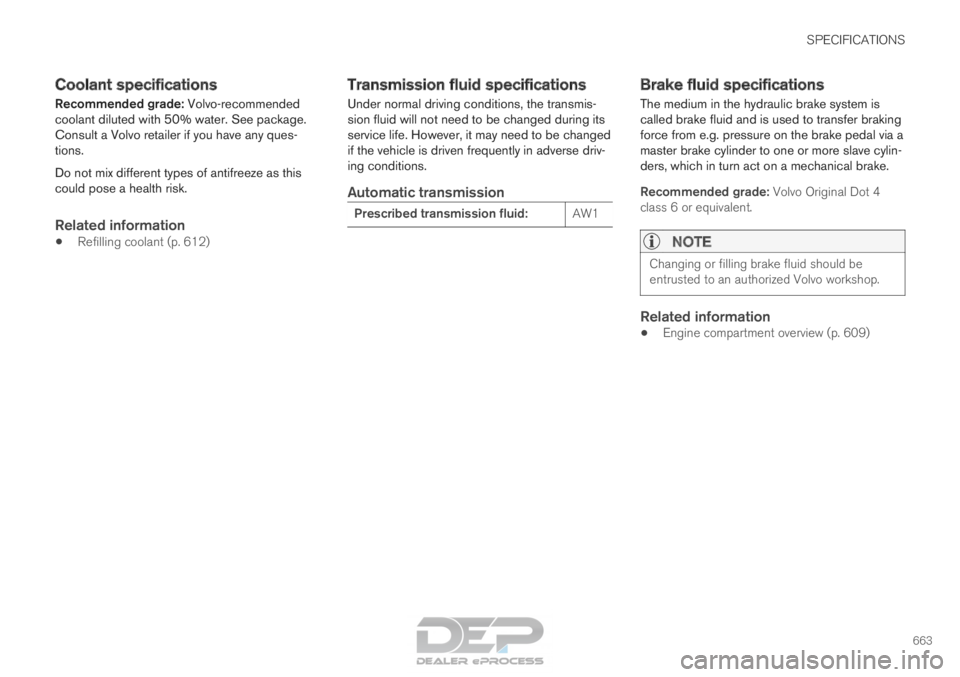
Coolant specifications
Recommended grade: Volvo-recommended
coolant diluted with 50% water. See package.
Consult a Volvo retailer if you have any ques-
tions.
Do not mix different types of antifreeze as this
could pose a health risk.
Related information
• Refilling coolant (p. 612) Transmission fluid specifications
Under normal driving conditions, the transmis-
sion fluid will not need to be changed during its
service life. However, it may need to be changed
if the vehicle is driven frequently in adverse driv-
ing conditions.
Automatic transmission Prescribed transmission fluid:
AW1 Brake fluid specifications
The medium in the hydraulic brake system is
called brake fluid and is used to transfer braking
force from e.g. pressure on the brake pedal via a
master brake cylinder to one or more slave cylin-
ders, which in turn act on a mechanical brake.
Recommended grade: Volvo Original Dot 4
class 6 or equivalent.
NOTE
Changing or filling brake fluid should be
entrusted to an authorized Volvo workshop.
Related information
•
Engine compartment overview (p. 609)
Page 669 of 686
INDEX
667
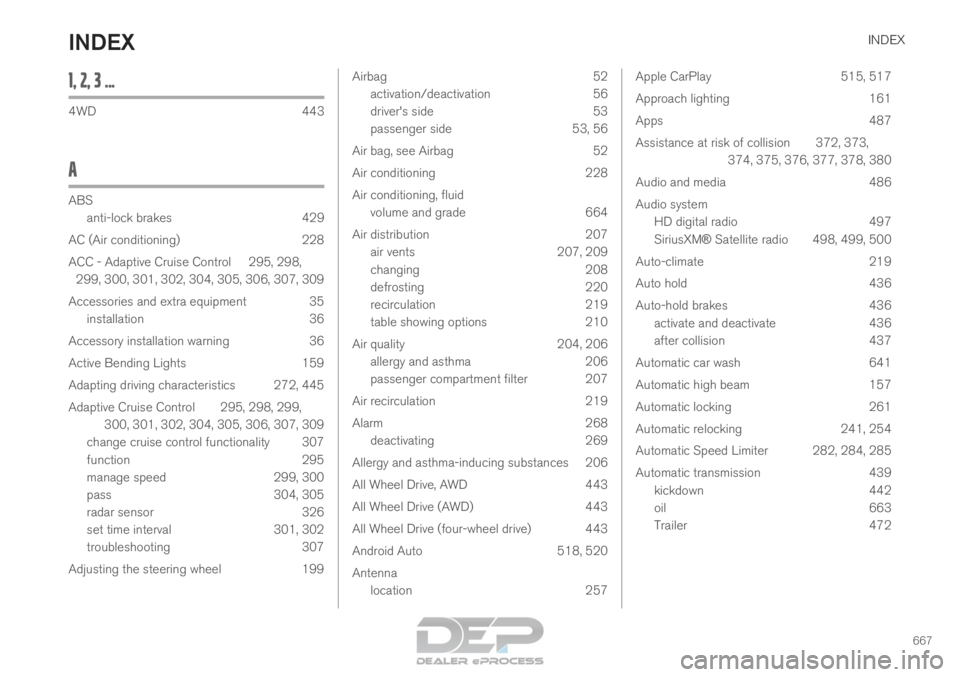
1, 2, 3 ... 4WD
443
A ABS
anti-lock brakes
429
AC (Air conditioning) 228
ACC - Adaptive Cruise Control 295, 298, 299, 300, 301, 302, 304, 305, 306, 307, 309
Accessories and extra equipment 35 installation 36
Accessory installation warning 36
Active Bending Lights 159
Adapting driving characteristics 272, 445
Adaptive Cruise Control 295, 298, 299, 300, 301, 302, 304, 305, 306, 307, 309
change cruise control functionality 307
function 295
manage speed 299, 300
pass 304, 305
radar sensor 326
set time interval 301, 302
troubleshooting 307
Adjusting the steering wheel 199 Airbag
52
activation/deactivation
56
driver's side 53
passenger side 53, 56
Air bag, see Airbag 52
Air conditioning 228
Air conditioning, fluid volume and grade 664
Air distribution 207
air vents 207, 209
changing 208
defrosting 220
recirculation 219
table showing options 210
Air quality 204, 206
allergy and asthma 206
passenger compartment filter 207
Air recirculation 219
Alarm 268
deactivating 269
Allergy and asthma-inducing substances 206
All Wheel Drive, AWD 443
All Wheel Drive (AWD) 443
All Wheel Drive (four-wheel drive) 443
Android Auto 518, 520
Antenna location 257 Apple CarPlay
515, 517
Approach lighting 161
Apps 487
Assistance at risk of collision 372, 373, 374, 375, 376, 377, 378, 380
Audio and media 486
Audio system HD digital radio 497
SiriusXM® Satellite radio 498, 499, 500
Auto-climate 219
Auto hold 436
Auto-hold brakes 436
activate and deactivate 436
after collision 437
Automatic car wash 641
Automatic high beam 157
Automatic locking 261
Automatic relocking 241, 254
Automatic Speed Limiter 282, 284, 285
Automatic transmission 439
kickdown 442
oil 663
Trailer 472
INDEX