parking brake VOLVO XC90 TWIN ENGINE 2018 Service Manual
[x] Cancel search | Manufacturer: VOLVO, Model Year: 2018, Model line: XC90 TWIN ENGINE, Model: VOLVO XC90 TWIN ENGINE 2018Pages: 686, PDF Size: 17 MB
Page 568 of 686

||WHEELS AND TIRES
* Option/accessory.
566
Related information
• Removing a wheel (p. 566)
• Installing a wheel (p. 568) Removing a wheel
Instructions for removing a wheel when chang-
ing wheels. Wheel changes must always be car-
ried out correctly.
CAUTION •
When not in use, the jack* should be kept
in its storage compartment under the
cargo compartment floor.
• The jack provided with your vehicle is
intended to be used only in temporary sit-
uations such as changing wheels in the
event of a flat tire. Only the jack that
came with your particular model should
be used to lift the vehicle. If the vehicle
needs to be lifted more frequently or for a
prolonged period, using a garage jack or
hoist is recommended. Always follow this
device's instructions for use.
WARNING •
Apply the parking brake and put the gear
selector in the Park (P) position.
• Block the wheels standing on the ground,
use rigid wooden blocks or large stones.
• Check that the jack is not damaged, the
threads are properly lubricated and it is
free from dirt.
• Be sure the jack is on a firm, level, non-
slippery surface and that it is upright and
not leaning.
• The jack must correctly engage in the
jack attachment.
• No objects should be placed between the
base of the jack and the ground, or
between the jack and the attachment bar
on the vehicle.
• Never let anyone remain in the vehicle
when it is raised on a jack.
• If a tire must be changed near passing
traffic, make sure all passengers move to
a safe location.
• Use a jack intended for the vehicle when
changing a tire. For any other job, use
stands to support the vehicle.
• Never crawl under or allow any part of
your body to be extended under a vehicle
supported by a jack.
Page 569 of 686

WHEELS AND TIRES
}}
* Option/accessory. 567
1.
Turn on the vehicle's hazard warning flashers
if a wheel change must be performed in an
area with traffic.
2. Apply the parking brake and put the gear selector in P.
For vehicles with Leveling Control*: If the
vehicle is equipped with pneumatic suspen-
sion, this must be switched off before the
vehicle is lifted with the jack*.
3. Take out the jack*, lug wrench* and tool for
removing the plastic covers, which are
stowed in the foam block. Tool for removing the plastic covers on the wheel bolts.
4. Place chocks in front of and behind the
wheels that are still on the ground. For exam-
ple, use heavy wooden blocks or large
stones. 5.
Using the lug wrench*, screw the towing eye
into place as far as possible according to the
instructions.
CAUTION The towing eyelet must be screwed into the
lug wrench* as far as possible.
6. Remove the plastic covers from the wheel
bolts using the designated tool.
7.
With the vehicle still on the ground, use the
lug wrench/towing eye to loosen the wheel
bolts ½-1 turn by pressing downward (coun-
terclockwise). 8. When hoisting the vehicle, it is important that
the jack* or garage lift arms are positioned
on the designated points under the vehicle.
The triangle markings on the plastic cover
indicate where the jack attachment points/
lifting points are located. There are two jack
attachment points on each side of the vehi-
cle. There is a groove for the jack at each
attachment point. 9. Position the jack under the attachment point
being used, ensuring that the surface is firm,
flat and not slippery.
Page 570 of 686

||WHEELS AND TIRES
* Option/accessory.
568 10. Crank it up until it is properly aligned and it is
in contact with the vehicle's jack attachment
point. Make sure the top of the jack (or the
garage lift arms) is correctly positioned in the
attachment point, with the bump on the top
of the jack in the recess in the attachment
point and the base positioned vertically under
the attachment point.
11. Turn the jack so that the crank is as far as possible from the side of the vehicle, which
will position the jack's arms perpendicular to
the vehicle's direction of movement.
12. Raise the vehicle until the wheel to be changed can move freely. Unscrew the wheel
bolts and lift off the wheel.
Related information
• Leveling control settings* (p. 453)
• When changing wheels (p. 564)
• Hoisting the vehicle (p. 605)
• Jack* (p. 565)
• Tool kit (p. 564)
• Installing a wheel (p. 568) Installing a wheel
Instructions for installing a wheel during a wheel
change.
NOTE The jack provided with your vehicle is
intended to be used only in temporary situa-
tions such as changing wheels in the event of
a flat tire. Only the jack that came with your
particular model should be used to lift the
vehicle. If the vehicle needs to be lifted more
frequently or for a prolonged period, using a
garage jack or hoist is recommended. Always
follow this device's instructions for use.
WARNING •
Apply the parking brake and put the gear
selector in the Park (P) position.
• Block the wheels standing on the ground,
use rigid wooden blocks or large stones.
• Check that the jack is not damaged, the
threads are properly lubricated and it is
free from dirt.
• Be sure the jack is on a firm, level, non-
slippery surface and that it is upright and
not leaning.
• The jack must correctly engage in the
jack attachment.
• No objects should be placed between the
base of the jack and the ground, or
between the jack and the attachment bar
on the vehicle.
• Never let anyone remain in the vehicle
when it is raised on a jack.
• If a tire must be changed near passing
traffic, make sure all passengers move to
a safe location.
• Use a jack intended for the vehicle when
changing a tire. For any other job, use
stands to support the vehicle.
• Never crawl under or allow any part of
your body to be extended under a vehicle
supported by a jack.
Page 589 of 686
LOADING, STORAGE AND PASSENGER COMPARTMENT
* Option/accessory.587
WARNINGIn a head-on collision at a speed of 50 km/h
(30 mph), an unsecured object weighing 20
kg (44 pounds) can reach a projectile weight
equivalent to 1000 kg (2200 pounds).
WARNING
If objects are loaded higher than the upper
edge of the side windows, leave a 10 cm (4
in.) space between the objects and the win-
dow. Objects placed closer to this could
impede the function of the inflatable curtain
concealed inside the headlining.
WARNING
Always secure the load. Otherwise, it may shift
during heavy braking and injure people in the
vehicle.
Cover sharp edges and sharp corners with
something soft.
Turn off the engine and apply the parking
brake when loading/unloading long objects.
Otherwise, it is possible for the load to reach
the gear lever or gear selector and move it to
a drive position – which could cause the vehi-
cle to begin rolling.
Extra cargo space
The rear seat backrests can be folded down to
increase cargo compartment space and simplify
loading. If the rear seat backrests are folded down, make sure that no objects loaded into the
vehicle prevent the WHIPS system for the front
seats from functioning correctly.
Raising/lowering the rear end of the
vehicle*
The rear end of the vehicle can be lowered or
raised for easier loading or to facilitate attaching
a trailer*.
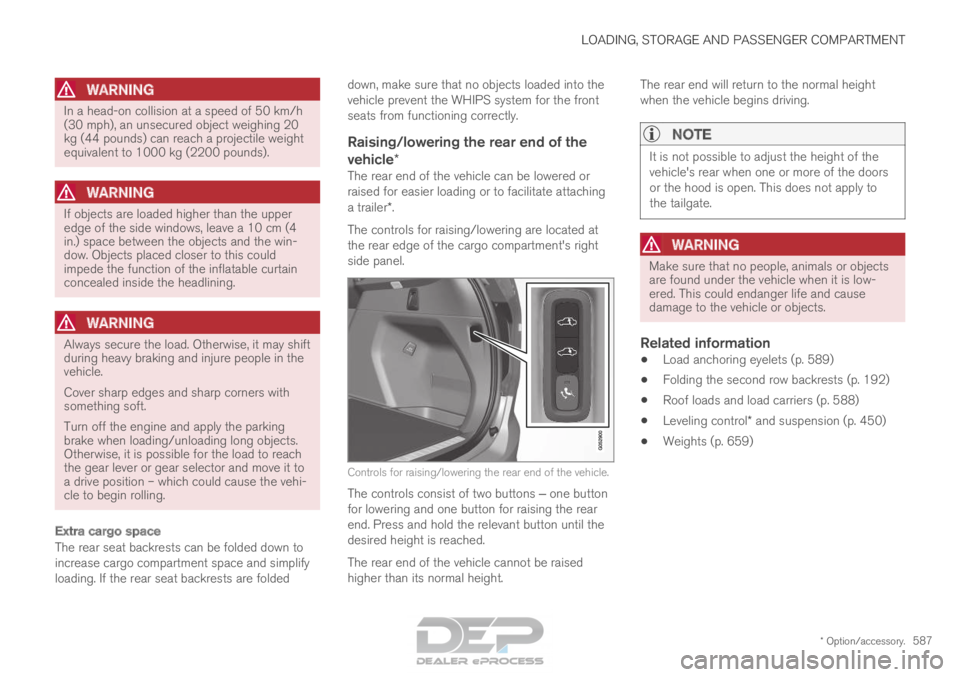
The controls for raising/lowering are located at
the rear edge of the cargo compartment's right
side panel. Controls for raising/lowering the rear end of the vehicle.
The controls consist of two buttons ‒ one button
for lowering and one button for raising the rear
end. Press and hold the relevant button until the
desired height is reached.
The rear end of the vehicle cannot be raised
higher than its normal height. The rear end will return to the normal height
when the vehicle begins driving.
NOTE It is not possible to adjust the height of the
vehicle's rear when one or more of the doors
or the hood is open. This does not apply to
the tailgate.
WARNING
Make sure that no people, animals or objects
are found under the vehicle when it is low-
ered. This could endanger life and cause
damage to the vehicle or objects.
Related information
•
Load anchoring eyelets (p. 589)
• Folding the second row backrests (p. 192)
• Roof loads and load carriers (p. 588)
• Leveling control* and suspension (p. 450)
• Weights (p. 659)
Page 626 of 686
||MAINTENANCE AND SERVICE
* Option/accessory.
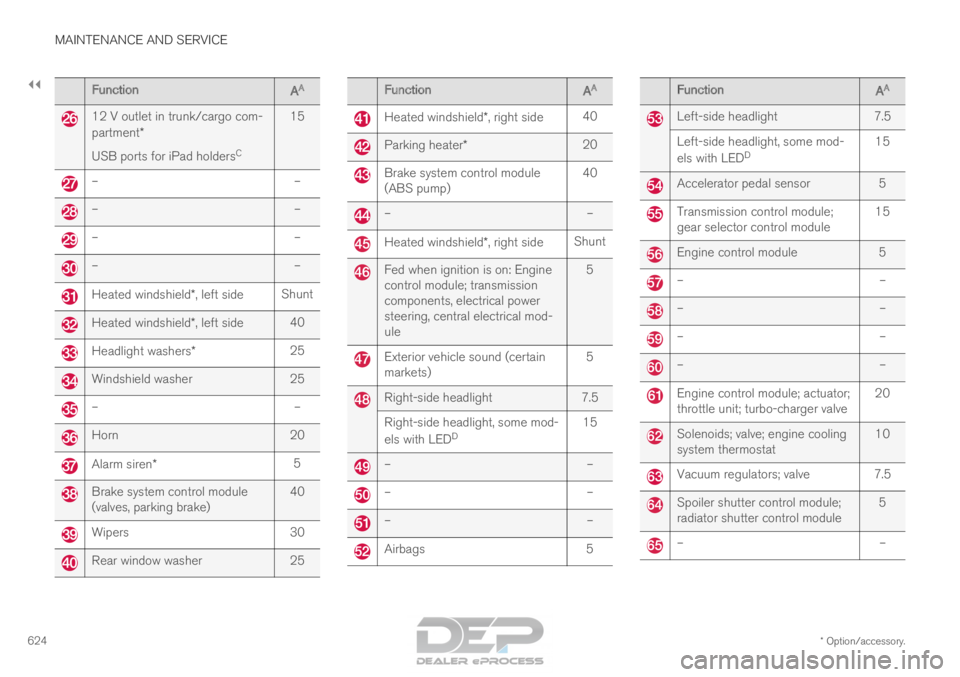
624 Function
AA 12 V outlet in trunk/cargo com-
partment*
USB ports for iPad holders
C15 –
––
––
––
–Heated windshield*, left side
ShuntHeated windshield*, left side
40Headlight washers*
25Windshield washer
25–
–Horn
20Alarm siren*
5Brake system control module
(valves, parking brake)
40Wipers
30Rear window washer
25 Function
AA Heated windshield*, right side
40 Parking heater*
20 Brake system control module
(ABS pump)
40 –
– Heated windshield*, right side
Shunt Fed when ignition is on: Engine
control module; transmission
components, electrical power
steering, central electrical mod-
ule
5 Exterior vehicle sound (certain
markets)
5 Right-side headlight
7.5
Right-side headlight, some mod-
els with LED D 15 –
– –
– –
– Airbags
5 Function
AA Left-side headlight
7.5
Left-side headlight, some mod-
els with LED D 15 Accelerator pedal sensor
5 Transmission control module;
gear selector control module
15 Engine control module
5 –
– –
– –
– –
– Engine control module; actuator;
throttle unit; turbo-charger valve
20 Solenoids; valve; engine cooling
system thermostat
10 Vacuum regulators; valve 7.5
Spoiler shutter control module;
radiator shutter control module
5 –
–
Page 629 of 686
MAINTENANCE AND SERVICE
}}
* Option/accessory. 627
Fuse pliers are provided on the inside of the fuse
box cover to assist in removing and inserting
fuses.
There are also spaces for several extra fuses in
the distribution box in the engine compart-
ment.
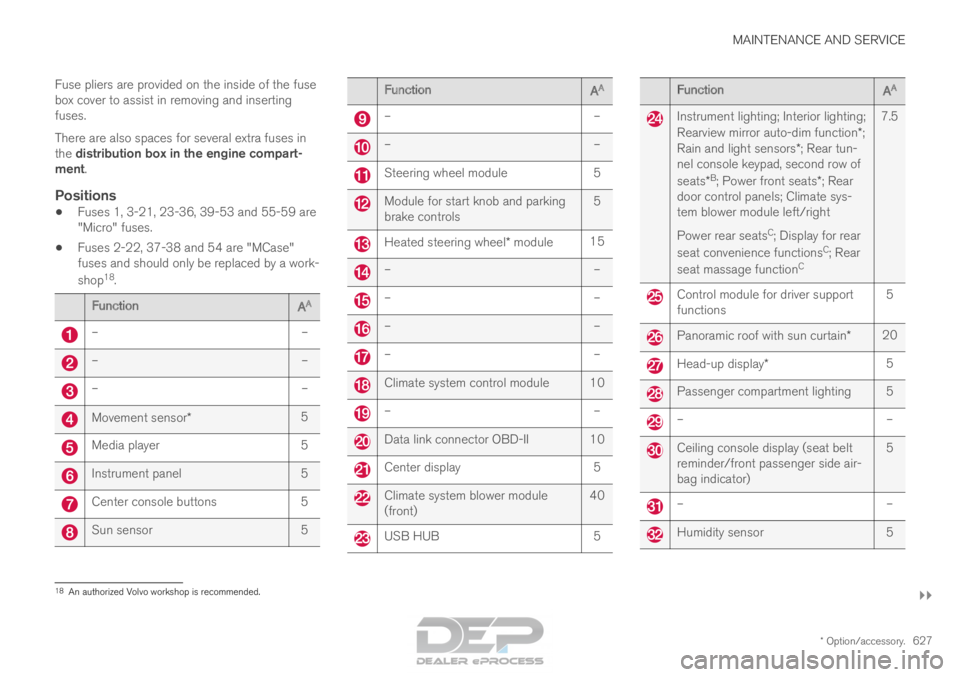
Positions
•
Fuses 1, 3-21, 23-36, 39-53 and 55-59 are
"Micro" fuses.
• Fuses 2-22, 37-38 and 54 are "MCase"
fuses and should only be replaced by a work-
shop 18
. Function
AA –
––
––
–Movement sensor*
5Media player
5Instrument panel
5Center console buttons
5Sun sensor
5 Function
AA –
– –
– Steering wheel module
5 Module for start knob and parking
brake controls
5 Heated steering wheel* module
15 –
– –
– –
– –
– Climate system control module 10
–
– Data link connector OBD-II 10
Center display
5 Climate system blower module
(front)
40 USB HUB
5 Function
AA Instrument lighting; Interior lighting;
Rearview mirror auto-dim function*;
Rain and light sensors*; Rear tun-
nel console keypad, second row of
seats* B
; Power front seats*; Rear
door control panels; Climate sys-
tem blower module left/right
Power rear seats C
; Display for rear
seat convenience functions C
; Rear
seat massage function C7.5 Control module for driver support
functions
5 Panoramic roof with sun curtain*
20 Head-up display*
5 Passenger compartment lighting 5
–
– Ceiling console display (seat belt
reminder/front passenger side air-
bag indicator)
5 –
– Humidity sensor
518
An authorized Volvo workshop is recommended.
Page 643 of 686

MAINTENANCE AND SERVICE
641
Automatic car washes
The vehicle should be washed as soon as it
becomes dirty. This makes the vehicle easier to
clean because dirt does not attach as strongly. It
also reduces the risk of scratches and keeps the
vehicle looking new.
Automatic car washesAn automatic car wash is a fast and easy way to
keep your vehicle clean, but it does not reach all
areas of the vehicle. For best results, Volvo rec-
ommends hand washing your vehicle or supple-
menting automatic car washes with a hand wash.
NOTE
Volvo recommends not washing the vehicle in
an automatic car wash during the first few
months; the paintwork on new vehicles takes
some time to fully harden.
CAUTION
Before driving the vehicle into a car wash,
deactivate the Automatic Braking when Sta-
tionary and Automatic Parking Brake Applica-
tion functions. If the functions are not deacti-
vated, the brake system will seize when the
vehicle is stationary and the vehicle will not be
able to roll.
CAUTION For automatic car washes in which the vehicle
is pulled forward on rolling wheels:
1.
Before washing the vehicle, make sure
that the automatic rain sensor is deacti-
vated. If it is not deactivated and inadver-
tently starts, the wiper arms could be
damaged.
2. To help prevent damage from the auto- matic car wash machinery, make sure
that the door mirrors are folded in, anten-
nas retracted or removed, and any auxili-
ary lights secured.
3. Drive into the automatic car wash.
4. Turn off the "Automatic Braking when Stationary" function using the switch in
the tunnel console.
5. Turn off the "Automatic Parking Brake Application" function in the center dis-
play's Top view.
6. Turn off the engine by turning the start knob in the tunnel console clockwise.
Hold the knob in position for at least
2 seconds.
The vehicle is now ready for the automatic car
wash.
CAUTION The system will automatically change to P
mode if the above steps are not followed. In P
mode, the wheels are locked, which they
should not be when the vehicle is being
washed in a car wash.
Related information
•
Cleaning the exterior (p. 638)
• Polishing and waxing (p. 639)
• Hand washing (p. 639)
• High-pressure washing (p. 642)
• Cleaning the wiper blades (p. 642)
• Cleaning exterior plastic, rubber and trim
components (p. 643)
• Cleaning rims (p. 644)
• Corrosion protection (p. 644)
Page 672 of 686
INDEX
670Cooling system
overheating 468
Corner Traction Control 274
Corrosion protection 644
Covering cargo compartment 590
Crash, see Collision 42
Crash event data 33
Cross Traffic Alert – CTA 353, 354, 355, 356
Cruise control 286, 287 manage speed 287, 288
temporary deactivation 289, 290
turn off 290
CTA – Cross Traffic Alert 353, 354, 355, 356
Curb weight 659
CZIP (Clean Zone Interior Package) 206
D Data
recording
33
transferring between vehicle and work-
shop 600
Data sharing 536
Daytime running lights 154 Decals
location of
654
Defrosting 220
Detection of cyclist 339
Dimensions 657
Dipstick, electronic 611
Direction of rotation 552
Display lighting 164
Distance Alert 291, 292, 293
limitations 294
DivX ®
512
Door mirrors 169, 171
compass 481, 482
dimming 170
outer 169, 171
power folding 171
resetting 171
Driveline transmission 438
Drive mode 445
changing 449
Driver Alert Control 362
operation 363, 364
Driver Alert Control limitations 364
Driver performance 92 Driver profile
137
edit 139
select 138
Driver support system 272
Drive systems 443
Driving cooling system 468
with a trailer 472
Driving economy 456
Driving through standing water 462
driving with a trailer towball load 660
towing capacity 660
E Economical driving
456
Electrical outlet
582
use 584
Electrical system 615
Electric drive motor specifications 661
electric motor 443 Driving 457
Range 458
Electric parking brake 432
Page 677 of 686
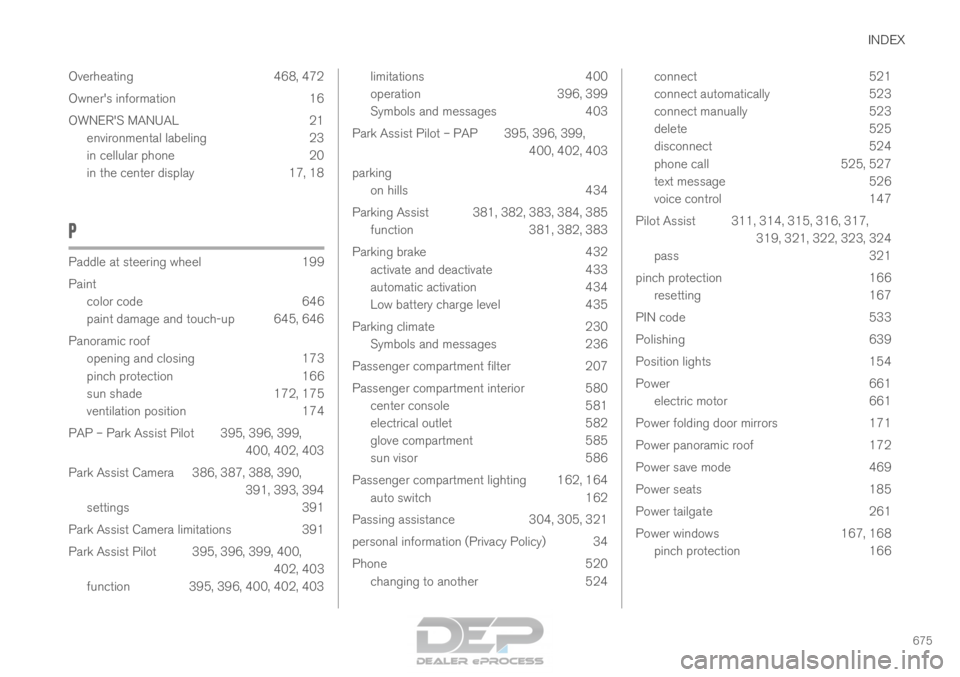
INDEX
675
Overheating 468, 472
Owner's information 16
OWNER'S MANUAL 21
environmental labeling 23
in cellular phone 20
in the center display 17, 18
P Paddle at steering wheel
199
Paint color code
646
paint damage and touch-up 645, 646
Panoramic roof opening and closing 173
pinch protection 166
sun shade 172, 175
ventilation position 174
PAP – Park Assist Pilot 395, 396, 399, 400, 402, 403
Park Assist Camera 386, 387, 388, 390, 391, 393, 394
settings 391
Park Assist Camera limitations 391
Park Assist Pilot 395, 396, 399, 400, 402, 403
function 395, 396, 400, 402, 403 limitations
400
operation
396, 399
Symbols and messages 403
Park Assist Pilot – PAP 395, 396, 399, 400, 402, 403
parking on hills 434
Parking Assist 381, 382, 383, 384, 385 function 381, 382, 383
Parking brake 432 activate and deactivate 433
automatic activation 434
Low battery charge level 435
Parking climate 230 Symbols and messages 236
Passenger compartment filter 207
Passenger compartment interior 580 center console 581
electrical outlet 582
glove compartment 585
sun visor 586
Passenger compartment lighting 162, 164 auto switch 162
Passing assistance 304, 305, 321
personal information (Privacy Policy) 34
Phone 520 changing to another 524 connect
521
connect automatically 523
connect manually 523
delete 525
disconnect 524
phone call 525, 527
text message 526
voice control 147
Pilot Assist 311, 314, 315, 316, 317, 319, 321, 322, 323, 324
pass 321
pinch protection 166
resetting 167
PIN code 533
Polishing 639
Position lights 154
Power 661
electric motor 661
Power folding door mirrors 171
Power panoramic roof 172
Power save mode 469
Power seats 185
Power tailgate 261
Power windows 167, 168
pinch protection 166
Page 680 of 686
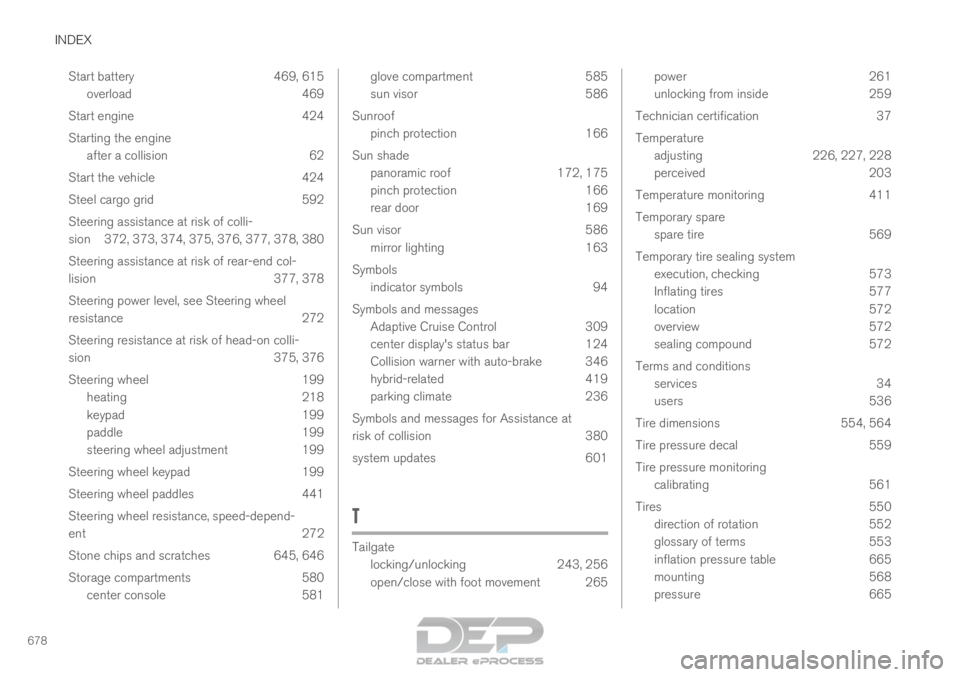
INDEX
678Start battery 469, 615
overload 469
Start engine 424
Starting the engine after a collision 62
Start the vehicle 424
Steel cargo grid 592
Steering assistance at risk of colli-
sion 372, 373, 374, 375, 376, 377, 378, 380
Steering assistance at risk of rear-end col-
lision 377, 378
Steering power level, see Steering wheel
resistance 272
Steering resistance at risk of head-on colli-
sion 375, 376
Steering wheel 199 heating 218
keypad 199
paddle 199
steering wheel adjustment 199
Steering wheel keypad 199
Steering wheel paddles 441
Steering wheel resistance, speed-depend-
ent 272
Stone chips and scratches 645, 646
Storage compartments 580 center console 581 glove compartment
585
sun visor
586
Sunroof pinch protection 166
Sun shade panoramic roof 172, 175
pinch protection 166
rear door 169
Sun visor 586 mirror lighting 163
Symbols indicator symbols 94
Symbols and messages Adaptive Cruise Control 309
center display's status bar 124
Collision warner with auto-brake 346
hybrid-related 419
parking climate 236
Symbols and messages for Assistance at
risk of collision 380
system updates 601
T Tailgate
locking/unlocking
243, 256
open/close with foot movement 265 power
261
unlocking from inside
259
Technician certification 37
Temperature adjusting 226, 227, 228
perceived 203
Temperature monitoring 411
Temporary spare spare tire 569
Temporary tire sealing system execution, checking 573
Inflating tires 577
location 572
overview 572
sealing compound 572
Terms and conditions services 34
users 536
Tire dimensions 554, 564
Tire pressure decal 559
Tire pressure monitoring calibrating 561
Tires 550
direction of rotation 552
glossary of terms 553
inflation pressure table 665
mounting 568
pressure 665