parking brake VOLVO XC90 TWIN ENGINE 2018 User Guide
[x] Cancel search | Manufacturer: VOLVO, Model Year: 2018, Model line: XC90 TWIN ENGINE, Model: VOLVO XC90 TWIN ENGINE 2018Pages: 686, PDF Size: 17 MB
Page 194 of 686

SEATS AND STEERING WHEEL
* Option/accessory.
192 •
Adjusting front seat side bolster settings*
(p. 190)
• Adjusting front seat lumbar support* (p. 190) Folding the second row backrests
The second row of seats has three individual
seating positions. The backrests can be folded
down separately.
WARNING •
Adjust the seat and ensure it locks into
position before driving. Use caution when
adjusting the seat. Uncontrolled or care-
less adjustments could lead to injury.
• Long objects must always be securely
tied down to help prevent injury or dam-
age in the event of sudden braking.
• Always turn off the engine and apply the
parking brake when loading or unloading
the vehicle.
• Put the gear selector in P to help prevent
the gear selector from being inadvertently
moved.
CAUTION When the backrest is folded down, make sure
there are no objects in the rear seat, and the
seat belts are not buckled. Otherwise there is
a risk of damage to the upholstery.
CAUTION The seat cushion of the integrated child
restraint* must be in the stowed position
before the center seat backrest can be folded
down.
The armrest* in the center seat must be
raised before the seat backrest is folded
down.
If the vehicle has private locking*, the ski
hatch must be closed before the seat back-
rest is folded down.
NOTE The front seats may need to be pushed for-
ward and/or the backrest adjusted so that the
rear seat backrests can be fully lowered.
The rear seats may also need to be moved
rearward.
The seats in the second row must be in the
upright position before they can be folded
down completely. They should not be folded
down when they are tilted forward to access
the third row of seats.
Page 198 of 686

||SEATS AND STEERING WHEEL
* Option/accessory.
196
WARNING •
Adjust the seat and ensure it locks into
position before driving. Use caution when
adjusting the seat. Uncontrolled or care-
less adjustments could lead to injury.
• Long objects must always be securely
tied down to help prevent injury or dam-
age in the event of sudden braking.
• Always turn off the engine and apply the
parking brake when loading or unloading
the vehicle.
• Put the gear selector in P to help prevent
the gear selector from being inadvertently
moved.
Related information
• Folding the second row backrests (p. 192)
• Adjusting the second row head restraints
(p. 194)
• Adjusting the second row backrest tilt
(p. 196)
• Getting into and out of the third row of
seats* (p. 197)
• Folding the third row backrests* (p. 198) Adjusting the second row backrest
tilt
Backrest tilt can be adjusted separately for each
seat in the second row.
Center seat 1. Pull the strap on the right side of the center
seat.
2.
Adjust backrest tilt forward/backward by
decreasing/increasing pressure on the back-
rest.
3. Release the strap to lock the backrest in its new position and press on the backrest until
the lock engages.
Check to make sure the seat is securely locked
into place after its position has been changed.
Outboard seats 1. Pull the handle on the side of the seat
upward.
2.
Adjust backrest tilt forward/backward by
decreasing/increasing pressure on the back-
rest.
3. Release the handle to lock the backrest in its new position and press on the backrest until
the lock engages.
Check to make sure the seat is securely locked
into place after its position has been changed.
Page 199 of 686

SEATS AND STEERING WHEEL
* Option/accessory.197
WARNING•
Adjust the seat and ensure it locks into
position before driving. Use caution when
adjusting the seat. Uncontrolled or care-
less adjustments could lead to injury.
• Long objects must always be securely
tied down to help prevent injury or dam-
age in the event of sudden braking.
• Always turn off the engine and apply the
parking brake when loading or unloading
the vehicle.
• Put the gear selector in P to help prevent
the gear selector from being inadvertently
moved.
Related information
• Folding the second row backrests (p. 192)
• Adjusting the second row head restraints
(p. 194)
• Moving the second row seats forward/rear-
ward* (p. 195)
• Getting into and out of the third row of
seats* (p. 197)
• Folding the third row backrests* (p. 198) Getting into and out of the third row
of seats*
The second row of seats can be adjusted for
easier access to the third row of seats*. To fold down the backrest:
1.
Pull the handle on the upper side of the right
or left outboard second row seat upward/
forward.
2. Fold the backrest down and move the entire seat forward.
To return the seat to the upright position:
– Push the seat rearward to its end position.
The backrest should then easily return to the
correct position.
NOTE If a backrest in the second row of seats does
not lock back into the upright position after
being folded down (e.g. for getting in or out of
the third row of seats), it may need to be
pushed forward again and then pushed back
with more force.
WARNING
Make sure that the rear seat backrest and
head restraint are locked securely in place
after the seat is folded up.
The head restraints at the outer seats must
always be raised when there is a passenger in
one of these spots of the rear seat.
Related information
•
Folding the second row backrests (p. 192)
• Adjusting the second row head restraints
(p. 194)
• Moving the second row seats forward/rear-
ward* (p. 195)
• Adjusting the second row backrest tilt
(p. 196)
• Folding the third row backrests* (p. 198)
Page 274 of 686
DRIVER SUPPORT
* Option/accessory.
272 Driver support systems
The vehicle is equipped with a number of driver
support systems that can provide the driver with
active or passive assistance in various situations.
The system can, for example, help the driver
maintain a set speed or a set time interval to the
vehicle ahead, help prevent a collision by warning
the driver and applying the brakes, or assist the
driver while parking.
Some of the systems are standard and others are
options. This also varies from market to market.
Related information
• Speed-dependent steering wheel resistance
(p. 272)
• Electronic Stability Control (p. 274)
• Stability system Roll Stability Control
(p. 273)
• Rear Collision Warning (p. 347)
• Speed limiter (p. 278)
• Cruise control (p. 286)
• Distance Alert* (p. 291)
• Adaptive Cruise Control* (p. 295)
• Pilot Assist (p. 311)
• Radar sensor (p. 326)
• Camera (p. 331)
• City Safety™ (p. 335)
• BLIS* (p. 348) •
Cross Traffic Alert* (p. 353)
• Road Sign Information* (p. 357)
• Driver Alert Control (p. 362)
• Lane Keeping Aid (p. 364)
• Steering assistance at risk of collision
(p. 372)
• Park Assist* (p. 381)
• Park Assist Camera* (p. 386)
• Park Assist Pilot* (p. 395) Speed-dependent steering wheel
resistance
Speed-dependent power steering increases the
steering wheel resistance in pace with the vehi-
cle's speed to give the driver an enhanced feel-
ing of control and stability.
Steering may feel stiffer on highways. When
parking and at low speeds, it will be easier to
move the steering wheel.
NOTE In some situations, the power steering may
become too hot and require temporary cool-
ing – during such time the power steering will
work at reduced output and the steering
wheel may feel more difficult to move.
In parallel with the temporarily reduced steer-
ing assistance, the driver display shows a
message as well as a STEERING WHEEL
symbol.
Page 305 of 686
DRIVER SUPPORT
}}
303
To temporarily deactivate Adaptive Cruise Control
and put it in standby mode:
– Press the button on the steering wheel
(2).
> The symbol in the instrument panel
changes color from WHITE to GRAY and
the set speed in the center of the speed-
ometer will change from BEIGE to GRAY.
WARNING •
If Adaptive Cruise Control is in standby
mode, the driver must intervene and regu-
late both speed and distance to the vehicle
ahead.
• If the vehicle comes too close to a vehicle
ahead when Adaptive Cruise Control is in
standby mode, the driver is instead warned
of the short distance by the Distance Alert
function.
Standby mode due to action by the driver
Adaptive Cruise Control will be temporarily deac-
tivated and put in standby mode if:
• the brakes are applied.
• the gear selector is moved to N
• the vehicle is driven faster than the set
speed for more than 1 minute Temporarily increasing speed using the accelera-
tor pedal, e.g. when passing another vehicle, will
not affect the setting. The vehicle will return to
the set speed when the accelerator pedal is
released.
Automatic standby mode
Adaptive Cruise Control is dependent on other
systems, such as Electronic Stability Control
(ESC 50
). If any of these other systems stops
working, Adaptive Cruise Control will automati-
cally switch off.
WARNING With automatic standby mode, the driver is
warned by an acoustic signal and a message
on the instrument panel.
•
The driver must then regulate vehicle
speed, apply the brakes if necessary, and
maintain a safe distance to other vehicles.
Adaptive Cruise Control may go into standby
mode if: • your vehicle's speed goes below 5 km/h
(3 mph) and ACC cannot determine if the
vehicle ahead is stationary or if it is another
object, e.g. a speed bump.
• your vehicle's speed goes under 5 km/h
(3 mph) and the vehicle ahead turns so that
ACC no longer has a vehicle to follow. •
the driver opens the door.
• the driver unbuckles the seat belt.
• the engine speed (rpm) is too low/high.
• one or more of the wheels lose traction.
• the brake temperature is high.
• the parking brake is applied.
• the camera/radar sensor is covered by snow
or heavy rain (the camera lens/radar waves
are blocked)
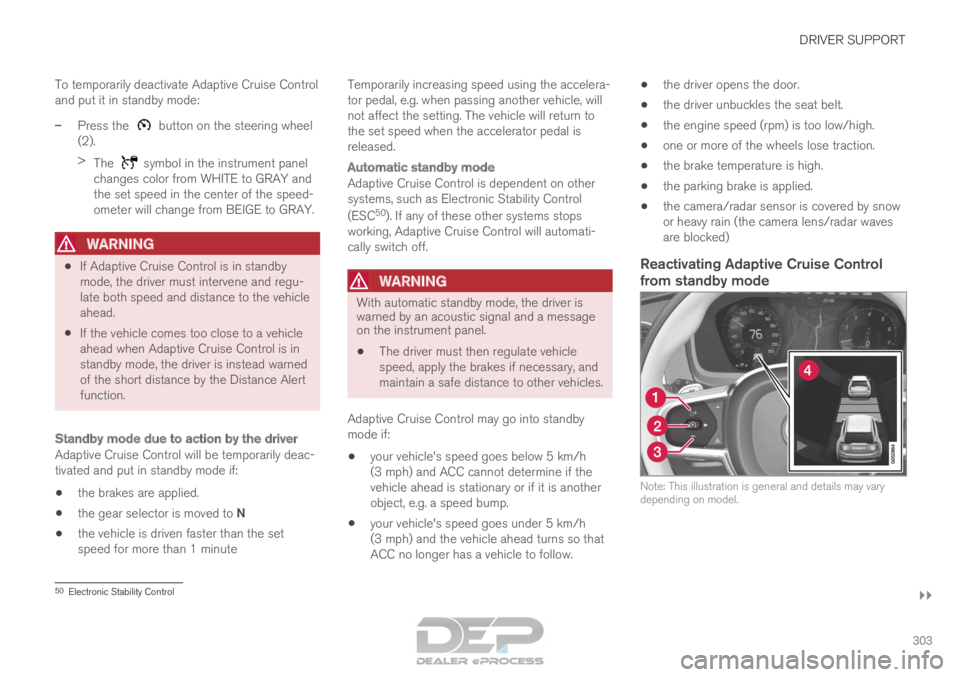
Reactivating Adaptive Cruise Control
from standby mode Note: This illustration is general and details may vary
depending on model.
50
Electronic Stability Control
Page 307 of 686
DRIVER SUPPORT
* Option/accessory.305
Limitations of passing assistance
with Adaptive Cruise Control
Passing assistance functionality may be reduced
in certain situations.
WARNING The driver should be aware that if conditions
suddenly change when using Parking Assis-
tance, the function may implement an unde-
sired acceleration in certain conditions.
Some situations should be avoided, e.g. if:
•
the vehicle is approaching an exit in the
same direction as passing would normally
occur
• the vehicle ahead slows before your vehi-
cle has had time to switch to the passing
lane
• traffic in the passing lane slows down
• a vehicle for right-hand traffic is driven in
a country with left-hand traffic (or vice
versa).
Situations of this type can be avoided by tempo-
rarily putting ACC 53
in standby mode.
Related information
• Adaptive Cruise Control* (p. 295) Switching target vehicles with
Adaptive Cruise Control
At certain speeds, models with automatic trans-
missions and Adaptive Cruise Control (ACC 54
)
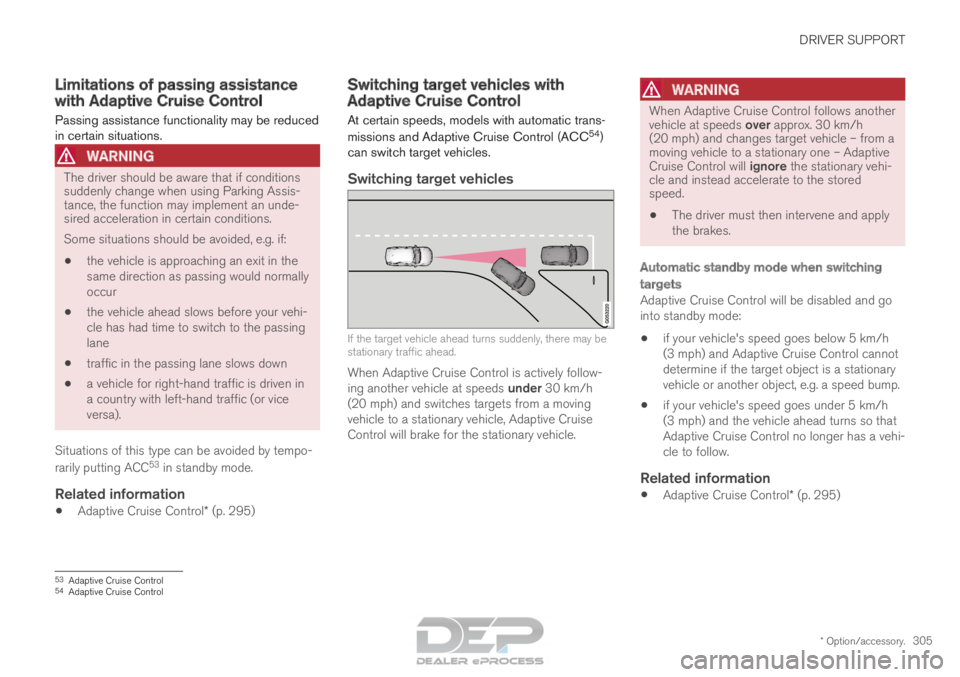
can switch target vehicles.
Switching target vehicles If the target vehicle ahead turns suddenly, there may be
stationary traffic ahead.
When Adaptive Cruise Control is actively follow-
ing another vehicle at speeds under 30 km/h
(20 mph) and switches targets from a moving
vehicle to a stationary vehicle, Adaptive Cruise
Control will brake for the stationary vehicle.
WARNING When Adaptive Cruise Control follows another
vehicle at speeds over approx. 30 km/h
(20 mph) and changes target vehicle – from a
moving vehicle to a stationary one – Adaptive
Cruise Control will ignore the stationary vehi-
cle and instead accelerate to the stored
speed.
•
The driver must then intervene and apply
the brakes.
Automatic standby mode when switching
targets
Adaptive Cruise Control will be disabled and go
into standby mode:
• if your vehicle's speed goes below 5 km/h
(3 mph) and Adaptive Cruise Control cannot
determine if the target object is a stationary
vehicle or another object, e.g. a speed bump.
• if your vehicle's speed goes under 5 km/h
(3 mph) and the vehicle ahead turns so that
Adaptive Cruise Control no longer has a vehi-
cle to follow.
Related information
•
Adaptive Cruise Control* (p. 295) 53
Adaptive Cruise Control
54 Adaptive Cruise Control
Page 308 of 686

DRIVER SUPPORT
* Option/accessory.
306 Automatic braking with Adaptive
Cruise Control
The Adaptive cruise control (ACC
55
) has a spe-
cial brake function in slow traffic and while sta-
tionary.
Braking function in slow traffic and at a
standstill
In slow-moving, stop-and-go traffic or when stop-
ped at a traffic light, driving will resume automati-
cally if the vehicle is stopped for less than
approx. 3 seconds. If it takes more than 3 sec-
onds for the vehicle ahead to begin moving again,
Adaptive Cruise Control will go into standby
mode and the Auto-hold brake function will acti-
vate.
– Adaptive Cruise Control can be reactivated in
one of the following ways:
• Pressing the button on the steering
wheel keypad.
• Pressing the accelerator pedal.
>
Adaptive Cruise Control will resume fol-
lowing the vehicle ahead if it begins to
move within approx. 6 seconds.
NOTE ACC can keep the vehicle stationary for no
more than 5 minutes – after that time the
parking brake is applied and Adaptive Cruise
Control is deactivated.
The parking brake must be released before
Adaptive Cruise Control can be reactivated.
Deactivation of the Auto-hold brake function
In certain situations, Auto-hold will be deactivated
when the vehicle is at a standstill and Adaptive
Cruise Control will go into standby mode. This
means that the brakes will be released and the
vehicle could begin to roll. The driver must
actively apply the brakes to keep the vehicle sta-
tionary.
This can occur if:
• the driver depresses the brake pedal
• the parking brake is applied
• the gear selector is moved to the
P
, N
or R
positions
• the driver puts Adaptive Cruise Control in
standby mode.
Auto Activate Parking BrakeIn certain situations, the parking brake will be
applied to keep the vehicle at a standstill. This occurs if Adaptive Cruise Control is keeping
the vehicle stationary using the brakes and:
• the driver opens the door or unbuckles
his/her seat belt
• ACC has kept the vehicle at a standstill for
more than approx. 5 minutes
• the brakes overheat
• the driver switches off the engine manually.
Related information
•
Adaptive Cruise Control* (p. 295) 55
Adaptive Cruise Control
Page 322 of 686
||DRIVER SUPPORT
320
Automatic standby mode
Pilot Assist is dependent on other systems, such
as Electronic Stability Control (ESC
66
). If any of
these other systems stops working, Pilot Assist
will automatically switch off.
WARNING With automatic standby mode, the driver is
warned by an acoustic signal and a message
on the instrument panel.
•
The driver must then regulate vehicle
speed, apply the brakes if necessary, and
maintain a safe distance to other vehicles.
Adaptive Cruise Control may go into standby
mode if, e.g.:
• the driver opens the door.
• the brake temperature is high.
• the driver's hands are not on the steering
wheel.
• the parking brake is applied.
• the engine speed (rpm) is too low/high.
• the driver unbuckles the seat belt.
• one or more of the wheels lose traction.
• the camera/radar sensor is covered by snow
or heavy rain (the camera lens/radar waves
are blocked) •
your vehicle's speed goes below 5 km/h
(3 mph) and Pilot Assist cannot determine if
the vehicle ahead is stationary or if it is
another object, e.g. a speed bump.
• your vehicle's speed goes under 5 km/h
(3 mph) and the vehicle ahead turns so that
Pilot Assist no longer has a vehicle to follow.
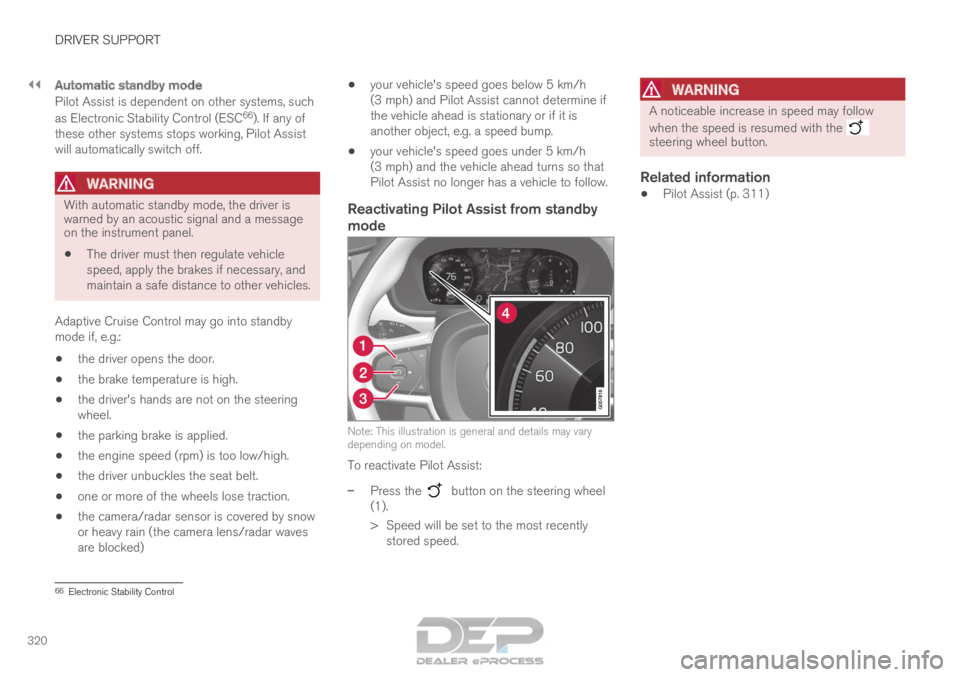
Reactivating Pilot Assist from standby
mode Note: This illustration is general and details may vary
depending on model.
To reactivate Pilot Assist:
–
Press the button on the steering wheel
(1).
>
Speed will be set to the most recently
stored speed.
WARNING A noticeable increase in speed may follow
when the speed is resumed with the
steering wheel button.
Related information
•
Pilot Assist (p. 311) 66
Electronic Stability Control
Page 324 of 686

DRIVER SUPPORT
322Switching target vehicles with Pilot
Assist
At certain speeds, models with automatic trans-
missions and
Pilot Assist can switch target vehi-
cles.
Switching target vehicles If the target vehicle ahead turns suddenly, there may be
stationary traffic ahead.
When Pilot Assist is actively following another
vehicle at speeds under 30 km/h (20 mph) and
switches targets from a moving vehicle to a sta-
tionary vehicle,
Pilot Assist will brake for the sta-
tionary vehicle.
WARNING When Pilot Assist follows another vehicle at
speeds over approx. 30 km/h (20 mph) and
changes target vehicle – from a moving vehi-
cle to a stationary one – Pilot Assist will
ignore the stationary vehicle and instead
accelerate to the stored speed.
• The driver must then intervene and apply
the brakes.
Automatic standby mode when switching
targets
Pilot Assist disengages and goes into standby
mode if:
• your vehicle's speed goes below 5 km/h
(3 mph) and Pilot Assist cannot determine if
the target object is a stationary vehicle or
another object, e.g. a speed bump.
• your vehicle's speed goes under 5 km/h
(3 mph) and the vehicle ahead turns so that
Pilot Assist no longer has a vehicle to follow.
Related information
•Pilot Assist (p. 311) Automatic braking with Pilot Assist
Pilot Assist has a special braking function in
slow traffic and at a standstill.
Braking function in slow traffic and at a
standstill
In slow-moving, stop-and-go traffic or when stop-
ped at a traffic light, driving will resume automati-
cally if the vehicle is stopped for less than
approx. 3 seconds. If it takes more than 3 sec-
onds for the vehicle ahead to begin moving again,
Pilot Assist will go into standby mode and the
Auto-hold brake function will activate.
– Pilot Assist can be reactivated by:
• Pressing the button on the steering
wheel keypad.
• Pressing the accelerator pedal.
>
Pilot Assist will resume following the vehi-
cle ahead if it begins to move within
approx. 6 seconds.
NOTE Pilot Assist can keep the vehicle stationary
for no more than 5 minutes – after that time
the parking brake is applied and the function
is deactivated.
The parking brake must be released before
Pilot Assist can be reactivated.
Page 325 of 686
DRIVER SUPPORT
}}}}
323
Deactivation of the Auto-hold brake function
In certain situations, Auto-hold will be deactivated
when the vehicle is at a standstill and Pilot Assist
will go into standby mode. This means that the
brakes will be released and the vehicle could
begin to roll. The driver must actively apply the
brakes to keep the vehicle stationary.
This can occur if:
• the driver depresses the brake pedal
• the parking brake is applied
• the gear selector is moved to the P, N or R
positions
• the driver puts Pilot Assist in standby mode.
Auto Activate Parking BrakeIn certain situations, the parking brake will be
applied to keep the vehicle at a standstill.
This occurs if Pilot Assist is keeping the vehicle
stationary using the brakes and:
• the driver opens the door or unbuckles
his/her seat belt
• Pilot Assist has kept the vehicle at a stand-
still for more than approx. 5 minutes
• the brakes overheat
• the driver switches off the engine manually.
Related information
•Pilot Assist (p. 311) Pilot Assist limitations
Pilot Assist functionality may be reduced in cer-
tain situations.
Pilot Assist is a driver support function designed
to simplify driving and assist the driver in many
situations. However, the driver is always responsi-
ble for maintaining a suitable distance to vehicles
or objects around it and ensuring that the vehicle
is correctly positioned in the traffic lane.
WARNING In some situations, Pilot Assist may have trou-
ble helping the driver properly or may be
deactivated automatically – we advise against
using Pilot Assist in such cases. Examples of
such situations include:
• the lane markings are worn, missing or
cross each other.
• lane division is unclear, for example, when
the lanes divide or merge or at exits or
when there are multiple sets of markings.
• edges or other lines than lane markings
are present on or near the road, e.g.
curbs, joints or repairs to the road sur-
face, edges of barriers, roadside edges or
strong shadows.
• the lane is narrow or winding.
• the lane contains ridges or holes.
• weather conditions are poor, e.g. rain,
snow or fog or slush or reduced visibility
with poor light conditions, backlighting,
wet road surface, etc.
The driver should also note that Pilot Assist
has the following limitations:
• High curbs, roadside barriers, temporary
obstacles (traffic cones, safety barriers,
etc.) are not detected. Alternatively, they
may be detected incorrectly as lane mark-
ings, with a subsequent risk of contact
between the vehicle and such obstacles.