service VOLVO XC90 TWIN ENGINE 2018 Owners Manual
[x] Cancel search | Manufacturer: VOLVO, Model Year: 2018, Model line: XC90 TWIN ENGINE, Model: VOLVO XC90 TWIN ENGINE 2018Pages: 686, PDF Size: 17 MB
Page 4 of 686
2
OWNER'S INFORMATION
Owner's information16
Owner's Manual in the center display17
Navigate in the Owner's Manual inthe center display18
Owner's manual in mobile devices20
Volvo Cars support site20
Using the Owner's Manual21
The Owner's Manual and the envi-ronment23
YOUR VOLVO
Contacting Volvo26
Volvo ID26
Creating and registering a Volvo ID27
Drive-E ‒ purer driving pleasure27
IntelliSafe - driver support28
Sensus - connection and entertainment30
Software Updates33
Data recording33
Terms & Conditions for Services34
Customer Privacy Policy34
Important information on accessoriesand extra equipment35
Accessory installation36
Connecting equipment to the vehi-cle's data link connector36
Technician certification37
Viewing the Vehicle IdentificationNumber (VIN)38
Volvo Structural Parts Statement38
Driver distraction39
SAFETY
Safety42
Safety during pregnancy43
Occupant safety43
Reporting safety defects44
Recall information45
Whiplash Protection System46
Seat belts47
Buckling and unbuckling seat belts48
Seat belt tensioners50
Resetting the electric seat belt ten-sioners51
Door and seat belt reminders51
Airbags52
Driver/passenger-side airbags53
Occupant weight sensor56
Side airbags60
Inflatable curtain60
Safety mode61
Starting and moving the vehiclewhen it is in safety mode62
Child safety63
Child restraints65
Infant seats67
Convertible seats69
Booster cushions71
TABLE OF CONTENTS
Page 15 of 686
13
LOADING, STORAGE AND
PASSENGER COMPARTMENT
Passenger compartment interior580
Tunnel console581
Electrical outlets582
Using the electrical outlets584
Using the glove compartment585
Sun visors586
Cargo compartment586
Loading recommendations586
Roof loads and load carriers588
Grocery bag holders588
Load anchoring eyelets589
Installing and removing the cargocompartment cover*589
Operating the cargo compartment cover*590
Installing and removing the steelcargo grid*592
Installing and removing the cargo net*593
MAINTENANCE AND SERVICE
Volvo's service program598
Data transfer between vehicle andworkshop over Wi-Fi600
Download Center601
Handling system updates via Down-load Center601
Vehicle status602
Scheduling service and repairs603
Sending vehicle information to theworkshop604
Hoisting the vehicle605
Opening and closing the hood607
Climate control system service608
Replacing a windshield with head-updisplay*608
Engine compartment overview609
Engine oil610
Checking and filling engine oil611
Refilling coolant612
Replacing bulbs613
Bulb specifications614
Start battery615
Hybrid battery619
Battery symbols620
Fuses and fuseboxes620
Replacing fuses621
Fuses in the engine compartment622
Fuses under the glove compartment626
Fuses in the cargo compartment629
Cleaning the interior633
Cleaning the center display633
Cleaning the head-up display*634
Cleaning fabric upholstery and ceil-ing liner635
Cleaning the seat belt635
Cleaning floor mats and inlay mats635
Cleaning leather upholstery636
Cleaning the leather steering wheel637
Cleaning interior plastic, metal andwood surfaces638
Cleaning the exterior638
Polishing and waxing639
Hand washing639
Automatic car washes641
High-pressure washing642
Cleaning the wiper blades642
Cleaning exterior plastic, rubber andtrim components643
Cleaning rims644
Corrosion protection644
Paintwork645
Page 16 of 686
14
Touching up minor paint damage645
Color codes646
Changing rear window wipers647
Replacing windshield wiper blades648
Windshield wipers in the service position649
Filling washer fluid650
SPECIFICATIONS
Type designations654
Dimensions657
Weights659
Towing capacity and tongue weight660
Engine specifications661
Engine oil specifications662
Coolant specifications663
Transmission fluid specifications663
Brake fluid specifications663
Fuel tank volume664
Air conditioning specifications664
Approved tire pressure665
INDEX
Index667
Page 19 of 686
OWNER'S INFORMATION
}}
17
CAUTION
The driver is always responsible for operatingthe vehicle in a safe manner and adhering toall applicable laws and regulations. It is alsoimportant that the vehicle is operated, main-tained and serviced according to Volvo's rec-ommendations provided in the owner's infor-mation.
If the information in the center display differsfrom the printed information, the printed infor-mation always takes precedence.
NOTE
Changing languages in the center displaycould mean that certain owner's informationwill not comply with national or local laws andregulations. Do not change to a language thatyou do not fully understand, as this couldmake it difficult to navigate back through themenu.
Related information
•Owner's Manual in the center display(p. 17)
•Owner's manual in mobile devices (p. 20)
•Volvo Cars support site (p. 20)
•Using the Owner's Manual (p. 21)
Owner's Manual in the centerdisplay
A digital version of the Owner's Manual is availa-
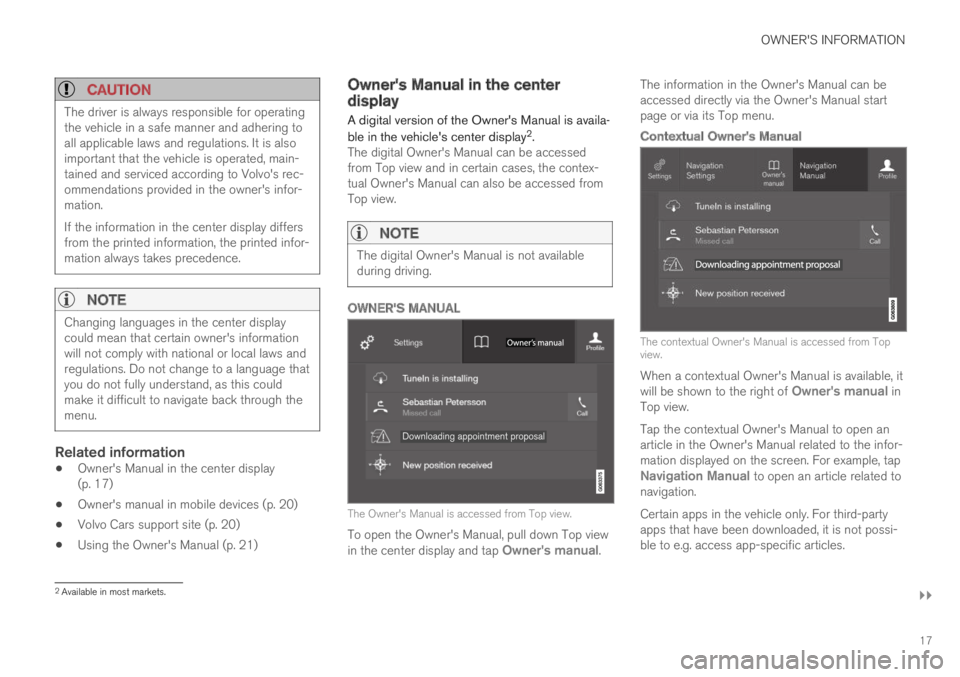
ble in the vehicle's center display2.The digital Owner's Manual can be accessedfrom Top view and in certain cases, the contex-tual Owner's Manual can also be accessed fromTop view.
NOTE
The digital Owner's Manual is not availableduring driving.
OWNER'S MANUAL
The Owner's Manual is accessed from Top view.
To open the Owner's Manual, pull down Top viewin the center display and tap Owner's manual.
The information in the Owner's Manual can beaccessed directly via the Owner's Manual startpage or via its Top menu.
Contextual Owner's Manual
The contextual Owner's Manual is accessed from Topview.
When a contextual Owner's Manual is available, itwill be shown to the right of Owner's manual inTop view.
Tap the contextual Owner's Manual to open anarticle in the Owner's Manual related to the infor-mation displayed on the screen. For example, tapNavigation Manual to open an article related tonavigation.
Certain apps in the vehicle only. For third-partyapps that have been downloaded, it is not possi-ble to e.g. access app-specific articles.
2Available in most markets.
Page 22 of 686
OWNER'S INFORMATION
* Option/accessory.20
Owner's manual in mobile devices
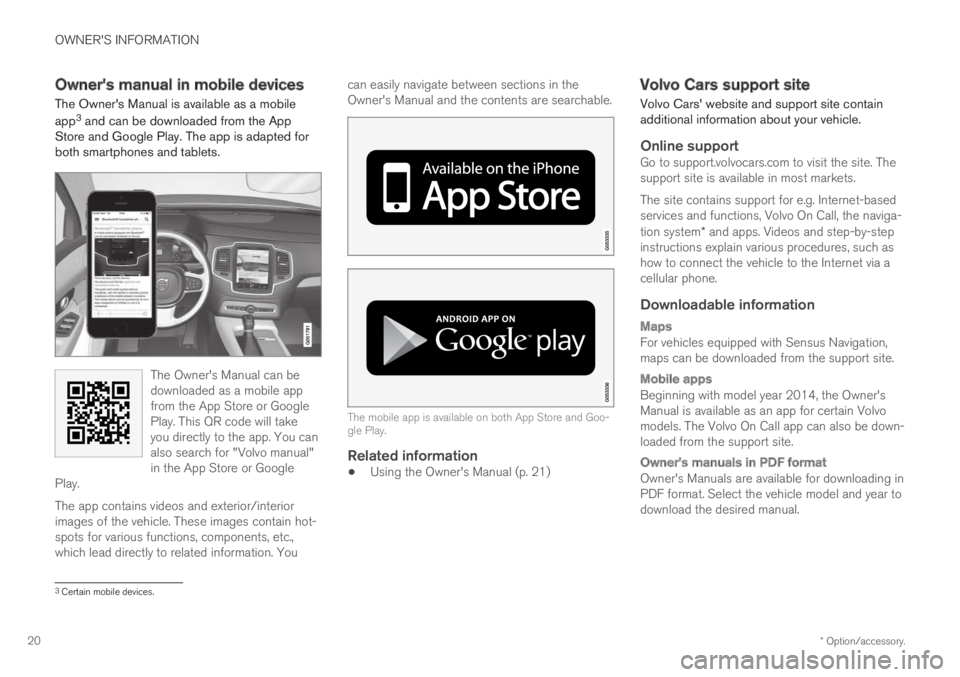
The Owner's Manual is available as a mobile
app3 and can be downloaded from the AppStore and Google Play. The app is adapted forboth smartphones and tablets.
The Owner's Manual can bedownloaded as a mobile appfrom the App Store or GooglePlay. This QR code will takeyou directly to the app. You canalso search for "Volvo manual"in the App Store or GooglePlay.
The app contains videos and exterior/interiorimages of the vehicle. These images contain hot-spots for various functions, components, etc.,which lead directly to related information. You
can easily navigate between sections in theOwner's Manual and the contents are searchable.
The mobile app is available on both App Store and Goo-gle Play.
Related information
•Using the Owner's Manual (p. 21)
Volvo Cars support site
Volvo Cars' website and support site containadditional information about your vehicle.
Online support
Go to support.volvocars.com to visit the site. Thesupport site is available in most markets.
The site contains support for e.g. Internet-basedservices and functions, Volvo On Call, the naviga-tion system* and apps. Videos and step-by-stepinstructions explain various procedures, such ashow to connect the vehicle to the Internet via acellular phone.
Downloadable information
Maps
For vehicles equipped with Sensus Navigation,maps can be downloaded from the support site.
Mobile apps
Beginning with model year 2014, the Owner'sManual is available as an app for certain Volvomodels. The Volvo On Call app can also be down-loaded from the support site.
Owner's manuals in PDF format
Owner's Manuals are available for downloading inPDF format. Select the vehicle model and year todownload the desired manual.
3Certain mobile devices.
Page 28 of 686
YOUR VOLVO
26
Contacting Volvo
Use the following contact information if youwould like to get in touch with Volvo in the Uni-ted States or Canada.
In the USA:
Volvo Car USA, LLC
Customer Care Center
1 Volvo Drive,
P.O. Box 914
Rockleigh, New Jersey 07647
1-800-458-1552
www.volvocars.com/us
In Canada:
Volvo Car Canada Ltd.
Customer Care Centre
9130 Leslie Street, Suite 101
Richmond Hill, Ontario L4B 0B9
1-800-663-8255
www.volvocars.com/ca
Volvo ID
A Volvo ID gives you access to a wide range of
personalized Volvo services1 online.
A Volvo ID can be created from the vehicle or the
Volvo On Call app2. To access certain functionsand services, the vehicle must be registered to apersonal Volvo ID. Registering a Volvo ID to thevehicle gives you access to a wide range of Volvoservices directly from the vehicle.
Examples of services:
•Volvo On Call - Volvo ID is used to log in tothe Volvo On Call app.
•Send to Car - Send an address from anonline map service directly to the vehicle.
•Book service and repairs - Register your pre-ferred workshop/retailer on volvocars.com toschedule service directly from the vehicle.
Advantages of having a Volvo ID
•Only one username and password are nee-ded to access online services (i.e. you onlyneed to remember one username and onepassword).
•If you change your username or password forone service (e.g. Volvo On Call), it will also beautomatically changed for the other services.
Related information
•Creating and registering a Volvo ID (p. 27)
•Scheduling service and repairs (p. 603)
1The services available may vary over time and depending on equipment level and market.2For Volvo On Call users.
Page 29 of 686
YOUR VOLVO
}}
* Option/accessory.27
Creating and registering a Volvo ID
A Volvo ID can be created in two ways. If yourVolvo ID was created with the Volvo On Callapp, the Volvo IDmust also be registered to thevehicle to enable access to the Volvo ID serv-ices.
Creating a Volvo ID using the app
1.Download the Volvo ID app from DownloadCenter in the center display's App view.
2.Start the app and register a personal emailaddress.
3. Follow the instructions that will be sent auto-matically to this email address.
> A Volvo ID has now been created and isautomatically registered to the vehicle.The Volvo ID services can now be used.
Creating a Volvo ID using the Volvo On Call
app 3
1. Download the latest version of the Volvo OnCall app from a smartphone, via e.g. AppStore, Windows Phone or Google Play.
2. On the app's start page, create a Volvo IDand enter a personal email address.
3. Follow the instructions that will be sent auto-matically to this email address.
> A Volvo ID has now been created. Seebelow for information on how the ID isregistered to the vehicle.
Registering your Volvo ID to the vehicle
If your Volvo ID was created using the Volvo OnCall app, follow these steps to register the ID tothe vehicle:
1. If you have not already done so, downloadthe Volvo ID app from Download Center inApp view.
NOTE
To download apps the vehicle must be con-nected to the internet.
2. Start the app and enter your Volvo ID/emailaddress.
3.Follow the instructions that will be automati-cally sent to the email address connected toyour Volvo ID.
> Your Volvo ID has now been registered tothe vehicle. The Volvo ID services can nowbe used.
Related information
•Volvo ID (p. 26)
•Download apps (p. 488)
•Handling system updates via Download Cen-ter (p. 601)
•Internet-connected vehicle* (p. 529)
Drive-E ‒ purer driving pleasure
Volvo is committed to the well-being of its cus-tomers. As a natural part of this commitment, wecare about the environment in which we all live.Concern for the environment means an everydayinvolvement in reducing our environmentalimpact.Volvo's environmental activities are based on aholistic view, which means we consider the over-all environmental impact of a product throughoutits complete life cycle. In this context, design, pro-duction, product use, and recycling are all impor-tant considerations. In production, Volvo haspartly or completely phased out several chemicalsincluding CFCs, lead chromates, asbestos, andcadmium; and reduced the number of chemicalsused in our plants 50% since 1991.
Volvo was the first in the world to introduce intoproduction a three-way catalytic converter with aLambda sond, now called the heated oxygen sen-sor, in 1976. The current version of this highlyefficient system reduces emissions of harmfulsubstances (CO, HC, NOx) from the exhaust pipeby approximately 95 - 99% and the search toeliminate the remaining emissions continues.Volvo is the only automobile manufacturer tooffer CFC-free retrofit kits for the air conditioningsystem of all models as far back as the 1975model 240. Advanced electronic engine controlsand cleaner fuels are bringing us closer to our
3
Vehicles with Volvo On Call.
Page 30 of 686
||
YOUR VOLVO
* Option/accessory.28
goal. In addition to continuous environmentalrefinement of conventional gasoline-poweredinternal combustion engines, Volvo is activelylooking at advanced technology alternative-fuelvehicles.
When you drive a Volvo, you become our partnerin the work to lessen the vehicle's impact on theenvironment. To reduce your vehicle's environ-mental impact, you can:
•Maintain proper air pressure in your tires.Tests have shown decreased fuel economywith improperly inflated tires.
•Follow the recommended maintenanceschedule in your Warranty and ServiceRecords Information booklet.
•Drive at a constant speed whenever possible.
•See a trained and qualified Volvo servicetechnician as soon as possible for inspectionif the check engine (malfunction indicator)light illuminates, or stays on after the vehiclehas started.
•Properly dispose of any vehicle-related wastesuch as used motor oil, used batteries, brakepads, etc.
•When cleaning your vehicle, please use gen-uine Volvo car care products. All Volvo carcare products are formulated to be environ-mentally friendly.
Twin Engine vehicles
•If possible, precondition the vehicle with thecharging cable before driving.
•If preconditioning is not possible in coldweather, use the seat and steering wheelheating primarily. Avoid heating the entirepassenger compartment, which reduces thehybrid battery's charge level.
•Choose the Pure drive mode to help mini-mize electric power consumption.
•In hilly terrain, put the gear selector in modeB to utilize the electric motor's braking func-tion when the accelerator pedal is released.This helps charge the hybrid battery.
Related information
•Economical driving (p. 456)
•Starting and stopping preconditioning(p. 231)
•The Owner's Manual and the environment(p. 23)
•Air quality (p. 204)
IntelliSafe - driver support
IntelliSafe is Volvo Cars' philosophy regardingvehicle safety. IntelliSafe consists of a number ofsystems, both standard and optional, that aredesigned to help make driving safer, preventaccidents and protect passengers and otherroad users.
Support
IntelliSafe includes driver support functions suchas Adaptive cruise control* which helps the driverto maintain an even speed combined with a pre-selected time interval to the vehicle ahead.
Pilot Assist4 helps the driver keep the vehicle inthe current traffic lane by providing steeringassistance and maintaining an even speed and aset time interval to the vehicle ahead.
Park Assist Pilot* helps the driver pull into andout of parking spaces.
Other examples of systems that can help thedriver are the Active main beam, Cross TrafficAlert (CTA)* and Blind Spot Information (BLIS)*systems.
Prevention
City Safety is a function intended to help preventaccidents. The function can help prevent or miti-gate a collision with pedestrians, cyclists, largeanimals or other vehicles. Light, sound and pulsa-tions in the brake pedal are provided to alert of a
4Depending on market, this function can be either standard or optional.
Page 35 of 686
YOUR VOLVO
}}
33
Software Updates
So that you as a Volvo customer shall have thebest possible experience from your car, Volvo iscontinuously developing the systems in the carsand the services that you are offered.
You can update the software in your Volvo to thelatest version when your car is serviced at anauthorized Volvo dealer. The latest softwareupdate gives you access to new functions andimprovements, as well as previous improvementsincluded with previous software updates.
For more information about released updates andanswers to frequently asked questions, please goto support.volvocars.com.
NOTE
Functionality after updating may vary depend-ing on market, model, model year and options.
Related information
•Sensus - connection and entertainment(p. 30)
•Handling system updates via Download Cen-ter (p. 601)
Data recording
As part of Volvo's commitment to safety andquality, certain information is recorded regardingvehicle operation, functionality and incidents.
This vehicle is equipped with an event datarecorder (EDR). The main purpose of an EDR isto record, in certain crash or near crash-like sit-uations, such as an airbag deployment or hittinga road obstacle, data that will assist in under-standing how a vehicle's systems performed. TheEDR is designed to record data related to vehicledynamics and safety systems for a short period oftime, typically 30 seconds or less. The EDR inthis vehicle is designed to record such data as:
•How various systems in your vehicle wereoperating;
•Whether or not the driver and passengersafety belts were buckled/fastened;
•How far (if at all) the driver was depressingthe accelerator and/or brake pedal; and,
•How fast the vehicle was traveling.
These data can help provide a better understand-ing of the circumstances in which crashes andinjuries occur.
EDR data is only recorded by the vehicle if amore serious collision situation occurs. No data isrecorded by the EDR under normal driving condi-tions and the EDR never registers who is drivingthe vehicle or the location of a crash or a nearcrash-like situation. However, other parties, such
as law enforcement, could combine the EDR datawith the type of personally identifying data rou-tinely acquired during a crash investigation. Toread data recorded by an EDR, special equipmentis required, and access to the vehicle or the EDRis needed.
Furthermore, your vehicle is equipped with anumber of computers whose task is to continu-ously control and monitor the vehicle's operation.They can also register some of this informationduring normal driving conditions, most importantlyif they detect a fault relating to the vehicle'soperation and functionality or upon activation ofthe vehicle's active safety systems (e.g. CitySafety and the auto-brake function). Some of theregistered information is required by technicianswhen carrying out service and maintenance toenable them to diagnose and rectify any faultsthat have occurred in the vehicle and to enableVolvo to fulfill legal and other regulatory require-ments. Information thus registered in the vehicleis registered in the vehicle's computers until thevehicle is serviced or repaired. In addition to theabove, the registered information may - on anaggregated basis - be used for research andproduct development purposes in order to contin-uously improve the safety and quality of Volvovehicles.
For additional information, please contact Volvo.
Page 36 of 686
||
YOUR VOLVO
34
Related information
•Contacting Volvo (p. 26)
•Volvo Structural Parts Statement (p. 38)
Terms & Conditions for Services
Volvo offers services to help make driving yourVolvo as safe and comfortable as possible.These services comprise everything from assis-tance in emergencies to navigation and variousmaintenance services.
Before using the services, it is important to readthe Terms and Conditions for the services atsupport.volvocars.com.
Related information
•Customer Privacy Policy (p. 34)
Customer Privacy Policy
Volvo respects and safeguards the personal pri-vacy of everyone who visits our websites.This policy refers to the handling of customerdata and personal information. The purpose is togive current, past and potential customers a gen-eral understanding of:
•The circumstances in which we collect andprocess your personal data.
•The types of personal data we collect.
•Why we collect your personal data.
•How we process your personal data.
The policy can be read in its entirety atsupport.volvocars.com.
Related information
•Terms of use and data sharing (p. 536)
•Terms & Conditions for Services (p. 34)
•Data recording (p. 33)