service VOLVO XC90 TWIN ENGINE 2018 Owner's Manual
[x] Cancel search | Manufacturer: VOLVO, Model Year: 2018, Model line: XC90 TWIN ENGINE, Model: VOLVO XC90 TWIN ENGINE 2018Pages: 686, PDF Size: 17 MB
Page 78 of 686
SAFETY
* Option/accessory.
76 Integrated booster cushion*
1
The integrated booster cushion in the second
row center seating position helps ensure that a
child can sit comfortably and safely.
The integrated booster cushion has been spe-
cially designed to help safeguard children in the
rear seat when used with the vehicle's seat belts.
If using a booster cushion does not result in
proper positioning of the shoulder strap, then the
child should be placed in a properly secured child
restraint. The shoulder belt must never be placed
behind the child's back or under the arm.
Only used for children in the weight range
15-36 kg (33-80 lbs) and height range
97-137 cm (38-54 inches).
In Canada: 18 kg (40 lbs) is the minimum
weight requirement for a child using booster
cushions according to the Canadian regulation
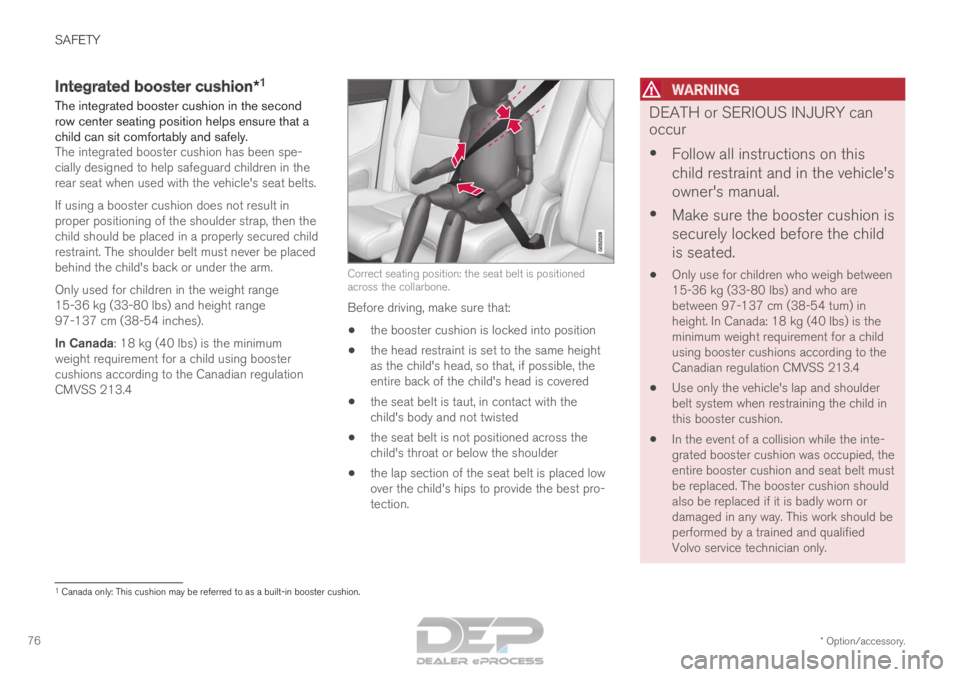
CMVSS 213.4 Correct seating position: the seat belt is positioned
across the collarbone.
Before driving, make sure that:
• the booster cushion is locked into position
• the head restraint is set to the same height
as the child's head, so that, if possible, the
entire back of the child's head is covered
• the seat belt is taut, in contact with the
child's body and not twisted
• the seat belt is not positioned across the
child's throat or below the shoulder
• the lap section of the seat belt is placed low
over the child's hips to provide the best pro-
tection.
WARNING DEATH or SERIOUS INJURY can
occur
•
Follow all instructions on this
child restraint and in the vehicle's
owner's manual.
• Make sure the booster cushion is
securely locked before the child
is seated.
• Only use for children who weigh between
15-36 kg (33-80 lbs) and who are
between 97-137 cm (38-54 tum) in
height. In Canada: 18 kg (40 lbs) is the
minimum weight requirement for a child
using booster cushions according to the
Canadian regulation CMVSS 213.4
• Use only the vehicle's lap and shoulder
belt system when restraining the child in
this booster cushion.
• In the event of a collision while the inte-
grated booster cushion was occupied, the
entire booster cushion and seat belt must
be replaced. The booster cushion should
also be replaced if it is badly worn or
damaged in any way. This work should be
performed by a trained and qualified
Volvo service technician only. 1
Canada only: This cushion may be referred to as a built-in booster cushi\
on.
Page 80 of 686

||SAFETY
* Option/accessory.
78
WARNING DEATH or SERIOUS INJURY can
occur
•
Follow all instructions on this
child restraint and in the vehicle's
owner's manual.
• Make sure the booster cushion is
securely locked before the child
is seated.
• Only use for children who weigh between
15-36 kg (33-80 lbs) and who are
between 97-137 cm (38-54 tum) in
height. In Canada: 18 kg (40 lbs) is the
minimum weight requirement for a child
using booster cushions according to the
Canadian regulation CMVSS 213.4
• Use only the vehicle's lap and shoulder
belt system when restraining the child in
this booster cushion.
• In the event of a collision while the inte-
grated booster cushion was occupied, the
entire booster cushion and seat belt must
be replaced. The booster cushion should
also be replaced if it is badly worn or
damaged in any way. This work should be
performed by a trained and qualified
Volvo service technician only.Related information
•
Integrated booster cushion* (p. 76)
• Folding down the integrated booster cush-
ion* (p. 78) Folding down the integrated
booster cushion*
When the integrated booster cushion in the rear
seat is not in use, it should be stowed (folded
down). Pull the handle forward to release the
booster cushion.
Page 81 of 686

SAFETY
* Option/accessory.79Press down on the center of the booster
cushion to lock it into position.
CAUTION
Make sure that there are no objects (e.g. toys)
on the seat under the integrated booster
cushion before folding it down.
NOTE
The integrated booster cushion must be
stowed (folded down) before folding down
the seat backrest.
WARNING DEATH or SERIOUS INJURY can
occur
•
Follow all instructions on this
child restraint and in the vehicle's
owner's manual.
• Make sure the booster cushion is
securely locked before the child
is seated.
• Only use for children who weigh between
15-36 kg (33-80 lbs) and who are
between 97-137 cm (38-54 tum) in
height. In Canada: 18 kg (40 lbs) is the
minimum weight requirement for a child
using booster cushions according to the
Canadian regulation CMVSS 213.4
• Use only the vehicle's lap and shoulder
belt system when restraining the child in
this booster cushion.
• In the event of a collision while the inte-
grated booster cushion was occupied, the
entire booster cushion and seat belt must
be replaced. The booster cushion should
also be replaced if it is badly worn or
damaged in any way. This work should be
performed by a trained and qualified
Volvo service technician only.Related information
•
Integrated booster cushion* (p. 76)
• Folding up the integrated booster cushion*
(p. 77)
Page 100 of 686

DISPLAYS AND VOICE CONTROL
98Instrument panel licenses
A license is an agreement on the right to con-
duct a certain activity or the right to use some-
one else's right according to terms and condi-
tions specified in the agreement. The following
text is Volvo's agreement with the manufacturer
or developer.
Boost Software License 1.0
Permission is hereby granted, free of charge, to
any person or organization obtaining a copy of
the software and accompanying documentation
covered by this license (the "Software") to use,
reproduce, display, distribute, execute, and
transmit the Software, and to prepare derivative
works of the Software, and to permit third-parties
to whom the Software is furnished to do so, all
subject to the following: The copyright notices in
the Software and this entire statement, including
the above license grant, this restriction and the
following disclaimer, must be included in all
copies of the Software, in whole or in part, and all
derivative works of the Software, unless such
copies or derivative works are solely in the form
of machine-executable object code generated by
a source language processor.
THE SOFTWARE IS PROVIDED "AS IS",
WITHOUT WARRANTY OF ANY KIND,
EXPRESS OR IMPLIED, INCLUDING BUT NOT
LIMITED TO THE WARRANTIES OF
MERCHANTABILITY, FITNESS FOR A
PARTICULAR PURPOSE, TITLE AND NON-
INFRINGEMENT. IN NO EVENT SHALL THE COPYRIGHT HOLDERS OR ANYONE
DISTRIBUTING THE SOFTWARE BE LIABLE
FOR ANY DAMAGES OR OTHER LIABILITY,
WHETHER IN CONTRACT, TORT OR
OTHERWISE, ARISING FROM, OUT OF OR IN
CONNECTION WITH THE SOFTWARE OR THE
USE OR OTHER DEALINGS IN THE
SOFTWARE.BSD 4-clause "Original" or "Old" License
Copyright (c) 1982, 1986, 1990, 1991, 1993
The Regents of the University of California. All
rights reserved.
Redistribution and use in source and binary
forms, with or without modification, are permitted
provided that the following conditions are met:
1. Redistributions of source code must retain
the above copyright notice, this list of
conditions and the following disclaimer.
2. Redistributions in binary form must reproduce the above copyright notice, this list
of conditions and the following disclaimer in
the documentation and/or other materials
provided with the distribution.
3. All advertising materials mentioning features or use of this software must display the
following acknowledgement: This product
includes software developed by the
University of California, Berkeley and its
contributors.
4. Neither the name of the University nor the names of its contributors may be used to endorse or promote products derived from
this software without specific prior written
permission.
THIS SOFTWARE IS PROVIDED BY THE
REGENTS AND CONTRIBUTORS ``AS IS'' AND
ANY EXPRESS OR IMPLIED WARRANTIES,
INCLUDING, BUT NOT LIMITED TO, THE
IMPLIED WARRANTIES OF MERCHANTABILITY
AND FITNESS FOR A PARTICULAR PURPOSE
ARE DISCLAIMED. IN NO EVENT SHALL THE
REGENTS OR CONTRIBUTORS BE LIABLE
FOR ANY DIRECT, INDIRECT, INCIDENTAL,
SPECIAL, EXEMPLARY, OR CONSEQUENTIAL
DAMAGES (INCLUDING, BUT NOT LIMITED TO,
PROCUREMENT OF SUBSTITUTE GOODS OR
SERVICES; LOSS OF USE, DATA, OR PROFITS;
OR BUSINESS INTERRUPTION) HOWEVER
CAUSED AND ON ANY THEORY OF LIABILITY,
WHETHER IN CONTRACT, STRICT LIABILITY,
OR TORT (INCLUDING NEGLIGENCE OR
OTHERWISE) ARISING IN ANY WAY OUT OF
THE USE OF THIS SOFTWARE, EVEN IF
ADVISED OF THE POSSIBILITY OF SUCH
DAMAGE.
Page 101 of 686

DISPLAYS AND VOICE CONTROL
}}99
BSD 3-clause "New" or "Revised" License
Copyright (c) 2011-2014, Yann Collet.
Redistribution and use in source and binary
forms, with or without modification, are permitted
provided that the following conditions are met:
1. Redistributions of source code must retain the above copyright notice, this list of
conditions and the following disclaimer.
2. Redistributions in binary form must reproduce the above copyright notice, this list
of conditions and the following disclaimer in
the documentation and/or other materials
provided with the distribution.
3. Neither the name of the organisation nor the names of its contributors may be used to
endorse or promote products derive from this
software without specific prior written
permission.
THIS SOFTWARE IS PROVIDED BY THE
COPYRIGHT HOLDERS AND CONTRIBUTORS
"AS IS" AND ANY EXPRESS OR IMPLIED
WARRANTIES, INCLUDING, BUT NOT LIMITED
TO, THE IMPLIED WARRANTIES OF
MERCHANTABILITY AND FITNESS FOR A
PARTICULAR PURPOSE ARE DISCLAIMED. IN
NO EVENT SHALL THE COPYRIGHT HOLDER
OR CONTRIBUTORS BE LIABLE FOR ANY
DIRECT, INDIRECT, INCIDENTAL, SPECIAL,
EXEMPLARY, OR CONSEQUENTIAL DAMAGES
(INCLUDING, BUT NOT LIMITED TO,
PROCUREMENT OF SUBSTITUTE GOODS OR SERVICES; LOSS OF USE, DATA, OR PROFITS;
OR BUSINESS INTERRUPTION) HOWEVER
CAUSED AND ON ANY THEORY OF LIABILITY,
WHETHER IN CONTRACT, STRICT LIABILITY,
OR TORT (INCLUDING NEGLIGENCE OR
OTHERWISE) ARISING IN ANY WAY OUT OF
THE USE OF THIS SOFTWARE, EVEN IF
ADVISED OF THE POSSIBILITY OF SUCH
DAMAGE.
BSD 2-clause “Simplified” license
Copyright (c)
reserved.
Redistribution and use in source and binary
forms, with or without modification, are permitted
provided that the following conditions are met:
1. Redistributions of source code must retain the above copyright notice, this list of
conditions and the following disclaimer.
2. Redistributions in binary form must reproduce the above copyright notice, this list
of conditions and the following disclaimer in
the documentation and/or other materials
provided with the distribution.
THIS SOFTWARE IS PROVIDED BY THE
COPYRIGHT HOLDERS AND CONTRIBUTORS
"AS IS" AND ANY EXPRESS OR IMPLIED
WARRANTIES, INCLUDING, BUT NOT LIMITED
TO, THE IMPLIED WARRANTIES OF
MERCHANTABILITY AND FITNESS FOR A
PARTICULAR PURPOSE ARE DISCLAIMED. IN
NO EVENT SHALL THE COPYRIGHT OWNER OR CONTRIBUTORS BE LIABLE FOR ANY
DIRECT, INDIRECT, INCIDENTAL, SPECIAL,
EXEMPLARY, OR CONSEQUENTIAL DAMAGES
(INCLUDING, BUT NOT LIMITED TO,
PROCUREMENT OF SUBSTITUTE GOODS OR
SERVICES; LOSS OF USE, DATA, OR PROFITS;
OR BUSINESS INTERRUPTION) HOWEVER
CAUSED AND ON ANY THEORY OF LIABILITY,
WHETHER IN CONTRACT, STRICT LIABILITY,
OR TORT (INCLUDING NEGLIGENCE OR
OTHERWISE) ARISING IN ANY WAY OUT OF
THE USE OF THIS SOFTWARE, EVEN IF
ADVISED OF THE POSSIBILITY OF SUCH
DAMAGE.
The views and conclusions contained in the
software and documentation are those of the
authors and should not be interpreted as
representing official policies, either expressed or
implied, of the FreeBSD Project.
Page 107 of 686

DISPLAYS AND VOICE CONTROL
}}
105
Related information
• App menu in instrument panel (p. 103)
• Messages in the instrument panel (p. 105) Messages in the instrument panel
The instrument panel shows messages in certain
circumstances to inform or assist the driver. Message in the instrument panel.
High-priority messages for the driver are dis-
played in the instrument panel.
The messages may appear in different parts of
the instrument panel depending on what other
information is currently being displayed. The mes-
sage will disappear from the instrument panel
after a short period of time or after it has been
acknowledged or any required action has been
taken. Messages that need to be saved are
stored in the Car status app, which can be
opened from the App view in the center display.
The message may be shown along with graphics,
symbols or buttons to e.g. acknowledge the mes-
sage or accept a request.
Service messages
The following table lists a selection of important
service messages and what they mean. Message
Meaning
Stop safely A
Stop and switch off the
engine. Serious risk of
damage - contact a work-
shopB
.
Turn off
engine A Stop and switch off the
engine. Serious risk of
damage - contact a work-
shop
B
.
Service urgent
Drive to work-
shop A Contact a workshop
B
to
have the vehicle inspected
immediately.
Service
required A Contact a workshop
B
to
have the vehicle inspected
as soon as possible.
Regular main-
tenance
Book time for
maintenance Time for service - contact
a workshop
B
. Shown
before the next service
date.
Regular main-
tenance
Time for main-
tenance Time for service - contact
a workshop
B
. Shown on
the next service date.
Page 108 of 686

||DISPLAYS AND VOICE CONTROL
106
Message
Meaning
Regular main-
tenance
Maintenance
overdue Time for service - contact
a workshop
B
. Shown when
the date for service has
passed.
Temporarily
off A A function has been tem-
porarily deactivated and
will be reactivated auto-
matically while driving or
after the engine is restar-
ted.A
Part of message, shown along with information on the location
of the problem.
B An authorized Volvo workshop is recommended.
Related information
• Handling messages in the instrument panel
(p. 106)
• Handling messages saved from the instru-
ment panel (p. 107)
• Messages in the center display (p. 140) Handling messages in the
instrument panel
Messages in the instrument panel are controlled
using the right-side steering wheel keypad. Messages in the instrument panel and the right-side
steering wheel keypad.
Left/right
Confirm
Some messages in the instrument panel contain
one or more buttons for e.g. confirming the mes-
sage or accepting a request.
Handling new messages
For messages with buttons:
1. Navigate among the buttons available by pressing the left/right arrow keys (1). 2. Confirm your selection by pressing confirm
(2).
> The message will disappear from theinstrument panel.
For messages without buttons:
– Close the message by pressing confirm (2)
or let the message automatically time-out
after a short period.
>
The message will disappear from the
instrument panel.
Messages that need to be saved are stored in
the Car status app, which can be opened from
the App view in the center display. The message
Car message stored in Car Status
application will simultaneously appear in the
center display.
Related information
• Messages in the instrument panel (p. 105)
• Handling messages saved from the instru-
ment panel (p. 107)
• Messages in the center display (p. 140)
Page 109 of 686

DISPLAYS AND VOICE CONTROL
}}
107
Handling messages saved from the
instrument panel
Messages saved from the instrument panel and
center displays are handled in the center display. Saved messages can be viewed in the Car Status app.
The messages displayed in the
instrument panel that need to
be saved are stored in the Car
status app in the center dis-
play. The message
Car
message stored in Car
Status application will simul-
taneously appear in the center display.
Reading saved messages
To read a saved message immediately:
– Tap the button to the right of the message
Car message stored in Car Status
application in the center display.
>
The saved message will be displayed in
the Car status app.
To read saved messages at a later time:
1. Open the Car status app from App view in
the center display.
>
The app will open in the bottom tile of
Home view.
2. Select the Messages tab in the app.
>
A list of saved messages will be displayed.
3. Tap a message to expand/minimize it. > More information about the message willappear in the list and the image to the left
of the app will display information about
the message in graphic form.
Handling saved messages
In expanded form, some messages have two but-
tons available for booking service or reading the
Owner's Manual. Booking service for saved messages:
–
With the message in expanded form, tap
Request appoint.Call to make
Appointment 3
for assistance booking serv-
ice.
> With Request appoint.: The
Appointments tab will open in the app
and create a request for a service/repair
appointment.
With Call to make Appointment: The
phone app will open and call a service
center to make an appointment for service
or repairs.
Reading the Owner's Manual for saved mes-
sages:
– With the message in expanded form, tap
Owner's manual to read relevant informa- tion about the message in the Owner's Man-
ual.
>
The Owner's Manual will open in the cen-
ter display and provide information related
to the message.
Saved messages in the app are automatically
deleted each time the engine is started. 3
Market dependent. Volvo ID and selected workshop also need to be registe\
red
Page 136 of 686
DISPLAYS AND VOICE CONTROL
134Changing settings in the center
display
You can change
Settings and information for
many of the vehicle's functions via the center
display. 1. Open Top view by tapping the tab or by drag-
ging/swiping from the top of the screen
downward.
2. Tap Settings to open the Settings menu.
3.
Tap one of the categories and sub-catego-
ries to navigate to the desired setting.
4. Change the setting(s). Different types of set- tings are changed in different ways.
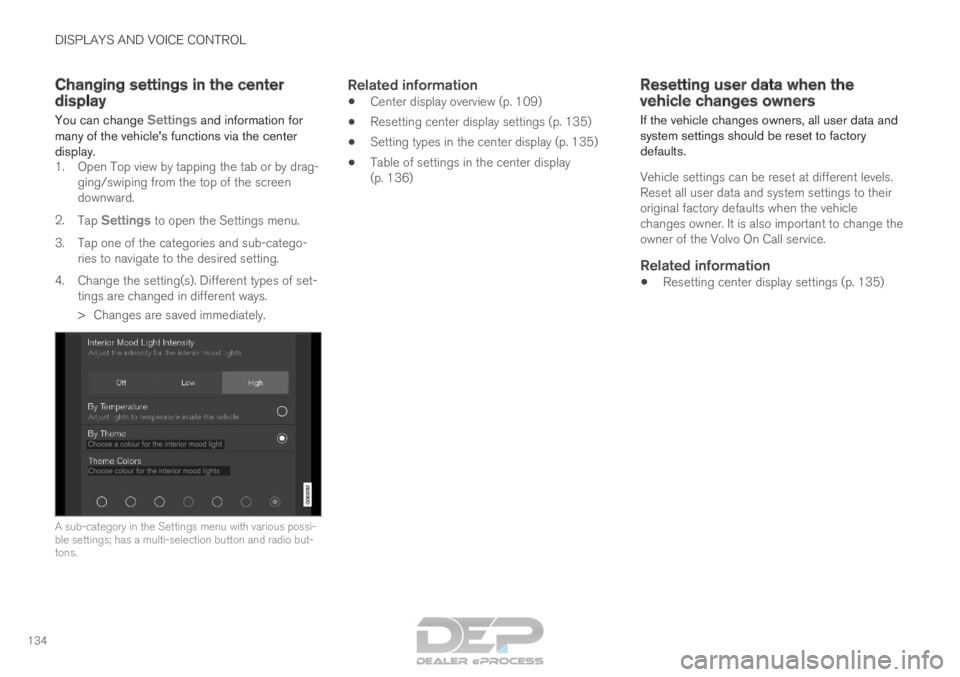
> Changes are saved immediately. A sub-category in the Settings menu with various possi-
ble settings; has a multi-selection button and radio but-
tons.
Related information
•
Center display overview (p. 109)
• Resetting center display settings (p. 135)
• Setting types in the center display (p. 135)
• Table of settings in the center display
(p. 136) Resetting user data when the
vehicle changes owners
If the vehicle changes owners, all user data and
system settings should be reset to factory
defaults.
Vehicle settings can be reset at different levels.
Reset all user data and system settings to their
original factory defaults when the vehicle
changes owner. It is also important to change the
owner of the Volvo On Call service.
Related information
• Resetting center display settings (p. 135)
Page 139 of 686
DISPLAYS AND VOICE CONTROL
}}
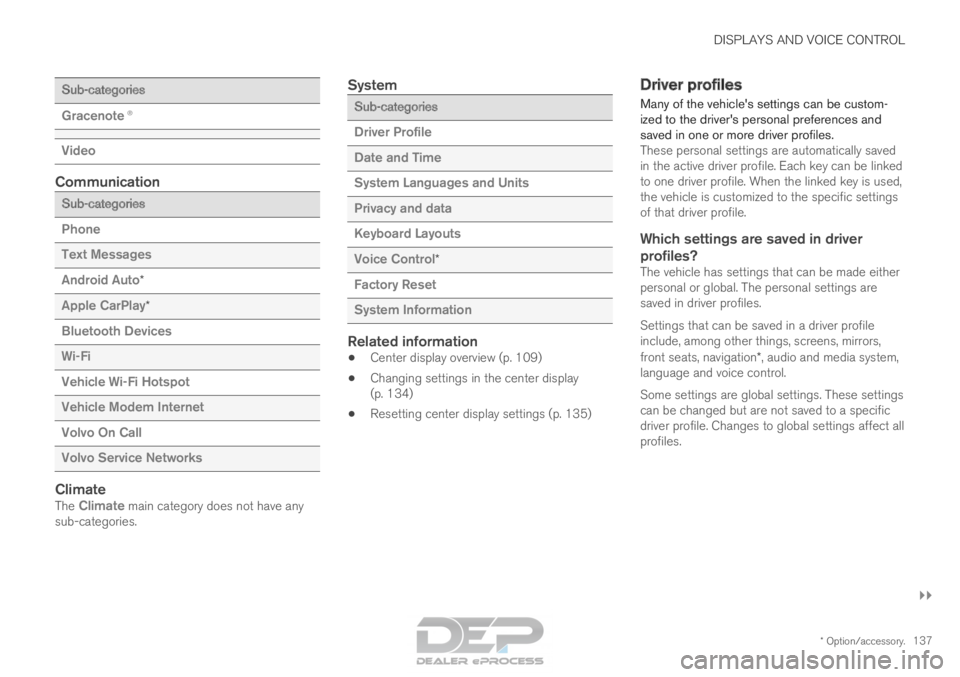
* Option/accessory. 137Sub-categories
Gracenote®
Video
Communication
Sub-categories
Phone
Text Messages
Android Auto
*
Apple CarPlay*
Bluetooth Devices
Wi-Fi
Vehicle Wi-Fi Hotspot
Vehicle Modem Internet
Volvo On Call
Volvo Service Networks
ClimateThe Climate main category does not have any sub-categories.
System Sub-categories
Driver Profile
Date and Time
System Languages and Units
Privacy and data
Keyboard Layouts
Voice Control
*
Factory Reset
System Information
Related information
• Center display overview (p. 109)
• Changing settings in the center display
(p. 134)
• Resetting center display settings (p. 135) Driver profiles
Many of the vehicle's settings can be custom-
ized to the driver's personal preferences and
saved in one or more driver profiles. These personal settings are automatically saved
in the active driver profile. Each key can be linked
to one driver profile. When the linked key is used,
the vehicle is customized to the specific settings
of that driver profile.
Which settings are saved in driver
profiles?
The vehicle has settings that can be made either
personal or global. The personal settings are
saved in driver profiles.
Settings that can be saved in a driver profile
include, among other things, screens, mirrors,
front seats, navigation*, audio and media system,
language and voice control.
Some settings are global settings. These settings
can be changed but are not saved to a specific
driver profile. Changes to global settings affect all
profiles.