steering VOLVO XC90 TWIN ENGINE 2019 Owners Manual
[x] Cancel search | Manufacturer: VOLVO, Model Year: 2019, Model line: XC90 TWIN ENGINE, Model: VOLVO XC90 TWIN ENGINE 2019Pages: 697, PDF Size: 10.33 MB
Page 539 of 697
AUDIO, MEDIA AND INTERNET
537
Handling phone calls
Handling phone calls in the vehicle for a
Bluetooth-connected cellular phone.
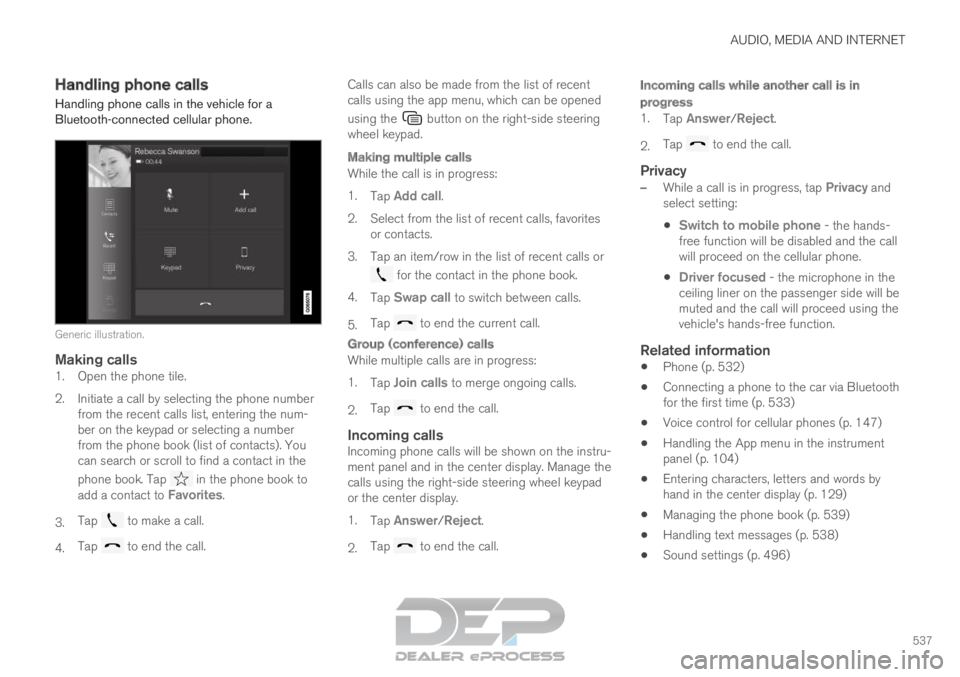
Generic illustration.
Making calls1. Open the phone tile.
2. Initiate a call by selecting the phone number
from the recent calls list, entering the num-
ber on the keypad or selecting a number
from the phone book (list of contacts). You
can search or scroll to find a contact in the
phone book. Tap in the phone book to
add a contact to Favorites.
3. Tap to make a call.
4. Tap to end the call. Calls can also be made from the list of recent
calls using the app menu, which can be opened
using the button on the right-side steering
wheel keypad.
Making multiple calls
While the call is in progress:
1. Tap Add call.
2.
Select from the list of recent calls, favorites
or contacts.
3. Tap an item/row in the list of recent calls or for the contact in the phone book.
4. Tap Swap call to switch between calls.
5. Tap to end the current call.
Group (conference) calls
While multiple calls are in progress:
1.
Tap Join calls to merge ongoing calls.
2. Tap to end the call.
Incoming callsIncoming phone calls will be shown on the instru-
ment panel and in the center display. Manage the
calls using the right-side steering wheel keypad
or the center display.
1.
Tap Answer/Reject.
2. Tap to end the call.
Incoming calls while another call is in
progress
1.
Tap Answer/Reject.
2. Tap to end the call.
Privacy
–
While a call is in progress, tap Privacy and
select setting:
Switch to mobile phone - the hands-
free function will be disabled and the call
will proceed on the cellular phone.
Driver focused - the microphone in the
ceiling liner on the passenger side will be
muted and the call will proceed using the
vehicle's hands-free function.
Related information
Phone (p. 532)
Connecting a phone to the car via Bluetooth
for the first time (p. 533)
Voice control for cellular phones (p. 147)
Handling the App menu in the instrument
panel (p. 104)
Entering characters, letters and words by
hand in the center display (p. 129)
Managing the phone book (p. 539)
Handling text messages (p. 538)
Sound settings (p. 496)
Page 540 of 697
AUDIO, MEDIA AND INTERNET
* Option/accessory.
538 Handling text messages
10
A Bluetooth-connected cellular phone's text
messages can be handled in the vehicle.
Text message functionality needs to be activated
in certain phones. Not all phones are fully com-
patible and therefore cannot display contacts and
messages in the vehicle. For additional informa-
tion on compatibility, see support.volvocars.com.
Handling text messages in the center
display
Text messages are only shown in the center dis-
play if the relevant setting is made.
Tap Messages in App view to
handle text messages in the
center display.
NOTE When the vehicle is moving:
Only one row of the message will be dis-
played. Tap Read out to have the entire
message read aloud.
The center display's keyboard cannot be
used.
Reading text messages in the center display
aloud
Tap the icon to have the message read
aloud.
Sending text messages in the center
display 11
1. It is possible to reply to text messages or
create a new message.
To reply to a text message - tap the name
of the contact who sent the message and
then tap
Answer.
To create a new message - tap
Create
new. Select a contact or enter a phone number.
2.
Write the message.
3. Tap Send.
Handling test messages in the
instrument panel
Text messages are only shown in the instrument
panel if the relevant setting is made.
Reading new text messages in the
instrument panel aloud
–To have the message read aloud, select
Read out using the steering wheel keypad.
Dictating replies in the instrument panel
After the test message has been read aloud, it is
possible to answer briefly with dictation if the
vehicle has an Internet connection.
– Tap
Answer using the steering wheel key-
pad. A dictation dialog will start.
Message alertAlerts can be activated and deactivated in the
text message settings.
Related information
Phone (p. 532)
Text message settings (p. 539)
Phone settings (p. 540)
Internet-connected vehicle* (p. 541)
Voice control for cellular phones (p. 147)
Entering characters, letters and words by
hand in the center display (p. 129) 10
Only applies to certain markets. Contact a Volvo retailer for more infor\
mation.
11Only certain phones can send messages via the vehicle. For additional in\
formation on compatibility, see support.volvocars.com.
Page 541 of 697
AUDIO, MEDIA AND INTERNET
}}
539
Connecting a phone to the car via Bluetooth
for the first time (p. 533)
Terms of use and data sharing (p. 548) Text message settings
Settings for handling text messages received
through a connected phone can be personal-
ized.
1. Tap Settings in the Top view.
2.
Tap Communication Text Messages
and select settings:
Notification in center display - display
text message notifications in the center
display's status bar.
Notification in driver display - displays
notifications in the driver's display and
incoming messages can be managed
using the steering wheel's right-hand key-
pad.
Text message tone - select tone for
incoming text messages.
Related information
Phone (p. 532)
Connecting a phone to the car via Bluetooth
for the first time (p. 533)
Handling text messages (p. 538)
Phone settings (p. 540) Managing the phone book
When a phone is connected with Bluetooth to
the vehicle, contacts can be managed directly in
the center display.
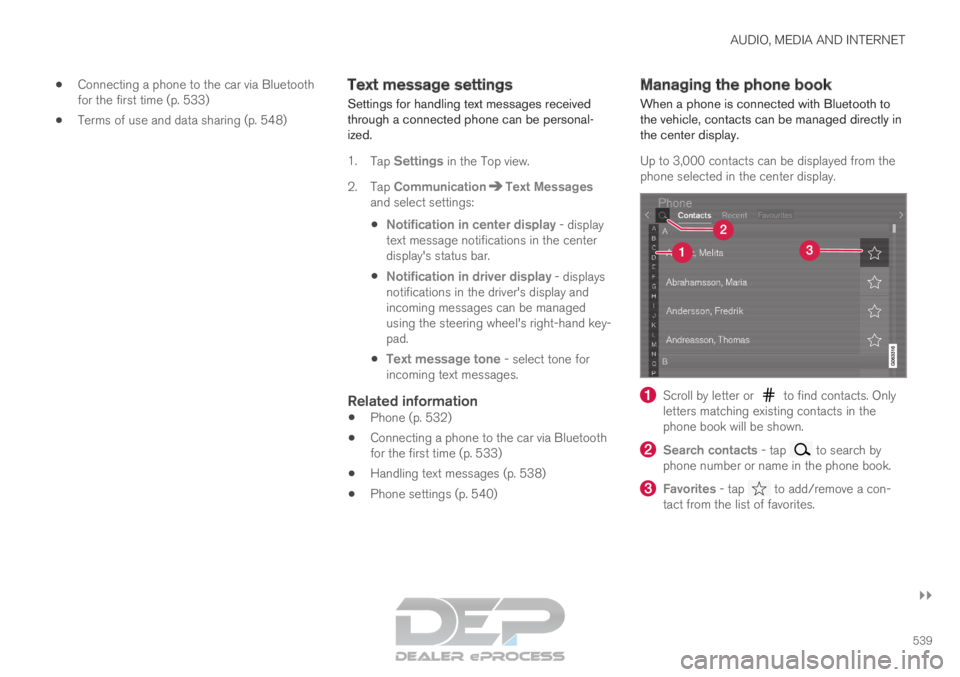
Up to 3,000 contacts can be displayed from the
phone selected in the center display. Scroll by letter or to find contacts. Only
letters matching existing contacts in the
phone book will be shown. Search contacts
- tap to search by
phone number or name in the phone book. Favorites
- tap to add/remove a con-
tact from the list of favorites.
Page 594 of 697
LOADING, STORAGE AND PASSENGER COMPARTMENT
* Option/accessory.
592 Passenger compartment interior
Overview of the passenger compartment interior
and storage spaces.
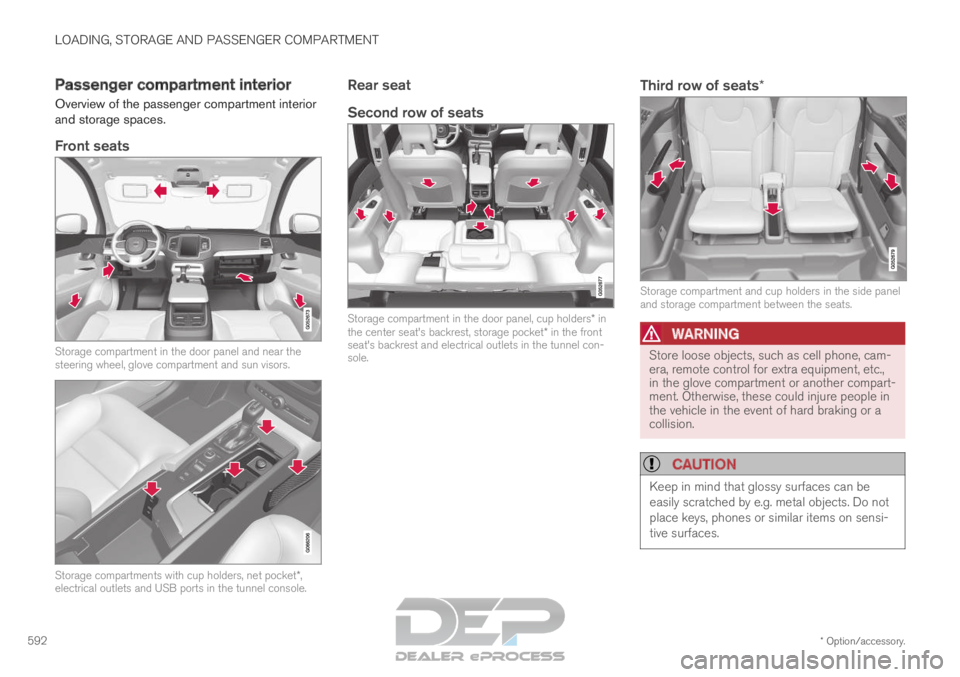
Front seats Storage compartment in the door panel and near the
steering wheel, glove compartment and sun visors.
Storage compartments with cup holders, net pocket*,
electrical outlets and USB ports in the tunnel console.
Rear seat
Second row of seats Storage compartment in the door panel, cup holders* in
the center seat's backrest, storage pocket* in the front
seat's backrest and electrical outlets in the tunnel con-
sole.Third row of seats* Storage compartment and cup holders in the side panel
and storage compartment between the seats.
WARNING
Store loose objects, such as cell phone, cam-
era, remote control for extra equipment, etc.,
in the glove compartment or another compart-
ment. Otherwise, these could injure people in
the vehicle in the event of hard braking or a
collision.
CAUTION
Keep in mind that glossy surfaces can be
easily scratched by e.g. metal objects. Do not
place keys, phones or similar items on sensi-
tive surfaces.
Page 638 of 697
||MAINTENANCE AND SERVICE
* Option/accessory.
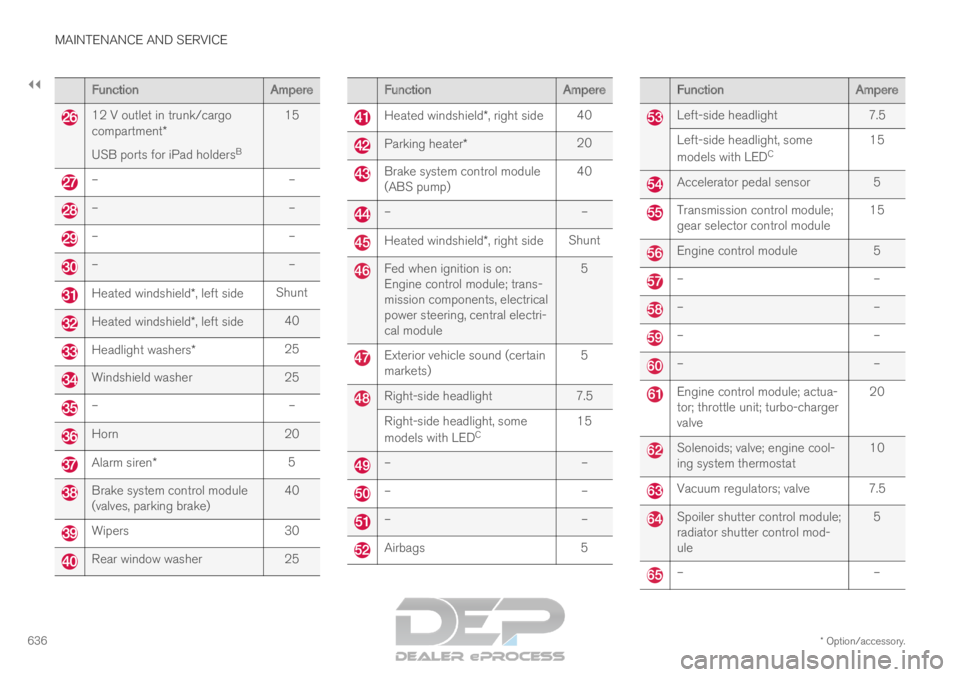
636 Function
Ampere12 V outlet in trunk/cargo
compartment*
USB ports for iPad holders
B15 –
––
––
––
–Heated windshield*, left side
ShuntHeated windshield*, left side
40Headlight washers*
25Windshield washer
25–
–Horn
20Alarm siren*
5Brake system control module
(valves, parking brake)
40Wipers
30Rear window washer
25 Function
Ampere Heated windshield*, right side
40 Parking heater*
20 Brake system control module
(ABS pump)
40 –
– Heated windshield*, right side
Shunt Fed when ignition is on:
Engine control module; trans-
mission components, electrical
power steering, central electri-
cal module
5 Exterior vehicle sound (certain
markets)
5 Right-side headlight
7.5
Right-side headlight, some
models with LED C 15 –
– –
– –
– Airbags
5 Function
Ampere Left-side headlight
7.5
Left-side headlight, some
models with LED C 15 Accelerator pedal sensor 5
Transmission control module;
gear selector control module
15 Engine control module
5 –
– –
– –
– –
– Engine control module; actua-
tor; throttle unit; turbo-charger
valve
20 Solenoids; valve; engine cool-
ing system thermostat
10 Vacuum regulators; valve 7.5
Spoiler shutter control module;
radiator shutter control mod-
ule
5 –
–
Page 641 of 697
MAINTENANCE AND SERVICE
}}
* Option/accessory. 639
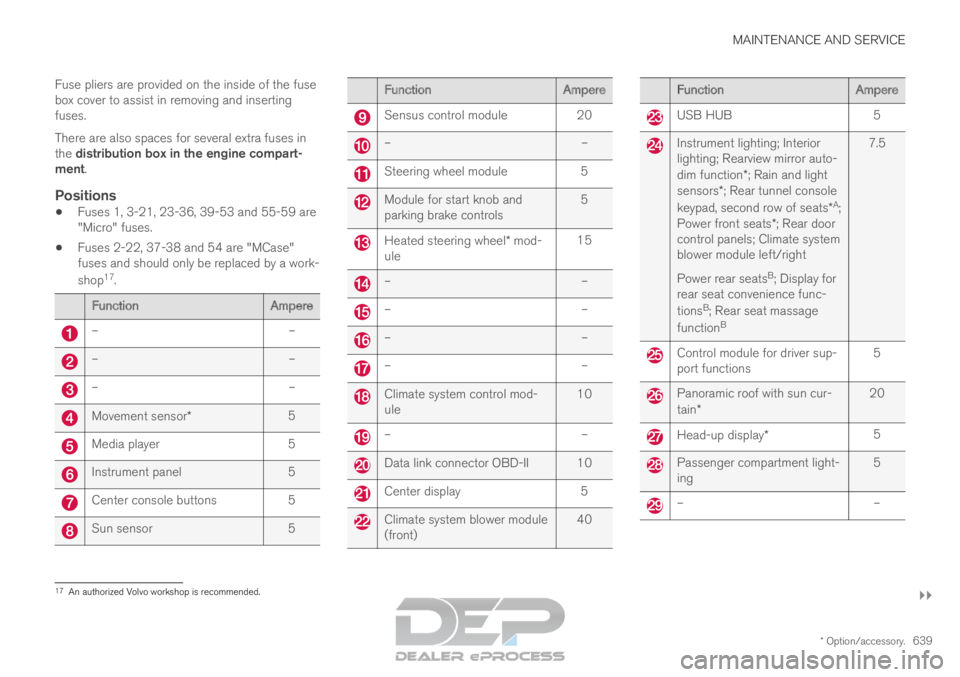
Fuse pliers are provided on the inside of the fuse
box cover to assist in removing and inserting
fuses.
There are also spaces for several extra fuses in
the distribution box in the engine compart-
ment.
Positions
Fuses 1, 3-21, 23-36, 39-53 and 55-59 are
"Micro" fuses.
Fuses 2-22, 37-38 and 54 are "MCase"
fuses and should only be replaced by a work-
shop 17
. Function
Ampere–
––
––
–Movement sensor*
5Media player
5Instrument panel
5Center console buttons
5Sun sensor
5 Function
Ampere Sensus control module
20 –
– Steering wheel module
5 Module for start knob and
parking brake controls
5 Heated steering wheel* mod-
ule 15 –
– –
– –
– –
– Climate system control mod-
ule
10 –
– Data link connector OBD-II 10
Center display
5 Climate system blower module
(front)
40 Function
Ampere USB HUB
5 Instrument lighting; Interior
lighting; Rearview mirror auto-
dim function*; Rain and light
sensors*; Rear tunnel console
keypad, second row of seats* A
;
Power front seats *; Rear door
control panels; Climate system
blower module left/right
Power rear seats B
; Display for
rear seat convenience func-
tions B
; Rear seat massage
function B 7.5 Control module for driver sup-
port functions
5 Panoramic roof with sun cur-
tain*
20 Head-up display*
5 Passenger compartment light-
ing
5 –
–17
An authorized Volvo workshop is recommended.
Page 647 of 697

MAINTENANCE AND SERVICE
}}
645
Cleaning the interior
Only use cleaning agents and car care products
recommended by Volvo. Clean regularly and
treat stains immediately for best results. It is
important to vacuum before using a cleaning
agent.
CAUTION
Some colored clothing (for example, dark
jeans and suede garments) may stain the
upholstery. If this occurs, it is important to
clean and treat these parts of the uphols-
tery as soon as possible.
Never use strong solvents such as
washer fluid, gasoline, mineral spirit or
concentrated alcohol to clean the interior
as this can damage the upholstery as
well as other interior materials.
Never spray cleaning agent directly onto
components that have electrical buttons
and controls. Wipe instead with a damp
cloth with cleaning agent.
Sharp objects and Velcro can damage
the car's textile upholstery.
Related information
Cleaning the center display (p. 645)
Cleaning fabric upholstery and ceiling liner
(p. 647)
Cleaning the seat belt (p. 647)
Cleaning floor mats and inlay mats (p. 647)
Cleaning leather upholstery (p. 648)
Cleaning the leather steering wheel
(p. 649)
Cleaning interior plastic, metal and wood sur-
faces (p. 650) Cleaning the center display
Marks, stains, finger smudges etc. on the center
display may affect its performance and readabil-
ity. Clean the screen regularly with a microfiber
cloth. To clean the center display:
1.
Turn off the center display by pressing and
holding the Home button.
2. Wipe the screen clean with the microfiber cloth provided or use another microfiber
cloth of similar quality. Wipe the screen with
a clean, dry microfiber cloth using small, cir-
cular motions. If necessary, moisten the cloth
slightly.
3. Reactivate the display by pressing the Home button briefly.
Page 648 of 697

||MAINTENANCE AND SERVICE
* Option/accessory.
646
CAUTION The microfiber cloth must be free of sand and
dirt when cleaning the center display.
CAUTION
When cleaning the center display, apply only
light pressure to the screen. Pressing too
hard could damage the screen.
CAUTION
Do not spray liquid or corrosive chemicals
directly onto the center display. Do not use
window cleaners, cleaning agents, aerosol
sprays, solvents, alcohol, ammonia or deter-
gents that contain abrasives.
Never use abrasive cloths, paper towels or tis-
sue paper, as these may scratch the center
display.
Related information
Cleaning the interior (p. 645)
Cleaning fabric upholstery and ceiling liner
(p. 647)
Cleaning the seat belt (p. 647)
Cleaning floor mats and inlay mats (p. 647)
Cleaning leather upholstery (p. 648)
Cleaning the leather steering wheel
(p. 649)
Cleaning interior plastic, metal and wood sur-
faces (p. 650) Cleaning the head-up display*
Carefully wipe the glass covering the head-up
display unit with a clean and dry microfiber cloth.
If necessary, the cloth may be slightly moistened.
Never use strong stain removers. For difficult
cleaning conditions, a special cleaning agent can
be purchased at a Volvo retailer.
Related information
Activating and deactivating the head-up dis-
play* (p. 143)
Head-up display* (p. 142)
Page 649 of 697
MAINTENANCE AND SERVICE
}}
647
Cleaning fabric upholstery and
ceiling liner
Only use cleaning agents and car care products
recommended by Volvo. Clean regularly and
treat stains immediately for best results. It is
important to vacuum before using a cleaning
agent.
Fabric upholstery and ceiling linerNever scrape or rub a stain, as this could damage
the upholstery. Never use strong stain removers,
as this could change the color of the upholstery.
Use soapy water or a similar detergent. For more
difficult stains caused by oil, ice cream, shoe pol-
ish, etc., use a stain remover. Consult with your
Volvo retailer.
Related information
Cleaning the interior (p. 645)
Cleaning the center display (p. 645)
Cleaning the seat belt (p. 647)
Cleaning floor mats and inlay mats (p. 647)
Cleaning leather upholstery (p. 648)
Cleaning the leather steering wheel
(p. 649)
Cleaning interior plastic, metal and wood sur-
faces (p. 650) Cleaning the seat belt
Only use cleaning agents and car care products
recommended by Volvo. Clean regularly and
treat stains immediately for best results. It is
important to vacuum before using a cleaning
agent.
Seat beltsUse water and a synthetic soap solution. Spe-
cially designed textile cleaning agents are availa-
ble for purchase at Volvo retailers. Make sure the
belt is dry before it is retracted.
Related information
Cleaning the interior (p. 645)
Cleaning the center display (p. 645)
Cleaning fabric upholstery and ceiling liner
(p. 647)
Cleaning floor mats and inlay mats (p. 647)
Cleaning leather upholstery (p. 648)
Cleaning the leather steering wheel
(p. 649)
Cleaning interior plastic, metal and wood sur-
faces (p. 650) Cleaning floor mats and inlay mats
Only use cleaning agents and car care products
recommended by Volvo. Clean regularly and
treat stains immediately for best results. It is
important to vacuum before using a cleaning
agent.
Inlay mats and floor matsRemove the inlay mats to clean the floor mats
and inlay mats separately. Use a vacuum to
remove dust and dirt. Each inlay mat is secured
into place with pins.
Remove the inlay mat by grasping the inlay mat
at each pin and lifting the mat straight up.
Put the inlay mat back into place by pressing it in
at each pin.
Page 650 of 697
||MAINTENANCE AND SERVICE
* Option/accessory.
648
WARNING
Never use more than one inlay mat at a
time on the driver's floor. If any other type
of floor mat is used, remove the original
mat from the driver's seat floor before
driving. All types of mats must be securely
anchored in the attachment points in the
floor. Make sure the floor mat does not
impede the movement of the brake pedal
or accelerator pedal in any way, as this
could be a serious safety hazard.
Volvo's floor mats are specially manufac-
tured for your vehicle. They must be prop-
erly secured in the attachment points in
the floor to help ensure they cannot slide
and become trapped under the pedals.
After vacuuming, a specially designed textile
cleaning agent should be used to remove stains
on floor mats. Floor mats should be cleaned with
products recommended by Volvo retailers.
Related information
Cleaning the interior (p. 645)
Cleaning the center display (p. 645)
Cleaning fabric upholstery and ceiling liner
(p. 647)
Cleaning the seat belt (p. 647)
Cleaning leather upholstery (p. 648)
Cleaning the leather steering wheel
(p. 649)
Cleaning interior plastic, metal and wood sur-
faces (p. 650) Cleaning leather upholstery
Only use cleaning agents and car care products
recommended by Volvo. Clean regularly and
treat stains immediately for best results. It is
important to vacuum before using a cleaning
agent.
Leather upholstery*Volvo's leather upholstery is treated to protect its
original appearance. Over time, sunlight, grease,
dirt, etc. could break down the protective layer.
This could result in scratches and cracking.
Leather upholstery is a natural product that
changes and acquires a beautiful patina over
time. Regular cleaning and treatments are
required to preserve the qualities and color of the
leather. Volvo offers a comprehensive product,
Volvo Leather Care Kit/Wipes, for cleaning and
treating leather upholstery that, when used as
directed, preserves the leather's protective coa-
ting.
For best results, Volvo recommends cleaning and
applying protective cream one to four times a
year (or more as needed). Volvo Leather Care Kit
951 0251 and Volvo Leather Softener 943
7429 are available for purchase at Volvo retailers.