power steering VOLVO XC90 TWIN ENGINE 2019 User Guide
[x] Cancel search | Manufacturer: VOLVO, Model Year: 2019, Model line: XC90 TWIN ENGINE, Model: VOLVO XC90 TWIN ENGINE 2019Pages: 697, PDF Size: 10.33 MB
Page 190 of 697
SEATS AND STEERING WHEEL
* Option/accessory.
188
Adjusting* front seat cushion length (p. 189)
Front seat massage* settings (p. 188)
Adjusting front seat side bolster settings*
(p. 190)
Adjusting front seat lumbar support* (p. 191)
Adjusting the passenger seat from the driv-
er's seat* (p. 192)
Adjusting the door mirrors (p. 171)
Head-up display settings* (p. 144) Front seat massage* settings
The settings for the multifunctional seats can be
adjusted using either the mutifunction control on
the seat or the center display. The adjustment
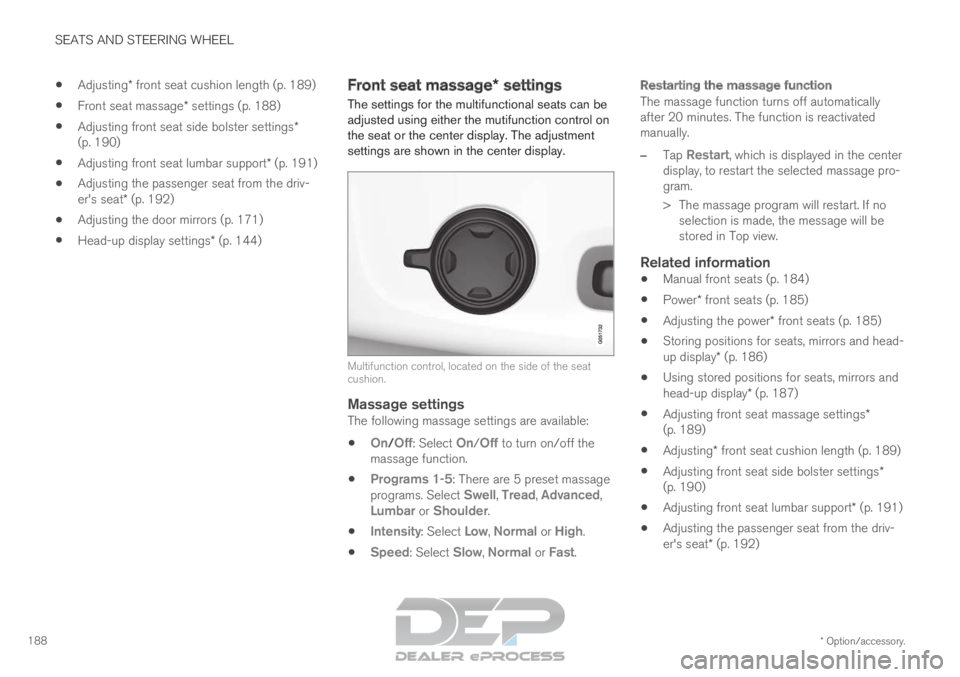
settings are shown in the center display. Multifunction control, located on the side of the seat
cushion.
Massage settingsThe following massage settings are available:
On/
Off: Select On/Off to turn on/off the
massage function.
Programs 1-5: There are 5 preset massage
programs. Select Swell, Tread, Advanced,
Lumbar or Shoulder.
Intensity: Select Low, Normal or High.
Speed: Select Slow, Normal or Fast.
Restarting the massage function
The massage function turns off automatically
after 20 minutes. The function is reactivated
manually.
–
Tap
Restart, which is displayed in the center
display, to restart the selected massage pro-
gram.
>
The massage program will restart. If no
selection is made, the message will be
stored in Top view.
Related information
Manual front seats (p. 184)
Power* front seats (p. 185)
Adjusting the power* front seats (p. 185)
Storing positions for seats, mirrors and head-
up display* (p. 186)
Using stored positions for seats, mirrors and
head-up display* (p. 187)
Adjusting front seat massage settings*
(p. 189)
Adjusting* front seat cushion length (p. 189)
Adjusting front seat side bolster settings*
(p. 190)
Adjusting front seat lumbar support* (p. 191)
Adjusting the passenger seat from the driv-
er's seat* (p. 192)
Page 191 of 697
SEATS AND STEERING WHEEL
}}
* Option/accessory. 189
Adjusting front seat massage
settings*
The settings for the multifunctional seats can be
adjusted using either the mutifunction control on
the seat or the center display. The adjustment
settings are shown in the center display.
Adjusting front seat massage settingsThe front seat backrests have a massage func-
tion. Air-filled cushions provide the massaging
action and a number of settings are available.
The massage function can only be activated
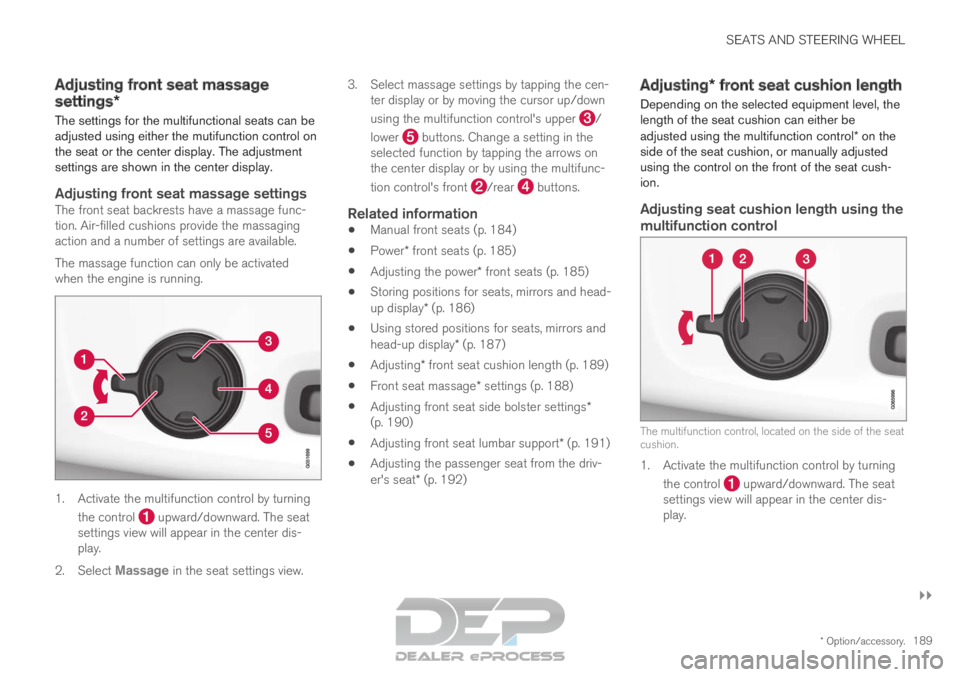
when the engine is running. 1. Activate the multifunction control by turning
the control upward/downward. The seat
settings view will appear in the center dis-
play.
2. Select Massage in the seat settings view. 3.
Select massage settings by tapping the cen-
ter display or by moving the cursor up/down
using the multifunction control's upper /
lower buttons. Change a setting in the
selected function by tapping the arrows on
the center display or by using the multifunc-
tion control's front /rear buttons.
Related information
Manual front seats (p. 184)
Power* front seats (p. 185)
Adjusting the power* front seats (p. 185)
Storing positions for seats, mirrors and head-
up display* (p. 186)
Using stored positions for seats, mirrors and
head-up display* (p. 187)
Adjusting* front seat cushion length (p. 189)
Front seat massage* settings (p. 188)
Adjusting front seat side bolster settings*
(p. 190)
Adjusting front seat lumbar support* (p. 191)
Adjusting the passenger seat from the driv-
er's seat* (p. 192) Adjusting* front seat cushion length
Depending on the selected equipment level, the
length of the seat cushion can either be
adjusted using the multifunction control* on the
side of the seat cushion, or manually adjusted
using the control on the front of the seat cush-
ion.
Adjusting seat cushion length using the
multifunction control The multifunction control, located on the side of the seat
cushion.
1. Activate the multifunction control by turning
the control upward/downward. The seat
settings view will appear in the center dis-
play.
Page 192 of 697
||SEATS AND STEERING WHEEL
* Option/accessory.
190 2.
Select Cushion extension in the seat set-
tings view.
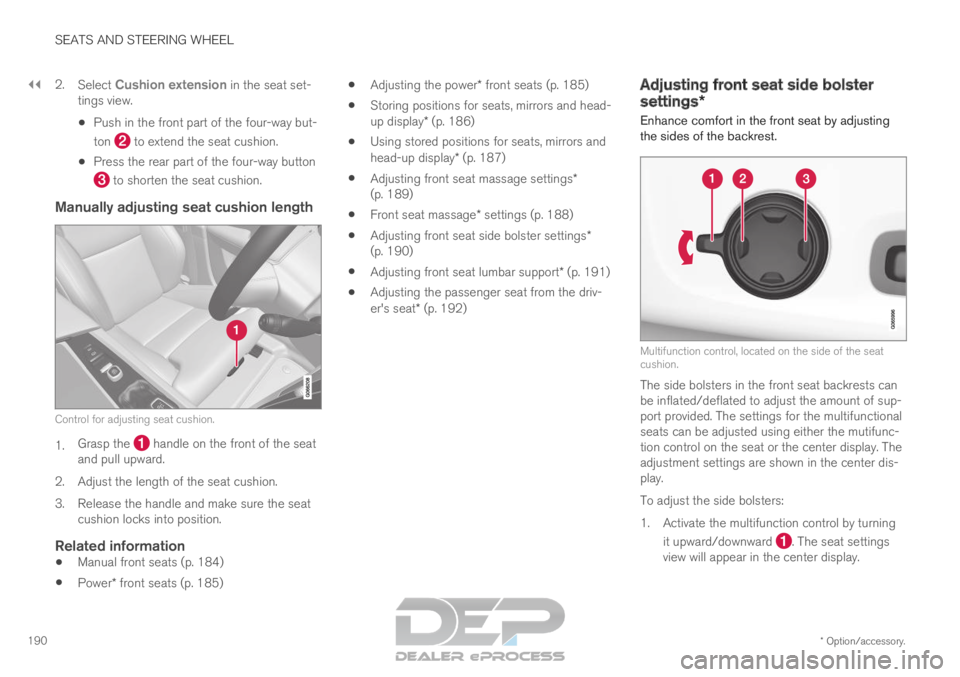
Push in the front part of the four-way but-
ton to extend the seat cushion.
Press the rear part of the four-way button to shorten the seat cushion.
Manually adjusting seat cushion length
Control for adjusting seat cushion.
1.
Grasp the handle on the front of the seat
and pull upward.
2.
Adjust the length of the seat cushion.
3. Release the handle and make sure the seat cushion locks into position.
Related information
Manual front seats (p. 184)
Power* front seats (p. 185)
Adjusting the power* front seats (p. 185)
Storing positions for seats, mirrors and head-
up display* (p. 186)
Using stored positions for seats, mirrors and
head-up display* (p. 187)
Adjusting front seat massage settings*
(p. 189)
Front seat massage* settings (p. 188)
Adjusting front seat side bolster settings*
(p. 190)
Adjusting front seat lumbar support* (p. 191)
Adjusting the passenger seat from the driv-
er's seat* (p. 192) Adjusting front seat side bolster
settings*
Enhance comfort in the front seat by adjusting
the sides of the backrest. Multifunction control, located on the side of the seat
cushion.
The side bolsters in the front seat backrests can
be inflated/deflated to adjust the amount of sup-
port provided. The settings for the multifunctional
seats can be adjusted using either the mutifunc-
tion control on the seat or the center display. The
adjustment settings are shown in the center dis-
play.
To adjust the side bolsters:
1.
Activate the multifunction control by turning
it upward/downward . The seat settings
view will appear in the center display.
Page 193 of 697
SEATS AND STEERING WHEEL
}}
* Option/accessory. 191
2.
Select Side bolsters in the seat settings
view.
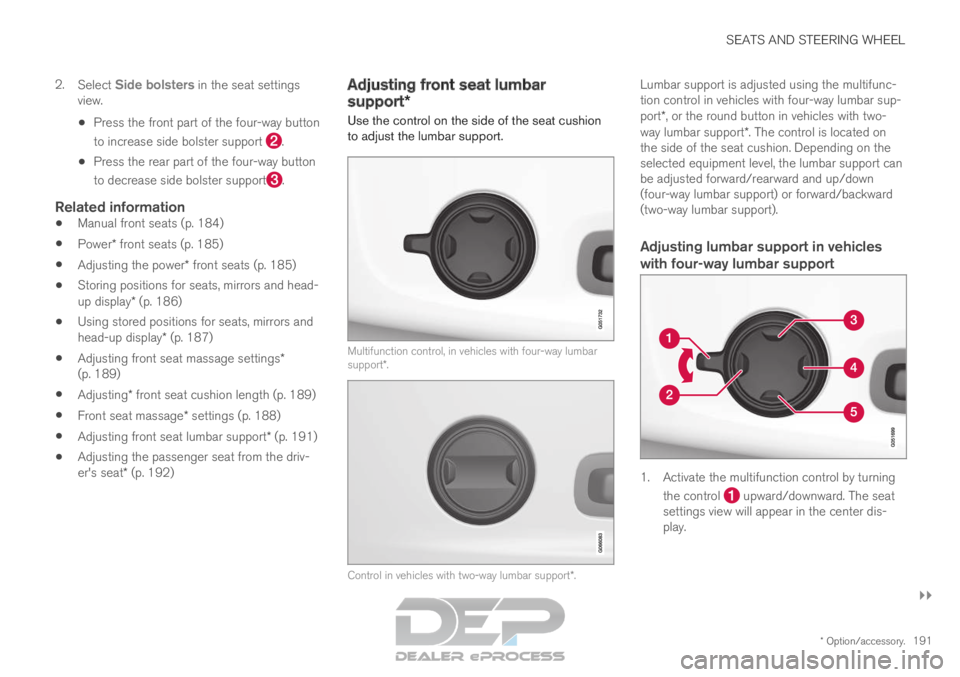
Press the front part of the four-way button
to increase side bolster support .
Press the rear part of the four-way button
to decrease side bolster support .
Related information
Manual front seats (p. 184)
Power* front seats (p. 185)
Adjusting the power* front seats (p. 185)
Storing positions for seats, mirrors and head-
up display* (p. 186)
Using stored positions for seats, mirrors and
head-up display* (p. 187)
Adjusting front seat massage settings*
(p. 189)
Adjusting* front seat cushion length (p. 189)
Front seat massage* settings (p. 188)
Adjusting front seat lumbar support* (p. 191)
Adjusting the passenger seat from the driv-
er's seat* (p. 192) Adjusting front seat lumbar
support*
Use the control on the side of the seat cushion
to adjust the lumbar support. Multifunction control, in vehicles with four-way lumbar
support*.
Control in vehicles with two-way lumbar support*.Lumbar support is adjusted using the multifunc-
tion control in vehicles with four-way lumbar sup-
port*, or the round button in vehicles with two-
way lumbar support*. The control is located on
the side of the seat cushion. Depending on the
selected equipment level, the lumbar support can
be adjusted forward/rearward and up/down
(four-way lumbar support) or forward/backward
(two-way lumbar support).
Adjusting lumbar support in vehicles
with four-way lumbar support 1. Activate the multifunction control by turning
the control upward/downward. The seat
settings view will appear in the center dis-
play.
Page 194 of 697
||SEATS AND STEERING WHEEL
* Option/accessory.
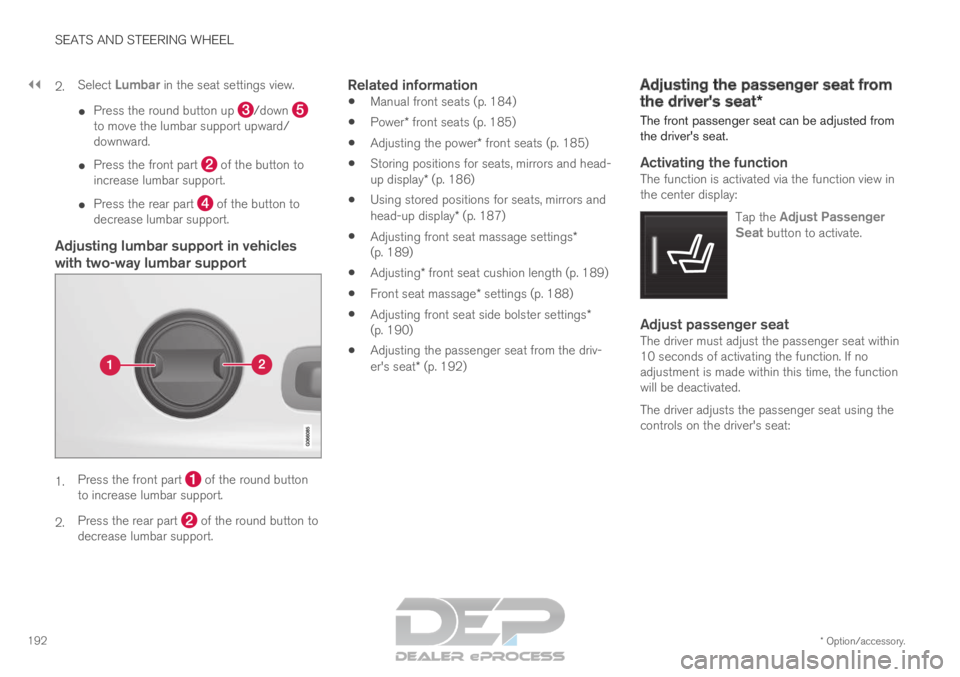
192 2.
Select
Lumbar in the seat settings view.
Press the round button up /down
to move the lumbar support upward/
downward.
Press the front part of the button to
increase lumbar support.
Press the rear part of the button to
decrease lumbar support.
Adjusting lumbar support in vehicles
with two-way lumbar support 1.
Press the front part of the round button
to increase lumbar support.
2. Press the rear part of the round button to
decrease lumbar support.
Related information
Manual front seats (p. 184)
Power* front seats (p. 185)
Adjusting the power* front seats (p. 185)
Storing positions for seats, mirrors and head-
up display* (p. 186)
Using stored positions for seats, mirrors and
head-up display* (p. 187)
Adjusting front seat massage settings*
(p. 189)
Adjusting* front seat cushion length (p. 189)
Front seat massage* settings (p. 188)
Adjusting front seat side bolster settings*
(p. 190)
Adjusting the passenger seat from the driv-
er's seat* (p. 192) Adjusting the passenger seat from
the driver's seat*
The front passenger seat can be adjusted from
the driver's seat.
Activating the functionThe function is activated via the function view in
the center display:
Tap the Adjust PassengerSeat button to activate.
Adjust passenger seatThe driver must adjust the passenger seat within
10 seconds of activating the function. If no
adjustment is made within this time, the function
will be deactivated.
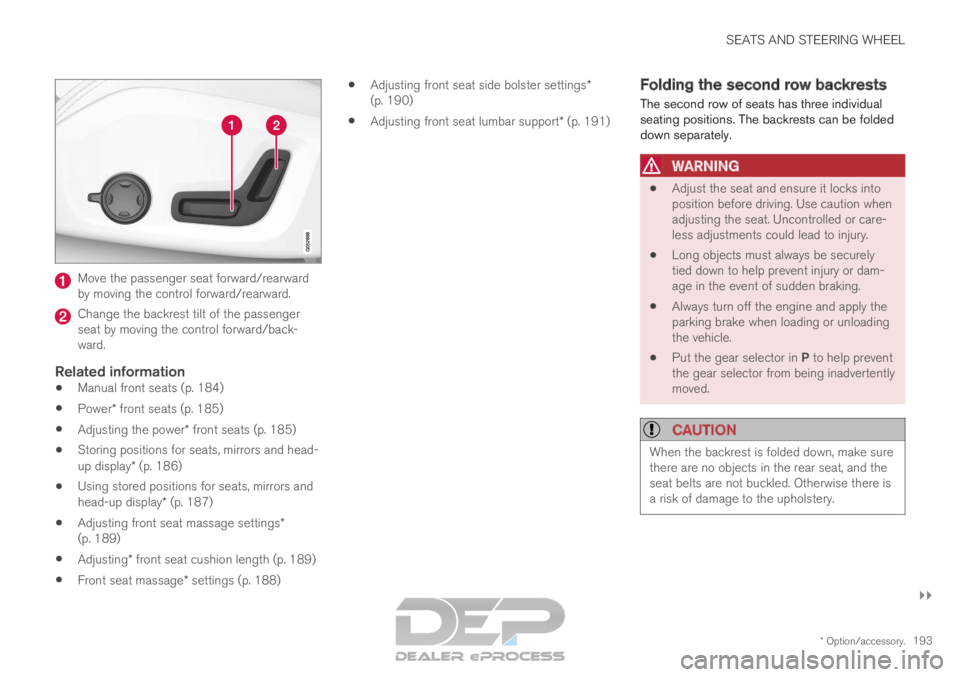
The driver adjusts the passenger seat using the
controls on the driver's seat:
Page 195 of 697
SEATS AND STEERING WHEEL
}}
* Option/accessory. 193Move the passenger seat forward/rearward
by moving the control forward/rearward.
Change the backrest tilt of the passenger
seat by moving the control forward/back-
ward.
Related information
Manual front seats (p. 184)
Power* front seats (p. 185)
Adjusting the power* front seats (p. 185)
Storing positions for seats, mirrors and head-
up display* (p. 186)
Using stored positions for seats, mirrors and
head-up display* (p. 187)
Adjusting front seat massage settings*
(p. 189)
Adjusting* front seat cushion length (p. 189)
Front seat massage* settings (p. 188)
Adjusting front seat side bolster settings*
(p. 190)
Adjusting front seat lumbar support* (p. 191) Folding the second row backrests
The second row of seats has three individual
seating positions. The backrests can be folded
down separately.
WARNING
Adjust the seat and ensure it locks into
position before driving. Use caution when
adjusting the seat. Uncontrolled or care-
less adjustments could lead to injury.
Long objects must always be securely
tied down to help prevent injury or dam-
age in the event of sudden braking.
Always turn off the engine and apply the
parking brake when loading or unloading
the vehicle.
Put the gear selector in P to help prevent
the gear selector from being inadvertently
moved.
CAUTION When the backrest is folded down, make sure
there are no objects in the rear seat, and the
seat belts are not buckled. Otherwise there is
a risk of damage to the upholstery.
Page 203 of 697

SEATS AND STEERING WHEEL
* Option/accessory.201
Adjusting the steering wheel
The steering wheel can be adjusted to various
positions. The steering wheel's reach and height can be adjusted.
WARNING
Adjust the steering wheel and ensure it locks
into position before driving. Never adjust the
steering wheel while driving.
Steering wheel force can be adjusted with
speed-dependent power steering. Steering wheel
force is adjusted according to the vehicle's speed
to give the driver an enhanced sense of control
and stability. Steering wheel adjuster lever.
1. Move the lever forward to release the steer-
ing wheel.
2.
Adjust the steering wheel to the desired
position.
3. Pull the lever back to lock the steering wheel into place. If the lever is difficult to move,
press the steering wheel lightly while pulling
the lever.
Related information
Steering wheel controls and horn (p. 200)
Adjusting the power* front seats (p. 185)
Page 219 of 697
CLIMATE CONTROL
* Option/accessory.217
Related information
Climate (p. 204)
Activating and deactivating power front
seats* (p. 217)
Activating and deactivating the heated rear
seats* (p. 218)
Activating and deactivating front seat ventila-
tion* (p. 219)
Activating and deactivating the heated steer-
ing wheel* (p. 219)
Activating auto climate control (p. 220)
Activating and deactivating recirculation
(p. 221)
Activating and deactivating max defroster
(p. 222)
Activating and deactivating the heated wind-
shield* (p. 223)
Activating and deactivating the heated rear
window and door mirrors (p. 225)
Setting the blower speed for the front seats
(p. 226)
Setting the blower speed for the rear seats
(p. 226)
Synchronize temperature (p. 229)
Activating and deactivating air conditioning
(p. 230)
Activating and deactivating climate control
for the third-row seats* (p. 231) Activating and deactivating power
front seats*
The seats can be heated for added comfort for
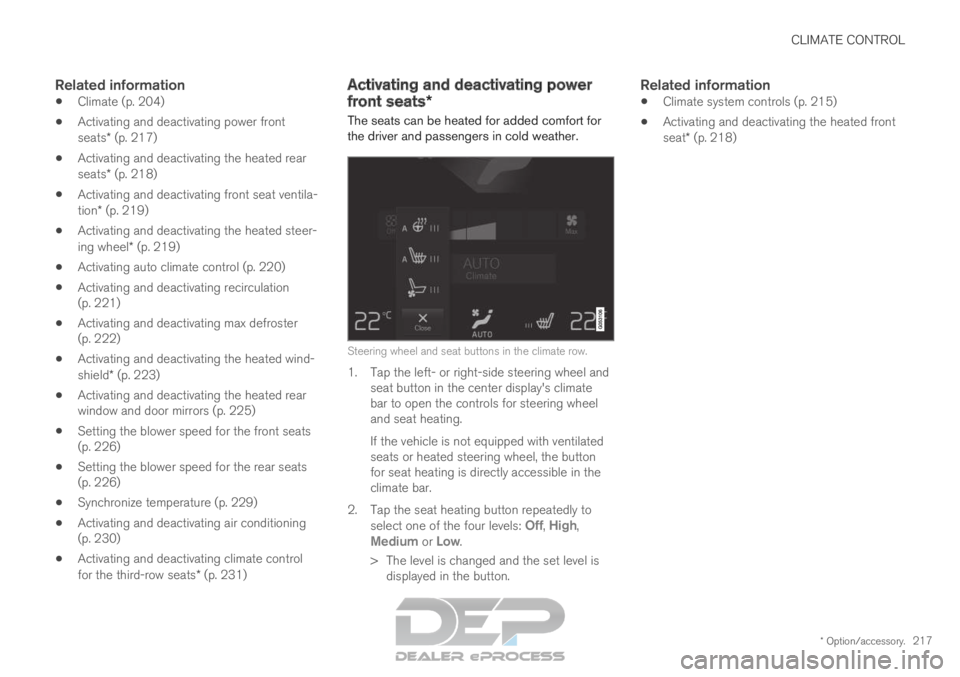
the driver and passengers in cold weather. Steering wheel and seat buttons in the climate row.
1. Tap the left- or right-side steering wheel and
seat button in the center display's climate
bar to open the controls for steering wheel
and seat heating.
If the vehicle is not equipped with ventilated
seats or heated steering wheel, the button
for seat heating is directly accessible in the
climate bar.
2.
Tap the seat heating button repeatedly to
select one of the four levels: Off,
High,
Medium or Low.
>
The level is changed and the set level is
displayed in the button.
Related information
Climate system controls (p. 215)
Activating and deactivating the heated front
seat* (p. 218)
Page 250 of 697
||KEY, LOCKS AND ALARM
* Option/accessory.
248 1.
Press the button on the remote key.
>
The lock and alarm indicator on the dash-
board will go out to indicate that the vehi-
cle is no longer fully armed.
The tailgate will be unlocked but remain
closed. However, the side doors will
remain locked and armed.
Press lightly on the rubberized pressure
plate under the tailgate handle to open
the tailgate.
If the tailgate is not opened within
2 minutes, it will be relocked and the
alarm armed.
2. With the optional power tailgate* -
Hold and press (about 1.5 seconds) the button on the remote key
>
The tailgate will unlock and open. How-
ever, the side doors will remain locked and
armed.
Related information
Locking and unlocking using the remote key
(p. 246)
Opening and closing the power tailgate*
(p. 266) Remote key range
In order to function correctly, the remote key
must be within a certain distance from the vehi-
cle.
Manual useThe remote key's functions for e.g. locking and
unlocking, which are activated by pressing or
, have a range of approx. 20 meters (65 feet)
from the vehicle.
If the vehicle's locks do not react, move closer
and try again.
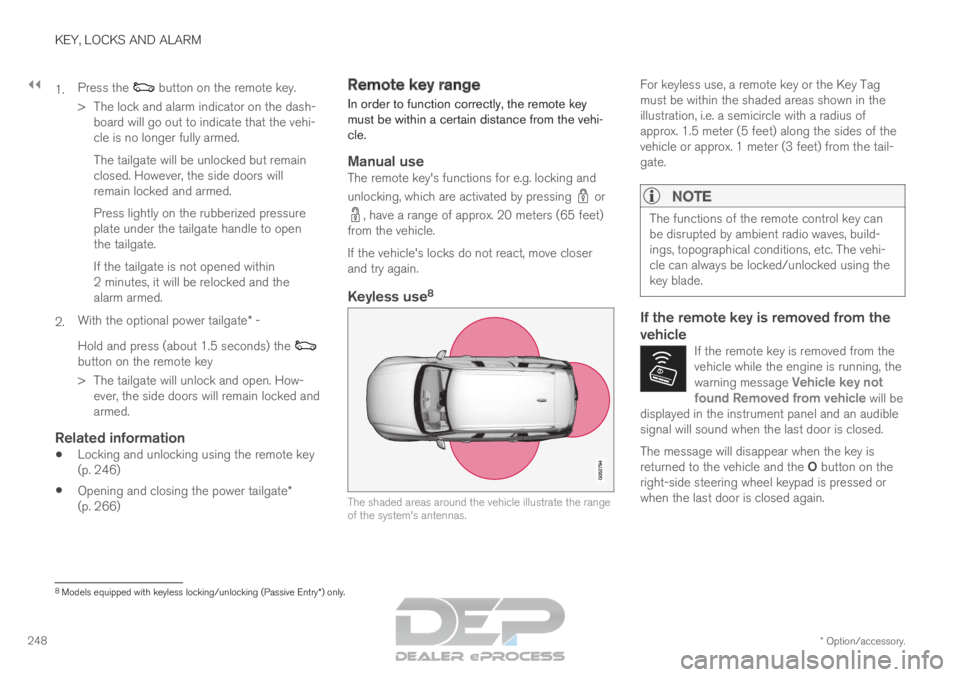
Keyless use 8 The shaded areas around the vehicle illustrate the range
of the system's antennas.For keyless use, a remote key or the Key Tag
must be within the shaded areas shown in the
illustration, i.e. a semicircle with a radius of
approx. 1.5 meter (5 feet) along the sides of the
vehicle or approx. 1 meter (3 feet) from the tail-
gate.
NOTE The functions of the remote control key can
be disrupted by ambient radio waves, build-
ings, topographical conditions, etc. The vehi-
cle can always be locked/unlocked using the
key blade.
If the remote key is removed from the
vehicle
If the remote key is removed from the
vehicle while the engine is running, the
warning message
Vehicle key not
found Removed from vehicle will be
displayed in the instrument panel and an audible
signal will sound when the last door is closed. The message will disappear when the key is
returned to the vehicle and the O button on the
right-side steering wheel keypad is pressed or
when the last door is closed again.
8 Models equipped with keyless locking/unlocking (Passive Entry*) only.
Page 280 of 697
DRIVER SUPPORT
* Option/accessory.
278 Driver support systems
The vehicle is equipped with a number of driver
support systems that can provide the driver with
active or passive assistance in various situations.
The systems can, for example, help the driver:
maintain a set speed
maintain a set time interval to the vehicle
ahead
help prevent a collision by warning the driver
and applying the brakes
park the vehicle.
Some of the systems are standard and others are
options. This also varies from market to market.
Related information
Speed-dependent steering wheel resistance
(p. 278)
Electronic Stability Control (p. 279)
Stability system Roll Stability Control
(p. 279)
Speed limiter (p. 283)
Automatic Speed Limiter (p. 287)
Cruise control (p. 291)
Distance Alert* (p. 296)
Adaptive Cruise Control* (p. 300)
Pilot Assist (p. 316)
Radar sensor (p. 332)
Camera (p. 337)
City Safety™ (p. 341)
Rear Collision Warning (p. 354)
BLIS* (p. 355)
Cross Traffic Alert* (p. 360)
Road Sign Information* (p. 364)
Driver Alert Control (p. 370)
Lane Keeping Aid (p. 372)
Steering assistance at risk of collision
(p. 380)
Park Assist* (p. 390)
Park Assist Camera* (p. 396)
Park Assist Pilot* (p. 406) Speed-dependent steering wheel
resistance
Speed-dependent power steering increases the
steering wheel resistance in pace with the vehi-
cle's speed to give the driver an enhanced feel-
ing of control and stability.
Steering may feel stiffer on highways. When
parking and at low speeds, it will be easier to
move the steering wheel.
NOTE In some situations, the power steering may
become too hot and require temporary cool-
ing – during such time the power steering will
work at reduced output and the steering
wheel may feel more difficult to move.
In parallel with the temporarily reduced steer-
ing assistance, the driver display shows a
message as well as a STEERING WHEEL
symbol.
WARNING
While the power steering is working at
reduced power, the driver support functions
and systems with steering assistance are not
available.
In such a situation, the driver display shows
the
Power steering failure message, com-
bined with a STEERING WHEEL symbol.