power steering VOLVO XC90 TWIN ENGINE 2019 Owners Manual
[x] Cancel search | Manufacturer: VOLVO, Model Year: 2019, Model line: XC90 TWIN ENGINE, Model: VOLVO XC90 TWIN ENGINE 2019Pages: 697, PDF Size: 10.33 MB
Page 7 of 697
5
SEATS AND STEERING WHEEL
Manual front seats184
Power* front seats185
Adjusting the power* front seats185
Storing positions for seats, mirrorsand head-up display*186
Using stored positions for seats, mir-rors and head-up display*187
Front seat massage* settings188
Adjusting front seat massage settings*189
Adjusting* front seat cushion length189
Adjusting front seat side bolster settings*190
Adjusting front seat lumbar support*191
Adjusting the passenger seat fromthe driver's seat*192
Folding the second row backrests193
Adjusting the second row head restraints195
Moving the second row seats for-ward/rearward*197
Adjusting the second row backrest tilt197
Getting into and out of the third rowof seats*198
Folding the third row backrests* 199
Steering wheel controls and horn200
Adjusting the steering wheel201
CLIMATE CONTROL
Climate204
Climate zones204
Climate control sensors204
Perceived temperature205
Climate control system voice commands205
Air quality206
Clean Zone*207
Clean Zone Interior Package*208
Interior Air Quality System*208
Activating and deactivating the airquality sensor*209
Passenger compartment air filter209
Air distribution209
Adjusting air distribution210
Opening, closing and directing air vents211
Air distribution options212
Climate system controls215
Activating and deactivating powerfront seats*217
Activating and deactivating theheated front seat*218
Activating and deactivating theheated rear seats*218
Activating and deactivating front seatventilation*219
Activating and deactivating theheated steering wheel*219
Activating and deactivating automaticsteering wheel heating*220
Activating auto climate control220
Activating and deactivating recirculation221
Activating and deactivating the recir-culation timer setting222
Activating and deactivating max defroster222
Activating and deactivating theheated windshield*223
Activating and deactivating automaticwindshield heating*224
Activating and deactivating theheated rear window and door mirrors225
Automatically activating and deacti-vating the heated rear window anddoor mirrors
225
Setting the blower speed for thefront seats226
Setting the blower speed for the rearseats226
Setting the temperature for the frontseats228
Setting the temperature for the rearseats228
Synchronize temperature229
Activating and deactivating air condi-tioning230
Page 30 of 697
||
YOUR VOLVO
* Option/accessory.28
goal. In addition to continuous environmentalrefinement of conventional gasoline-poweredinternal combustion engines, Volvo is activelylooking at advanced technology alternative-fuelvehicles.
When you drive a Volvo, you become our partnerin the work to lessen the vehicle's impact on theenvironment. To reduce your vehicle's environ-mental impact, you can:
Maintain proper air pressure in your tires.Tests have shown decreased fuel economywith improperly inflated tires.
Follow the recommended maintenanceschedule in your Warranty and ServiceRecords Information booklet.
Drive at a constant speed whenever possible.
See a trained and qualified Volvo servicetechnician as soon as possible for inspectionif the check engine (malfunction indicator)light illuminates, or stays on after the vehiclehas started.
Properly dispose of any vehicle-related wastesuch as used motor oil, used batteries, brakepads, etc.
When cleaning your vehicle, please use gen-uine Volvo car care products. All Volvo carcare products are formulated to be environ-mentally friendly.
Twin Engine vehicles
If possible, precondition the vehicle with thecharging cable before driving.
If preconditioning is not possible in coldweather, use the seat and steering wheelheating primarily. Avoid heating the entirepassenger compartment, which reduces thehybrid battery's charge level.
Choose the Pure drive mode to help mini-mize electric power consumption.
In hilly terrain, put the gear selector in modeB to utilize the electric motor's braking func-tion when the accelerator pedal is released.This helps charge the hybrid battery.
Related information
Economical driving (p. 467)
Starting and stopping preconditioning(p. 233)
The Owner's Manual and the environment(p. 24)
Air quality (p. 206)
IntelliSafe - driver support
IntelliSafe is Volvo Cars' philosophy regardingvehicle safety. IntelliSafe consists of a number ofsystems, both standard and optional, that aredesigned to help make driving safer, preventaccidents and protect passengers and otherroad users.
Support
IntelliSafe includes driver support functions suchas Adaptive cruise control* which helps the driverto maintain an even speed combined with a pre-selected time interval to the vehicle ahead.
Pilot Assist2 helps the driver keep the vehicle inthe current traffic lane by providing steeringassistance and maintaining an even speed and aset time interval to the vehicle ahead.
Park Assist Pilot* helps the driver pull into andout of parking spaces.
Other examples of systems that can help thedriver are the Active main beam, Cross TrafficAlert (CTA)* and Blind Spot Information (BLIS)*systems.
Prevention
City Safety is a function intended to help preventaccidents. The function can help prevent or miti-gate a collision with pedestrians, cyclists, largeanimals or other vehicles. Light, sound and pulsa-tions in the brake pedal are provided to alert of a
2Depending on market, this function can be either standard or optional.
Page 45 of 697
SAFETY
}}
* Option/accessory.43
Safety during pregnancy
It is important that seat belts are worn correctlyduring pregnancy and that pregnant driversadjust their seating position accordingly.
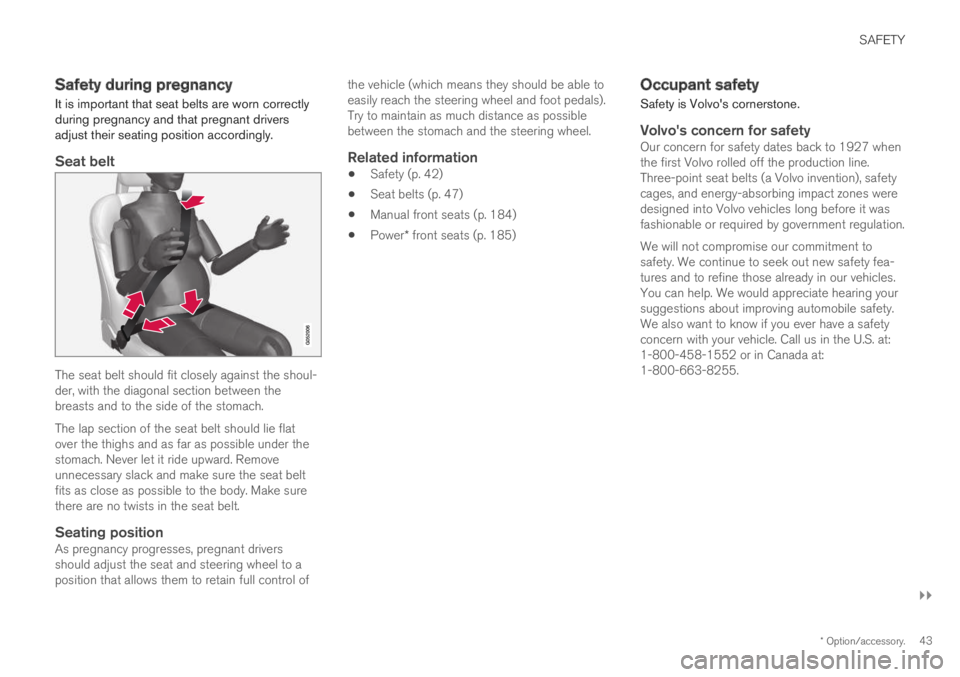
Seat belt
The seat belt should fit closely against the shoul-der, with the diagonal section between thebreasts and to the side of the stomach.
The lap section of the seat belt should lie flatover the thighs and as far as possible under thestomach. Never let it ride upward. Removeunnecessary slack and make sure the seat beltfits as close as possible to the body. Make surethere are no twists in the seat belt.
Seating position
As pregnancy progresses, pregnant driversshould adjust the seat and steering wheel to aposition that allows them to retain full control of
the vehicle (which means they should be able toeasily reach the steering wheel and foot pedals).Try to maintain as much distance as possiblebetween the stomach and the steering wheel.
Related information
Safety (p. 42)
Seat belts (p. 47)
Manual front seats (p. 184)
Power* front seats (p. 185)
Occupant safety
Safety is Volvo's cornerstone.
Volvo's concern for safety
Our concern for safety dates back to 1927 whenthe first Volvo rolled off the production line.Three-point seat belts (a Volvo invention), safetycages, and energy-absorbing impact zones weredesigned into Volvo vehicles long before it wasfashionable or required by government regulation.
We will not compromise our commitment tosafety. We continue to seek out new safety fea-tures and to refine those already in our vehicles.You can help. We would appreciate hearing yoursuggestions about improving automobile safety.We also want to know if you ever have a safetyconcern with your vehicle. Call us in the U.S. at:1-800-458-1552 or in Canada at:1-800-663-8255.
Page 56 of 697

||
SAFETY
54
sors that activate the gas generators, causing theairbags to be inflated with nitrogen gas.
As the movement of the seats' occupants com-presses the airbags, some of the gas is expelledat a controlled rate to provide better cushioning.The belt tensioners minimize slack in the seatbelts and are activated for occupants wearingtheir seat belts. The entire process, from inflationto deflation of the airbag, occurs within tenths ofa second.
The location of the front airbags is indicated bySRS AIRBAG embossed on the steering wheelpad and above the glove compartment, and bydecals on both sun visors and on the front andfar right side of the dash.
The driver's side front airbag is folded andlocated in the steering wheel hub.
The knee airbag is folded on the underside ofthe dashboard on the driver's side. The textAIRBAG is embossed on the panel.
The passenger's side front airbag is foldedbehind a panel located above the glove compart-ment.
WARNING
The airbags in the vehicle are designed tobe a SUPPLEMENT to-not a replacementfor-the three-point seat belts. For maxi-mum protection, wear seat belts at alltimes. Be aware that no system can pre-vent all possible injuries that may occur inan accident.
Never drive with your hands on the steer-ing wheel pad/airbag housing.
The front airbags are designed to helpprevent serious injury. Deployment occursvery quickly and with considerable force.During normal deployment and depend-ing on variables such as seating position,one may experience abrasions, bruises,swellings, or other injuries as a result ofdeployment of one or both of the airbags.
When installing any accessory equipment,make sure that the front airbag system isnot damaged. Any interference in the sys-tem could cause malfunction.
Front airbag deployment
The front airbags are designed to deploy dur-ing certain frontal or front-angular collisions,impacts, or decelerations, depending on thecrash severity, angle, speed and objectimpacted. The airbags may also deploy in
certain non-frontal collisions where rapiddeceleration occurs.
The airbag system's sensors, which triggerthe front airbags, are designed to determineif the collision is powerful enough to activatethe belt tensioners and/or the airbags.
However, not all frontal collisions activate thefront airbags.
If the collision involves a nonrigid object (e.g.,a snow drift or bush), or a rigid, fixed objectat a low speed, the front airbags will not nec-essarily deploy.
Front airbags do not normally deploy in aside impact collision, in a collision from therear or in a rollover situation.
The amount of damage to the bodyworkdoes not reliably indicate if the airbagsshould have deployed or not.
Page 85 of 697
DISPLAYS AND VOICE CONTROL
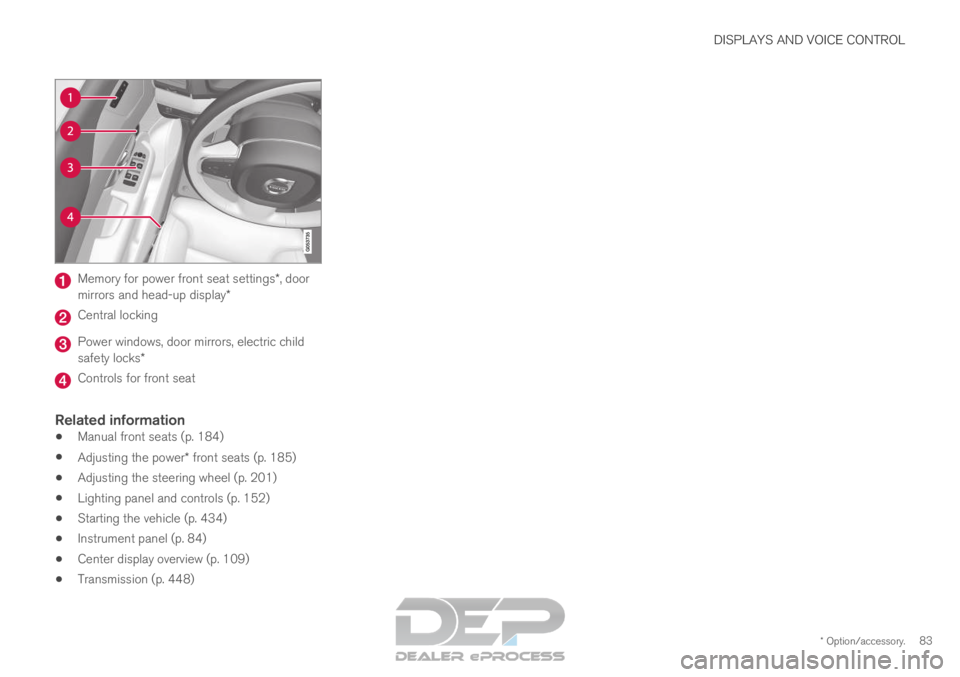
* Option/accessory.83Memory for power front seat settings*, door
mirrors and head-up display* Central locking
Power windows, door mirrors, electric child
safety locks*
Controls for front seat
Related information
Manual front seats (p. 184)
Adjusting the power* front seats (p. 185)
Adjusting the steering wheel (p. 201)
Lighting panel and controls (p. 152)
Starting the vehicle (p. 434)
Instrument panel (p. 84)
Center display overview (p. 109)
Transmission (p. 448)
Page 146 of 697
DISPLAYS AND VOICE CONTROL
* Option/accessory.
144 Head-up display settings*
Adjusting settings for the head-up display.
Settings can be adjusted when the vehicle is
started and a projected image is displayed on the
windshield.
Selecting display options
Select the functions to be shown in the head-up
display.
1. Tap Settings in the center display's Top
view.
2.
Tap My Car Displays Head-Up
Display Options .
3.
Select one or more functions:
Show Navigation
Show Road Sign Information
Show Driver Support
Show Phone.
This setting is stored as a personal setting in the
driver profile.
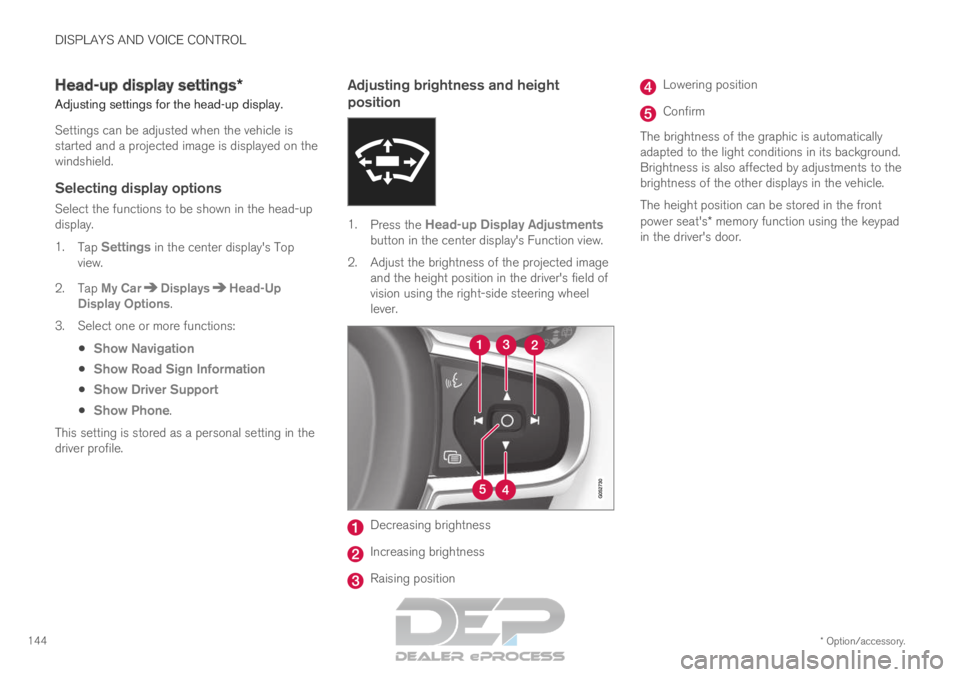
Adjusting brightness and height
position 1.
Press the Head-up Display Adjustments
button in the center display's Function view.
2.
Adjust the brightness of the projected image
and the height position in the driver's field of
vision using the right-side steering wheel
lever. Decreasing brightness
Increasing brightness
Raising position Lowering position
Confirm
The brightness of the graphic is automatically
adapted to the light conditions in its background.
Brightness is also affected by adjustments to the
brightness of the other displays in the vehicle.
The height position can be stored in the front
power seat's* memory function using the keypad
in the driver's door.
Page 186 of 697
SEATS AND STEERING WHEEL
* Option/accessory.
184 Manual front seats
The power front seats can be adjusted in a num-
ber of different ways for optimal comfort and
ergonomics.
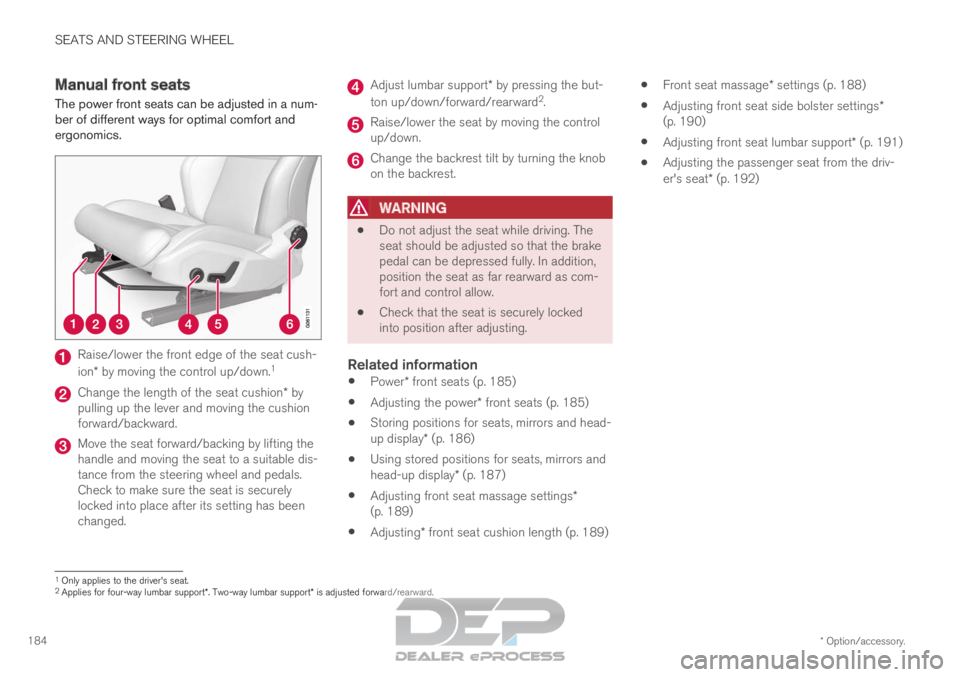
Raise/lower the front edge of the seat cush-
ion* by moving the control up/down.
1Change the length of the seat cushion* by
pulling up the lever and moving the cushion
forward/backward. Move the seat forward/backing by lifting the
handle and moving the seat to a suitable dis-
tance from the steering wheel and pedals.
Check to make sure the seat is securely
locked into place after its setting has been
changed. Adjust lumbar support* by pressing the but-
ton up/down/forward/rearward 2
. Raise/lower the seat by moving the control
up/down.
Change the backrest tilt by turning the knob
on the backrest.
WARNING
Do not adjust the seat while driving. The
seat should be adjusted so that the brake
pedal can be depressed fully. In addition,
position the seat as far rearward as com-
fort and control allow.
Check that the seat is securely locked
into position after adjusting.
Related information
Power* front seats (p. 185)
Adjusting the power* front seats (p. 185)
Storing positions for seats, mirrors and head-
up display* (p. 186)
Using stored positions for seats, mirrors and
head-up display* (p. 187)
Adjusting front seat massage settings*
(p. 189)
Adjusting* front seat cushion length (p. 189)
Front seat massage* settings (p. 188)
Adjusting front seat side bolster settings*
(p. 190)
Adjusting front seat lumbar support* (p. 191)
Adjusting the passenger seat from the driv-
er's seat* (p. 192) 1
Only applies to the driver's seat.
2 Applies for four-way lumbar support*. Two-way lumbar support* is adjusted forward/rearward.
Page 187 of 697
SEATS AND STEERING WHEEL
}}
* Option/accessory. 185
Power* front seats
The power front seats can be adjusted in a num-
ber of different ways for optimal comfort and
ergonomics. The power seat can be moved for-
ward/backward and up/down. The height and
length* of the seat cushion and the tilt of the
backrest can be adjusted. Lumbar support* can
be adjusted up, down, forward and backward 3
.
The power seats can be adjusted for a certain
period of time after the door is unlocked without
the engine running. The seats can always be
adjusted while the engine is running. They can
also be adjusted for a short period after the
engine is turned off.
CAUTION The power seats have an overload protector
that is triggered if a seat is blocked by any
object. If this occurs, remove the object and
attempt to adjust the seat again.
Related information
Manual front seats (p. 184)
Adjusting the power* front seats (p. 185)
Storing positions for seats, mirrors and head-
up display* (p. 186)
Using stored positions for seats, mirrors and
head-up display* (p. 187)
Adjusting front seat massage settings*
(p. 189)
Adjusting* front seat cushion length (p. 189)
Front seat massage* settings (p. 188)
Adjusting front seat side bolster settings*
(p. 190)
Adjusting front seat lumbar support* (p. 191)
Adjusting the passenger seat from the driv-
er's seat* (p. 192) Adjusting the power* front seats
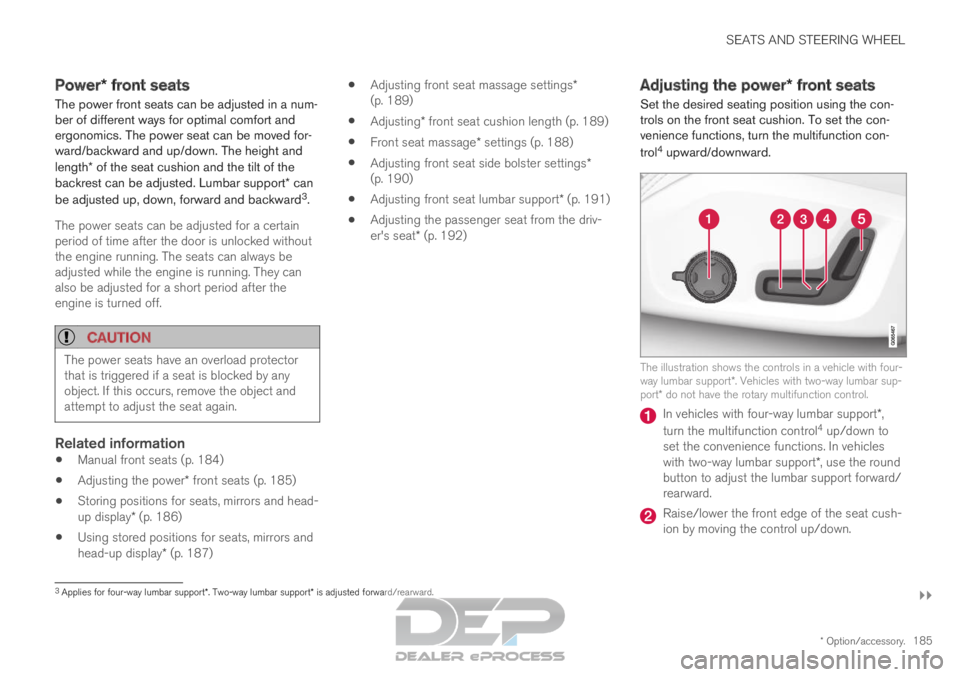
Set the desired seating position using the con-
trols on the front seat cushion. To set the con-
venience functions, turn the multifunction con-
trol 4
upward/downward. The illustration shows the controls in a vehicle with four-
way lumbar support*. Vehicles with two-way lumbar sup-
port* do not have the rotary multifunction control. In vehicles with four-way lumbar support*,
turn the multifunction control 4
up/down to
set the convenience functions. In vehicles
with two-way lumbar support*, use the round
button to adjust the lumbar support forward/
rearward. Raise/lower the front edge of the seat cush-
ion by moving the control up/down.
3
Applies for four-way lumbar support*. Two-way lumbar support* is adjusted forward/rearward.
Page 188 of 697
||SEATS AND STEERING WHEEL
* Option/accessory.
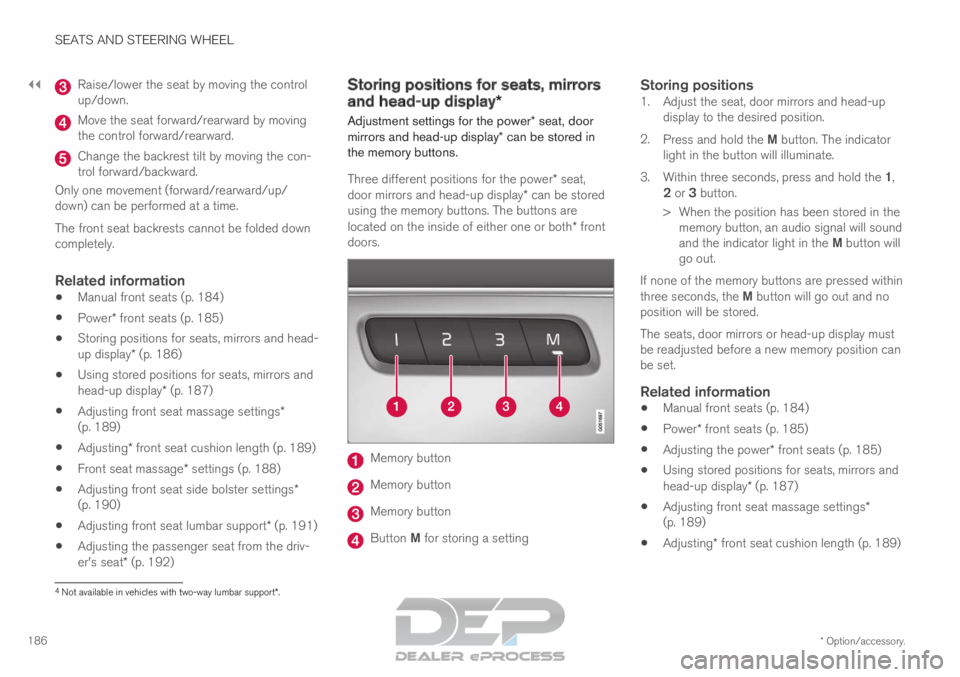
186 Raise/lower the seat by moving the control
up/down.
Move the seat forward/rearward by moving
the control forward/rearward.
Change the backrest tilt by moving the con-
trol forward/backward.
Only one movement (forward/rearward/up/
down) can be performed at a time.
The front seat backrests cannot be folded down
completely.
Related information
Manual front seats (p. 184)
Power* front seats (p. 185)
Storing positions for seats, mirrors and head-
up display* (p. 186)
Using stored positions for seats, mirrors and
head-up display* (p. 187)
Adjusting front seat massage settings*
(p. 189)
Adjusting* front seat cushion length (p. 189)
Front seat massage* settings (p. 188)
Adjusting front seat side bolster settings*
(p. 190)
Adjusting front seat lumbar support* (p. 191)
Adjusting the passenger seat from the driv-
er's seat* (p. 192) Storing positions for seats, mirrors
and head-up display*
Adjustment settings for the power* seat, door
mirrors and head-up display* can be stored in
the memory buttons.
Three different positions for the power* seat,
door mirrors and head-up display* can be stored
using the memory buttons. The buttons are
located on the inside of either one or both* front
doors. Memory button
Memory button
Memory button
Button M for storing a setting
Storing positions1. Adjust the seat, door mirrors and head-up
display to the desired position.
2. Press and hold the M button. The indicator
light in the button will illuminate.
3. Within three seconds, press and hold the 1,
2 or 3 button.
> When the position has been stored in the memory button, an audio signal will sound
and the indicator light in the M button will
go out.
If none of the memory buttons are pressed within
three seconds, the M button will go out and no
position will be stored.
The seats, door mirrors or head-up display must
be readjusted before a new memory position can
be set.
Related information
Manual front seats (p. 184)
Power* front seats (p. 185)
Adjusting the power* front seats (p. 185)
Using stored positions for seats, mirrors and
head-up display* (p. 187)
Adjusting front seat massage settings*
(p. 189)
Adjusting* front seat cushion length (p. 189) 4
Not available in vehicles with two-way lumbar support*.
Page 189 of 697
SEATS AND STEERING WHEEL
}}
* Option/accessory. 187
Front seat massage* settings (p. 188)
Adjusting front seat side bolster settings*
(p. 190)
Adjusting front seat lumbar support* (p. 191)
Adjusting the passenger seat from the driv-
er's seat* (p. 192)
Adjusting the door mirrors (p. 171)
Head-up display settings* (p. 144) Using stored positions for seats,
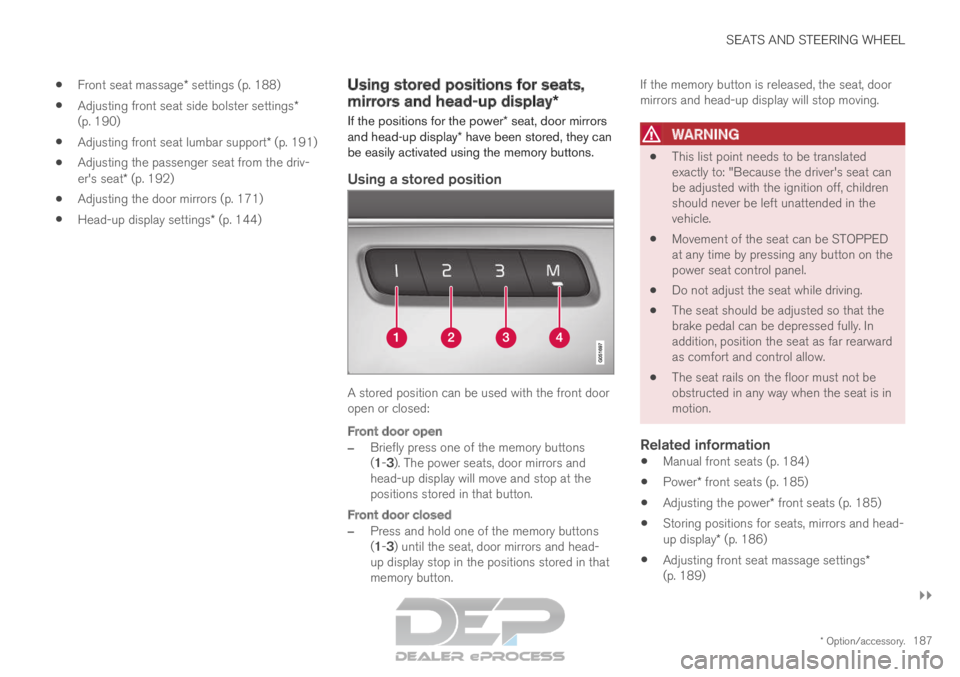
mirrors and head-up display*
If the positions for the power* seat, door mirrors
and head-up display* have been stored, they can
be easily activated using the memory buttons.
Using a stored position A stored position can be used with the front door
open or closed:
Front door open
–
Briefly press one of the memory buttons
(1-3). The power seats, door mirrors and
head-up display will move and stop at the
positions stored in that button.
Front door closed
– Press and hold one of the memory buttons
(1-3) until the seat, door mirrors and head-
up display stop in the positions stored in that
memory button. If the memory button is released, the seat, door
mirrors and head-up display will stop moving.
WARNING
This list point needs to be translated
exactly to: "Because the driver's seat can
be adjusted with the ignition off, children
should never be left unattended in the
vehicle.
Movement of the seat can be STOPPED
at any time by pressing any button on the
power seat control panel.
Do not adjust the seat while driving.
The seat should be adjusted so that the
brake pedal can be depressed fully. In
addition, position the seat as far rearward
as comfort and control allow.
The seat rails on the floor must not be
obstructed in any way when the seat is in
motion.
Related information
Manual front seats (p. 184)
Power* front seats (p. 185)
Adjusting the power* front seats (p. 185)
Storing positions for seats, mirrors and head-
up display* (p. 186)
Adjusting front seat massage settings*
(p. 189)