steering wheel VOLVO XC90 TWIN ENGINE 2019 User Guide
[x] Cancel search | Manufacturer: VOLVO, Model Year: 2019, Model line: XC90 TWIN ENGINE, Model: VOLVO XC90 TWIN ENGINE 2019Pages: 697, PDF Size: 10.33 MB
Page 84 of 697
DISPLAYS AND VOICE CONTROL
* Option/accessory.
82 Instruments and controls in left-
hand drive vehicles
The overviews show the location of the vehicle's
displays and controls.
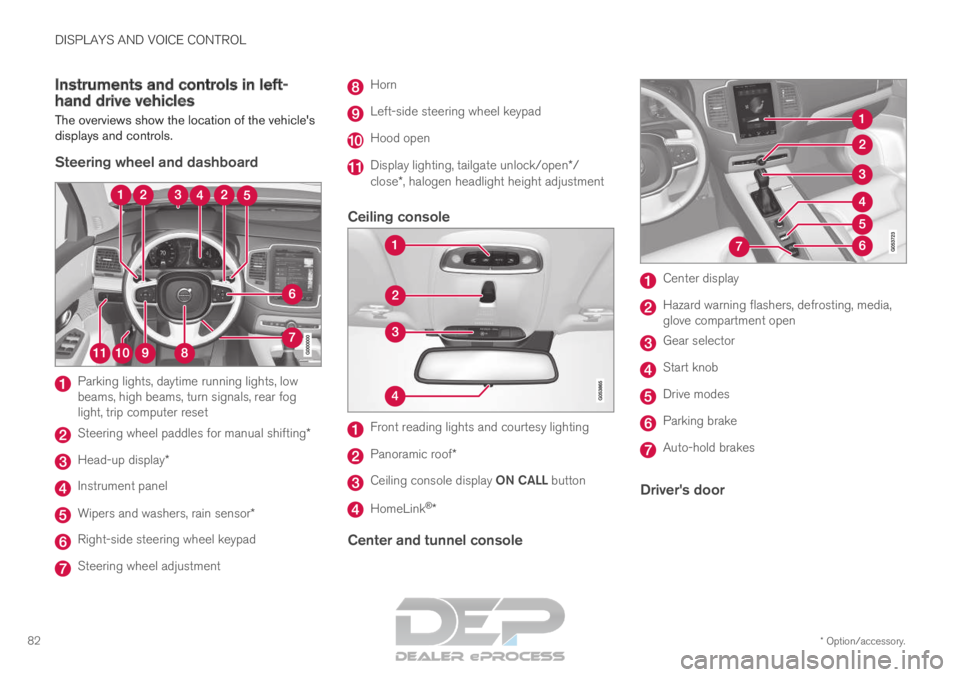
Steering wheel and dashboard Parking lights, daytime running lights, low
beams, high beams, turn signals, rear fog
light, trip computer reset
Steering wheel paddles for manual shifting*
Head-up display*
Instrument panel
Wipers and washers, rain sensor*
Right-side steering wheel keypad
Steering wheel adjustment Horn
Left-side steering wheel keypad
Hood open
Display lighting, tailgate unlock/open*/
close*, halogen headlight height adjustment
Ceiling console Front reading lights and courtesy lighting
Panoramic roof*
Ceiling console display ON CALL button
HomeLink
®
*
Center and tunnel console Center display
Hazard warning flashers, defrosting, media,
glove compartment open
Gear selector
Start knob
Drive modes
Parking brake
Auto-hold brakes
Driver's door
Page 85 of 697
DISPLAYS AND VOICE CONTROL
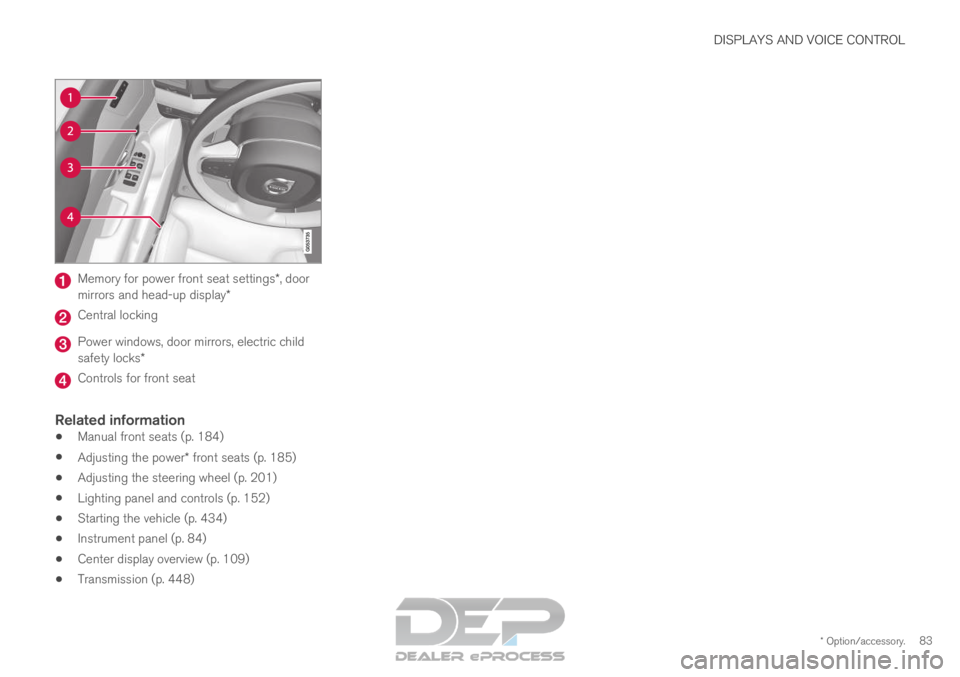
* Option/accessory.83Memory for power front seat settings*, door
mirrors and head-up display* Central locking
Power windows, door mirrors, electric child
safety locks*
Controls for front seat
Related information
Manual front seats (p. 184)
Adjusting the power* front seats (p. 185)
Adjusting the steering wheel (p. 201)
Lighting panel and controls (p. 152)
Starting the vehicle (p. 434)
Instrument panel (p. 84)
Center display overview (p. 109)
Transmission (p. 448)
Page 87 of 697
DISPLAYS AND VOICE CONTROL
85Left side
In the centerRight side
– Media player
Distance to discharged battery
– Navigation system mapCurrent fuel consumption
– PhoneApp menu (activated using steering wheel keypad)
– Voice Control–
– CompassA
–A
Depends on selected drive mode.
B Total distance.
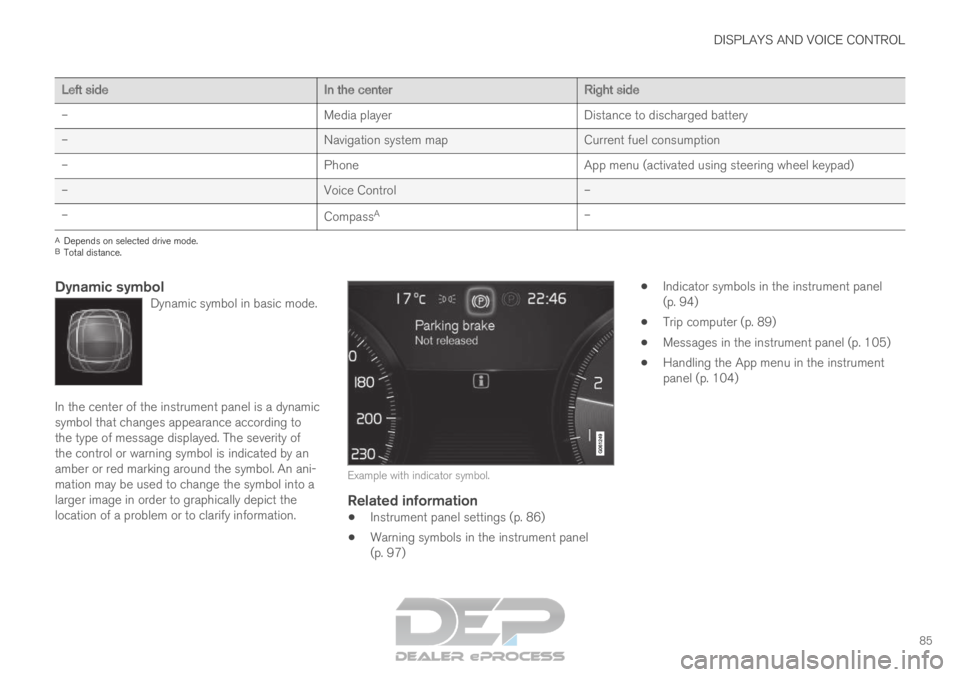
Dynamic symbolDynamic symbol in basic mode. In the center of the instrument panel is a dynamic
symbol that changes appearance according to
the type of message displayed. The severity of
the control or warning symbol is indicated by an
amber or red marking around the symbol. An ani-
mation may be used to change the symbol into a
larger image in order to graphically depict the
location of a problem or to clarify information.
Example with indicator symbol.
Related information
Instrument panel settings (p. 86)
Warning symbols in the instrument panel
(p. 97)
Indicator symbols in the instrument panel
(p. 94)
Trip computer (p. 89)
Messages in the instrument panel (p. 105)
Handling the App menu in the instrument
panel (p. 104)
Page 88 of 697
DISPLAYS AND VOICE CONTROL
86Instrument panel settings
Display settings for the instrument panel can be
set via the instrument panel's app menu and via
the center display's Settings menu.
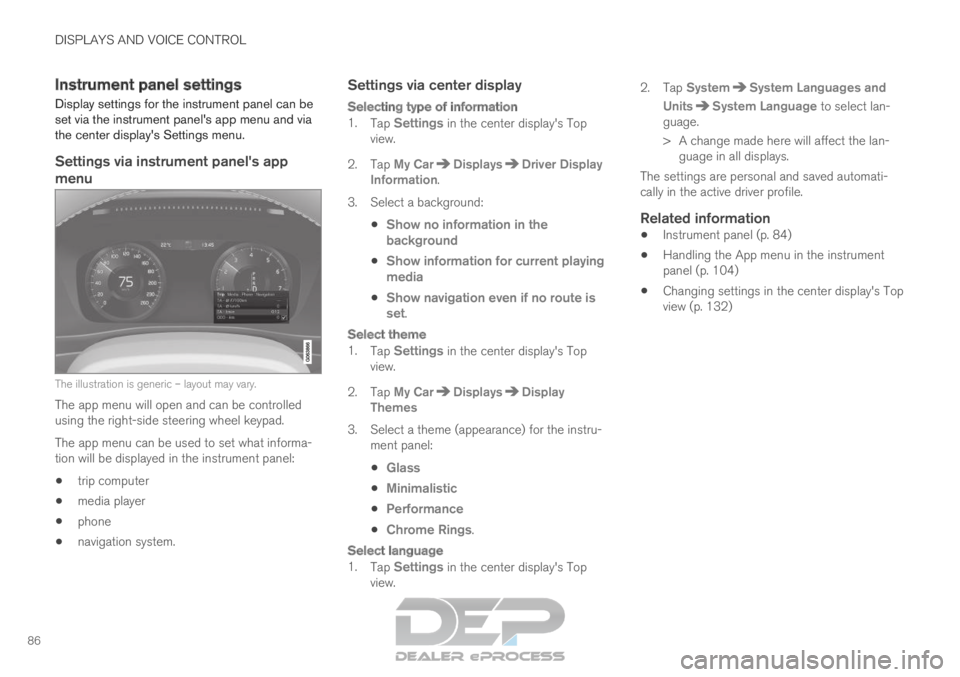
Settings via instrument panel's app
menu The illustration is generic – layout may vary.
The app menu will open and can be controlled
using the right-side steering wheel keypad.
The app menu can be used to set what informa-
tion will be displayed in the instrument panel:
trip computer
media player
phone
navigation system.
Settings via center display
Selecting type of information
1.
Tap Settings in the center display's Top
view.
2.
Tap My Car Displays Driver Display
Information .
3.
Select a background:
Show no information in the
background
Show information for current playing
media
Show navigation even if no route is
set.
Select theme
1.
Tap Settings in the center display's Top
view.
2.
Tap My Car Displays Display
Themes
3. Select a theme (appearance) for the instru- ment panel:
Glass
Minimalistic
Performance
Chrome Rings.
Select language
1.
Tap Settings in the center display's Top
view. 2.
Tap
System System Languages and
Units System Language
to select lan-
guage.
> A change made here will affect the lan- guage in all displays.
The settings are personal and saved automati-
cally in the active driver profile.
Related information
Instrument panel (p. 84)
Handling the App menu in the instrument
panel (p. 104)
Changing settings in the center display's Top
view (p. 132)
Page 93 of 697
DISPLAYS AND VOICE CONTROL
91
Displaying trip data in the
instrument panel
Data recorded and calculated by the trip com-
puter can be displayed on the instrument panel.
This data is stored in a trip computer app. You
can choose which information the instrument
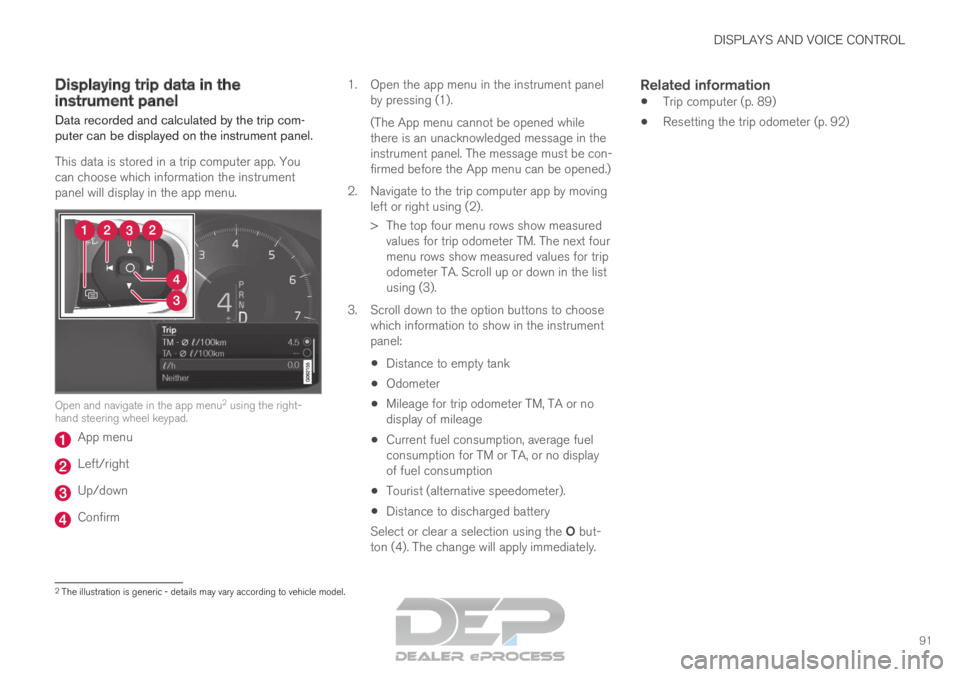
panel will display in the app menu. Open and navigate in the app menu
2
using the right-
hand steering wheel keypad. App menu
Left/right
Up/down
Confirm 1.
Open the app menu in the instrument panel
by pressing (1).
(The App menu cannot be opened while
there is an unacknowledged message in the
instrument panel. The message must be con-
firmed before the App menu can be opened.)
2. Navigate to the trip computer app by moving left or right using (2).
> The top four menu rows show measuredvalues for trip odometer TM. The next four
menu rows show measured values for trip
odometer TA. Scroll up or down in the list
using (3).
3. Scroll down to the option buttons to choose which information to show in the instrument
panel:
Distance to empty tank
Odometer
Mileage for trip odometer TM, TA or no
display of mileage
Current fuel consumption, average fuel
consumption for TM or TA, or no display
of fuel consumption
Tourist (alternative speedometer).
Distance to discharged battery
Select or clear a selection using the O but-
ton (4). The change will apply immediately.
Related information
Trip computer (p. 89)
Resetting the trip odometer (p. 92) 2
The illustration is generic - details may vary according to vehicle mode\
l.
Page 94 of 697
DISPLAYS AND VOICE CONTROL
92Resetting the trip odometer
Resetting the trip odometer using the left-side
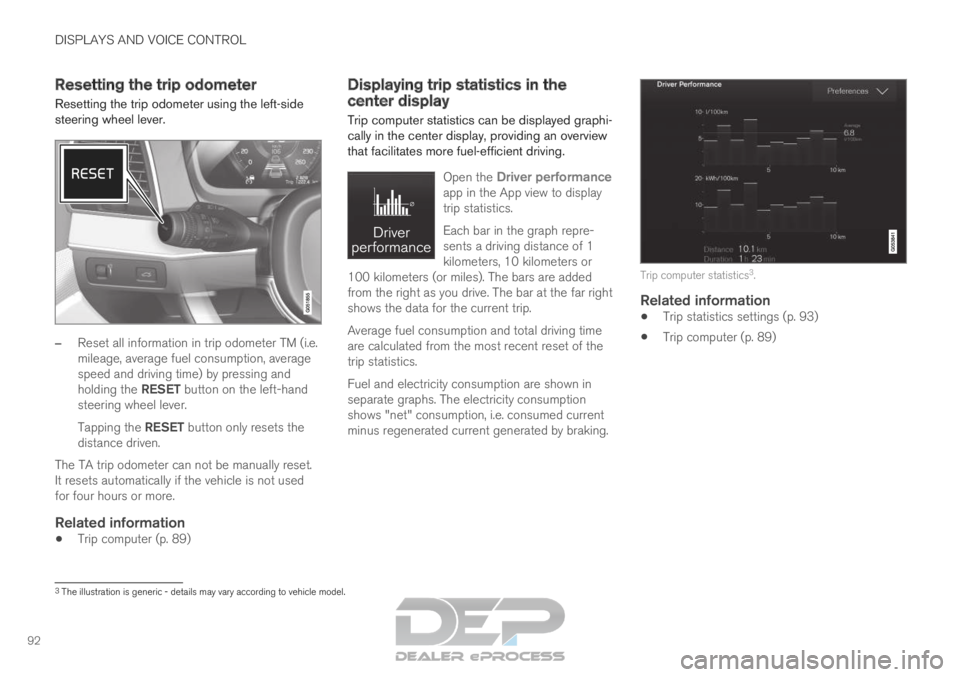
steering wheel lever. –
Reset all information in trip odometer TM (i.e.
mileage, average fuel consumption, average
speed and driving time) by pressing and
holding the RESET button on the left-hand
steering wheel lever.
Tapping the RESET button only resets the
distance driven.
The TA trip odometer can not be manually reset.
It resets automatically if the vehicle is not used
for four hours or more.
Related information
Trip computer (p. 89) Displaying trip statistics in the
center display
Trip computer statistics can be displayed graphi-
cally in the center display, providing an overview
that facilitates more fuel-efficient driving.
Open the
Driver performance
app in the App view to display
trip statistics.
Each bar in the graph repre-
sents a driving distance of 1
kilometers, 10 kilometers or
100 kilometers (or miles). The bars are added
from the right as you drive. The bar at the far right
shows the data for the current trip.
Average fuel consumption and total driving time
are calculated from the most recent reset of the
trip statistics.
Fuel and electricity consumption are shown in
separate graphs. The electricity consumption
shows "net" consumption, i.e. consumed current
minus regenerated current generated by braking. Trip computer statistics
3
.
Related information
Trip statistics settings (p. 93)
Trip computer (p. 89) 3
The illustration is generic - details may vary according to vehicle mode\
l.
Page 105 of 697

DISPLAYS AND VOICE CONTROL
}}
103
zlib License
The zlib/libpng License Copyright (c)
This software is provided 'as-is', without any
express or implied warranty. In no event will the
authors be held liable for any damages arising
from the use of this software.
Permission is granted to anyone to use this
software for any purpose, including commercial
applications, and to alter it and redistribute it
freely, subject to the following restrictions:
1. The origin of this software must not be misrepresented; you must not claim that you
wrote the original software. If you use this
software in a product, an acknowledgment in
the product documentation would be
appreciated but is not required.
2. Altered source versions must be plainly marked as such, and must not be
misrepresented as being the original
software.
3. This notice may not be removed or altered from any source distribution.
SGI Free Software B License Version 2.0.
SGI FREE SOFTWARE LICENSE B (Version 2.0,
Sept. 18, 2008)
Copyright (C) [dates of first publication] Silicon
Graphics, Inc. All Rights Reserved. Permission is
hereby granted, free of charge, to any person
obtaining a copy of this software and associated documentation files (the "Software"), to deal in
the Software without restriction, including without
limitation the rights to use, copy, modify, merge,
publish, distribute, sublicense, and/or sell copies
of the Software, and to permit persons to whom
the Software is furnished to do so, subject to the
following conditions: The above copyright notice
including the dates of first publication and either
this permission notice or a reference to http://
oss.sgi.com/projects/FreeB/ shall be included in
all copies or substantial portions of the Software.
THE SOFTWARE IS PROVIDED "AS IS",
WITHOUT WARRANTY OF ANY KIND,
EXPRESS OR IMPLIED, INCLUDING BUT NOT
LIMITED TO THE WARRANTIES OF
MERCHANTABILITY, FITNESS FOR A
PARTICULAR PURPOSE AND
NONINFRINGEMENT. IN NO EVENT SHALL
SILICON GRAPHICS, INC. BE LIABLE FOR ANY
CLAIM, DAMAGES OR OTHER LIABILITY,
WHETHER IN AN ACTION OF CONTRACT,
TORT OR OTHERWISE, ARISING FROM, OUT
OF OR IN CONNECTION WITH THE SOFTWARE
OR THE USE OR OTHER DEALINGS IN THE
SOFTWARE.
Except as contained in this notice, the name of
Silicon Graphics, Inc. shall not be used in
advertising or otherwise to promote the sale, use
or other dealings in this Software without prior
written authorization from Silicon Graphics, Inc.
Related information
Instrument panel (p. 84) App menu in instrument panel
The application menu (App menu) in the instru-
ment panel provides quick access to commonly
used functions for certain apps. The App menu in the instrument panel can be used
instead of the center display. The illustration is generic –
layout may vary.
The App menu is displayed in the instrument
panel and is controlled using the right-side steer-
ing wheel keypad. The app menu makes it easier
to switch between different apps or functions
within the apps without having to let go of the
steering wheel.
App menu functionsDifferent apps provide access to different types
of functions. The following apps and their func-
tions can be controlled from the App menu:
Page 106 of 697
||DISPLAYS AND VOICE CONTROL
104
App
Functions
Trip com-
puter Select a trip odometer, change
instrument panel display set-
tings, etc.
Media player
Select active source for media
player.
Phone Call a contact from the call list.
Navigation Guide to destination, etc.
Related information
Instrument panel (p. 84)
Center display overview (p. 109)
Handling the App menu in the instrument
panel (p. 104) Handling the App menu in the
instrument panel
The App (application) menu in the instrument
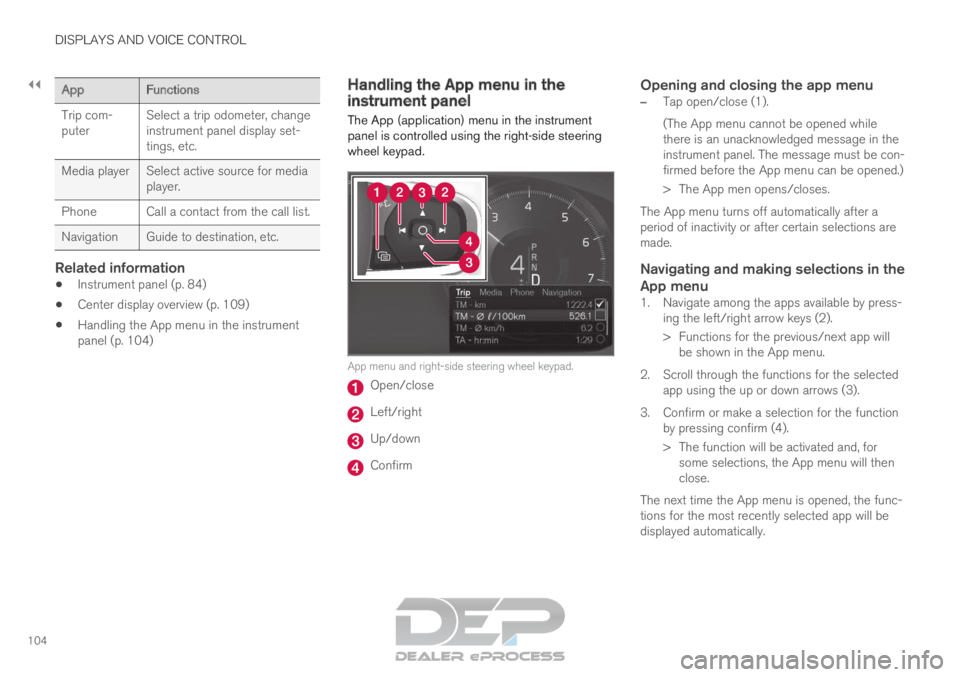
panel is controlled using the right-side steering
wheel keypad. App menu and right-side steering wheel keypad.
Open/close
Left/right
Up/down
Confirm
Opening and closing the app menu
–
Tap open/close (1).
(The App menu cannot be opened while
there is an unacknowledged message in the
instrument panel. The message must be con-
firmed before the App menu can be opened.)
>
The App men opens/closes.
The App menu turns off automatically after a
period of inactivity or after certain selections are
made.
Navigating and making selections in the
App menu
1. Navigate among the apps available by press- ing the left/right arrow keys (2).
> Functions for the previous/next app willbe shown in the App menu.
2. Scroll through the functions for the selected app using the up or down arrows (3).
3. Confirm or make a selection for the function by pressing confirm (4).
> The function will be activated and, forsome selections, the App menu will then
close.
The next time the App menu is opened, the func-
tions for the most recently selected app will be
displayed automatically.
Page 108 of 697
||DISPLAYS AND VOICE CONTROL
106
Message
Meaning
Regular main-
tenance
Maintenance
overdue Time for service - contact
a workshop
B
. Shown when
the date for service has
passed.
Temporarily
off A A function has been tem-
porarily deactivated and
will be reactivated auto-
matically while driving or
after the engine is restar-
ted.A
Part of message, shown along with information on the location
of the problem.
B An authorized Volvo workshop is recommended.
Related information
Handling messages in the instrument panel
(p. 106)
Handling messages saved from the instru-
ment panel (p. 107)
Messages in the center display (p. 140) Handling messages in the
instrument panel
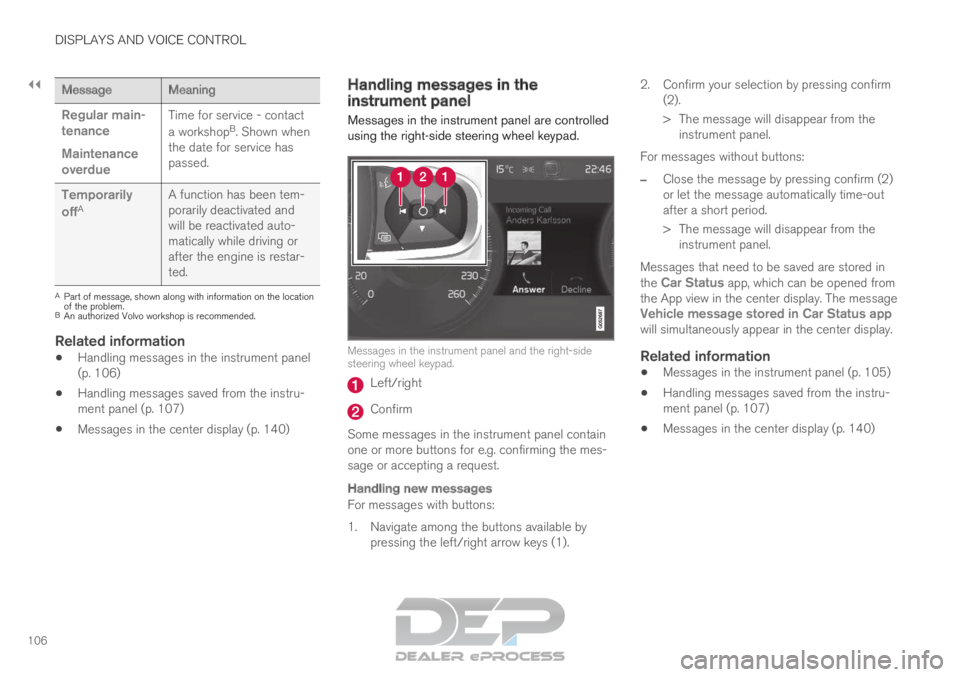
Messages in the instrument panel are controlled
using the right-side steering wheel keypad. Messages in the instrument panel and the right-side
steering wheel keypad.
Left/right
Confirm
Some messages in the instrument panel contain
one or more buttons for e.g. confirming the mes-
sage or accepting a request.
Handling new messages
For messages with buttons:
1. Navigate among the buttons available by pressing the left/right arrow keys (1). 2. Confirm your selection by pressing confirm
(2).
> The message will disappear from theinstrument panel.
For messages without buttons:
– Close the message by pressing confirm (2)
or let the message automatically time-out
after a short period.
>
The message will disappear from the
instrument panel.
Messages that need to be saved are stored in
the Car Status app, which can be opened from
the App view in the center display. The message
Vehicle message stored in Car Status app
will simultaneously appear in the center display.
Related information
Messages in the instrument panel (p. 105)
Handling messages saved from the instru-
ment panel (p. 107)
Messages in the center display (p. 140)
Page 113 of 697
DISPLAYS AND VOICE CONTROL
* Option/accessory.111
adjusted using the right-side steering wheel
keypad.
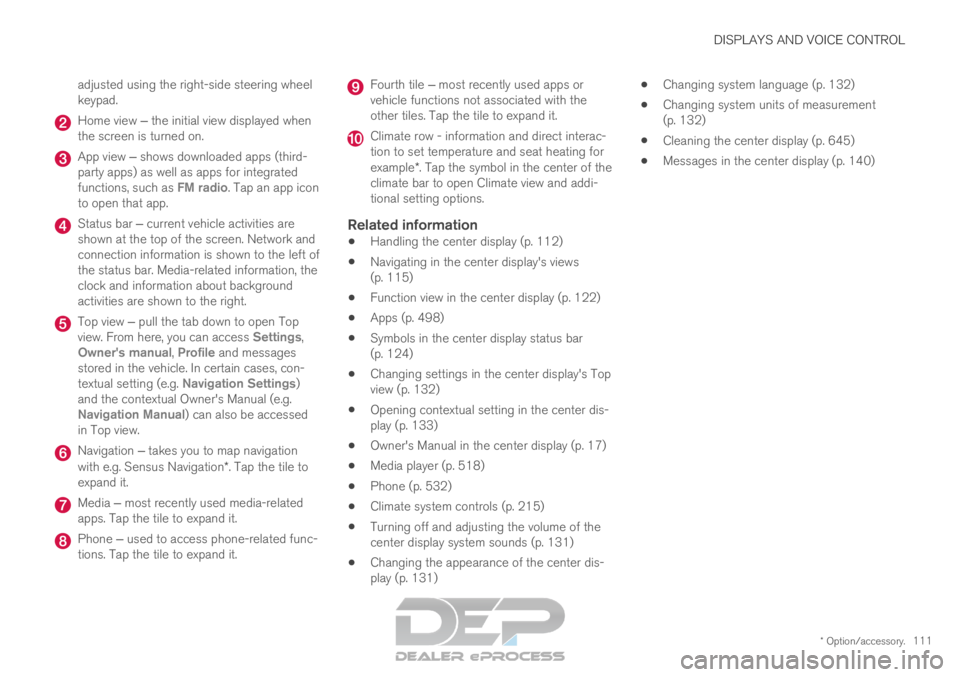
Home view ‒ the initial view displayed when
the screen is turned on. App view ‒ shows downloaded apps (third-
party apps) as well as apps for integrated
functions, such as FM radio
. Tap an app icon
to open that app. Status bar ‒ current vehicle activities are
shown at the top of the screen. Network and
connection information is shown to the left of
the status bar. Media-related information, the
clock and information about background
activities are shown to the right. Top view ‒ pull the tab down to open Top
view. From here, you can access Settings
,
Owner's manual, Profile and messages
stored in the vehicle. In certain cases, con-
textual setting (e.g. Navigation Settings
)
and the contextual Owner's Manual (e.g.
Navigation Manual) can also be accessed
in Top view. Navigation ‒ takes you to map navigation
with e.g. Sensus Navigation*. Tap the tile to
expand it. Media ‒ most recently used media-related
apps. Tap the tile to expand it. Phone ‒ used to access phone-related func-
tions. Tap the tile to expand it. Fourth tile ‒ most recently used apps or
vehicle functions not associated with the
other tiles. Tap the tile to expand it. Climate row - information and direct interac-
tion to set temperature and seat heating for
example*. Tap the symbol in the center of the
climate bar to open Climate view and addi-
tional setting options.
Related information
Handling the center display (p. 112)
Navigating in the center display's views
(p. 115)
Function view in the center display (p. 122)
Apps (p. 498)
Symbols in the center display status bar
(p. 124)
Changing settings in the center display's Top
view (p. 132)
Opening contextual setting in the center dis-
play (p. 133)
Owner's Manual in the center display (p. 17)
Media player (p. 518)
Phone (p. 532)
Climate system controls (p. 215)
Turning off and adjusting the volume of the
center display system sounds (p. 131)
Changing the appearance of the center dis-
play (p. 131)
Changing system language (p. 132)
Changing system units of measurement
(p. 132)
Cleaning the center display (p. 645)
Messages in the center display (p. 140)