seat adjustment VOLVO XC90 TWIN ENGINE 2019 Owners Manual
[x] Cancel search | Manufacturer: VOLVO, Model Year: 2019, Model line: XC90 TWIN ENGINE, Model: VOLVO XC90 TWIN ENGINE 2019Pages: 697, PDF Size: 10.33 MB
Page 124 of 697
DISPLAYS AND VOICE CONTROL
122Function view in the center display
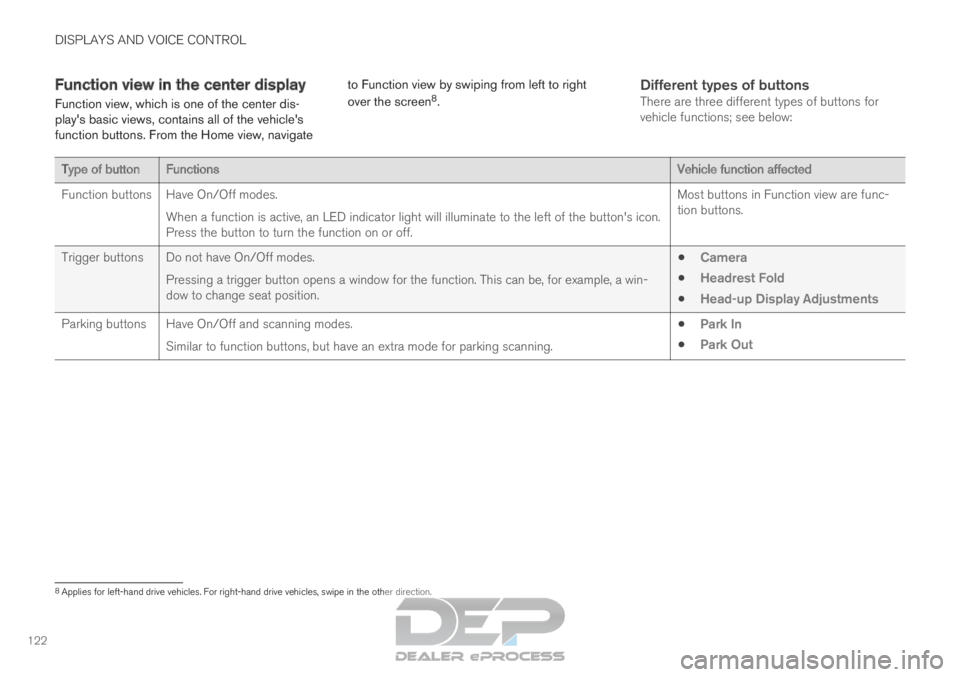
Function view, which is one of the center dis-
play's basic views, contains all of the vehicle's
function buttons. From the Home view, navigate to Function view by swiping from left to right
over the screen
8
.
Different types of buttonsThere are three different types of buttons for
vehicle functions; see below: Type of button
Functions Vehicle function affected
Function buttons
Have On/Off modes.
When a function is active, an LED indicator light will illuminate to the\
left of the button's icon.
Press the button to turn the function on or off. Most buttons in Function view are func-
tion buttons.
Trigger buttons Do not have On/Off modes. Pressing a trigger button opens a window for the function. This can be, \
for example, a win-
dow to change seat position.
Camera
Headrest Fold
Head-up Display Adjustments
Parking buttons Have On/Off and scanning modes. Similar to function buttons, but have an extra mode for parking scanning\
.
Park In
Park Out 8
Applies for left-hand drive vehicles. For right-hand drive vehicles, swi\
pe in the other direction.
Page 146 of 697
DISPLAYS AND VOICE CONTROL
* Option/accessory.
144 Head-up display settings*
Adjusting settings for the head-up display.
Settings can be adjusted when the vehicle is
started and a projected image is displayed on the
windshield.
Selecting display options
Select the functions to be shown in the head-up
display.
1. Tap Settings in the center display's Top
view.
2.
Tap My Car Displays Head-Up
Display Options .
3.
Select one or more functions:
Show Navigation
Show Road Sign Information
Show Driver Support
Show Phone.
This setting is stored as a personal setting in the
driver profile.
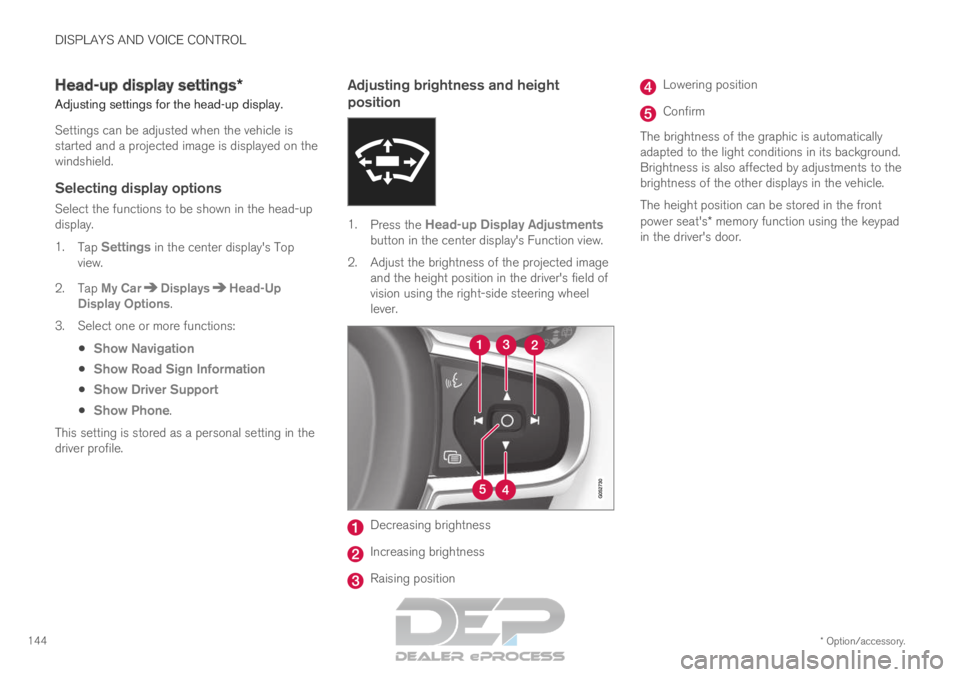
Adjusting brightness and height
position 1.
Press the Head-up Display Adjustments
button in the center display's Function view.
2.
Adjust the brightness of the projected image
and the height position in the driver's field of
vision using the right-side steering wheel
lever. Decreasing brightness
Increasing brightness
Raising position Lowering position
Confirm
The brightness of the graphic is automatically
adapted to the light conditions in its background.
Brightness is also affected by adjustments to the
brightness of the other displays in the vehicle.
The height position can be stored in the front
power seat's* memory function using the keypad
in the driver's door.
Page 172 of 697
WINDOWS, GLASS AND MIRRORS
* Option/accessory.
170
Storing positions for seats, mirrors and head-
up display* (p. 186)
Activating and deactivating the heated rear
window and door mirrors (p. 225) Adjusting the rearview mirror
dimming function
Bright light entering the vehicle from behind, e.g.
from the headlights of following vehicles, could
reflect in the rearview mirror and door mirrors
and cause a glare. Use the dimming function
when light from behind is distracting.
Auto-dimIf bright light enters the vehicle from behind, the
door mirrors will automatically dim. Auto-dim is
always active when the engine is running, except
when reverse gear is engaged.
NOTE Adjustments to the sensitivity level will not be
noticeable immediately but will instead take
effect after a short period of time.
The sensitivity level for dimming will affect both
the rearview mirror and door mirrors.
To change the dimming sensitivity level:
1.
Tap Settings in the Top view in the center
display.
2.
Tap My Car Mirrors and Convenience
.
3. Under Rearview Mirror Auto Dimming ,
select
Normal, Dark or Light.
The rearview mirror instead has two sensors -
one pointing forward and one pointing rearward - which work together to identify and eliminate
glare. The forward-pointing sensor monitors
ambient light, while the rearward-pointing sensor
monitors light from the headlights of following
vehicles.
For the door mirrors to be equipped with auto-
dim, the rearview mirror must also be equipped
with auto-dim.
NOTE
If the sensors are obstructed by e.g. a parking
permit, transponder, sunshade or objects on
the seats or in the cargo compartment in a
way that prevents light from reaching the sen-
sors, the auto-dim function in the door and
rearview mirrors will be reduced.
Related information
Rearview/door mirrors (p. 169)
Adjusting the door mirrors (p. 171)
Page 188 of 697
||SEATS AND STEERING WHEEL
* Option/accessory.
186 Raise/lower the seat by moving the control
up/down.
Move the seat forward/rearward by moving
the control forward/rearward.
Change the backrest tilt by moving the con-
trol forward/backward.
Only one movement (forward/rearward/up/
down) can be performed at a time.
The front seat backrests cannot be folded down
completely.
Related information
Manual front seats (p. 184)
Power* front seats (p. 185)
Storing positions for seats, mirrors and head-
up display* (p. 186)
Using stored positions for seats, mirrors and
head-up display* (p. 187)
Adjusting front seat massage settings*
(p. 189)
Adjusting* front seat cushion length (p. 189)
Front seat massage* settings (p. 188)
Adjusting front seat side bolster settings*
(p. 190)
Adjusting front seat lumbar support* (p. 191)
Adjusting the passenger seat from the driv-
er's seat* (p. 192) Storing positions for seats, mirrors
and head-up display*
Adjustment settings for the power* seat, door
mirrors and head-up display* can be stored in
the memory buttons.
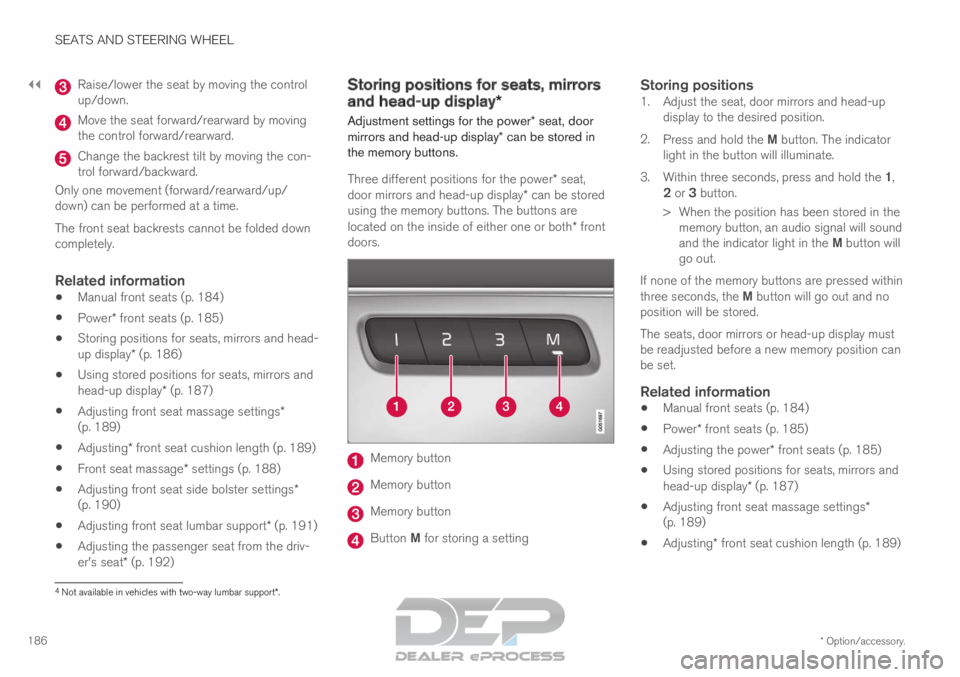
Three different positions for the power* seat,
door mirrors and head-up display* can be stored
using the memory buttons. The buttons are
located on the inside of either one or both* front
doors. Memory button
Memory button
Memory button
Button M for storing a setting
Storing positions1. Adjust the seat, door mirrors and head-up
display to the desired position.
2. Press and hold the M button. The indicator
light in the button will illuminate.
3. Within three seconds, press and hold the 1,
2 or 3 button.
> When the position has been stored in the memory button, an audio signal will sound
and the indicator light in the M button will
go out.
If none of the memory buttons are pressed within
three seconds, the M button will go out and no
position will be stored.
The seats, door mirrors or head-up display must
be readjusted before a new memory position can
be set.
Related information
Manual front seats (p. 184)
Power* front seats (p. 185)
Adjusting the power* front seats (p. 185)
Using stored positions for seats, mirrors and
head-up display* (p. 187)
Adjusting front seat massage settings*
(p. 189)
Adjusting* front seat cushion length (p. 189) 4
Not available in vehicles with two-way lumbar support*.
Page 190 of 697
SEATS AND STEERING WHEEL
* Option/accessory.
188
Adjusting* front seat cushion length (p. 189)
Front seat massage* settings (p. 188)
Adjusting front seat side bolster settings*
(p. 190)
Adjusting front seat lumbar support* (p. 191)
Adjusting the passenger seat from the driv-
er's seat* (p. 192)
Adjusting the door mirrors (p. 171)
Head-up display settings* (p. 144) Front seat massage* settings
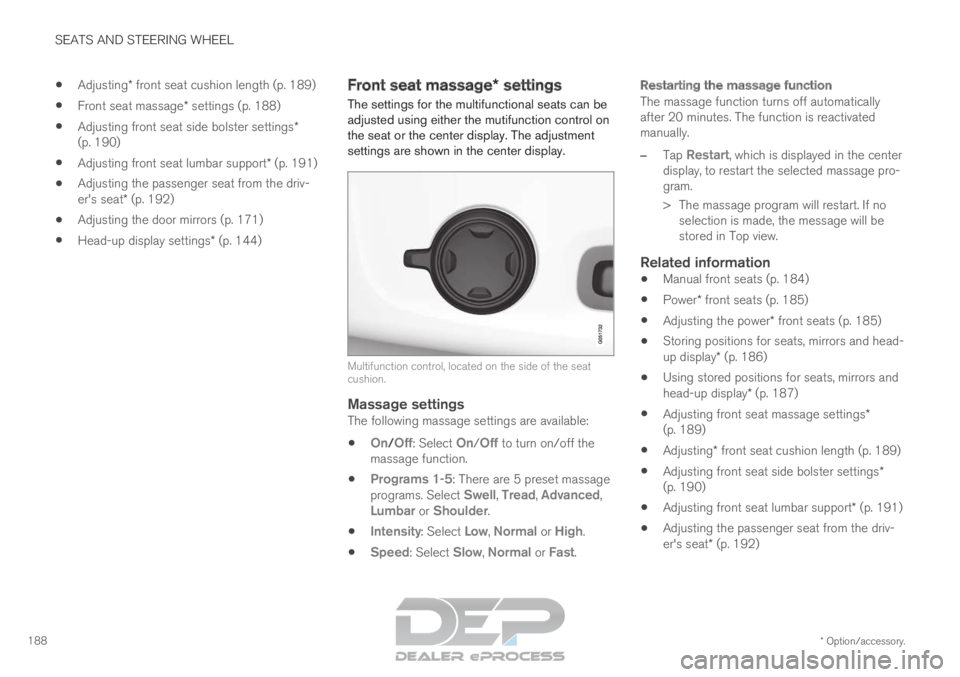
The settings for the multifunctional seats can be
adjusted using either the mutifunction control on
the seat or the center display. The adjustment
settings are shown in the center display. Multifunction control, located on the side of the seat
cushion.
Massage settingsThe following massage settings are available:
On/
Off: Select On/Off to turn on/off the
massage function.
Programs 1-5: There are 5 preset massage
programs. Select Swell, Tread, Advanced,
Lumbar or Shoulder.
Intensity: Select Low, Normal or High.
Speed: Select Slow, Normal or Fast.
Restarting the massage function
The massage function turns off automatically
after 20 minutes. The function is reactivated
manually.
–
Tap
Restart, which is displayed in the center
display, to restart the selected massage pro-
gram.
>
The massage program will restart. If no
selection is made, the message will be
stored in Top view.
Related information
Manual front seats (p. 184)
Power* front seats (p. 185)
Adjusting the power* front seats (p. 185)
Storing positions for seats, mirrors and head-
up display* (p. 186)
Using stored positions for seats, mirrors and
head-up display* (p. 187)
Adjusting front seat massage settings*
(p. 189)
Adjusting* front seat cushion length (p. 189)
Adjusting front seat side bolster settings*
(p. 190)
Adjusting front seat lumbar support* (p. 191)
Adjusting the passenger seat from the driv-
er's seat* (p. 192)
Page 191 of 697
SEATS AND STEERING WHEEL
}}
* Option/accessory. 189
Adjusting front seat massage
settings*
The settings for the multifunctional seats can be
adjusted using either the mutifunction control on
the seat or the center display. The adjustment
settings are shown in the center display.
Adjusting front seat massage settingsThe front seat backrests have a massage func-
tion. Air-filled cushions provide the massaging
action and a number of settings are available.
The massage function can only be activated
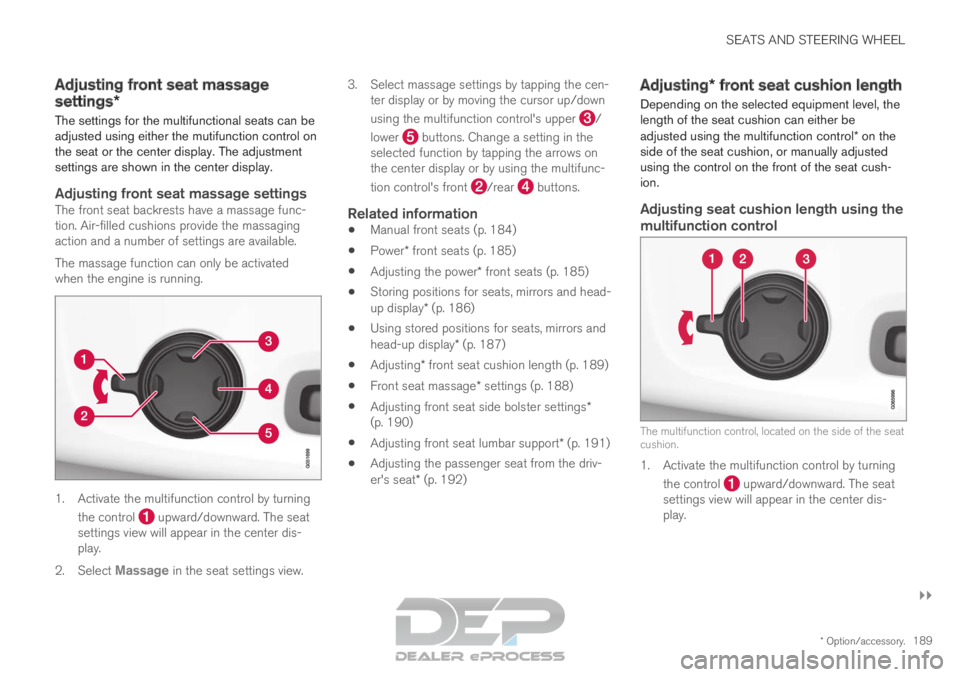
when the engine is running. 1. Activate the multifunction control by turning
the control upward/downward. The seat
settings view will appear in the center dis-
play.
2. Select Massage in the seat settings view. 3.
Select massage settings by tapping the cen-
ter display or by moving the cursor up/down
using the multifunction control's upper /
lower buttons. Change a setting in the
selected function by tapping the arrows on
the center display or by using the multifunc-
tion control's front /rear buttons.
Related information
Manual front seats (p. 184)
Power* front seats (p. 185)
Adjusting the power* front seats (p. 185)
Storing positions for seats, mirrors and head-
up display* (p. 186)
Using stored positions for seats, mirrors and
head-up display* (p. 187)
Adjusting* front seat cushion length (p. 189)
Front seat massage* settings (p. 188)
Adjusting front seat side bolster settings*
(p. 190)
Adjusting front seat lumbar support* (p. 191)
Adjusting the passenger seat from the driv-
er's seat* (p. 192) Adjusting* front seat cushion length
Depending on the selected equipment level, the
length of the seat cushion can either be
adjusted using the multifunction control* on the
side of the seat cushion, or manually adjusted
using the control on the front of the seat cush-
ion.
Adjusting seat cushion length using the
multifunction control The multifunction control, located on the side of the seat
cushion.
1. Activate the multifunction control by turning
the control upward/downward. The seat
settings view will appear in the center dis-
play.
Page 192 of 697
||SEATS AND STEERING WHEEL
* Option/accessory.
190 2.
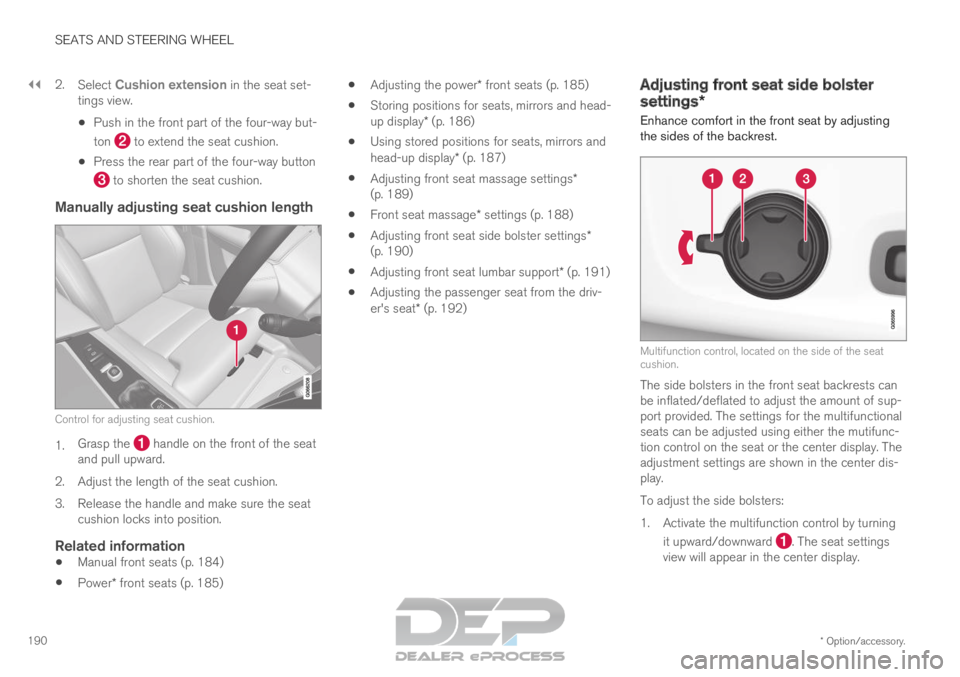
Select Cushion extension in the seat set-
tings view.
Push in the front part of the four-way but-
ton to extend the seat cushion.
Press the rear part of the four-way button to shorten the seat cushion.
Manually adjusting seat cushion length
Control for adjusting seat cushion.
1.
Grasp the handle on the front of the seat
and pull upward.
2.
Adjust the length of the seat cushion.
3. Release the handle and make sure the seat cushion locks into position.
Related information
Manual front seats (p. 184)
Power* front seats (p. 185)
Adjusting the power* front seats (p. 185)
Storing positions for seats, mirrors and head-
up display* (p. 186)
Using stored positions for seats, mirrors and
head-up display* (p. 187)
Adjusting front seat massage settings*
(p. 189)
Front seat massage* settings (p. 188)
Adjusting front seat side bolster settings*
(p. 190)
Adjusting front seat lumbar support* (p. 191)
Adjusting the passenger seat from the driv-
er's seat* (p. 192) Adjusting front seat side bolster
settings*
Enhance comfort in the front seat by adjusting
the sides of the backrest. Multifunction control, located on the side of the seat
cushion.
The side bolsters in the front seat backrests can
be inflated/deflated to adjust the amount of sup-
port provided. The settings for the multifunctional
seats can be adjusted using either the mutifunc-
tion control on the seat or the center display. The
adjustment settings are shown in the center dis-
play.
To adjust the side bolsters:
1.
Activate the multifunction control by turning
it upward/downward . The seat settings
view will appear in the center display.
Page 194 of 697
||SEATS AND STEERING WHEEL
* Option/accessory.
192 2.
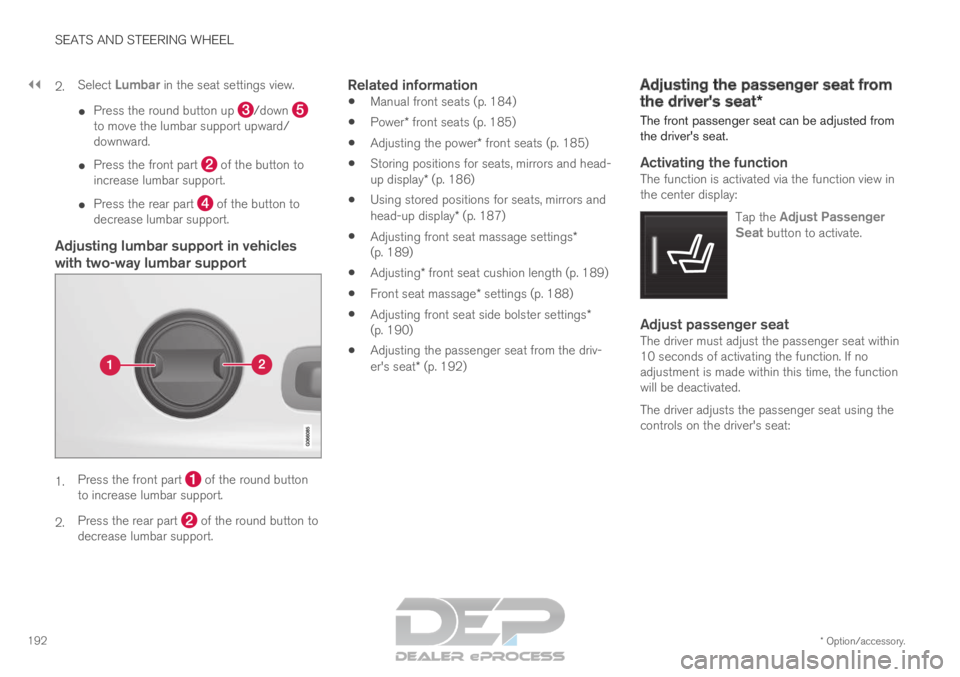
Select
Lumbar in the seat settings view.
Press the round button up /down
to move the lumbar support upward/
downward.
Press the front part of the button to
increase lumbar support.
Press the rear part of the button to
decrease lumbar support.
Adjusting lumbar support in vehicles
with two-way lumbar support 1.
Press the front part of the round button
to increase lumbar support.
2. Press the rear part of the round button to
decrease lumbar support.
Related information
Manual front seats (p. 184)
Power* front seats (p. 185)
Adjusting the power* front seats (p. 185)
Storing positions for seats, mirrors and head-
up display* (p. 186)
Using stored positions for seats, mirrors and
head-up display* (p. 187)
Adjusting front seat massage settings*
(p. 189)
Adjusting* front seat cushion length (p. 189)
Front seat massage* settings (p. 188)
Adjusting front seat side bolster settings*
(p. 190)
Adjusting the passenger seat from the driv-
er's seat* (p. 192) Adjusting the passenger seat from
the driver's seat*
The front passenger seat can be adjusted from
the driver's seat.
Activating the functionThe function is activated via the function view in
the center display:
Tap the Adjust PassengerSeat button to activate.
Adjust passenger seatThe driver must adjust the passenger seat within
10 seconds of activating the function. If no
adjustment is made within this time, the function
will be deactivated.
The driver adjusts the passenger seat using the
controls on the driver's seat:
Page 195 of 697
SEATS AND STEERING WHEEL
}}
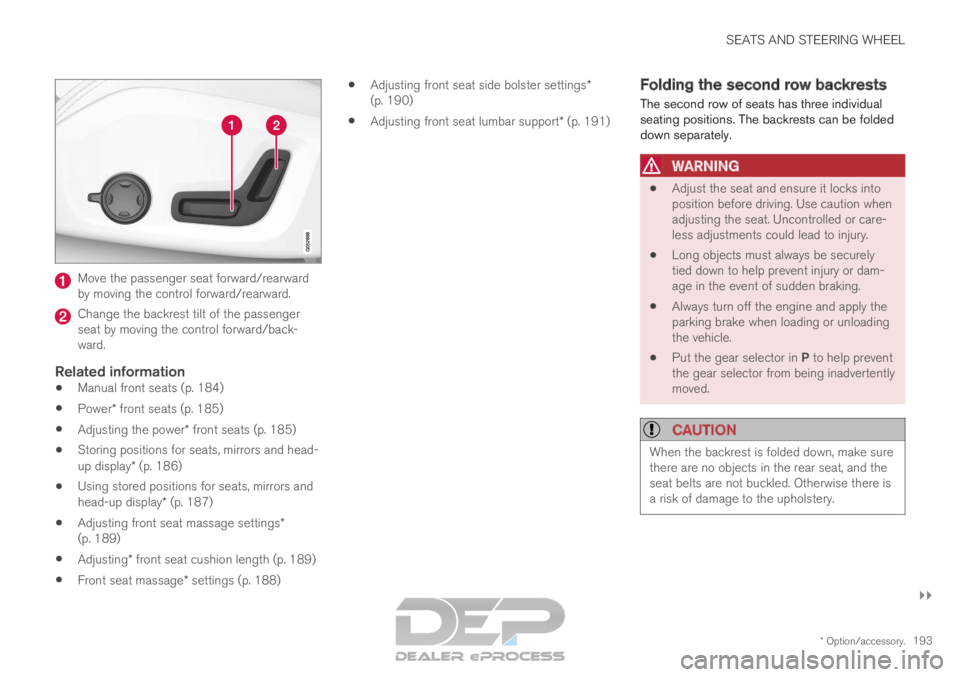
* Option/accessory. 193Move the passenger seat forward/rearward
by moving the control forward/rearward.
Change the backrest tilt of the passenger
seat by moving the control forward/back-
ward.
Related information
Manual front seats (p. 184)
Power* front seats (p. 185)
Adjusting the power* front seats (p. 185)
Storing positions for seats, mirrors and head-
up display* (p. 186)
Using stored positions for seats, mirrors and
head-up display* (p. 187)
Adjusting front seat massage settings*
(p. 189)
Adjusting* front seat cushion length (p. 189)
Front seat massage* settings (p. 188)
Adjusting front seat side bolster settings*
(p. 190)
Adjusting front seat lumbar support* (p. 191) Folding the second row backrests
The second row of seats has three individual
seating positions. The backrests can be folded
down separately.
WARNING
Adjust the seat and ensure it locks into
position before driving. Use caution when
adjusting the seat. Uncontrolled or care-
less adjustments could lead to injury.
Long objects must always be securely
tied down to help prevent injury or dam-
age in the event of sudden braking.
Always turn off the engine and apply the
parking brake when loading or unloading
the vehicle.
Put the gear selector in P to help prevent
the gear selector from being inadvertently
moved.
CAUTION When the backrest is folded down, make sure
there are no objects in the rear seat, and the
seat belts are not buckled. Otherwise there is
a risk of damage to the upholstery.
Page 199 of 697
SEATS AND STEERING WHEEL
}}
* Option/accessory. 197
Moving the second row seats
forward/rearward*
In vehicles with 7 seats*, the seats in the second
row can be moved forward or rearward individu-
ally to help optimize legroom for passengers in
the second and third rows. The second row
seats cannot be moved forward or backward in
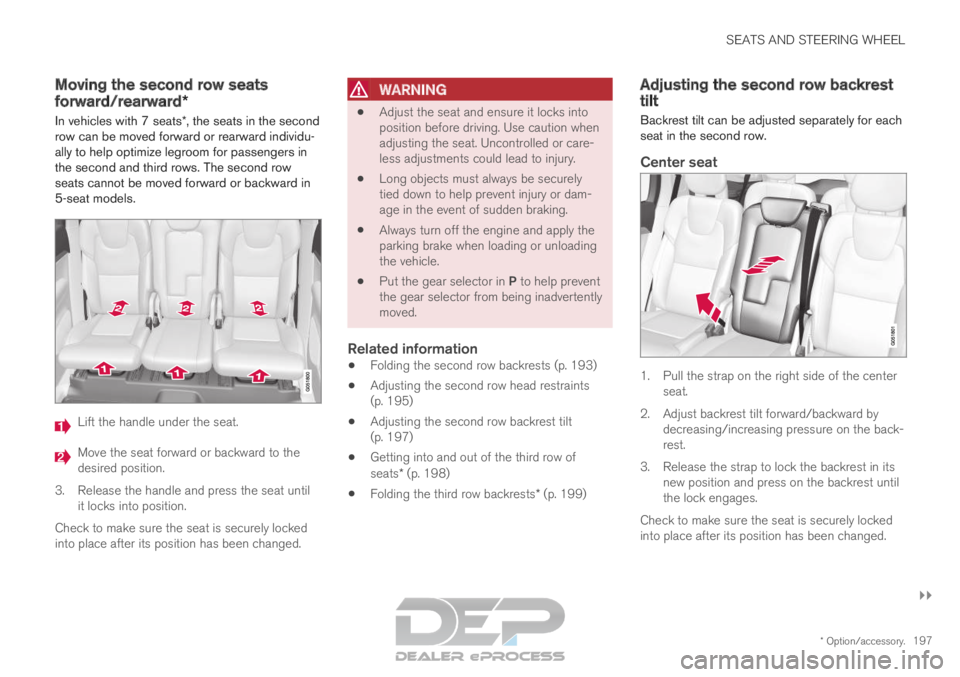
5-seat models. Lift the handle under the seat.
Move the seat forward or backward to the
desired position.
3.
Release the handle and press the seat until
it locks into position.
Check to make sure the seat is securely locked
into place after its position has been changed.
WARNING
Adjust the seat and ensure it locks into
position before driving. Use caution when
adjusting the seat. Uncontrolled or care-
less adjustments could lead to injury.
Long objects must always be securely
tied down to help prevent injury or dam-
age in the event of sudden braking.
Always turn off the engine and apply the
parking brake when loading or unloading
the vehicle.
Put the gear selector in P to help prevent
the gear selector from being inadvertently
moved.
Related information
Folding the second row backrests (p. 193)
Adjusting the second row head restraints
(p. 195)
Adjusting the second row backrest tilt
(p. 197)
Getting into and out of the third row of
seats* (p. 198)
Folding the third row backrests* (p. 199) Adjusting the second row backrest
tilt
Backrest tilt can be adjusted separately for each
seat in the second row.
Center seat 1. Pull the strap on the right side of the center
seat.
2.
Adjust backrest tilt forward/backward by
decreasing/increasing pressure on the back-
rest.
3. Release the strap to lock the backrest in its new position and press on the backrest until
the lock engages.
Check to make sure the seat is securely locked
into place after its position has been changed.