brake VOLVO XC90 TWIN ENGINE 2019 Owner's Manual
[x] Cancel search | Manufacturer: VOLVO, Model Year: 2019, Model line: XC90 TWIN ENGINE, Model: VOLVO XC90 TWIN ENGINE 2019Pages: 697, PDF Size: 10.33 MB
Page 186 of 697
SEATS AND STEERING WHEEL
* Option/accessory.
184 Manual front seats
The power front seats can be adjusted in a num-
ber of different ways for optimal comfort and
ergonomics.
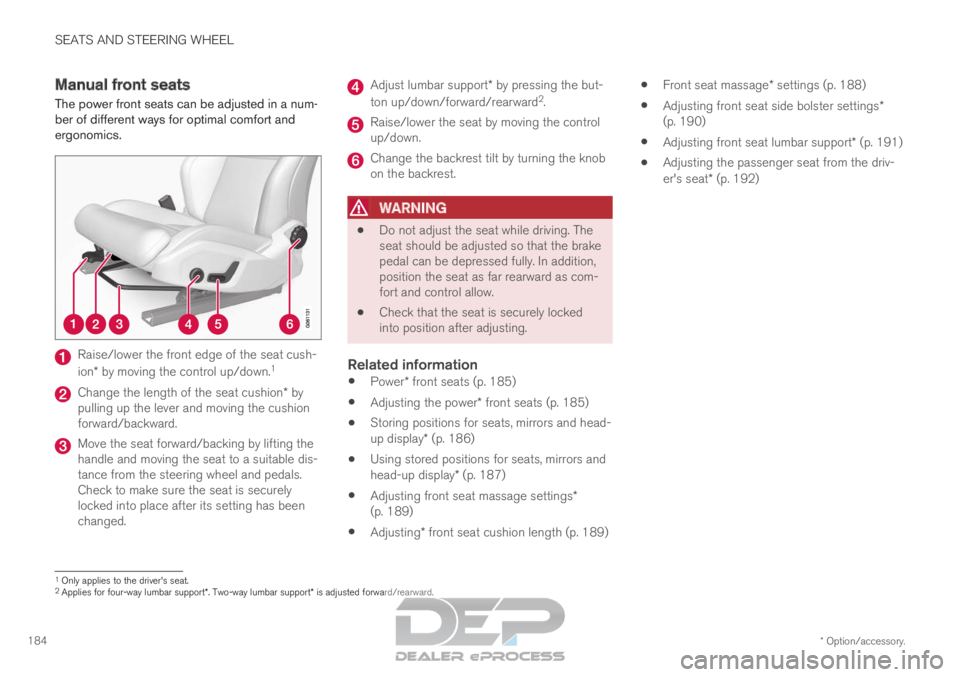
Raise/lower the front edge of the seat cush-
ion* by moving the control up/down.
1Change the length of the seat cushion* by
pulling up the lever and moving the cushion
forward/backward. Move the seat forward/backing by lifting the
handle and moving the seat to a suitable dis-
tance from the steering wheel and pedals.
Check to make sure the seat is securely
locked into place after its setting has been
changed. Adjust lumbar support* by pressing the but-
ton up/down/forward/rearward 2
. Raise/lower the seat by moving the control
up/down.
Change the backrest tilt by turning the knob
on the backrest.
WARNING
Do not adjust the seat while driving. The
seat should be adjusted so that the brake
pedal can be depressed fully. In addition,
position the seat as far rearward as com-
fort and control allow.
Check that the seat is securely locked
into position after adjusting.
Related information
Power* front seats (p. 185)
Adjusting the power* front seats (p. 185)
Storing positions for seats, mirrors and head-
up display* (p. 186)
Using stored positions for seats, mirrors and
head-up display* (p. 187)
Adjusting front seat massage settings*
(p. 189)
Adjusting* front seat cushion length (p. 189)
Front seat massage* settings (p. 188)
Adjusting front seat side bolster settings*
(p. 190)
Adjusting front seat lumbar support* (p. 191)
Adjusting the passenger seat from the driv-
er's seat* (p. 192) 1
Only applies to the driver's seat.
2 Applies for four-way lumbar support*. Two-way lumbar support* is adjusted forward/rearward.
Page 189 of 697
SEATS AND STEERING WHEEL
}}
* Option/accessory. 187
Front seat massage* settings (p. 188)
Adjusting front seat side bolster settings*
(p. 190)
Adjusting front seat lumbar support* (p. 191)
Adjusting the passenger seat from the driv-
er's seat* (p. 192)
Adjusting the door mirrors (p. 171)
Head-up display settings* (p. 144) Using stored positions for seats,
mirrors and head-up display*
If the positions for the power* seat, door mirrors
and head-up display* have been stored, they can
be easily activated using the memory buttons.
Using a stored position A stored position can be used with the front door
open or closed:
Front door open
–
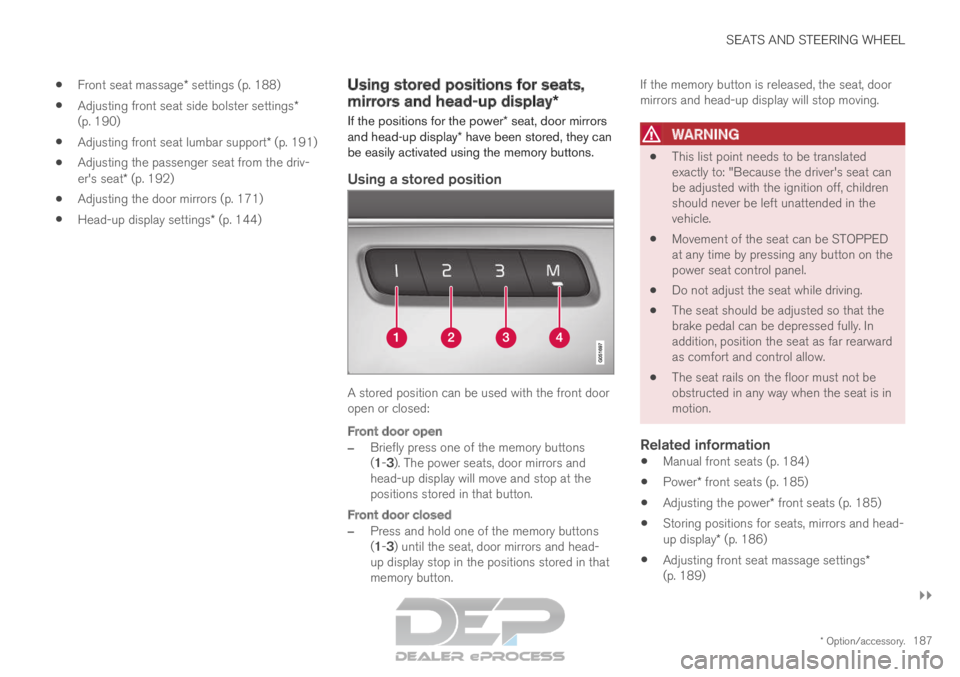
Briefly press one of the memory buttons
(1-3). The power seats, door mirrors and
head-up display will move and stop at the
positions stored in that button.
Front door closed
– Press and hold one of the memory buttons
(1-3) until the seat, door mirrors and head-
up display stop in the positions stored in that
memory button. If the memory button is released, the seat, door
mirrors and head-up display will stop moving.
WARNING
This list point needs to be translated
exactly to: "Because the driver's seat can
be adjusted with the ignition off, children
should never be left unattended in the
vehicle.
Movement of the seat can be STOPPED
at any time by pressing any button on the
power seat control panel.
Do not adjust the seat while driving.
The seat should be adjusted so that the
brake pedal can be depressed fully. In
addition, position the seat as far rearward
as comfort and control allow.
The seat rails on the floor must not be
obstructed in any way when the seat is in
motion.
Related information
Manual front seats (p. 184)
Power* front seats (p. 185)
Adjusting the power* front seats (p. 185)
Storing positions for seats, mirrors and head-
up display* (p. 186)
Adjusting front seat massage settings*
(p. 189)
Page 195 of 697
SEATS AND STEERING WHEEL
}}
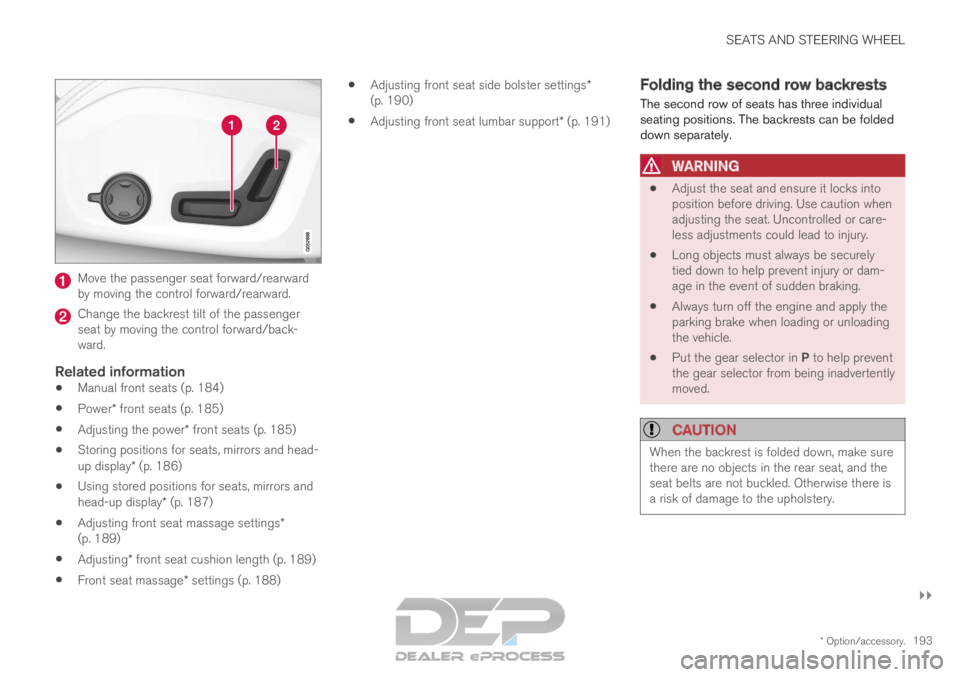
* Option/accessory. 193Move the passenger seat forward/rearward
by moving the control forward/rearward.
Change the backrest tilt of the passenger
seat by moving the control forward/back-
ward.
Related information
Manual front seats (p. 184)
Power* front seats (p. 185)
Adjusting the power* front seats (p. 185)
Storing positions for seats, mirrors and head-
up display* (p. 186)
Using stored positions for seats, mirrors and
head-up display* (p. 187)
Adjusting front seat massage settings*
(p. 189)
Adjusting* front seat cushion length (p. 189)
Front seat massage* settings (p. 188)
Adjusting front seat side bolster settings*
(p. 190)
Adjusting front seat lumbar support* (p. 191) Folding the second row backrests
The second row of seats has three individual
seating positions. The backrests can be folded
down separately.
WARNING
Adjust the seat and ensure it locks into
position before driving. Use caution when
adjusting the seat. Uncontrolled or care-
less adjustments could lead to injury.
Long objects must always be securely
tied down to help prevent injury or dam-
age in the event of sudden braking.
Always turn off the engine and apply the
parking brake when loading or unloading
the vehicle.
Put the gear selector in P to help prevent
the gear selector from being inadvertently
moved.
CAUTION When the backrest is folded down, make sure
there are no objects in the rear seat, and the
seat belts are not buckled. Otherwise there is
a risk of damage to the upholstery.
Page 199 of 697
SEATS AND STEERING WHEEL
}}
* Option/accessory. 197
Moving the second row seats
forward/rearward*
In vehicles with 7 seats*, the seats in the second
row can be moved forward or rearward individu-
ally to help optimize legroom for passengers in
the second and third rows. The second row
seats cannot be moved forward or backward in
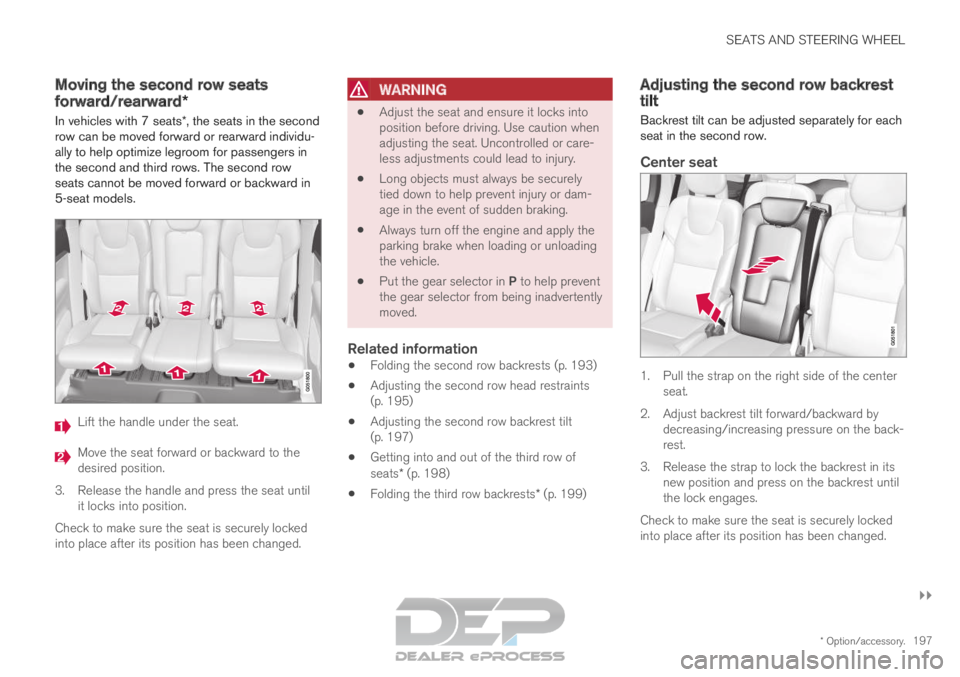
5-seat models. Lift the handle under the seat.
Move the seat forward or backward to the
desired position.
3.
Release the handle and press the seat until
it locks into position.
Check to make sure the seat is securely locked
into place after its position has been changed.
WARNING
Adjust the seat and ensure it locks into
position before driving. Use caution when
adjusting the seat. Uncontrolled or care-
less adjustments could lead to injury.
Long objects must always be securely
tied down to help prevent injury or dam-
age in the event of sudden braking.
Always turn off the engine and apply the
parking brake when loading or unloading
the vehicle.
Put the gear selector in P to help prevent
the gear selector from being inadvertently
moved.
Related information
Folding the second row backrests (p. 193)
Adjusting the second row head restraints
(p. 195)
Adjusting the second row backrest tilt
(p. 197)
Getting into and out of the third row of
seats* (p. 198)
Folding the third row backrests* (p. 199) Adjusting the second row backrest
tilt
Backrest tilt can be adjusted separately for each
seat in the second row.
Center seat 1. Pull the strap on the right side of the center
seat.
2.
Adjust backrest tilt forward/backward by
decreasing/increasing pressure on the back-
rest.
3. Release the strap to lock the backrest in its new position and press on the backrest until
the lock engages.
Check to make sure the seat is securely locked
into place after its position has been changed.
Page 200 of 697

||SEATS AND STEERING WHEEL
* Option/accessory.
198
Outboard seats 1. Pull the handle on the side of the seat
upward.
2.
Adjust backrest tilt forward/backward by
decreasing/increasing pressure on the back-
rest.
3. Release the handle to lock the backrest in its new position and press on the backrest until
the lock engages.
Check to make sure the seat is securely locked
into place after its position has been changed.
WARNING
Adjust the seat and ensure it locks into
position before driving. Use caution when
adjusting the seat. Uncontrolled or care-
less adjustments could lead to injury.
Long objects must always be securely
tied down to help prevent injury or dam-
age in the event of sudden braking.
Always turn off the engine and apply the
parking brake when loading or unloading
the vehicle.
Put the gear selector in P to help prevent
the gear selector from being inadvertently
moved.
Related information
Folding the second row backrests (p. 193)
Adjusting the second row head restraints
(p. 195)
Moving the second row seats forward/rear-
ward* (p. 197)
Getting into and out of the third row of
seats* (p. 198)
Folding the third row backrests* (p. 199) Getting into and out of the third row
of seats*
The second row of seats can be adjusted for
easier access to the third row of seats*. To fold down the backrest:
1.
Pull the handle on the upper side of the right
or left outboard second row seat upward/
forward.
2. Fold the backrest down and move the entire seat forward.
To return the seat to the upright position:
– Push the seat rearward to its end position.
The backrest should then easily return to the
correct position.
Page 280 of 697
DRIVER SUPPORT
* Option/accessory.
278 Driver support systems
The vehicle is equipped with a number of driver
support systems that can provide the driver with
active or passive assistance in various situations.
The systems can, for example, help the driver:
maintain a set speed
maintain a set time interval to the vehicle
ahead
help prevent a collision by warning the driver
and applying the brakes
park the vehicle.
Some of the systems are standard and others are
options. This also varies from market to market.
Related information
Speed-dependent steering wheel resistance
(p. 278)
Electronic Stability Control (p. 279)
Stability system Roll Stability Control
(p. 279)
Speed limiter (p. 283)
Automatic Speed Limiter (p. 287)
Cruise control (p. 291)
Distance Alert* (p. 296)
Adaptive Cruise Control* (p. 300)
Pilot Assist (p. 316)
Radar sensor (p. 332)
Camera (p. 337)
City Safety™ (p. 341)
Rear Collision Warning (p. 354)
BLIS* (p. 355)
Cross Traffic Alert* (p. 360)
Road Sign Information* (p. 364)
Driver Alert Control (p. 370)
Lane Keeping Aid (p. 372)
Steering assistance at risk of collision
(p. 380)
Park Assist* (p. 390)
Park Assist Camera* (p. 396)
Park Assist Pilot* (p. 406) Speed-dependent steering wheel
resistance
Speed-dependent power steering increases the
steering wheel resistance in pace with the vehi-
cle's speed to give the driver an enhanced feel-
ing of control and stability.
Steering may feel stiffer on highways. When
parking and at low speeds, it will be easier to
move the steering wheel.
NOTE In some situations, the power steering may
become too hot and require temporary cool-
ing – during such time the power steering will
work at reduced output and the steering
wheel may feel more difficult to move.
In parallel with the temporarily reduced steer-
ing assistance, the driver display shows a
message as well as a STEERING WHEEL
symbol.
WARNING
While the power steering is working at
reduced power, the driver support functions
and systems with steering assistance are not
available.
In such a situation, the driver display shows
the
Power steering failure message, com-
bined with a STEERING WHEEL symbol.
Page 281 of 697
DRIVER SUPPORT
}}
* Option/accessory. 279
Changing the level of steering wheel
resistance*
To change the level of steering wheel resistance,
see the description of the INDIVIDUAL option
under "Available drive modes" in the "Drive
modes" section.
On models not equipped with drive mode con-
trols and the INDIVIDUAL option, steering wheel
resistance can instead be set in the center dis-
play's Top view under:
Settings My Car Drive Modes
Steering Force
Steering wheel resistance settings cannot be
accessed when turning at speeds above
10 km/h (6 mph).
Related information
Drive modes (p. 454)
Pilot Assist (p. 316)
Lane Keeping Aid (p. 372)
Steering assistance at risk of collision
(p. 380)
Park Assist Pilot* (p. 406) Stability system Roll Stability
Control
The Roll Stability Control (RSC 1
) system helps
minimize the risk of a rollover in the event of e.g.
a sudden evasive maneuver or if the vehicle
begins to skid.
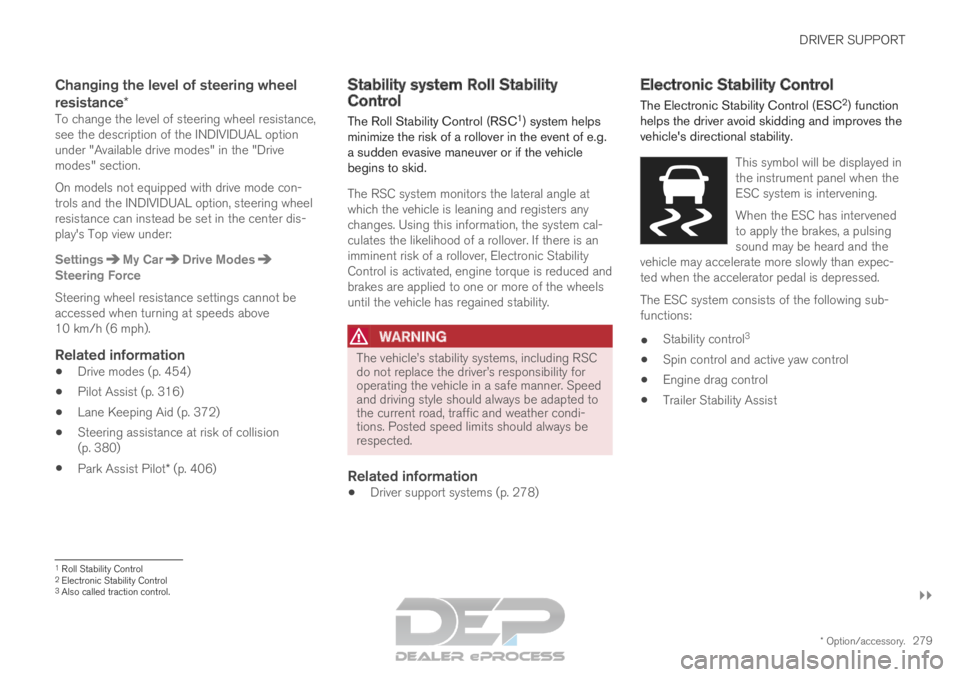
The RSC system monitors the lateral angle at
which the vehicle is leaning and registers any
changes. Using this information, the system cal-
culates the likelihood of a rollover. If there is an
imminent risk of a rollover, Electronic Stability
Control is activated, engine torque is reduced and
brakes are applied to one or more of the wheels
until the vehicle has regained stability.
WARNING The vehicle
Page 282 of 697
||DRIVER SUPPORT
* Option/accessory.
280
WARNING
The Electronic Stability Control system
ESC is supplementary driver support
intended to facilitate driving and make it
safer – it cannot handle all situations in
all traffic, weather and road conditions.
ESC is not a substitute for the driver's
attention and judgment. The driver is
always responsible for ensuring the vehi-
cle is driven in a safe manner, at the
appropriate speed, with an appropriate
distance to other vehicles, and in accord-
ance with current traffic rules and regula-
tions.
Stability control 3This function helps control the driving and brak-
ing force of each individual wheel in an attempt
to stabilize the vehicle.
Spin control and active yaw controlThis function is active at low speeds and brakes
the wheels that are spinning to transfer additional
power from wheels that are not spinning.
This function also helps prevent the wheels from
spinning while the vehicle is accelerating.
Engine drag control
Engine drag control (EDC
4
) helps prevent inad-
vertent wheel lock, e.g. after downshifting or
using engine braking when driving at low speeds
on a slippery surface.
Inadvertent wheel lock while driving could impair
the driver's ability to steer the vehicle.
Trailer Stability Assist* 5
Trailer Stability Assist (TSA
6
) is designed to help
stabilize a vehicle that is towing a trailer if the
vehicle and trailer have begun to sway. For more
information, see "Trailer Stability Assist".
NOTE The TSA function is deactivated if
ESC Sport
Mode is activated.
Related information
Electronic Stability Control Sport mode
(p. 281)
Activating/deactivating Sport mode in Elec-
tronic Stability Control (p. 281)
Electronic Stability Control Sport mode limi-
tations (p. 281)
Electronic Stability Control symbols and mes-
sages (p. 282)
Trailer Stability Assist* (p. 485)
3
Also called traction control.4 Engine Drag Control5Trailer Stability Assist is included if the vehicle is equipped with a V\
olvo original towbar.6 Trailer Stability Assist
Page 284 of 697
DRIVER SUPPORT
282Electronic Stability Control symbols
and messages
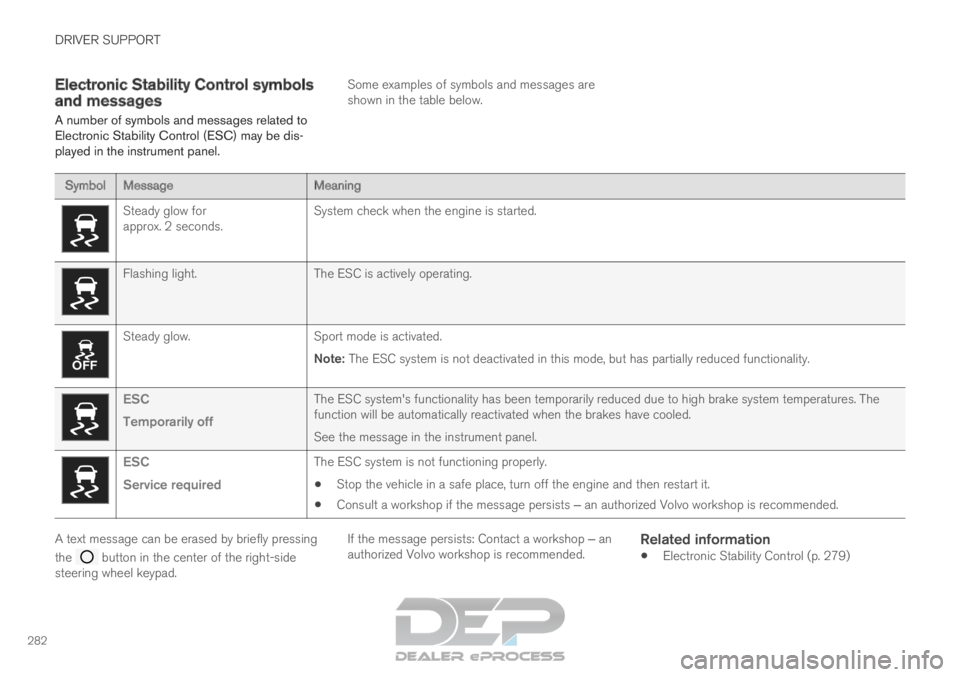
A number of symbols and messages related to
Electronic Stability Control (ESC) may be dis-
played in the instrument panel. Some examples of symbols and messages are
shown in the table below.Symbol
Message MeaningSteady glow for
approx. 2 seconds.
System check when the engine is started.Flashing light.
The ESC is actively operating.Steady glow.
Sport mode is activated.
Note: The ESC system is not deactivated in this mode, but has partially reduc\
ed functionality. ESC
Temporarily off
The ESC system's functionality has been temporarily reduced due to hi\
gh brake system temperatures. The
function will be automatically reactivated when the brakes have cooled.
See the message in the instrument panel.ESC
Service required
The ESC system is not functioning properly.
Stop the vehicle in a safe place, turn off the engine and then restart i\
t.
Consult a workshop if the message persists ‒ an authorized Volvo workshop is recommended. A text message can be erased by briefly pressing
the
button in the center of the right-side
steering wheel keypad. If the message persists: Contact a workshop ‒ an
authorized Volvo workshop is recommended.
Related information
Electronic Stability Control (p. 279)
Page 290 of 697
||DRIVER SUPPORT
288
WARNING
The ASL function is supplementary driver
support intended to facilitate driving and
help make it safer – it cannot handle all
situations in all traffic, weather and road
conditions.
Even if the driver can clearly see the
speed limit sign, the speed information
from the Road Sign Information (RSI)
function to ASL may be incorrect. In such
cases, the driver must intervene and
accelerate or brake to an appropriate
speed.
ASL is not a substitute for the driver's
attention and judgment. The driver is
always responsible for ensuring the vehi-
cle is driven in a safe manner, at the
appropriate speed, with an appropriate
distance to other vehicles, and in accord-
ance with current traffic rules and regula-
tions.
See also the heading "Road Sign Infor-
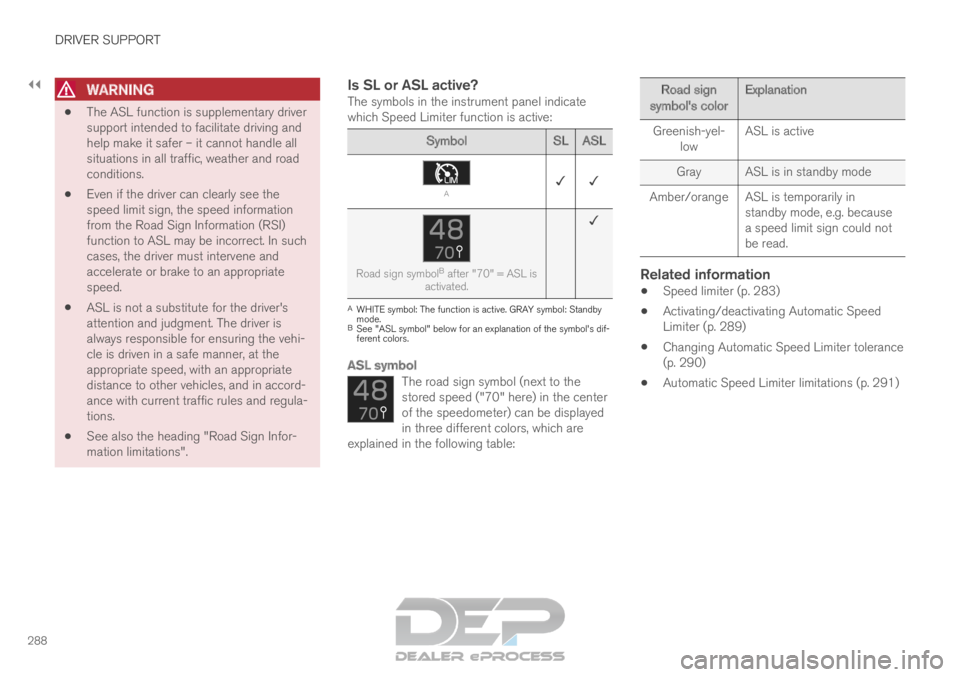
mation limitations".Is SL or ASL active?The symbols in the instrument panel indicate
which Speed Limiter function is active: Symbol
SLASL A
✓ ✓ Road sign symbol
B
after "70" = ASL is
activated. ✓ A
WHITE symbol: The function is active. GRAY symbol: Standby
mode.
B See "ASL symbol" below for an explanation of the symbol's dif-
ferent colors.
ASL symbol
The road sign symbol (next to the
stored speed ("70" here) in the center
of the speedometer) can be displayed
in three different colors, which are
explained in the following table: Road sign
symbol's color Explanation
Greenish-yel- low ASL is active
Gray
ASL is in standby mode
Amber/orange ASL is temporarily in standby mode, e.g. because
a speed limit sign could not
be read.
Related information
Speed limiter (p. 283)
Activating/deactivating Automatic Speed
Limiter (p. 289)
Changing Automatic Speed Limiter tolerance
(p. 290)
Automatic Speed Limiter limitations (p. 291)