center console VOLVO XC90 TWIN ENGINE 2019 Owner's Manual
[x] Cancel search | Manufacturer: VOLVO, Model Year: 2019, Model line: XC90 TWIN ENGINE, Model: VOLVO XC90 TWIN ENGINE 2019Pages: 697, PDF Size: 10.33 MB
Page 512 of 697
||AUDIO, MEDIA AND INTERNET
* Option/accessory.
510
Search
Tap the magnifying glass to display a screen
where you can enter text using the center dis-
play's keyboard or by writing in the free-text field
to search for e.g., a station number, an artist,
song title, etc.
Channels
Tap to display a complete list of the channels
included in your subscription. Tap a channel
name to listen. If a subscription to a channel has
expired, its name will be grayed-out on the
screen.
For quick access to a channel that you often lis-
ten to, tap the star to the right of the channel's
name. It will then be added to your list of favor-
ites.
Favorites
Tap to display the channels that you have added
to this list. Tap a channel name to listen.
Categories/Genres
Tap to display the categories available. Tap a cat-
egory or genre name to display the channels that
it contains and then tap a channel to listen.
If you have activated alerts (see the “Alerts” sec-
tion below) and an alert is activated for an artist,
song or team, temporary virtual categories will
also be created and displayed. The channels cur-
rently broadcasting the song, artist or broadcast-
ing a program with the selected team will be lis-
ted in a virtual category.
EPG (Electronic Program Guide)On the center display's Home view, tap EPG for
information about e.g., when a program is being
broadcast and its name, description, artist, etc. If
no information is currently available,
No
information will be displayed.
AlertsIf this feature has been selected under SiriusXM
Settings, the Alerts button will be displayed on
the Home view.
To add e.g. an artist's name, song title or a sports
team to the list of alerts:
1.
Tune to a channel that is broadcasting a
song, game, etc., of your choice.
2. Tap the Alerts button.
3.
A pop-up window will be displayed showing a
list of alerts (nothing will be displayed if the
selected channel does not support the alert
function).
4. Select one of the alternatives in list (only one can be selected at a time).
5. The song/artist/team will now be added to the list of alerts. Favorite sports teams can
also be added to the list using “Game Alert”
in the SiriusXM satellite radio settings.
> When your choice is being broadcast on achannel, you will be informed by a pop-up.
iTunes taggingFrom the center display's Top view, tap SiriusXM
Settings. Tap the iTunes Tagging menu. Tap
the
iTunes Tagging box to activate/deactivate
this function and tap Close to return to Home
view. Tap Tags List to display a list of all tagged
songs.
If the function is activated, the iTunes tag button will be displayed in Home view. If a song is played
that you would like to buy in the iTunes store, tap
this button while the song is playing to tag it. If a
song with
iTunes Tagging information is availa-
ble, the button will be selectable. Tap the button
to tag the song. If you would like to buy a tagged
song via iTunes, Tap the iTunes tag button.
To buy a song in iTunes, begin by connecting an
iPhone/iPod/iPad to the USB port in the tunnel
console. The iTunes tagging list will automatically
be transferred to the device and removed from
the list in the vehicle. If the device is connected
when a song is tagged, the data will automatically
be saved in the device. To purchase the song,
consult the iTunes support page.
Related information
SiriusXM ®
Satellite radio* (p. 508)
Entering characters, letters and words by
hand in the center display (p. 129)
Settings for SiriusXM ®
Satellite radio*
(p. 511)
Page 527 of 697
AUDIO, MEDIA AND INTERNET
* Option/accessory.525
Connecting a device via the USB
port
External audio sources, such as an iPod ®
or
MP3 player, can be connected to the audio sys-
tem via any of the vehicle's USB ports.
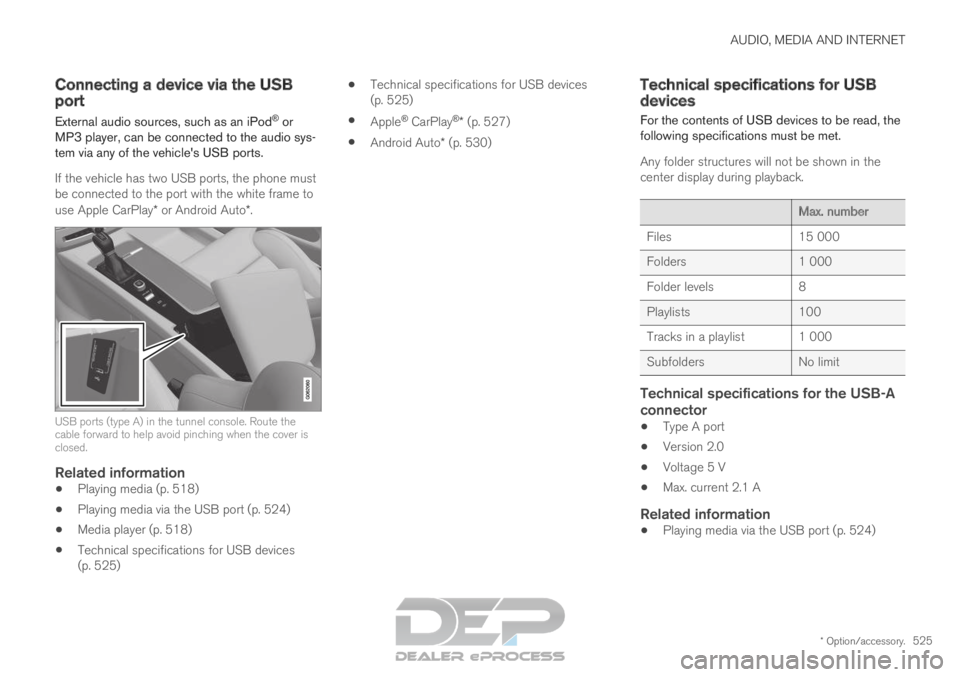
If the vehicle has two USB ports, the phone must
be connected to the port with the white frame to
use Apple CarPlay* or Android Auto*. USB ports (type A) in the tunnel console. Route the
cable forward to help avoid pinching when the cover is
closed.
Related information
Playing media (p. 518)
Playing media via the USB port (p. 524)
Media player (p. 518)
Technical specifications for USB devices
(p. 525)
Technical specifications for USB devices
(p. 525)
Apple ®
CarPlay ®
* (p. 527)
Android Auto* (p. 530) Technical specifications for USB
devices
For the contents of USB devices to be read, the
following specifications must be met.
Any folder structures will not be shown in the
center display during playback. Max. number
Files
15 000
Folders 1 000
Folder levels 8
Playlists 100
Tracks in a playlist 1 000
Subfolders No limit
Technical specifications for the USB-A
connector
Type A port
Version 2.0
Voltage 5 V
Max. current 2.1 A
Related information
Playing media via the USB port (p. 524)
Page 594 of 697
LOADING, STORAGE AND PASSENGER COMPARTMENT
* Option/accessory.
592 Passenger compartment interior
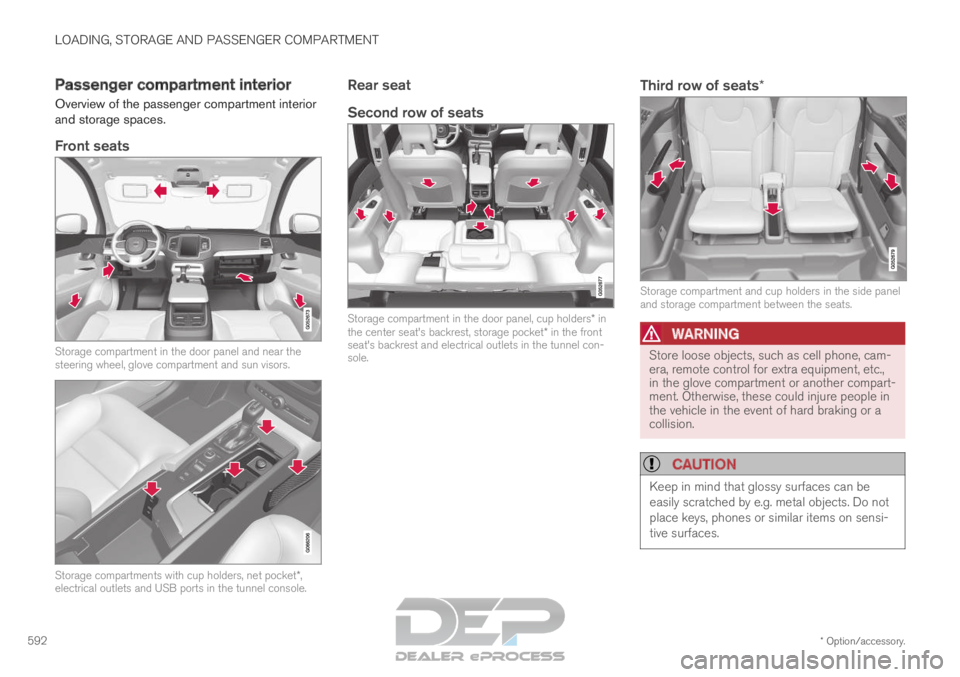
Overview of the passenger compartment interior
and storage spaces.
Front seats Storage compartment in the door panel and near the
steering wheel, glove compartment and sun visors.
Storage compartments with cup holders, net pocket*,
electrical outlets and USB ports in the tunnel console.
Rear seat
Second row of seats Storage compartment in the door panel, cup holders* in
the center seat's backrest, storage pocket* in the front
seat's backrest and electrical outlets in the tunnel con-
sole.Third row of seats* Storage compartment and cup holders in the side panel
and storage compartment between the seats.
WARNING
Store loose objects, such as cell phone, cam-
era, remote control for extra equipment, etc.,
in the glove compartment or another compart-
ment. Otherwise, these could injure people in
the vehicle in the event of hard braking or a
collision.
CAUTION
Keep in mind that glossy surfaces can be
easily scratched by e.g. metal objects. Do not
place keys, phones or similar items on sensi-
tive surfaces.
Page 595 of 697

LOADING, STORAGE AND PASSENGER COMPARTMENT
* Option/accessory.593
Related information
Electrical outlets (p. 594)
Using the glove compartment (p. 597)
Sun visors (p. 598)
Tunnel console (p. 593)
Connecting a device via the USB port
(p. 525) Tunnel console
The tunnel console is located between the front
seats. Storage compartment with cover*. The cover
can be opened/closed by pressing the han-
dle. Storage compartment with cup holder and
12 V socket.
Storage compartment and USB port under
the armrest.
Climate control panel for the rear seats* or
storage compartment.WARNING Store loose objects, such as cell phone, cam-
era, remote control for extra equipment, etc.,
in the glove compartment or another compart-
ment. Otherwise, these could injure people in
the vehicle in the event of hard braking or a
collision.
NOTE
One of the sensors for the alarm* is located
under the cup holder in the center console.
Avoid placing coins, keys and other metal
objects in the cup holder as this could trigger
the alarm.
CAUTION Keep in mind that glossy surfaces can be
easily scratched by e.g. metal objects. Do not
place keys, phones or similar items on sensi-
tive surfaces.
Related information
Passenger compartment interior (p. 592)
Electrical outlets (p. 594)
Climate system controls (p. 215)
Page 599 of 697

LOADING, STORAGE AND PASSENGER COMPARTMENT
597
WARNING
Only use accessories that are not dam-
aged or malfunctioning. The accessories
must be designed for 120 V and 60 Hz,
with plugs intended for the outlet. The
accessories must be CE marked, UL
marked or have an equivalent safety
marking.
New let outlets, plugs or accessories
come into contact with water or another
fluid. Do not touch or use the outlet if it
appears damaged or has been in contact
with water or another fluid.
Do not connect power strips, adapters or
extension cords to the outlet has this
could cause the outlet's safety functions
to malfunction.
The outlet is equipped with a pet guard.
Make sure that no one picks at or dam-
ages the outlet in such a way that the
guard is disabled. Children should not be
left unsupervised in the vehicle when the
outlet is active.
Failure to follow the above could lead to
severe or fatal electrical shocks.
Related information
Electrical outlets (p. 594)
Passenger compartment interior (p. 592) Using the glove compartment
The glove compartment is located on the pas-
senger side. The glove compartment can be
used to store the Owner's Manual, maps, etc.
There is also room for a pen and a card holder. Glove compartment and opening button on the center
console.
The glove compartment is opened by pressing
the opening button in the center console.
Locking and unlocking the glove box
The glove compartment can be locked ("private
locking") when the vehicle is left at a workshop,
hotel, etc. When private locking is activated, the
tailgate is also locked.
Using the glove box as a cooled area
The glove compartment can be used to cool e.g.
drinks or food. Cooling is possible when the cli-mate system is active (i.e. when the ignition is in
mode II or when the engine is running).
The illustration is generic – the design may vary.
Activate cooling
Deactivate cooling
– Activate or deactivate cooling by moving the
control as far as possible toward the passen-
ger compartment/glove compartment.
Related information
Passenger compartment interior (p. 592)
Private Locking (p. 271)
Page 641 of 697
MAINTENANCE AND SERVICE
}}
* Option/accessory. 639
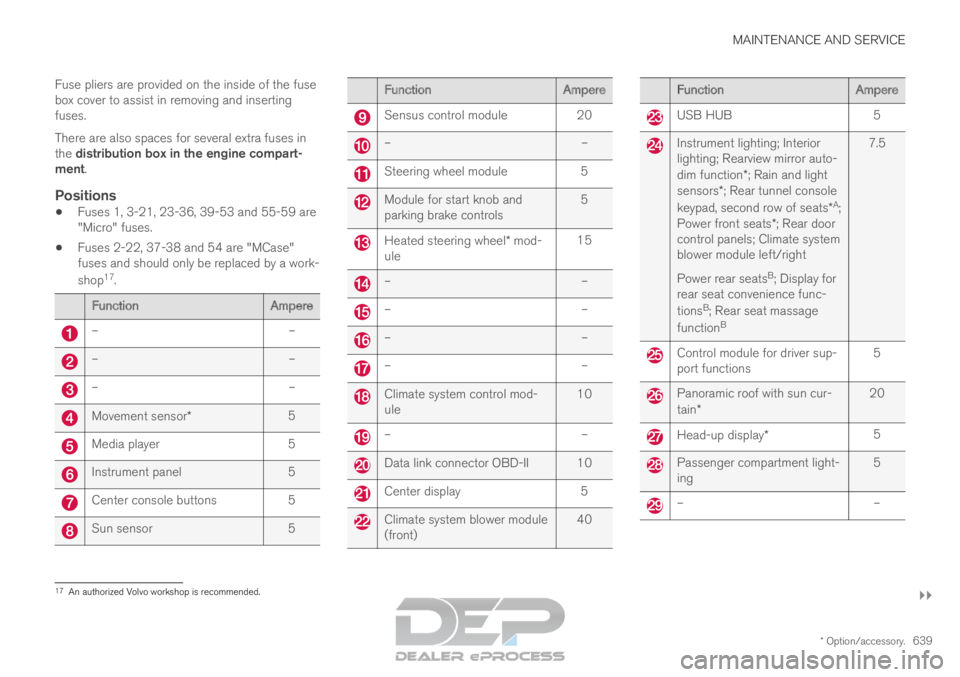
Fuse pliers are provided on the inside of the fuse
box cover to assist in removing and inserting
fuses.
There are also spaces for several extra fuses in
the distribution box in the engine compart-
ment.
Positions
Fuses 1, 3-21, 23-36, 39-53 and 55-59 are
"Micro" fuses.
Fuses 2-22, 37-38 and 54 are "MCase"
fuses and should only be replaced by a work-
shop 17
. Function
Ampere–
––
––
–Movement sensor*
5Media player
5Instrument panel
5Center console buttons
5Sun sensor
5 Function
Ampere Sensus control module
20 –
– Steering wheel module
5 Module for start knob and
parking brake controls
5 Heated steering wheel* mod-
ule 15 –
– –
– –
– –
– Climate system control mod-
ule
10 –
– Data link connector OBD-II 10
Center display
5 Climate system blower module
(front)
40 Function
Ampere USB HUB
5 Instrument lighting; Interior
lighting; Rearview mirror auto-
dim function*; Rain and light
sensors*; Rear tunnel console
keypad, second row of seats* A
;
Power front seats *; Rear door
control panels; Climate system
blower module left/right
Power rear seats B
; Display for
rear seat convenience func-
tions B
; Rear seat massage
function B 7.5 Control module for driver sup-
port functions
5 Panoramic roof with sun cur-
tain*
20 Head-up display*
5 Passenger compartment light-
ing
5 –
–17
An authorized Volvo workshop is recommended.
Page 655 of 697
MAINTENANCE AND SERVICE
653
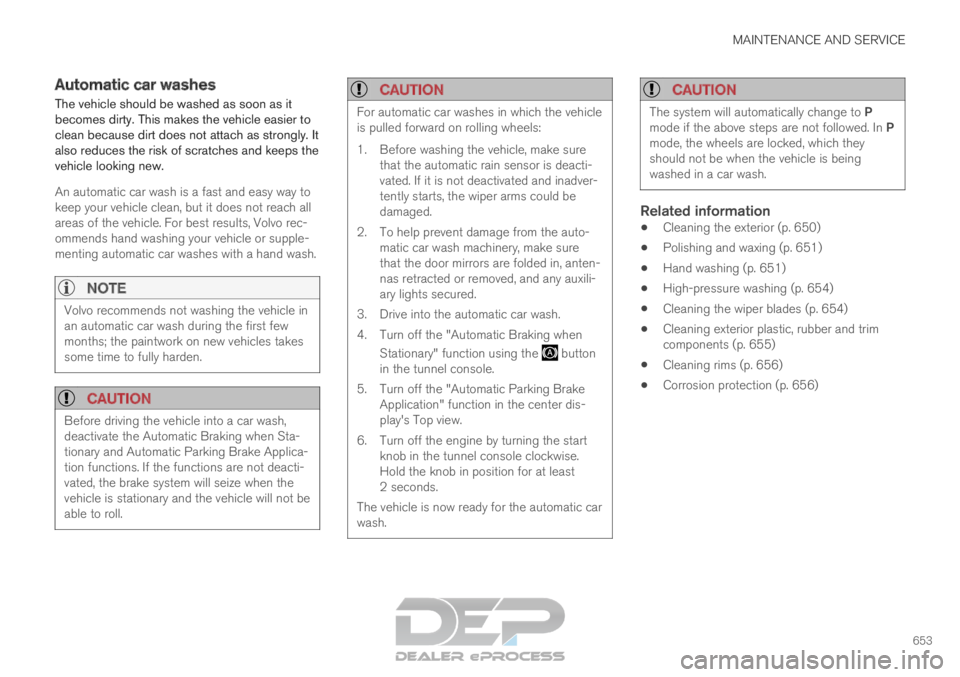
Automatic car washes
The vehicle should be washed as soon as it
becomes dirty. This makes the vehicle easier to
clean because dirt does not attach as strongly. It
also reduces the risk of scratches and keeps the
vehicle looking new.
An automatic car wash is a fast and easy way to
keep your vehicle clean, but it does not reach all
areas of the vehicle. For best results, Volvo rec-
ommends hand washing your vehicle or supple-
menting automatic car washes with a hand wash.
NOTE
Volvo recommends not washing the vehicle in
an automatic car wash during the first few
months; the paintwork on new vehicles takes
some time to fully harden.
CAUTION
Before driving the vehicle into a car wash,
deactivate the Automatic Braking when Sta-
tionary and Automatic Parking Brake Applica-
tion functions. If the functions are not deacti-
vated, the brake system will seize when the
vehicle is stationary and the vehicle will not be
able to roll.
CAUTION For automatic car washes in which the vehicle
is pulled forward on rolling wheels:
1.
Before washing the vehicle, make sure
that the automatic rain sensor is deacti-
vated. If it is not deactivated and inadver-
tently starts, the wiper arms could be
damaged.
2. To help prevent damage from the auto- matic car wash machinery, make sure
that the door mirrors are folded in, anten-
nas retracted or removed, and any auxili-
ary lights secured.
3. Drive into the automatic car wash.
4. Turn off the "Automatic Braking when Stationary" function using the button
in the tunnel console.
5.
Turn off the "Automatic Parking Brake
Application" function in the center dis-
play's Top view.
6. Turn off the engine by turning the start knob in the tunnel console clockwise.
Hold the knob in position for at least
2 seconds.
The vehicle is now ready for the automatic car
wash.
CAUTION The system will automatically change to P
mode if the above steps are not followed. In P
mode, the wheels are locked, which they
should not be when the vehicle is being
washed in a car wash.
Related information
Cleaning the exterior (p. 650)
Polishing and waxing (p. 651)
Hand washing (p. 651)
High-pressure washing (p. 654)
Cleaning the wiper blades (p. 654)
Cleaning exterior plastic, rubber and trim
components (p. 655)
Cleaning rims (p. 656)
Corrosion protection (p. 656)
Page 680 of 697
INDEX
678B Backrest
front seat, adjusting
184, 185, 188,
189, 190, 191
rear seat, adjusting 197, 198
rear seat, folding 193, 198, 199
Battery Hybrid 631
jump-start 481
Maintenance 627
start 627
symbols on the battery 632
warning symbols 632
BLIS 355, 356, 357, 358
Blower adjusting 226
air distribution 210
air vents 211
Bluetooth connect 524
connecting vehicle to Internet 543
phone 532
settings 541
Book service and repair 615
Booster cushions 71
Brake assist after collision 447 Brake fluid
grade
673
Brake functions 438
Brake light 160
Brake position 449
Brakes 439
anti-lock brakes, ABS 439
automatic when stationary 446
Brake Assist System, BAS 441
brake lights 160
brake system 438
emergency brake lights 160
handbrake 442
Maintenance 442
on salted roads 441
on wet roads 441
brake system fluid 673
C Camera sensor
351
Camera unit
337, 341
Capacity weight 588, 669
Cargo compartment 598
attachment points 601
cargo net 606 electrical outlet
594, 596
Lighting
163
Cargo compartment cover 601, 602
cargo net 606
Cargo net 606
Car wash 650, 651, 653, 654, 655, 656
Catalytic converter 479
recovery 487
CD player 522
Cell phone, see Phone 533
Center console 593
Center display change appearance 131
cleaning 645
climate controls 215
Function view 122
keyboard 126
messages 140, 141
operation 112, 115, 119, 124
overview 109
settings 132, 133
switch off and change volume 131
symbols in status bar 124
views 115
Central locking 262
Change of owner 134
Changing a wheel 574
Page 687 of 697
INDEX
685
N Net
cargo compartment
606
O Occupant safety
43
Occupant weight sensor
56
Octane rating 477
Oil, see also Engine oil 672
On-board diagnostics 610
On-board Diagnostic socket 37
Option/accessory 21
Outside temperature gauge 94
Overheating 479, 483
Owner's information 16
OWNER'S MANUAL 21
environmental labeling 24
in cellular phone 20
in the center display 17, 18 P
Paddle at steering wheel
200
Paint color code
658
paint damage and touch-up 657, 658
Panoramic roof opening and closing 173
pinch protection 166
sun shade 172, 175
ventilation position 174
PAP – Park Assist Pilot 406, 408, 410, 411, 413, 414
Park Assist Camera 396, 397, 399, 401, 403, 404, 405
settings 402
Park Assist Camera limitations 403
Park Assist Pilot 406, 408, 410, 411, 413, 414
function 406, 408, 411, 413, 414
limitations 411
operation 408, 410
Symbols and messages 414
Park Assist Pilot – PAP 406, 408, 410, 411, 413, 414
parking on hills 444 Parking Assist 390, 391, 392, 393, 394, 395
function
390, 391, 392
Parking brake 442
activate and deactivate 443
automatic activation 444
Low battery charge level 445
Parking climate 231
Symbols and messages 238
Parking heater 239
Passenger compartment filter 209
Passenger compartment heater (Parking
heater) 239
Passenger compartment interior 592 center console 593
electrical outlet 594
glove compartment 597
sun visor 598
Passenger compartment lighting 162, 164 auto switch 162
Passing assistance 309, 310, 326, 327
personal information (Customer Privacy
Policy) 35
Phone 532
changing to another 536
connect 533
connect automatically 535
connect manually 535
delete 536
Page 690 of 697
INDEX
688Sound settings 496, 539
phone 540
playing media 518, 520
text message 539
Spare tire 579, 580
Speed camera 368
Speed Limiter 283, 286, 287, 291 getting started 284
shut down 286
temporary deactivation 285
Speed symbols, tires 564
Spin control 279
Stability and traction control system 279, 282 operation 281
Stability system 279
Stains 645, 647, 648, 649, 650
Start and lock system type designations 257
Start battery 481, 627 overload 480
Start engine 434
Starting the engine after a collision 62
Start the vehicle 434
Steel cargo grid 604 Steering assistance at risk of colli-
sion
380, 381, 382, 383, 384, 385, 386, 387, 389
Steering assistance at risk of rear-end col-
lision 386, 387
Steering power level, see Steering wheel
resistance 278
Steering resistance at risk of head-on colli-
sion 383, 384, 385
Steering wheel 200, 201
heating 219, 220
keypad 200
paddle 200
steering wheel adjustment 201
Steering wheel keypad 200
Steering wheel paddles 451
Steering wheel resistance, speed-depend-
ent 278
Stone chips and scratches 657, 658
Storage compartments 592
center console 593
glove compartment 597
sun visor 598
Sunroof pinch protection 166 Sun shade
panoramic roof 172, 175
pinch protection 166
rear door 169
Sun visor 598
mirror lighting 163
Symbols indicator symbols 94
warning symbols 97
Symbols and messages Adaptive Cruise Control 314
center display's status bar 124
Collision warner with auto-brake 353
hybrid-related 430
parking climate 238
Symbols and messages for Assistance at
risk of collision 389
system updates 613
T Tailgate
locking/unlocking
247, 261
open/close with foot movement 270
power 266
unlocking from inside 264
Technician certification 38