transmission VOLVO XC90 TWIN ENGINE 2019 Owner's Manual
[x] Cancel search | Manufacturer: VOLVO, Model Year: 2019, Model line: XC90 TWIN ENGINE, Model: VOLVO XC90 TWIN ENGINE 2019Pages: 697, PDF Size: 10.33 MB
Page 487 of 697
STARTING AND DRIVING
}}
* Option/accessory. 485
The automatic transmission selects the optimal
gear for the current load and engine speed.
Steep inclines
Do not lock the automatic transmission into a
higher gear than what the engine can handle ‒ it
is not always preferable to drive in high gears at
low rpm.
Parking on a hill
1. Depress the brake pedal.
2. Apply the parking brake.
3. Put the gear selector in P.
4. Release the brake pedal.
Put chocks behind the wheels when the vehicle
is parked on a hill with a trailer attached.
Starting on a hill
1. Depress the brake pedal.
2. Put the gear selector in D.
3. Release the parking brake.
4. Release the brake pedal and start driving.
Related information
Trailer Stability Assist* (p. 485)
Checking trailer lights (p. 486)
Towing capacity and tongue weight (p. 670)
Overheating of engine and transmission
(p. 479) Trailer Stability Assist*
Trailer Stability Assist (TSA 8
) is a function
designed to help stabilize a vehicle that is tow-
ing a trailer when the vehicle and trailer have
begun to sway. The function is part of the Elec-
tronic Stability Control system ESC 9
.
Reasons for swayingA vehicle towing a trailer may begin to sway for
various reasons. Normally this only occurs at high
speeds. However, if the trailer is overloaded or
unevenly distributed, e.g. too far back, there is a
risk of swaying even at low speeds.
Swaying may be caused by factors such as:
The vehicle and trailer are hit by a sudden,
strong crosswind.
The vehicle and trailer are traveling on an
uneven road or over a bump.
Sudden movements of the steering wheel.
Once swaying has begun, it can be difficult or
impossible to stop it. This makes the vehicle and
trailer difficult to control and there is a risk of
swerving into oncoming traffic or driving off the
road.
Trailer Stability Assist functionTrailer Stability Assist continuously monitors the
vehicle's movements, particularly lateral move- ments. If swaying is detected, the brakes are
applied individually on the front wheels, which has
a stabilizing effect on the vehicle and trailer. This
is often enough to enable the driver to regain
control of the vehicle.
If the Trailer Stability Assist function's first
attempt is not adequate to stop the swaying
motion, the brakes are applied on all wheels and
engine power is temporarily reduced. As the
swaying motion begins to decrease and the vehi-
cle and trailer have once again become stable,
TSA stops regulating the brakes/engine power
and the driver regains control of the vehicle.
NOTE
Trailer Stability Assist is deactivated if the
driver selects the sport mode by deactivating
ESC in the center display's menu system. Trailer Stability Assist may not intervene if the
driver tries to compensate for the swaying motion
by moving the steering wheel rapidly, because
the system will then not be able to determine if it
is the trailer or the driver causing the swaying.
8
Trailer Stability Assist
9 Electronic Stability Control
Page 510 of 697
AUDIO, MEDIA AND INTERNET
* Option/accessory.
508 HD Radio™
limitations
Limitations
Main channel vs. sub-channels (FM only):
The main channel is the only channel that
can receive in hybrid mode (both digital and
analog). If a frequency has sub-channels,
they are broadcast in digital mode only. The
main FM channel will be displayed as, for
example, "WRIF-FM HD1". The sub-FM
channels will be displayed as"WRIF-FM
HD2", "WRIF-FM HD3", etc.
Reception coverage area: Due to current
IBOC transmitter power limitations, the
reception coverage area in digital mode is
somewhat more limited than the station's
analog coverage area. Be aware that, like all
radio transmission technology, terrain, time of
day, vegetation and buildings can have a
positive or negative effect on radio reception.
Analog to digital/digital to analog blend-
ing: Analog to digital blending will occur as
the signal strength reaches a preset thresh-
old in the receiver. This will be noticeable in
fringe areas (areas with weak reception) and
is normal.
NOTE There may be a noticeable difference in
sound quality when a change from analogue
to digital or digital to analogue occurs, such
as:
Volume increase or decrease
Equalizer settings, i.e., Bass/ Midrange/
Treble cut or boost
Time alignment (Digital program material
in extreme cases can be as much as 8
seconds behind the analogue). This will
noticeable as a "stuttering" effect.
The above items are dependant on the
broadcaster's equipment settings and do
not indicate a fault in the vehicle's radio
receiver or antenna systems.
Related information
HD Radio™ (p. 505)
Activating and deactivating the HD Radio™
(p. 506)
HD Radio
™
sub-channels (p. 507) SiriusXM
®
Satellite radio*
The SiriusXM ®
Satellite system broadcasts from
of a number of high elevation satellites in geo-
synchronous orbit.
Listening to satellite radioThe digital signals from the satellites are line-of-
sight, which means that physical obstructions
such as bridges, tunnels, etc, may temporarily
interfere with signal reception.
Avoid any obstructions, such as metallic objects
transported on roof racks or in a ski box, or other
antennas that may impede signals from the
SiriusXM ®
satellites.
Selecting SiriusXM ®
Satellite radio
mode
1. From the center display's Home view, swipe from right to left to come to App view. 2.
Tap the SiriusXM ®
Satellite radio icon.
Page 582 of 697
||WHEELS AND TIRES
* Option/accessory.
580
WARNING
The vehicle must never be driven with
more than one "Temporary Spare" tire
mounted.
Driving with a spare wheel may alter the
driving characteristics of the vehicle.
Replace the spare wheel with a normal
wheel as soon as possible.
The spare wheel is smaller than the nor-
mal wheel, which affects the vehicle's
ground clearance. Watch for high curbs
and do not wash the vehicle in an auto-
matic car wash when a spare wheel is
mounted.
Follow the manufacturer's recommended
tire inflation pressure for the spare wheel.
On all-wheel drive vehicles, the drive on
the rear axle can be disconnected.
If the spare wheel is mounted on the
front axle, snow chains must not be used.
The spare wheel must not be repaired.
CAUTION The vehicle must not be driven with wheels of
different dimensions or with a spare tire other
than the one that came with the vehicle. The
use of different size wheels can seriously
damage your vehicle's transmission.
Related information
When changing wheels (p. 574)
Recommended tire pressure (p. 569) Accessing the spare wheel
Follow these instructions regarding handling the
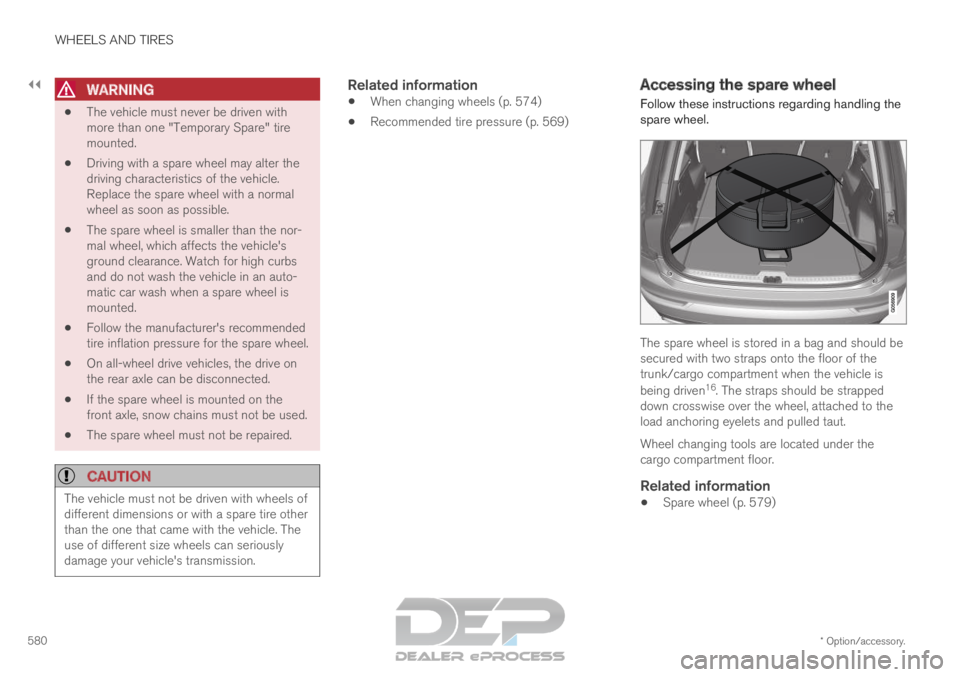
spare wheel. The spare wheel is stored in a bag and should be
secured with two straps onto the floor of the
trunk/cargo compartment when the vehicle is
being driven
16
. The straps should be strapped
down crosswise over the wheel, attached to the
load anchoring eyelets and pulled taut.
Wheel changing tools are located under the
cargo compartment floor.
Related information
Spare wheel (p. 579)
Page 618 of 697
||MAINTENANCE AND SERVICE
* Option/accessory.
616 7.
Tap Send appointment request.
>
You will receive an appointment sugges-
tion by email within a couple of days 7
.
You will also receive the same message
via email and when you log in to
www.volvocars.com.
On some markets, the message in the
instrument panel indicating that the vehi-
cle requires service will go out once the
appointment request has been sent.
8. Tap Cancel request if you would like to
cancel your request.
The appointment request contains information
about your vehicle that helps the workshop plan
for your visit.
The retailer will send you a digital appointment
suggestion. Information about your retailer is also
available in the vehicle so that you can contact
your workshop at any time.
Accepting an appointment suggestionWhen the vehicle has received an appointment
suggestion, a message will be displayed at the
top of the center display.
1. Tap the message. 2. To accept the suggested appointment, tap
Accept. Otherwise, tap Send new
proposal or Decline.
For some markets, the system reminds you when
an appointment time is approaching and the navi-
gation system 8
can also guide you to the work-
shop at the appointed time.
Related information
Vehicle status (p. 614)
Sending vehicle information to the workshop
(p. 616)
Navigating in the center display's views
(p. 115)
Volvo ID (p. 26)
Internet-connected vehicle* (p. 541) Sending vehicle information to the
workshop
9
Vehicle-related information can be sent at any
time from the vehicle, e.g. if you schedule a visit
to a workshop and would like to assist your
workshop by providing additional basic informa-
tion. Sending vehicle information is not the same
as scheduling service. 1.
Open the Car Status app from App view in
the center display.
2. Tap Appointments.
3. Tap Send vehicle data.
>
A message confirming that vehicle-related
information has been sent will appear at
the top of the center display. You can
cancel data transmission by tapping the
checkbox in the activity indicator.
Information is sent via the vehicle's Inter-
net connection 10
. 7
Timespan may vary depending on market.
8 For vehicles with Sensus Navigation*.
9 Certain markets only.
10 There may be a charge for transmitting data over the Internet, depending\
on your service plan.
Page 637 of 697
MAINTENANCE AND SERVICE
}}
635
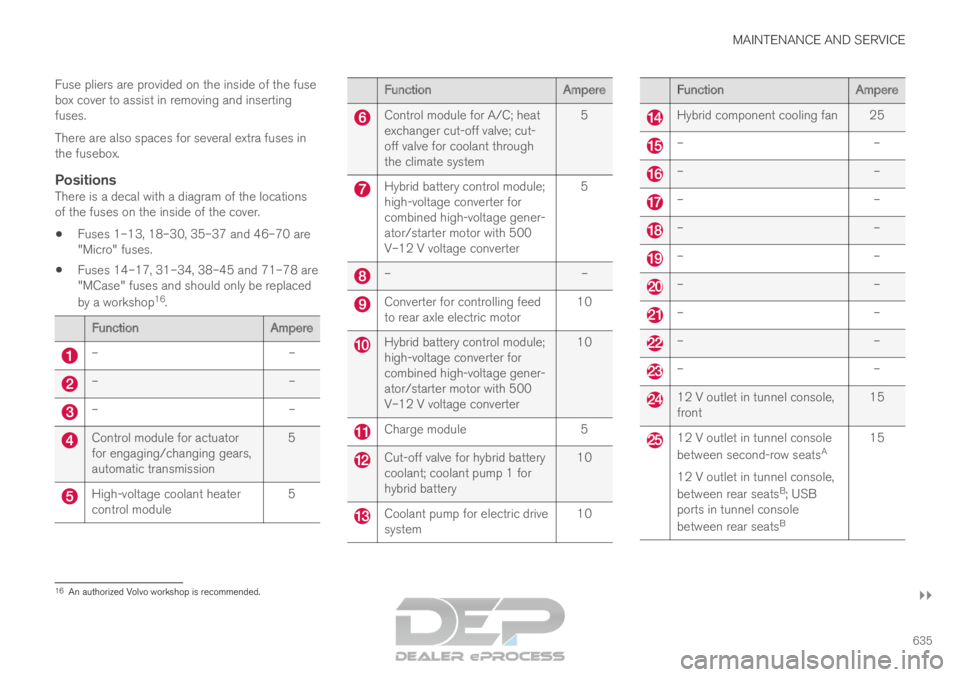
Fuse pliers are provided on the inside of the fuse
box cover to assist in removing and inserting
fuses.
There are also spaces for several extra fuses in
the fusebox.
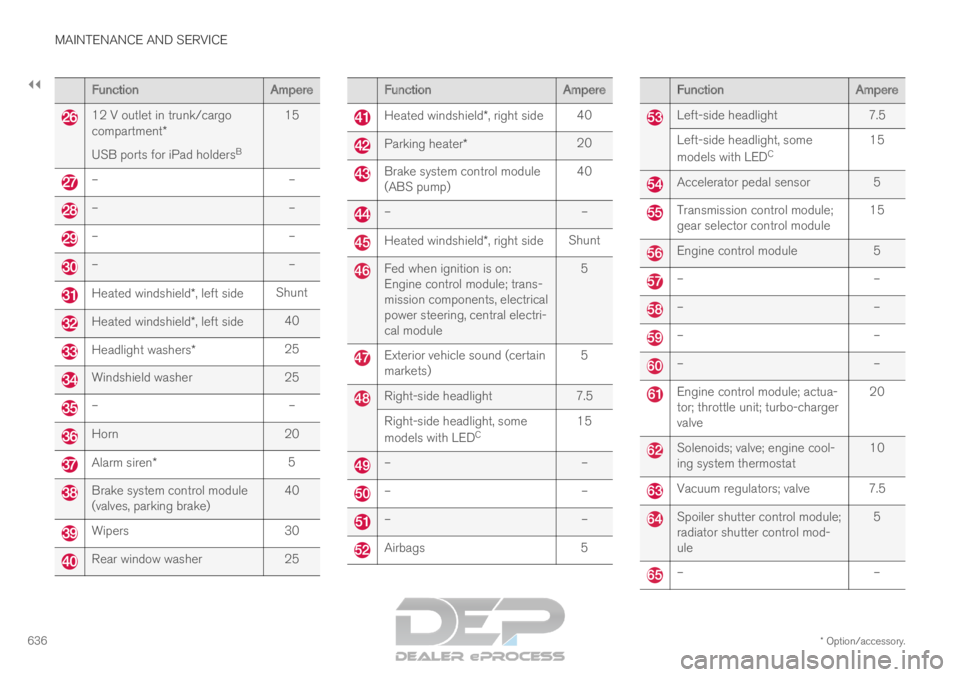
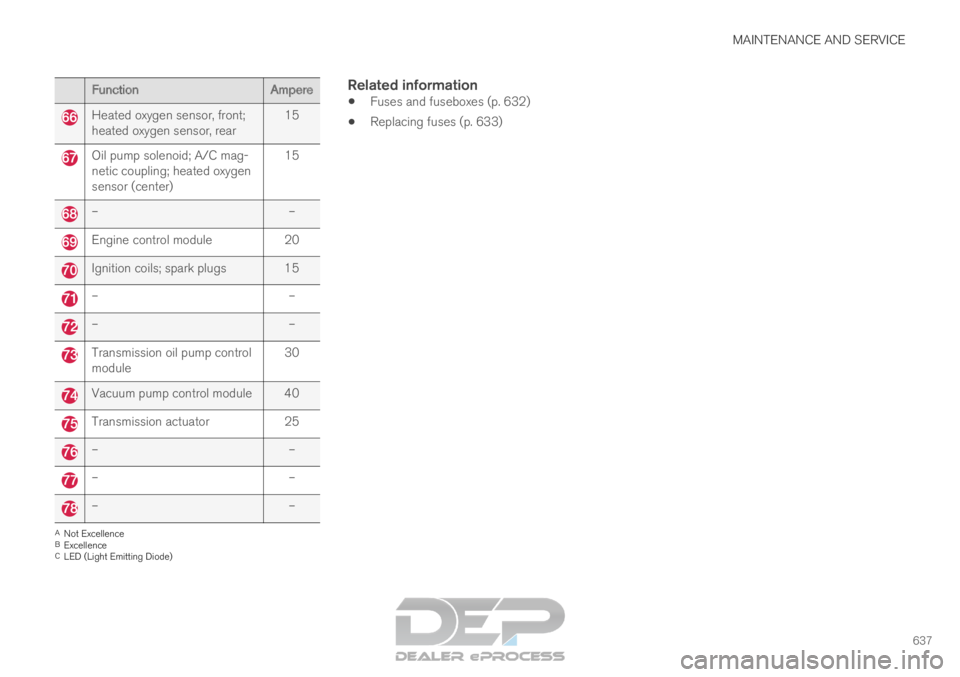
PositionsThere is a decal with a diagram of the locations
of the fuses on the inside of the cover.
Fuses 1–13, 18–30, 35–37 and 46–70 are
"Micro" fuses.
Fuses 14–17, 31–34, 38–45 and 71–78 are
"MCase" fuses and should only be replaced
by a workshop 16
. Function
Ampere–
––
––
–Control module for actuator
for engaging/changing gears,
automatic transmission
5High-voltage coolant heater
control module
5 Function
Ampere Control module for A/C; heat
exchanger cut-off valve; cut-
off valve for coolant through
the climate system
5 Hybrid battery control module;
high-voltage converter for
combined high-voltage gener-
ator/starter motor with 500
V–12 V voltage converter
5 –
– Converter for controlling feed
to rear axle electric motor
10 Hybrid battery control module;
high-voltage converter for
combined high-voltage gener-
ator/starter motor with 500
V–12 V voltage converter
10 Charge module
5 Cut-off valve for hybrid battery
coolant; coolant pump 1 for
hybrid battery
10 Coolant pump for electric drive
system
10 Function
Ampere Hybrid component cooling fan 25
–
– –
– –
– –
– –
– –
– –
– –
– –
– 12 V outlet in tunnel console,
front
15 12 V outlet in tunnel console
between second-row seats
A
12 V outlet in tunnel console,
between rear seats B
; USB
ports in tunnel console
between rear seats B15
16
An authorized Volvo workshop is recommended.
Page 638 of 697
||MAINTENANCE AND SERVICE
* Option/accessory.
636 Function
Ampere12 V outlet in trunk/cargo
compartment*
USB ports for iPad holders
B15 –
––
––
––
–Heated windshield*, left side
ShuntHeated windshield*, left side
40Headlight washers*
25Windshield washer
25–
–Horn
20Alarm siren*
5Brake system control module
(valves, parking brake)
40Wipers
30Rear window washer
25 Function
Ampere Heated windshield*, right side
40 Parking heater*
20 Brake system control module
(ABS pump)
40 –
– Heated windshield*, right side
Shunt Fed when ignition is on:
Engine control module; trans-
mission components, electrical
power steering, central electri-
cal module
5 Exterior vehicle sound (certain
markets)
5 Right-side headlight
7.5
Right-side headlight, some
models with LED C 15 –
– –
– –
– Airbags
5 Function
Ampere Left-side headlight
7.5
Left-side headlight, some
models with LED C 15 Accelerator pedal sensor 5
Transmission control module;
gear selector control module
15 Engine control module
5 –
– –
– –
– –
– Engine control module; actua-
tor; throttle unit; turbo-charger
valve
20 Solenoids; valve; engine cool-
ing system thermostat
10 Vacuum regulators; valve 7.5
Spoiler shutter control module;
radiator shutter control mod-
ule
5 –
–
Page 639 of 697
MAINTENANCE AND SERVICE
637Function
AmpereHeated oxygen sensor, front;
heated oxygen sensor, rear
15Oil pump solenoid; A/C mag-
netic coupling; heated oxygen
sensor (center)
15–
–Engine control module
20Ignition coils; spark plugs 15
–
––
–Transmission oil pump control
module
30Vacuum pump control module 40
Transmission actuator
25–
––
––
–A
Not Excellence
B Excellence
C LED (Light Emitting Diode)
Related information
Fuses and fuseboxes (p. 632)
Replacing fuses (p. 633)
Page 675 of 697
SPECIFICATIONS
673
Coolant specifications
Recommended grade: Volvo-approved pre-
mixed coolant. If concentrated coolant is used,
mix with 50% water. Consult a Volvo retailer if
you have any questions.
To avoid deterioration of the cooling system,
engine trouble, etc., only approved Volvo coolant
should be used.
WARNING Do not ingest. May cause damage to organs
(kidneys). The product contains ethylene gly-
col, inhibitor, emetic, water, etc.
Related information
Refilling coolant (p. 625) Transmission fluid specifications
Under normal driving conditions, the transmis-
sion fluid will not need to be changed during its
service life. However, it may need to be changed
if the vehicle is driven frequently in adverse driv-
ing conditions.
Automatic transmission Prescribed transmission fluid:
AW1
Related information
Type designations (p. 664) Brake fluid specifications
The medium in the hydraulic brake system is
called brake fluid and is used to transfer braking
force from e.g. pressure on the brake pedal via a
master brake cylinder to one or more slave cylin-
ders, which in turn act on a mechanical brake.
Recommended grade: Volvo Original or similar
fluid that meets a combination of Dot 4, 5.1 and
ISO 4925 class 6.NOTE Changing or filling brake fluid should be
entrusted to an authorized Volvo workshop.
Related information
Engine compartment overview (p. 622)
Page 679 of 697
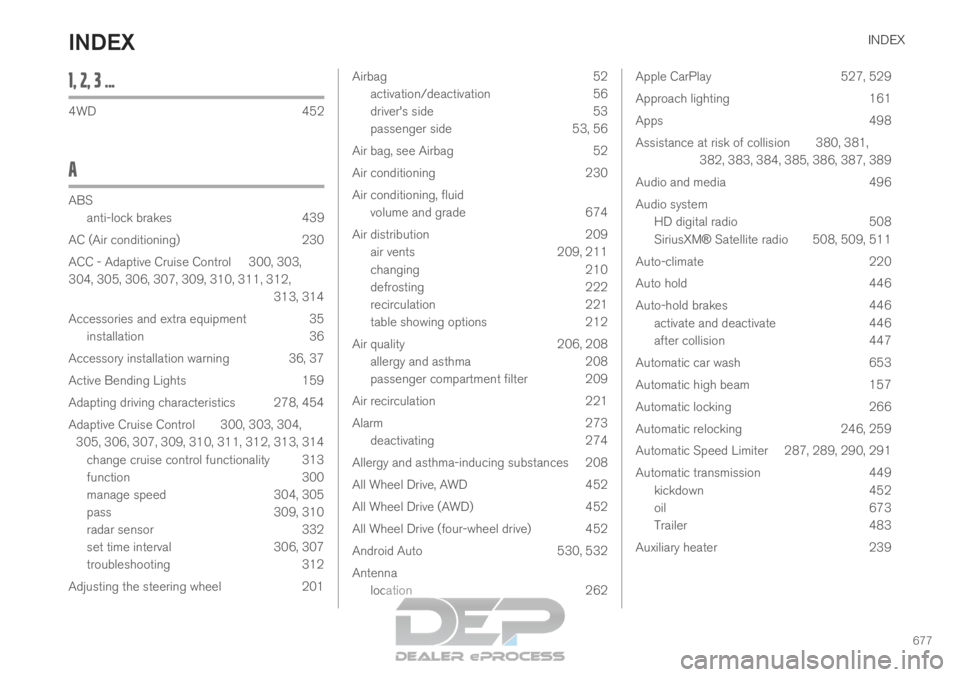
INDEX
677
1, 2, 3 ... 4WD
452
A ABS
anti-lock brakes
439
AC (Air conditioning) 230
ACC - Adaptive Cruise Control 300, 303,
304, 305, 306, 307, 309, 310, 311, 312, 313, 314
Accessories and extra equipment 35 installation 36
Accessory installation warning 36, 37
Active Bending Lights 159
Adapting driving characteristics 278, 454
Adaptive Cruise Control 300, 303, 304, 305, 306, 307, 309, 310, 311, 312, 313, 314 change cruise control functionality 313
function 300
manage speed 304, 305
pass 309, 310
radar sensor 332
set time interval 306, 307
troubleshooting 312
Adjusting the steering wheel 201 Airbag
52
activation/deactivation
56
driver's side 53
passenger side 53, 56
Air bag, see Airbag 52
Air conditioning 230
Air conditioning, fluid volume and grade 674
Air distribution 209
air vents 209, 211
changing 210
defrosting 222
recirculation 221
table showing options 212
Air quality 206, 208
allergy and asthma 208
passenger compartment filter 209
Air recirculation 221
Alarm 273
deactivating 274
Allergy and asthma-inducing substances 208
All Wheel Drive, AWD 452
All Wheel Drive (AWD) 452
All Wheel Drive (four-wheel drive) 452
Android Auto 530, 532
Antenna location 262 Apple CarPlay
527, 529
Approach lighting 161
Apps 498
Assistance at risk of collision 380, 381, 382, 383, 384, 385, 386, 387, 389
Audio and media 496
Audio system HD digital radio 508
SiriusXM® Satellite radio 508, 509, 511
Auto-climate 220
Auto hold 446
Auto-hold brakes 446
activate and deactivate 446
after collision 447
Automatic car wash 653
Automatic high beam 157
Automatic locking 266
Automatic relocking 246, 259
Automatic Speed Limiter 287, 289, 290, 291
Automatic transmission 449
kickdown 452
oil 673
Trailer 483
Auxiliary heater 239
INDEX
Page 682 of 697

INDEX
680Cooling system
overheating 479
Corner Traction Control 279
Corrosion protection 656
Covering cargo compartment 602
Crash, see Collision 42
Crash event data 33
Cross Traffic Alert – CTA 360, 361, 362, 363
Cruise control 291, 292 manage speed 292, 293
temporary deactivation 294, 295
turn off 296
CTA – Cross Traffic Alert 360, 361, 362, 363
Curb weight 669
Customer Privacy Policy 35
CZIP (Clean Zone Interior Package) 208
D Data
recording
33
transferring between vehicle and work-
shop 612
Data sharing 548
Daytime running lights 154 Decals
location
664
Defrosting 222
Detection of cyclist 345
Dimensions 667
Dipstick, electronic 624
Direction of rotation 562
Display driver information 84
Display lighting 164
Distance Alert 296, 297, 298
limitations 299
DivX ®
523
Door mirrors 169, 171
compass 493
dimming 170
outer 169, 171
power folding 171
resetting 171
store position 186, 187
Driveline transmission 448
Drive mode 454
changing 459
Driver Alert Control 370
operation 371, 372
Driver Alert Control limitations 372 Driver performance
92, 93
Driver profile 136
edit 137, 138, 139
select 137
Driver support system 278
Drive systems 453
Driving cooling system 479
with a trailer 483
Driving economy 467
Driving through standing water 473
driving with a trailer towball load 670
towing capacity 670
E Economical driving
467
Electrical outlet
594
use 596
Electrical system 627
Electric drive motor specifications 671
electric motor 453 Driving 469
Range 469