ECU VOLVO XC90 TWIN ENGINE 2019 Owner's Guide
[x] Cancel search | Manufacturer: VOLVO, Model Year: 2019, Model line: XC90 TWIN ENGINE, Model: VOLVO XC90 TWIN ENGINE 2019Pages: 697, PDF Size: 10.33 MB
Page 483 of 697
STARTING AND DRIVING
}}
481
Jump starting using another battery
If the start battery is discharged, current from
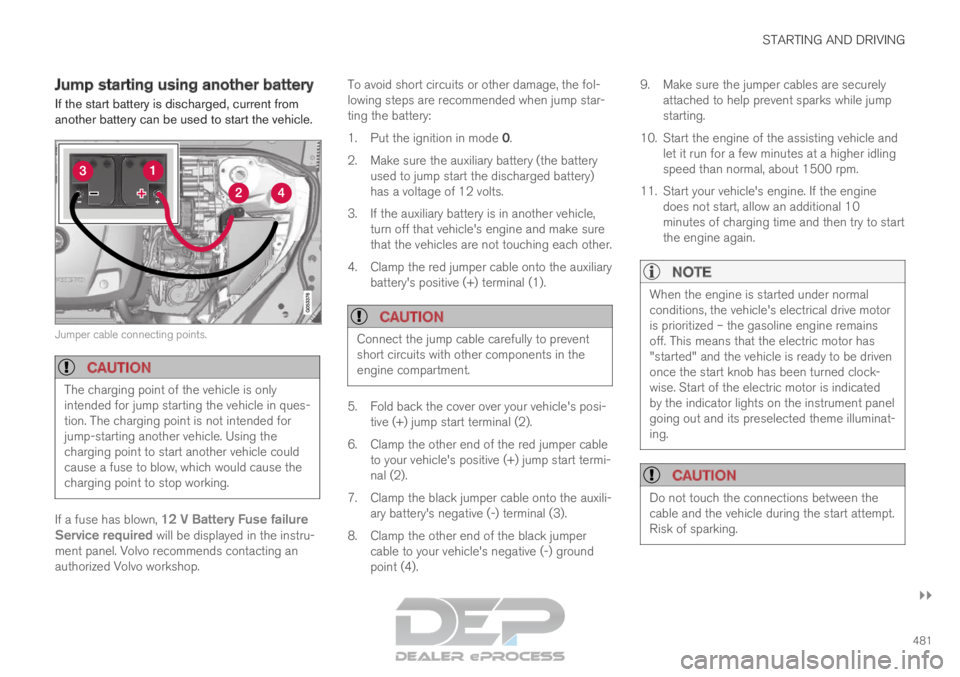
another battery can be used to start the vehicle. Jumper cable connecting points.
CAUTION
The charging point of the vehicle is only
intended for jump starting the vehicle in ques-
tion. The charging point is not intended for
jump-starting another vehicle. Using the
charging point to start another vehicle could
cause a fuse to blow, which would cause the
charging point to stop working.
If a fuse has blown, 12 V Battery Fuse failure
Service required will be displayed in the instru-
ment panel. Volvo recommends contacting an
authorized Volvo workshop. To avoid short circuits or other damage, the fol-
lowing steps are recommended when jump star-
ting the battery:
1.
Put the ignition in mode 0.
2.
Make sure the auxiliary battery (the battery
used to jump start the discharged battery)
has a voltage of 12 volts.
3. If the auxiliary battery is in another vehicle, turn off that vehicle's engine and make sure
that the vehicles are not touching each other.
4. Clamp the red jumper cable onto the auxiliary battery's positive (+) terminal (1).
CAUTION Connect the jump cable carefully to prevent
short circuits with other components in the
engine compartment.
5. Fold back the cover over your vehicle's posi-
tive (+) jump start terminal (2).
6.
Clamp the other end of the red jumper cable
to your vehicle's positive (+) jump start termi-
nal (2).
7. Clamp the black jumper cable onto the auxili- ary battery's negative (-) terminal (3).
8. Clamp the other end of the black jumper cable to your vehicle's negative (-) ground
point (4). 9. Make sure the jumper cables are securely
attached to help prevent sparks while jump
starting.
10. Start the engine of the assisting vehicle and let it run for a few minutes at a higher idling
speed than normal, about 1500 rpm.
11. Start your vehicle's engine. If the engine does not start, allow an additional 10
minutes of charging time and then try to start
the engine again.
NOTE When the engine is started under normal
conditions, the vehicle's electrical drive motor
is prioritized – the gasoline engine remains
off. This means that the electric motor has
"started" and the vehicle is ready to be driven
once the start knob has been turned clock-
wise. Start of the electric motor is indicated
by the indicator lights on the instrument panel
going out and its preselected theme illuminat-
ing.
CAUTION
Do not touch the connections between the
cable and the vehicle during the start attempt.
Risk of sparking.
Page 485 of 697
STARTING AND DRIVING
}}
483
Installing the ball holder1. If necessary, remove the cotter pin from the locking bolt and slide the locking bolt out of
the towbar assembly.
2. Slide the ball holder into the towbar assem- bly.
3. Align the hole in the ball holder with the one in the towbar assembly.
4. Slide the locking bolt through the towbar assembly/ball holder.
5. Insert the cotter pin in the hole at the end of the locking bolt.
WARNING
Be sure the towbar is securely locked in
position before attaching anything to it.
Always attach the trailer's safety wire
securely to the towbar's safety wire
attachment bracket.
Removing the ball holder1. Remove the cotter pin from the locking bolt
and slide the locking bolt out of the ball
holder/towbar assembly.
2. Pull the ball holder out of the towbar assem- bly.
Stowing the ball holder
WARNING When not in use, the detachable ball holder
should always be properly stowed in the des-
ignated location under the floor of the cargo
compartment.
Related information
Driving with a trailer (p. 483)
Towing capacity and tongue weight (p. 670) Driving with a trailer
There are a number of things to consider when
towing a trailer, such as the towbar, the trailer
and how the load is distributed in the trailer.
Load-carrying capacity is determined by the vehi-
cle's curb weight. The total weight of all passen-
gers and any installed accessories, e.g. towbar,
reduces the vehicle's load-carrying capacity by
the corresponding amount.
Towbars used on the vehicle must be
approved for the applicable use.
Distribute the load on the trailer so that the
weight on the towbar complies with the
specified maximum towball weight. The
tongue weight is calculated as part of the
vehicle's payload.
Increase the tire pressure to the recom-
mended pressure for a full load.
The engine is subjected to more load than
usual when towing a trailer.
Towing a trailer affects the vehicle's han-
dling, durability and driving economy.
Do not drive with a heavy trailer when the
vehicle is very new. Wait until the mileage
has reached at least 1000 km (620 miles).
On long and steep downgrades, the vehicle's
brakes are subjected to much more load
than usual. When manually shifting, down-
shift and adapt speed accordingly.
Page 490 of 697

STARTING AND DRIVING
* Option/accessory.
488 Attaching and removing the towing
eyelet
Use the towing eyelet to tow another vehicle.
Screw the towing eyelet securely into place in
the threaded outlet behind the cover on the
right-hand side of the rear bumper.
NOTE If the vehicle is equipped with a towbar, there
is no rear attachment for the towing eye.
Attaching the towing eyelet
Take out the towing eyelet, which is stored in
a foam block under the floor in the cargo
compartment. Remove the cover - press the marker with
your finger while prying open the opposite
side/corner open with a coin or similar.
>
The cover turns along its center line and
can then be removed. 3. Screw in the towing eyelet until it reaches its
stop. Fasten the eyelet securing by, for example,
inserting a lug wrench* through it and using
this as a lever.
CAUTION It is important that the towing eye is screwed
in securely as far as possible.
Removing the towing eyelet
–
Unscrew the towing eyelet after use and
return it to its storage location in the foam
block.
Replace the cover on the bumper.
Related information
Towing using a towline (p. 487)
Recovery (p. 489)
Tool kit (p. 574)
Page 492 of 697
||STARTING AND DRIVING
* Option/accessory.
490 programmable buttons and an indicator light in
the mirror.
For more information about HomeLink
®
, please
visit www.HomeLink.com, www.youtube.com/
HomeLinkGentex or call 1-800-355-3515.
Save the original remote controls for future pro-
gramming (e.g. for use in another vehicle). It is
also advisable to delete the button programming
if the vehicle is sold.
Related information
Using HomeLink ®
* (p. 491)
Programming HomeLink ®
* (p. 490)
Type approval for HomeLink ®
* (p. 492) Programming HomeLink
®
*12
Follow these instructions to program
HomeLink ®
, reset all programming, or program
individual buttons.
NOTE In some vehicles, the ignition must be on or in
the "accessory position" before HomeLink
®
can be programmed or used. It can be a good
idea to put new batteries in the remote con-
trol being replaced by HomeLink ®
for faster
programming and better radio signal trans-
mission. The HomeLink ®
buttons should be
reset before programming.
WARNING While HomeLink
®
is being programmed, the
garage door or gate being programmed may
be activated. Make sure that no one is near
the door or gate during programming. When
programming a garage door opener, it is
advised to park outside of the garage. 1.
Point the remote control at the HomeLink ®
button to be programmed and hold it about
2-8 cm (1-3 inches) from the button. Do not
obstruct the HomeLink ®
indicator light.
Note: Some remote controls are more effec-
tive at programming HomeLink ®
from a dis-
tance of about 15-20 cm (6-12 inches). Try
moving the remote control closer or further
away if you are experiencing any difficulties
programming.
2.
Press and hold both the remote control but-
ton and the HomeLink ®
button to be pro-
grammed.
3. Do not release the buttons until the indicator light has stopped flashing slowly (about once
a second) and either flashes quickly (about
10 times a second) or glows steadily.
>Steady glow: Indication that program-
ming is complete. Press the programmed
button twice to activate.
Flashing quickly: The device being pro-
grammed with HomeLink ®
may have a
security function that requires an extra
step. Try pressing the programmed button
twice to see whether the programming
works. Otherwise, continue with the fol-
lowing steps. 10
Certain markets only.
11 HomeLink and the HomeLink house symbol are registered trademarks of Gent\
ex Corporation.
12 Certain markets only.
Page 544 of 697
||AUDIO, MEDIA AND INTERNET
542
tion (Wi-Fi hotspot) so that other devices, e.g.
tablets, can access the Internet
12
.
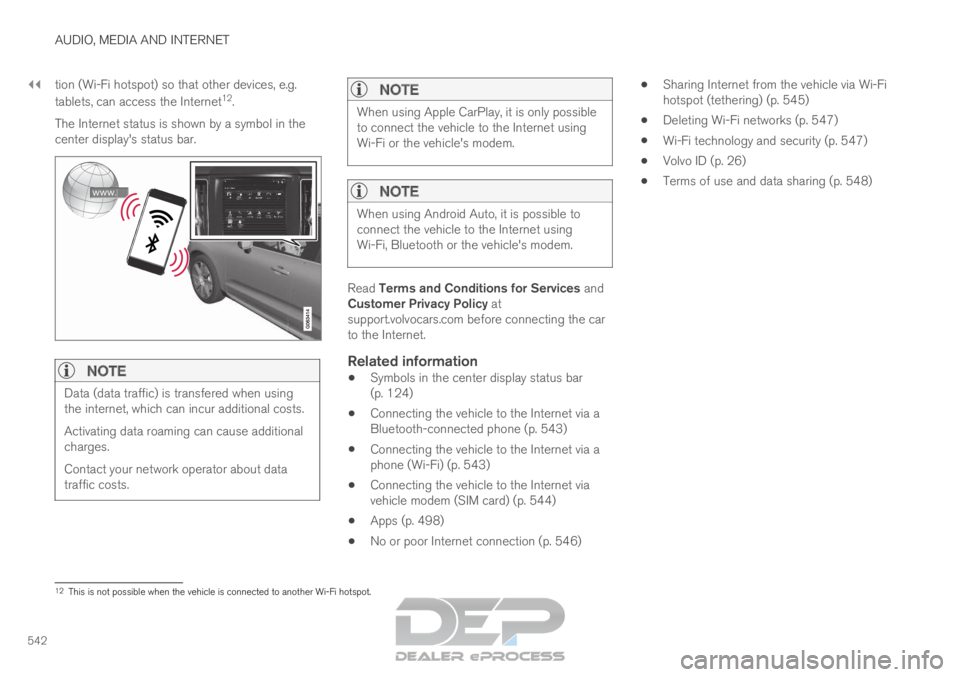
The Internet status is shown by a symbol in the
center display's status bar.
NOTE Data (data traffic) is transfered when using
the internet, which can incur additional costs.
Activating data roaming can cause additional
charges.
Contact your network operator about data
traffic costs.
NOTE When using Apple CarPlay, it is only possible
to connect the vehicle to the Internet using
Wi-Fi or the vehicle's modem.
NOTE
When using Android Auto, it is possible to
connect the vehicle to the Internet using
Wi-Fi, Bluetooth or the vehicle's modem.
Read Terms and Conditions for Services and
Customer Privacy Policy at
support.volvocars.com before connecting the car
to the Internet.
Related information
Symbols in the center display status bar
(p. 124)
Connecting the vehicle to the Internet via a
Bluetooth-connected phone (p. 543)
Connecting the vehicle to the Internet via a
phone (Wi-Fi) (p. 543)
Connecting the vehicle to the Internet via
vehicle modem (SIM card) (p. 544)
Apps (p. 498)
No or poor Internet connection (p. 546)
Sharing Internet from the vehicle via Wi-Fi
hotspot (tethering) (p. 545)
Deleting Wi-Fi networks (p. 547)
Wi-Fi technology and security (p. 547)
Volvo ID (p. 26)
Terms of use and data sharing (p. 548) 12
This is not possible when the vehicle is connected to another Wi-Fi hots\
pot.
Page 546 of 697
||AUDIO, MEDIA AND INTERNET
* Option/accessory.
544 reactivated the next time the phone's hotspot is
used to connect to the Internet.
When a phone is connected to the vehicle, it will
be saved for future use. To display a list of saved
networks or to manually delete saved networks,
tap
Settings Communication Wi-Fi
Saved networks
.
NOTE
The cellular phone and network operator
must support tethering (sharing of Internet
connection) and the subscription must
include data traffic.
Technical and security requirements for Wi-Fi
connection are described in a separate section.
Related information
Internet-connected vehicle* (p. 541)
Deleting Wi-Fi networks (p. 547)
No or poor Internet connection (p. 546)
Wi-Fi technology and security (p. 547) Connecting the vehicle to the
Internet via vehicle modem (SIM
card)
For vehicles equipped with Volvo On Call, it is
possible to establish an Internet connection via
the vehicle modem and a personal SIM card (P-
SIM).
When the vehicle is connected using the inte-
grated modem, the Volvo On Call services will
use this connection.
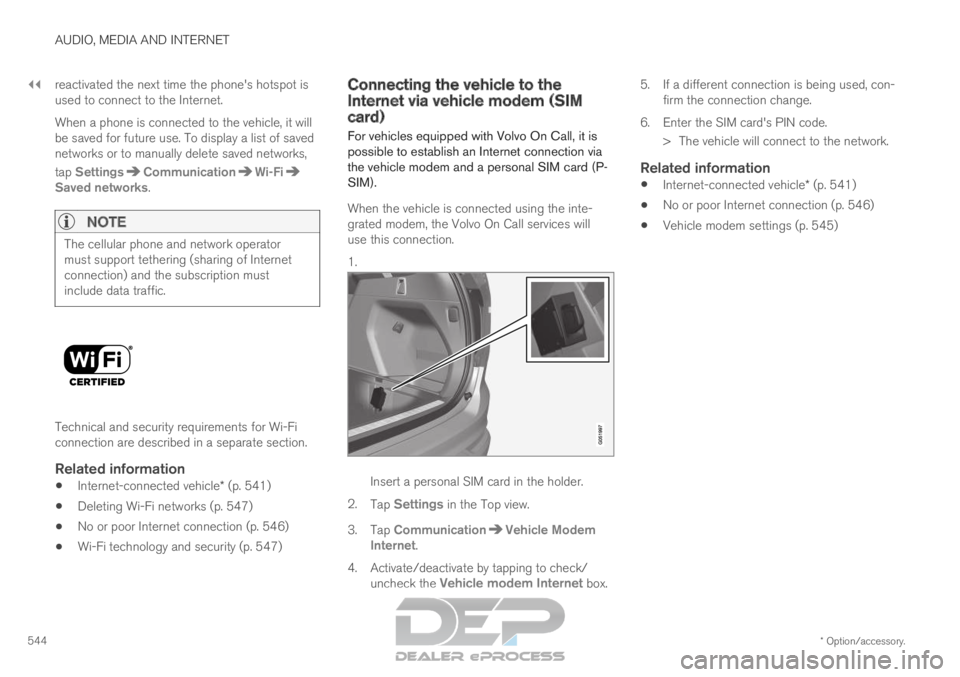
1. Insert a personal SIM card in the holder.
2. Tap Settings in the Top view.
3.
Tap Communication Vehicle Modem
Internet .
4.
Activate/deactivate by tapping to check/
uncheck the Vehicle modem Internet box. 5.
If a different connection is being used, con-
firm the connection change.
6. Enter the SIM card's PIN code. > The vehicle will connect to the network.
Related information
Internet-connected vehicle* (p. 541)
No or poor Internet connection (p. 546)
Vehicle modem settings (p. 545)
Page 549 of 697
AUDIO, MEDIA AND INTERNET
* Option/accessory.547
Restarting the phoneIf you experience any Internet connection prob-
lems, it may help to restart your phone.
Related information
Internet-connected vehicle* (p. 541)
Wi-Fi technology and security (p. 547) Deleting Wi-Fi networks
Networks that are not needed can be deleted.
1. Tap Settings in the Top view.
2.
Proceed to Communication Wi-Fi
Saved networks
.
3. Tap Forget to delete the network.
4.
Confirm the selection.
> The vehicle will no longer connect to the deleted network.
Deleting all networksAll networks can be deleted at once by perform-
ing a factory reset. Please note that all user data
and system settings will be restored to original
default factory settings.
Related information
Internet-connected vehicle* (p. 541)
No or poor Internet connection (p. 546)
Resetting center display settings (p. 134)
Connecting the vehicle to the Internet via a
phone (Wi-Fi) (p. 543) Wi-Fi technology and security
Networks must meet certain criteria in order for
the vehicle to connect.
It is possible to connect to the following types of
networks:
Frequency - 2.4 or 5 GHz 14
.
Standards - 802.11 a/b/g/n.
Security type - WPA2-AES-CCMP.
The vehicle's Wi-Fi system is designed to handle
Wi-Fi devices inside the vehicle.
Performance may be impaired if multiple devices
are using a frequency at the same time.
Related information
Internet-connected vehicle* (p. 541) 14
Selecting a frequency is not possible on all markets.
Page 556 of 697

||AUDIO, MEDIA AND INTERNET
554
Country/
Area
Brazil:
Este equipamento opera em caráter secundário isto e, náo tem di\
reito a protecão contra interferéncia prejudicial, mesmo tipo, e n\
ão pode
causar interferéncia a sistemas operando em caráter primário.
Para consultas, visite: www.anatel.gov.br
EU: Manufacturer: Mitsubishi Electric Corporation Sanda Works 2-3-33, Miwa, \
Sanda-city. Hyogo, 669-1513, Japan
Mitsubishi Electric Corporation hereby declares that this type of radio \
equipment [Audio Navigation Unit] conforms with directive 2014/53/EU.
For more information, see support.volvocars.com.
United
Arab Emi-
rates:
Page 581 of 697
WHEELS AND TIRES
}}
* Option/accessory. 579
1.
Clean the contact surfaces between the
wheel and the wheel hub.
2. Lift the wheel into place. Tighten the wheel bolts securely.
Do not grease the wheel bolt threads.
3. Lower the vehicle so that the wheel cannot rotate.
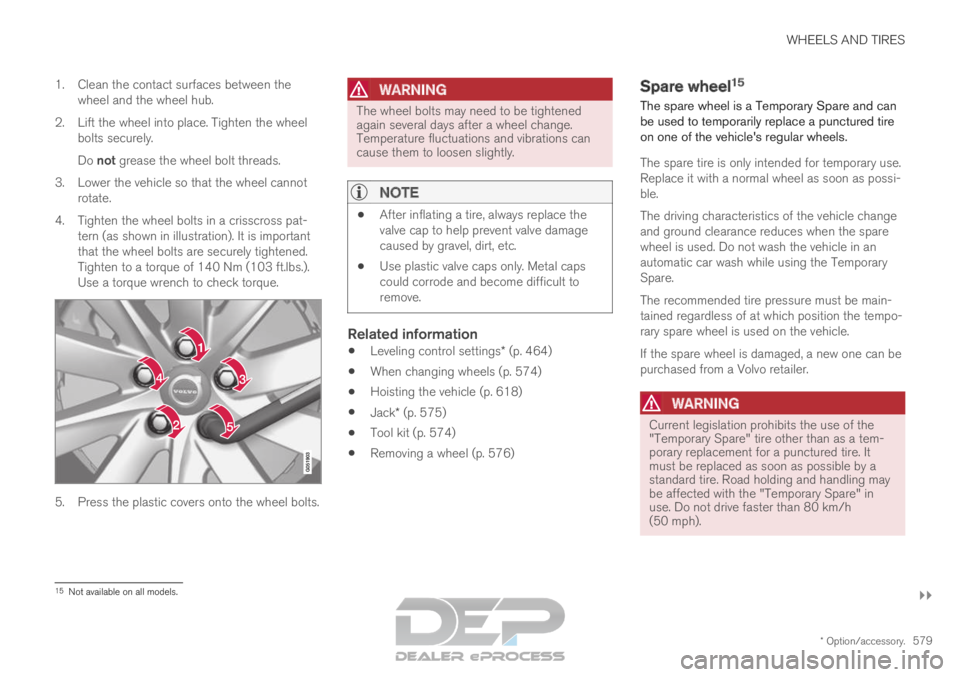
4. Tighten the wheel bolts in a crisscross pat- tern (as shown in illustration). It is important
that the wheel bolts are securely tightened.
Tighten to a torque of 140 Nm (103 ft.lbs.).
Use a torque wrench to check torque. 5. Press the plastic covers onto the wheel bolts.
WARNING The wheel bolts may need to be tightened
again several days after a wheel change.
Temperature fluctuations and vibrations can
cause them to loosen slightly.
NOTE
After inflating a tire, always replace the
valve cap to help prevent valve damage
caused by gravel, dirt, etc.
Use plastic valve caps only. Metal caps
could corrode and become difficult to
remove.
Related information
Leveling control settings* (p. 464)
When changing wheels (p. 574)
Hoisting the vehicle (p. 618)
Jack* (p. 575)
Tool kit (p. 574)
Removing a wheel (p. 576) Spare wheel
15
The spare wheel is a Temporary Spare and can
be used to temporarily replace a punctured tire
on one of the vehicle's regular wheels.
The spare tire is only intended for temporary use.
Replace it with a normal wheel as soon as possi-
ble.
The driving characteristics of the vehicle change
and ground clearance reduces when the spare
wheel is used. Do not wash the vehicle in an
automatic car wash while using the Temporary
Spare.
The recommended tire pressure must be main-
tained regardless of at which position the tempo-
rary spare wheel is used on the vehicle.
If the spare wheel is damaged, a new one can be
purchased from a Volvo retailer.
WARNING Current legislation prohibits the use of the
"Temporary Spare" tire other than as a tem-
porary replacement for a punctured tire. It
must be replaced as soon as possible by a
standard tire. Road holding and handling may
be affected with the "Temporary Spare" in
use. Do not drive faster than 80 km/h
(50 mph).
15
Not available on all models.
Page 582 of 697
||WHEELS AND TIRES
* Option/accessory.
580
WARNING
The vehicle must never be driven with
more than one "Temporary Spare" tire
mounted.
Driving with a spare wheel may alter the
driving characteristics of the vehicle.
Replace the spare wheel with a normal
wheel as soon as possible.
The spare wheel is smaller than the nor-
mal wheel, which affects the vehicle's
ground clearance. Watch for high curbs
and do not wash the vehicle in an auto-
matic car wash when a spare wheel is
mounted.
Follow the manufacturer's recommended
tire inflation pressure for the spare wheel.
On all-wheel drive vehicles, the drive on
the rear axle can be disconnected.
If the spare wheel is mounted on the
front axle, snow chains must not be used.
The spare wheel must not be repaired.
CAUTION The vehicle must not be driven with wheels of
different dimensions or with a spare tire other
than the one that came with the vehicle. The
use of different size wheels can seriously
damage your vehicle's transmission.
Related information
When changing wheels (p. 574)
Recommended tire pressure (p. 569) Accessing the spare wheel
Follow these instructions regarding handling the
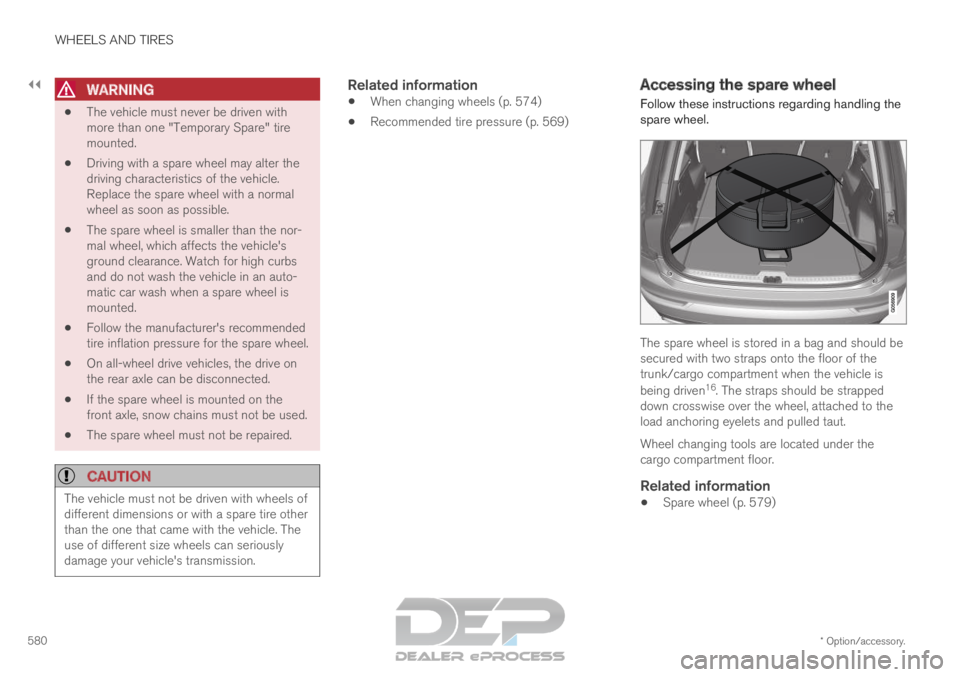
spare wheel. The spare wheel is stored in a bag and should be
secured with two straps onto the floor of the
trunk/cargo compartment when the vehicle is
being driven
16
. The straps should be strapped
down crosswise over the wheel, attached to the
load anchoring eyelets and pulled taut.
Wheel changing tools are located under the
cargo compartment floor.
Related information
Spare wheel (p. 579)