change wheel VOLVO XC90 TWIN ENGINE 2019 Owner's Guide
[x] Cancel search | Manufacturer: VOLVO, Model Year: 2019, Model line: XC90 TWIN ENGINE, Model: VOLVO XC90 TWIN ENGINE 2019Pages: 697, PDF Size: 10.33 MB
Page 326 of 697

||DRIVER SUPPORT
324
Select one of the following:
Eco - Pilot Assist will focus on providing
optimal fuel economy, which will increase the
time interval to the vehicle ahead.
Comfort - Pilot Assist will focus on following
the set time interval to the vehicle ahead as
smoothly as possible.
Dynamic - Pilot Assist will focus on follow-
ing the set time interval to the vehicle ahead
more exactly, which could mean faster accel-
eration and heavier braking.
For more information, see "Drive modes".
Related information
Pilot Assist (p. 316)
Drive modes (p. 454)
Managing Cruise Control speed (p. 293) Deactivating/reactivating Pilot
Assist
Pilot Assist
can be temporarily put into standby
mode and then reactivated.
Deactivating and putting Pilot Assist in
standby mode Note: This illustration is general and details may vary
depending on model.
To temporarily deactivate Pilot Assist and put it in
standby mode:
–
Press the button on the steering wheel
(2).
>
Pilot Assist goes into standby mode - the
symbol (8) in the instrument panel
changes color from WHITE to GRAY and
the set speed in the center of the speed-
ometer will change from BEIGE to GRAY.
...or... –
Press the ◀ button on the steering wheel (3).
>
Pilot Assist is turned off and Adaptive
Cruise Control will go into active mode.
WARNING
With Pilot Assist in standby mode, the
driver must intervene and steer and regu-
late both speed and distance to the vehi-
cle ahead.
If the vehicle comes too close to a vehicle
ahead when Pilot Assist is in standby
mode, the driver is instead warned of the
short distance by the Distance Alert func-
tion.
Page 328 of 697

||DRIVER SUPPORT
326
WARNING
A noticeable increase in speed may follow
when the speed is resumed with the
steering wheel button.
Related information
Pilot Assist (p. 316) Passing assistance with Pilot Assist
Pilot Assist can assist the driver when passing
other vehicles.
How passing assistance worksWhen Pilot Assist is following another vehicle
and you indicate that you intend to pass that
vehicle by using the turn signal 62
, Pilot Assist will
begin accelerating toward the vehicle ahead
before your vehicle has moved into the passing
lane.
The function will then delay a speed reduction to
avoid early braking as your vehicle approaches a
slower-moving vehicle.
The function remains active until your vehicle has
passed the other vehicle.
WARNING Please note that this function can be acti-
vated in more situations than just passing
another vehicle, such as when a direction indi-
cator is used to indicate a lane change or
before exiting to another road – the vehicle
will then briefly accelerate.
Related information
Pilot Assist (p. 316)
Starting passing assistance with Pilot Assist
(p. 327)
Passing assistance with Pilot Assist limita-
tions (p. 327) 62
Only the left-hand turn signal for left-hand drive vehicles, or right-ha\
nd turn signal for right-hand drive vehicles.
Page 330 of 697
||DRIVER SUPPORT
328
WARNING
When Pilot Assist follows another vehicle at
speeds over approx. 30 km/h (20 mph) and
changes target vehicle – from a moving vehi-
cle to a stationary one – Pilot Assist will
ignore the stationary vehicle and instead
accelerate to the stored speed.
The driver must then intervene and apply
the brakes.
Automatic standby mode when switching
targets
Pilot Assist disengages and goes into standby
mode if:
your vehicle's speed goes below 5 km/h
(3 mph) and Pilot Assist cannot determine if
the target object is a stationary vehicle or
another object, e.g. a speed bump.
your vehicle's speed goes under 5 km/h
(3 mph) and the vehicle ahead turns so that
Pilot Assist no longer has a vehicle to follow.
Related information
Pilot Assist (p. 316) Auto-hold braking with Pilot Assist
Pilot Assist has a special braking function in
slow traffic and at a standstill.
Braking function in slow traffic and at a
standstill
In slow-moving, stop-and-go traffic or when stop-
ped at a traffic light, driving will resume automati-
cally if the vehicle is stopped for less than
approx. 3 seconds. If it takes more than 3 sec-
onds for the vehicle ahead to begin moving again,
Pilot Assist will go into standby mode and the
Auto-hold brake function will activate.
– Pilot Assist can be reactivated by:
Pressing the button on the steering
wheel keypad.
Pressing the accelerator pedal.
>
Pilot Assist will resume following the vehi-
cle ahead if it begins to move within
approx. 6 seconds.
NOTE Pilot Assist can keep the vehicle stationary
for no more than 5 minutes – after that time
the parking brake is applied and the function
is deactivated.
The parking brake must be released before
Pilot Assist can be reactivated.
Deactivation of the Auto-hold brake function
In certain situations, Auto-hold will be deactivated
when the vehicle is at a standstill and Pilot Assist
will go into standby mode. This means that the
brakes will be released and the vehicle could
begin to roll. The driver must actively apply the
brakes to keep the vehicle stationary.
This can occur if:
the driver depresses the brake pedal
the parking brake is applied
the gear selector is moved to the P, N or R
positions
the driver puts Pilot Assist in standby mode.
Auto Activate Parking BrakeIn certain situations, the parking brake will be
applied to keep the vehicle at a standstill.
This occurs if Pilot Assist is keeping the vehicle
stationary using the brakes and:
the driver opens the door or unbuckles
his/her seat belt
Pilot Assist has kept the vehicle at a stand-
still for more than approx. 5 minutes
the brakes overheat
the driver switches off the engine manually.
Related information
Pilot Assist (p. 316)
Page 374 of 697

DRIVER SUPPORT
* Option/accessory.
372 Selecting guidance to a rest area if
the Driver Alert Control warning has
been given
The Rest Stop Guidance function can be
switched on or off.
In vehicles equipped with Sensus Navigation*, the
driver can activate a guide that can automatically
suggest a suitable rest stop if the DAC warning
is given.
To select Rest Stop Guidance:
1. Tap Settings in the center display's Top
view.
2.
Select My Car IntelliSafe Driver Alert
Control .
3. Select/deselect Rest Stop Guidance to
activate/deactivate the function.
Related information
Driver Alert Control (p. 370) Driver Alert Control limitations
Driver Alert Control (DAC) functionality may be
reduced in certain situations.
In certain situations, the system may provide a
warning even if it has not detected a change in
driving behavior, e.g.:
in strong crosswinds
on grooved road surfaces.
WARNING In certain cases, driving behavior might not be
affected despite the driver's fatigue – when
using the Pilot Assist function – resulting in
the driver not getting a warning from DAC.
It is therefore very important to always stop
and take a break at the slightest sign of fati-
gue, regardless of whether the DAC function
has issued a warning or not.
NOTE
The function uses the vehicle's camera unit,
which has some general limitations – see the
section "Camera unit limitations".
Related information
Driver Alert Control (p. 370)
Camera limitations (p. 338) Lane Keeping Aid
Lane Keeping Aid (LKA 104
) is designed to
actively steer the vehicle on freeways, highways
and other major roads to help the driver reduce
the risk of the vehicle unintentionally veering out
of the lane.
Lake Keeping Assistance steers the vehicle back
into the lane and/or alerts the driver using vibra-
tions in the steering wheel.
Lane Keeping Aid is active at speeds between
65-200 km/h (40-125 mph) on roads with
clearly visible traffic lane marker lines.
On narrow roads, the function may be unavailable
and go into standby mode. The function will
become available again when the road becomes
sufficiently wide. A camera monitors the road/traffic lane's marker lines.
104
Lane Keeping Aid
Page 403 of 697
DRIVER SUPPORT
}}
401
Sensor field from Park Assist for
Park Assist Camera
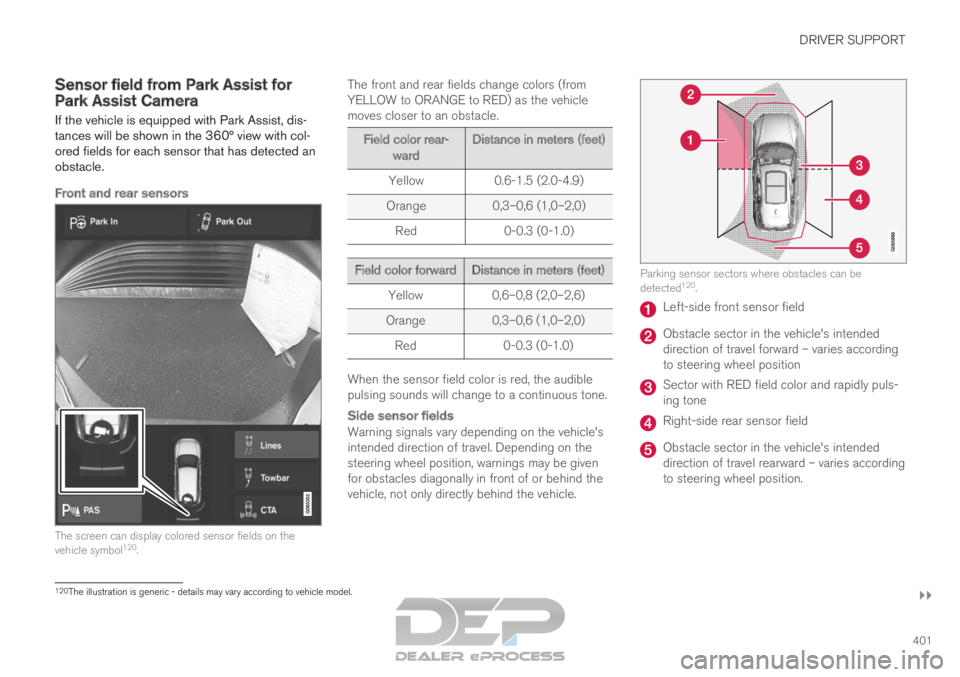
If the vehicle is equipped with Park Assist, dis-
tances will be shown in the 360° view with col-
ored fields for each sensor that has detected an
obstacle.
Front and rear sensors The screen can display colored sensor fields on the
vehicle symbol
120
. The front and rear fields change colors (from
YELLOW to ORANGE to RED) as the vehicle
moves closer to an obstacle. Field color rear-
ward Distance in meters (feet)
Yellow
0.6-1.5 (2.0-4.9)
Orange 0,3–0,6 (1,0–2,0)
Red 0-0.3 (0-1.0) Field color forward
Distance in meters (feet)
Yellow
0,6–0,8 (2,0–2,6)
Orange 0,3–0,6 (1,0–2,0)
Red 0-0.3 (0-1.0) When the sensor field color is red, the audible
pulsing sounds will change to a continuous tone.
Side sensor fields
Warning signals vary depending on the vehicle's
intended direction of travel. Depending on the
steering wheel position, warnings may be given
for obstacles diagonally in front of or behind the
vehicle, not only directly behind the vehicle. Parking sensor sectors where obstacles can be
detected
120
. Left-side front sensor field
Obstacle sector in the vehicle's intended
direction of travel forward – varies according
to steering wheel position
Sector with RED field color and rapidly puls-
ing tone
Right-side rear sensor field
Obstacle sector in the vehicle's intended
direction of travel rearward – varies according
to steering wheel position.
120
The illustration is generic - details may vary according to vehicle mode\
l.
Page 414 of 697

||DRIVER SUPPORT
412
The parking sequence is cancelledA parking sequence will be cancelled if:
the driver moves the steering wheel
the vehicle's speed exceeds 7 km/h (4 mph)
the driver taps
Cancel in the center display
when the anti-lock brakes or the Electronic
stability control are engaged - e.g. when a
wheel loses grip on a slippery road
when the power steering works at reduced
power - e.g. during cooling due to overheat-
ing (see section "Speed-dependent steering
force").
A message in the center display will explain why
the parking sequence was cancelled.
CAUTION Under certain circumstances, PAP may not be
able to find parking spaces – one reason may
be that the sensors are disrupted by external
sound sources that emit the same ultrasonic
frequencies that the system works with.
Examples of such sources include horns, wet
tires on asphalt, pneumatic brakes, exhaust
noise from motorcycles, etc.
NOTE Dirt, ice and snow covering the sensors
reduce their function and can make measure-
ment impossible.
Driver responsibilityThe driver should keep in mind that PAP is a
parking aid ‒ not an infallible fully automatic sys-
tem. The driver must always be prepared to take
control and cancel a parking sequence if neces-
sary.
There are a number of things to keep in mind
when parking, including:
The driver is always responsible for determin-
ing if the space suggested by PAP is suita-
ble for parking.
Do not use PAP when using snow chains or
a temporary spare tire.
Do not use PAP if there are any objects pro-
truding from the vehicle.
Heavy rain or snowfall may inhibit PAP's abil-
ity to accurately measure a parking space.
While searching and measuring the parking
space, PAP may be unable to detect objects
located far into the space.
PAP may not suggest parking spaces on
narrow streets if it does not detect sufficient
space for maneuvering the vehicle.
Use approved tires 126
inflated to the correct
tire pressure because this affects PAP's abil-
ity to provide parking assistance.
PAP's function is based on the way the vehi-
cles are parked behind and in front of your
parking space. If they are, for example,
parked too close to the curb, there is a risk
that your vehicle's tires or wheel rims could
be damaged by the curb during the parking
procedure.
Perpendicular parking spaces may not be
detected or may be suggested unnecessarily
if a parked vehicle is sticking out more than
other parked vehicles.
PAP is intended to provide parking assis-
tance on straight streets, not sections of
street with sharp curves or bends. Always
make sure that your vehicle is parallel to rel-
evant parking spaces when PAP is measur-
ing the parking space.
CAUTION Switching to another approved wheel and/or
tire dimension could change the tire circum-
ference, which would then require the PAP
system to be updated. Consult a workshop –
an authorized Volvo workshop is recom-
mended.
126
"Approved tires" refers to tires of the same type and make as the vehicl\
e's original, factory-installed tires.
Page 450 of 697
||STARTING AND DRIVING
* Option/accessory.
448
Related information
Rear Collision Warning (p. 354)
BLIS* (p. 355)
Brake functions (p. 438) Transmission
The transmission is part of the vehicle's driveline
(power transmission) between the engine and
the drive wheels. The function of the transmis-
sion is to change gears depending on speed
and power needs.
The vehicle has an 8-speed automatic transmis-
sion and an electric motor for rear-wheel drive.
The number of gears allows the engine's torque
and power band to be effectively utilized. Two of
the gears are overdrive gears that save fuel when
driving at a constant engine speed. The steering
wheel paddles* can be used to shift up or down
manually. The instrument panel shows the gear
currently in use.
CAUTION Check the operating temperature of the
transmission to help avoid damage to any of
the drive system components. If there is a risk
of overheating, a warning symbol will appear
in the instrument panel and a text message
will be displayed. Follow the recommenda-
tions given.
Symbols in the instrument panelIf a problem should occur with the transmission, a
symbol and a message will appear in the instru-
ment panel. Symbol
Meaning Information and messages related
to the transmission. Follow the rec-
ommendations provided.
Hot or overheated transmission.
Follow the recommendations provi-
ded.
Reduced performance/Acceler-
ation performance reduced
In the event of a temporary fault in
the driveline, the vehicle may go
into a "limp home" mode with
reduced power output to help avoid
damage to the driveline.
Related information
Gear selector positions for automatic trans-
missions (p. 449)
Page 453 of 697

STARTING AND DRIVING
* Option/accessory.451
Using the steering wheel paddles*
to shift
The steering wheel paddles are a supplement to
the gear selector and make it possible to shift
manually without removing your hands from the
steering wheel.
Activating the steering wheel paddlesIn order to shift gears using the paddles, they
must first be activated:
– Pull one of the paddles toward the steering
wheel.
>
A number in the instrument panel indi-
cates the current gear being used. Instrument panel when the paddles are activated for
shifting.
ChangeTo shift one gear: –
Pull one of the paddles toward the steering
wheel and then release. "-": Shift down one gear.
"+": Shift up one gear.
As long as the engine speed (rpm) is within the
permissible range for the selected gear, a gear
shift will take place each time a paddle is pulled.
After each gear shift, a number indicating the
current gear will be displayed in the instrument
panel.
Turning off Start/Stop
Manual deactivation in gear D and B
– Deactivate the paddles by pulling the right
paddle (+) toward the steering wheel and
holding it until the number of the current
gear is no longer displayed in the instrument
panel.
> The transmission will revert to gear D or B
depending on which gear was selected
before the paddles were activated.
Automatic deactivation
In gear position D, the steering wheel paddles
are deactivated after a short period of time if they
are not used. The number of the current gear will
no longer be displayed in the instrument panel.
In gear position B, the paddles will not activate
automatically.
Related information
Gear selector positions for automatic trans-
missions (p. 449)
Page 459 of 697
STARTING AND DRIVING
}}
457
This drive mode is optimized for maximum control
when driving at low speeds on very poor roads or
difficult terrain. It raises the chassis
3
, reduces
driveline throttle response, and locks the vehicle
in all-wheel drive. The Hill Descent Control func-
tion facilitates controlled driving on steep down-
grades.
NOTE This drive mode is not designed to be used
for normal street driving.
NOTE
Due to the increased ground clearance, if the
OFF ROAD mode was selected when the
engine was switched off, the suspension will
lower when the engine is restarted.
CAUTION
Do not use the OFF ROAD drive mode when
towing a trailer without an electrical connec-
tion. This could result in damage to the pneu-
matic suspension system's bellows.
AWD
Improves the vehicle's traction and handling
by increasing all-wheel drive. This drive mode locks the vehicle in all-wheel
drive. An optimal distribution between front and
rear axle torque helps provide the best possible
control, stability and traction, e.g. on slippery
roads or when towing a heavy trailer or another
vehicle. The AWD drive mode is always available
regardless of the hybrid battery's charge status.
Both the combustion engine and the electric
motor are engaged to enable all-wheel drive,
which results in higher fuel consumption.
In the other drive modes, the vehicle automati-
cally adapts the need for all-wheel drive accord-
ing to the road surface, and can activate the elec-
tric motor or start the combustion engine as nee-
ded.
POWER
Power mode is designed to provide sportier
driving characteristics and a faster accelera-
tion response.
This drive mode maximizes the combined power
from the combustion engine and the electric
motor by providing power to both the front and
rear wheels. Gear shifting will be faster and more
distinct and the transmission will prioritize gears
with a higher traction force. Steering response is
faster, suspension is stiffer and ground clearance
is lower 3
to help reduce body roll when cornering. Both the combustion engine and the electric
motor are engaged to enable all-wheel drive,
which results in higher fuel consumption.
This drive mode is optimized for maximum per-
formance and throttle response. It changes the
throttle response, gear shifting program and
turbo boost system. Chassis settings and steer-
ing and brake response are also optimized. The
Power drive mode is always available regardless
of the hybrid battery's charge status.
3
For vehicles with pneumatic suspension.
Page 461 of 697
STARTING AND DRIVING
* Option/accessory.459
Related information
Changing drive mode (p. 459)
Economical driving (p. 467)
Energy distribution in hybrid mode using map
data* (p. 460)
Hybrid gauge (p. 87)
General information about Twin Engine
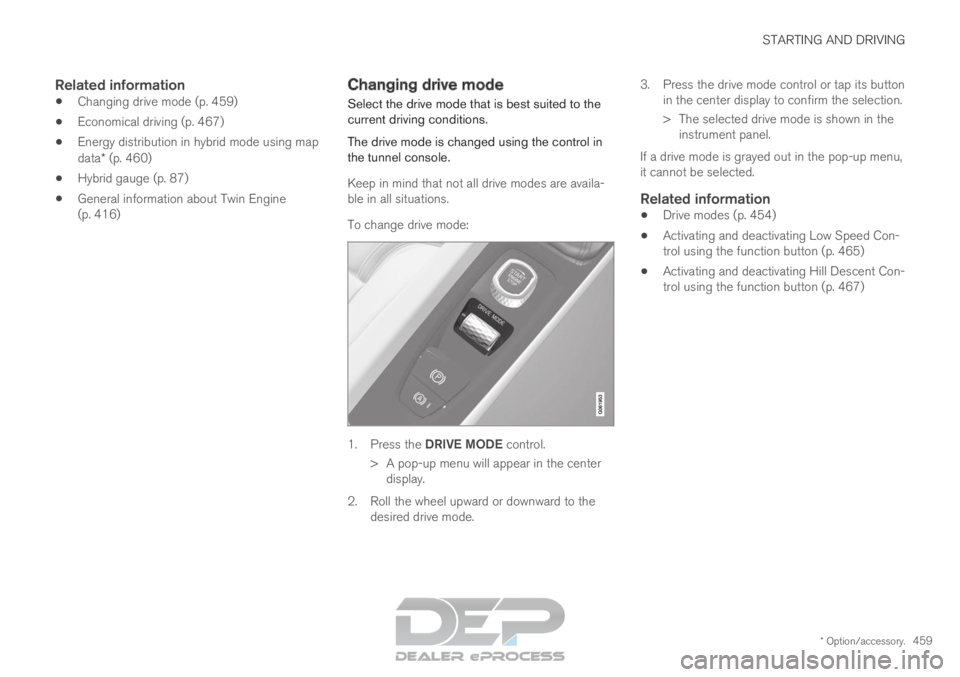
(p. 416) Changing drive mode
Select the drive mode that is best suited to the
current driving conditions.
The drive mode is changed using the control in
the tunnel console.
Keep in mind that not all drive modes are availa-
ble in all situations.
To change drive mode: 1.
Press the DRIVE MODE control.
>
A pop-up menu will appear in the center
display.
2. Roll the wheel upward or downward to the desired drive mode. 3. Press the drive mode control or tap its button
in the center display to confirm the selection.
> The selected drive mode is shown in theinstrument panel.
If a drive mode is grayed out in the pop-up menu,
it cannot be selected.
Related information
Drive modes (p. 454)
Activating and deactivating Low Speed Con-
trol using the function button (p. 465)
Activating and deactivating Hill Descent Con-
trol using the function button (p. 467)