mirror VOLVO XC90 TWIN ENGINE 2019 Workshop Manual
[x] Cancel search | Manufacturer: VOLVO, Model Year: 2019, Model line: XC90 TWIN ENGINE, Model: VOLVO XC90 TWIN ENGINE 2019Pages: 697, PDF Size: 10.33 MB
Page 358 of 697
||DRIVER SUPPORT
356
given, the indicator light will become brighter and
begin flashing.
NOTE
The light illuminates on the side of the vehicle
where the system has detected the vehicle. If
the vehicle is passed on both sides simulta-
neously, both lights come on.
WARNING
The BLIS function is supplementary driver
support intended to facilitate driving and
help make it safer – it cannot handle all
situations in all traffic, weather and road
conditions.
The responsibility for changing lanes
safely and using good judgment always
rests with the driver.
BLIS is not a substitute for the driver's
attention and judgment. The driver is
always responsible for ensuring the vehi-
cle is driven in a safe manner, at the
appropriate speed, with an appropriate
distance to other vehicles, and in accord-
ance with current traffic rules and regula-
tions.
Related information
Activating/deactivating BLIS (p. 356)
BLIS limitations (p. 357)
Recommended maintenance for BLIS
(p. 358)
BLIS messages (p. 359) Activating/deactivating BLIS
The BLIS
76
function can be activated/deacti-
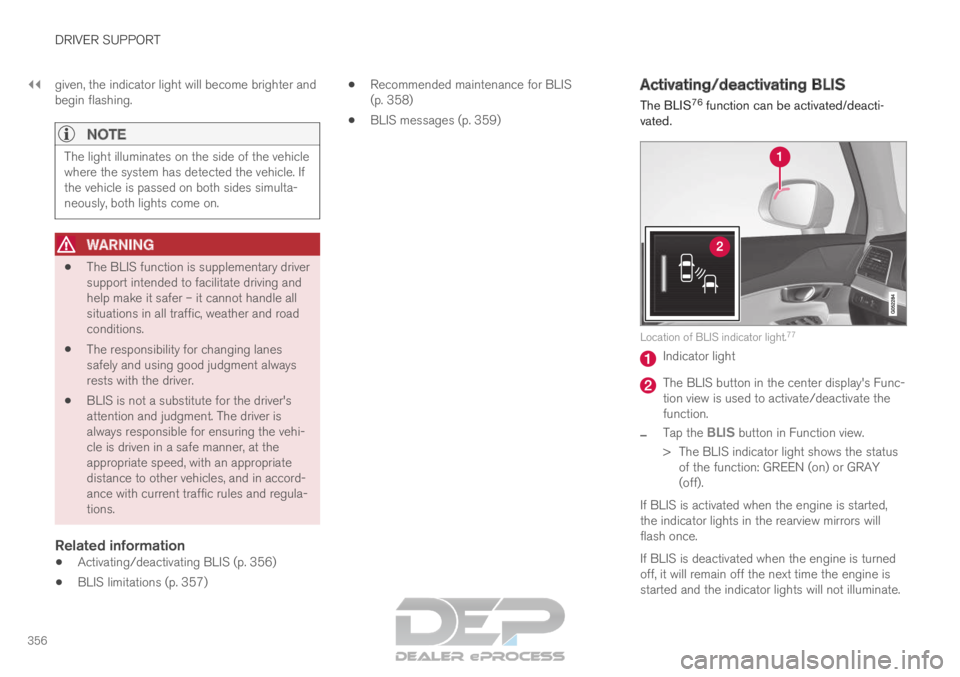
vated. Location of BLIS indicator light.
77 Indicator light
The BLIS button in the center display's Func-
tion view is used to activate/deactivate the
function.
– Tap the
BLIS button in Function view.
>
The BLIS indicator light shows the status
of the function: GREEN (on) or GRAY
(off).
If BLIS is activated when the engine is started,
the indicator lights in the rearview mirrors will
flash once.
If BLIS is deactivated when the engine is turned
off, it will remain off the next time the engine is
started and the indicator lights will not illuminate.
Page 400 of 697

||DRIVER SUPPORT
* Option/accessory.
398
Back The rear camera
117
is located above the license plate.
The rear camera shows a wide area behind the
vehicle. On certain models, part of the bumper
and the towbar (if installed) may be visible.
Objects on the center display may appear to be
leaning slightly. This is normal.Front camera The front Park Assist Camera
118
is located in the grille.
The front camera can be useful when pulling out
from areas with limited visibility, such as a drive-
way surrounded by a hedge. The front camera is
active at speeds up to 25 km/h (16 mph) and is
automatically turned off when the vehicle
exceeds this speed.
If the vehicle does not reach a speed of 50 km/h
(30 mph) and speed falls below 22 km/h
(14 mph) within 1 minute after the front camera
turns off, the camera will be reactivated.Side cameras The side cameras
118
are located in the rearview mirrors.
The side cameras can show views along each
side of the vehicle.
Related information
Park Assist Camera* (p. 396)
Starting the Park Assist Camera (p. 402) 117
Note: This illustration is general and details may vary depending on mod\
el.
118 Note: This illustration is general and details may vary depending on mod\
el.
Page 401 of 697

DRIVER SUPPORT
}}
399
Park Assist Camera trajectory lines
The Park Assist Camera uses trajectory lines
and fields on the screen to indicate the vehicle's
position in relation to its immediate surround-
ings. Example
119
of trajectory lines.
The trajectory lines show the anticipated trajec-
tory for the vehicle's outermost dimensions based
on the current position of the steering wheel to help simplify parallel parking, backing into tight
spaces or attaching a trailer.
The lines on the screen are projected as if they
were painted lines on the ground behind the
vehicle and are directly affected by the way in
which the steering wheel is turned. This enables
the driver to see path the vehicle will take, even if
he/she turns the steering wheel.
These lines also indicate the outermost limits that
any object (towbar, rearview mirrors, corners of
the body, etc.) extends out from the vehicle.
NOTE
When reversing with a trailer that is not
electrically connected to the vehicle, the
screen guide lines show the path the
vehicle will take – not the trailer.
The screen does not show guide lines
when a trailer is electrically connected to
the vehicle's electrical system.
Guide lines are not shown when zooming
in.
CAUTION
Bear in mind that when the rearward
camera view is selected, the screen only
shows the area behind the vehicle – pay
attention to the sides and front of the
vehicle when steering while reversing.
The same applies to the reverse – pay
attention to what is happening with the
rear parts of the vehicle when the front
camera view is selected.
Note that the guide lines show the short-
est path – pay extra attention to ensure
that the vehicle sides do not come in
contact with/travel over anything when
steering while driving forward or that the
vehicle front moves toward/over anything
when steering while reversing. 119
The illustration is generic - details may vary according to vehicle mode\
l.
Page 405 of 697

DRIVER SUPPORT
}}
403
Park Assist Camera limitations
The Park Assist Camera may not be able to
detect all conditions in all situations and func-
tionality may therefore be limited.
The driver should be aware of the following limi-
tations for the Park Assist Camera:
WARNING Be extra cautious when
reversing if this symbol is
shown when a trailer, bike
carrier or similar is attached
and electrically connected
to the vehicle.
The symbol indicates that
the rear parking assist sensors are deacti-
vated and will not warn of any obstacles.
NOTE A bike carrier and other accessories mounted
on the rear of the vehicle can obscure the
camera's view.
Blind sectors There are "blind" sectors between the cameras' fields of
vision.
With 360° view selected, objects/obstacles may
not be detected if they are located in the "joints"
where the edges of the individual camera views
meet.
WARNING
Even if it seems as though only a fairly small
section of the screen image is obstructed, this
may mean that a relatively large sector is hid-
den and obstacles there may not be detected
until they are very near the vehicle.
Defective cameraIf a camera sector is dark and
contains this symbol, this indi-
cates that the camera is not
functioning properly.
See the following illustration for
an example. The vehicle's left-side camera is malfunctioning.
Dark camera sector
A dark camera sector may also be displayed in
the following situations, but without the defective
camera symbol:
a door is open
the tailgate is open
a rearview mirror is folded in
Lighting conditionsThe camera image is automatically adjusted
according to the current lighting conditions. This
Page 466 of 697
STARTING AND DRIVING
* Option/accessory.
464 Leveling control settings*
Turn off leveling control before lifting the vehicle
with a jack to help avoid problems with the
pneumatic suspension.
The vehicle can be lowered or raised to make it
easier to load or for passengers to get in and
out.
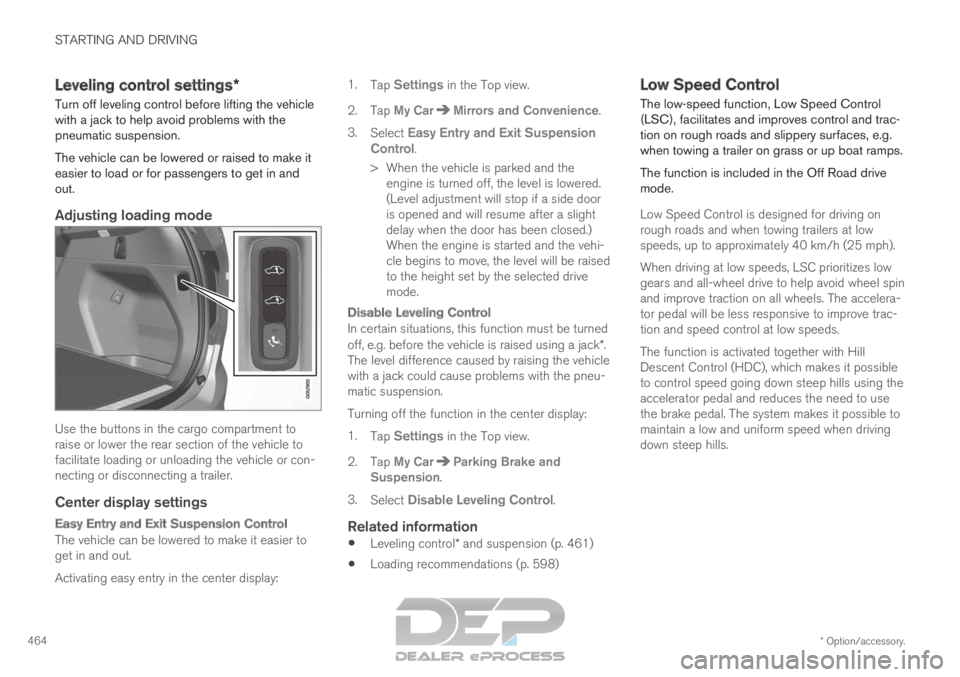
Adjusting loading mode Use the buttons in the cargo compartment to
raise or lower the rear section of the vehicle to
facilitate loading or unloading the vehicle or con-
necting or disconnecting a trailer.
Center display settings
Easy Entry and Exit Suspension Control
The vehicle can be lowered to make it easier to
get in and out.
Activating easy entry in the center display: 1.
Tap Settings in the Top view.
2.
Tap My Car Mirrors and Convenience
.
3. Select Easy Entry and Exit Suspension
Control.
>
When the vehicle is parked and the
engine is turned off, the level is lowered.
(Level adjustment will stop if a side door
is opened and will resume after a slight
delay when the door has been closed.)
When the engine is started and the vehi-
cle begins to move, the level will be raised
to the height set by the selected drive
mode.
Disable Leveling Control
In certain situations, this function must be turned
off, e.g. before the vehicle is raised using a jack*.
The level difference caused by raising the vehicle
with a jack could cause problems with the pneu-
matic suspension.
Turning off the function in the center display:
1. Tap Settings in the Top view.
2.
Tap My Car Parking Brake and
Suspension .
3. Select Disable Leveling Control.
Related information
Leveling control* and suspension (p. 461)
Loading recommendations (p. 598) Low Speed Control
The low-speed function, Low Speed Control
(LSC), facilitates and improves control and trac-
tion on rough roads and slippery surfaces, e.g.
when towing a trailer on grass or up boat ramps.
The function is included in the Off Road drive
mode.
Low Speed Control is designed for driving on
rough roads and when towing trailers at low
speeds, up to approximately 40 km/h (25 mph).
When driving at low speeds, LSC prioritizes low
gears and all-wheel drive to help avoid wheel spin
and improve traction on all wheels. The accelera-
tor pedal will be less responsive to improve trac-
tion and speed control at low speeds.
The function is activated together with Hill
Descent Control (HDC), which makes it possible
to control speed going down steep hills using the
accelerator pedal and reduces the need to use
the brake pedal. The system makes it possible to
maintain a low and uniform speed when driving
down steep hills.
Page 470 of 697
||STARTING AND DRIVING
* Option/accessory.
468
Preconditioning
Whenever possible, precondition the vehicle
before driving by connecting the charging
cable to an electrical outlet.
Avoid parking the vehicle somewhere where
the interior will become too hot or too cold
while the vehicle is parked. If possible, park
the vehicle in a climate-controlled garage.
During a short drive after passenger com-
partment preconditioning, turn off the pas-
senger compartment fan or the air condition-
ing in a hot climate.
If preconditioning is not possible when it is
cold outside, use seat and steering wheel
heating first. Avoid heating the entire pas-
senger compartment to reduce the amount
of current being taken from the hybrid bat-
tery.
Driving
Choose the Pure drive mode to help mini-
mize electric power consumption.
Maintain a steady speed and a generous fol-
lowing distance to traffic ahead to minimize
braking. This drive mode has the lowest
power consumption.
Balance energy requirements using the
accelerator pedal. Use the indicator on the
instrument panel to see available electric
power and avoid starting the combustion
engine unnecessarily. The electric motor is more effective than the combustion engine,
especially at low speeds.
When braking is necessary, brake gently
using the brake pedal. This will help recharge
the hybrid battery. A regenerative function is
integrated in the brake pedal and can be
augmented by the electric motor's braking
capacity when the gear selector is in mode
B.
Higher speeds increase energy consumption
- air resistance increases with speed.
Activate the Hold function in the Function
view at high speeds when traveling farther
than is possible using the hybrid battery's
capacity.
Whenever possible, avoid using the Charge
function to charge the hybrid battery. Charg-
ing the battery using the combustion engine
increases fuel consumption and carbon diox-
ide emissions.
In a cold climate, reduce heating of the wind-
shield/rear window, mirrors, seats and the
steering wheel.
Maintain the correct pressure in the tires and
check pressure regularly.
The type of tires used could affect energy
consumption - consult a retailer for advice on
suitable tires.
Remove unnecessary items from the vehicle
- the heavier the load, the higher the fuel
consumption.
Roof loads increase air resistance and
increase fuel consumption. Remove roof
boxes, ski racks, etc. that are not in use.
Avoid driving with the windows open.
Do not keep the vehicle still on an upward
gradient by using the accelerator pedal. Use
the brakes instead.
Related information
Drive-E ‒ purer driving pleasure (p. 27)
Energy distribution in hybrid mode using map
data* (p. 460)
Factors affecting electric motor range
(p. 469)
Using the electric motor only (p. 469)
Hybrid gauge (p. 87)
Checking tire pressure (p. 567)
Page 491 of 697
STARTING AND DRIVING
}}
* Option/accessory. 489
Recovery
This section refers to transporting the vehicle
with a tow truck or similar vehicle.
Call a professional towing service for assistance.
In certain conditions, the towing eyelet can be
used to pull the vehicle onto a flatbed tow truck.
CAUTION Note that vehicles with Twin Engine must
always be towed raised with all wheels on the
tow truck.
For vehicles equipped with leveling control*:
If the vehicle is equipped with pneumatic suspen-
sion, this feature must be turned off before the
vehicle is lifted onto a tow truck. Turning off the
function in the center display.
1. Tap Settings in the Top view.
2.
Tap My Car Parking Brake and
Suspension .
3. Select Disable Leveling Control.
The vehicle's location and ground clearance
determine if it can be lifted onto a tow truck. If
the incline of the tow truck is too steep or if the
ground clearance under the vehicle is insufficient,
attempting to pull it up may result in damage. In
this case, the vehicle should only be lifted with
the tow truck's lifting equipment.
WARNING No person or object should be behind the tow
truck when the vehicle is lifted onto the bed
of the truck.
Related information
Attaching and removing the towing eyelet
(p. 488) HomeLink
®
*10
HomeLink ®11
is a programmable remote control,
integrated in the vehicle electrical system, that
can control up to three different devices (e.g.
garage door opener, alarm system, outdoor and
indoor lighting) and thereby replace the remote
controls for these.
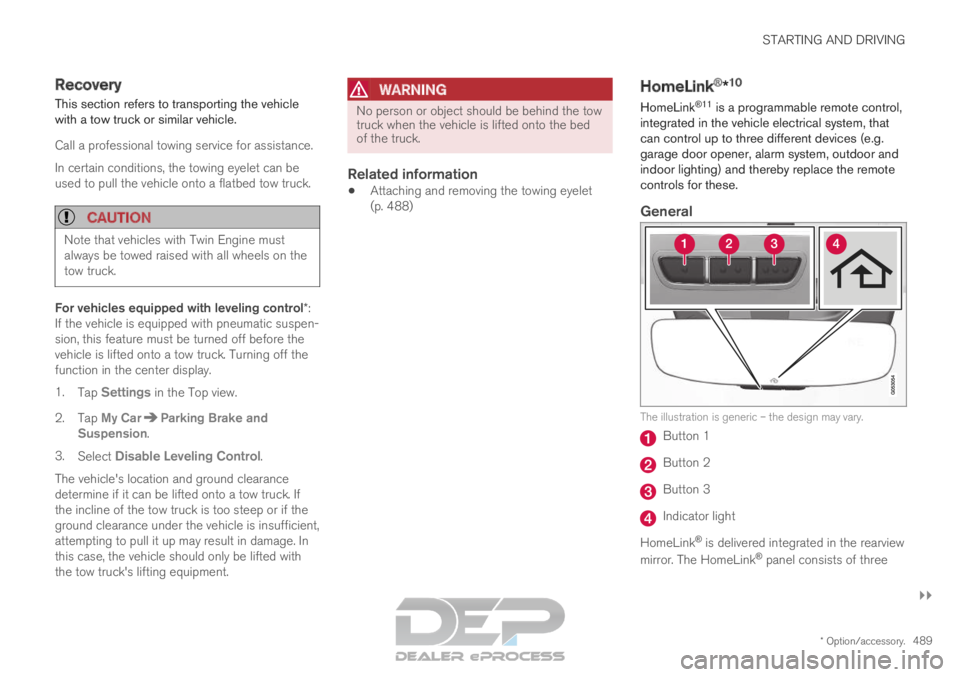
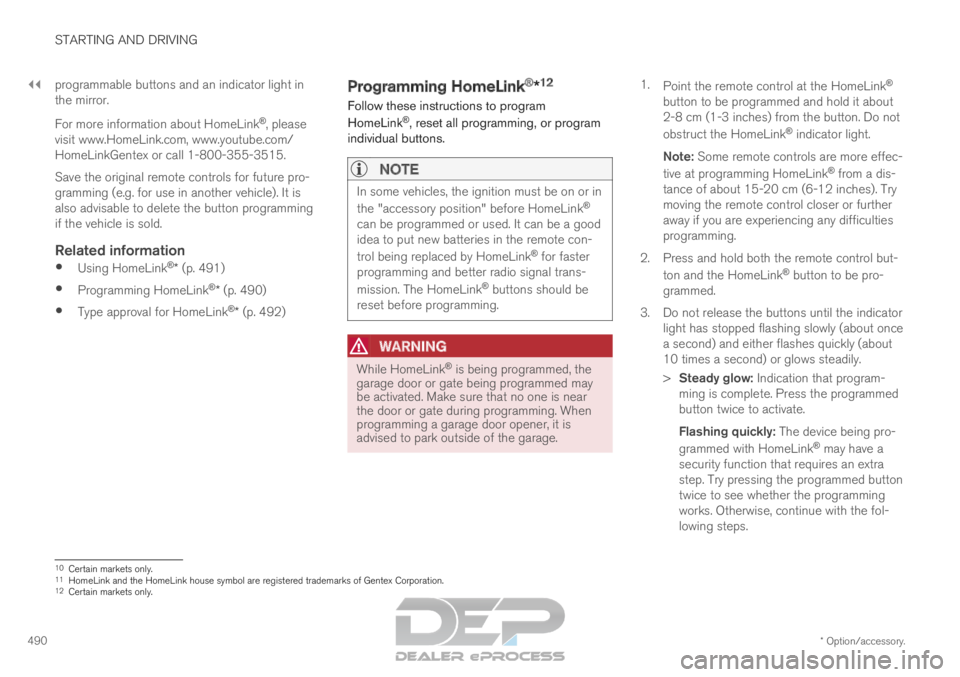
General The illustration is generic – the design may vary.
Button 1
Button 2
Button 3
Indicator light
HomeLink ®
is delivered integrated in the rearview
mirror. The HomeLink ®
panel consists of three
Page 492 of 697
||STARTING AND DRIVING
* Option/accessory.
490 programmable buttons and an indicator light in
the mirror.
For more information about HomeLink
®
, please
visit www.HomeLink.com, www.youtube.com/
HomeLinkGentex or call 1-800-355-3515.
Save the original remote controls for future pro-
gramming (e.g. for use in another vehicle). It is
also advisable to delete the button programming
if the vehicle is sold.
Related information
Using HomeLink ®
* (p. 491)
Programming HomeLink ®
* (p. 490)
Type approval for HomeLink ®
* (p. 492) Programming HomeLink
®
*12
Follow these instructions to program
HomeLink ®
, reset all programming, or program
individual buttons.
NOTE In some vehicles, the ignition must be on or in
the "accessory position" before HomeLink
®
can be programmed or used. It can be a good
idea to put new batteries in the remote con-
trol being replaced by HomeLink ®
for faster
programming and better radio signal trans-
mission. The HomeLink ®
buttons should be
reset before programming.
WARNING While HomeLink
®
is being programmed, the
garage door or gate being programmed may
be activated. Make sure that no one is near
the door or gate during programming. When
programming a garage door opener, it is
advised to park outside of the garage. 1.
Point the remote control at the HomeLink ®
button to be programmed and hold it about
2-8 cm (1-3 inches) from the button. Do not
obstruct the HomeLink ®
indicator light.
Note: Some remote controls are more effec-
tive at programming HomeLink ®
from a dis-
tance of about 15-20 cm (6-12 inches). Try
moving the remote control closer or further
away if you are experiencing any difficulties
programming.
2.
Press and hold both the remote control but-
ton and the HomeLink ®
button to be pro-
grammed.
3. Do not release the buttons until the indicator light has stopped flashing slowly (about once
a second) and either flashes quickly (about
10 times a second) or glows steadily.
>Steady glow: Indication that program-
ming is complete. Press the programmed
button twice to activate.
Flashing quickly: The device being pro-
grammed with HomeLink ®
may have a
security function that requires an extra
step. Try pressing the programmed button
twice to see whether the programming
works. Otherwise, continue with the fol-
lowing steps. 10
Certain markets only.
11 HomeLink and the HomeLink house symbol are registered trademarks of Gent\
ex Corporation.
12 Certain markets only.
Page 495 of 697
STARTING AND DRIVING
}}
* Option/accessory. 493
Compass*
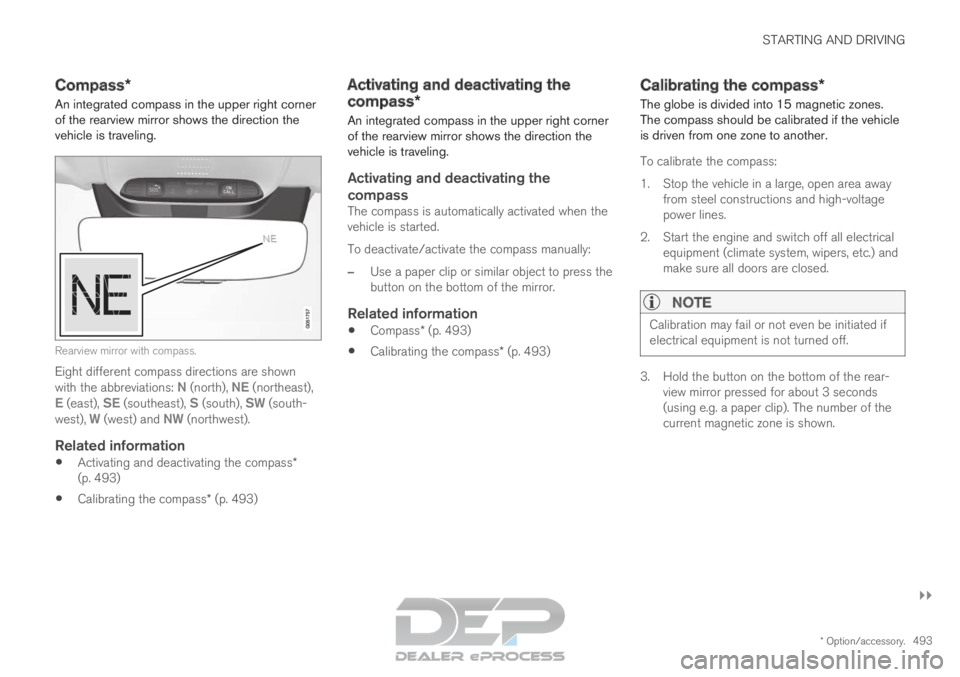
An integrated compass in the upper right corner
of the rearview mirror shows the direction the
vehicle is traveling. Rearview mirror with compass.
Eight different compass directions are shown
with the abbreviations: N (north),
NE (northeast),
E (east), SE (southeast), S (south), SW (south-
west), W (west) and NW (northwest).
Related information
Activating and deactivating the compass*
(p. 493)
Calibrating the compass* (p. 493) Activating and deactivating the
compass*
An integrated compass in the upper right corner
of the rearview mirror shows the direction the
vehicle is traveling.
Activating and deactivating the
compass
The compass is automatically activated when the
vehicle is started.
To deactivate/activate the compass manually:
– Use a paper clip or similar object to press the
button on the bottom of the mirror.
Related information
Compass* (p. 493)
Calibrating the compass* (p. 493) Calibrating the compass*
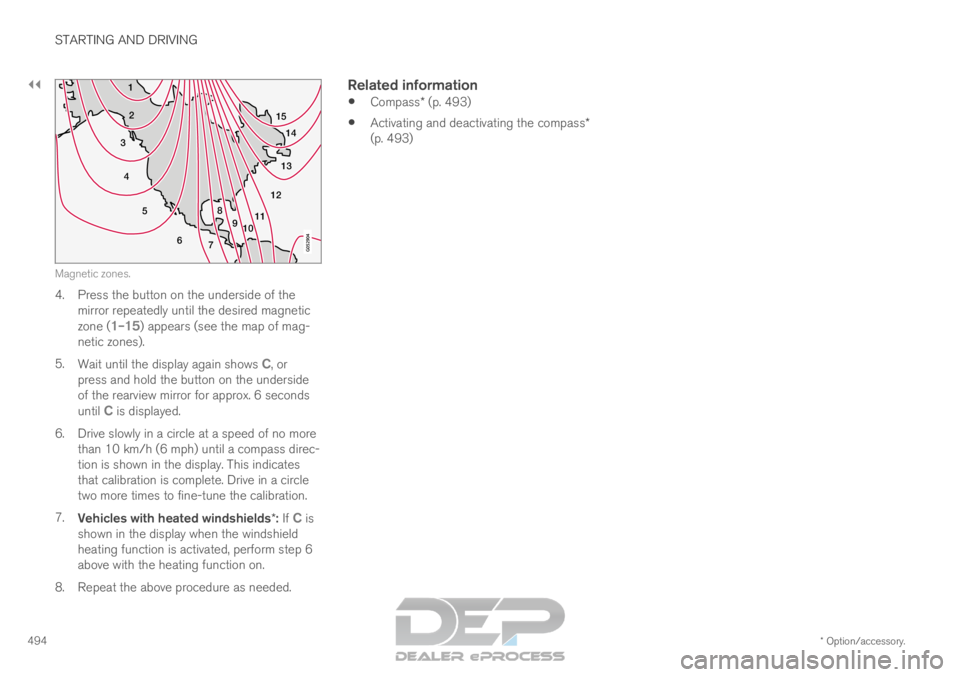
The globe is divided into 15 magnetic zones.
The compass should be calibrated if the vehicle
is driven from one zone to another.
To calibrate the compass:
1.
Stop the vehicle in a large, open area away
from steel constructions and high-voltage
power lines.
2. Start the engine and switch off all electrical equipment (climate system, wipers, etc.) and
make sure all doors are closed.
NOTE Calibration may fail or not even be initiated if
electrical equipment is not turned off.
3. Hold the button on the bottom of the rear-
view mirror pressed for about 3 seconds
(using e.g. a paper clip). The number of the
current magnetic zone is shown.
Page 496 of 697
||STARTING AND DRIVING
* Option/accessory.
494 15
14
13
12
11
9
8
7
6
5
4
3
2
1
10Magnetic zones.
4. Press the button on the underside of the
mirror repeatedly until the desired magnetic
zone ( 1–15) appears (see the map of mag-
netic zones).
5. Wait until the display again shows C, or
press and hold the button on the underside
of the rearview mirror for approx. 6 seconds
until
C is displayed.
6.
Drive slowly in a circle at a speed of no more
than 10 km/h (6 mph) until a compass direc-
tion is shown in the display. This indicates
that calibration is complete. Drive in a circle
two more times to fine-tune the calibration.
7. Vehicles with heated windshields*: If C is
shown in the display when the windshield
heating function is activated, perform step 6
above with the heating function on.
8.
Repeat the above procedure as needed.
Related information
Compass* (p. 493)
Activating and deactivating the compass*
(p. 493)