warning light VOLVO XC90 TWIN ENGINE 2019 Workshop Manual
[x] Cancel search | Manufacturer: VOLVO, Model Year: 2019, Model line: XC90 TWIN ENGINE, Model: VOLVO XC90 TWIN ENGINE 2019Pages: 697, PDF Size: 10.33 MB
Page 358 of 697
||DRIVER SUPPORT
356
given, the indicator light will become brighter and
begin flashing.
NOTE
The light illuminates on the side of the vehicle
where the system has detected the vehicle. If
the vehicle is passed on both sides simulta-
neously, both lights come on.
WARNING
The BLIS function is supplementary driver
support intended to facilitate driving and
help make it safer – it cannot handle all
situations in all traffic, weather and road
conditions.
The responsibility for changing lanes
safely and using good judgment always
rests with the driver.
BLIS is not a substitute for the driver's
attention and judgment. The driver is
always responsible for ensuring the vehi-
cle is driven in a safe manner, at the
appropriate speed, with an appropriate
distance to other vehicles, and in accord-
ance with current traffic rules and regula-
tions.
Related information
Activating/deactivating BLIS (p. 356)
BLIS limitations (p. 357)
Recommended maintenance for BLIS
(p. 358)
BLIS messages (p. 359) Activating/deactivating BLIS
The BLIS
76
function can be activated/deacti-
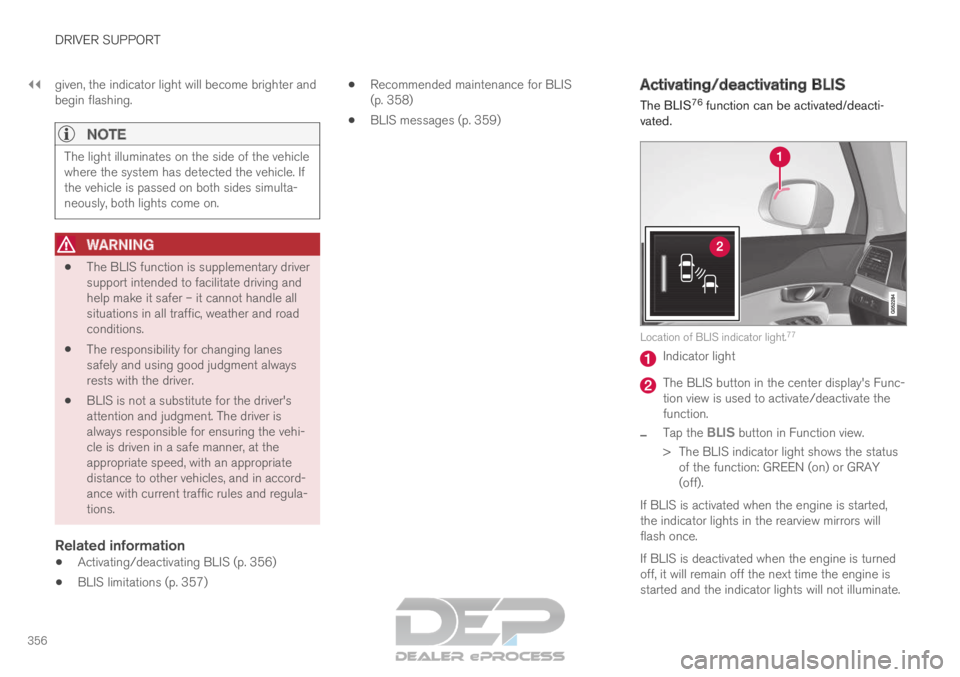
vated. Location of BLIS indicator light.
77 Indicator light
The BLIS button in the center display's Func-
tion view is used to activate/deactivate the
function.
– Tap the
BLIS button in Function view.
>
The BLIS indicator light shows the status
of the function: GREEN (on) or GRAY
(off).
If BLIS is activated when the engine is started,
the indicator lights in the rearview mirrors will
flash once.
If BLIS is deactivated when the engine is turned
off, it will remain off the next time the engine is
started and the indicator lights will not illuminate.
Page 367 of 697

DRIVER SUPPORT
* Option/accessory.365
Road Sign Information with speed camera
information (p. 368)
Road Sign Information limitations (p. 369) Activating/deactivating Road Sign
Information
The Road Sign Information function can be
switched On or Off.
Press the Road Sign
Information button in the cen-
ter display's Function view.
GREEN button indicator light - RSI is acti-
vated.
GRAY button indicator light - RSI is deacti-
vated.
NOTE
If the Automatic Speed Limiter function is
activated, road sign information is shown
in the driver display even if RSI 93
is not
activated.
To remove road sign information from the
driver display, you must deactivate both
Automatic Speed Limiter and RSI.
When the Automatic Speed Limiter func-
tion is activated but RSI is deactivated, no
warnings are given from RSI. RSI must
also be activated for warnings to be pos-
sible.
Related information
Road Sign Information* (p. 364) 93
Road Sign Information (RSI)
Page 374 of 697

DRIVER SUPPORT
* Option/accessory.
372 Selecting guidance to a rest area if
the Driver Alert Control warning has
been given
The Rest Stop Guidance function can be
switched on or off.
In vehicles equipped with Sensus Navigation*, the
driver can activate a guide that can automatically
suggest a suitable rest stop if the DAC warning
is given.
To select Rest Stop Guidance:
1. Tap Settings in the center display's Top
view.
2.
Select My Car IntelliSafe Driver Alert
Control .
3. Select/deselect Rest Stop Guidance to
activate/deactivate the function.
Related information
Driver Alert Control (p. 370) Driver Alert Control limitations
Driver Alert Control (DAC) functionality may be
reduced in certain situations.
In certain situations, the system may provide a
warning even if it has not detected a change in
driving behavior, e.g.:
in strong crosswinds
on grooved road surfaces.
WARNING In certain cases, driving behavior might not be
affected despite the driver's fatigue – when
using the Pilot Assist function – resulting in
the driver not getting a warning from DAC.
It is therefore very important to always stop
and take a break at the slightest sign of fati-
gue, regardless of whether the DAC function
has issued a warning or not.
NOTE
The function uses the vehicle's camera unit,
which has some general limitations – see the
section "Camera unit limitations".
Related information
Driver Alert Control (p. 370)
Camera limitations (p. 338) Lane Keeping Aid
Lane Keeping Aid (LKA 104
) is designed to
actively steer the vehicle on freeways, highways
and other major roads to help the driver reduce
the risk of the vehicle unintentionally veering out
of the lane.
Lake Keeping Assistance steers the vehicle back
into the lane and/or alerts the driver using vibra-
tions in the steering wheel.
Lane Keeping Aid is active at speeds between
65-200 km/h (40-125 mph) on roads with
clearly visible traffic lane marker lines.
On narrow roads, the function may be unavailable
and go into standby mode. The function will
become available again when the road becomes
sufficiently wide. A camera monitors the road/traffic lane's marker lines.
104
Lane Keeping Aid
Page 375 of 697

DRIVER SUPPORT
}}
373 Lane Keeping Aid steers the vehicle back into its lane.
Lane Keeping Aid alerts the driver using vibrations in the
steering wheel
105
. Depending on the settings used, Lane Keeping
Aid functions in different ways:
With
Assist 106
activated: When the vehicle
approaches a lane marker line, LKA will
actively steer the vehicle back into the lane
using light pressure on the steering wheel.
With
Warning 106
activated: If the vehicle is
about to move over a lane marker line, the
driver will be alerted by vibrations in the
steering wheel.
NOTE When the direction indicator is activated, the
Lane Keeping Aid does not provide any warn-
ing or intervene with steering.
WARNING
The Lane Keeping Aid function is supple-
mentary driver support intended to help
improve driving safety – it cannot handle
all situations in all traffic, weather and
road conditions.
The function is not a substitute for the
driver's attention and judgment. The driver
is always responsible for ensuring the
vehicle is driven in a safe manner, at the
appropriate speed, with an appropriate
distance to other vehicles, and in accord-
ance with current traffic rules and regula-
tions. 105
The steering wheel vibrations vary. The more time the vehicle is over th\
e lane marker line, the longer the vibrations.
106 See "LKA assistance options" under "Activating/deactivating Lane Keeping\
Aid".
Page 377 of 697

DRIVER SUPPORT
375
vated, another symbol will illuminate and the
following message will be displayed:
–
Lane Keeping Aid –
Apply
steering
LKA will then be deactivated until the driver
begins actively steering the vehicle again.
The audible signal will stop and the information
symbol and message will disappear when LKA
detects that the driver is actively steering the
vehicle again.
Related information
Lane Keeping Aid (p. 372) Activating/deactivating Lane
Keeping Aid
The Lane Keeping Aid (LKA
108
) function can be
switched On or Off.
On/OffPress the Lane Keeping Aid
button in the center display's
Function view.
GREEN button indicator light - LKA is acti-
vated.
GRAY button indicator light - LKA is deacti-
vated.
Related information
Lane Keeping Aid (p. 372) Selecting type of assistance for
Lane Keeping Aid
The driver can determine what types of assis-
tance LKA 109
should provide if the vehicle veers
from its lane.
1. Select
Settings My Car IntelliSafe in
the center display's Top view.
2. Under Lane Keeping Aid Mode, select
what assistance LKA should provide:
Assist the driver will receive steering
assistance but no warning.
Both - the driver will receive both steering
assistance and a warning.
Warning - the driver will only receive a
warning.
Related information
Lane Keeping Aid (p. 372) 108
Lane Keeping Aid
109 Lane Keeping Aid
Page 393 of 697
DRIVER SUPPORT
}}
391
Park Assist front, rear and sides
Park Assist has different parameters depending
on which part of the vehicle is approaching an
obstacle.
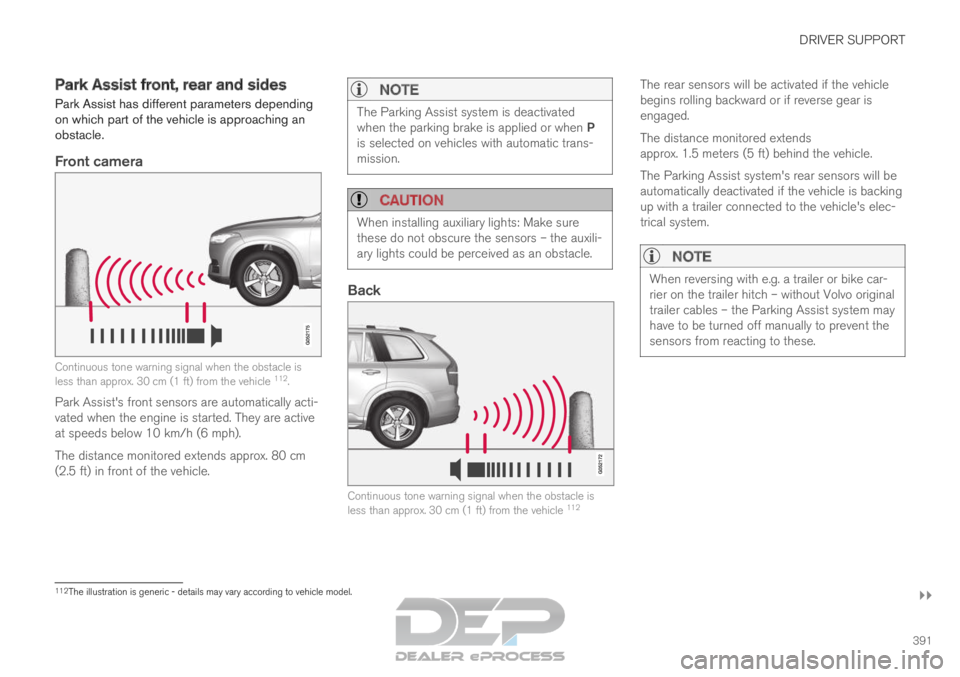
Front camera Continuous tone warning signal when the obstacle is
less than approx. 30 cm (1 ft) from the vehicle
112
.
Park Assist's front sensors are automatically acti-
vated when the engine is started. They are active
at speeds below 10 km/h (6 mph).
The distance monitored extends approx. 80 cm
(2.5 ft) in front of the vehicle.
NOTE The Parking Assist system is deactivated
when the parking brake is applied or when P
is selected on vehicles with automatic trans-
mission.
CAUTION
When installing auxiliary lights: Make sure
these do not obscure the sensors – the auxili-
ary lights could be perceived as an obstacle.
Back
Continuous tone warning signal when the obstacle is
less than approx. 30 cm (1 ft) from the vehicle
112The rear sensors will be activated if the vehicle
begins rolling backward or if reverse gear is
engaged.
The distance monitored extends
approx. 1.5 meters (5 ft) behind the vehicle.
The Parking Assist system's rear sensors will be
automatically deactivated if the vehicle is backing
up with a trailer connected to the vehicle's elec-
trical system.
NOTE
When reversing with e.g. a trailer or bike car-
rier on the trailer hitch – without Volvo original
trailer cables – the Parking Assist system may
have to be turned off manually to prevent the
sensors from reacting to these.
112
The illustration is generic - details may vary according to vehicle mode\
l.
Page 394 of 697

||DRIVER SUPPORT
* Option/accessory.
392
Side sensors Rapid pulsing warning signal when the obstacle is less
than approx. 25 cm (0.8 ft) from the vehicle
112
.
Park Assist's side sensors are automatically acti-
vated when the engine is started. They are active
at speeds below 10 km/h (6 mph).
The distance monitored is approx. 25 cm (0.8 ft)
out from the sides.
The detection area increases significantly when
the steering angle of the front wheels increases
and depending on the steering wheel position,
obstacles up to approx. 90 cm (3 ft) directly
behind or in front of the vehicle can be detected
(also see “Side sensor fields” in the section “Sen-
sor field from Park Assist for Park Assist Cam-
era”).Related information
Park Assist* (p. 390)
Sensor field from Park Assist for Park Assist
Camera (p. 401) Activating/deactivating Park Assist
The Park Assist Pilot function can be activated/
deactivated.
On/OffPark Assist's front and side sensors are automat-
ically activated when the engine is started. The
rear sensors are activated if the vehicle is moving
backward or reverse gear is engaged.
The function can be activated/
deactivated in the center dis-
play's Function view. –
Tap the
Park Assist button in Function view.
>
The Park Assist Pilot indicator light shows
the status of the function: GREEN (on) or
GRAY (off).
In vehicles equipped with Park Assist Camera,
Park Assist can also be activated/deactivated
from the relevant camera view.
Related information
Park Assist* (p. 390) 112
The illustration is generic - details may vary according to vehicle mode\
l.
Page 405 of 697

DRIVER SUPPORT
}}
403
Park Assist Camera limitations
The Park Assist Camera may not be able to
detect all conditions in all situations and func-
tionality may therefore be limited.
The driver should be aware of the following limi-
tations for the Park Assist Camera:
WARNING Be extra cautious when
reversing if this symbol is
shown when a trailer, bike
carrier or similar is attached
and electrically connected
to the vehicle.
The symbol indicates that
the rear parking assist sensors are deacti-
vated and will not warn of any obstacles.
NOTE A bike carrier and other accessories mounted
on the rear of the vehicle can obscure the
camera's view.
Blind sectors There are "blind" sectors between the cameras' fields of
vision.
With 360° view selected, objects/obstacles may
not be detected if they are located in the "joints"
where the edges of the individual camera views
meet.
WARNING
Even if it seems as though only a fairly small
section of the screen image is obstructed, this
may mean that a relatively large sector is hid-
den and obstacles there may not be detected
until they are very near the vehicle.
Defective cameraIf a camera sector is dark and
contains this symbol, this indi-
cates that the camera is not
functioning properly.
See the following illustration for
an example. The vehicle's left-side camera is malfunctioning.
Dark camera sector
A dark camera sector may also be displayed in
the following situations, but without the defective
camera symbol:
a door is open
the tailgate is open
a rearview mirror is folded in
Lighting conditionsThe camera image is automatically adjusted
according to the current lighting conditions. This
Page 418 of 697
HYBRID INFORMATION
416General information about Twin
Engine
Twin Engine vehicles are driven just like any
other vehicle, but certain functions differ from a
vehicle powered exclusively by gasoline. The
electric motor powers the vehicle primarily at low
speeds; the gasoline engine is used at higher
speeds or during more active driving.
The instrument panel displays Twin Engine-spe-
cific information - charging information, selected
drive mode, distance to discharged battery and
hybrid battery charge level.
Different drive modes can be selected while driv-
ing, e.g. electric power only or, if more power is
needed, a combination of electric and gasoline
power. The vehicle calculates the optimal combi-
nation of driveability, driving experience, environ-
mental impact and fuel economy for the selected
drive mode.
In order to function optimally, the hybrid battery
(and its electrical drive systems) and the gasoline
engine (and its drive systems) must be at the
correct operating temperature. Battery capacity
can be considerably reduced if the battery is too
cold or too hot. Preconditioning prepares the
vehicle's drive systems and passenger compart-
ment before driving to help reduce both wear and
energy consumption. It also helps increase the
hybrid battery's range.
The hybrid battery which powers the electric
motor is recharged using the charging cable. It can also be recharged during light braking and
through engine braking in gear position B. The
combustion engine can also help recharge the
hybrid battery.
Important
No electrical current
Keep in mind that if there is no electrical current
to the vehicle, i.e. the ignition is switched off or
the start battery is discharged, certain functions
such as brakes, power steering, etc. will not work.
WARNING If the vehicle does not have electrical current
and both the electric motor and the gasoline
engine are switched off, the brakes cannot be
used to stop the vehicle.
Towing not permitted
Never tow a Twin Engine vehicle behind another
vehicle, as this could damage the electric motor.
Exterior engine noise
WARNING
Please be aware that there is no sound from
the engine when the vehicle is being powered
by the electric motor and it may be difficult to
detect by children, pedestrians, cyclists and
animals. This is especially true at low speeds.
High-voltage electrical current
WARNING A number of electrical components in Twin
Engine Plug-in Hybrid vehicles use high-volt-
age current and can be extremely dangerous
if handled incorrectly. These components and
any orange wiring in the vehicle may only be
handled by trained and qualified Volvo service
technicians.
Do not touch anything that is not clearly descri-
bed in this Owner's Manual.
Related information
Charging the hybrid battery (p. 417)
Hybrid gauge (p. 87)
Drive modes (p. 454)
Starting and stopping preconditioning
(p. 233)
Hybrid battery (p. 631)
Factors affecting electric motor range
(p. 469)
Page 419 of 697
HYBRID INFORMATION
}}
417
Gear selector positions for automatic trans-
missions (p. 449)
Towing using a towline (p. 487) Charging the hybrid battery
In addition to the conventional fuel tank, your
vehicle is also equipped with a rechargeable
lithium-ion hybrid battery.
WARNING California Proposition 65
Operating, servicing and maintaining a pas-
senger vehicle can expose you to chemicals
including engine exhaust, carbon monoxide,
phthalates, and lead, which are known to the
State of California to cause cancer and birth
defects or other reproductive harm. To mini-
mize exposure, avoid breathing exhaust, do
not idle the engine except as necessary, serv-
ice your vehicle in a well ventilated area and
wear gloves or wash your hands frequently
when servicing your vehicle. For more infor-
mation go to www.P65Warnings.ca.gov/
passenger-vehicle.
The hybrid battery can be recharged using the
charging cable stored in a storage space in the
cargo compartment.
WARNING The hybrid electrical system in your vehicle
uses high voltage electrical current. Any dam-
age to this system or to the hybrid battery
may result in the danger of overheating, fire,
or serious injury. If the vehicle is involved in a
collision or subjected to flooding, fire, etc.,
have it inspected by a trained and qualified
Volvo service technician. Prior to this inspec-
tion, the vehicle should be parked outdoors at
a safe distance from any building or poten-
tially flammable materials.
The hybrid battery's charging time depends on
the charging current used.
NOTE The capacity of the hybrid battery diminishes
somewhat with age and use, which could
result in increased use of the gasoline engine
and consequently, slightly higher fuel con-
sumption.
WARNING
If the hybrid battery needs to be replaced, this
may only be done by a Volvo retailer or
authorized Volvo workshop.