AUX VOLVO XC90 TWIN ENGINE 2019 Owners Manual
[x] Cancel search | Manufacturer: VOLVO, Model Year: 2019, Model line: XC90 TWIN ENGINE, Model: VOLVO XC90 TWIN ENGINE 2019Pages: 697, PDF Size: 10.33 MB
Page 8 of 697

6
Activating and deactivating climatecontrol for the third-row seats*231
Parking climate231
Preconditioning232
Starting and stopping preconditioning233
Preconditioning timer234
Adding and editing timer settings forpreconditioning234
Activating and deactivating precondi-tioning timer235
Deleting preconditioning timer settings236
Climate comfort retaining function237
Starting and switching off the cli-mate retaining function when parking237
Parking climate symbols and messages238
Heater239
Parking heater239
Additional heater239
Activating and deactivating the auxili-ary heater240
KEY, LOCKS AND ALARM
Lock indication242
Lock confirmation settings243
Remote key243
Locking and unlocking using theremote key246
Settings for remote and inside doorunlock247
Unlocking the tailgate using theremote key247
Remote key range248
Replacing the remote key's battery249
Ordering additional remote keys252
Red Key - restricted remote key*253
Red Key* settings253
Detachable key blade254
Locking and unlocking with detacha-ble key blade255
Electronic immobilizer257
Start and lock system type designations257
Keyless and touch-sensitive surfaces*258
Keyless locking and unlocking*259
Keyless unlock settings*261
Keyless tailgate unlock*261
Antenna locations for the start andlock system262
Locking and unlocking from insidethe vehicle262
Unlocking the tailgate from insidethe vehicle264
Activating and deactivating childsafety locks264
Automatic locking when driving266
Opening and closing the power tailgate*266
Setting a maximum height for thepower tailgate*269
Foot movement tailgate operation*270
Private Locking271
Activating and deactivating privatelocking272
Alarm273
Arming and disarming the alarm274
Page 241 of 697
CLIMATE CONTROL
239
Heater
The heater helps the engine and passenger
compartment reach the correct temperature
before and while driving.
The heater has two sub-functions: Parking heater - heats the passenger com-
partment as needed when the parking cli-
mate's preconditioning is activated.
Auxiliary heater - heats the passenger com-
partment and engine while driving.
The heater is a high-voltage coolant heater and is
mounted in the front right-side wheel housing.
Battery and chargingThe heater is powered by the vehicle's hybrid bat-
tery. If the charge level in the hybrid battery is too
low, the heater will switch off automatically and a
message will be displayed in the instrument
panel.
NOTE Make sure that the battery has sufficient
charge if the heater must be used.
Related information
Climate (p. 204) Parking heater
The parking heater heats the passenger com-
partment as needed before driving if precondi-
tioning is activated.
The parking heater is one of two sub-functions of
the vehicle's heater. The heater is mounted in the
front right-side wheel housing.
The parking heater starts automatically if the
parking climate's preconditioning is activated and
the passenger compartment needs to be heated.
It switches off automatically when a set timer
time or the heater's maximum run time expires, or
if the car is restarted.
The heater's maximum running time is 40
minutes. Additional heater
The auxiliary heater helps heat the passenger
compartment and engine while driving.
The auxiliary heater is one of two sub-functions
of the vehicle's heater. The heater is mounted in
the front right-side wheel housing.
The auxiliary heater is started and controlled
automatically when extra heat is required while
the vehicle is being driven.
It switches off automatically when the ignition is
switched off.
Page 242 of 697
CLIMATE CONTROL
240Activating and deactivating the
auxiliary heater
The auxiliary heater helps heat the passenger
compartment and engine while driving.
It is possible to set whether automatic start for
the auxiliary heater should be activated or deacti-
vated.
1.
Tap Settings in the Top view in the center
display.
2. Tap Climate.
3. Select Additional Heater to activate/deac-
tivate automatic start for the auxiliary heater.
NOTE If automatic start of the auxiliary heater is
deactivated, this may impair comfort in the
passenger compartment since the climate
system then does not have a heat source dur-
ing electrical operation.
Page 338 of 697
DRIVER SUPPORT
336Recommended maintenance for the
radar sensor
In order for the camera/radar sensor to function
properly, the area of the windshield in front of the
unit must be kept free of dirt, ice, snow, etc. and
should be washed regularly with water and car
washing detergent.
NOTE
Dirt, ice and snow covering the camera and
radar unit reduce their function and can make
measurement impossible.
It could cause functions to be reduced, deac-
tivated completely or produce an incorrect
function response.
Related information
Radar sensor (p. 332) Radar sensor type approval
The type approval for the vehicle radar sensor in
the ACC 66
, PA 67
and BLIS 68
functions can be
read here.
ACC, PA and BLISUSA & Canada:
FCC ID: L2C0054TR IC: 3432A-0054TR
FCC ID: L2C0055TR IC: 3432A-0055TR
This device complies with Part 15 of the FCC
Rules and with Industry Canada license-exempt
RSS standard(s).
Operation is subject to the following two
conditions:
(1) This device may not cause harmful
interference, and
(2) This device must accept any interference
received, including interference that may cause
undesired operation.
Cet appareil est conforme aux CNR d
Page 353 of 697
DRIVER SUPPORT
}}
351
City Safety limitations
City Safety functionality may be reduced in cer-
tain situations.
Surroundings
Low objects
Hanging objects, such as flags for overhanging
loads or accessories such as auxiliary lights or
front protective grids that extend beyond the
height of the hood, may limit City Safety function-
ality.
Slippery road conditions
The extended braking distance on slippery roads
may reduce City Safety's capacity to help avoid a
collision. In these types of situations, the Anti-
lock Braking System and Electronic Stability Con-
trol (ESC 73
) will help provide optimal braking
power with maintained stability.
Backlighting
The visual warning signal in the windshield may
be difficult to detect in bright sunlight, if there are
reflections, or if the driver is wearing sunglasses
or not looking straight ahead.
Heat
If the temperature in the passenger compartment
is high due to e.g. bright sunlight, the visual warn-
ing signal in the windshield may be temporarily
disabled.
Camera and radar sensor's field of vision
The camera's field of vision is limited and in cer-
tain situations, it may be unable to detect pedes-
trians, large animals, cyclists or vehicles, or it may
detect them later than expected.
Vehicles that are dirty may be detected later than
clean vehicles, and in dark conditions, motorcy-
cles may be detected late or not at all.
If a text message displayed in the instrument
panel indicates that the camera/radar sensor is
obstructed, it may be difficult for City Safety to
detect pedestrians, large animals, cyclists, vehi-
cles or lane markings in front of the vehicle. City
Safety functionality may therefore be reduced.
Text messages may not be displayed for all situa-
tions in which the windshield sensors are
blocked. The driver must therefore always keep
the windshield in front of the camera/radar sen-
sor clean.
CAUTION Maintenance and replacement of City Safety
components may only be performed by a
workshop – an authorized Volvo workshop is
recommended.
Driver intervention
Backing up
City Safety is temporarily deactivated when the
vehicle is backing up.
Low speed
City Safety is not activated at very low speeds
under 4 km/h (3 mph). The system will therefore
not intervene in situations in which your vehicle is
approaching another vehicle very slowly, such as
when parking.
Active driver
Action by the driver always has priority. City
Safety will therefore not react or will react at a
later stage with a warning or intervention in situa-
tions in which the driver is clearly steering and
operating the accelerator pedal, even if a collision
is unavoidable.
An active and aware driving style may therefore
delay collision warnings and intervention in order
to minimize unnecessary warnings.
73
Electronic Stability Control
Page 393 of 697
DRIVER SUPPORT
}}
391
Park Assist front, rear and sides
Park Assist has different parameters depending
on which part of the vehicle is approaching an
obstacle.
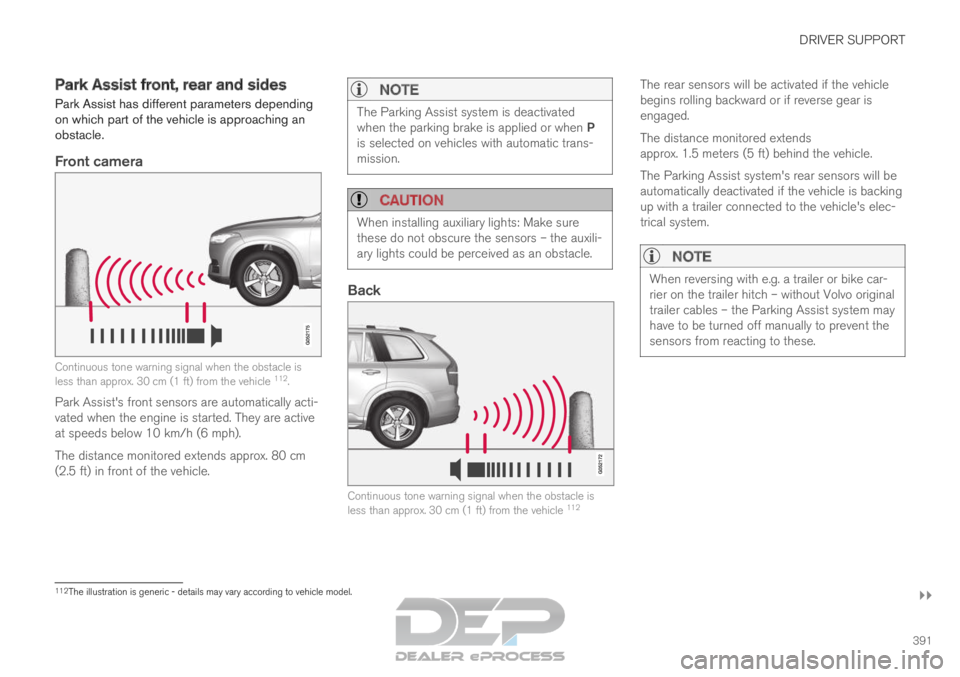
Front camera Continuous tone warning signal when the obstacle is
less than approx. 30 cm (1 ft) from the vehicle
112
.
Park Assist's front sensors are automatically acti-
vated when the engine is started. They are active
at speeds below 10 km/h (6 mph).
The distance monitored extends approx. 80 cm
(2.5 ft) in front of the vehicle.
NOTE The Parking Assist system is deactivated
when the parking brake is applied or when P
is selected on vehicles with automatic trans-
mission.
CAUTION
When installing auxiliary lights: Make sure
these do not obscure the sensors – the auxili-
ary lights could be perceived as an obstacle.
Back
Continuous tone warning signal when the obstacle is
less than approx. 30 cm (1 ft) from the vehicle
112The rear sensors will be activated if the vehicle
begins rolling backward or if reverse gear is
engaged.
The distance monitored extends
approx. 1.5 meters (5 ft) behind the vehicle.
The Parking Assist system's rear sensors will be
automatically deactivated if the vehicle is backing
up with a trailer connected to the vehicle's elec-
trical system.
NOTE
When reversing with e.g. a trailer or bike car-
rier on the trailer hitch – without Volvo original
trailer cables – the Parking Assist system may
have to be turned off manually to prevent the
sensors from reacting to these.
112
The illustration is generic - details may vary according to vehicle mode\
l.
Page 447 of 697
STARTING AND DRIVING
445
Parking brake malfunction
If you are unable to deactivate or activate the
parking brake after several attempts, contact an
authorized Volvo workshop.
A audible warning signal will sound if the parking
brake is applied while the vehicle is being driven.
If the vehicle must be parked before the problem
is rectified, turn the wheels as when parking on
an incline and put the gear selector in P.
Low battery charge levelIf the battery charge level is too low, it will not be
possible to apply or release the parking brake.
Connect an auxiliary battery to the vehicle if the
battery is discharged.
Replacing brake padsDue to the design of the electric parking brake,
the rear brake pads must be replaced by a work-
shop. An authorized Volvo workshop is recom-
mended.
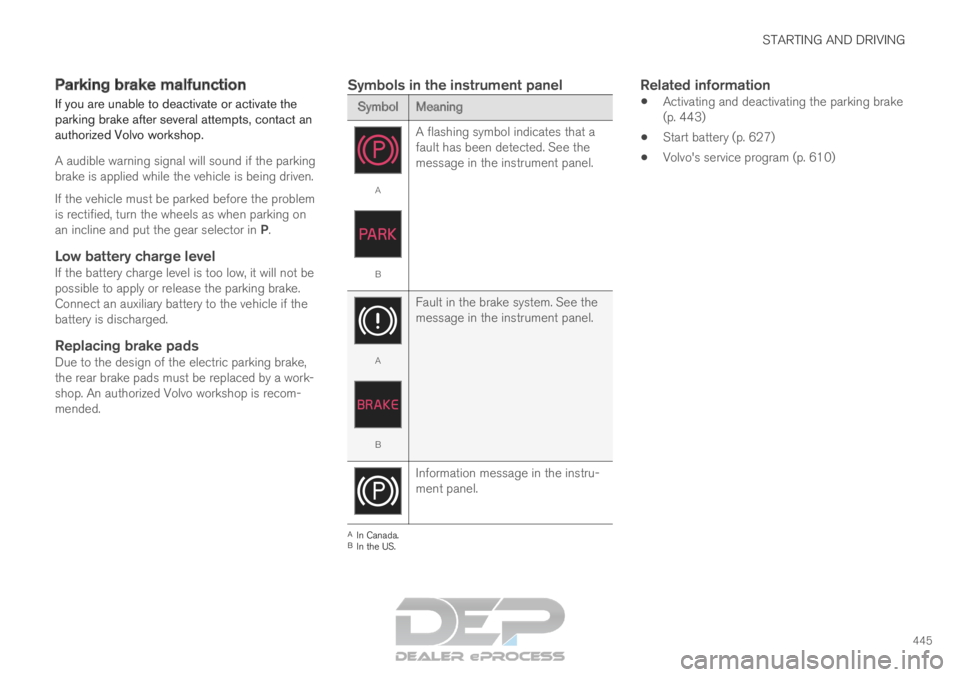
Symbols in the instrument panel Symbol
Meaning A
B
A flashing symbol indicates that a
fault has been detected. See the
message in the instrument panel. A
B
Fault in the brake system. See the
message in the instrument panel. Information message in the instru-
ment panel.
A
In Canada.
B In the US.Related information
Activating and deactivating the parking brake
(p. 443)
Start battery (p. 627)
Volvo's service program (p. 610)
Page 481 of 697
STARTING AND DRIVING
}}
479
Emission controls
Three-way catalytic converter
Keep your engine properly tuned. Certain
engine malfunctions, particularly involving the
electrical, fuel or distributor ignition systems,
may cause unusually high three-way catalytic
converter temperatures. Do not continue to
operate your vehicle if you detect engine
misfire, noticeable loss of power or other
unusual operating conditions, such as engine
overheating or backfiring. A properly tuned
engine will help avoid malfunctions that
could damage the three-way catalytic con-
verter.
Do not park your vehicle over combustible
materials, such as grass or leaves, which can
come into contact with the hot exhaust sys-
tem and cause such materials to ignite under
certain wind and weather conditions.
Excessive starter cranking (in excess of one
minute), or an intermittently firing or flooded
engine can cause three-way catalytic con-
verter or exhaust system overheating.
Remember that tampering or unauthorized
modifications to the engine, the Engine Con-
trol Module, or the vehicle may be illegal and
can cause three-way catalytic converter or
exhaust system overheating. This includes:
altering fuel injection settings or compo-
nents, altering emission system components or location or removing components, and/or
repeated use of leaded fuel.NOTE Unleaded fuel is required for vehicles with
three-way catalytic converters.
Heated oxygen sensorsThe heated oxygen sensors monitor the oxygen
content of the exhaust gases. Readings are fed
into a control module that continuously monitors
engine functions and controls fuel injection. The
ratio of fuel to air into the engine is continuously
adjusted for efficient combustion to help reduce
harmful emissions.
Related information
Octane rating (p. 477)
Fuel (p. 476) Overheating of engine and
transmission
In demanding driving conditions, such as driving
in mountainous areas or hot weather, there is a
risk of the engine or transmission overheating,
especially when carrying heavy loads.
Engine power may be temporarily limited.
Remove any auxiliary lights mounted in front
of the grille when driving in hot weather.
If the temperature in the engine's cooling
system becomes too high, a warning symbol
will appear in the instrument panel along with
the message Engine temperature High
temperature Stop safely. Pull over to a safe location and let the engine idle for a few
minutes to cool down.
If the message
Engine temperature High
temperature Turn off engine or Engine
coolant Level low, turn off engine is dis- played, stop the vehicle and turn off the
engine.
If the transmission begins to overheat, an
alternative gear shifting program will be
selected. An integrated protective function
will also be activated, the warning symbol will
illuminate and the message Transmission
warm
Reduce speed to lower
temperature or Transmission hot Stop
safely, wait for cooling will be displayed in the instrument panel. Follow the recommen-
dations given by reducing speed or stopping
Page 483 of 697
STARTING AND DRIVING
}}
481
Jump starting using another battery
If the start battery is discharged, current from
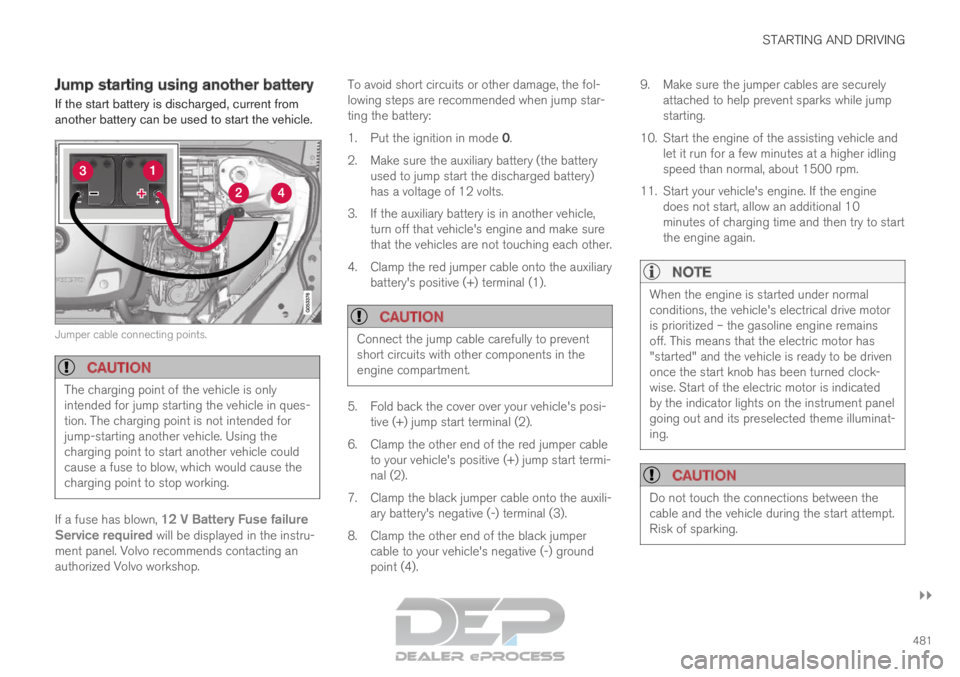
another battery can be used to start the vehicle. Jumper cable connecting points.
CAUTION
The charging point of the vehicle is only
intended for jump starting the vehicle in ques-
tion. The charging point is not intended for
jump-starting another vehicle. Using the
charging point to start another vehicle could
cause a fuse to blow, which would cause the
charging point to stop working.
If a fuse has blown, 12 V Battery Fuse failure
Service required will be displayed in the instru-
ment panel. Volvo recommends contacting an
authorized Volvo workshop. To avoid short circuits or other damage, the fol-
lowing steps are recommended when jump star-
ting the battery:
1.
Put the ignition in mode 0.
2.
Make sure the auxiliary battery (the battery
used to jump start the discharged battery)
has a voltage of 12 volts.
3. If the auxiliary battery is in another vehicle, turn off that vehicle's engine and make sure
that the vehicles are not touching each other.
4. Clamp the red jumper cable onto the auxiliary battery's positive (+) terminal (1).
CAUTION Connect the jump cable carefully to prevent
short circuits with other components in the
engine compartment.
5. Fold back the cover over your vehicle's posi-
tive (+) jump start terminal (2).
6.
Clamp the other end of the red jumper cable
to your vehicle's positive (+) jump start termi-
nal (2).
7. Clamp the black jumper cable onto the auxili- ary battery's negative (-) terminal (3).
8. Clamp the other end of the black jumper cable to your vehicle's negative (-) ground
point (4). 9. Make sure the jumper cables are securely
attached to help prevent sparks while jump
starting.
10. Start the engine of the assisting vehicle and let it run for a few minutes at a higher idling
speed than normal, about 1500 rpm.
11. Start your vehicle's engine. If the engine does not start, allow an additional 10
minutes of charging time and then try to start
the engine again.
NOTE When the engine is started under normal
conditions, the vehicle's electrical drive motor
is prioritized – the gasoline engine remains
off. This means that the electric motor has
"started" and the vehicle is ready to be driven
once the start knob has been turned clock-
wise. Start of the electric motor is indicated
by the indicator lights on the instrument panel
going out and its preselected theme illuminat-
ing.
CAUTION
Do not touch the connections between the
cable and the vehicle during the start attempt.
Risk of sparking.
Page 489 of 697
STARTING AND DRIVING
487
Disabling the automatic check
The automatic light check can be disabled in the
center display.
1.Tap Settings in the Top view.
2.
Tap My Car Lights and Lighting
.
3. Deselect Automatic Trailer Lamp Check.
Manual check
If the automatic check has been disabled, the
check can be started manually.
1.
Tap Settings in the Top view.
2.
Tap My Car Lights and Lighting
.
3. Select Manual Trailer Lamp Check.
>
The light check will begin. Get out of the
vehicle to perform the check.
Related information
Driving with a trailer (p. 483) Towing using a towline
This section refers to one vehicle being towed
behind another using a towline.
Twin Engine vehicles may not be towed behind
another vehicle due to the risk of damage to the
electric motor. The vehicle must be lifted onto a
tow truck and transported with all four wheels on
the bed or lifting platform of the truck (no wheels
may touch the road).
Towing another vehicleTowing another vehicle requires a lot of power -
use the AWD drive mode. This helps charge the
hybrid battery and improve the vehicle's driving
and roadholding characteristics.
Before towing another vehicle, check applicable
speed limit regulations.
Jump startingDo not tow the vehicle to start the engine. Use an
auxiliary battery if the start battery's charge level
is so low that the engine cannot be started.
CAUTION Attempts to tow-start the vehicle could cause
damage to the electrical drive motor and
three-way catalytic converter.
Related information
Attaching and removing the towing eyelet
(p. 488)
Hazard warning flashers (p. 161)
Recovery (p. 489)
Jump starting using another battery (p. 481)
Selecting ignition mode (p. 438)