USB VOLVO XC90 TWIN ENGINE 2019 Owners Manual
[x] Cancel search | Manufacturer: VOLVO, Model Year: 2019, Model line: XC90 TWIN ENGINE, Model: VOLVO XC90 TWIN ENGINE 2019Pages: 697, PDF Size: 10.33 MB
Page 13 of 697
11
AUDIO, MEDIA AND INTERNET
Audio, media and Internet496
Sound settings496
Sound experience*497
Apps498
Download apps499
Updating apps500
Deleting apps500
Radio501
Starting the radio501
Changing waveband and radio station502
Searching for a radio station503
Storing radio favorites503
Radio settings504
RBDS505
HD Radio™505
Activating and deactivating the HDRadio™506
HD Radio™ sub-channels507
HD Radio™ limitations508
SiriusXM® Satellite radio*508
Using SiriusXM® Satellite radio*509
Settings for SiriusXM® Satellite radio*511
SiriusXM Travel Link®*512
SiriusXM Travel Link®* - Weather514
SiriusXM Travel Link®* - Notifications515
SiriusXM Travel Link®* - Fuel516
SiriusXM Travel Link®* - Sports517
Media player518
Playing media518
Controlling and changing media520
Media searches521
Gracenote®521
CD player*522
Video522
Playing video523
Playing DivX® 523
Video settings523
Streaming media via Bluetooth®524
Connecting a device via Bluetooth®524
Playing media via the USB port524
Connecting a device via the USB port525
Technical specifications for USB devices525
Compatible file formats for media526
Apple® CarPlay®*527
Using Apple® CarPlay®*527
Settings for Apple® CarPlay®*528
Tips for using Apple® CarPlay®*529
Android Auto*530
Using Android Auto*530
Settings for Android Auto*531
Tips for using Android Auto*532
Phone532
Connecting a phone to the car viaBluetooth for the first time533
Connecting a phone to the car viaBluetooth automatically535
Connecting a phone to the car viaBluetooth manually535
Disconnecting a Bluetooth-con-nected phone536
Switch between phones connectedvia Bluetooth536
Disconnecting Bluetooth-connecteddevices536
Handling phone calls537
Handling text messages538
Text message settings539
Managing the phone book539
Phone settings540
Settings for Bluetooth devices541
Internet-connected vehicle*541
Connecting the vehicle to the Inter-net via a Bluetooth-connected phone543
Page 127 of 697
DISPLAYS AND VOICE CONTROL
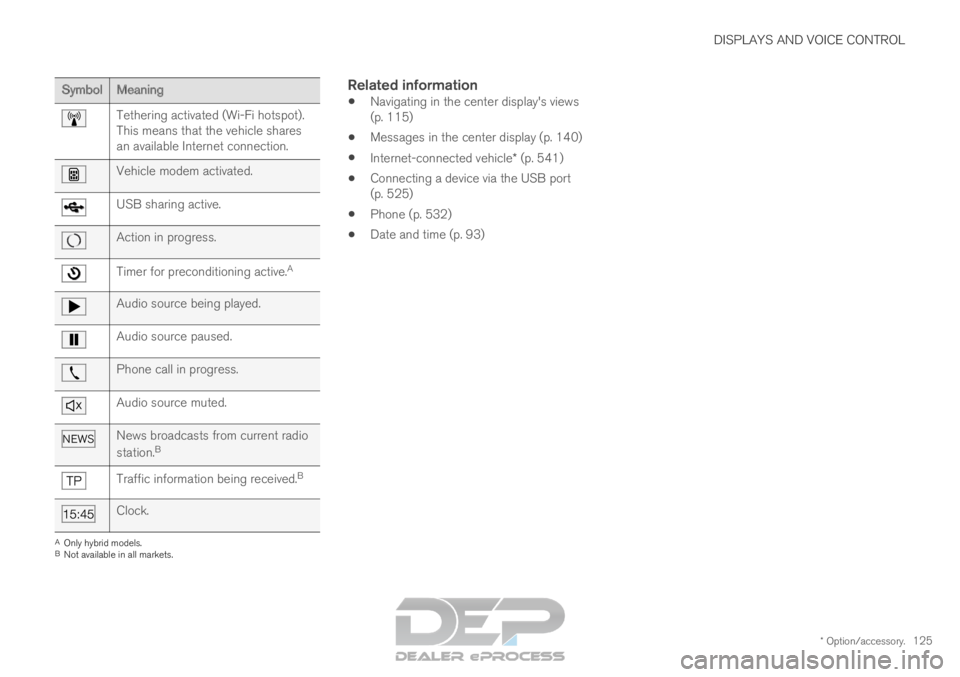
* Option/accessory.125Symbol
Meaning Tethering activated (Wi-Fi hotspot).
This means that the vehicle shares
an available Internet connection.
Vehicle modem activated.
USB sharing active.
Action in progress.
Timer for preconditioning active.
AAudio source being played.
Audio source paused.
Phone call in progress.
Audio source muted.
News broadcasts from current radio
station.
B Traffic information being received.
BClock.
A
Only hybrid models.
B Not available in all markets.
Related information
Navigating in the center display's views
(p. 115)
Messages in the center display (p. 140)
Internet-connected vehicle* (p. 541)
Connecting a device via the USB port
(p. 525)
Phone (p. 532)
Date and time (p. 93)
Page 135 of 697
DISPLAYS AND VOICE CONTROL
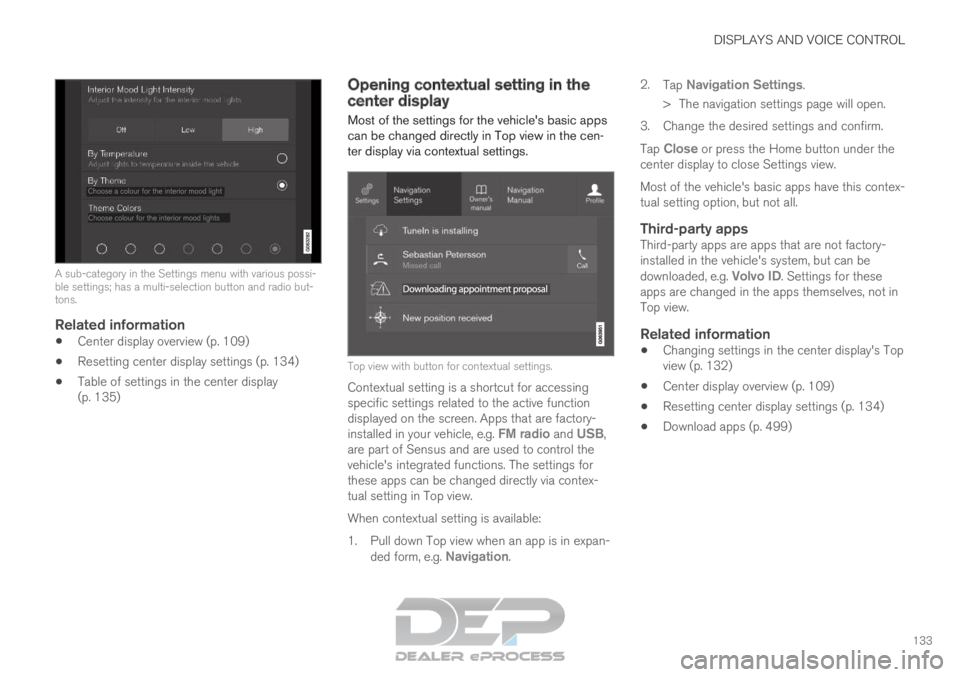
133A sub-category in the Settings menu with various possi-
ble settings; has a multi-selection button and radio but-
tons.
Related information
Center display overview (p. 109)
Resetting center display settings (p. 134)
Table of settings in the center display
(p. 135) Opening contextual setting in the
center display
Most of the settings for the vehicle's basic apps
can be changed directly in Top view in the cen-
ter display via contextual settings. Top view with button for contextual settings.
Contextual setting is a shortcut for accessing
specific settings related to the active function
displayed on the screen. Apps that are factory-
installed in your vehicle, e.g. FM radio and USB,
are part of Sensus and are used to control the
vehicle's integrated functions. The settings for
these apps can be changed directly via contex-
tual setting in Top view.
When contextual setting is available:
1.
Pull down Top view when an app is in expan-
ded form, e.g. Navigation. 2.
Tap Navigation Settings.
>
The navigation settings page will open.
3. Change the desired settings and confirm.
Tap Close or press the Home button under the
center display to close Settings view.
Most of the vehicle's basic apps have this contex-
tual setting option, but not all.
Third-party appsThird-party apps are apps that are not factory-
installed in the vehicle's system, but can be
downloaded, e.g. Volvo ID. Settings for these
apps are changed in the apps themselves, not in
Top view.
Related information
Changing settings in the center display's Top
view (p. 132)
Center display overview (p. 109)
Resetting center display settings (p. 134)
Download apps (p. 499)
Page 150 of 697
DISPLAYS AND VOICE CONTROL
* Option/accessory.
148 Voice control for radio and media
19
Voice commands for the radio and media play-
ers are shown below.
Tap and say one of the following commands:
"Media" - initiates a dialog for media and
radio and displays examples of commands.
"
Play [artist]" - plays music by the selected
artist.
"
Play [song title]" - plays the selected
song.
"
Play [song title] from [album]" - plays
the selected song from the selected album.
"Play [radio station]" - starts the selected
radio station.
"
Tune to [frequency]" - tunes to the
selected radio frequency in the currently
active waveband. If no radio source is active,
the FM band will be started as default.
"
Tune to [frequency] [waveband]" - tunes
to the selected radio frequency on the
selected waveband.
"Radio" - starts FM radio.
"
Radio FM" - starts FM radio.
"
SiriusXM" - starts SiriusXM radio*
"
CD" - starts playback from CD*.
"
USB" - starts playback from USB.
"iPod" - starts playback from iPod.
"
Bluetooth" - starts playback from a Blue-
tooth-connected media source.
"
Similar music" - plays music from a USB-
connected device with music similar to that
currently playing.
Related information
Voice control (p. 145)
Using voice commands (p. 146)
Voice control for cellular phones (p. 147)
Climate control system voice commands
(p. 205)
Voice control settings (p. 148) Voice control settings
20
Settings for the voice control system are made
here.
Settings System Voice Control
Settings can be personalized in the following
areas:
Repeat Voice Command
Gender
Speech Rate
Sound settingsSelect sound settings under:
Settings Sound System Volumes
Voice Control
Language settingsThe voice control system is not available for all
languages. The languages available for voice
commands are indicated by the
icon in the
list of languages.
Changing the language here will also change the
language in the menus, messages and help texts.
Settings System System Languages
and Units System Language
19
Certain markets only.
Page 512 of 697
||AUDIO, MEDIA AND INTERNET
* Option/accessory.
510
Search
Tap the magnifying glass to display a screen
where you can enter text using the center dis-
play's keyboard or by writing in the free-text field
to search for e.g., a station number, an artist,
song title, etc.
Channels
Tap to display a complete list of the channels
included in your subscription. Tap a channel
name to listen. If a subscription to a channel has
expired, its name will be grayed-out on the
screen.
For quick access to a channel that you often lis-
ten to, tap the star to the right of the channel's
name. It will then be added to your list of favor-
ites.
Favorites
Tap to display the channels that you have added
to this list. Tap a channel name to listen.
Categories/Genres
Tap to display the categories available. Tap a cat-
egory or genre name to display the channels that
it contains and then tap a channel to listen.
If you have activated alerts (see the “Alerts” sec-
tion below) and an alert is activated for an artist,
song or team, temporary virtual categories will
also be created and displayed. The channels cur-
rently broadcasting the song, artist or broadcast-
ing a program with the selected team will be lis-
ted in a virtual category.
EPG (Electronic Program Guide)On the center display's Home view, tap EPG for
information about e.g., when a program is being
broadcast and its name, description, artist, etc. If
no information is currently available,
No
information will be displayed.
AlertsIf this feature has been selected under SiriusXM
Settings, the Alerts button will be displayed on
the Home view.
To add e.g. an artist's name, song title or a sports
team to the list of alerts:
1.
Tune to a channel that is broadcasting a
song, game, etc., of your choice.
2. Tap the Alerts button.
3.
A pop-up window will be displayed showing a
list of alerts (nothing will be displayed if the
selected channel does not support the alert
function).
4. Select one of the alternatives in list (only one can be selected at a time).
5. The song/artist/team will now be added to the list of alerts. Favorite sports teams can
also be added to the list using “Game Alert”
in the SiriusXM satellite radio settings.
> When your choice is being broadcast on achannel, you will be informed by a pop-up.
iTunes taggingFrom the center display's Top view, tap SiriusXM
Settings. Tap the iTunes Tagging menu. Tap
the
iTunes Tagging box to activate/deactivate
this function and tap Close to return to Home
view. Tap Tags List to display a list of all tagged
songs.
If the function is activated, the iTunes tag button will be displayed in Home view. If a song is played
that you would like to buy in the iTunes store, tap
this button while the song is playing to tag it. If a
song with
iTunes Tagging information is availa-
ble, the button will be selectable. Tap the button
to tag the song. If you would like to buy a tagged
song via iTunes, Tap the iTunes tag button.
To buy a song in iTunes, begin by connecting an
iPhone/iPod/iPad to the USB port in the tunnel
console. The iTunes tagging list will automatically
be transferred to the device and removed from
the list in the vehicle. If the device is connected
when a song is tagged, the data will automatically
be saved in the device. To purchase the song,
consult the iTunes support page.
Related information
SiriusXM ®
Satellite radio* (p. 508)
Entering characters, letters and words by
hand in the center display (p. 129)
Settings for SiriusXM ®
Satellite radio*
(p. 511)
Page 513 of 697
AUDIO, MEDIA AND INTERNET
}}
* Option/accessory. 511
Settings for SiriusXM ®
Satellite radio*
(p. 511)
Connecting a device via the USB port
(p. 525) Settings for SiriusXM
®
Satellite
radio*
There are numerous settings that can be made
to enhance your SiriusXM ®
Satellite radio listen-
ing experience.
Settings
Drag down the top view and tap on Settings Media SiriusXM
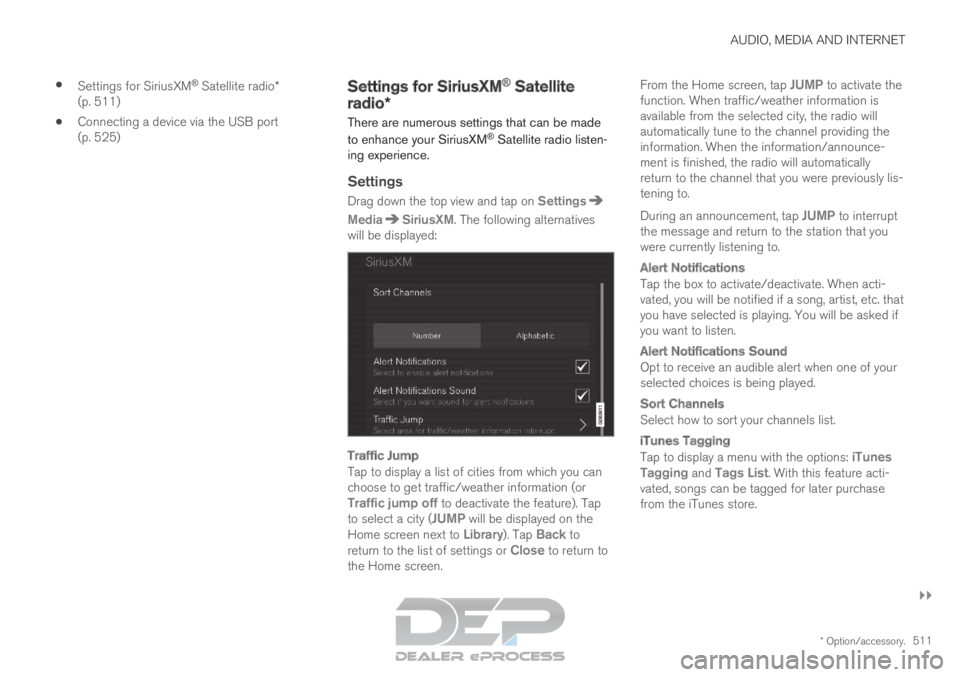
. The following alternatives
will be displayed:
Traffic Jump
Tap to display a list of cities from which you can
choose to get traffic/weather information (or
Traffic jump off to deactivate the feature). Tap
to select a city (JUMP will be displayed on the Home screen next to
Library). Tap Back to
return to the list of settings or Close to return to
the Home screen. From the Home screen, tap JUMP to activate the
function. When traffic/weather information is
available from the selected city, the radio will
automatically tune to the channel providing the
information. When the information/announce-
ment is finished, the radio will automatically
return to the channel that you were previously lis-
tening to.
During an announcement, tap JUMP to interrupt
the message and return to the station that you
were currently listening to.
Alert Notifications
Tap the box to activate/deactivate. When acti-
vated, you will be notified if a song, artist, etc. that
you have selected is playing. You will be asked if
you want to listen.
Alert Notifications Sound
Opt to receive an audible alert when one of your
selected choices is being played.
Sort Channels
Select how to sort your channels list.
iTunes Tagging
Tap to display a menu with the options: iTunes
Tagging and Tags List. With this feature acti-
vated, songs can be tagged for later purchase
from the iTunes store.
Page 520 of 697
AUDIO, MEDIA AND INTERNET
* Option/accessory.
518 Media player
The media player can play audio from the CD
player* and from external audio sources con-
nected via USB port or Bluetooth. It can also
play video format via the USB port.
When the vehicle is connected to the Internet, it
is also possible to listen to web radio, audio
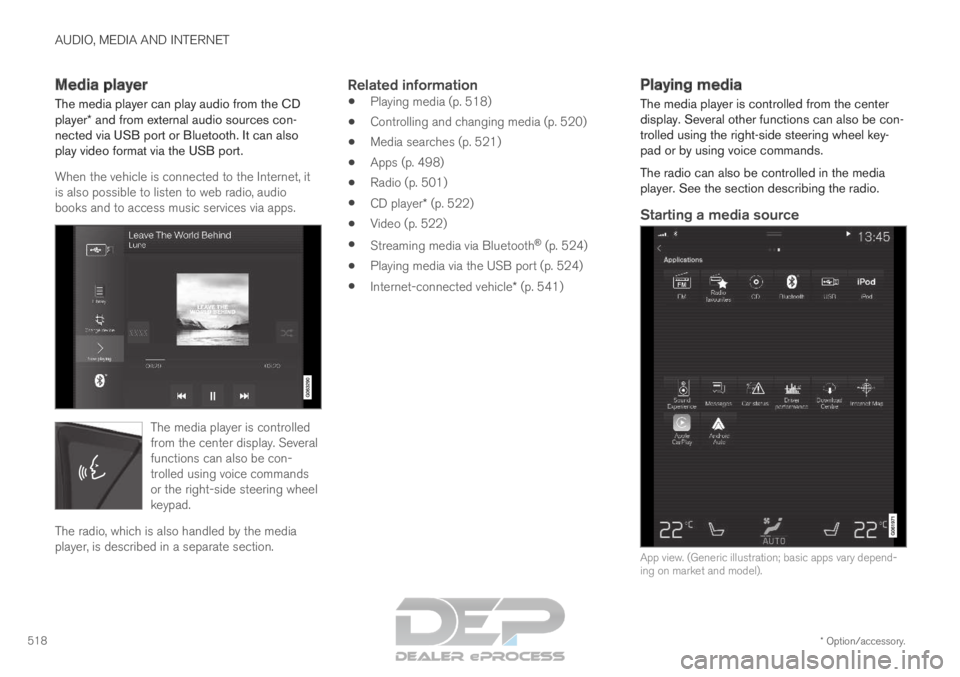
books and to access music services via apps. The media player is controlled
from the center display. Several
functions can also be con-
trolled using voice commands
or the right-side steering wheel
keypad.
The radio, which is also handled by the media
player, is described in a separate section.
Related information
Playing media (p. 518)
Controlling and changing media (p. 520)
Media searches (p. 521)
Apps (p. 498)
Radio (p. 501)
CD player* (p. 522)
Video (p. 522)
Streaming media via Bluetooth ®
(p. 524)
Playing media via the USB port (p. 524)
Internet-connected vehicle* (p. 541) Playing media
The media player is controlled from the center
display. Several other functions can also be con-
trolled using the right-side steering wheel key-
pad or by using voice commands.
The radio can also be controlled in the media
player. See the section describing the radio.
Starting a media source
App view. (Generic illustration; basic apps vary depend-
ing on market and model).
Page 521 of 697
AUDIO, MEDIA AND INTERNET
* Option/accessory.519
CD*
1. Insert a CD.
2.
Open the CD app from App view.
3.
Select the track you would like to play.
> Playback will begin.
USB flash drive
1. Inset a USB flash drive.
2. Open the USB app from App view.
3.
Select the track you would like to play.
> Playback will begin.
MP3 player and iPod ®
NOTETo start playback from an iPod, the iPod app
must be used (not USB).
When an iPod is used as source, the car's
audio and media system has a menu struc-
ture similar to the iPod player's own menu
structure.
1. Connect a media source.
2.
Start playback in the connected media
source.
3. Open the app ( iPod, USB) from App view.
>
Playback will begin.
Bluetooth-connected device
1. Activate Bluetooth in the media source.
2. Connect a media source.
3. Start playback in the connected media source.
4. Open the Bluetooth app from App view.
>
Playback will begin.
Media with Internet connection
Medial playback from apps with Internet connec-
tion:
1. Connect the vehicle to the Internet.
2. Open the app from the App view. > Playback will begin.
Read the separate section on how to download
apps.
Video
1. Connect a media source.
2. Open the USB app from App view.
3.
Tap the title you would like to play.
> Playback will begin.
Apple CarPlay
CarPlay is described in a separate section.
Android Auto
Android Auto is described in a separate section.
Related information
Handling the App menu in the instrument
panel (p. 104)
Radio (p. 501)
Controlling and changing media (p. 520)
Connecting a device via the USB port
(p. 525)
Connecting a device via Bluetooth ®
(p. 524)
Download apps (p. 499)
Internet-connected vehicle* (p. 541)
Video (p. 522)
Apple ®
CarPlay ®
* (p. 527)
Android Auto* (p. 530)
Voice control for radio and media (p. 148)
Compatible file formats for media (p. 526)
Page 522 of 697
AUDIO, MEDIA AND INTERNET
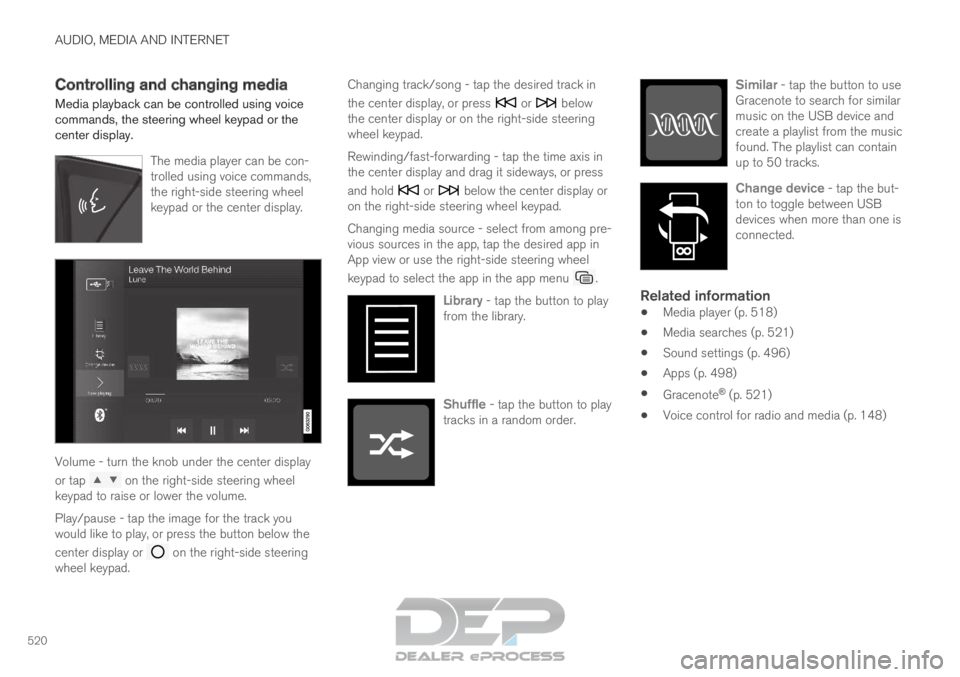
520Controlling and changing media
Media playback can be controlled using voice
commands, the steering wheel keypad or the
center display.
The media player can be con-
trolled using voice commands,
the right-side steering wheel
keypad or the center display.Volume - turn the knob under the center display
or tap
on the right-side steering wheel
keypad to raise or lower the volume.
Play/pause - tap the image for the track you
would like to play, or press the button below the
center display or on the right-side steering
wheel keypad. Changing track/song - tap the desired track in
the center display, or press or below
the center display or on the right-side steering
wheel keypad.
Rewinding/fast-forwarding - tap the time axis in
the center display and drag it sideways, or press
and hold or below the center display or
on the right-side steering wheel keypad.
Changing media source - select from among pre-
vious sources in the app, tap the desired app in
App view or use the right-side steering wheel
keypad to select the app in the app menu .
Library - tap the button to play
from the library. Shuffle - tap the button to play
tracks in a random order. Similar - tap the button to use
Gracenote to search for similar
music on the USB device and
create a playlist from the music
found. The playlist can contain
up to 50 tracks. Change device - tap the but-
ton to toggle between USB
devices when more than one is
connected.
Related information
Media player (p. 518)
Media searches (p. 521)
Sound settings (p. 496)
Apps (p. 498)
Gracenote ®
(p. 521)
Voice control for radio and media (p. 148)
Page 524 of 697
||AUDIO, MEDIA AND INTERNET
* Option/accessory.
522
Related information
Playing media (p. 518)
License agreement for audio and media
(p. 549) CD player*
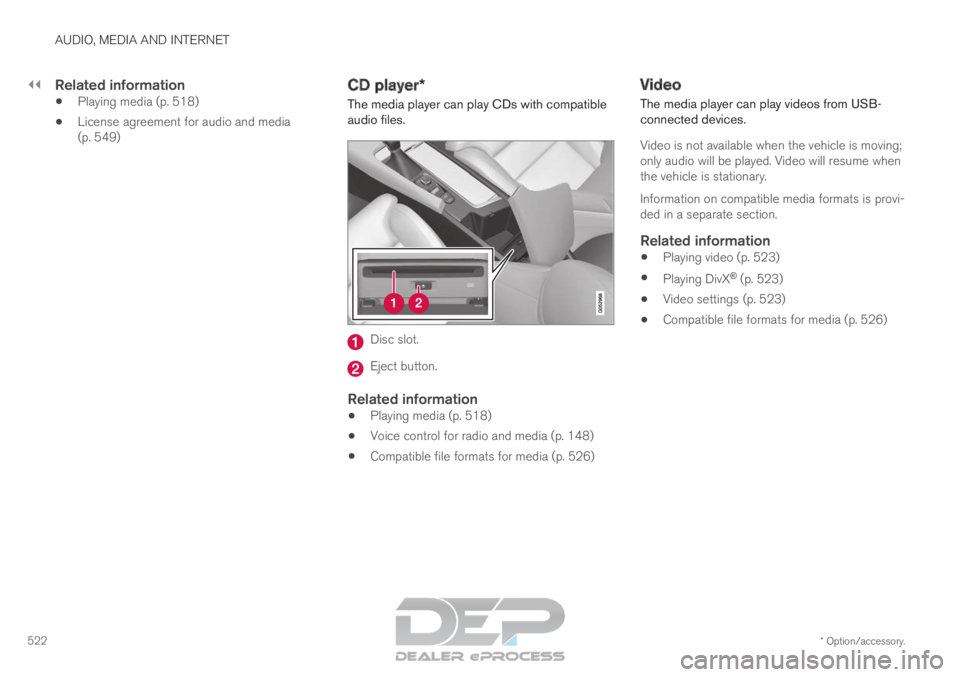
The media player can play CDs with compatible
audio files. Disc slot.
Eject button.
Related information
Playing media (p. 518)
Voice control for radio and media (p. 148)
Compatible file formats for media (p. 526) Video
The media player can play videos from USB-
connected devices.
Video is not available when the vehicle is moving;
only audio will be played. Video will resume when
the vehicle is stationary.
Information on compatible media formats is provi-
ded in a separate section.
Related information
Playing video (p. 523)
Playing DivX ®
(p. 523)
Video settings (p. 523)
Compatible file formats for media (p. 526)