four wheel drive VOLVO XC90 TWIN ENGINE 2019 Owners Manual
[x] Cancel search | Manufacturer: VOLVO, Model Year: 2019, Model line: XC90 TWIN ENGINE, Model: VOLVO XC90 TWIN ENGINE 2019Pages: 697, PDF Size: 10.33 MB
Page 94 of 697
DISPLAYS AND VOICE CONTROL
92Resetting the trip odometer
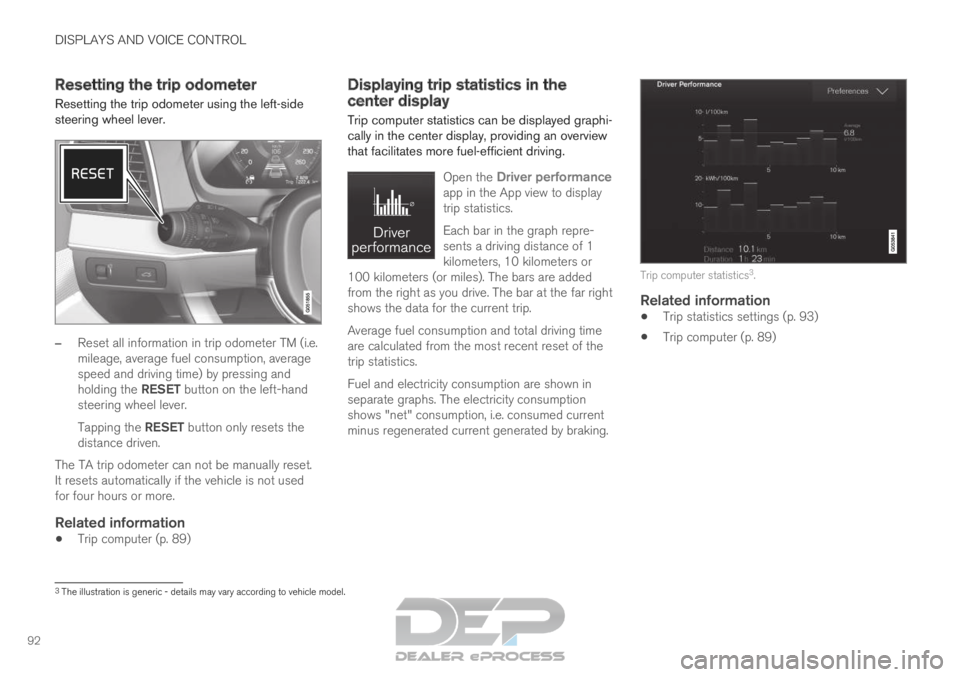
Resetting the trip odometer using the left-side
steering wheel lever. –
Reset all information in trip odometer TM (i.e.
mileage, average fuel consumption, average
speed and driving time) by pressing and
holding the RESET button on the left-hand
steering wheel lever.
Tapping the RESET button only resets the
distance driven.
The TA trip odometer can not be manually reset.
It resets automatically if the vehicle is not used
for four hours or more.
Related information
Trip computer (p. 89) Displaying trip statistics in the
center display
Trip computer statistics can be displayed graphi-
cally in the center display, providing an overview
that facilitates more fuel-efficient driving.
Open the
Driver performance
app in the App view to display
trip statistics.
Each bar in the graph repre-
sents a driving distance of 1
kilometers, 10 kilometers or
100 kilometers (or miles). The bars are added
from the right as you drive. The bar at the far right
shows the data for the current trip.
Average fuel consumption and total driving time
are calculated from the most recent reset of the
trip statistics.
Fuel and electricity consumption are shown in
separate graphs. The electricity consumption
shows "net" consumption, i.e. consumed current
minus regenerated current generated by braking. Trip computer statistics
3
.
Related information
Trip statistics settings (p. 93)
Trip computer (p. 89) 3
The illustration is generic - details may vary according to vehicle mode\
l.
Page 186 of 697
SEATS AND STEERING WHEEL
* Option/accessory.
184 Manual front seats
The power front seats can be adjusted in a num-
ber of different ways for optimal comfort and
ergonomics.
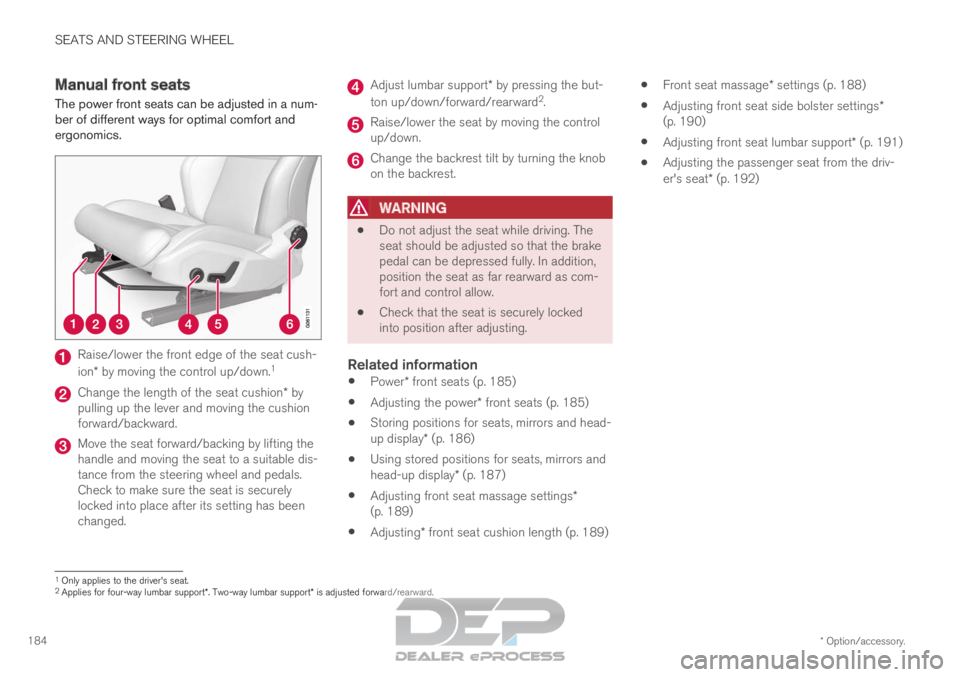
Raise/lower the front edge of the seat cush-
ion* by moving the control up/down.
1Change the length of the seat cushion* by
pulling up the lever and moving the cushion
forward/backward. Move the seat forward/backing by lifting the
handle and moving the seat to a suitable dis-
tance from the steering wheel and pedals.
Check to make sure the seat is securely
locked into place after its setting has been
changed. Adjust lumbar support* by pressing the but-
ton up/down/forward/rearward 2
. Raise/lower the seat by moving the control
up/down.
Change the backrest tilt by turning the knob
on the backrest.
WARNING
Do not adjust the seat while driving. The
seat should be adjusted so that the brake
pedal can be depressed fully. In addition,
position the seat as far rearward as com-
fort and control allow.
Check that the seat is securely locked
into position after adjusting.
Related information
Power* front seats (p. 185)
Adjusting the power* front seats (p. 185)
Storing positions for seats, mirrors and head-
up display* (p. 186)
Using stored positions for seats, mirrors and
head-up display* (p. 187)
Adjusting front seat massage settings*
(p. 189)
Adjusting* front seat cushion length (p. 189)
Front seat massage* settings (p. 188)
Adjusting front seat side bolster settings*
(p. 190)
Adjusting front seat lumbar support* (p. 191)
Adjusting the passenger seat from the driv-
er's seat* (p. 192) 1
Only applies to the driver's seat.
2 Applies for four-way lumbar support*. Two-way lumbar support* is adjusted forward/rearward.
Page 219 of 697
CLIMATE CONTROL
* Option/accessory.217
Related information
Climate (p. 204)
Activating and deactivating power front
seats* (p. 217)
Activating and deactivating the heated rear
seats* (p. 218)
Activating and deactivating front seat ventila-
tion* (p. 219)
Activating and deactivating the heated steer-
ing wheel* (p. 219)
Activating auto climate control (p. 220)
Activating and deactivating recirculation
(p. 221)
Activating and deactivating max defroster
(p. 222)
Activating and deactivating the heated wind-
shield* (p. 223)
Activating and deactivating the heated rear
window and door mirrors (p. 225)
Setting the blower speed for the front seats
(p. 226)
Setting the blower speed for the rear seats
(p. 226)
Synchronize temperature (p. 229)
Activating and deactivating air conditioning
(p. 230)
Activating and deactivating climate control
for the third-row seats* (p. 231) Activating and deactivating power
front seats*
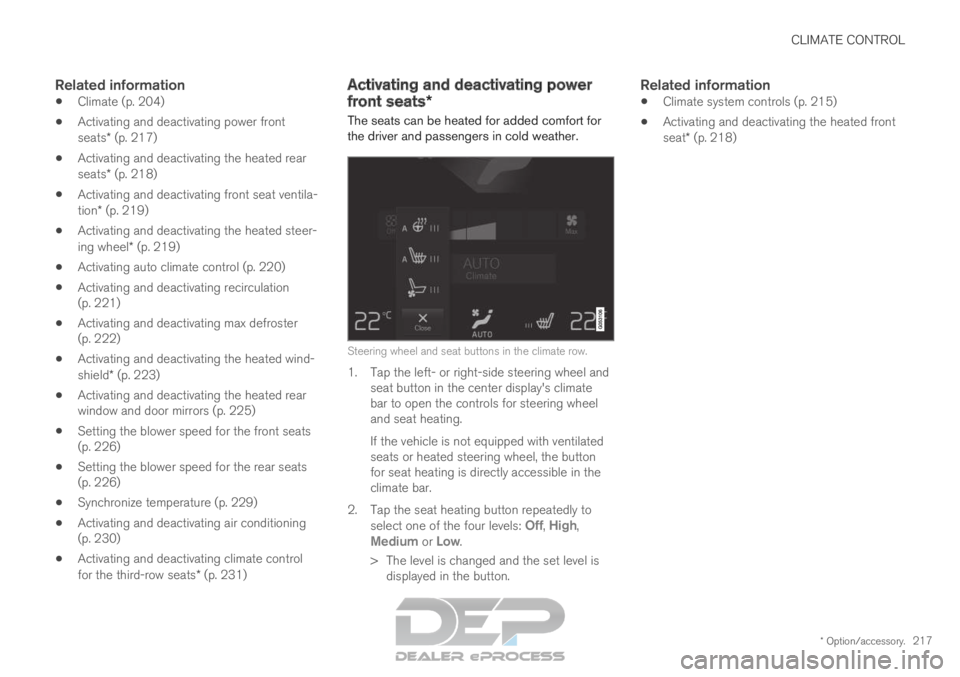
The seats can be heated for added comfort for
the driver and passengers in cold weather. Steering wheel and seat buttons in the climate row.
1. Tap the left- or right-side steering wheel and
seat button in the center display's climate
bar to open the controls for steering wheel
and seat heating.
If the vehicle is not equipped with ventilated
seats or heated steering wheel, the button
for seat heating is directly accessible in the
climate bar.
2.
Tap the seat heating button repeatedly to
select one of the four levels: Off,
High,
Medium or Low.
>
The level is changed and the set level is
displayed in the button.
Related information
Climate system controls (p. 215)
Activating and deactivating the heated front
seat* (p. 218)
Page 221 of 697

CLIMATE CONTROL
}}
* Option/accessory. 219
Activating and deactivating front
seat ventilation*
The seats can be ventilated to provide increased
comfort in warm weather.
The ventilation system consists of fans in the
seats and backrest that draw air through the seat
upholstery. The cooler the passenger compart-
ment is, the greater the cooling effect of the ven-
tilation. The system can be activated when the
engine is running.
Steering wheel and seat buttons in the climate row.
1. Tap the left- or right-side steering wheel and
seat button in the center display's climate
bar to open the controls for steering wheel
and seat heating.
If the vehicle is not equipped with heated
seats or heated steering wheel, the button
for seat ventilation is directly accessible in
the climate bar.
2.
Tap the seat ventilation button repeatedly to
select one of the four levels: Off, High,
Medium or Low.
>
The level is changed and the set level is
displayed in the button.
Related information
Climate system controls (p. 215) Activating and deactivating the
heated steering wheel*
The steering wheel can be heated for added
comfort in cold weather. Steering wheel and seat buttons in the climate row.
1. Tap the driver's side steering wheel and seat
button in the climate bar in the center display
to open the controls for steering wheel and
seat heating.
If the vehicle is not equipped with heated or
ventilated seats, the button for steering
wheel heating is directly accessible in the cli-
mate bar.
2.
Tap the steering wheel heating button
repeatedly to select one of the four levels:
Off,
High, Medium or Low.
>
The level is changed and the set level is
displayed in the button.
Page 352 of 697
DRIVER SUPPORT
350City Safety braking for oncoming
vehicles
City Safety can help you apply the brakes for an
oncoming vehicle in your lane.
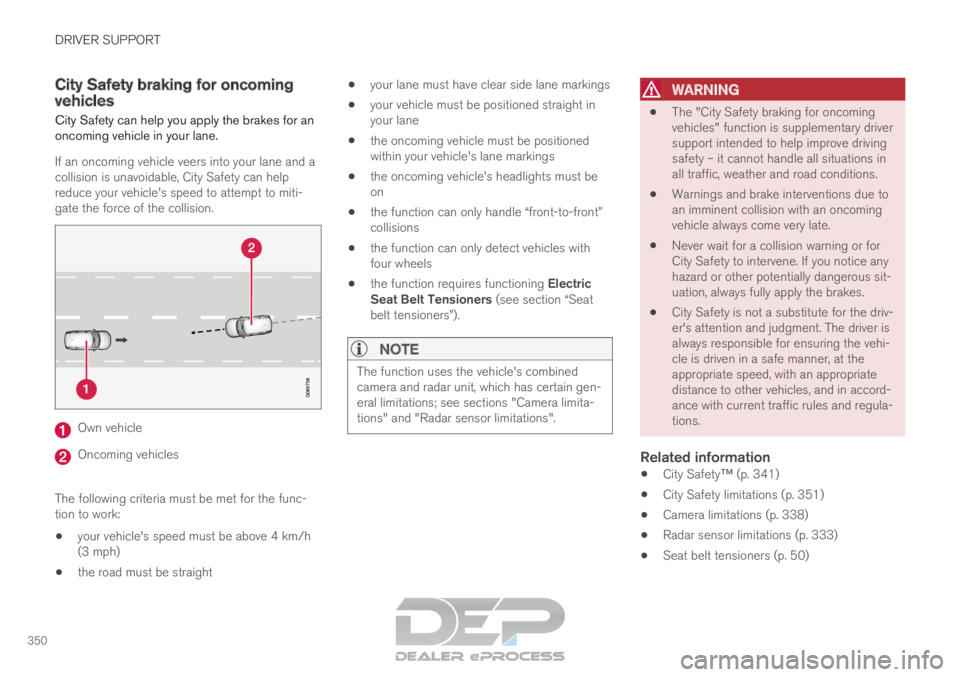
If an oncoming vehicle veers into your lane and a
collision is unavoidable, City Safety can help
reduce your vehicle's speed to attempt to miti-
gate the force of the collision. Own vehicle
Oncoming vehicles
The following criteria must be met for the func-
tion to work:
your vehicle's speed must be above 4 km/h
(3 mph)
the road must be straight
your lane must have clear side lane markings
your vehicle must be positioned straight in
your lane
the oncoming vehicle must be positioned
within your vehicle's lane markings
the oncoming vehicle's headlights must be
on
the function can only handle “front-to-front”
collisions
the function can only detect vehicles with
four wheels
the function requires functioning Electric
Seat Belt Tensioners (see section “Seat
belt tensioners”).
NOTE The function uses the vehicle's combined
camera and radar unit, which has certain gen-
eral limitations; see sections "Camera limita-
tions" and "Radar sensor limitations".
WARNING
The "City Safety braking for oncoming
vehicles" function is supplementary driver
support intended to help improve driving
safety – it cannot handle all situations in
all traffic, weather and road conditions.
Warnings and brake interventions due to
an imminent collision with an oncoming
vehicle always come very late.
Never wait for a collision warning or for
City Safety to intervene. If you notice any
hazard or other potentially dangerous sit-
uation, always fully apply the brakes.
City Safety is not a substitute for the driv-
er's attention and judgment. The driver is
always responsible for ensuring the vehi-
cle is driven in a safe manner, at the
appropriate speed, with an appropriate
distance to other vehicles, and in accord-
ance with current traffic rules and regula-
tions.
Related information
City Safety™ (p. 341)
City Safety limitations (p. 351)
Camera limitations (p. 338)
Radar sensor limitations (p. 333)
Seat belt tensioners (p. 50)
Page 454 of 697
STARTING AND DRIVING
452Shiftlock
The automatic transmission's shiftlock function
helps prevent inadvertently moving the gear
selector between different positions.
Automatic shiftlockThe automatic shiftlock has a separate safety
system.
From Park - P
To move to another gear from P (Park), the brake
pedal must be depressed and the ignition in
mode II.
From Neutral - N
If the gear selector is in N and the vehicle has
been stationary for at least 3 seconds (with or
without the engine running), the gear selector will
be locked in that position.
To move the gear selector from N to another
gear, the brake pedal must be depressed and the
ignition in mode II.
Messages in the instrument panelIf the gear selector is locked in position, a mes-
sage will appear in the instrument panel, e.g.
Gear lever Press brake pedal to activate
gear lever.
There is no mechanical shiftlock function.
Related information
Gear selector positions for automatic trans-
missions (p. 449) The kickdown function
Kickdown is used when maximum acceleration is
needed, e.g. when passing.
When the accelerator pedal is depressed all the
way to the floor (past the normal full accelerator
position), the transmission will automatically
engage kickdown, i.e. immediately shift down to a
lower gear.
If the accelerator pedal is released from the kick-
down position, the transmission will automatically
shift up again.
Safety function
The transmission control module is equipped with
a downshift protection feature to help prevent the
engine from overheating.
In some conditions, the transmission will prevent
downshifting/kickdown if this would lead to such
high engine speed (rpm) that the engine could
be damaged. If the driver still attempts downshift-
ing or kickdown at a high rpm, nothing will hap-
pen and the original gear will remain selected.
With kickdown, the vehicle can downshift one or
more steps at a time depending on the engine
speed. The vehicle upshifts when the engine rea-
ches its maximum rpm to prevent engine dam-
age.
Related information
Gear selector positions for automatic trans-
missions (p. 449) All Wheel Drive (AWD)
All-wheel drive, All Wheel Drive (AWD), also
called four-wheel drive, means that power is dis-
tributed to all four wheels, which improves trac-
tion.
The electric motor that powers the rear wheels
enables electronic all-wheel drive functionality.
All-wheel drive reacts differently depending on
which drive mode is selected.
Related information
Drive modes (p. 454)
Low Speed Control (p. 464)
Transmission (p. 448)
Page 489 of 697
STARTING AND DRIVING
487
Disabling the automatic check
The automatic light check can be disabled in the
center display.
1.Tap Settings in the Top view.
2.
Tap My Car Lights and Lighting
.
3. Deselect Automatic Trailer Lamp Check.
Manual check
If the automatic check has been disabled, the
check can be started manually.
1.
Tap Settings in the Top view.
2.
Tap My Car Lights and Lighting
.
3. Select Manual Trailer Lamp Check.
>
The light check will begin. Get out of the
vehicle to perform the check.
Related information
Driving with a trailer (p. 483) Towing using a towline
This section refers to one vehicle being towed
behind another using a towline.
Twin Engine vehicles may not be towed behind
another vehicle due to the risk of damage to the
electric motor. The vehicle must be lifted onto a
tow truck and transported with all four wheels on
the bed or lifting platform of the truck (no wheels
may touch the road).
Towing another vehicleTowing another vehicle requires a lot of power -
use the AWD drive mode. This helps charge the
hybrid battery and improve the vehicle's driving
and roadholding characteristics.
Before towing another vehicle, check applicable
speed limit regulations.
Jump startingDo not tow the vehicle to start the engine. Use an
auxiliary battery if the start battery's charge level
is so low that the engine cannot be started.
CAUTION Attempts to tow-start the vehicle could cause
damage to the electrical drive motor and
three-way catalytic converter.
Related information
Attaching and removing the towing eyelet
(p. 488)
Hazard warning flashers (p. 161)
Recovery (p. 489)
Jump starting using another battery (p. 481)
Selecting ignition mode (p. 438)
Page 562 of 697
WHEELS AND TIRES
560Tires
The function of the tires is to carry loads, provide
traction on road surfaces, reduce vibrations and
protect the wheels from wear.
The tires significantly influence the vehicle's driv-
ing characteristics. The type, dimensions, tire
pressure and speed rating have a considerable
impact on how the vehicle performs.
Your vehicle is equipped with tires according to
the vehicle's tire information placard on the B-pil-
lar (the structural member at the side of the vehi-
cle, at the rear of the driver's door opening).
WARNING A damaged tire could cause the driver to lose
control of the vehicle.
CAUTION Some Volvo models are equipped with an
Ultra High Performance tire and wheel com-
bination designed to provide maximum dry
pavement performance with consideration for
hydroplaning resistance. They may be more
susceptible to road hazard damage and,
depending on driving conditions, may achieve
a tread life of less than 30,000 km (20,000
miles). Even if this vehicle is equipped with
Volvo's advanced AWD or stability system,
these tires are not designed for winter driving,
and should be replaced with winter tires when
weather conditions dictate.
The tires have good road holding characteristics
and offer good handling on dry and wet surfaces.
It should be noted however that the tires have
been developed to give these features on snow/
ice-free surfaces.
Most models are equipped with "all-season" tires,
which provide a somewhat higher degree of road-
holding on slippery road surfaces than tires with-
out the "all-season" rating. However, for optimal
roadholding on icy or snow-covered roads, Volvo
recommends snow tires on all four wheels.
When replacing tires, be sure that the new tires
are the same size designation, type (radial) and
preferably from the same manufacturer, on allfour wheels. Otherwise there is a risk of altering
the vehicle's roadholding and handling characte-
ristics.
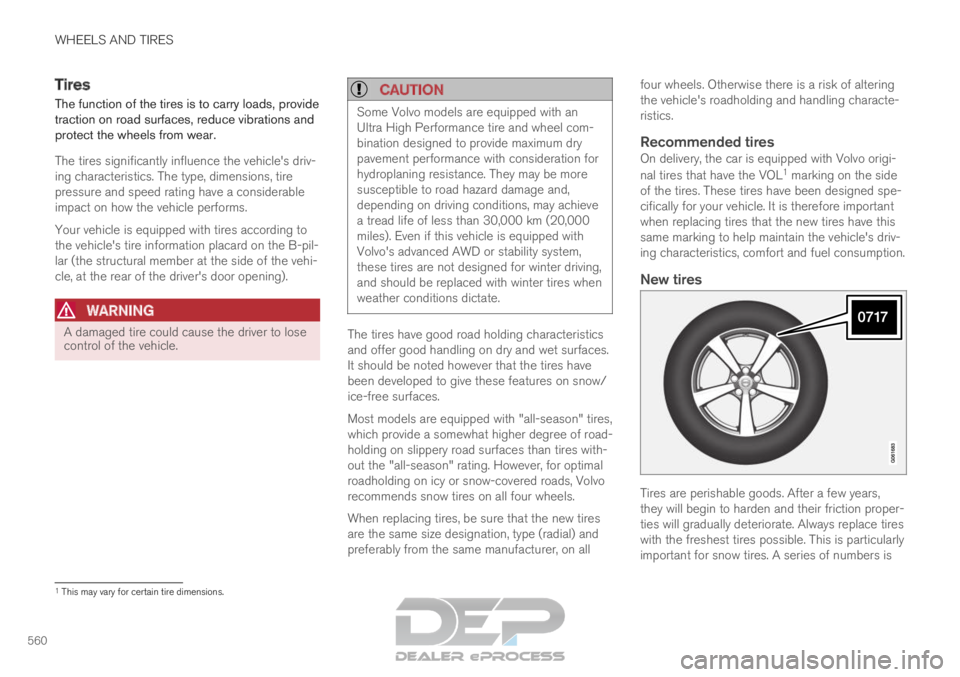
Recommended tiresOn delivery, the car is equipped with Volvo origi-
nal tires that have the VOL
1
marking on the side
of the tires. These tires have been designed spe-
cifically for your vehicle. It is therefore important
when replacing tires that the new tires have this
same marking to help maintain the vehicle's driv-
ing characteristics, comfort and fuel consumption.
New tires Tires are perishable goods. After a few years,
they will begin to harden and their friction proper-
ties will gradually deteriorate. Always replace tires
with the freshest tires possible. This is particularly
important for snow tires. A series of numbers is
1
This may vary for certain tire dimensions.
Page 567 of 697
WHEELS AND TIRES
565
NOTEThe tire's load index and speed rating may
not appear on the sidewall because they are
not required by law.
7.
M+S or M/S = Mud and Snow, AT = All Ter-
rain, AS = All Season
8. U.S. DOT Tire Identification Number
(TIN): This begins with the letters "DOT" and
indicates that the tire meets all federal
standards. The next two numbers are the
factory code where the tire was manufac-
tured, the next two are the tire size code and
the last four numbers represent the week
and year the tire was made. For example,
0717 means that the tire was manufactured
during week 7 of 2017. The numbers in
between are marketing codes used at the
manufacturer's discretion. This information
helps a tire manufacturer identify a tire for
safety recall purposes.
9. Tire Ply Composition and Material Used:
Indicates the number of plies indicates or the
number of layers of rubber-coated fabric in
the tire tread and sidewall. Tire manufactur-
ers also must indicate the ply materials in the
tire and the sidewall, which include steel,
nylon, polyester, and others.
10. Maximum Load: Indicates the maximum
load in pounds and kilograms that can be
carried by the tire. Refer to the vehicle's tire information placard located on the B-Pillar
for the correct tire pressure for your vehicle.
11. Treadwear, Traction, and Temperature
grades.
12. Maximum permissible inflation pressure:
the greatest amount of air pressure that
should ever be put in the tire. This limit is set
by the tire manufacturer.
Speed SymbolA tire's Speed Symbol (SS) indicates the maxi-
mum speed for which the tire has been certified
and should be at least equivalent to the vehicle's
top speed.
Winter tires, with or without studs, are exceptions
and may use a lower SS. When winter tires are
installed, the vehicle may not be driven faster
than the tires' SS.
The vehicle's speed should always be determined
by the posted speed limit and traffic and road
conditions, not the tire's SS.
The following table indicates the maximum per-
missible speed for each SS. M 130 km/h (81 mph)
Q
160 km/h (100 mph)
T 190 km/h (118 mph)
H 210 km/h (130 mph) V 240 km/h (149 mph)
W
270 km/h (168 mph)
Y 300 km/h (186 mph)
WARNING
The wheel and tire sizes for your Volvo
are specified to meet stringent stability
and handling requirements. Unapproved
wheel/tire size combinations can nega-
tively affect your vehicle's stability and
handling.
Any damage caused by installation of
unapproved wheel/tire size combinations
will not be covered by your new vehicle
warranty. Volvo assumes no responsibility
for death, injury, or expenses that may
result from such installations.
Related information
Tires (p. 560)
Page 573 of 697
WHEELS AND TIRES
}}
* Option/accessory. 571
Calibrating the tire pressure
monitoring system*
In order for the tire pressure monitoring system 9
to function correctly, tire pressure reference val-
ues must be set correctly. This must be done
each time the tires are changed or the tire pres-
sure is adjusted.
For example, when driving with a heavy load or at
high speeds (over 160 km/h (100 mph)), tire
pressure should be adjusted to the Volvo-recom-
mended tire pressure values. The system should
then be recalibrated.
1.
Switch off the ignition.
2. Inflate the tire to the correct inflation pres- sure; see the tire pressure placard on the
driver's side B pillar for recommended pres-
sures for factory-mounted tires.
3. Start the vehicle.
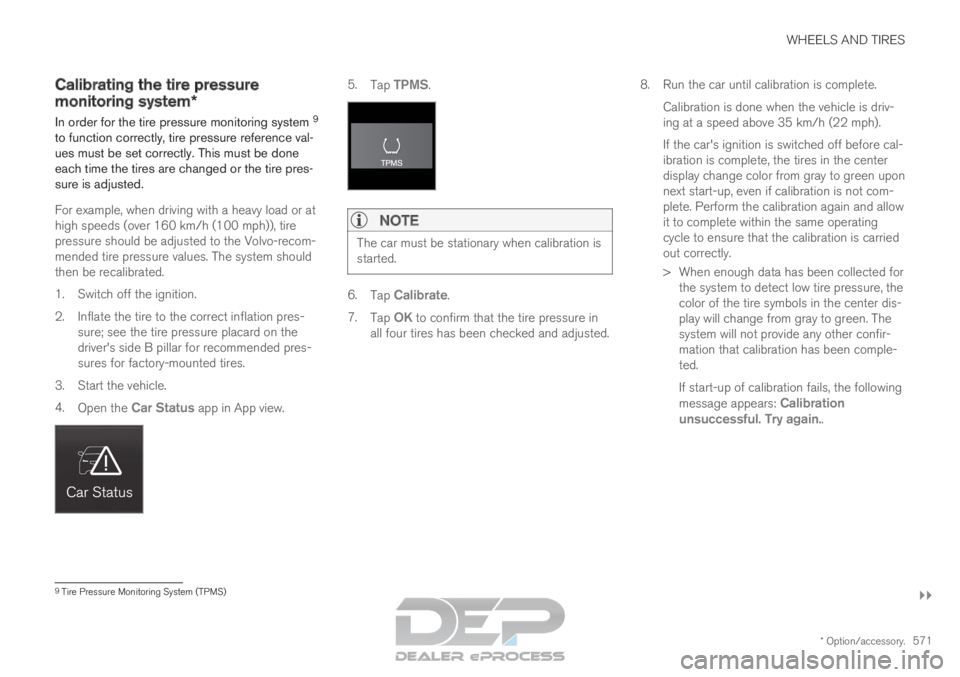
4. Open the Car Status app in App view. 5.
Tap TPMS.NOTE The car must be stationary when calibration is
started.
6.
Tap Calibrate.
7. Tap OK to confirm that the tire pressure in
all four tires has been checked and adjusted. 8.
Run the car until calibration is complete.
Calibration is done when the vehicle is driv-
ing at a speed above 35 km/h (22 mph).
If the car's ignition is switched off before cal-
ibration is complete, the tires in the center
display change color from gray to green upon
next start-up, even if calibration is not com-
plete. Perform the calibration again and allow
it to complete within the same operating
cycle to ensure that the calibration is carried
out correctly.
> When enough data has been collected for the system to detect low tire pressure, the
color of the tire symbols in the center dis-
play will change from gray to green. The
system will not provide any other confir-
mation that calibration has been comple-
ted.
If start-up of calibration fails, the following
message appears: Calibration
unsuccessful. Try again.. 9
Tire Pressure Monitoring System (TPMS)