washer fluid VOLVO XC90 TWIN ENGINE 2019 Owners Manual
[x] Cancel search | Manufacturer: VOLVO, Model Year: 2019, Model line: XC90 TWIN ENGINE, Model: VOLVO XC90 TWIN ENGINE 2019Pages: 697, PDF Size: 10.33 MB
Page 6 of 697
4
Resetting user data when the vehiclechanges owners134
Resetting center display settings134
Table of settings in the center display135
Driver profiles136
Selecting a driver profile137
Changing a driver profile's name137
Protecting a driver profile138
Linking a remote key to a driver profile138
Resetting driver profile settings139
Messages in the center display140
Handling messages in the center display140
Handling messages saved from thecenter display141
Head-up display*142
Activating and deactivating the head-up display*143
Head-up display settings*144
Voice control145
Using voice commands146
Voice control for cellular phones147
Voice control for radio and media148
Voice control settings148
LIGHTING
Lighting panel and controls152
Adjusting light functions via the cen-ter display153
Parking lights154
Daytime running lights154
Low beams155
Using high beam156
Active high beam157
Using turn signals158
Active Bending Lights*159
Rear fog light159
Brake lights160
Emergency brake lights160
Hazard warning flashers161
Using home safe lighting161
Welcome Light161
Interior Lighting162
Adjusting interior lighting164
WINDOWS, GLASS AND MIRRORS
Windows, glass and mirrors166
Pinch protection for windows andsun curtains166
Reset procedure for pinch protection167
Power windows167
Operating the power windows168
Using sun curtains*169
Rearview/door mirrors169
Adjusting the rearview mirror dim-ming function170
Adjusting the door mirrors171
Panoramic roof*172
Operating the panoramic roof*173
Auto closing the panoramic roof* suncurtain175
Wiper blades and washer fluid176
Using the windshield wipers176
Using the rain sensor177
Using the rain sensor's memory function178
Using the windshield and headlightwashers179
Using the rear window wiper/washer180
Using automatic rear window wipingwhen backing up181
Page 16 of 697
14
Color codes658
Changing rear window wipers659
Replacing windshield wiper blades660
Windshield wipers in the service position661
Filling washer fluid662
SPECIFICATIONS
Type designations664
Dimensions667
Weights669
Towing capacity and tongue weight670
Engine specifications671
Engine oil specifications672
Coolant specifications673
Transmission fluid specifications673
Brake fluid specifications673
Fuel tank volume674
Air conditioning specifications674
Approved tire pressure675
INDEX
Index677
Page 178 of 697
WINDOWS, GLASS AND MIRRORS
* Option/accessory.
176
Keyless locking and unlocking* (p. 259)
Locking and unlocking using the remote key
(p. 246) Wiper blades and washer fluid
The wipers and the washer fluid are used to
improve visibility and the headlight pattern.
The washer nozzles are heated* automatically in
cold weather to prevent the washer fluid from
freezing.
When there is approximately 1 liter (1 qt) of
washer fluid remaining, a message to refill will
appear in the instrument panel.
Related information
Using the rain sensor (p. 177)
Using the windshield and headlight washers
(p. 179)
Using automatic rear window wiping when
backing up (p. 181)
Using the rain sensor's memory function
(p. 178)
Using the rear window wiper/washer
(p. 180)
Filling washer fluid (p. 662)
Windshield wipers in the service position
(p. 661)
Replacing windshield wiper blades (p. 660)
Changing rear window wipers (p. 659)
Using the windshield wipers (p. 176) Using the windshield wipers
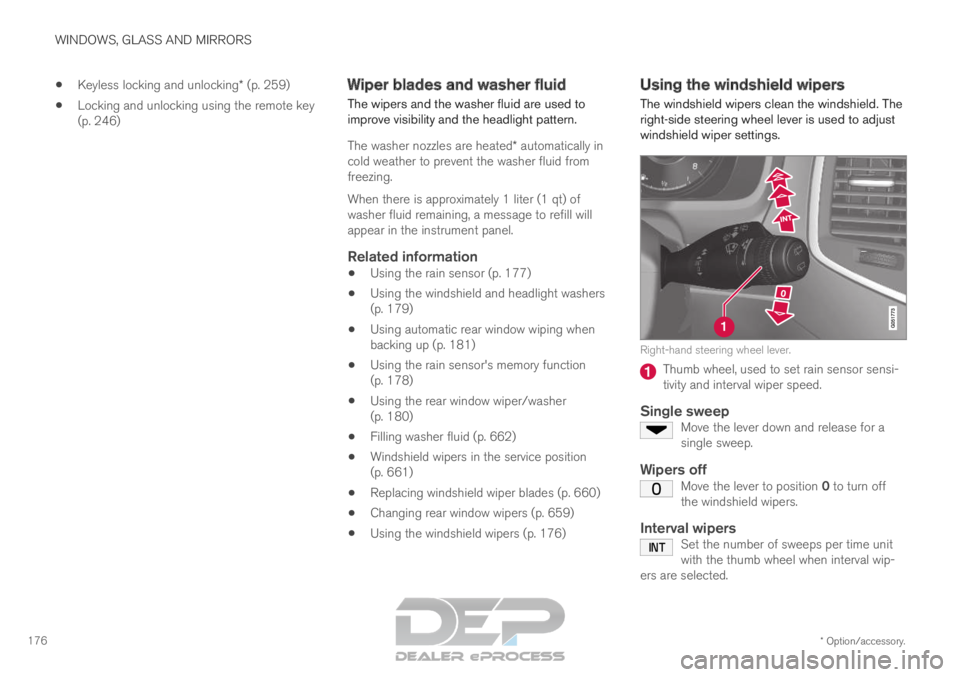
The windshield wipers clean the windshield. The
right-side steering wheel lever is used to adjust
windshield wiper settings. Right-hand steering wheel lever.
Thumb wheel, used to set rain sensor sensi-
tivity and interval wiper speed.
Single sweepMove the lever down and release for a
single sweep.
Wipers offMove the lever to position 0 to turn off
the windshield wipers.
Interval wipersSet the number of sweeps per time unit
with the thumb wheel when interval wip-
ers are selected.
Page 179 of 697
WINDOWS, GLASS AND MIRRORS
}}
177
Continuous wipersMove the lever upward for the wipers to
operate at normal speed. Move the lever upward again for the wip-
ers to operate at high speed.
CAUTION
Before activating the wipers, make sure that
the wiper blades are not frozen in place and
that any snow or ice on the windshield and
rear window has been scraped away.
CAUTION
Use plenty of washer fluid when the wipers
clean the windshield. The windshield must be
wet when the windshield wipers are working.
Related information
Using the rain sensor (p. 177)
Using the windshield and headlight washers
(p. 179)
Using automatic rear window wiping when
backing up (p. 181)
Wiper blades and washer fluid (p. 176)
Using the rain sensor's memory function
(p. 178)
Using the rear window wiper/washer
(p. 180)
Filling washer fluid (p. 662)
Windshield wipers in the service position
(p. 661)
Replacing windshield wiper blades (p. 660)
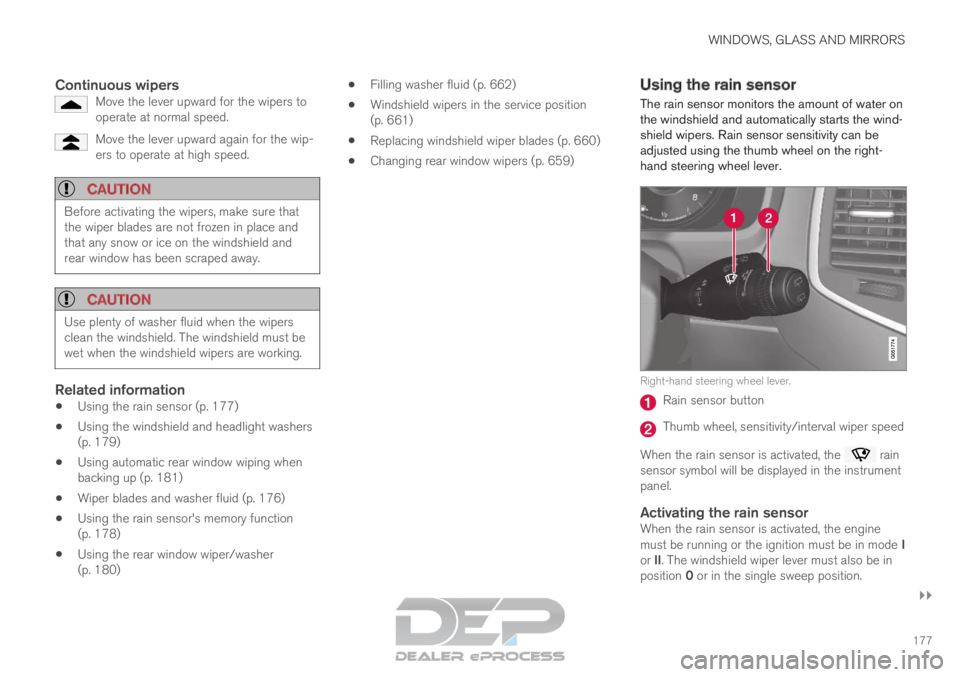
Changing rear window wipers (p. 659) Using the rain sensor
The rain sensor monitors the amount of water on
the windshield and automatically starts the wind-
shield wipers. Rain sensor sensitivity can be
adjusted using the thumb wheel on the right-
hand steering wheel lever. Right-hand steering wheel lever.
Rain sensor button
Thumb wheel, sensitivity/interval wiper speed
When the rain sensor is activated, the rain
sensor symbol will be displayed in the instrument
panel.
Activating the rain sensorWhen the rain sensor is activated, the engine
must be running or the ignition must be in mode I
or II. The windshield wiper lever must also be in
position 0 or in the single sweep position.
Page 180 of 697
||WINDOWS, GLASS AND MIRRORS
178
Activate the rain sensor by pressing the rain sen-
sor button .
If the lever is pressed down, the wipers will make
additional sweeps across the windshield.
Turn the thumb wheel upward for increased sen-
sitivity and downward for decreased sensitivity.
The wipers will make one extra sweep when the
thumb wheel is turned upward.
Deactivate the rain sensor
Deactivate the rain sensor by pressing the rain sensor button or moving the lever upward to
another wiper mode.
The rain sensor is automatically deactivated in
ignition mode 0 or when the engine is switched
off.
The rain sensor is also automatically deactivated
when the wiper blades are put in the service
position. The rain sensor will reactivate when
service mode is switched off.
CAUTION The windshield wipers may start inadvertently
and be damaged in automatic car washes.
Deactivate the rain sensor when the engine is
running or when the ignition is in mode I or II.
The symbol in the instrument panel will go
out.
Related information
Using the windshield and headlight washers
(p. 179)
Using automatic rear window wiping when
backing up (p. 181)
Wiper blades and washer fluid (p. 176)
Using the rain sensor's memory function
(p. 178)
Using the rear window wiper/washer
(p. 180)
Filling washer fluid (p. 662)
Windshield wipers in the service position
(p. 661)
Replacing windshield wiper blades (p. 660)
Changing rear window wipers (p. 659)
Using the windshield wipers (p. 176) Using the rain sensor's memory
function
The rain sensor monitors the amount of water on
the windshield and automatically starts the wind-
shield wipers.
Activating/deactivating memory
function
The rain sensor's memory function can be set to
activate so that the rain sensor button does not
need to be pressed each time the engine is
started:
1.
Tap Settings in the Top view in the center
display.
2.
Tap My Car Wipers
.
3. Select Rain Sensor Memory to activate/
deactivate the memory function.
Related information
Using the rain sensor (p. 177)
Using the windshield and headlight washers
(p. 179)
Using automatic rear window wiping when
backing up (p. 181)
Wiper blades and washer fluid (p. 176)
Using the rear window wiper/washer
(p. 180)
Filling washer fluid (p. 662)
Page 181 of 697
WINDOWS, GLASS AND MIRRORS
}}
* Option/accessory. 179
Windshield wipers in the service position
(p. 661)
Replacing windshield wiper blades (p. 660)
Changing rear window wipers (p. 659)
Using the windshield wipers (p. 176) Using the windshield and headlight
washers
The windshield and headlight washers clean the
windshield and headlights. Use the right-side
steering wheel lever to start the windshield and
headlight washers.
Starting the windshield and headlight
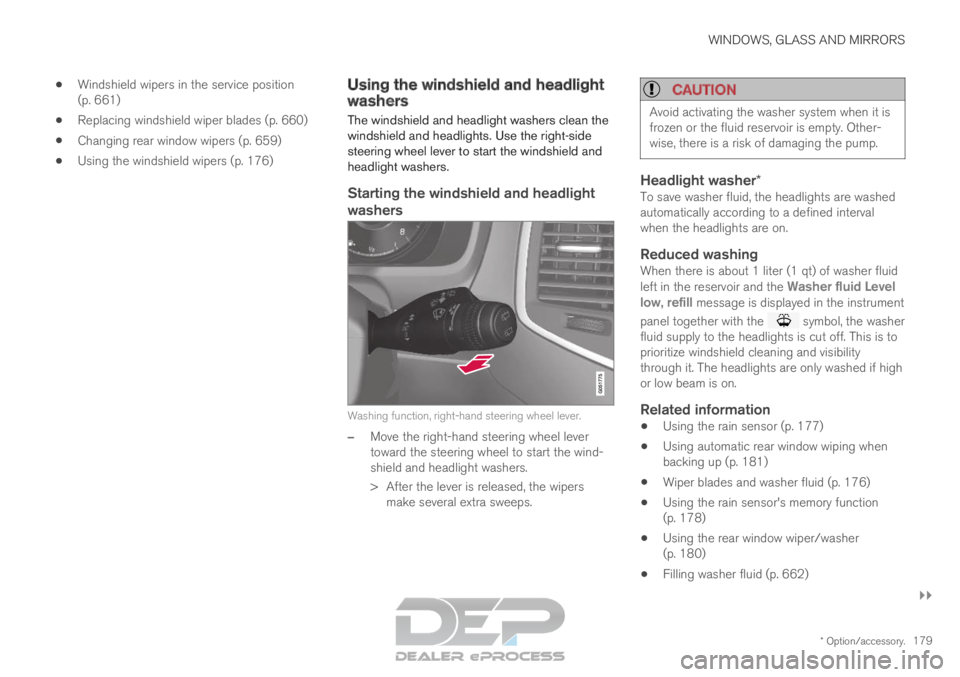
washers Washing function, right-hand steering wheel lever.
–
Move the right-hand steering wheel lever
toward the steering wheel to start the wind-
shield and headlight washers.
>
After the lever is released, the wipers
make several extra sweeps.
CAUTION Avoid activating the washer system when it is
frozen or the fluid reservoir is empty. Other-
wise, there is a risk of damaging the pump.
Headlight washer*To save washer fluid, the headlights are washed
automatically according to a defined interval
when the headlights are on.
Reduced washingWhen there is about 1 liter (1 qt) of washer fluid
left in the reservoir and the
Washer fluid Level
low, refill message is displayed in the instrument
panel together with the symbol, the washer
fluid supply to the headlights is cut off. This is to
prioritize windshield cleaning and visibility
through it. The headlights are only washed if high
or low beam is on.
Related information
Using the rain sensor (p. 177)
Using automatic rear window wiping when
backing up (p. 181)
Wiper blades and washer fluid (p. 176)
Using the rain sensor's memory function
(p. 178)
Using the rear window wiper/washer
(p. 180)
Filling washer fluid (p. 662)
Page 182 of 697
WINDOWS, GLASS AND MIRRORS
180
Windshield wipers in the service position
(p. 661)
Replacing windshield wiper blades (p. 660)
Changing rear window wipers (p. 659)
Using the windshield wipers (p. 176) Using the rear window wiper/
washer
The rear window wiper/washer cleans the rear
window. Use the right-side steering wheel lever
to start and control the wiper/washer.
Activating the rear window wiper/
washer
NOTE The rear window wiper motor is equipped with
overheating protection that switches off the
motor if it becomes overheated. The rear win-
dow wiper can be operated again after a cool-
ing-down period.
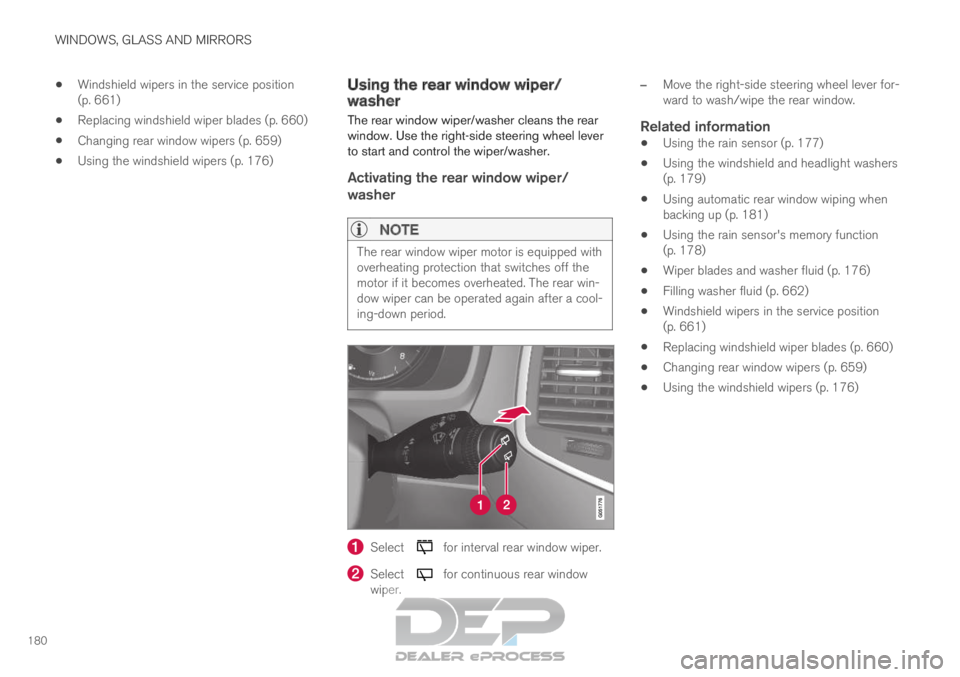
Select for interval rear window wiper.
Select for continuous rear window
wiper. –
Move the right-side steering wheel lever for-
ward to wash/wipe the rear window.
Related information
Using the rain sensor (p. 177)
Using the windshield and headlight washers
(p. 179)
Using automatic rear window wiping when
backing up (p. 181)
Using the rain sensor's memory function
(p. 178)
Wiper blades and washer fluid (p. 176)
Filling washer fluid (p. 662)
Windshield wipers in the service position
(p. 661)
Replacing windshield wiper blades (p. 660)
Changing rear window wipers (p. 659)
Using the windshield wipers (p. 176)
Page 183 of 697

WINDOWS, GLASS AND MIRRORS
181
Using automatic rear window wiping
when backing up
If reverse gear is engaged while the windshield
wipers are on, the rear window wipers will start.
This function is deactivated when a different
gear is selected.
1. Tap Settings in the Top view in the center
display.
2.
Tap My Car Wipers
.
3. Select Auto Rear Wiper to activate/deacti-
vate automatic rear window wiping when
backing up.
If the rear window wipers are already in continu-
ous wiper mode, no change will be made.
Related information
Using the rain sensor (p. 177)
Using the windshield and headlight washers
(p. 179)
Wiper blades and washer fluid (p. 176)
Using the rain sensor's memory function
(p. 178)
Using the rear window wiper/washer
(p. 180)
Filling washer fluid (p. 662)
Windshield wipers in the service position
(p. 661)
Replacing windshield wiper blades (p. 660)
Changing rear window wipers (p. 659)
Using the windshield wipers (p. 176)
Page 474 of 697
STARTING AND DRIVING
472Preparing for a long trip
It is important to have the vehicle's systems and
equipment checked carefully before driving long
distances.
Check that:
the engine is running properly and that fuel
consumption is normal
there are no leaks (fuel, oil or other fluid)
the brake pedal is functioning optimally
all lights are working ‒ adjust the headlight
height if the vehicle is carrying a heavy load
tire tread depth and air pressure are at cor-
rect levels. Change to snow tires when driv-
ing in areas where there is a risk of snowy or
icy roads
the start battery is sufficiently charged
the wiper blades are in good condition
Related information
Checking tire pressure (p. 567)
Filling washer fluid (p. 662)
Winter driving (p. 472)
Economical driving (p. 467)
Vehicle modem settings (p. 545)
Loading recommendations (p. 598)
Driving with a trailer (p. 483)
Pilot Assist (p. 316)
Speed limiter (p. 283)
Tire sealing system (p. 582) Winter driving
It is important to check the vehicle before driving
in cold/snowy conditions to make sure it can be
driven safely.
Before the cold season arrives: Make sure the engine coolant contains 50%
antifreeze. This mixture helps protect the
engine from frost erosion down to
approx. -35 °C (-31 °F). Do not mix different
types of antifreeze as this could pose a
health risk.
Keep the fuel tank well filled to prevent con-
densation from forming.
Check the viscosity of the engine oil. Oil with
low viscosity (thinner oil) improves cold-
weather starting and reduces fuel consump-
tion when driving with a cold engine.
CAUTION Low-viscosity oil should not be used with hard
driving or in hot weather.
Check the condition and charge level of the
start battery. Cold weather places greater
demands on the start battery and reduces its
capacity.
Use washer fluid containing antifreeze to
help prevent ice from forming in the washer
fluid reservoir.
Page 475 of 697
STARTING AND DRIVING
473
Slippery driving conditionsFor optimal traction and roadholding, Volvo rec-
ommends using snow tires on all wheels when-
ever there is a risk of snow or ice on the road.
NOTECertain countries require use of winter tires
by law. Not all countries permit the use of
studded tires.
Practice driving on slippery surfaces under con-
trolled conditions to learn how the vehicle reacts.
Related information
Snow tires (p. 581)
Snow chains (p. 581)
Braking on salted roads (p. 441)
Braking on wet roads (p. 441)
Filling washer fluid (p. 662)
Start battery (p. 627)
Replacing windshield wiper blades (p. 660)
Changing rear window wipers (p. 659)
Refilling coolant (p. 625) Driving through standing water
Driving the vehicle through a deep pool of stand-
ing water on a water-covered roadway is called
fording. This must be done with great caution.
To prevent damage to the vehicle when driving
through water (e.g. on flooded roads):
Do not drive in water higher than the floor of
the vehicle. If possible, check the depth of
the water at its deepest point before driving
through it. Be particularly careful when driv-
ing through flowing water.
Always select the
Off Road drive mode
before driving in water to ensure the gasoline
engine is running.
Do not drive faster than walking speed.
Do not stop the vehicle in the water. Drive
carefully forward or back the vehicle out of
the water.
Remember that waves created by passing
vehicles could cause the water level to rise
above the vehicle's floor level.
Avoid driving through salt water to help avoid
the risk of corrosion.
CAUTION Parts of the vehicle (e.g. engine, transmission,
driveline, electrical components, etc.) can be
damaged if the vehicle is driven through water
higher than its floor level. Damage to any
components caused by flooding, vapor lock or
insufficient oil is not covered under warranty.
If the engine stalls while the vehicle is in
water, do not attempt to restart it. Have the
vehicle towed on the bed of a tow truck to a
workshop - an authorized Volvo workshop is
recommended.
CAUTION
Because it can be difficult to determine the
water depth, avoid driving through standing or
running water.
When you have passed the water, press lightly on
the brake pedal and check that the brakes are
functioning properly. Water, mud, slush, etc. can
make the brake linings slippery, resulting in
delayed braking effect.
If the vehicle is equipped with a trailer coupling
contact, clean the contact after driving in water or
mud.
Related information
Recovery (p. 489)
Low Speed Control (p. 464)