wheel VOLVO XC90 TWIN ENGINE 2020 Owners Manual
[x] Cancel search | Manufacturer: VOLVO, Model Year: 2020, Model line: XC90 TWIN ENGINE, Model: VOLVO XC90 TWIN ENGINE 2020Pages: 693, PDF Size: 13.34 MB
Page 308 of 693
DRIVER SUPPORT
* Option/accessory.
306
Temporarily deactivating steering assistance with Pilot Assist *44
Pilot Assist steering assistance can be tem- porarily deactivated and reactivated withoutprior warning.
When the turn signals are used, Pilot Assist's steering assistance will be temporarily deacti-vated. When the turn signal is switched off,steering assistance will be automatically reac-tivated if the traffic lane's side markings canstill be detected. If Pilot Assist cannot clearly interpret the lane's side marker lines or if the camera/radarsensor is unable for some other reason toclearly interpret the lane, Pilot Assist will tem-porarily deactivate steering assistance. How-ever, the speed and distance warnings willremain active. Steering assistance will resumewhen the side marker lines can once again beinterpreted. In these situations, the driver maybe alerted through slight vibrations in thesteering wheel that steering assistance is tem-porarily deactivated.
Related information
Pilot Assist
* (p. 300)
Selecting and activating Pilot Assist
*
(p. 303)
Deactivating Pilot Assist
* (p. 304)
Pilot Assist
* limitations (p. 306)
Pilot Assist *45
limitations
Pilot Assist functionality may be reduced in certain situations.
Pilot Assist is a driver support function designed to simplify driving and assist thedriver in many situations. However, the driveris always responsible for maintaining a suita-ble distance to vehicles or objects around itand ensuring that the vehicle is correctly posi-tioned in the traffic lane.
WARNING
In some situations, Pilot Assist may have trouble helping the driver properly or maybe deactivated automatically – we adviseagainst using Pilot Assist in such cases.Examples of such situations include:
the lane markings are worn, missing or cross each other.
lane division is unclear, for example,when the lanes divide or merge or atexits or when there are multiple sets ofmarkings.
edges or other lines than lane markingsare present on or near the road, e.g.curbs, joints or repairs to the road sur-face, edges of barriers, roadside edgesor strong shadows.
the lane is narrow or winding.
the lane contains ridges or holes.
weather conditions are poor, e.g. rain,snow or fog or slush or reduced visibil-ity with poor light conditions, back-lighting, wet road surface, etc.
The driver should also note that Pilot Assist has the following limitations:
High curbs, roadside barriers, tempo- rary obstacles (traffic cones, safety bar-riers, etc.) are not detected. Alterna-
44
Depending on market, this function can be either standard or optional.
Page 309 of 693
DRIVER SUPPORT
}}
* Option/accessory.307
tively, they may be detected incorrectly as lane markings, with a subsequentrisk of contact between the vehicle andsuch obstacles. The driver is responsi-ble for ensuring that the vehicle main-tains a suitable distance from suchobstacles.
The camera and radar sensors do nothave the capacity to detect all oncom-ing objects and obstacles in trafficenvironments, e.g. potholes, stationaryobstacles or objects that completely orpartially block the route.
Pilot Assist does not "see" pedestrians,animals, etc.
The recommended steering input islimited in force, which means that itcannot always help the driver to steerand keep the vehicle within the lane.
In vehicles equipped with Sensus Navigation
*, the function is able to use
information from map data, which could cause variations in performance.
Pilot Assist will be switched off if thespeed-dependent power steeringwheel resistance is working at reducedpower, e.g. during cooling due to over-heating.WARNING
Pilot Assist should only be used if there are clear lane lines painted on each side of thelane. All other use will increase the risk ofcontact with nearby obstacles that cannotbe detected by the functions.
WARNING
This is not a collision avoidance sys- tem. The driver is always responsibleand must intervene if the system failsto detect a vehicle ahead.
The function does not brake for peopleor animals and does not brake for smallvehicles, such as bikes and motorcy-cles. Similarly, it does not brake for lowtrailers, oncoming, slow-moving or sta-tionary vehicles and objects.
Do not use the function in demandingsituations, such as in city traffic, atintersections, on slippery surfaces,with a lot of water or slush on the road,in heavy rain/snow, in poor visibility, onwinding roads, or on on/off ramps.
The driver can always correct or adjust steer-ing assistance provided by Pilot Assist by turn-ing the steering wheel to the desired position.
Steep roads and/or heavy loadsPilot Assist is primarily intended to be drivenon flat roads. The function may not be able tomaintain the correct time interval to the vehi-cle ahead when driving down steep hills. Thedriver should be extra attentive and preparedto apply the brakes. Do not use Pilot Assist if the vehicle is carrying a heavy load or towing a trailer.
NOTE
Pilot Assist cannot be activated if a trailer, bike carrier or similar is connected to thevehicle electrical system.
Other limitationsThe Off Road drive mode cannot be selected
when Pilot Assist is activated.
NOTE
The function uses the vehicle's camera and radar sensor, which has certain generallimitations.
Related information
Pilot Assist
* (p. 300)
Camera/radar sensor limitations (p. 322)
45
Depending on market, this function can be either standard or optional.
Page 310 of 693
DRIVER SUPPORT
* Option/accessory.
308
Speed-dependent steering wheel resis- tance (p. 280)
Drive modes (p. 433)
Pilot Assist
*46
symbols and
messages
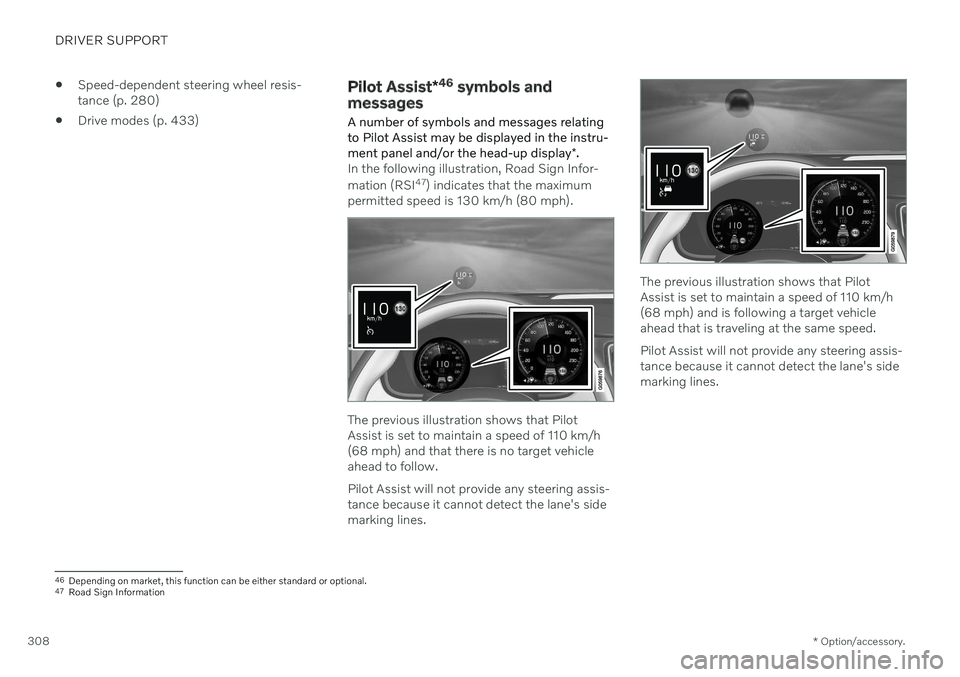
A number of symbols and messages relating to Pilot Assist may be displayed in the instru- ment panel and/or the head-up display *.
In the following illustration, Road Sign Infor- mation (RSI 47
) indicates that the maximum
permitted speed is 130 km/h (80 mph).
The previous illustration shows that Pilot Assist is set to maintain a speed of 110 km/h(68 mph) and that there is no target vehicleahead to follow. Pilot Assist will not provide any steering assis- tance because it cannot detect the lane's sidemarking lines.
The previous illustration shows that Pilot Assist is set to maintain a speed of 110 km/h(68 mph) and is following a target vehicleahead that is traveling at the same speed. Pilot Assist will not provide any steering assis- tance because it cannot detect the lane's sidemarking lines.
46 Depending on market, this function can be either standard or optional.
47 Road Sign Information
Page 313 of 693

DRIVER SUPPORT
}}
* Option/accessory.311
WARNING
When driver support follows another vehi- cle at speeds over approx. 30 km/h
(20 mph) and changes target vehicle –from a moving vehicle to a stationary one –driver support will ignore the stationary
vehicle and instead accelerate to the storedspeed. The driver must then intervene and apply the brakes.
Automatic standby mode when switching targets
Driver support disengages and goes into standby mode if:
your vehicle's speed goes under 5 km/h(3 mph) and driver support cannot deter-mine if the target vehicle is stationary or ifit is another object, e.g. a speed bump.
your vehicle's speed goes under 5 km/h(3 mph) and the vehicle ahead turns sothat driver support no longer has a vehicleto follow.
Related information
Driver support systems (p. 280)
Adaptive Cruise Control
* (p. 290)
Pilot Assist
* (p. 300)
Adjusting set speed for driver support
It is possible to adjust set speeds for the Adaptive Cruise Control * and Pilot Assist *
functions.
: Increases the set speed.
: Reduces the set speed.
Set speed.
–Change a set speed by pressing the
(1) or (2) buttons briefly or by pressing
and holding them:
Brief
press: Each press changes the
speed in +/- 5 km/h (+/- 5 mph) incre- ments.
Press
and hold: Release the button
when the set speed indicator (3) hasmoved to the desired speed.
NOTE
For vehicles without Adaptive Cruise Con- trol *, speed instead increases by +/- 1km/h
(+/- 1 mph) each time the button is pressed.
The most recently set speed will be stored.
If speed is increased by depressing the accel- erator pedal while pressing the
(1) button
on the steering wheel, the vehicle's speed when the button is pressed will be stored as the set speed. Temporarily increasing speed using the accel- erator pedal, e.g. when passing another vehi-cle, will not affect the setting. The vehicle willreturn to the set speed when the acceleratorpedal is released.
Page 314 of 693
||
DRIVER SUPPORT
* Option/accessory.
312
Automatic transmission
The driver support functions can follow another vehicle at speeds from a standstill upto 200 km/h (125 mph). Pilot Assist can provide steering assistance from near-stationary speeds up to 140 km/h(87 mph). The lowest speed that can be set is 30 km/h (20 mph). When following another vehicle,ACC can monitor that vehicle's speed andslow your own vehicle down to a standstill,but it is not possible to set speeds lower than30 km/h (20 mph).
Related information
Driver support systems (p. 280)
Cruise control (p. 287)
Adaptive Cruise Control
* (p. 290)
Pilot Assist
* (p. 300)
Setting time interval to the vehicle ahead The time interval to the vehicle ahead can be set for the functions Adaptive Cruise Control *,
Pilot Assist * and Distance Alert *.
Different time intervals to the vehicle ahead can be selectedand are shown in the instru-ment panel as 1–5 horizontalbars. The more bars, thelonger the time interval. Onebar represents an interval of
approx. 1 second to the vehicle ahead. 5 barsrepresents approx. 3 seconds.
NOTE
When the symbol in the instrument panel shows a vehicle and a steering wheel, PilotAssist follows a vehicle ahead at a presettime interval. When only a steering wheel is shown, there is no vehicle ahead within a reasona-ble distance.
NOTE
When the symbol in the instrument panel shows two vehicles, ACC is following thevehicle ahead at a preset time interval. When only one vehicle is shown, there is no vehicle ahead within a reasonable dis-tance.
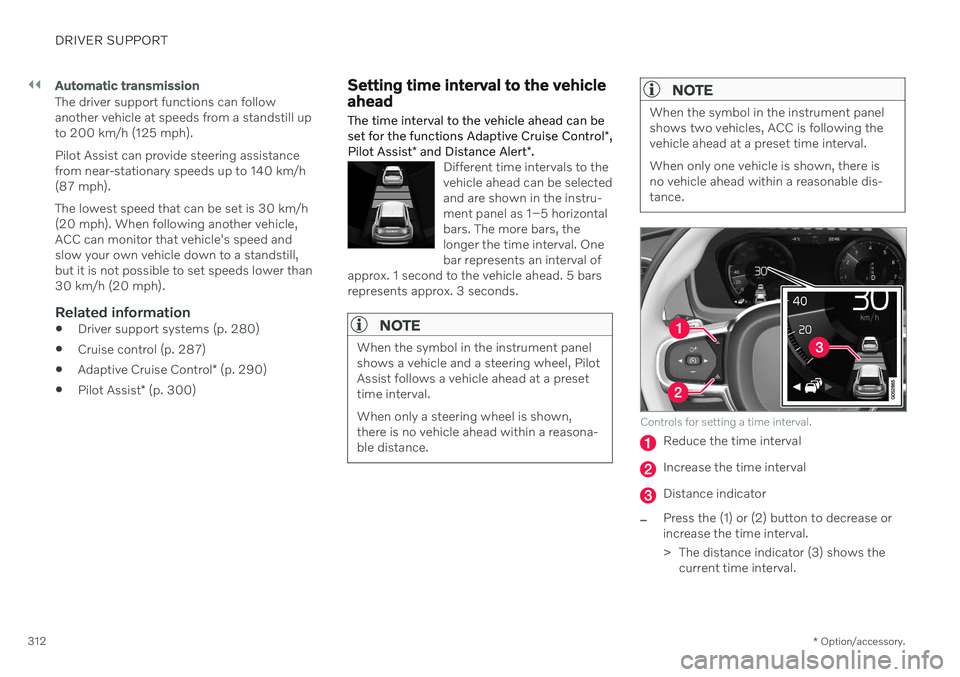
Controls for setting a time interval.
Reduce the time interval
Increase the time interval
Distance indicator
–Press the (1) or (2) button to decrease or increase the time interval.
> The distance indicator (3) shows the current time interval.
Page 315 of 693

DRIVER SUPPORT
}}
* Option/accessory.313
In order to help your vehicle follow the vehicle ahead as smoothly and comfortably as possi-ble, Adaptive Cruise Control allows the timeinterval to vary noticeably in certain situations.At low speeds, when the distance to the vehi-cle ahead is short, Adaptive Cruise Controlincreases the time interval slightly.
NOTE
The greater the vehicles' speed, the greater the distance between them fora set time interval.
Only use the time intervals permittedby local traffic regulations.
If driver support does not seem torespond with a speed increase whenactivated, it may be because the timeinterval to the vehicle ahead is shorterthan the set time interval.
WARNING
Only use a time interval suitable for the current traffic conditions.
The driver should be aware that shorttime intervals give them limited time toreact and act to any unforeseen trafficsituation.
Related information
Driver support systems (p. 280)
Adaptive Cruise Control
* (p. 290)
Pilot Assist
* (p. 300)
Distance Alert
* (p. 285)
Head-up display
* (p. 145)
Auto-hold braking with driver support
The driver support functions Adaptive Cruise Control * and Pilot Assist * have a special brake
function in slow traffic and while stationary.
Braking function in slow traffic and at a standstill
In slow-moving, stop-and-go traffic or when stopped at a traffic light, driving will resumeautomatically if the vehicle is stopped for lessthan approx. 3 seconds. If it takes more than 3seconds for the vehicle ahead to begin movingagain, the driver support function will go intostandby mode and the auto-hold brake func-tion will activate.
–The function can be reactivated by:
Pressing the
button on the steer-
ing wheel keypad.
Pressing the accelerator pedal.
> The function will resume following the vehicle ahead if it begins to move within approx. 6 seconds.
WARNING
A noticeable increase in speed may follow when the speed is resumed with the
steering wheel button.
Page 338 of 693

||
DRIVER SUPPORT
336City Safety will not intervene to automatically apply the brakes if it is possible for the driverto avoid a collision by steering the vehicle. However, if City Safety determines that an evasive maneuver would not be possible dueto traffic in the adjacent lane(s), the functioncan assist the driver by automatically startingto apply the brakes at an earlier stage.
Related information
City Safety
™ (p. 327)
City Safety limitations (p. 337)
City Safety braking for oncoming vehicles City Safety can help you apply the brakes for an oncoming vehicle in your lane.
If an oncoming vehicle veers into your lane and a collision is unavoidable, City Safety canhelp reduce your vehicle's speed to attempt tomitigate the force of the collision.
Own vehicle
Oncoming vehicles
The following criteria must be met for the function to work:
your vehicle's speed must be above4 km/h (3 mph)
the road must be straight
your lane must have clear side lane mark-ings
your vehicle must be positioned straight inyour lane
the oncoming vehicle must be positionedwithin your vehicle's lane markings
the oncoming vehicle's headlights mustbe on
the function can only handle “front-to-front” collisions
the function can only detect vehicles withfour wheels.
WARNING
Warnings and brake interventions due to an imminent collision with an oncomingvehicle always come very late.
Related information
City Safety
™ (p. 327)
City Safety limitations (p. 337)
60
This function is not available on all markets.
Page 342 of 693

DRIVER SUPPORT
340
City Safety messages
A number of messages related to City Safety may be displayed in the instrument panel.Several examples are provided below.
Message Meaning
City Safety Automatic interventionWhen City Safety is braking or has activated the automatic braking function, one or more symbols may illuminate in the instrument panel and a text message may be displayed.
City Safety Reduced functionality Service requiredThe system is not functioning as intended. Contact a workshop A
.
A An authorized Volvo workshop is recommended.
A text message can be erased by briefly press- ing the
button in the center of the right-
side steering wheel keypad. If a message cannot be erased, contact a workshop A
.
Related information
City Safety
™ (p. 327)
Page 347 of 693

DRIVER SUPPORT
* Option/accessory.345
BLIS messages
A number of messages related to BLIS 70
may
be displayed in the instrument panel. Several examples are provided below.
Message Meaning
Blind spot sensor Service requiredThe system is not functioning as intended. Contact a workshop A
.
Blind spot system off Trailer attachedBLIS and CTA B
have been deactivated because a trailer has been connected to the vehicle's electrical system.
A An authorized Volvo workshop is recommended.
B Cross Traffic Alert *
A text message can be erased by briefly press- ing the
button in the center of the right-
side steering wheel keypad. If a message cannot be erased, contact a workshop A
.
Related information
BLIS
* (p. 342)
Cross Traffic Alert
* (p. 346)
70
Blind Spot Information
Page 351 of 693
DRIVER SUPPORT
* Option/accessory.349
Cross Traffic Alert *75
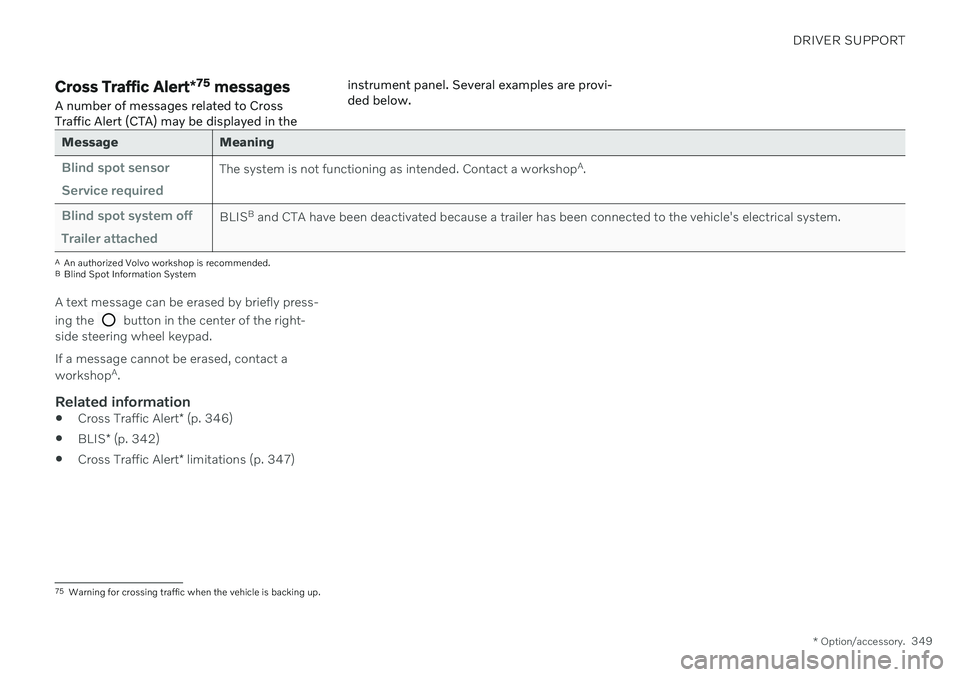
messages
A number of messages related to Cross Traffic Alert (CTA) may be displayed in the instrument panel. Several examples are provi-ded below.
Message Meaning
Blind spot sensor Service requiredThe system is not functioning as intended. Contact a workshop
A
.
Blind spot system off Trailer attachedBLIS B
and CTA have been deactivated because a trailer has been connected to the vehicle's electrical system.
A An authorized Volvo workshop is recommended.
B Blind Spot Information System
A text message can be erased by briefly press- ing the
button in the center of the right-
side steering wheel keypad. If a message cannot be erased, contact a workshop A
.
Related information
Cross Traffic Alert
* (p. 346)
BLIS
* (p. 342)
Cross Traffic Alert
* limitations (p. 347)
75
Warning for crossing traffic when the vehicle is backing up.